

TL;DR: What Is Xperiencify And Is It Worth Using?
Xperiencify is a course platform built around gamification. It helps creators build courses that keep students engaged, using points, rewards, and behavior-based automation to drive completions, not just sales.
🆓 Free Plan: Unlimited free trial with all features but you cannot publish products.
💰 Paid Plans
– Growth ($99/mo): 10 published courses, 1,000 students, full gamification.
– Pro ($199/mo): 20 published courses, 5,000 students, affiliate tools, better support.
🚀 Key Features
– Sell courses, memberships, coaching, and limited community access
– Built-in gamification engine (points, badges, surprise rewards)
– Automated engagement via email, SMS, and voicemail
– Multimedia course builder with drip, binge, and unlock settings
– Basic quizzes and celebration triggers
– Upsells, and simple landing pages
– AI content generation features
✅ Best For: Educators who are willing to compromise marketing and course creation features for excellent student engagement leading to higher course completion rates.
❌ Not Best For: Corporate teams, academic users, or creators who need advanced analytics, community tools, or polished site design or course creation tools.
Verdict: Xperiencify is a promising platform and has some innovative engagement boosting features. But it lacks marketing and course creation tools of Thinkific and Kajabi. If you’re happy with toned down features for better engagement, Xperiencify is worth checking out.
Try Xperiencify For Free
Click here to read our list of the best online course platforms
Research shows that 85% of people never finish an online course once they start it.
Xperiencify claims to fix that problem.
It’s built by Marisa Murgatroyd and Murray Gray, two seasoned course creators who’ve been in the trenches.
That’s why I took it seriously. When creators build tools for their own kind, they usually get it right.
So I signed up, explored the platform, and gave it a real shot.
Does it actually solve the engagement problem? Can it compete with tools like Thinkific or Kajabi? And is it worth the switch?
In this review, I’ll break it all down and share my honest take.
What Is Xperiencify (And What Makes It Different?)
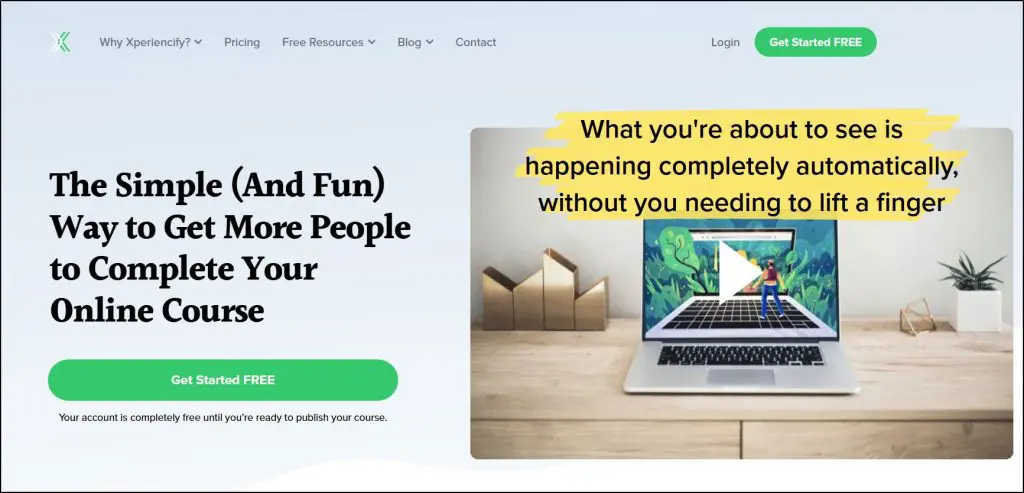
Xperiencify is an online course platform built around gamification with the sole purpose of getting more customers to finish your courses and get real, actionable value from your content.
It lets you sell online courses, memberships, live coaching, and even build a simple community. But everything centers on keeping students engaged and helping them finish what they start.
Xperiencify turns your course into an interactive, gamified experience that builds momentum and rewards action from the very beginning.
That’s its edge.
At the heart of it is the Experience Engine, an automation system that responds to what students do in real time.
Complete a task? They get points. Hit a milestone? They trigger surprise rewards, celebration messages, or unlock bonus content. Go inactive? The system can send custom emails, SMS messages, or even voicemails to bring them back.
You set it up once, and it runs in the background like an invisible team member keeping everyone motivated.
Unlike many other course platforms, Xperiencify makes learning feel more like a game or challenge, something students actually want to come back to.
If you’re tired of people buying your course and never finishing it, Xperiencify gives you real tools to change that.
Here are some of the core features and capabilities Xperiencify offers.
- Experience Engine – Automates engagement via emails, SMS, voicemails, popups, tags, and rewards based on user behavior.
- Gamification Tools – Adds points, badges, countdowns, sound effects, and surprise rewards to drive motivation.
- Course Builder – Create structured lessons using video, audio, PDFs, checklists, and drip content.
- Quizzing & Assessments – Add simple quizzes with logic-based triggers, but lacks advanced testing features.
- Memberships – Bundle products or restrict access based on plan; lacks deep membership segmentation.
- Basic Community Tools – Discussion forums; limited compared to platforms like Skool or Circle.
- Automations – Trigger actions based on student behavior like inactivity, module completion, or point thresholds.
- Leaderboards & Badges – Motivate students with competition and achievement-based recognition.
- Upsells & Offers – Display personalized offers and 1-click upsells at key engagement points.
- Integrated Payments – Accept payments via Stripe or PayPal with support for subscriptions and one-time purchases.
- Affiliate Management – Track and pay affiliates inside the platform with no extra tools.
- Email Marketing & CRM – Broadcast emails and manage contact pipelines; useful but not as advanced as standalone tools.
- 2-Way SMS & Calls – Engage leads and students via text and calls through built-in CRM (requires setup).
- Completion Certificates – Auto-generate certificates to celebrate course completions.
- AI “Ask the Expert” Bot – Let a chatbot trained on your course content answer student questions.
- AI Copywriting Tools – Generate emails or page copy using built-in AI prompts.
- Live Chat & Messenger – Add chat support or connect with Facebook Messenger.
- Coaching (1:1) – Not natively supported but can be added using workarounds like booking links.
Xperiencify Pricing | Is There a Free Plan?
Yes, Xperiencify has a generous free plan — but only during course setup. You can build your entire course, test features, and invite a few people to experience it without paying anything. You only start paying when you go live and publish your course.
Once you’re ready, you have two paid options to choose from:
- Growth Plan ($99/month) – Best for growing creators with up to 10 published courses and 1,000 active students.
- Pro Plan ($199/month) – Suited for established creators managing more volume with 20 courses and 5,000 students.
Both plans include unlimited sites, funnels, and total student enrollments (only active monthly students are capped).
Xperiencify Pricing Comparison Table
| Feature / Plan | Growth ($99/mo) | Pro ($199/mo) |
| Published Courses | 10 | 20 |
| Active Monthly Students | 1,000 | 5,000 |
| Team Members/Admins | 1 | 3 |
| Gamification Tools (Full Access) | ✅ | ✅ |
| Experience Engine Automations | ✅ | ✅ |
| Quizzing & Assessments | ✅ | ✅ |
| Email Broadcasts & CRM | ✅ (basic) | ✅ (advanced) |
| Affiliate Management | ✅ | ✅ |
| Memberships & Bundles | ✅ (basic) | ✅ (basic) |
| Community Features | ✅ (forums/chat) | ✅ (forums/chat) |
| Payments (Stripe & PayPal) | ✅ | ✅ |
| Funnel & Page Builder | ✅ | ✅ |
| Support Response Time | 48 hrs | 24 hrs |
| Course Migration Help | ❌ | ✅ |
No transaction fees apply to any plan. All paid plans are available in both monthly and annual billing options, with discounts on yearly commitments.
How Xperiencify Works: Dashboard and Content Structure
Xperiencify takes a “course-first” approach. When you log in, the main dashboard shows a grid of all your courses. Each one is its own standalone product with separate settings, lessons, and automations.
There’s no traditional “school” or unified learning hub for students. Each course lives independently with its own landing page and access rules.
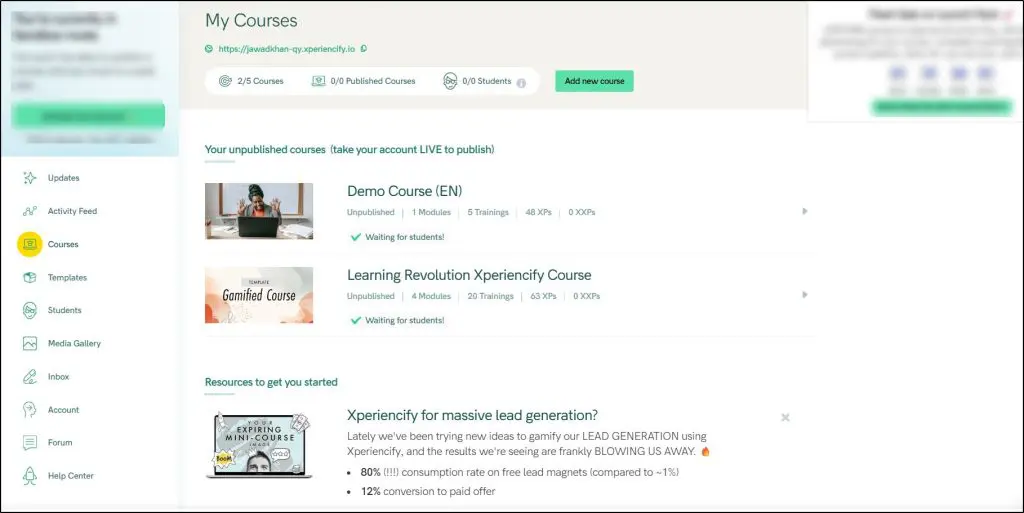
Memberships aren’t a separate content type. Instead, they’re created by bundling multiple courses and controlling access through tags or automations. You can set up monthly unlocks or tiered access this way, but there’s no dedicated membership portal.
Coaching isn’t a built-in feature either. You can offer it as part of a course by embedding external booking tools like Calendly inside a lesson or page.
Similarly, communities aren’t separate products; they exist as chatrooms or comment threads within a course.
So everything, including courses, coaching, community, and memberships, is built around the core course structure.
Xperiencify Features: How It Builds Courses With Gamification
Every Xperiencify course is built like an experience. From the dashboard to the student view, everything is designed to pull learners in and keep them moving forward.
You’ll see elements of gamification, multimedia lessons, psychological triggers, and progress-based rewards everywhere.
But at its core, the platform stays focused on one central product: the course.
Let’s break it down feature by feature.
Feature #1: Courses, Memberships, & Coaching
Courses are the heart of Xperiencify and everything else revolves around them. Whether you’re building a challenge, a coaching offer, or a membership, you’ll do it through the Courses section.
That’s where you manage your content, structure, settings, site pages, XP rewards, and even automation, all in one place.
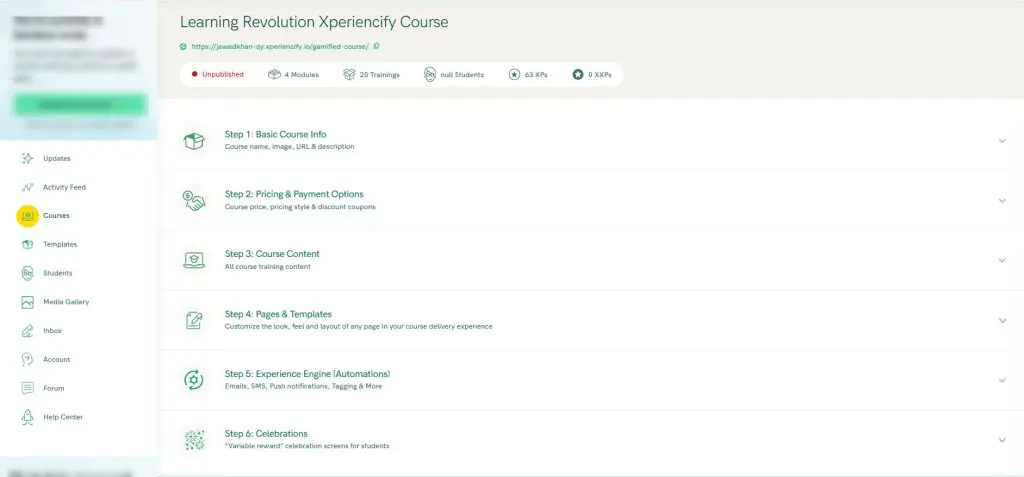
To make things even easier, Xperiencify gives you a library of ready-to-use course templates based on proven structures. Whether it’s a 5-day challenge, a live cohort-based program, or a self-paced evergreen course, you can choose a template and just replace the content. No tech setup. No guessing. It gives you the exact sections, pages, and flow you need.

Each course is made up of Modules, and each Module has multiple Trainings (lessons). You can upload videos, add downloadable files, write lesson notes, insert checklists, and assign XP points. There’s support for content locking, drip schedules, and even binge mode—where finishing one lesson auto-unlocks the next.
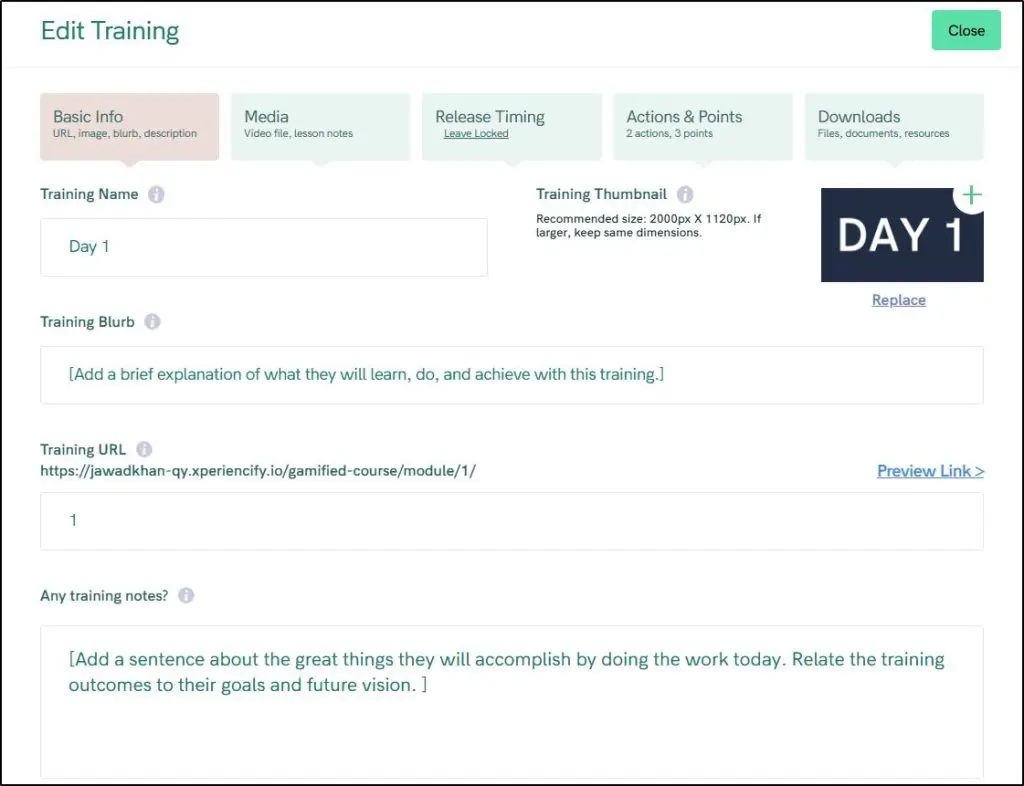
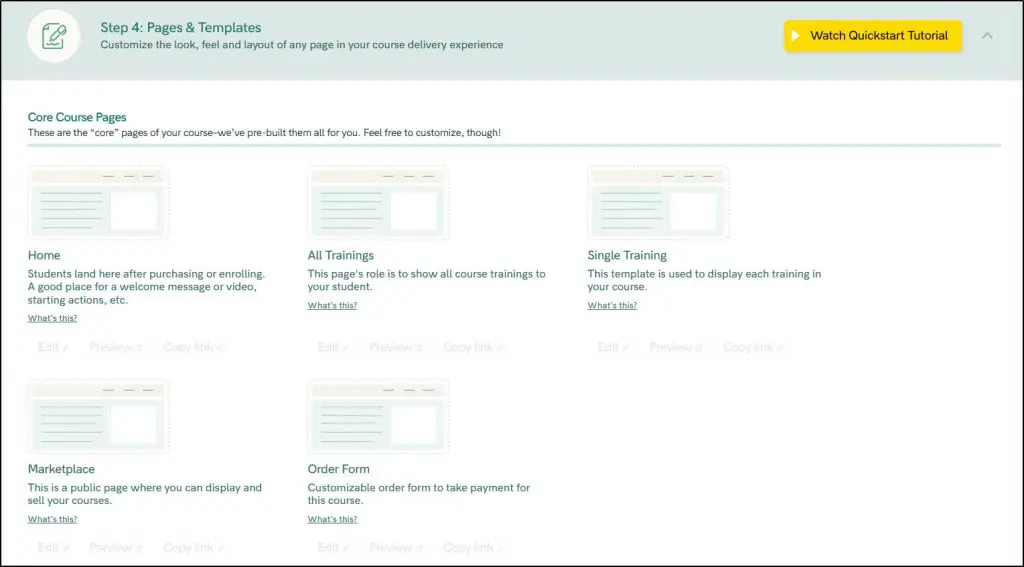
The platform also comes with built-in course pages: Home, All Trainings, and Single Training, already linked and styled.
You control everything like content structure, design, emails, automations, gamification triggers, and more from the Courses section.
My thoughts on Xperiencify course features?
Its course creation capabilities are certainly impressive and quite user friendly. But it lacks advanced coaching tools, assessment variety, and deep membership control. So it’s best for creators focused on engagement, not complexity.
Feature #2: Gamification Tools
When you set up a course in Xperiencify, one of the first things it asks is:
“How many days do you want your students to finish this course in?”
This shapes how the platform delivers content, tracks progress, and nudges students forward.
Right after that, Xperiencify walks you through customizing your celebration experience. You get to choose the kind of motivational feedback students will see when they hit key milestones.
Once you configure this, the Experience Engine kicks in, automating every piece of feedback based on what your students do (or don’t do).
- Points & Visual Feedback
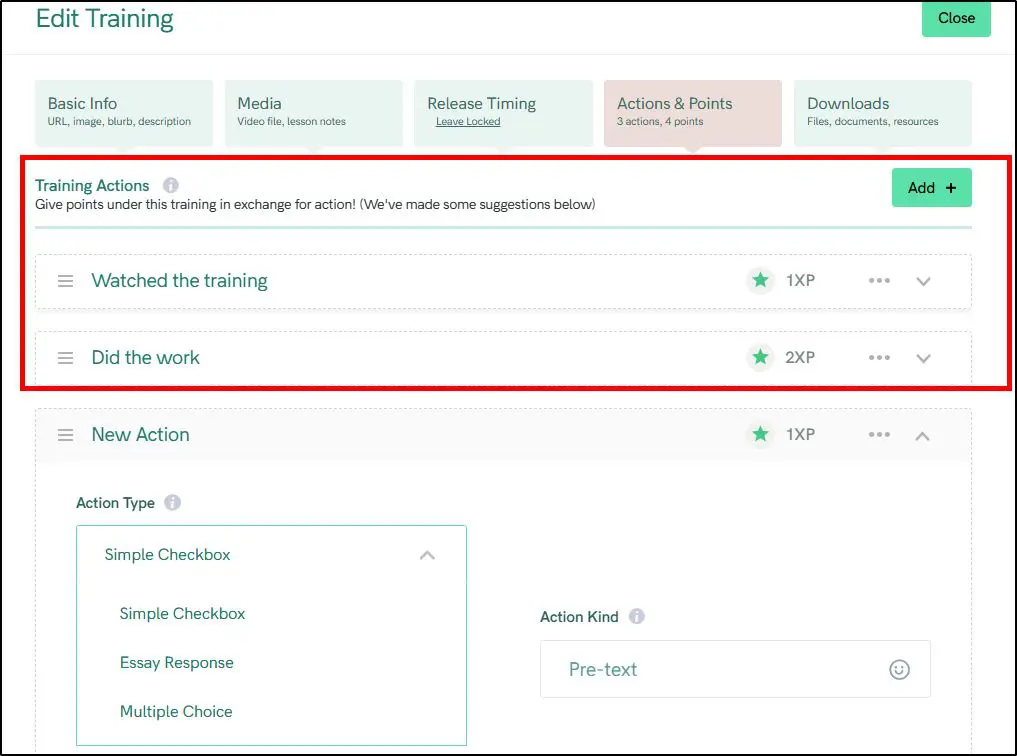
Every lesson can be tied to points. You decide how many each task or lesson is worth. Once a student clicks “Mark Complete,” their point total increases instantly, visibly shown at the top of the course interface. This live counter stays persistent across the course and reminds students how far they’ve come.
Hit 300 points? You can trigger a new badge, a hidden module, or even a celebratory message and sound combo.

You can assign these points on specific actions for every course lesson.
- Celebrations & Milestones
You can assign celebrations to meaningful actions like completing a lesson, finishing a module, taking action or logging in consistently.
Students see visual celebrations right in the course player.
Example celebrations:
- A badge popup after finishing a lesson
- A motivational video message when someone returns after 3 days away
- Confetti with a message: “Boom! You just crushed 25% of this course!”
You choose what gets celebrated and how.
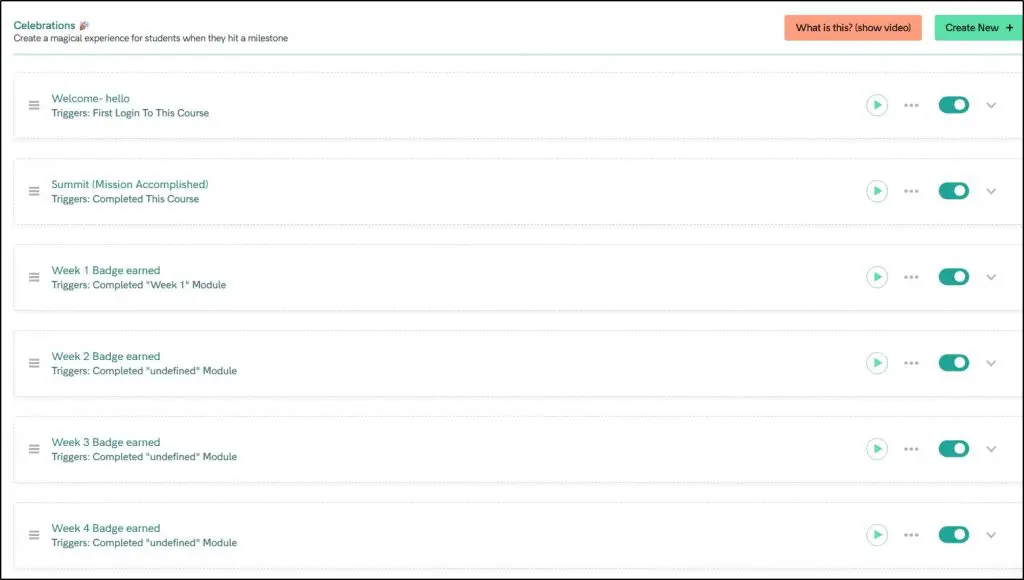
You can define the exact triggers for different celebrations to make your content more engaging.

It has a drag & drop celebration builder using which you can add different elements and animations to a celebration page that appears when an event is triggered.
- Surprise Unlocks & Bonus Drops
These are hidden elements that only appear when the student hits a condition, like:
- Reaching a point milestone
- Completing a specific module
- Logging in 5 days in a row
Surprise content could include:
- A bonus training video
- A downloadable worksheet
- A discount code or secret offer
- A recorded message from you
The surprise appears right in the course interface with a burst effect or popup window. You can even add a countdown to increase urgency.
- Leaderboards
Want to spark a little friendly competition? Enable a leaderboard in your course settings. Students then see a ranked list on their course homepage, based on total points earned.
You can reset the leaderboard weekly or monthly — ideal for group coaching or live challenges.
- Countdown Timers & Limited-Time Content
You can add countdown timers to any lesson or piece of content. Use this to:
- Give time-limited access to bonuses
- Encourage students to complete a section before a deadline
- Create a “binge watch” window with expiration
The timer is visible to students inside the lesson, often paired with language like “You’ve got 48 hours left to unlock your bonus!”
- Automated Follow-Ups (Email, SMS, Voicemail)
When a student is inactive, the Experience Engine lets you reach out with automated:
- Email nudges (“Lesson 4 is waiting for you”)
- SMS reminders (“Don’t lose your momentum!”)
- Even voicemails you pre-record and upload (“Hey [Name], just checking in…”)
These are triggered by specific rules: missed logins, unfinished lessons, inactivity streaks, or completed modules.
Gamification isn’t just sprinkled on top in Xperiencify. It’s baked into the course journey from the moment students log in.
Every reward, sound, pop-up, and trigger is there to guide behavior and encourage follow-through, especially helpful for creators who run group challenges, bootcamps, or want to raise course completion rates.
Just be ready to spend time planning the journey.
Unlike passive platforms, where you just upload videos, Xperiencify expects you to build an experience. If you do it well, the payoff can be huge.
Feature #3: Student Engagement Tools
Beyond gamification, Xperiencify includes subtle but effective tools to keep students active, motivated, and emotionally connected to your course.
- Daily Lesson Emails: You can schedule automated emails that remind students what to do next. These aren’t generic drip emails — they’re tightly linked to your course structure and progress goals. You can personalize these emails using the student’s name, current module, or even point totals.
- “Binge Mode” Toggle: If you want students to power through, you can enable Binge Mode, which unlocks all modules at once instead of dripping them out. This is especially useful if someone joins late or prefers learning in chunks.
- Welcome Flow & Re-Engagement Prompts: New students are greeted with a welcome message and checklist. You can customize what they see first — like an intro video, goal-setting survey, or onboarding tips. If they go inactive, Xperiencify nudges them with pop-ups and emails.
- Emotional Anchoring: Every student can answer a “Why are you taking this course?” question at the start. That answer is saved — and Xperiencify can later remind them of their reason when motivation drops, like:
“Remember, you started this to finally launch your coaching business. Let’s keep going!”
These engagement touches may seem small, but together they recreate a sense of presence, like the student isn’t just navigating a cold interface, but being guided and cheered on by a real mentor.
You also get a dedicated Student section in your account dashboard where you can get a bird’s eye view of your students’ performance.
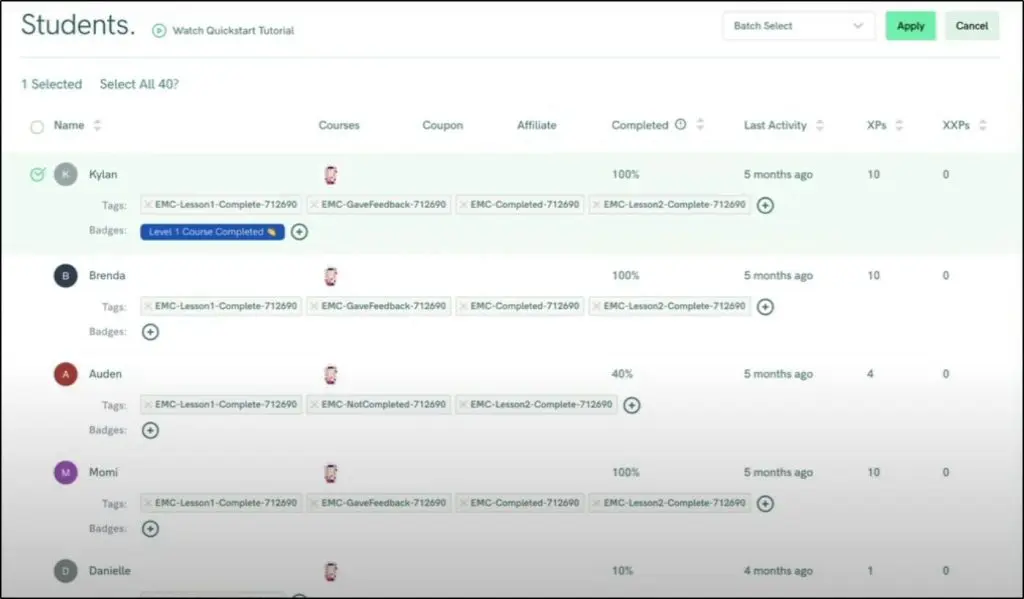
You can use tags to filter students to see specific performance metrics.
Feature #4: Marketing Features
Xperiencify is light on marketing features and you will need to use dedicated email marketing and funnel building tools if you’re serious about selling your courses.
However, here are some of the features you get to promote your products.
Landing Pages: You can create multiple landing pages per course — opt-ins, sales pages, or bonus offers. These pages live under your Xperiencify site domain (or your custom domain) and can be styled using their page blocks: hero sections, countdowns, testimonials, videos, FAQs, pricing tables, and more.
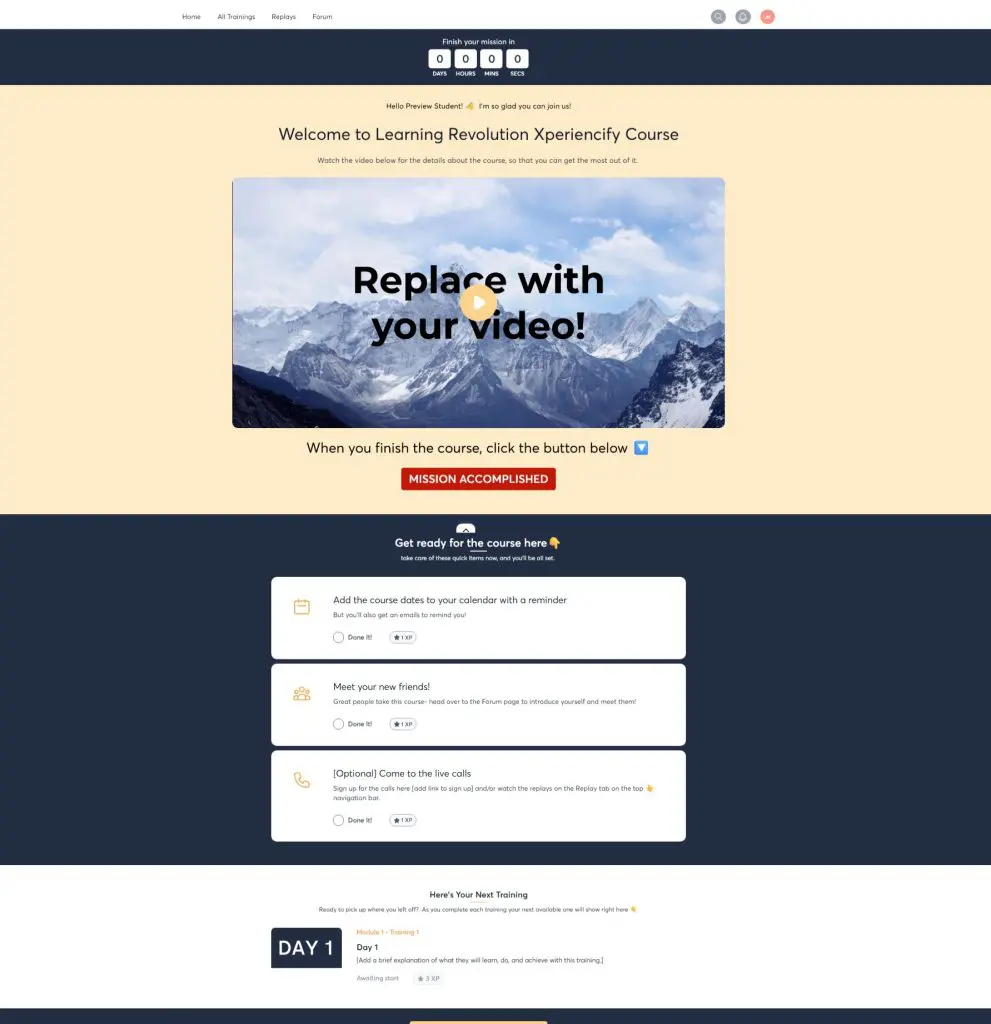
Course Pages: The course pages themselves — where students land after buying — can also be edited. You can customize what students see after logging in, rearrange content modules, and add upsell banners or community links.
1-Click Upsells: Xperiencify lets you offer additional products during checkout or after a lesson ends. You can use triggers like:
- “Completed Module 3 → Show offer for VIP bundle”
- “Scored 80% on quiz → Unlock discount on next course”
These upsells appear as lightboxes, banners, or full pages, depending on where you place them.
Countdown Timers & Scarcity Tools: You can set timers on specific pages or modules. This is useful for flash sales or gated bonus content inside the course — not just on the sales page.
Xperiencify’s main focus is on giving you audience engagement tools. That’s where it excels. Marketing isn’t its strength for now.
Xperiencify Pros & Cons
Before reaching a verdict, let’s summarize the main strengths and weaknesses of Xperiencify.
| Pros | Cons |
| Engaging learning experience through built-in gamification | Not built for complex LMS use cases (certifications, multi-instructor) |
| Ready-to-use templates for fast course setup | Coaching tools require third-party integrations (e.g. Calendly, Zapier) |
| Built-in landing pages, upsells, and payments | Community features are basic, lack real-time interaction and tagging |
| Simple membership setup via course bundling and content dripping | Limited design customization for course or landing pages |
| Powerful student re-engagement tools (email, SMS, voicemail automations) | Learning curve for the Experience Engine automations |
| Helpful onboarding and fast launch process for new course creators | Email broadcasts are very basic, no email sequences or funnels. |
| Stripe and PayPal integration included on all plans | Support response times depend on pricing tier (48h on Launch plan) |
Final Thoughts: Should You Use Xperiencify?
If you’re serious about making sure your students finish your course, not just buy it and ghost, Xperiencify deserves your attention.
From the moment you start building your course, Xperiencify pushes you to think like a game designer: What motivates your students? How can you reward momentum? What happens if someone drops off?
The tools are all there — points, badges, secret rewards, timed content, and even voice messages that trigger automatically if a student goes inactive.
No need for third-party plugins or duct-taped automations. It’s built in.
But is it the right tool for you? Here’s my take.
✅ Best For
If you’re teaching a transformation that happens over a few weeks (like a 30-day challenge, mindset shift, or skill-building program), and you want students to feel progress every day, this platform makes that easier.
You’ll appreciate it most if you care deeply about completion rates, student momentum, and designing an experience that pulls learners back in.
❌ Not For
If you need deep analytics, SCORM or Tin Can support, detailed user reporting, or academic grading systems, Thinkific or LearnWorlds will serve you better.
If you want an all-in-one suite with built-in blogging, advanced automation, branded app support, and professional-looking templates that are ready out of the box — Kajabi is the safer pick.
Xperiencify is not designed for corporate training teams, academic institutions, or creators selling large course catalogs with multiple instructors. It’s built for scrappy, fast-moving educators who value engagement over polish, momentum over modules, and student transformation over curriculum length.
Frequently Asked Questions (FAQs)
- Can I migrate my existing courses from Kajabi or Thinkific to Xperiencify?
Yes, but there’s no native migration tool. You’ll need to manually move content or request assistance if you’re on the Pro plan. - Is Xperiencify suitable for selling digital downloads or ebooks?
While the platform focuses on courses, you can technically sell digital downloads by embedding downloads inside course lessons or pages. - Does Xperiencify support multiple instructors or team teaching?
Not natively. You can add admins with the Pro plan, but there’s no built-in instructor role or user-level content restriction like Thinkific. - Can I run a cohort-based course on Xperiencify?
Yes. Xperiencify works well for time-bound programs thanks to drip schedules, countdown timers, and engagement automations. - Does Xperiencify offer multilingual support or localization?
Currently, Xperiencify does not offer built-in multilingual features. You’d have to create duplicate content or use third-party solutions. - Can I white-label my course platform on Xperiencify?
You can use your own domain and branding, but some backend elements (like system emails or app interfaces) still show “Xperiencify.” - Is there an API or Zapier integration to connect with other tools?
Yes, Xperiencify supports Zapier integrations and webhooks, allowing you to connect with CRMs, email tools, and other platforms. - Does Xperiencify support video hosting or do I need Vimeo/Wistia?
You can upload videos directly or embed from platforms like YouTube, Vimeo, or Wistia. No native hosting bandwidth limits are mentioned. - Is there a limit on total student enrollments or email contacts?
No, Xperiencify only caps active monthly students. You can enroll unlimited total users and build large email lists. - What kind of support does Xperiencify offer?
Support varies by plan. The Growth plan offers a 48-hour response time, while the Pro plan includes 24-hour responses and migration help.

Jeff Cobb, Founder of Learning Revolution
Jeff Cobb is an expert in online education and the business of adult lifelong learning. Over the past 20+ years he has built a thriving career based on that expertise – as an entrepreneur, a consultant, an author, and a speaker. Learning Revolution is a place where Jeff curates tips, insights, and resources to help you build a thriving expertise-based business. Learn more about Jeff Cobb here.
Table of Contents