

TL;DR – YouTube SEO Best Practices & Tips for Edupreneurs
YouTube SEO is the process of making your videos easy for YouTube to understand and recommend. For course creators, coaches, and consultants, the goal isn’t millions of views—it’s to consistently reach the right people who are already searching for the topics you teach.
Optimized videos become a steady source of qualified leads that feed your courses, consulting programs, and coaching offers.
10 Top YouTube SEO Ranking Factors
1. Watch Time: Total minutes people spend watching your video.
2. Audience Retention: Percentage watched from start to finish.
3. Click-Through Rate (CTR): How often viewers click when they see your video.
4.User Engagement: Likes, comments, shares, and new subscriptions.
5. Keyword Relevance: Strong keyword use in title, description, and spoken content.
6. Video Quality: HD (1080p or 4K) signals professional value.
7. Closed Captions & Transcripts: Accurate text that reinforces keywords.
8. Consistency & Frequency: Regular posting keeps your channel active.
9. Session Duration & Repeat Viewers: Videos that keep people on YouTube and bring them back get rewarded.
10. Viewer Satisfaction: Positive feedback and minimal “not interested” clicks.
11 Key Steps to Optimize Your YouTube Videos For SEO
Step 1 – Choose the Right Video Quality & Format: Record in HD/4K with clean audio and the correct orientation.
Step 2 – Do YouTube Keyword Research: Find primary and related keywords with tools like Keywords Everywhere and TubeBuddy.
Step 3 – Write Keyword-Rich Titles & Descriptions: Lead with your main keyword and describe value clearly.
Step 4 – Design Custom Thumbnails: Create bold, high-contrast images to boost CTR.
Step 5 – Add Accurate Captions & Transcripts: Upload clean SRT files and speak keywords naturally.
Step 6 – Add Chapters: Improve navigation and give YouTube extra keyword context.
Step 7 – Strengthen Engagement: Ask for comments, likes, and subscriptions at the right moments.
Step 8 – Improve Watch Time & Retention: Hook viewers early, cut fluff, and use pattern interrupts.
Step 9 – Create Playlists: Organize related videos to boost session time.
Step 10 – Use Internal Linking: Add end screens, info cards, and pinned comments to guide viewers to more of your content.
Step 11 – Publish & Promote Smartly: Share and embed within the first 24 hours for a strong algorithmic start.
Optimize YouTube Shorts: Use vertical 9:16, hook in 3 seconds, and add #Shorts to tap into 70 B daily views.
Consistently applying these steps—and refreshing older videos as trends and search queries evolve—builds lasting channel authority and keeps your content discoverable long after publishing.
The best tools for YouTube SEO are TubeBuddy, vidIQ, and Keywords Everywhere.
If you teach online or run a course-based business, YouTube is one of the biggest opportunities to grow your edupreneur business.
Nearly 70 percent of YouTube’s 2.5 billion monthly users come to the platform to learn something new, which is exactly the kind of audience you want.
I believe a YouTube channel doesn’t just build trust and credibility. It immediately helps you connect with people in a way text never can.
At a time when the boundaries between AI and human content often blur, seeing you explain an idea on video shows viewers you’re a real expert with real experience.
But for YouTube to work for you, you must understand YouTube SEO and how it works. Without optimizing your videos, you’ll struggle to get discovered and miss out on all the benefits YouTube offers.
In this guide, I’ll walk you through the specifics of YouTube SEO and how you can optimize your videos for maximum exposure.
What Is YouTube Search Engine Optimization (SEO)?
YouTube Search Engine Optimization (SEO) is the process of helping YouTube clearly understand what your video is about so it can recommend it to the right people.
When a video is properly optimized, it can appear higher in YouTube’s search results for specific keywords and show up more often in recommended videos, home feeds, and topic playlists.
This matters because YouTube is the world’s second-largest search engine after Google, with 2.5 billion monthly users. Every day millions of people type questions like how to create an online course, how do I lose weight, or best home workouts. If your video isn’t optimized, it’s unlikely to appear when someone searches for your topic.
Youtube video optimization happens on several levels.
YouTube’s algorithm scans your titles, descriptions, tags, and captions to match your content with relevant searches. It also reads signals from your video itself like the keywords spoken in the audio, thumbnails, and even viewer behavior such as watch time and likes, to decide how prominently to feature it.
For edupreneurs, this means a course teaser or how-to lesson doesn’t just sit quietly on your channel. With smart YouTube SEO, it can surface when someone searches for your subject, appear next to related educational videos, or be suggested to viewers who have shown an interest in learning.
Once you understand these mechanics, every video you publish has a much better chance of being discovered long after it goes live.

The Goal of YouTube SEO for Course Creators, Coaches, and Consultants
YouTube SEO isn’t about chasing viral fame or racking up a million views, though there’s nothing wrong with that.
Its real value for edupreneurs is in helping the right people find you. When you rank for the topics you’ve mastered, your videos become magnets for learners, clients, and prospects who are actively searching for solutions you provide.
For example, what would any serious Etsy business owner do after watching this video? Probably contact the video creator for help, right?
The same happens to your coaching or online course propsects. When they see your videos where you do something they want to achieve, they’re instantly convined you’re the one to help them.
On our Learning Revolution channel, we only have a few hundred subscribers and rarely see massive view counts. Yet those few hundred views come from the exact audience we want, generating leads and business inquiries that directly feed our courses and consulting programs.
That’s the true measure of success. For course creators, coaches, and consultants, YouTube SEO isn’t about going viral—it’s about consistent discovery by the people who matter most, and turning that discovery into long-term business growth.
Read our guide to the best ways to make money on YouTube
How SEO for YouTube Works
From the moment you upload a video, YouTube starts figuring out who should see it based on its powerful recommendation system designed to evaluate content at scale.
It looks at three main areas.
Relevance: YouTube scans the video’s title, description, tags, closed captions, and even the spoken words in the video. These details help the system understand what the video is about and which searches or topics it should appear for.
Performance: The algorithm studies how viewers react. Watch time, audience retention, likes, comments, and click-through rate all show whether people stay engaged and find the content valuable.
Viewer match: YouTube compares your video with each user’s watch history and interests to decide who is most likely to enjoy it and keep watching.
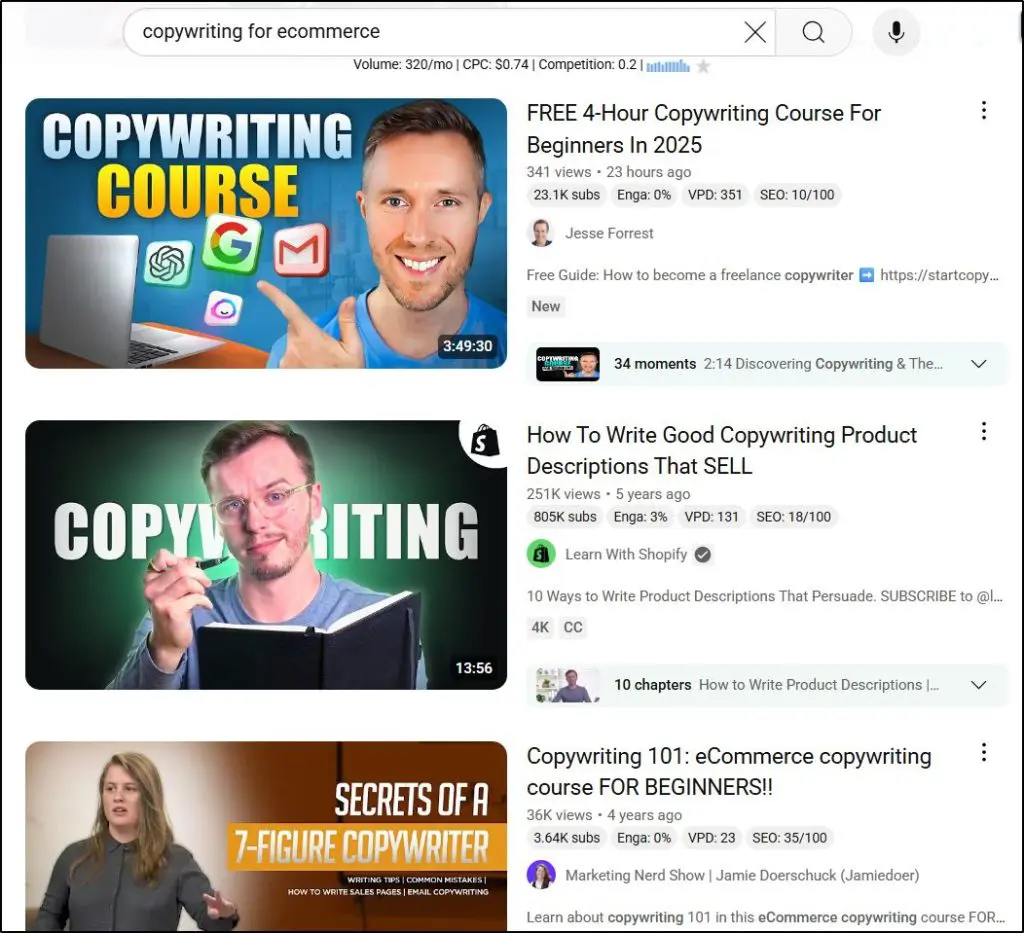
When two videos target the same keyword or topic, YouTube prefers the one that performs better on these signals.
A video that keeps viewers watching longer, earns more clicks, and generates more interaction will usually appear higher in search results and recommendations.
In other words, strong engagement and clear relevance give YouTube confidence that a video will satisfy viewers.
When all of these signals line up, your video can show up in search results, in the suggested videos sidebar, and on home pages. Good optimization gives YouTube the evidence it needs to keep sending the right viewers to you long after the upload date.
The Most Critical YouTube SEO Ranking Factors
YouTube looks at a mix of content quality, engagement signals, and channel strength when deciding which videos to show first.
Here are the YouTube SEO factors that matter most:
- Watch Time – Total minutes viewers spend watching your video. Longer viewing tells YouTube the content is valuable and relevant.
- Audience Retention – The percentage of a video people watch from start to finish. High retention signals strong viewer interest.
- Click-Through Rate (CTR) – The percentage of users who click your video when it appears in search or suggested results. Eye-catching titles and thumbnails boost this.
- User Engagement – Likes, comments, shares, and new subscriptions generated by the video. Interaction shows satisfaction.
- Keyword Relevance – The presence of focused keywords in your title, description, tags, and spoken content. This helps YouTube understand the topic.
- Video Quality – High-definition (HD) videos tend to rank better because they improve the viewing experience.
- Closed Captions & Transcripts – Accurate captions make content accessible and give YouTube more text to analyze for context.
- Channel Authority – A channel with consistent uploads, steady growth, and strong engagement earns more trust and visibility.
- Consistency & Frequency – Regular publishing keeps viewers returning and helps YouTube view your channel as active.
- Session Duration – Videos that lead viewers to watch more YouTube content extend overall session time, which YouTube values.
- Repeat Viewers – When people come back to rewatch or explore more of your content, it signals lasting value.
- Viewer Satisfaction – Positive feedback and fewer “not interested” reports tell YouTube that viewers are happy with what they see.
Optimizing for these factors gives YouTube strong evidence that your videos deserve to appear higher in both search results and recommended feeds, leading to steady growth long after publication.
How much does YouTube pay for a million views?
How YouTube’s Discovery Engine Works
People usually find videos on YouTube in two main ways:
- by searching for a topic or keyword
- by clicking on a recommended video that appears on their home feed, in “Up Next,” or inside topic-based playlists.
Behind the scenes, these two paths are tightly connected.
Even a brand-new video with zero views can be suggested to the right viewers if YouTube’s system thinks it fits their interests.
For example, I regularly see videos in my YouTube feed from creators I’ve never heard of.
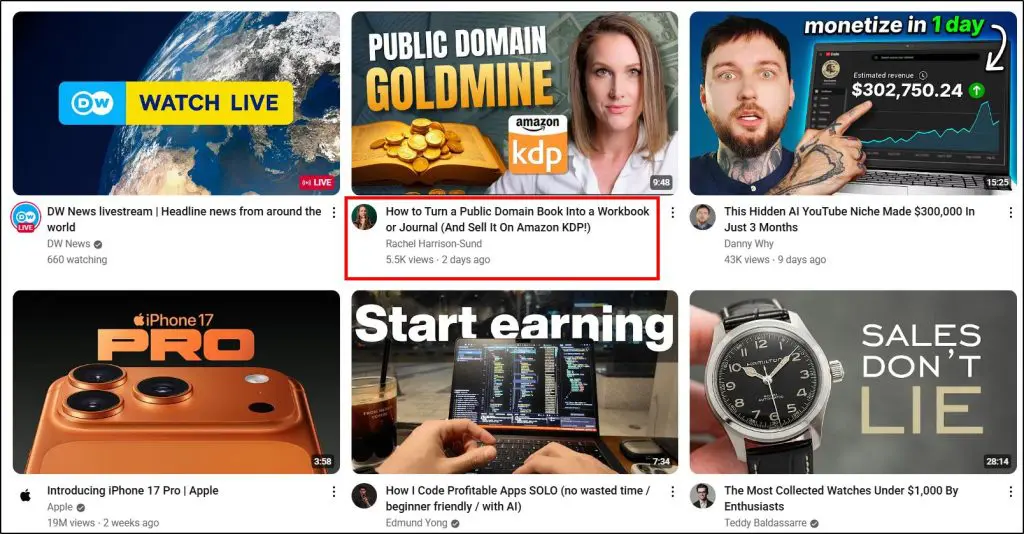
But most of those videos from creators unknown to me are about topics of my interest.
The platform studies each user’s watching preferences—what channels they subscribe to, which topics and formats they watch most often, where they tend to stop watching, and even what other channels their favorite creators’ audiences enjoy.
All of these signals help YouTube predict which videos will keep someone watching.
Your optimization work feeds directly into this process.
A well-optimized video with a clear title, descriptive text, accurate captions, and smart keywords tells YouTube exactly what the video is about. Personalization then takes over, matching that video to people whose habits and interests align with the topic.
This is why SEO still matters, even in a personalized environment.
Without clear SEO signals, YouTube’s algorithm can’t confidently understand your video’s subject, making it harder to surface in both search results and personalized recommendations.
Strong optimization gives the discovery engine the context it needs to keep showing your content to the right audience, long after the day you publish.
Use our YouTube Calculator to estimate your advertising earnings
Google SEO vs. YouTube SEO: The Main Differences & Similarities
Both Google and YouTube are massive search engines owned by the same company, and both rely on algorithms to match content with user intent. But the way they evaluate and rank that content is different. Understanding these overlaps and gaps helps you plan a smarter strategy for your courses, coaching, or consulting business.
Key Similarities
- Keyword relevance: Both platforms read titles, descriptions, and metadata to understand what content is about and match it with search queries.
- User engagement signals: Click-through rate (CTR), time on page or watch time, and bounce or retention rates help measure quality and relevance.
- Freshness and authority: Consistent publishing and audience trust increase visibility over time.
Key Differences
- Content format: Google indexes web pages, blog posts, and PDFs. YouTube focuses on videos and treats spoken words, captions, and visual signals as ranking factors.
- Engagement depth: Google cares about dwell time and backlinks, while YouTube weighs watch time, audience retention, comments, likes, and subscriptions.
- Discovery paths: Google mostly serves search-based intent. YouTube combines search with algorithmic recommendations, meaning a well-optimized video can keep growing even without initial traffic.
- Optimization focus: Google SEO requires site speed, structured data, and internal links. YouTube SEO relies more on thumbnails, captions, chapters, playlists, and consistent publishing.
How YouTube SEO Strengthens Google SEO
Optimized YouTube videos often rank directly in Google’s search results, complete with rich video snippets and timestamps. When you embed these videos on your website or blog, they increase on-page engagement and dwell time—positive signals for Google SEO.
Strong YouTube SEO also generates backlinks and social shares, which feed your site’s authority. In short, every well-optimized YouTube video can become a second doorway to your website, boosting visibility across both platforms and reinforcing your overall search presence.
Read: How To Start A Successful YouTube Channel
11 Steps & Best Practices To Optimize Your YouTube Videos for SEO
Now that you understand how YouTube SEO and its discovery engine work, and which ranking factors matter most, it’s time to put it all into action.
Here’s how to optimize your videos for maximum search visibility and ongoing recommendations.
Step 1: Choose the Right Video Quality, Orientation, and Format
Before you even hit record, decide on the quality, orientation, and format of your video. These technical choices strongly influence engagement and ranking, because YouTube’s algorithm favors videos that look professional and keep viewers watching.
In fact, 4K uploads grew by 35% in 2024, showing that audiences increasingly expect crisp, high-resolution content.
- Shoot in at least 1080p HD. Most first-page YouTube results are HD. Clear, sharp visuals make people stay longer and reduce drop-offs.
- Match orientation to your content. Use landscape (16:9) for tutorials, interviews, and most educational content. Use vertical (9:16) for Shorts or when your audience mainly watches on phones. Mismatched formats can hurt viewer retention.
- Use the right frame rate and aspect ratio. Stick to standard 24–60 fps and 16:9 for long videos or 9:16 for Shorts. Consistent formatting avoids playback issues and keeps your video polished across devices.
- Record clean audio. Viewers will forgive minor visual flaws but not muffled sound. Use an external mic or a quiet recording space to keep them engaged.
Good production quality makes a strong first impression and signals to YouTube that your video is worth recommending. Starting with the right format and resolution sets the foundation for every SEO step that follows.
Step 2: YouTube Keyword Research
Despite all the advances in YouTube’s algorithm, keywords are still one of the primary ways YouTube decides whether a video is relevant to a user’s search or interest. Using the right keywords in your video’s title, description, tags, and even spoken content is critical if you want your video to surface in search results and recommendations.
Here’s how to find the best keywords:
- Use YouTube’s search suggest: Type your main topic and watch the auto-complete phrases appear—those are real searches. Add letters before and after the main keyword (for example, “a online course,” “online course a”) to get even more ideas.
- Check search volume with Keywords Everywhere: This browser extension shows estimated monthly search volume right inside YouTube and Google results, so you instantly see if a keyword is in demand.
- Analyze competitors with TubeBuddy: Its Keyword Explorer shows search volume, competition score, and related tags, helping you spot keywords you can realistically rank for.
- Inspect top-ranking videos: Search your topic and look at titles, descriptions, and tags of videos with strong views. These keywords are proven to draw traffic.
By the end of this process, you’ll have a list of solid keywords. Use them throughout your content: one will serve as your primary topic keyword, while the rest become natural variations to reinforce your video’s relevance.
Step 3: Write Keyword-Rich, Click-Worthy Titles and Descriptions
Now that you’ve gathered a list of strong keywords, the next step is to work those keywords into titles and descriptions that both YouTube and real viewers can understand and trust. Titles and descriptions send the clearest relevance signals to YouTube’s algorithm and help people instantly see why your video is worth watching.
Here’s how to do it:
- Lead with your primary keyword in the title: Place it naturally near the start so it appears clearly in search. For example: “YouTube SEO Tips for Course Creators” works better than “Learn to Improve Your Channel with These SEO Tips.”
- Make the benefit obvious: Write a title that promises a result or key takeaway in plain, everyday language. Avoid filler or clickbait.
- Write a 250+ word description with purpose: Use the main keyword in the first 25 words, then include related keyword variations where they fit naturally. Describe what viewers will learn, add timestamps for easy navigation, and link to helpful resources or your website.
- Format for quick scanning: Break text into short paragraphs or use simple bullet points so the most important details stand out on both desktop and mobile.
Finally, track how these changes perform. Check average view duration and traffic sources inside YouTube Studio. If certain keywords consistently bring viewers who stay longer, update older titles and descriptions and plan future videos around those terms. Regularly refining these elements keeps your videos relevant and discoverable long after publishing.
Step 4: Design Custom Thumbnails That Earn Clicks
YouTube weighs click-through rate (CTR) heavily when deciding which videos to feature in search results and recommended feeds. A clear, eye-catching thumbnail is your first chance to grab attention and tell viewers what to expect.
This is critical because 90% of the best-performing videos on YouTube use custom thumbnails, and most views now happen on mobile, where small screens make a sharp, well-framed thumbnail even more important.
For example, notice how all these thumbnails not only immediately capture your attention but also describe the transformation from the viewer’s current state to their desired state.
This is what makes people click.
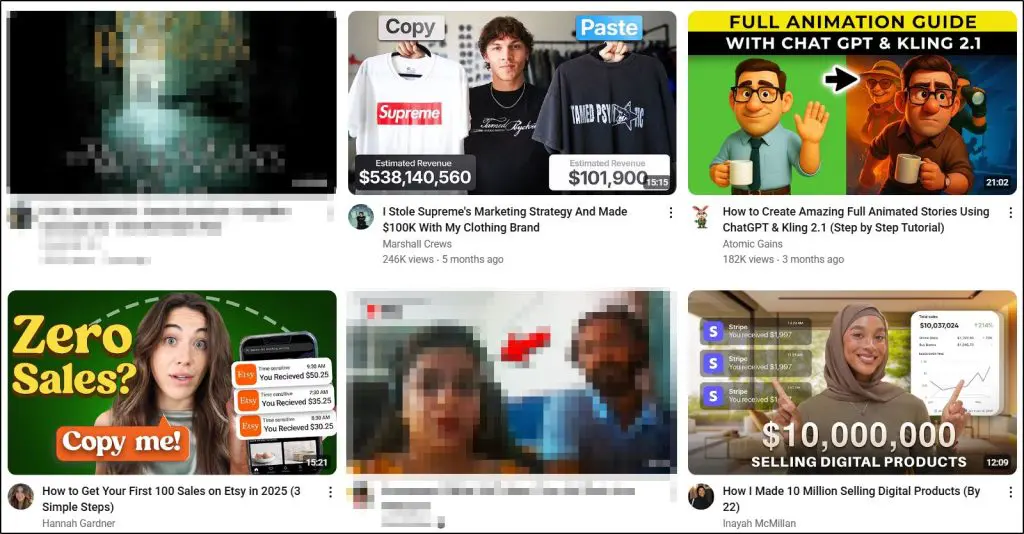
Here’s how to design thumbnails that work:
- Use bold, high-contrast visuals. Bright backgrounds or contrasting colors help your video stand out against YouTube’s mostly white and gray interface.
- Keep text short and readable. Limit on-image text to 3–5 words in large fonts so it stays clear on small mobile screens, which drive the majority of watch time (users spend about 29 hours per month on YouTube mobile).
- Show a clear focal point. If you appear on camera, use a well-lit, expressive shot of yourself or the main subject to add a human touch and build trust.
- Match the mood of your content. A friendly smile for a tutorial or a dramatic still for a case study instantly sets expectations.
- Test and refine. Use TubeBuddy’s A/B testing to compare different thumbnail designs and track which version drives a higher CTR.
Over time, keep a swipe file of top thumbnails in your niche and note what patterns consistently attract clicks, like specific color palettes, framing styles, or text placement.
Even small CTR gains can compound into thousands of extra views as YouTube rewards videos that consistently get clicked.
Step 5: Add Accurate Captions and Transcripts
Once your titles, descriptions, and thumbnails are ready, the next step is to make sure YouTube fully understands every word in your video.
Captions and transcripts give the algorithm extra text to analyze, strengthening relevance signals and helping your content surface in search results and personalized recommendations.
They also make your video easier to follow for viewers watching with the sound off, which improves audience retention—a key ranking factor.
Here’s how to do it right:
- Upload a clean transcript. Don’t rely on YouTube’s auto-captions alone. They often miss brand names or niche terms. Use Descript to generate an automatic transcript, then refine it with ChatGPT and edit for accuracy.
- In YouTube Studio, open Content, select your video, and click Subtitles.
- Choose Add Language › Add Subtitles, upload your SRT or TXT file, and carefully review timing and spelling inside the editor so every important keyword and phrase is correct.
- Speak your keywords naturally: Saying your primary and related keywords during the video allows accurate captions to reinforce them, which helps YouTube confirm the topic and show your video in relevant searches.
- Format for clarity: Break captions into short, well-punctuated lines so they’re easy to read on mobile and don’t distract viewers.
Well-prepared captions give YouTube a precise, keyword-rich text layer while improving the viewing experience. This combination strengthens your search rankings and increases the chances of appearing in personalized recommendations long after the video goes live.
Step 6: Add Chapters to Improve Navigation and SEO
Adding video chapters is an easy way to help viewers jump to the parts they care about while giving YouTube more context about your content. Chapters appear as clickable segments in the progress bar and description, making your video easier to navigate.
This matters for SEO because:
- Viewers are more likely to stay and watch longer when they can quickly find what they need, which improves audience retention and watch time—both key ranking factors.
- Each chapter title provides extra text for YouTube to read, helping your video show up for a wider range of related searches and topics.
Here’s how to set them up:
- In your video description, add a list of timestamps starting with 0:00 and give each a short, keyword-rich title.
- Example: 0:00 Introduction, 1:45 Step 1: Keyword Research, 5:20 Step 2: Titles and Descriptions.
- Example: 0:00 Introduction, 1:45 Step 1: Keyword Research, 5:20 Step 2: Titles and Descriptions.
- Include at least three chapters, each at least 10 seconds long.
- Double-check formatting (MM:SS Title) so YouTube detects them automatically and displays them on the video timeline.
Done well, chapters do more than help users skip ahead. They keep viewers engaged longer, create extra entry points for search, and allow Google to feature specific sections of your video in search results—driving new traffic even if someone doesn’t watch the whole video.
Step 7: Strengthen User Engagement Signals
Once your video is well-optimized and easy to navigate, the next priority is getting viewers to interact.
Engagement—likes, comments, shares, and new subscribers—tells YouTube that people find your content valuable.
Strong engagement not only boosts search rankings but also increases how often your video is recommended on home feeds and in “Up Next” suggestions.
Here’s how to build engagement that lasts:
- Invite comments with purpose: Ask specific questions related to your topic. For example, “Which of these YouTube SEO tips will you try first?” This sparks discussion and gives YouTube a clear sign of viewer interest.
- Pin a valuable comment: Highlight a key takeaway, a quick summary, or a link to a related video. Pinned comments guide conversation and keep people on your channel.
- Encourage shares: Remind viewers to share with friends or colleagues who might benefit. Shares bring fresh viewers and longer watch sessions, which YouTube values.
- Respond quickly and consistently: Thoughtful replies show that you’re active and committed to your audience. This often inspires more comments and repeat visits.
- Ask for subscriptions at the right moment: Instead of starting with a generic request, place a natural call-to-action after delivering value—viewers are more likely to subscribe when they’ve just learned something useful.
Strong engagement is a signal that your content satisfies viewers. The more interaction you earn, the more confidently YouTube will keep recommending your video long after it’s published.
Step 8: Improve Watch Time and Audience Retention
Watch time and retention are two of YouTube’s strongest ranking signals. The more minutes people spend watching your video—and the higher the percentage they watch—the more YouTube recommends it in search results and “Up Next” suggestions.
Here’s how to keep viewers glued to the screen:
- Hook viewers fast. Open with a clear promise of value in the first 15 seconds. For example, “In this video, you’ll learn how to double your course sign-ups with YouTube SEO.”
- Deliver value without fluff. Follow a tight script to avoid filler words and long pauses. Cut anything that doesn’t move the lesson forward.
- Use pattern interrupts. Switch camera angles, add quick graphics, or show on-screen text every 30–60 seconds to reset attention.
- Preview what’s next. Tease upcoming tips or a final takeaway to keep viewers curious until the end.
- Break long videos into chapters. Clear timestamps help people jump between sections and still count toward retention when they watch the parts they need.
Higher retention signals that your content is both engaging and useful. Consistently applying these tactics encourages YouTube to keep surfacing your videos long after publishing.
Step 9: Create Playlists to Boost Session Time and Discovery
Finally, organize your videos into playlists so viewers keep watching—and so YouTube sees your channel as a connected resource on specific topics. Playlists don’t just tidy up your channel. They extend watch sessions, which YouTube values highly when deciding what to recommend next.
Here’s how to set them up for maximum SEO impact:
- Group by topic or learning path. For example, an edupreneur might create playlists like YouTube SEO Basics, Course Launch Strategies, or Email Marketing Tips. Each playlist should have a logical flow so viewers naturally move from one video to the next.
- Use keyword-rich titles and descriptions. Add clear, concise keywords that describe the playlist’s focus. This helps YouTube understand the theme and rank it in search.
- Lead with your strongest content. Place your most popular or highest-retention video first to hook viewers right away.
- Keep them fresh. Add new videos and update order over time. Active playlists signal an active channel, which strengthens overall authority.
Done well, playlists create extra entry points in search results and encourage viewers to binge-watch. This boosts session duration across your channel, making every video—old or new—more likely to show up in YouTube’s recommendations and Google search results.
Step 10: Use YouTube Internal Linking to Keep Viewers on Your Channel
Internal linking inside YouTube means strategically guiding viewers to your other videos so they stay on your channel longer. Longer sessions tell YouTube that your content keeps people engaged, which can lift your overall rankings and help more of your videos appear in recommendations.
Here’s how to do it effectively:
- Add end screens. In YouTube Studio › Editor, set a 15–20 second end screen that links to a related video, a playlist, or your channel’s subscribe button.
- Use info cards mid-video. Place cards at natural breakpoints to suggest deeper dives on specific subtopics. For example, during a “YouTube SEO” video, link to a separate tutorial on keyword research.
- Mention related videos verbally. Phrases like “I explain this in detail in my video on audience retention—check the link on screen now” help viewers click through.
- Link in descriptions and pinned comments. Add contextual links to related content so viewers can continue learning even after the video ends.
Well-planned internal links extend watch sessions, strengthen channel authority, and create multiple paths for viewers to explore your expertise, all of which help YouTube surface your content more widely.
Step 11: Publishing & Promotion Best Practices
The first day after upload is critical for how YouTube evaluates a video. Early traction in the form of views, likes, comments, and shares tells the platform that your content deserves broader visibility.
Here’s how to give every video a strong start and long-term reach:
- Add the video to relevant playlists immediately. This links it to your existing content and helps it appear in playlist search results and suggested videos.
- Embed on your website or blog. Add the video to new or existing posts and link from related pages. Google indexes these embeds, and viewers who watch via your site still count toward YouTube watch time.
- Promote in the first 24 hours. Share the video with your email list, post it on social channels, and pin it in community groups or forums where your audience is active. Early engagement can accelerate rankings and recommended placements.
- Pin it on your YouTube channel. Set the new video as the featured video or add it to your channel trailer spot so every visitor sees it first.
Consistent publishing and a strong promotion plan not only boost immediate views but also help YouTube’s algorithm recognize your channel as active and trustworthy, increasing the chance that each video continues to grow long after launch.
The Best Practices For YouTube Shorts SEO: Additional Tips
YouTube Shorts follow the same core SEO principles as long-form videos, but their vertical format and quick-burst style require a slightly different approach.
They’re also a massive discovery tool.
According to YouTube’s own data, Shorts now generate over 70 billion views every day, and 164.5 million Americans watch Shorts regularly, making them a powerful way to reach new audiences fast.
Here’s how to make your Shorts stand out:
- Stick to vertical 9:16 and 60 seconds or less. Shorts must meet these specs to qualify for the Shorts shelf and recommendations.
- Use the #Shorts tag. Add “#Shorts” in the title and description so YouTube correctly categorizes and promotes the video.
- Front-load your hook. The first three seconds decide if someone keeps watching or swipes away. Start with a bold question, a surprising stat, or an eye-catching visual to hold attention.
- Optimize title and description with keywords. Apply the same keyword research process from Step 1 and include your primary keyword early in the title and naturally in the opening of the description.
- Leverage Shorts playlists. Create dedicated Shorts playlists to group related clips and increase total session time, which YouTube values highly when recommending content.
- Encourage instant engagement. Ask for quick likes, comments, or a subscription at the end to signal relevance.
When properly optimized, Shorts can drive new subscribers to your long-form videos, strengthen your channel authority, and keep your content surfacing in both YouTube search and personalized recommendations—all while tapping into one of YouTube’s fastest-growing formats.
The Best YouTube Search Engine Optimization Tools
Before wrapping up, here are some of the best tools for YouTube SEO I’ve used over the years.
1. TubeBuddy – All-in-One YouTube SEO Toolkit
TubeBuddy is a browser extension built specifically for YouTube creators. Its Keyword Explorer shows search volume, competition scores, and related tags so you can choose the right target terms. You can also run A/B tests on titles, descriptions, and thumbnails to see which version gets a higher click-through rate (CTR).
2. vidIQ – Competitor and Trend Tracking
vidIQ provides real-time keyword trends, competitor analysis, and historical performance data. Its video scorecard displays engagement metrics and SEO strength for any video, helping you spot opportunities and learn from top-ranking channels.
3. Keywords Everywhere – Instant Search Volume
This simple browser add-on places estimated monthly search volume directly inside YouTube and Google search results. It’s perfect for quickly gauging whether a keyword has enough demand before you start scripting or filming.
4. Descript – Fast, Accurate Transcripts
Descript automatically transcribes your video audio so you can edit captions quickly. Clean captions improve accessibility and give YouTube more context for your topic, which helps with both search visibility and personalized recommendations.
5. Canva – Custom Thumbnails and Branding
Canva’s drag-and-drop design tools make it easy to create bold, on-brand thumbnails with the correct 1280×720 size and 16:9 ratio. Eye-catching thumbnails boost CTR, which is one of YouTube’s strongest ranking signals.
6. Google Trends – Seasonal & Topic Insights
Use Google Trends to spot rising topics before they peak. Pairing these insights with TubeBuddy or vidIQ helps you publish content when interest is surging, giving new videos an early ranking advantage.
Together, these tools streamline keyword research, thumbnail design, captions, and ongoing analytics—freeing you to focus on creating videos that keep viewers engaged and help your channel grow steadily.
Read: The best tools to grow your YouTube channel
YouTube SEO Is An Ongoing Activity
Optimizing a single video is just the start.
YouTube rewards ongoing practice such as regular uploads, periodic title and description updates, and revisiting older videos with new keywords or chapters when trends shift.
Keep watching your analytics for audience retention and search traffic patterns, then adjust future content to match what’s working. Over time, these small, consistent actions help every video—new or old—gain fresh momentum and keep showing up in recommendations.
Think of YouTube SEO as a cycle, not a one-time project. The more you refine and refresh, the stronger your channel authority and long-term discovery will become.
Frequently Asked Questions (FAQs)
1. How often should I refresh old videos for better YouTube SEO ranking?
Review top-performing videos every 3–6 months. Use YouTube Analytics to spot new search queries bringing traffic and add them to your title or description. Refreshing timestamps, links, and thumbnails can help older content maintain high rankings and adapt to YouTube algorithm updates.
2. Should I target trending YouTube keywords or focus on evergreen search terms?
A balanced mix works best. Trending keywords can deliver quick spikes, while evergreen topics like how to increase watch time keep driving steady traffic for years. Check keyword volume with tools like Keywords Everywhere and use TubeBuddy to gauge competition before choosing.
3. Does editing a video title or thumbnail affect search rankings?
If you improve clarity or boost click-through rate (CTR), updates usually help. Avoid constant tweaks in the first few days, but updating older videos with stronger titles and custom thumbnails is one of the simplest YouTube SEO tips for long-term ranking gains.
4. How important are tags for YouTube search optimization today?
Tags carry less weight than titles or descriptions but still help with alternate spellings and related searches. Adding a few accurate, keyword-rich tags supports YouTube search optimization—especially if your topic includes common typos or multiple naming variations.
5. Can live streams rank as well as uploaded videos in YouTube search?
Yes. After a live stream ends, it becomes a regular video. Adding a strong title, keyword-focused description, chapters, and custom thumbnail can help it show up in YouTube search results and recommendations just like any pre-recorded video.
6. What’s better for YouTube SEO—daily uploads or fewer, higher-quality videos?
Quality and audience retention matter more than frequency. A well-produced weekly video with strong watch time and engagement will outperform several rushed uploads. Consistency counts, but aim for content viewers finish and share.
7. Do external backlinks improve YouTube SEO?
Indirectly, yes. Embedding your videos in blog posts or sharing them on social media increases watch time and traffic—key ranking factors for YouTube search optimization. While backlinks don’t pass “link juice” like in Google SEO, they still support stronger engagement signals.
8. How can I repurpose old videos to boost video ranking?
Create Shorts from key highlights, add fresh chapters, update descriptions with trending keywords, or link older videos inside new uploads. These tactics refresh relevance and can trigger a new wave of recommendations from the YouTube algorithm.
9. What is the ideal video length for higher YouTube rankings?
For educational content, 6–12 minutes is often the sweet spot. Longer videos can also rank well if they hold attention. Focus on audience retention—keeping viewers engaged is more important than hitting a specific time target.
10. Do community posts and polls impact YouTube SEO?
Indirectly. Posts, polls, and Q&As spark comments and repeat visits, helping you build an active audience. That early traffic and engagement lift can improve how new videos perform in YouTube search and recommendations.
Table of Contents
Related Posts
17+ Traffic Generation Tips For Online Course Websites (2025)
How to Maximize Social Media SEO in 2024
Use Blogging to Market Your Course Business