
TL;DR — Is Circle.so the Best Online Community Platform? (2026)
Circle is a modern, all-in-one community platform built for creators who want to run their business around connection, not just content. It brings together community spaces, courses, memberships, live events, payments, automation, and even branded mobile apps—under one brand, without duct-taping multiple tools.
What Circle lets you do:
– Host discussions, group chat, and searchable knowledge spaces
– Sell modular courses and gated digital products
– Run live streams, workshops, group coaching, and small live rooms
– Charge one-time fees, subscriptions, or tiered memberships via Stripe
– Automate onboarding, access, reminders, and engagement with visual workflows
– Use AI Agents (Enterprise+) to support and coach members 24/7 using your own content
– Launch fully branded iOS and Android apps with Circle Plus
Core Circle features:
Spaces · Live Rooms & Streams · Courses · Memberships · Workflows · Payments · AI Agents · APIs · Branded mobile apps
Circle Pricing (annual billing):
Professional – $89/month: core community, courses, events, and memberships
Business – $199/month: unlimited workflows, APIs, and deeper customization
Enterprise – $419/month: AI Agents, advanced analytics, priority support, lower fees
Circle Plus – Custom pricing: fully branded mobile apps and launch support
All plans include a 14-day free trial (no credit card required).
Email marketing is available via Email Hub, which is a paid add-on priced separately by contact count.
Great for: Course creators, coaches, and membership businesses that want strong community engagement and everything under one brand.
Not ideal for: Creators who only need a traditional LMS with quizzes and certificates, or those looking for a free or ultra-low-cost solution.
Try Circle For Free Now
In a world flooded with AI-generated content, your personal connection with your audience is your most valuable asset.
As a course creator or digital product seller, that connection is what sets you apart. It’s the reason people choose you over a generic chatbot, a faceless brand, or an automated tutorial.
But how do you scale that kind of personal engagement, without burning out or duct-taping ten different tools together?
That’s exactly what Circle is built for.
Circle is a unified online community platform to bring your audience together, sell your knowledge, and grow a thriving, branded community, while still keeping you at the center.
It uses AI where it helps (like onboarding, moderation, automation), but never replaces your voice. In fact, it enhances it.
In this review, we’ll dive into everything Circle offers (from courses and memberships to branded mobile apps, live events, CRM, and AI agents) so you can decide if it’s the right community platform to build your creator business on your terms.
Let’s get into it.

Circle.so Product Snapshot (2026) | Online Community Pricing & Features
| Category | Details |
|---|---|
| Product Name | Circle |
| Platform Type | Online community platform with courses, events, memberships, and coaching |
| Best Known For | Community-led businesses that combine discussions, live interaction, and paid access under one brand |
| Core Use Case | Building, engaging, and monetizing communities around courses, coaching, and expertise |
| Starting Price | $89/month (Professional plan, billed annually) |
| Free Trial | 14-day free trial (no credit card required) |
| Community Features | Discussions, group chat, spaces, member directory, gamification |
| Course Features | Modular courses with video, audio, and text content |
| Video Hosting | Native video hosting for course lessons, posts, and events (no external video platform required) |
| Live Features | Live events, live streams, and small group live rooms |
| Memberships | Free or paid memberships with tiered access and gated spaces |
| Coaching Use Cases | Group coaching, live workshops, private spaces for coaching clients, 1:1 or cohort-based programs |
| Monetization Options | Paid memberships, subscriptions, one-time purchases, paywalled spaces |
| Payments | Stripe integration (credit/debit cards) |
| Email Marketing | Email Hub: send email broadcasts, build automated email sequences, capture leads with forms, segment members and contacts, personalize emails based on behavior, and track opens, clicks, and engagement journeys (priced as a paid add-on by contact count) |
| AI Features | AI Agents, AI summaries, and AI workflows (Enterprise plan and above) |
| Automation | Visual workflows for onboarding, access control, reminders, and engagement |
| Website Builder | Built-in website, landing pages, and sales pages |
| Mobile Apps | Native Circle app (default); branded iOS/Android apps via Circle Plus |
| Integrations | Zapier, APIs, Headless Member API (Business plan and above) |
| Scalability | Works for small creator communities up to large brand-led communities |
| Ideal For | Course creators, coaches, membership businesses, and community-first brands |
| Not Ideal For | Creators who only need a traditional LMS with quizzes, certificates, or grading |
Read: The best online course platforms for edupreneurs
What Is Circle.so?

Circle is a modern, all-in-one platform that helps edupreneurs build high-value communities around their courses, content, and expertise, without stitching together a dozen tools.
It combines community spaces, live events, online courses, payments, email marketing, and even AI-powered automation in one place under your brand.
Unlike most platforms that focus on just content delivery or chat forums, Circle is designed to help you build a business, not just a group.
Whether you’re selling memberships, coaching, digital downloads, or live workshops, Circle gives you the structure to deliver value and grow your revenue.
Used by more than 17,000 creators, educators, and brands like Pat Flynn, Ali Abdaal, and Jay Shetty, Circle is purpose-built for turning attention into engagement, and engagement into income.
Circle.so Pricing & Free Trial (2026) | How Much Does It Cost?
Circle offers four pricing plans depending on the features you need and the size of your community. All plans come with a 14-day free trial, no credit card required, and pricing is based on annual billing.
- Professional – $89/month (billed annually)
Best for course creators, small memberships, and coaching programs - Business – $199/month (billed annually)
Ideal for growing communities that need workflows, automation, and deeper customization - Enterprise – $419/month (billed annually)
Built for brands and large communities that need AI features, scale, and priority support - Circle Plus – Custom pricing
Adds fully branded iOS and Android apps with a dedicated launch team
Email Hub (Optional Add-On)
Circle’s email marketing features are available through Email Hub, which is priced separately based on your contact count.
Email Hub lets you send email broadcasts, build automated email sequences, capture leads with forms, segment members and contacts, personalize emails based on behavior, and track opens, clicks, and engagement journeys.
The first 30 days are free.
Circle.so Paid Plan Comparison
| Feature | Professional | Business | Enterprise | Circle Plus |
|---|---|---|---|---|
| Price (annual billing) | $89/month | $199/month | $419/month | Custom pricing |
| Free Trial | 14 days | 14 days | 14 days | 14 days |
| Members | Unlimited | Unlimited | Unlimited | Unlimited |
| Spaces | 20 | 30 | 100 | 500 |
| Admins / Moderators | 3 / 10 | 5 / 15 | 10 / 100 | 20 / 200 |
| File Storage | 100 GB | 250 GB | 1 TB | 2 TB |
| Transaction Fees | 2% | 1% | 0.5% | 0.5% |
| Courses | ✅ | ✅ | ✅ | ✅ |
| Events & Live Streams | ✅ | ✅ | ✅ | ✅ (up to 2,000 attendees) |
| Live Rooms | Basic limits | Extended limits | Higher limits | Highest limits |
| Memberships & Subscriptions | ✅ | ✅ | ✅ | ✅ |
| Coaching Use Cases | Group & cohort | Advanced programs | Large-scale coaching | Premium & enterprise coaching |
| Workflows / Automations | Up to 20 | Unlimited | Unlimited | Unlimited |
| API Access | ❌ | Headless + Admin | Full access | Full access |
| Branded Email Notifications | ❌ | ✅ | ✅ | ✅ |
| AI Agents & AI Workflows | ❌ | ❌ | ✅ | ✅ |
| Website & Landing Pages | ✅ | ✅ | ✅ | ✅ |
| Mobile App Access | Circle default app | Circle default app | Circle default app | Fully branded iOS & Android apps |
| Support & Onboarding | Standard support | Migration (annual plans) | Priority support | Dedicated launch team |
What is Circle Plus and Who is it For?
Circle Plus is Circle’s premium add-on for creators and brands that want a fully branded mobile app experience, not just the default Circle app. It gives you custom iOS and Android apps with your name, icon, and App Store/Google Play listings, plus a launch team that helps you roll it out.
Circle Plus is best for established memberships, coaching programs, and communities where people return weekly and you want higher retention through push notifications and a “one app = one brand” feel.
It’s not ideal if you’re still validating your offer or your community activity is inconsistent.
Read: The best online community platforms for edupreneurs
Circle.so Pros & Cons | Summary of its strengths & weaknesses
| ✅ Pros | ❌ Cons |
|---|---|
| Fully integrated platform combining community, courses, live events, chat, memberships, payments, and a website builder | Limited LMS depth — no quizzes, assignments, certificates, or grading |
| Strong community-first experience built for engagement, not just content delivery | Email marketing costs extra — Email Hub is a paid add-on |
| Native live rooms, live streams, and events for coaching, masterminds, and workshops | Advanced features are plan-gated — AI Agents and advanced analytics require higher tiers |
| Powerful workflows for onboarding, access control, and engagement automation | No ready-made templates for landing pages or spaces |
| Customizable AI Agents (Enterprise+) trained on your own content | Stripe-only payments — no native PayPal support |
| Flexible monetization: memberships, subscriptions, one-time products, and gated access | No free plan — not ideal for very early-stage creators |
| Branded mobile apps available with Circle Plus | Pricing can feel high compared to simple community tools |
| Built-in website and landing page builder | Learning curve for creators new to community-led businesses |
| Excellent onboarding, documentation, and live training | Not designed as a full replacement for a traditional LMS |
| Active creator ecosystem with ongoing education and peer support | Email Hub pricing scales with contact count |
Circle.so Use Cases | How Creators Use The Platform
You can use Circle in numerous ways to create knowledge-driven online communities and digital products. Here are some of its most common use cases.
Create Online Communities
With Circle, you can create highly engaged online communities where your members can exchange ideas, seek feedback, and interact with each other. It allows you to create public, private, secret, or hybrid communities and consists of spaces and space groups to help you organize your discussions.
Sell Online Courses
Circle comes with online course creation and selling features using which you can create modular courses with video, audio, and text content.
Host Live Workshops
Numerous entrepreneurs use Circle to host live workshops with hundreds of members from their communities. You can host one-time or recurring workshops and offer them for free or charge a fee.
Provide 1:1 Consultation
If you provide online consultancy, Circle can be an excellent platform to help you generate leads and provide live consultancy sessions. You can generate demand from your community and schedule live video sessions to provide your services
AI Coaching & Support Agents
Circle’s AI Agents let you clone your knowledge into a 24/7 assistant that answers member questions, shares resources, and offers personalized support without you being online all the time.
Branded Mobile Apps
With Circle’s white-labeled mobile apps, your members access your content, events, and community under your brand without distractions.
Build Membership Sites
Circle is an excellent platform for free and paid memberships or gated content. It gives you total control over your content access and allows you to add paywalls to any discussion thread/space.
Create A Knowledge Base
Circle is also a great choice for building your company’s knowledge base. You can use its threads/Spaces to cover different topics and create posts with detailed content. Your members can navigate your knowledge base using its homepage, Circle’s search bar, or topical hashtags.
In short, Circle is a robust and multi-purpose platform where you can grow a community, engage with your audience, and make money selling different forms of digital products.
How Circle Supports a Course or Membership Business
Circle helps you create a personal connection with your audience, something AI cannot replace.
AI can help you produce content faster. But it can’t replicate trust, connection, or shared experience. That’s what people pay for when they join your course, sign up for your membership, or work with you directly.
With Circle, you can bring your audience into a space where they feel seen and supported. Every feature is designed to keep people close to your voice and your community, not just your content.
- Set up a private community where students can ask questions, share wins, and stay motivated between lessons
- Run live coaching calls or group sessions inside your platform without sending people to Zoom or third-party tools
- Host courses alongside the community so learners can engage with your material and with each other in real time
- Offer multiple membership tiers with different levels of access, content, or support
- Build onboarding flows using automated spaces and pinned posts to guide new members
- Use AI tools to summarize discussions or assist members—but keep your responses personal where it matters
- Track engagement to see who’s active, who’s stuck, and who needs a nudge
- Share resources, templates, or recordings in organized spaces that don’t get lost in email or chat threads
- Offer private spaces for premium clients or coaching groups within the same environment
- Keep your business under one brand, with your voice at the center of every interaction
People come for the course but stay for the community. It becomes a core part of their learning experience where they build momentum, get feedback, and connect with others on the same journey.
How Circle’s AI Changes the Learning Experience For Both Instructors & Learners
Before I tell you more about Circle’s features, I want to share my personal experience with its AI capabilities.
I’ve seen what happens to online learning when a community grows.
The first thing that breaks isn’t the content. It’s response time, visibility, and momentum. Learners start asking the same questions. Good discussions get buried. Instructors spend more time reacting than teaching.
What Circle’s AI does well is remove that friction without getting in the way.
From a learner’s perspective, the experience feels more responsive. They don’t have to wait for the next live session or hope an instructor sees their question. Relevant discussions, past answers, and resources surface naturally inside the community. That keeps people moving forward instead of stalling out between sessions.
From the instructor side, the shift is even more noticeable. Instead of answering the same questions again and again, I can see where learners consistently get stuck and address those patterns directly in a live session, a follow-up post, or a course update. My time goes into teaching and guidance, not repetition.
The most important thing is that AI stays in the background.
It supports discovery, clarity, and continuity, while the instructor remains the voice learners trust. In practice, that makes learning feel more human at scale, and teaching far more sustainable as a community grows.
Circle.so | Top eLearning & Online Community Features
Circle.so is packed with features to help you start, manage, and grow thriving online communities, sell online courses and digital products, and build a loyal audience around your brand.
Let’s discuss some of its main features.
Feature #1: AI Agents
Imagine if you could clone yourself. Someone who knows your content, your tone, your approach. Then make that version of you available 24/7 to help your community.
That’s what Circle’s AI Agents let you do.
It’s like creating an AI-powered version of yourself that can coach, guide, and support your members at scale. It never gets tired, never misses a question, and always stays true to your voice, because you train it.
Here’s how it works:
- You choose what your AI Agent knows—your courses, posts, discussions, resources, even PDFs
- You control how it talks—set the tone, style, and behavior so it feels like you
- Your members can message it directly, get help through search, or meet it during onboarding
- Every conversation is tracked in a shared AI Inbox, so you or your team can step in any time
You could create one agent for onboarding, another to answer course questions, and a third to handle general support. Each one works like a trained assistant that knows your material and helps your people get more value, without relying on you to answer everything manually.
Feature #2: Circle Community AI
Community AI is a suite of AI features to help Circle community owners create more valuable, meaningful, and tailored content for their audiences faster than ever.
Thriving communities are built upon the willingness of their members to help each other by sharing personal experiences and creating actionable and high-quality content.
But most online community owners and users don’t actively create such content because:
- Content creation is time-consuming and requires in-depth research.
- They can’t think of the right words to express themselves.
- They don’t know enough about the problem to contribute meaningfully.
Community AI solves those problems by giving you content creation and audience insights tools.
It uses the latest advancements in AI technology to help you understand your audience’s behavior, needs, and how they interact with your community. Based on its insights, you can answer your members’ questions through text and visual content.
Your Circle community members can also access some of these features to create better content and add more value to the discussions.
In short, Community AI leverages artificial intelligence to help you and your Circle members build stronger relationships based on helpful, reliable, and engaging content.
You can read our detailed Circle Community AI review to learn how it enhances content creation, and to see it is worth using for your online course business.
Feature #3: Circle Spaces
In Circle, everything happens in spaces.
So, what are spaces?
Spaces are dedicated channels where you can offer different types of content to your audience. A space could be a forum containing threads, a public or private chat room, a live event, or an online course. Each space can be private, public, or secret, depending on your choice.
So when you create a new space, Circle gives you the following options:

You can use spaces to organize your content into broader categories. So, for example, if you have a Circle community about freelance writing, your spaces could be
- Freelance writing jobs
- Writing skills, tips, and strategies
- Client management
- Outsourcing
- Scaling your business
Let’s say these are “Post” spaces. In that case, each space has its dedicated discussion threads. So, in the “Freelance writing jobs” space, you could add new threads about job opportunities where you share the employer’s requirements and other details.
Here’s an example of spaces from Circle’s own community.

For better management, you can organize related spaces under a space group like you can see in the screenshot.
Let’s open the space, “What’s New?” to see it from inside.
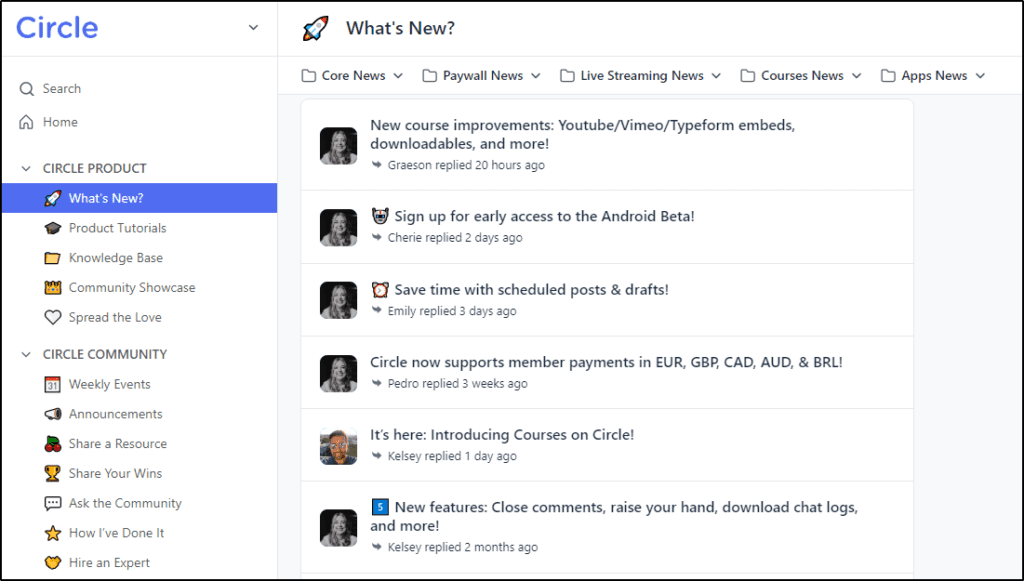
As you can see, this space consists of threads about different product releases and updates. Each thread contains messages between members, like any other online discussion forum. You can use these threads to post long-form content with videos, images, attachments, and emojis.
Similarly, if you choose “Chat” as your space type, it sets up a Slack-style public or private chat room (your choice) where members can directly interact with each other, share files, and exchange ideas.
A “Course” space allows you to set up a dedicated online course. An “Event” space allows you to host live events with as many members of your community as you want.
Irrespective of the space type, you have complete control over who accesses your content and how they can access it (free, public, paid).
Let’s discuss the course and event space types in more detail because of their importance.
Feature #4: Online Courses
Circle allows you to create and sell modular online courses with video, audio, and text content. Simply choose the “Course” space type to create your course.
To get started, just name your course space and choose the space group under which it should be displayed in your community.
Inside the course space, you get a clean user interface where you can configure your course’s privacy settings, customize branding, set up paywalls, and create modules and lessons.
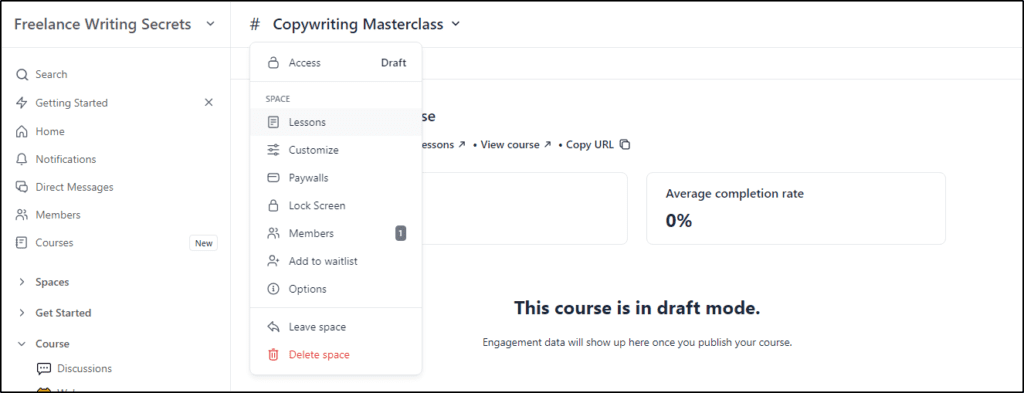
In Circle, course modules are called sections. To create course content, you first need to create your course’s main sections (modules). For example, the modules for an SEO course could be
- Course introduction and fundamentals
- Technical SEO
- On-Page SEO
- Off-Page SEO
Each section (module) consists of multiple lessons. For example, the “On-Page SEO” module could contain lessons like:
- What is on-page SEO
- Keyword research
- Optimizing page titles
- Writing the perfect meta description
Here’s a screenshot of the list of modules and courses in a Circle course space.

A lesson is where the actual course content resides in the form of videos, audios, text content, or a mix of all content types.
Here’s an example of what Circle’s course lessons look like.
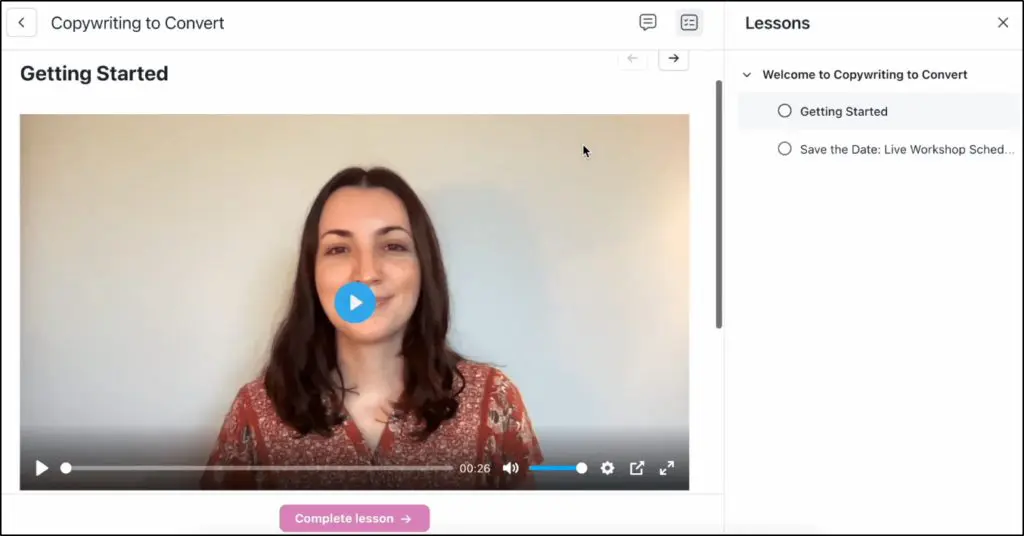
You can completely customize these pages, add your logo, and brand colors to give it a unique look.
In addition, you can also create landing pages for your course where you can allow people to sign up for free using their email addresses or buy your course for a one-time or monthly fee.
In short, Circle gives you everything to quickly create and manage a modern online course.
Feature #5: Live Events, Rooms, & Streams
Video streaming is among Circle’s most impressive features. It allows you to reach and engage your community with live video in several ways.
Live events: One-time or recurring live video events ideal for online classes, workshops, masterclasses, seminars, and other event types.
Live streams: Ideal for large-scale events like Q&A and webinars
Live Rooms: Small video meetings where all the participants can show up on camera and exchange ideas live.

Depending on your business needs, you can use any of these live video types to engage your audience. But all of them offer some amazing engagement capabilities.
For example, you can add a paywall and hold a live class with a small or large group of students. You control the camera and can invite anyone on stage. Plus, you also have a co-host who manages the event with you, responds to chat questions, and ensures the event goes smoothly.
Once the event is over, you can have the video recording that you can share with your students in your community or as a downloadable file.
In short, Circle allows you to instantly create highly engaging video events in your online community and gives you complete control over how users can access them.
Feature #6: Memberships & Subscriptions
Circle is built for subscriptions, memberships, and gated content delivery. It provides you with simple but robust membership features that allow you to turn your community or any space into a members-only section.
Then, it’s up to you to offer free memberships that people can get by registering with their email addresses. Or charge a monthly or one-time membership to grant access.
Here’s how it works.
When creating a new space, you can make it private so that users need to sign up to access it.
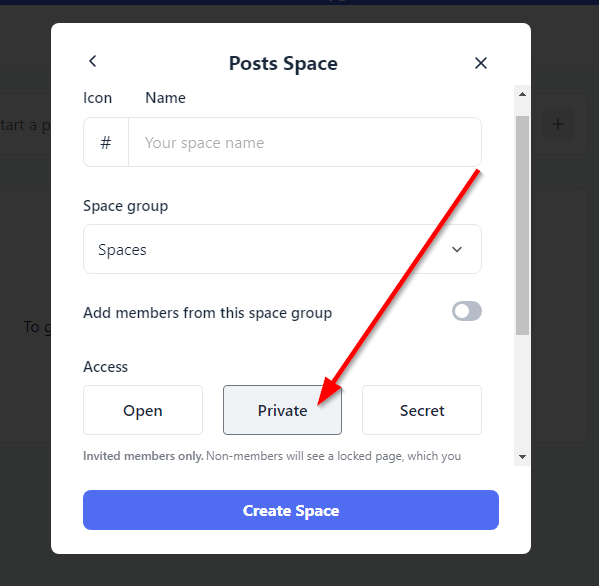
If you choose “Secret”, your community will only be visible to a user when you invite them. Both settings can be used to offer memberships.
Plus, if you want to make an existing space or your entire community Private or Secret, you can do so from its settings.
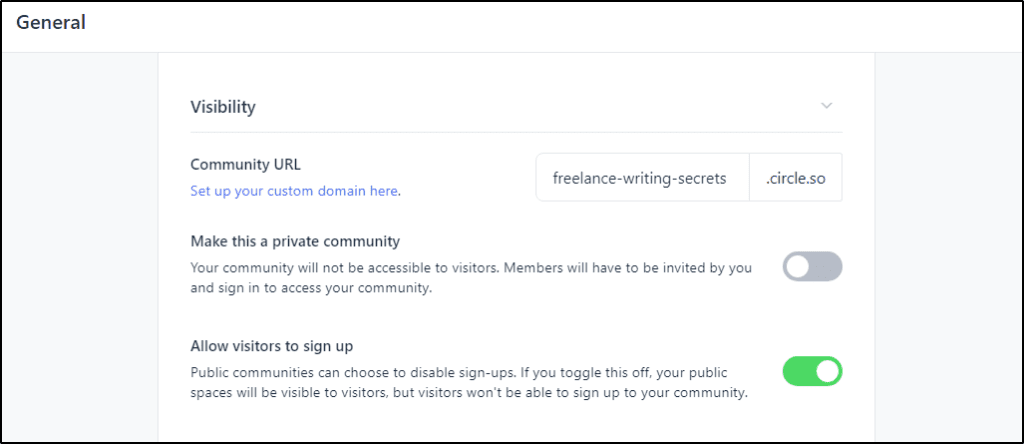
You can also configure multiple membership tiers or offer free trials before charging your members.
So, effectively, your community can have free public spaces, free members-only spaces, and premium member-only spaces all at the same time.
To charge membership fees, you’ll need to configure a paywall. Let’s discuss it in the next section.
Feature #7: Workflows
Circle’s Workflows feature helps you automate repetitive tasks so you can stay focused on what actually grows your business: teaching, coaching, and connecting.
Think of workflows as your invisible assistant. Once set up, they take care of the behind-the-scenes work without you lifting a finger.
Here’s what you can do:
- Automatically send a welcome message when someone joins
- Add members to specific spaces based on their plan, interest, or tags
- Assign badges to your most engaged students or clients
- Nudge inactive members to check in before they fall off completely
- Send event reminders or follow-ups based on behavior
- Remove access when someone cancels or stops participating
- Trigger custom actions using profile fields, segments, or tags
Circle’s workflow builder is simple and visual, you just choose the trigger and decide what should happen next.
Whether you have 10 members or 10,000, workflows help you give every person a more personal, timely experience, without burning yourself out trying to do it all manually.
Feature #8: Monetization Features And Payment Gateways
Circle allows you to monetize your content in several ways once you configure your payment gateway. To collect and process payments in Circle, you need to have a Stripe account so your customer can pay using their credit/debit cards.
Once you configure a paywall for a space or your entire community, you can use different payment modes.
- Paid memberships: Offer memberships for a one-time fee or installments.
- Online courses and digital products: Sell courses and digital products for a one-time payment or against multiple installments.
- Recurring subscriptions: Automatically charge a monthly subscription fee.
- Gate access: Charge for specific sections of your community without impacting any other spaces or content.
- Offer upsells: Setup upsell offers to maximize your revenue.
- Free trials: Offer limited-time free trials to give prospects an inside look at your community.
- Coupons & discounts: Create exclusive discount coupons for sales campaigns and to increase customer engagement.
You can also turn your event spaces, like live sessions or chat rooms, into premium products that members must pay to access.
In short, these flexible payment options allow you to sell any type of digital products, online courses, subscriptions, gated content, or consultancy services.
Feature #9: Advanced User Management
User management is a critical feature that allows community owners to know exactly who is a part of their community and how they’re interacting with the content.
Every Circle community comes with a members directory containing rich member profiles and filters like location, posts, and tags to search members.
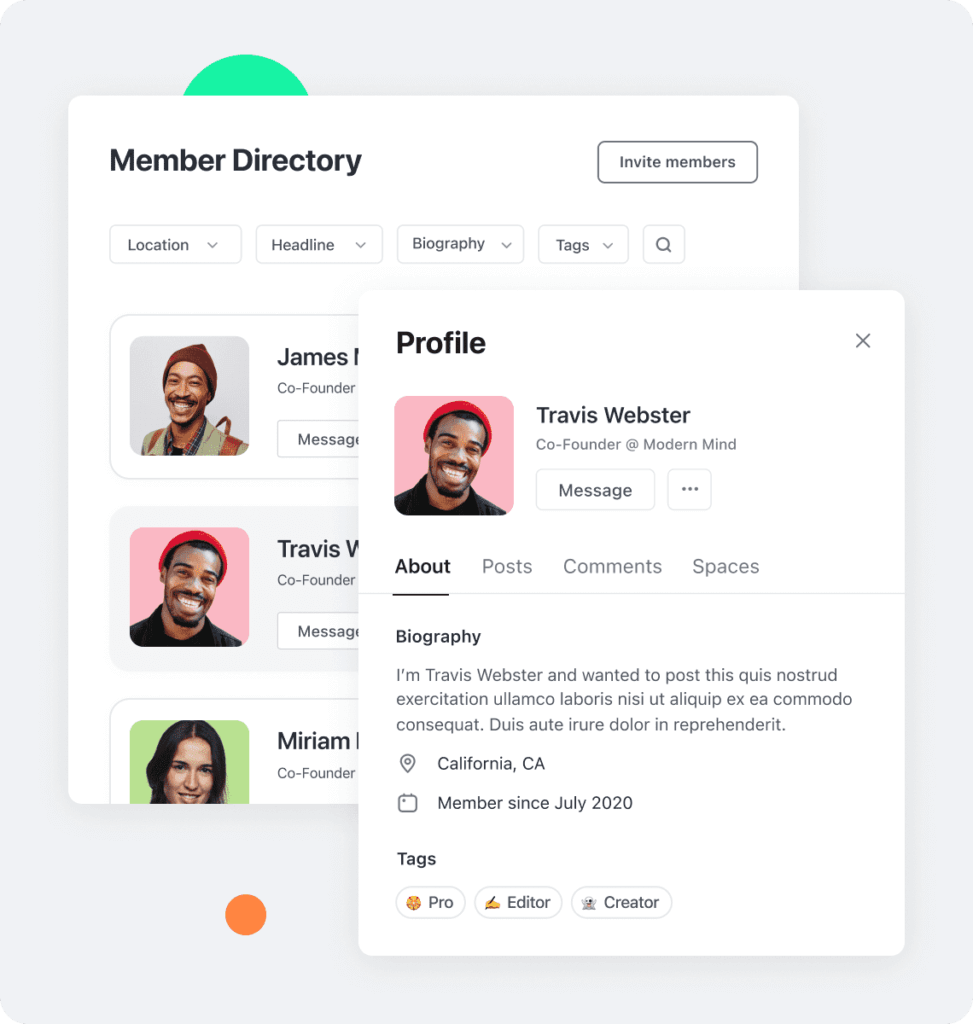
Using these search filters, you can easily find posts from specific members, find members from a certain location, or shortlist posts with a particular tag.
This feature comes in handy for large communities with dozens of different private and public spaces and thousands of members worldwide.
Feature #10: Advanced Analytics
Circle analytics shows you a comprehensive picture of your community engagement levels. You can see exactly which content is performing better and getting more engagement.
Similarly, you can get detailed member insights and identify trends to help you understand the topics or spaces that resonate more with your community.
We’ve discussed some of Circle’s main features. But it offers a lot more that we couldn’t cover. But let me share a few examples of live Circle communities to give you a better idea of what it offers.
Circle.so Examples | eLearning Brands, Digital Product Sellers & Course Creators Using Circle
You can find thousands of live public and private Circle communities in the Community Showcase. But let’s quickly explore some popular Circle communities.
Circle.so Example #1: Smart Passive Income (SPI) Circle Community
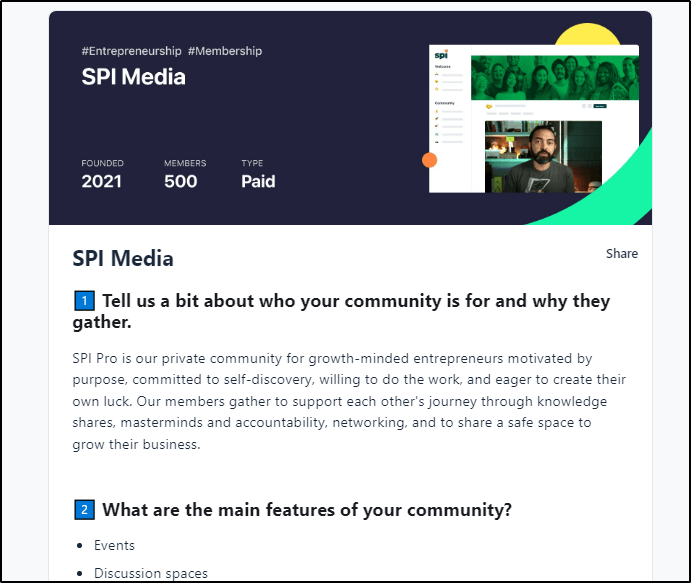
Smart Passive Income (SPI) is one of the most well-known brands in the “internet marketing” and “make money online” niches. Owned by Pat Flynn, SPI Media is a paid Circle community for entrepreneurs and growth marketers to network, discuss ideas, build partnerships, and grow together.
Circle.so Example #2: Code Meets No-Code

As the name suggests, Code Meets No-Code is a premium Circle community that helps no-coders learn how to code. With 100 premium members, it’s a closely knit community where the members help each other excel at coding and achieving their business goals.
Circle.so Example #3: Product-Led Marketing
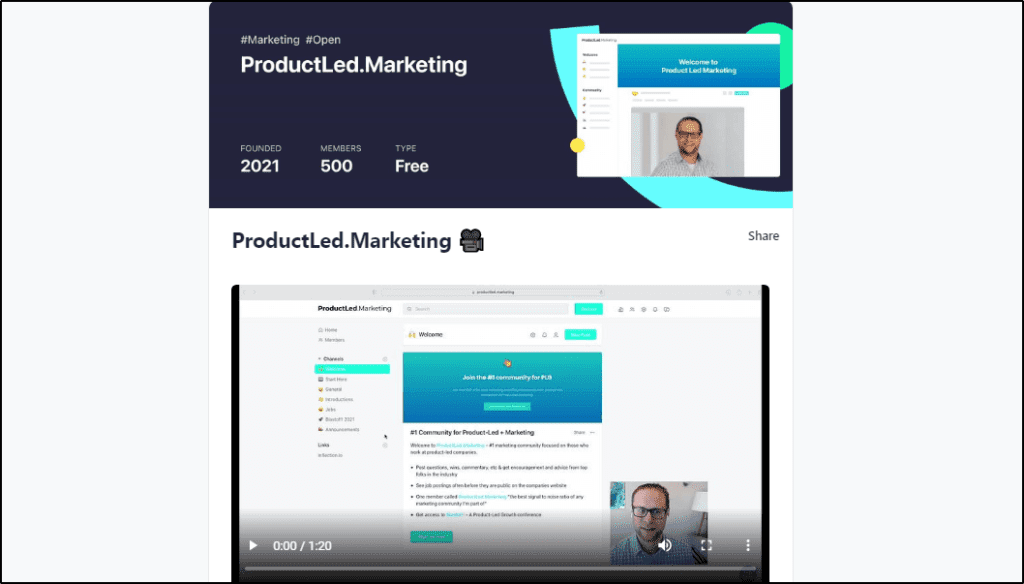
ProductLed Marketing is a free Circle community for growth marketers, entrepreneurs, and product managers. Users can sign up by entering their email addresses on the community’s landing page.
Circle Alternatives (2026) | When To Look For A Replacement?
If Circle doesn’t fit your business goals for any reason, here are the best alternatives you can consider.
Alternative #1: Skool vs Circle
Skool is a good Circle alternative when you want a simple community + course combo with built-in gamification that pushes daily participation without much setup.
If your business runs on a cohort vibe, daily check-ins, wins, and accountability, Skool feels lighter and faster than Circle. You also avoid the “too many knobs” problem.
Choose Skool if you don’t need workflows, APIs, advanced spaces, or branded apps.
Pick Circle instead if you run multiple programs, want polished live events, and need automation for onboarding, access, and retention.

Alternative #2: Mighty Networks vs Circle
Mighty Networks is a good Circle alternative when your community success depends on a social feed-first experience and you want an integrated branded app experience without paying Circle Plus pricing.
Mighty is great for creators who want members scrolling, posting, and engaging like a private social network. It also works well when you’re selling memberships and light courses but don’t need heavy automation or advanced business tooling.
Choose Mighty if you want “community as a social network.”
Choose Circle if you want “community as your business hub,” with stronger workflows, live rooms, and higher-end structure.

Alternative #3: Kajabi vs Circle
Kajabi is a good Circle alternative when your priority is selling—funnels, email sequences, landing pages, upsells, and checkout—more than deep community features.
If your business looks like “course + marketing machine,” Kajabi can replace multiple tools in one go. Its community features work well for basic engagement, but they don’t match Circle’s depth for spaces, conversations, live interaction, and community-led programs.
Choose Kajabi if your main need is marketing automation and conversion.
Choose Circle if your community drives retention, referrals, coaching delivery, and long-term member value.

Circle Headless Member API: What You Can Actually Do With It
Circle’s Headless Member API is an advanced feature where Circle stops being “just a platform” and starts behaving like infrastructure.
I’ve seen creators and organizations hit a ceiling with all-in-one tools. The moment you want Circle to work inside a larger ecosystem like your website, your SaaS product, or your internal systems, that’s where the Headless API earns its keep.
At a practical level, it lets you decouple the member experience from Circle’s interface. Circle still manages members, spaces, permissions, and activity, but you decide how and where that experience shows up.
In real-world use, this opens up a lot of flexibility:
- You can keep member access in sync across your website, community, and products so people never fall out of alignment when plans change.
- You can present Circle content inside a custom dashboard on WordPress, Webflow, or a custom app, instead of sending users to a separate community URL.
- You can build onboarding flows that feel seamless—one sign-up, one login, immediate access to the right spaces based on role, cohort, or purchase.
- You can embed community and learning directly into a SaaS, coaching portal, or enterprise product where Circle is the engagement layer, not the destination.
What I appreciate most is that you’re not rebuilding community logic from scratch. Circle still handles the hard parts. You’re simply extending it into your own ecosystem.
How to Get Started With the Headless Member API
If you’re considering using the Headless API, the path is fairly straightforward:
- Confirm plan access: The Headless Member API is available on the Business plan and above. Make sure your account includes API access before planning any integration.
- Define what Circle will manage: Decide what stays inside Circle (members, spaces, permissions, posts) and what you’ll control externally (UI, dashboards, product logic).
- Map your member data: Identify which user fields, tags, or plans in your system should correspond to Circle roles and space access.
- Set up authentication and SSO: Use Circle’s authentication methods to ensure users sign in once and are recognized everywhere they interact with your product or community.
- Build a small pilot experience: Start with one use case—like showing community access inside your main app or syncing member roles—before expanding further.
- Automate access and updates: Connect upgrades, cancellations, or role changes so Circle permissions update automatically without manual intervention.
- Monitor and refine: Watch how members move through the experience. The goal is fewer handoffs, fewer support tickets, and a smoother learning journey.
For most creators, this level of control is unnecessary. But for businesses running multiple programs, products, or audiences, the Headless Member API is what lets Circle scale without becoming a bottleneck.
Verdict | Is Circle.so Worth Using For Community Building?
AI is replacing information-only offers fast. But it can’t replace your personal connection. Your community is where trust is built, relationships form, and long-term business happens.
That’s exactly what Circle is built to support.
It’s where your people show up, stay engaged, and grow with you through live sessions, conversations, shared wins, and real support.
Circle is a great fit if:
- You want to turn your audience into an active, loyal community
- You offer coaching, group programs, or membership tiers
- You’re selling courses and want deeper engagement, not just views
- You’re tired of juggling 5 tools and want everything in one place
It might not be for you if:
- You need complex LMS features like quizzes, certificates, and assignments
- You’re just selling a one-time course and don’t plan to engage after purchase
- You’re extremely early-stage and can’t justify a monthly cost
If you believe your business grows with connection, not just content, Circle gives you the space, tools, and structure to make that happen.
Start with the 14-day free trial. Explore how it fits. Then decide.
Frequently Asked Questions (FAQs)
Is Circle suitable for AI-driven or agentic businesses?
Circle works well when AI supports learning and decision-making rather than replacing human interaction. It’s commonly used by AI educators, consultants, and product teams who want agents to assist members while keeping humans in the loop for guidance and trust.
Does Circle offer an API for custom integrations?
Yes. Circle provides a Headless Member API on higher plans that lets you sync users, spaces, tags, and access rules with external systems. This is useful for SaaS products, custom front ends, and advanced CRM workflows.
Can Circle be used as a white-label community platform?
Circle allows full branding inside the web experience, and with Circle Plus you can launch fully branded iOS and Android apps. While the backend remains Circle-managed, the member-facing experience can be fully brand-owned.
Why do people refer to Circle as an LMS if it’s not one?
Because many creators deliver structured learning inside Circle. While it doesn’t include quizzes or certificates, it replaces an LMS when learning is discussion-led, cohort-based, or supported by live sessions and community interaction.
Is Circle suitable for enterprise or large organizations?
Yes. Larger organizations use Circle for customer education, internal learning, and partner communities. Enterprise plans support SSO, advanced permissions, analytics, and large moderator teams.
Does Circle include AI-based moderation tools?
Yes. On higher plans, Circle uses AI to help flag spam, low-quality posts, and policy violations. This reduces moderation overhead as communities grow and keeps discussions high quality.
Can Circle replace Slack or Discord for paid communities?
For structured, paid communities, yes. Circle works better when you need organized content, gated access, and long-term knowledge retention. Slack and Discord are better suited for fast, real-time chat without structure.
Does Circle work well for international or multilingual communities?
Yes. Members can post in any language, and many communities organize language-specific spaces. This makes Circle practical for global programs and region-based learning groups.
What kind of analytics does Circle provide?
Circle focuses on engagement and participation rather than vanity metrics. You can see which spaces drive activity, who’s active or disengaging, and how members interact over time.
Is Circle better for memberships or one-time course sales?
Circle delivers the most value for memberships, coaching programs, and ongoing learning. One-time course sellers often benefit less unless they add community or live interaction.
Does Circle integrate well with WordPress websites?
Yes. Many creators use WordPress for content and Circle for community. You can embed Circle components, connect sign-ups, and use SSO on higher plans.
Can non-creators or traditional businesses use Circle?
Absolutely. Agencies, SaaS companies, and professional organizations use Circle for customer onboarding, internal training, and partner education.
Can Circle communities be public and visible to search engines?
Yes. Public spaces can be indexed and used as a content hub or knowledge base, helping attract organic traffic and convert visitors into members.
Is Circle a safe and legitimate platform for paid communities?
Yes. Payments are processed through Stripe, data is securely stored, and Circle is widely used by established creators and businesses running paid programs.
Who is Circle not a good fit for?
Circle may not be ideal if you only need a basic course player, a free community tool, or a marketing-first funnel platform without ongoing engagement.

Jeff Cobb, Founder of Learning Revolution
Jeff Cobb is an expert in online education and the business of adult lifelong learning. Over the past 20+ years he has built a thriving career based on that expertise – as an entrepreneur, a consultant, an author, and a speaker. Learning Revolution is a place where Jeff curates tips, insights, and resources to help you build a thriving expertise-based business. Learn more about Jeff Cobb here.
Table of Contents
Related Posts
Skool vs Circle (2026): I’ve Used Both, Here’s My Choice
Mighty Networks vs Circle (2026): My Experience & Honest Opinion