

Podia and Thinkific are among the most popular online course platforms for beginners.
They’re both affordable products that allow you to take advantage of the global e-learning demand without investing a considerable amount of money upfront.
Despite their relatively low rates, Podia and Thinkific offer world-class course designing and marketing features.
But which one offers more value for your money?
I’ll answer this question in this detailed Podia vs Thinkific comparison and help you choose the right online course platform for your business.
Let’s dive in.
Quick Verdict | The Best Online Learning Platform Is….
Don’t have time to read the article till the end? Here’s my quick verdict.
If you’re looking for an affordable course creation platform with one of the best course builders and student experience features in the industry, go for Thinkific.

But if you can accept slightly weaker course creation and site-building features for a more affordable price, then Podia is an excellent choice.

Podia vs Thinkific – The Main Differences
Before diving deeper into Podia and Thinkific, let’s discuss their main differences.
| Podia | Thinkific |
|---|---|
| Podia is a beginner-friendly online course and membership site platform with superior marketing features | Offers native email marketing features with unlimited email subscribers. The following email-sending limits apply: Basic Plan – up to 5K emails per day Advanced Plan – up to 15K emails per day |
| Offers native email marketing features with unlimited email subscribers. The following email sending limits apply: Basic Plan – up to 5K emails per day Advanced Plan – up to 15K emails per day | Integrates with all popular email marketing tools but does not offer native email features. |
| You need to pay for additional admin users. | Multiple admin users already available in different plans |
| Podia’s page builder offers limited functionality, customization, and design options. | Thinkific’s site builder provides numerous customization options and advanced design features. |
| No quizzes, surveys, or student certificates | Offers multiple quizzes, completion certificates, and survey options. |
| Podia doesn’t have a marketplace or app store. | Thinkific has an app store with dozens of apps for various business goals. |
| Podia doesn’t offer specific features for assignments and assessments | Thinkific offers assignments, assessments, and different exam types. |
| Allows WordPress integration via links | Has a WordPress plugin for managing courses on your existing site. |
| No revenue sharing options for multiple course creators | It has an easy-to-use revenue sharing feature that allows you to collaborate with other course creators. |
| You can sign up for a free 30-day trial. | Offers a 14-day free trial |
| Podia has no free plan | Thinkific has no free plan |
Podia vs Thinkific – An Overview
Podia and Thinkific are among the most beginner-friendly (but highly scalable) online course platforms that have helped thousands of course creators earn millions of dollars worldwide.
Let’s take a close look at what makes them so popular.
What is Podia?
Podia is among the most popular online course platforms for beginners and mid-level course sellers. It helps professionals, technical experts, consultants, and even hobbyists monetize their knowledge by selling online courses, digital products, and membership sites.
Podia is designed for completely non-technical users, which means you don’t need any coding knowledge to create courses. It provides an intuitive user interface to help you design courses and sites by combining various blocks, widgets, and elements.
Podia comes with a host of features for building, marketing, and selling online courses. Unlike most other online learning platforms in this price bracket, Podia offers some pretty impressive email marketing, automation, and webinar hosting capabilities.
Here are the core features you get with Podia.
– Online courses, membership sites, digital downloads.
– Recurring, installments, and one-time payments
– Product bundles and upsells
– Drag & drop website and landing page builder.
– Support for video, audio, PDF, and text content
– Video and webinar hosting
– Quizzes and additional downloadable files in lessons
– Embeddable course widget with a Buy Now button
– Email marketing, sales funnels, and automation
– 24/7 customer support
Podia’s strengths are simplicity and ease of use. However, despite offering an impressive feature range, its course creation features are not as sophisticated as other course platforms.
On the other hand, it comes with marketing features that many of its competitors don’t offer.
What Is Thinkific?

Thinkific is a hugely popular online course and membership platform explicitly designed for beginners and mid-level course creators. But it offers such a wide range of features that many six to seven-figure course creators also use it for selling their online courses.
Founded in 2012, Thinkific has helped over 50K knowledge entrepreneurs sell over 100 million online courses to students in 160+ countries and generate $650 million+ in revenue.
Thinkific is known for its world-class course design features, site builder, student experience, and assessment features. Overall it’s an ideal product for creating a classic learning environment for your students and delivering all kinds of online courses.
Thinkific also offers a native email marketing feature that allows you to send Sales Flow email sequences to contacts that meet specific criteria. This feature also comes with email analytics to help you optimize your audience engagement and conversion efforts.
Here’s a quick list of Thinkific’s salient features.
– A drag & drop course creator
– Members sites and subscription courses
– Support for video, audio, presentations, and text lessons
– Scheduled lessons and drip courses
– Course website along with several templates
– Landing pages
– Funnels and Abandoned Carts
– Quizzes, surveys, and student certificates
– Integration with hundreds of different marketing and business tools
In short, Thinkific is a complete solution for growing a profitable online education business.
Podia vs Thinkific – Comparing Two of The Best Online Course Platforms
Let’s now analyze Podia vs Thinkific in more detail and try to find a winner.
Here are the factors we’ll compare.
- Pricing And Features
- Course Creation
- Student Experience
- Course Website Builder
- Course Marketing
- Student Analytics
- Teacher Features
- Payment Management
1. Pricing, Free Trial, & Features
Your online course platform’s cost has a significant impact on your course’s overall profitability.
Let’s see how much you’ll need to pay for using Podia and Thinkific.
Thinkific Pricing and Free Trial
Thinkific is a versatile and feature-rich product that offers three different pricing plans designed for businesses of various sizes.
Each plan comes with a 14-day free trial during which you can decide if it’s the right product for your business needs.
Here’s what Thinkific’s plans offer.
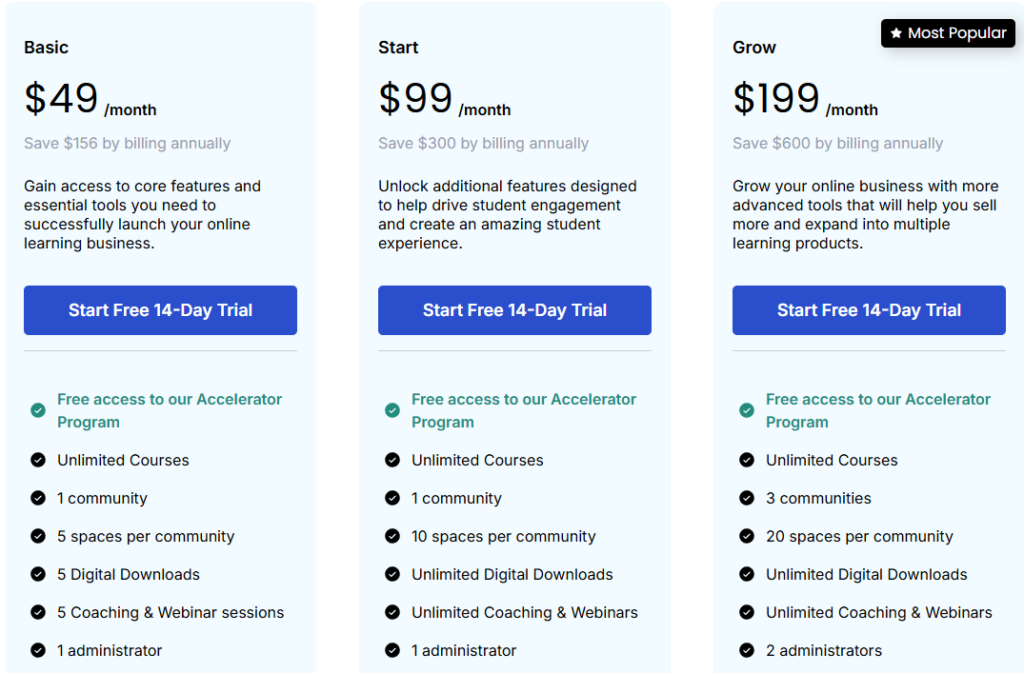
Here’s what Thinkific’s premium plans cost per month (billed annually.)
- Basic Plan – $36/month
- Start Plan – $74/month
- Grow Plan – $149/month
All Thinkific plans come with these core features.

As a Thinkific user, you get access to a drag-and-drop site builder, instant payments, zero transaction fees, content hosting, forums, and several other features.

The Basic plan gives beginner course sellers all the core features along with drip courses, email marketing features, app store access, and many other useful features.
The Grow plan is designed for advanced users with higher sales volume and more sophisticated course management needs.
Overall, Thinkific’s pricing is quite affordable and allows new course builders to upgrade as their business grows.
Podia Pricing and Free Trial
Podia offers two different subscription plans priced for businesses of different sizes. There’s no free plan, but you can sign up for a free 30-day trial. If you pay annually, you save 17%.
Here’s what Podia plans offer.
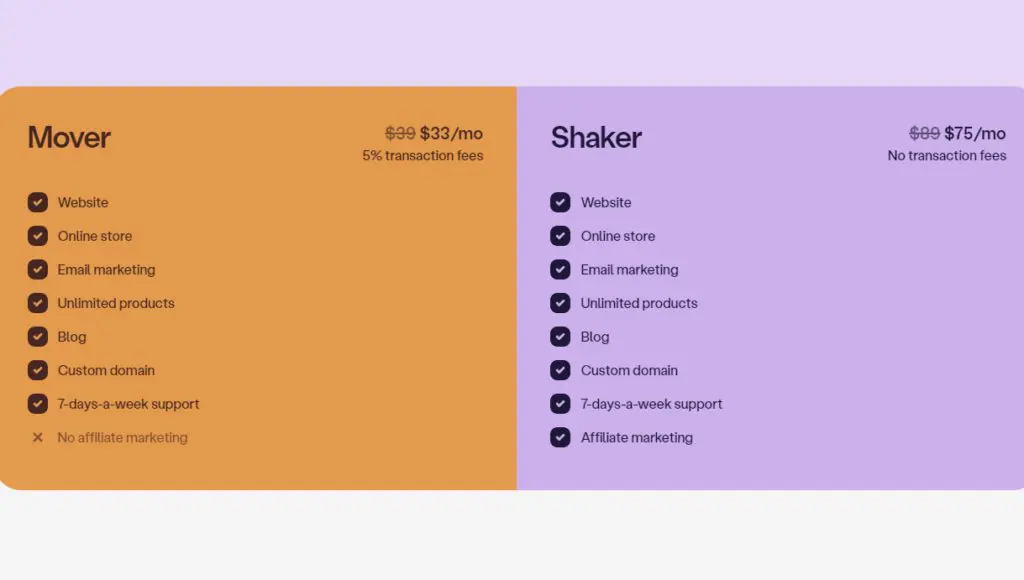
Here’s how much you’ll pay for using Podia (billed annually)
- Mover Plan – $33/month
- Shaker Plan – $75/month
What’s the difference in platform features?
Like Thinkific, Podia offers unlimited courses, students, and sales. But it also provides email marketing features which is a huge advantage and saves you a significant amount of money if you’re on a tight budget.
You also get a site builder, affiliate management, and several other useful functions.
However, Podia lacks the student assessment and management features of Thinkific.
Still, for someone just starting with a limited budget, Podia offers more value for money.
Winner: Podia
2. Course Creation
The course creation features of any e-learning platform largely determine the quality of your course.
Here’s how Podia and Thinkific compare in this area.
Thinkific
Thinkific claims to have the best course creation features in the online course industry. And honestly, it’s hard to disagree with them.
Thinkific’s course creator gives you complete control over your course content, how it is organized, and how students engage with it. In addition, it has an intuitive user interface with clear guidelines for first-time course creators.
You can start the course creation process by clicking New Course from your account dashboard.

Every course consists of chapters (modules) and lessons.
You can have unlimited chapters in a course and as many lessons in a chapter as you want.

Every lesson can consist of a different content type.
For example, you can create one text lesson, follow it up with a video lesson, and add an audio file for the third lesson.
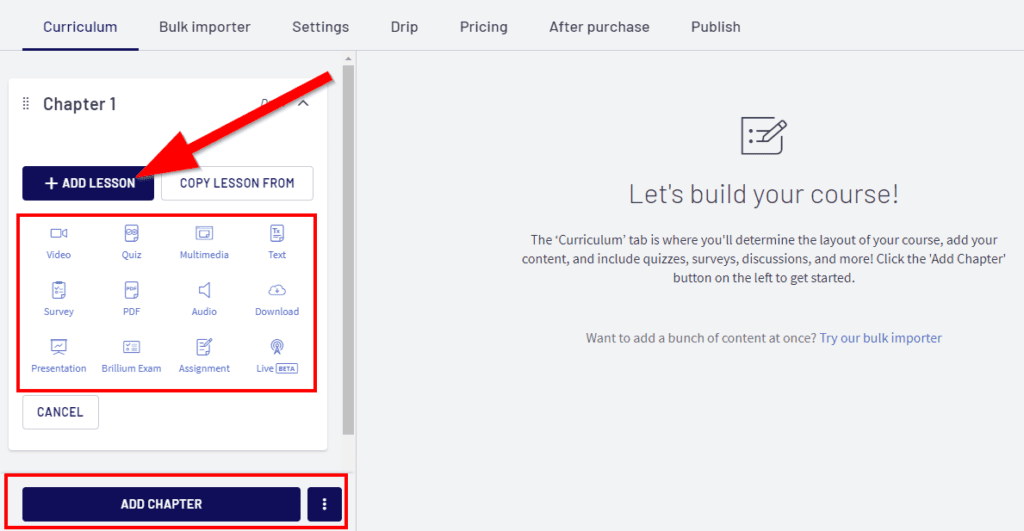
You can also add presentations, assignments, or exam questions to a lesson.
To add context to every lesson, you can add a text description, a title, and a category as well.
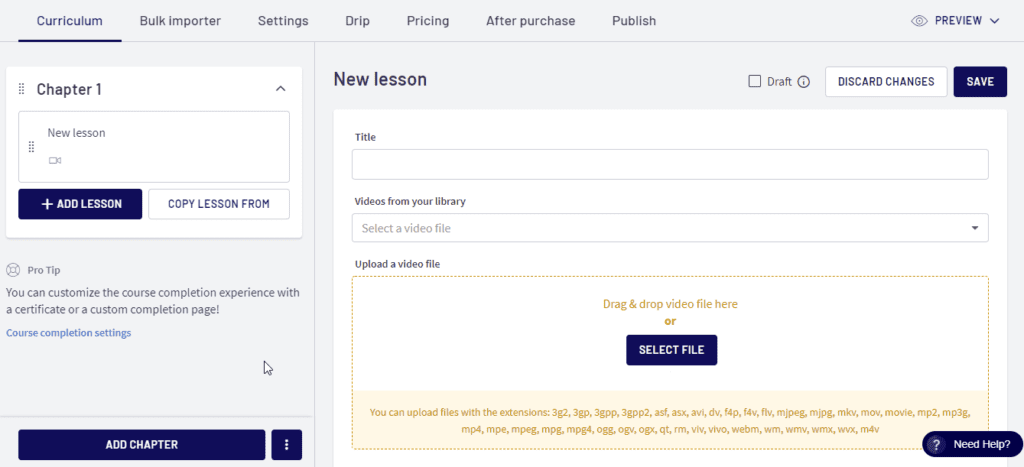
You also have the option to offer a lesson as a free preview to your prospective buyers, make the video files downloadable, or add comments under a lesson.

Plus, you can mark a lesson as a pre-requisite to other lessons, enable drip courses, and enforce video watching for students.
In short, you get complete control over how students engage with your courses.
Podia
Course creation isn’t Podia’s strength, but it still offers an impressive feature range to help you set up your course.
You can use it for creating conventional online courses, membership sites, digital downloads, or product bundles.
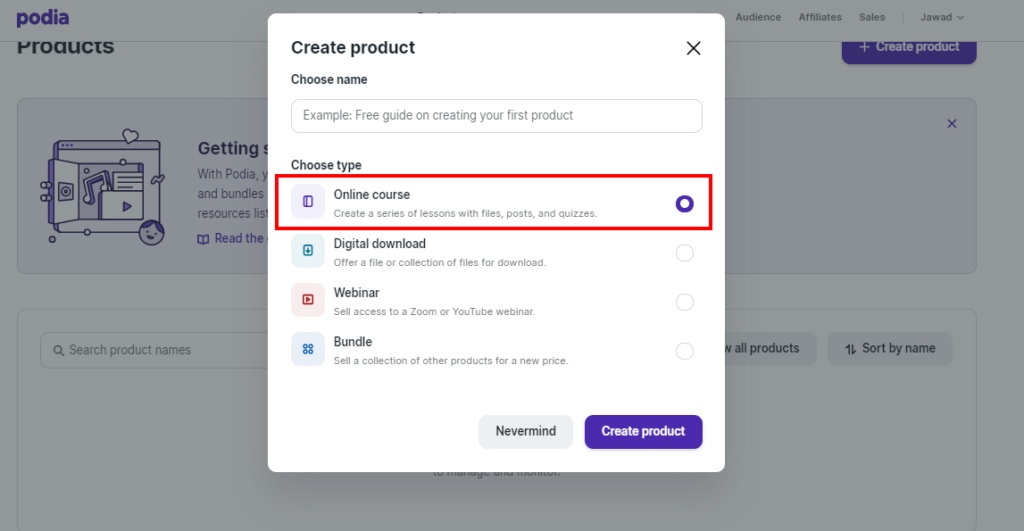
You get a clean and easy-to-use interface where you can structure your course the way you want.
Like Thinkific, Podia courses also consist of sections (modules) and lessons without any limits. You can use one content type for every lesson, for example, a video, audio, PDF, presentation, or quiz.
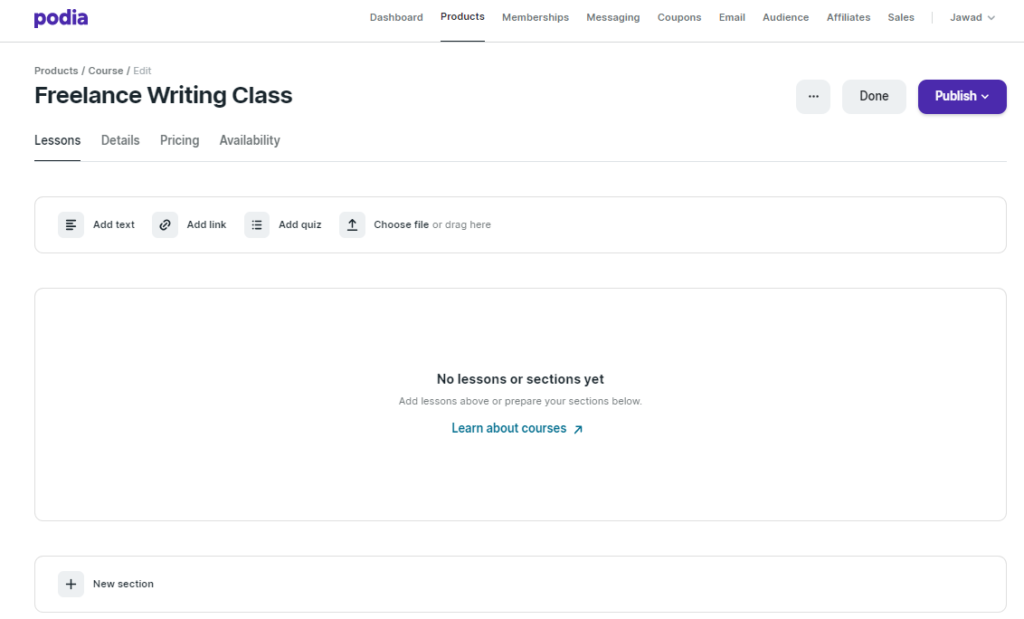
You also have the choice to add downloadable files and a text description of your lesson for the students.
You can configure drip courses in the availability section, pre-sell your content, add upsells, or sell it as a bundle. Plus, you can get instant previews of your course page as a customer or visitor to ensure your lesson appears exactly the way you want.
However, you can’t enforce a lesson sequence or video watching for students like Thinkific.
Overall, Thinkific still fares much better in course creation because of its superior user interface and more extensive admin options.
Winner: Thinkific
3. Course Website Builder
Your course website not only hosts your online courses but also plays a vital role in branding, marketing, and converting traffic into leads.
Let’s compare the site builders in Podia vs Thinkific.
Thinkific
Thinkific provides you with a robust drag-and-drop website builder to create your course website’s homepage and internal pages. Plus, you can use it for creating landing pages and opt-in pages as well.
The best part? You don’t need any design skills because the site builder provides you with drag & drop widgets and blocks for various website elements.

Every page of your site is fully customizable.
This means you can adjust the color themes, images, buttons, CTAs, and even the complete structure of a page.
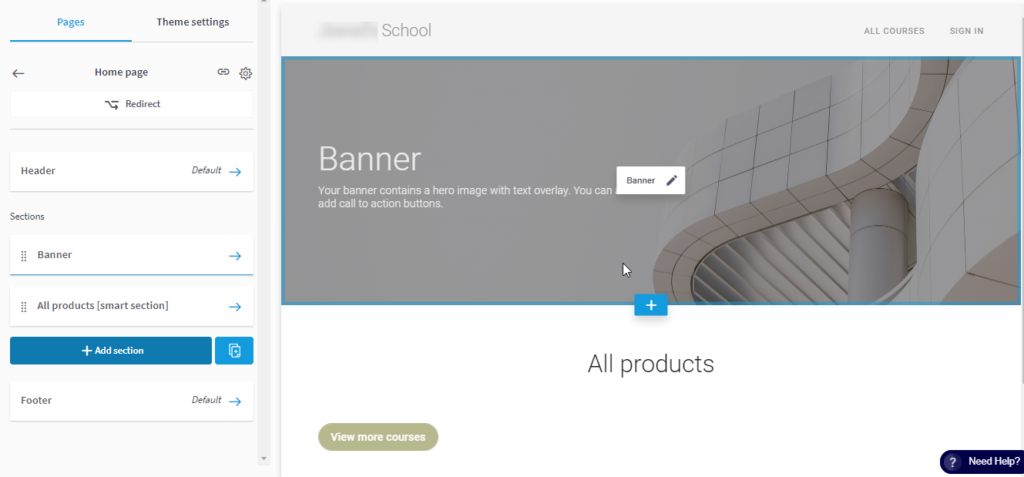
To make your page content more engaging, you can add checklists, countdown timers, icons, images, categories, and various other content blocks.

Apart from the homepage, you get several default pages user sign-up, sign-in, check-out, coming soon, etc.
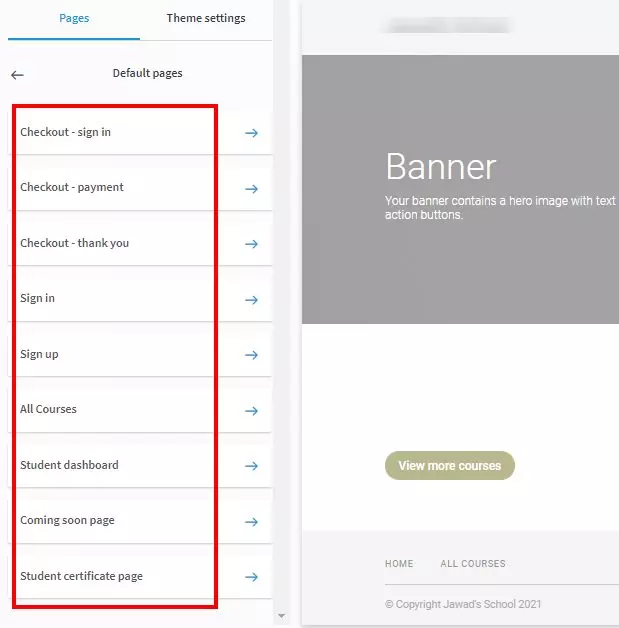
Thinkific’s site builder comes with three website themes in seven different styles. You can choose a theme from the theme library and customize it according to your brand’s needs.

Here’s an example of a course website created with Thinkific.
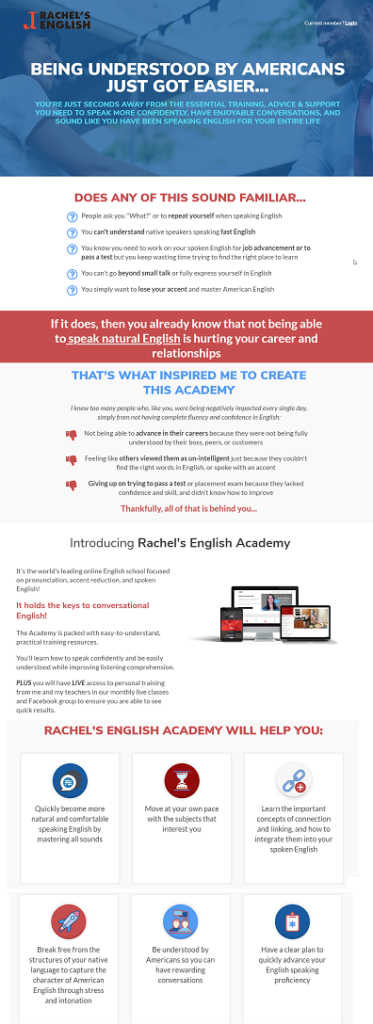
Here’s another Thinkific site that follows a completely different design and theme.

In short, Thinkific’s site builder is packed with features and customizations and gives you complete control over your site’s appearance and user experience.
Podia
Podia also offers an easy-to-use drag-and-drop website builder to help you create responsive websites, landing pages, and opt-in pages for your online courses.
Here’s an example of a site created with Podia.
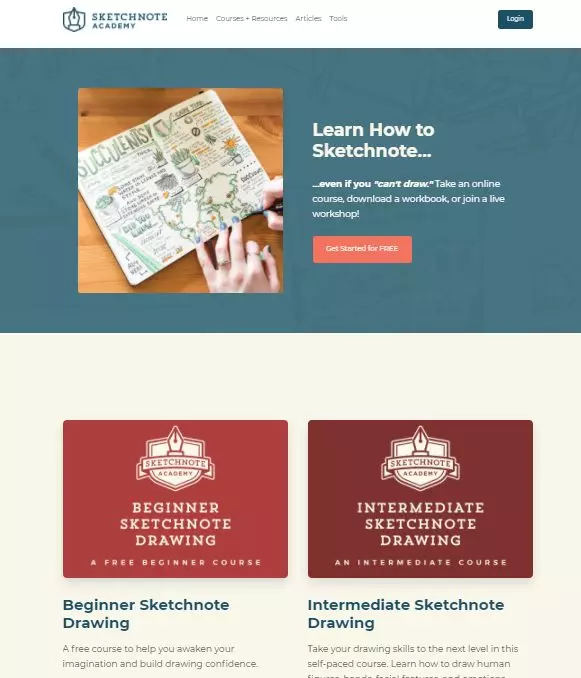
However, Podia’s site builder offers limited customization options.
You can use different page blocks to create new sections, and add images, testimonials, or text sections. But you can’t edit every element of the page the way you want.
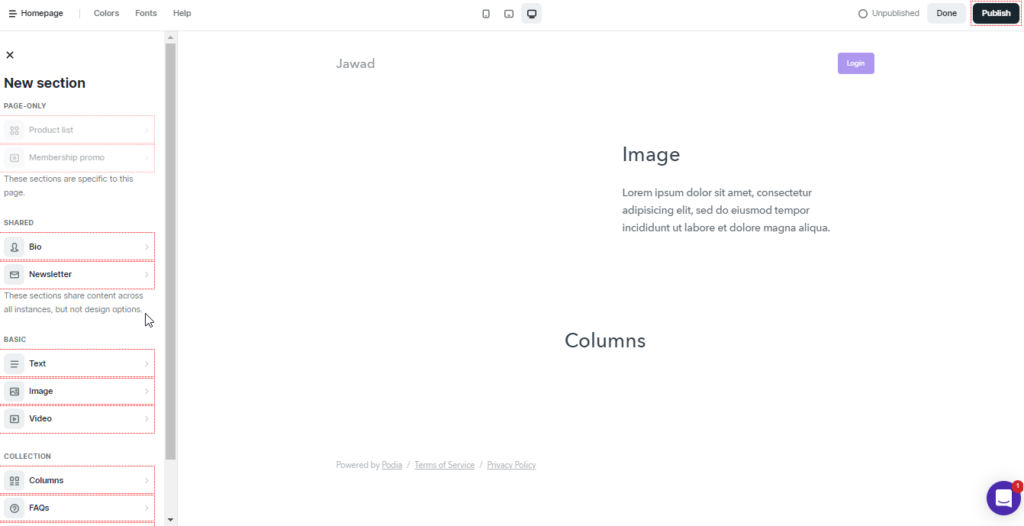
Podia offers one standard theme that you can customize to your brand’s needs (with several limitations.)
You can preview your site on various devices to ensure it appears exactly the way you want.
You can also add opt-in forms and CTAs to your pages for lead generation and use the SEO widget to optimize your content for search engines.
But overall, Podia’s site builder isn’t as robust and flexible as Thinkific.
Winner: Thinkific
4. Course Marketing
Without sufficient marketing features, you can’t drive traffic or convert leads for your courses. Let’s see what marketing features you get with Podia vs Thinkific.
Thinkific
Sales and marketing aren’t Thinkific’s core strengths. But you still get plenty of features to drive traffic to your site and convert it into leads and customers.
You start by creating a course widget to embed on your website or any other platform where you have editorial control. A widget allows your site visitors to buy your course directly from your site.
You can also recruit affiliates for your course by using Thinkific’s affiliate management features.
Other useful features include discount coupons, landing pages, free course previews for attracting buyers, live webinars via YouTube Live or Zoom, and dozens of apps for various business goals.
Thinkific also offers various types of funnels for generating leads, engaging your audience, and increasing sales and enrollments. These include:
- Free Lesson Funnel
- Sales Page Funnel
- Digital Download Funnel
One thing users will appreciate about Thinkific is its commitment to ongoing improvement. In the past, the platform’s biggest drawback was the lack of native email marketing features.
However, with recent upgrades, Thinkific has not only added native email marketing tools but also included an Abandoned Cart email remarketing feature that helps you recoup lost sales automatically. You can personalized your emails to optimize them for conversions and boost your marketing impact.
Podia
Podia is packed with sales and marketing features to help you drive traffic and generate leads.
First of all, Podia gives you a complete email marketing solution that saves you money and allows you to set up email campaigns for different customer segments.
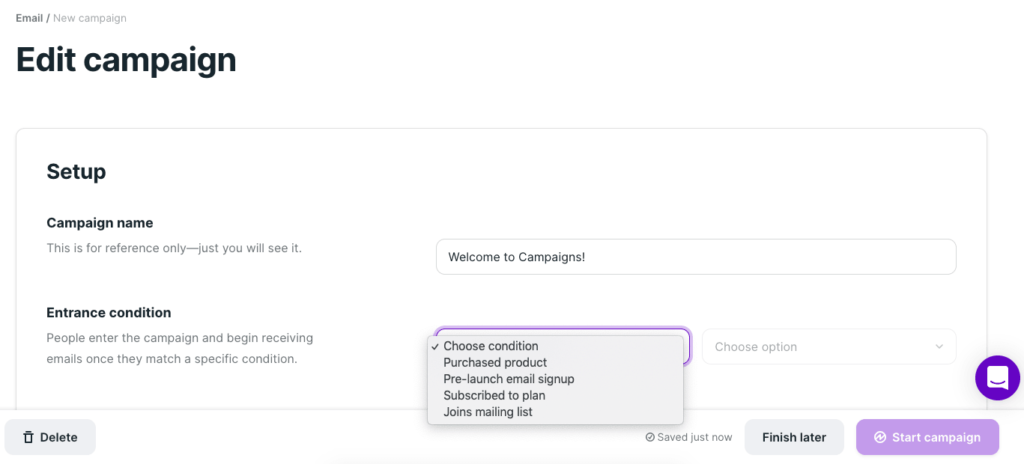
You can use Podia’s email interface to create broadcasts, autoresponders, and triggered email campaigns based on different conditions.
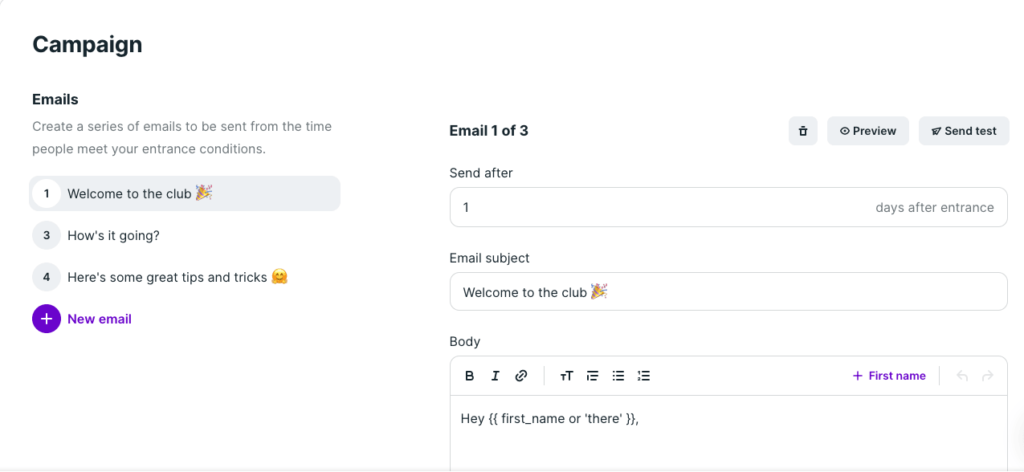
It gives you a user-friendly interface to write emails and add new ones to your sequence.
Apart from email marketing, you get some pretty impressive webinar hosting features. You can use Podia to run live webinars, pre-sell webinars, and recorded webinars. Podia also offers sales widgets that you can embed anywhere you have editorial control.

Other than that, you can create coupons, course previews, landing pages, and affiliate campaigns to promote your courses.
In short, Podia offers much more comprehensive marketing features than Thinkific.
Winner: Podia
5. Student Experience
Your students’ user experience is a factor in determining the success of your online courses. Let’s compare the student experience in Podia vs Thinkific.
Thinkific
Thinkific offers a classic classroom experience where your content takes center stage and gives your students a distraction-free learning environment.
Here’s a screenshot of a lesson in a Thinkific course.

As you can see, the lesson video occupies most of the space on the page, while the other lessons in the course are listed on the left.
The course logo adds a professional look to the page, and the progress bar under it helps students track how much they’ve learned from the course.
The curriculum section on your course page gives students a look inside your course with an index of all the lessons.
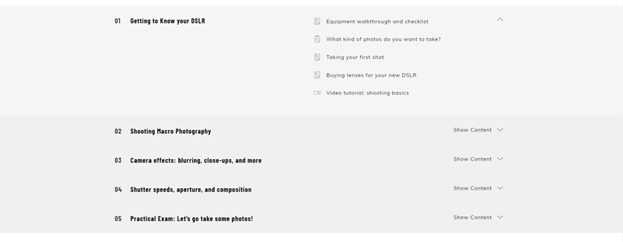
Overall, Thinkific offers an excellent student experience with no apparent weaknesses.
Podia
Podia’s student experience is quite similar to Thinkific.
It lists your course curriculum the same way on your course pages, where the students can get an overview of your course.

The lesson page contains your main content in the center, with the other chapters and lessons in the sidebar.

However, there’s no progress bar like Thinkific, which would’ve been nice to have.
Winner: Thinkific
6. Teacher Features
What tools do you get with Thinkific and Podia for evaluating your students? Let’s find out.
Thinkific
Thinkific offers plenty of student evaluation and management features for course instructors. For example, you can create quizzes, surveys and add mandatory or optional assignments to a lesson.
Similarly, you can award completion certificates to your students by choosing any template from Thinkific’s library.
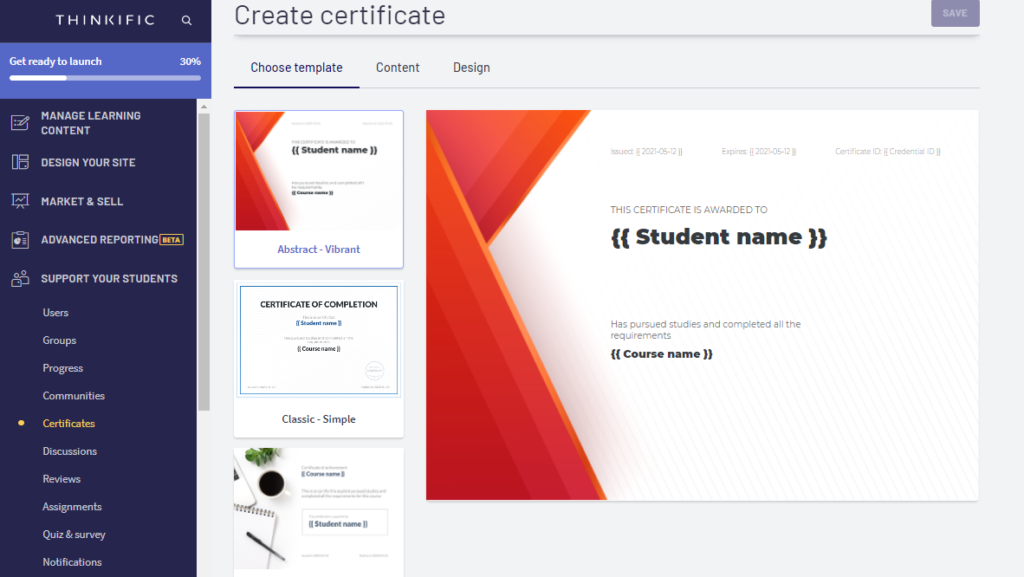
To increase the content consumption of your course, you can enable mandatory video completion before allowing access to the next lesson.
Thinkific also gives you in-depth student analytics that reports your course engagement and completion rates and the individual lessons in them.
Podia
Podia offers limited student evaluation features.
You can only create multiple-choice questions or add assignments as regular attachments to your lessons.
But there’s no way to create surveys, certificates, or graded assignments. You can, however, use third-party apps for these features.
Winner: Thinkific
7. Payment Management
Thinkific
Thinkific allows recurring payments, subscriptions, and installments with credit cards. For full payments, students can also use PayPal.
Thinkific manages payouts with Stripe and PayPal and charges zero transaction fees. But payment processing fees still apply.
Podia
Podia’s payment features are almost identical to Thinkific.
Your students can pay in full using PayPal or sign up for subscriptions and recurring payments with their credit cards.
For payouts, Stripe and Paypal are the standard options with zero transaction fees.
Winner: Draw
Podia vs Thinkific – Pros and Cons
Before reaching the final verdict, let’s quickly summarize the main pros and cons of Podia and Thinkific that we’ve discussed in this post.
Thinkific Pros and Cons
| Pros | Cons |
|---|---|
| Thinkific offers multiple payment plans for learners | No live chat support |
| Every paid plan comes with a free 14-day trial | No mobile app |
| Unlimited courses and unlimited students in all plans | |
| Beginner-friendly pricing plans | |
| Quizzes, surveys, and completion certificates | |
| Excellent student experience features | |
| Embeddable course widgets | |
Podia Pros and Cons
| Pros | Cons |
|---|---|
| Podia has a limited website and landing page creation features | Podia has limited website and landing page creation features |
| Offers affordable pricing plans | Limited customization options in the site builder |
| Excellent marketing features like email marketing and embeddable widgets | It doesn’t offer surveys or certificates |
| Robust webinar hosting capabilities | Transaction fee on Mover plan |
| Provides a complete affiliate management system |
Podia vs Thinkific Verdict | Which Online Learning Platform Is Right For You?
I’ve given you an in-depth review of Thinkific and Podia. Now, it’s decision time.
Firstly, let me say that both Podia and Thinkific are excellent products and you won’t regret buying either of them.
However, based on their strengths and weaknesses, here’s my recommendation.
If you’re a complete beginner and need to have all your course creation and marketing tools in one place, Thinkific is an excellent choice because it offers a far superior course creation experience.
However, if you want more value for money, Podia is the better choice. It offers decent course creation capabilities at an affordable price.
Both these products come with free trials, so I’d recommend using them for a few days before making up your mind.
Podia vs Thinkific | Frequently Asked Questions (FAQs)
Is Podia any good?
Yes, Podia is an excellent online course platform for beginners and mid-level course sellers.
How much is Thinkific monthly?
Thinkific‘s paid plans start from $49/month, or $36/month paid annually.
Does Podia have a community?
Yes, you can build a community around your course using Podia.
Do I need a website with Podia?
No, Podia provides you with a fully hosted responsive website.
How long is Thinkific’s free trial?
Thinkific offers a 14-day trial with every paid plan.
How do I pay for Thinkific?
You can pay for Thinkific via credit card or PayPal
See also:

ABOUT YOUR HOST
Learning Revolution founder Jeff Cobb is an expert in online education and the business of adult lifelong learning. Over the past 20+ years he has built a thriving career based on that expertise – as an entrepreneur, a consultant, an author, and a speaker. Learning Revolution is a place where Jeff curates tips, insights, and resources to help you build a thriving expertise-based business.
Table of Contents
Related Posts
Thinkific Pricing (2026): Comparison of Basic, Start, Grow & Plus Plans
LearnDash Review 2026: WordPress LMS Pricing, Pros & Cons, Features
Podia Pricing Breakdown (2026): Which Plan is Best for Creators?