
TL;DR – Spreaker Review (2026) | Is It Worth Using For Podcast Hosting?
Spreaker is a podcast hosting and monetization platform I’ve used multiple times for my Leading Learning Podcast. It handles your RSS feed, hosting, distribution, analytics, automatic ads, and basic subscriptions in one place. It is not a full audio editor, not an advanced membership platform, and it does not support video or AI editing tools.
Free Plan & Pricing
– Free Speech – $0/month: Unlimited episodes, one podcast, automatic ads.
– Broadcaster – $20/month: Private podcasts, Apple Podcast Subscriptions.
– Anchorman – $50/month: Full stats, unlimited collaborators, customizable player.
– Publisher – $250/month: Ad campaign manager, priority support, advanced monetization.
Main Spreaker Features
1. Unlimited episode hosting and simple RSS management.
2. One-click distribution to Apple, Spotify, iHeartRadio, and more.
3. Automatic ad monetization with dynamic ad insertion, even on older episodes.
4. Supporters Club for paid listener subscriptions and bonus content.
5. IAB + Nielsen certified analytics that advertisers trust.
6. Spreaker Studio app for recording and basic editing on desktop and mobile.
7. Team and network tools plus embeddable players and a basic podcast page.
Best For: Creators who want simple, reliable podcast hosting and easy monetization. New and mid-sized shows that want automatic ads and basic subscriptions. Small teams or networks that want to manage multiple shows from one place.
Not Ideal For: Creators who need advanced audio editing or AI tools inside the platform. Video podcasters or brands that need deep website and branding control. Complex membership or community setups with multiple tiers and perks.
Try Spreaker For Free
After running the Leading Learning Podcast for more than a decade and producing over 450 episodes, I’ve seen how much difference the right podcast hosting platform can make.
Spreaker is one podcast hosting platform that consistently comes up, especially for creators who want to create, publish, monetize, and grow their show in one place.
If you’re trying to understand what Spreaker is, how its free plan works, how its pricing compares to other podcast hosting platforms, or whether it’s still a strong choice, this updated review walks through everything you need to know.
Spreaker has rolled out several advanced tools including Spreaker Create, improved monetization, and Supporters Club, making it more relevant for both new and experienced podcasters.
In this Spreaker review, I’ll share my experience of using its latest features, updated pricing, and how it stacks up against other podcast hosting platforms.
Read: The best podcast hosting platforms for beginners & pros
Spreaker Product Snapshot (2026)
| Category | Details |
|---|---|
| Creation Tools | Spreaker Studio (mobile + desktop), Spreaker Create templates, built-in recording and editing, unlimited episode uploads. |
| Distribution | One-click publishing to Apple Podcasts, Spotify, iHeartRadio, and all major listening platforms. |
| Monetization | Automatic ads, dynamic ad insertion, Supporters Club monthly subscriptions, Apple Podcast Subscriptions. |
| Analytics | IAB-certified real-time statistics, listener demographics, episode performance tracking. |
| Customization | Custom podcast player, customizable player colors (paid plans), branded RSS feeds. |
| Community Growth | Supporters Club tools to turn listeners into paid subscribers and offer exclusive content. |
| Team & Network Tools | Unlimited collaborators (Anchorman/Publisher), collaboration dashboard, Enterprise network management options. |
| Support | Email support on all plans, in-app support on paid plans, priority support on Publisher. |
| Free Plan | Free Speech – $0/month: Unlimited episodes, automatic ad monetization, auto-distribution to Apple/Spotify/iHeartRadio, customizable RSS feeds, 6-month statistics, 20% Supporters Club fee. |
| Starting Price (Paid Plans) | Broadcaster – $20/month: Unlimited podcasts, advanced stats, enhanced private podcasts, Apple Podcast Subscriptions, 0% Supporters Club fee, faster in-app support |

What Is Spreaker?
Spreaker is a podcast hosting platform known for being simple, reliable, and easy for creators to work with. It launched in 2010 and is now backed by iHeartMedia, which gives it strong industry credibility and access to high-quality advertising partnerships.
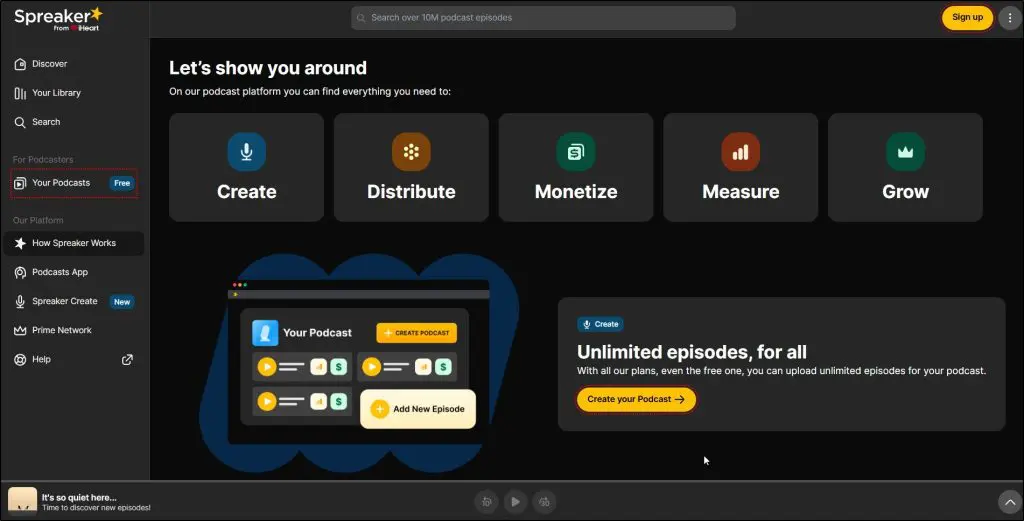
At its core, Spreaker is a hosting and monetization platform, not a full audio editor. You manage your RSS feed, publish episodes, distribute your show everywhere, track performance, and monetize—all from one clean dashboard. That’s the main reason many new podcasters choose it: the workflow is straightforward, and you don’t need to stitch together multiple tools just to run your show.
Spreaker does offer a recording app called Spreaker Studio, but it’s designed for quick, lightweight recordings. It’s convenient for simple episodes or mobile publishing, but not a replacement for proper editing tools like Descript, Audacity, or Adobe Audition.
I’ve used Spreaker myself with the Leading Learning Podcast during years when we tested different podcast hosts to streamline our workflow. Publishing was smooth, analytics were trustworthy, and the built-in ad monetization was easier to set up than most competitors. It didn’t give us every advanced feature we eventually needed, but for straightforward podcast hosting and monetization, it worked very well.
That’s why Spreaker remains a strong option for creators who want dependable podcast hosting without a steep learning curve.
Here’s a quick list of the core features and tools Spreaker offers:
- Unlimited Episode Uploads – Publish as many episodes as you want, even on the free plan.
- One-Click Distribution – Send your podcast to Apple Podcasts, Spotify, iHeartRadio, and all major directories.
- Automatic Ad Monetization – Turn on ads, choose placement spots, and Spreaker fills them with paid campaigns.
- Supporters Club – Offer premium, subscriber-only content and earn monthly recurring revenue.
- IAB & Nielsen-Certified Analytics – Track downloads, listener geography, and performance with trusted data.
- Multiple Podcast Management – Run several shows from one dashboard on paid plans.
- Customizable RSS Feeds – Control how your show appears on directories and manage advanced feed settings.
- Private Podcasts – Host restricted, private feeds for internal content or paid members.
- Customizable Player – Embed a branded audio player on your site or landing pages.
- Spreaker Studio App – Record, edit, and publish episodes directly from mobile or desktop.
- Podcast Website – Auto-generated public page for your show with episode listings.
- Collaboration Tools – Add team members and manage multi-host or producer workflows (on higher plans).
- Ad Campaign Manager (Publisher Plan) – Run, manage, and sell your own ad campaigns.
- Priority Support (Publisher) – Faster support response times for high-volume podcasters.
In the rest of this article, I’ll dive deeper into some of these features and help you determine if Spreaker is right for you.
Read: Podcast Recording Tips For Excellent Content Quality
Spreaker Pricing & Free Plan | How Much Does It Cost?
Spreaker offers a free plan (the “Free Speech” plan) with no credit card required. It allows you to publish unlimited episodes and begin monetization immediately, making it ideal to test the platform and see how its podcast hosting, distribution and monetization workflows work for you.
When you’re ready to upgrade, Spreaker has three paid plans:
- Broadcaster – $20/month: Unlimited podcasts, advanced stats, private podcast support, Apple Podcast Subscriptions.
- Anchorman – $50/month: Adds full statistics, unlimited collaborators, customizable player colors and advanced team collaboration features.
- Publisher – $250/month: Premium tier for networks — all features plus ad-campaign manager, priority support, and full customization for a podcast network.
Let’s quickly compare what these plans offer.
| Plan | Price/Month | Key Features Included |
|---|---|---|
| Free Speech | $0 | Unlimited episodes, one podcast, monetization, basic stats for 6 months |
| Broadcaster | $20 | Unlimited podcasts, advanced stats, private feeds, 0% Supporters Club fee |
| Anchorman | $50 | Unlimited podcasts, full stats, unlimited collaborators, custom player colors |
| Publisher | $250 | All the above plus ad-campaign manager, full customization, priority support |
Read: Proven Ways To Make Money With Your Podcasts
Who is Spreaker Best For?
Spreaker is the perfect platform for podcasters of all skill levels. It has tools for both organizations and individuals who want to create, distribute, and monetize their podcasts without having to cobble multiple tools and apps together.
The platform also has millions of active monthly users, which makes it ideal for audio creators who want to reach and interact with a large community of listeners.
Here are some use cases to help you get a clearer picture of what this podcast hosting provider is capable of:
- Podcasters: Whether you’re a beginner, semi-pro, or professional podcaster, Spreaker allows you to create and grow your podcast, and even go full-time with powerful monetization tools.
- Course Creators: Having a podcast gives you an additional way to connect with your learners and allows you to share your voice and personality
- Podcast Publishers: If you have a large catalog of podcasts, you can manage and monetize your entire network using a fully customized enterprise podcast platform created by Spreaker.
Spreaker Pros & Cons | The Main Strengths & Weaknesses
Let’s take a quick look at the main strengths and weaknesses of Spreaker before we dive deeper into its features.
Spreaker Pros
| Pros | Why It Matters / What It Means |
|---|---|
| Unlimited episodes on all plans | You never have to worry about storage limits, file caps, or upgrading just to upload more episodes. This removes friction for new podcasters and high-volume creators. |
| Automatic ad monetization | You turn ads on, choose where they play, and Spreaker handles the rest. This helps small and mid-sized shows earn money without chasing sponsors or joining separate ad networks. |
| Strong analytics backed by IAB + Nielsen | Your download numbers are trusted by advertisers, which increases your chances of getting better ad deals or joining premium networks later. |
| One-click distribution to all major platforms | Apple, Spotify, and iHeartRadio approve your show faster when the feed is well-structured. Spreaker handles the formatting so your content publishes reliably and on time. |
| Supporters Club for subscriber-only content | Built-in subscriptions mean you can offer paid bonus episodes without third-party integrations like Patreon, making recurring revenue easier to manage. |
| Simple, beginner-friendly dashboard | Everything—hosting, analytics, monetization—lives in one place, so beginners don’t get lost in complicated settings or multiple apps. |
| Spreaker Studio mobile and desktop app | You can record, edit, and publish from anywhere. This lowers the barrier to entry and helps creators who don’t want to buy extra software. |
| Backed by iHeartMedia | Reliability and long-term stability are higher compared to new or unproven podcast hosts. This matters for creators who want a platform that won’t suddenly shut down or pivot. |
Spreaker’s Weaknesses
| Cons | Why It Matters / What It Means |
|---|---|
| No more live broadcasting (removed in 2024) | Many creators still search for “Spreaker live broadcasting,” but the feature is discontinued. If you want live audio or live podcasting, you must use another tool (e.g., YouTube Live, Riverside, or social platforms). |
| No Advanced AI Features | Spreaker doesn’t offer AI editing, transcription, or content-generation features, so creators who want faster production workflows still need separate tools like Descript or Riverside. |
| Basic recording tools compared to dedicated editors | Spreaker Studio is convenient but not as powerful as tools like Audacity, Adobe Audition, or Descript. Serious editors may outgrow it quickly. |
| Advanced features sit behind higher plans | Collaboration, full stats, and customizable players only unlock on Anchorman and Publisher. Solo creators won’t mind, but teams will hit these limits. |
| $250 Publisher plan is expensive | It’s built for podcast networks, not individuals. Smaller creators looking for advanced ad control or direct campaign management may find it overpriced. |
| Fewer website customization options | Spreaker provides a simple podcast page, but it’s not a full website. Creators wanting branding control still need WordPress or another site builder. |
Read: How to start a successful podcast
Spreaker’s Top Podcasting Features and Functionality
Spreaker is built to be a practical, all-in-one platform for running a podcast without juggling separate tools.
Its main strength is handling the core workflow like hosting your files, managing your RSS feed, distributing episodes everywhere, and giving creators a simple way to turn monetization on.
It doesn’t replace full audio editors or advanced membership platforms, but it covers the essentials well enough for most shows.
The tools are easy to use, the dashboard is predictable, and the publishing process is reliable.
Let’s look at its main features in detail.
Feature #1: Podcast Hosting & RSS Management
Spreaker gives you solid, reliable podcast hosting with unlimited episode uploads on every plan, including the free one. You can store all your audio files in one place, upload in all major formats (.mp3, .wav, .mp4, .ogg, etc.), and publish new episodes without worrying about storage caps or bandwidth limits.
Everything you upload is automatically optimized so your show plays cleanly on Apple Podcasts, Spotify, iHeartRadio, and other major listening apps.
RSS feed management is just as simple.
Spreaker keeps your feed clean and properly structured, and you can edit your show description, categories, episode metadata, and artwork from one easy dashboard.
It handles the behind-the-scenes technical work like feed validation and metadata formatting, so your episodes publish reliably and on time.
The setup is built for creators who don’t want to fight with XML files or advanced technical settings. You get enough customization for a professional show, though it’s not as deeply configurable as Libsyn or Captivate, which offer more granular control for edge cases and enterprise needs.
Spreaker also generates a basic public podcast page, which is helpful for beginners, but you’ll still want a real website if branding matters.
Overall, Spreaker’s hosting is stable, beginner-friendly, and dependable which is exactly what most creators need when they want their show published cleanly without a lot of technical overhead.
Feature #2: One-Click Podcast Distribution
At its core, distribution is one of the main jobs of any podcast host, and Spreaker handles this in a straightforward way.
Once your RSS feed is set up, you can submit your show to major listening platforms such as Apple Podcasts, Spotify, iHeartRadio, Amazon Music, and others, directly from the dashboard.
After the initial setup, new episodes automatically appear across all connected platforms without any extra work from you.
Spreaker handles the formatting requirements that different directories expect, which helps reduce the chance of publishing errors or delays.
This is useful for creators who don’t want to manually manage listings on multiple apps or deal with directory-specific settings.
Distribution through Spreaker is fast and reliable for standard podcast use. The system doesn’t offer advanced customization for individual platforms (for example, different descriptions or visual layouts for Spotify vs. Apple), but most creators don’t need that level of control.
What you get is a simple, predictable workflow: publish once, and your episode goes out everywhere it needs to be.
This keeps things manageable, especially if you publish frequently or run multiple shows.
Feature #3: Spreaker Studio App (Recording & Basic Editing)
Spreaker includes a companion app called Spreaker Studio, available on both mobile and desktop. Its main purpose is to make recording and publishing simple, especially for creators who don’t want to use separate audio software.
You can record solo episodes, make basic edits, add sound effects, and publish straight to your feed without leaving the app.
The editing tools are minimal by design. You can trim audio, adjust levels, mix in background tracks, and manage simple transitions.
This is enough for straightforward episodes or quick updates, but it’s not meant to replace full editors like Audacity, Descript, or Adobe Audition.
If you rely heavily on multitrack editing, noise reduction, or detailed post-production, you’ll still need external software.
Spreaker Studio also supports features like chapter markers and simple track layering, which help organize episodes and improve listener navigation.
Spreaker Create lets you build reusable episode templates with pre-set intros, outros, segments, and structure. It saves time for creators producing recurring formats like interviews or news updates.
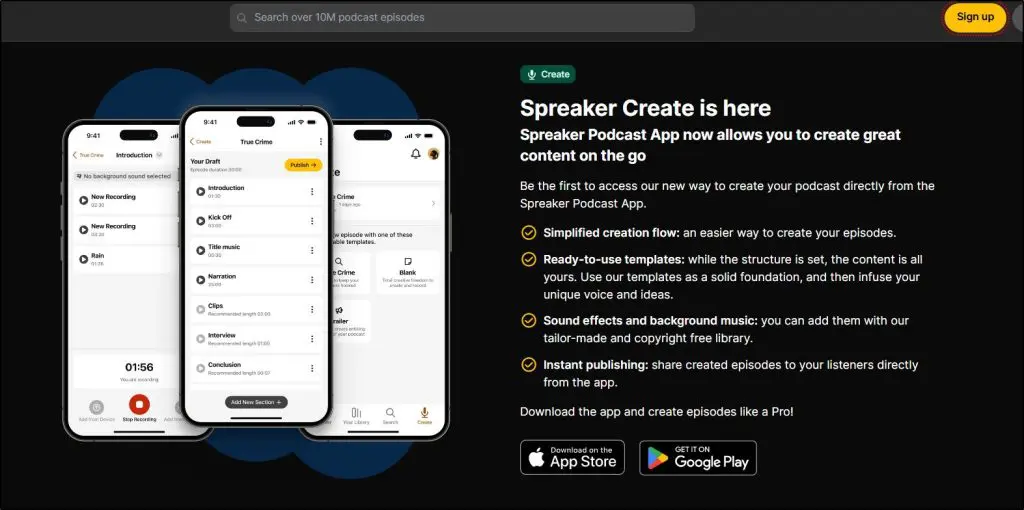
It’s not a full scripting or AI tool, but it helps standardize your workflow and reduces the number of manual steps per episode.
For teams or podcasters with more advanced editing needs, it functions more as a capture tool than a full production solution.
Feature #4: Automatic Ad Monetization
Spreaker includes built-in monetization through automatic ads, which is one of the platform’s most practical features.
You can turn monetization on from your dashboard, choose where ads should appear (pre-roll, mid-roll, and post-roll), and Spreaker handles the rest through its programmatic ad network.
The system uses dynamic ad insertion, meaning ads can be added to both new and older episodes. This gives creators a chance to earn from the back catalog without manually editing each file.
You don’t need a minimum audience size to enable ads, which makes this accessible for newer or smaller shows.
The trade-off is control.
Programmatic ads are automated, so you don’t get to approve individual advertisers. You can block broad categories, but if you want to negotiate your own sponsorships or hand-pick brands, you’ll still need to manage those outside Spreaker or use the higher-tier Publisher plan for more direct ad control.
Payouts depend on ad demand, listener location, and episode downloads — the same variables that affect most podcast ad networks.
For creators who want a simple way to turn on monetization without outreach or manual ad placement, Spreaker’s system covers the basics reliably.
But for teams with more specific advertising goals, the automation may feel limited.
Feature #5: Supporters Club & Listener Subscriptions
Spreaker offers a built-in way to earn recurring revenue through its Supporters Club feature. This allows listeners to pay a monthly subscription to your show in exchange for bonus content, early releases, or any perks you choose to offer.
The setup is simple: you turn it on, set your pricing, and decide which episodes are for paying supporters only.
Supporters Club sits inside Spreaker’s own ecosystem, so you don’t need to connect external tools like Patreon unless you want more advanced membership controls.
On the free plan, Spreaker keeps a 20% fee, while paid plans reduce that to 0%, which makes recurring revenue more practical for long-term use.
This feature works well for creators who want a lightweight way to offer premium content without building a full membership site.
The subscription options are straightforward — you can lock individual episodes or create a small library of supporter-only material.
The main limitation is flexibility.
You don’t get complex tiering, community tools, or advanced paywall features that standalone membership platforms offer.
If your podcast relies heavily on memberships or you run a multi-tier system, you may still prefer Patreon or a dedicated community platform.
For most podcasters who simply want a clean way to offer bonus content and turn loyal listeners into paying supporters, Supporters Club handles the essentials.
Feature #6: IAB + Nielsen Certified Analytics
Spreaker provides built-in analytics that follow IAB Tech Lab and Nielsen certification standards, which means the download and listener data is measured in a way advertisers typically trust.
You can see metrics such as total downloads, listener locations, playback behavior, and performance trends at the episode and show level.
The dashboard is easy to read, and most creators can interpret the data without needing additional tools. Real-time statistics help you see how new episodes are performing shortly after publishing, which is useful if you follow a consistent release schedule or want to understand listener engagement patterns.
The analytics are designed for podcasting basics: downloads, geography, listening platforms, and simple audience insights.
They don’t go as deep into behavior tracking as some advanced tools (for example, detailed retention graphs or per-minute engagement charts that platforms like Spotify for Podcasters provide).
But for general tracking and advertising purposes, the data is accurate and reliable.
If you’re running a larger team or a network, the full analytics available on higher-tier plans expand what you can measure, especially when evaluating multiple shows at once.
For individual creators, the default analytics cover what most people need to monitor growth and make decisions about content and publishing schedules.
Feature #7: Team & Network Management Tools
Spreaker includes tools for managing multiple podcasts and collaborating with other people on your team. These features become more useful as you move into the higher-tier plans, where you can run several shows from the same dashboard and assign different levels of access to collaborators.
For teams, you can add producers, editors, or co-hosts and let them handle publishing, episode uploads, analytics review, or specific parts of the workflow.
Permissions are straightforward, not as detailed as enterprise-level systems, but enough for most small to mid-size podcast operations.
For networks, Spreaker’s Anchorman and Publisher plans offer more centralized control. You can oversee multiple shows, check performance across all of them, and manage monetization settings at the network level.
Publisher also includes tools for ad-campaign management, giving companies more direct control over inventory and advertiser relationships.
These features aren’t necessary for solo creators, and some of the more advanced controls require the higher-priced plans.
But if you run several shows or work with a distributed team, having a shared environment helps keep the workflow organized and reduces the need for multiple logins or outside project-management tools.
Feature #8: Embeddable Player & Basic Podcast Page
Spreaker provides an embeddable audio player that lets you place episodes on your website, landing pages, or blog posts.
The player supports basic customization, such as changing colors to match your branding and choosing whether to display recent episodes or a specific episode.
It’s functional and easy to use, and most creators will find it sufficient for embedding audio without relying on third-party widgets.
You can also enable options like comments, likes, and sharing directly from the player, which helps keep engagement connected to the episode even when it’s embedded outside of Spreaker.
The higher-tier plans allow for more visual customization, including removing Spreaker branding if you want a cleaner, more branded look.
Alongside the player, Spreaker automatically generates a simple public podcast page for your show. This page displays your artwork, description, and episode list, acting as a lightweight website for creators who don’t have one yet.
It’s not a replacement for a full site as its customization is minimal, and it doesn’t offer advanced layout control.
But it works as a temporary hub or a place to send listeners while you build something more robust.
For many podcasters, these tools are enough to get started quickly. If branding and design matter to you or your podcast is part of a broader business, you’ll still want your own website, but the built-in player and basic page give you a practical way to share episodes without additional setup.
The Top Spreaker Alternatives For Podcasters
Spreaker is a great software that provides audio creators with reliable hosting at affordable rates. It also comes with easy migrations, increased storage space, unlimited episodes, and various other features.
However, Spreaker is just one of many available podcast hosting solutions. And while the platform has a lot to offer, it also has its downsides, like any other podcast host. For example, Spreaker doesn’t offer video hosting capabilities.
With that said, here are three great podcasting options that make superb alternatives to Spreaker.
| Platform | Free & Entry Price | Key Features |
|---|---|---|
| Spreaker | Free plan (“Free Speech”): $0/month; Entry paid: $20/month (Broadcaster) | Unlimited episodes on all tiers, built-in monetization, full analytics + distribution. |
| Buzzsprout | Free plan available with limited upload hours; Entry paid: $19/month | Very beginner-friendly UI, limited upload time on free, fewer monetization network features than Spreaker. |
| Podbean | Free plan available with limited hours/storage; Entry paid: $9/month (“Unlimited Audio”) | Strong value, unlimited storage/bandwidth in paid plans, built-in ad marketplace, simpler team tools compared to Spreaker. |
| Castos | Free trial only (14 days); Entry paid: $19/month (Essentials) | Great WordPress integration, private podcast tools, weekly/unlimited episodes; fewer automated ad features than Spreaker. |
Spreaker vs Buzzsprout
When comparing Spreaker and Buzzsprout, both offer full podcast hosting, unlimited episode uploads, built-in monetization, and easy distribution.
Spreaker stands out with automatic ad insertion, a built-in subscriber club (Supporters Club), and IAB/Nielsen-certified analytics — making it strong for monetization-first creators.
Buzzsprout, on the other hand, excels at ease of use, integrates with Canva for artwork, and offers a “magic mastering” audio-cleaning feature.
However, Spreaker places many advanced tools behind higher-tier plans, while Buzzsprout includes more features in its lower tiers.
Choose Spreaker if monetization and scale matter; choose Buzzsprout if simplicity and production polish matter more.

Spreaker vs Podbean
Spreaker and Podbean are both full-featured podcast hosting platforms but differ in key ways. Spreaker offers strong monetization via automatic ads, subscriber tools (Supporters Club), and certified analytics from IAB/Nielsen — ideal for creators looking to earn.
Podbean, meanwhile, often costs less, offers unlimited storage on many plans, and includes built-in membership options and an integrated ad marketplace (PodAds).
Podbean excels for budget-conscious creators needing more flexibility early on.
If monetization, analytics credibility, and multi-show management are your priorities, go with Spreaker; if cost control, simplicity, and unlimited storage matter more, consider Podbean.

Spreaker vs Castos
Spreaker offers unlimited episode uploads even on the free plan, built-in ad monetization, subscribers (Supporters Club), and IAB-certified analytics — making it strong for creators who want all-in-one monetization and publishing.
Castos, by contrast, focuses more on podcast networks and advanced analytics, includes a YouTube republishing workflow, and integrates deeply with WordPress via its “Seriously Simple Podcasting” plugin.
However, Castos doesn’t offer a true free forever plan (only a trial), and lacks the same level of built-in ad automation as Spreaker.
Choose Spreaker for monetization simplicity; choose Castos for network workflows and advanced publishing.

Is Spreaker the Best Podcasting Platform for You?
Spreaker is a solid choice if you want a hosting platform that keeps the core workflow simple: upload your audio, publish it everywhere, and turn on monetization without a complicated setup.
Its unlimited episode uploads, automatic ads, and straightforward dashboard make it especially useful for new podcasters or anyone who wants to manage their show without extra tools.
It doesn’t replace full audio editors or offer deep customization, and some advanced features sit behind the higher-tier plans.
But if your focus is reliable hosting, clean distribution, and accessible monetization, Spreaker covers those essentials well.
If you need a different balance of features, explore our other recommended podcast hosting platforms for comparison.
Frequently Asked Questions (FAQs)
1. Can I move from Spreaker to another podcast host later?
Yes. You can redirect your RSS feed from Spreaker to any other hosting platform without losing subscribers or episode history.
2. Does Spreaker keep ownership of my podcast or audio files?
No. You retain full ownership of your content. Spreaker only hosts and distributes it.
3. How fast does Spreaker process and publish new episodes?
Episodes publish almost instantly on Spreaker, while platforms like Apple or Spotify typically update within a few minutes to an hour.
4. Is Spreaker good for private or internal company podcasts?
Yes, but only on paid plans. Private feeds work reliably, but advanced access controls are limited compared to enterprise-focused hosts.
5. Does Spreaker support video podcasts?
No. Spreaker is audio-only. If you need video, you’ll need a host that supports MP4 uploads or YouTube distribution.
6. Can I schedule podcast episodes on Spreaker?
Yes. Spreaker allows episode scheduling, so you can upload ahead of time and set an automatic release date.
7. How does Spreaker handle podcast migrations with existing ads?
Your old audio comes over without issues, but previously embedded ads remain baked in. Dynamic ads begin only after switching to Spreaker.
8. Is Spreaker suitable for multilingual podcasts?
Yes. You can tag your podcast with language metadata, but there’s no built-in translation or multilingual feed support.
9. Does Spreaker provide podcast transcript tools?
Not natively. It integrates with FreePodcastTranscription.com and Musixmatch, but you still need to handle formatting manually.
10. What happens if my podcast suddenly grows or goes viral?
Spreaker’s unlimited bandwidth handles spikes without extra fees. If you want more control over advertising or network-level tools, you may need a higher-tier plan.
11. Can I use custom domains with Spreaker’s podcast page?
No. The generated page is basic and tied to a Spreaker domain. You’ll need a separate website if you want custom branding.
12. Does Spreaker support podcast networks with shared feeds?
It supports multiple shows and team management, but it doesn’t offer the network-wide feed or cross-promotion automations some enterprise tools provide.

Jeff Cobb, Founder of Learning Revolution
Jeff Cobb is an expert in online education and the business of adult lifelong learning. Over the past 20+ years he has built a thriving career based on that expertise – as an entrepreneur, a consultant, an author, and a speaker. Learning Revolution is a place where Jeff curates tips, insights, and resources to help you build a thriving expertise-based business. Learn more about Jeff Cobb here.
Table of Contents