

TL;DR — Which Podia Pricing Plan Is Worth It in 2026?
Podia retired its free plan in late 2024 and now offers a 30-day free trial with full feature access.
After that, you’ll need to pick a paid plan:
✅ Mover Plan ($39/mo or $33/mo billed annually): Best for new creators launching courses, coaching, or digital products. Comes with unlimited products and email tools—but includes 5% transaction fees and lacks affiliate marketing or PayPal.
✅ Shaker Plan ($89/mo or $75/mo billed annually): Built for scaling creators. No transaction fees, affiliate marketing, PayPal, embedded checkout, and deeper integrations.
Podia Email is included in both plans (first 100 subscribers free), with paid upgrades starting at $7/month. While simpler than tools like ConvertKit or Kajabi, it’s great for most creators who need easy email automation.
Our pick:
– Start with Mover if you’re testing your first product.
– Go for Shaker if you’re scaling and want to maximize revenue.

If you’ve been eyeing Podia as your all-in-one platform for selling courses, memberships, and digital products, you may have noticed a major change: Podia pricing got an update in late 2024.
The biggest shift? Podia has officially retired its free plan and replaced it with a 30-day free trial that unlocks all features before requiring a paid upgrade.
If you were hoping to run your business for free, this change may feel like a dealbreaker—but is it?
In this guide, I’ll break down the latest Podia plans, the features you get at each tier, and whether the pricing structure still makes sense for creators in 2026. Should you invest in Podia Mover or Podia Shaker, or is there a better option for your business?
Let’s find out.
Want to learn more about Podia before making a decision about pricing? Read my complete Podia review here.
Podia Pricing Plans | How Much Does It Cost In 2026?
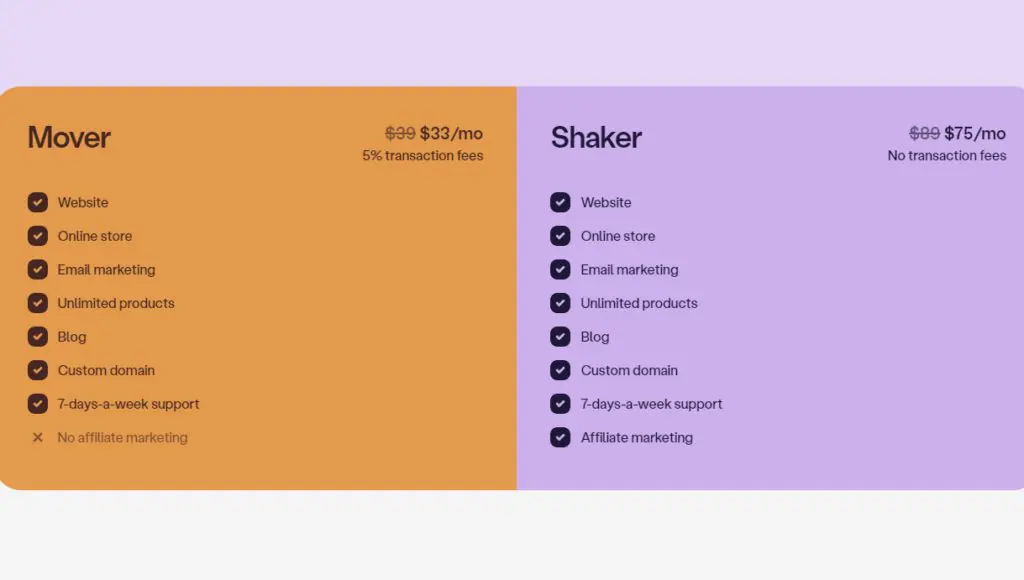
Podia offers two main paid plans tailored to different types of creators. The free plan is no longer available, but Podia now provides a 30-day free trial with access to all features, so you can test the platform before committing to a paid plan.
Here’s a breakdown of the Podia pricing plans in 2026.
- Mover Plan ($39/month or $33/month annually) – This is Podia’s entry-level plan, best for creators launching their first online course, coaching service, or digital product. It includes a customizable website builder, online store, email marketing tools, and unlimited products, but comes with a 5% transaction fee on sales.
- Shaker Plan ($89/month or $75/month annually) – This plan is built for scaling businesses and established creators. It includes everything from the Mover Plan but removes transaction fees and adds affiliate marketing capabilities, making it ideal if you want to grow through partnerships and promotions.
Additional Podia Pricing Features
- Podia Email – Included for free for up to 100 subscribers. Beyond that, pricing is based on your email list size, starting at $7/month. Features include email automation, sales tracking, segmentation, and custom email templates.
- Podia Teams – If you need to add team members (like virtual assistants or content managers), each additional user costs $20/month.
One of Podia’s strengths is its transparent pricing. There are no hidden fees or surprise charges—what you see is what you pay.
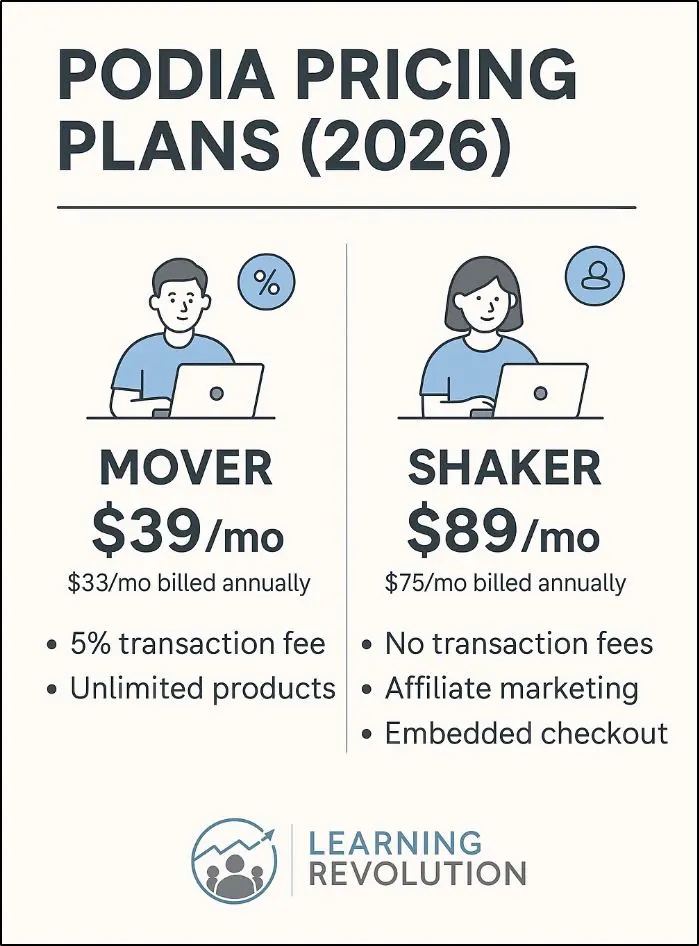
Detailed Breakdown of Podia’s New Pricing Plans
To help you decide which Podia pricing plan fits your business, let’s break down what each one offers and who it’s best for.
Both plans come with unlimited everything—products, customers, messages, and files—so you won’t hit usage limits or get hit with unexpected fees. You also get built-in blogging tools, meaning you can run your entire content and product strategy from one platform.
Podia Pricing Comparison (Mover vs Shaker)
| Feature | Mover Plan | Shaker Plan |
|---|---|---|
| Monthly price | $39 / month | $89 / month |
| Annual price | $33 / month (billed yearly) | $75 / month (billed yearly) |
| Free trial | 30 days (full access) | 30 days (full access) |
| Transaction fees | 5% per sale | 0% transaction fees |
| Website & blog | Yes | Yes |
| Online courses | Unlimited | Unlimited |
| Digital downloads | Unlimited | Unlimited |
| Coaching & 1:1 products | Yes | Yes |
| Memberships & community | Yes | Yes |
| Webinars & replays | Yes | Yes |
| Email marketing (Podia Email) | Included (100 subs free) | Included (100 subs free) |
| Email automations & tagging | Yes (basic) | Yes (basic) |
| Stripe payments | Yes | Yes |
| PayPal payments | No | Yes |
| Payment plans & coupons | Yes | Yes |
| Embedded checkout | No | Yes |
| Affiliate marketing | No | Yes |
| Zapier actions | Limited | Expanded |
| Free migration | Up to 20 products | Up to 30 products |
| Team members | $20/user/month | $20/user/month |
| Best suited for | New & growing creators | Scaling creators & businesses |
1. Podia Mover Plan ($33/month – billed annually, $39/month – billed monthly)
This is Podia’s entry-level plan, designed for new creators who want an all-in-one platform for selling online courses, memberships, and digital downloads.
It includes all core features, plus:
- Unlimited courses, coaching, webinars, and digital downloads
- Course certificates for students
- Coupons, upsells, and waitlists to boost sales
- Video uploads inside community spaces
- Site search functionality for easier navigation
- Marketing integrations with Google Ads, Facebook Pixel, and Zapier triggers
- Free migration for up to 20 products
- 5% transaction fees on every sale
Limitations of the Mover Plan
- No PayPal integration (Stripe only)
- No embedded checkout for external sites
- No affiliate marketing tools
If you pay annually, the price drops to $33/month, making it one of the more affordable all-in-one platforms for course creators.
2. Podia Shaker Plan ($75/month – billed annually, $89/month – billed monthly)
The Shaker Plan builds on Mover with zero transaction fees and advanced sales features, making it ideal for scaling creators and established businesses.
Everything in the Mover Plan, plus:
- Affiliate marketing tools to set up and track referral commissions
- Embedded checkout for selling directly from external sites
- Zapier actions for automating workflows
- Free migration for up to 30 products
- No transaction fees, so you keep 100% of your revenue
If you pay annually, this plan drops to $75/month, making it a better long-term deal if you’re running a profitable business.
Podia Email Pricing: Included in All Plans (With Upgrade Options)
All Podia plans come with Podia Email, so you don’t need to juggle separate email marketing software. Whether you’re launching a course, selling digital products, or running a membership site, you can send emails, automate campaigns, and track sales—all from one dashboard.
The best part? Your first 100 subscribers are free, and when you grow beyond that, paid plans start at just $7/month.
What Can You Do With Podia Email?
- Set up automated email sequences: Want to welcome new subscribers, nurture leads, or send follow-ups after a sale? Just create an email sequence once, and Podia Email takes care of the rest, sending emails at the right time based on subscriber actions.
- Segment your audience for better targeting: Not every subscriber is the same. With tagging and segmentation, you can send emails to the right people at the right time. Whether you want to email only your customers, just your warm leads, or those who clicked but didn’t buy, Podia lets you personalize your marketing effortlessly.
- Send unlimited broadcasts: Flash sales, product updates, newsletters—you can send as many one-time emails as you need without worrying about limits. Whether you’re emailing once a week or multiple times a day, Podia won’t cap your messages.
- Track email performance: Forget switching between platforms. Podia Email shows you exactly how many people opened, clicked, and even purchased from your emails—so you know what’s working (and what needs tweaking).
- Customize your emails to match your brand: No boring, generic emails here. Choose from beautiful templates or create your own with Podia’s simple drag-and-drop editor. Whether you need a plain text email or a visually polished campaign, you’re in control.
Instead of paying for separate email tools, you get everything built into Podia—seamless automations, targeted campaigns, and real-time sales tracking, all designed to help you sell more with less effort.
And since Podia pricing already includes this feature, you’re not stuck with extra software costs or integrations.
Read our detailed breakdown of Podia Email Features
How Does Podia Email Compare With Dedicated Email Software?
If you’re someone who lives and breathes email marketing, you might find Podia Email a bit basic compared to ConvertKit, Mailchimp, or ActiveCampaign.
Those tools offer more advanced automation, deeper analytics, A/B testing, and CRM capabilities, which are essential for high-volume email marketers and sales-heavy businesses.
And what about Kajabi, the best all-in-one course platform in my experience?
Kajabi Email is more advanced than Podia’s, offering visual automation builders, better email design options, and stronger segmentation. If you want to run complex email funnels with conditional triggers and advanced workflows, Kajabi is the stronger pick.
However, Kajabi’s plans are significantly more expensive, so unless you really need those extra automation features, Podia Email is the better value—especially if you’re just looking for simple, effective email marketing without extra costs.
Who Should Use Podia Email?
If you’re a course creator, coach, or small business owner who just needs straightforward email automation, segmentation, and broadcasts, Podia Email is perfect—and included in your Podia pricing at no extra cost.
But if email marketing is a core part of your growth strategy, and you need complex automations, SMS marketing, or deep analytics, you might want to pair Podia with a dedicated email platform or consider Kajabi if you’re looking for an all-in-one alternative with stronger email tools.
Comparison of Podia’s Pricing Plans
The main difference between Podia’s plans comes down to features, marketing capabilities, and transaction fees.
The Mover plan is a great starting point for most creators selling courses, coaching, or digital downloads, but if you’re running a high-volume business or want affiliate marketing and advanced automation, the Shaker plan makes more sense in the long run.
But here’s the key question: Which one is right for you?
How To Choose the Right Podia Plan
Not every creator needs the most expensive plan, but going with the cheapest plan isn’t always the best choice either. Instead, consider where you are right now and where you want to be.
Mover Plan: Best for New and Growing Creators
If you’re just getting started or only need a simple website, online store, and email marketing, the Mover plan is a great fit. It includes unlimited products, built-in email marketing, and community features, but keep in mind you’ll pay a 5% transaction fee on sales.
Shaker Plan: Best for Scaling and Advanced Marketing
If you’re running a larger operation, need affiliate marketing, or want to eliminate transaction fees, the Shaker plan is the better deal. It also gives you advanced integrations (like PayPal and Zapier actions), making it ideal for serious course creators and entrepreneurs.
Key Factors to Consider Before Choosing
- Current Needs – If you’re selling your first digital product, start with Mover and upgrade later.
- Future Growth – Planning to scale? The Shaker plan has more tools to help you grow.
- Budget – If you’re keeping costs low, Mover works, but Shaker saves you money long-term by removing transaction fees.
- Sales Volume – If you expect high sales, Shaker is more cost-effective since you keep 100% of your revenue.
- Marketing Needs – Need affiliate marketing, embedded checkout, and deeper automation? Go with Shaker.
Our Final Recommendation
For new creators or side hustlers: Start with the 30-day free trial, then move to Mover for a balance of cost and features.
For full-time creators and scaling businesses: Shaker is the best bet, especially if you want zero transaction fees, better automation, and affiliate marketing.
At the end of the day, Podia pricing is straightforward, but your choice should depend on your business goals. If you’re still unsure, start with Mover—you can always upgrade as you grow.
Is Podia’s New Pricing Justified?
Podia’s recent pricing changes have sparked mixed reactions in the creator community. While the 30-day free trial provides full access to Podia’s features, removing the free plan entirely has left many small creators feeling stranded.
For serious entrepreneurs ready to monetize, Podia’s pricing is reasonable—the platform bundles website hosting, online course tools, email marketing, and affiliate management into a single subscription, eliminating the need for multiple third-party tools. The no transaction fees on the Shaker plan is a major plus, especially for high-volume sellers who would otherwise lose a chunk of their revenue to platform fees.
However, there’s a glaring gap for creators who aren’t quite ready to commit. Many users in the Podia Community voiced concerns about the lack of a lower-tier option, especially for those who only need a basic website and blog. This pricing change pushes casual creators toward alternatives like Teachable’s free plan or Thinkific’s starter options, which provide more flexibility before making a full commitment.
Essentially, Podia has doubled down on its belief that a free plan holds creators back from launching, instead shifting its focus toward serious business owners who are ready to invest in their growth.
So, is Podia worth it?
If you’re a dedicated creator or entrepreneur looking for a scalable, feature-rich platform, Podia’s pricing is justified and offers great value for money.
The 30-day free trial gives beginners plenty of time to test the platform without paying anything. So, overall, I still feel Podia is an attractive option if you’re serious about launching a course or starting a membership community.
FAQ: Frequently Asked Questions About Podia Pricing
Is there a free trial available for Podia?
Yes. Podia offers a 30-day free trial for all plans, giving you full access to its features before committing to a subscription.
Can I switch between plans?
Yes. You can upgrade or downgrade your Podia plan at any time, and your billing will be adjusted accordingly. However, if you’re on an annual plan, the downgrade may not be immediately reflected in your billing cycle.
Are there any hidden fees with Podia?
No. Podia pricing is transparent, with no hidden fees. The only extra charges come from payment processing fees via Stripe or PayPal, which are standard across all platforms.
Does Podia offer refunds?
Not typically. Podia does not have a standard refund policy, but they may consider refund requests case by case. It’s best to use the free trial to ensure it fits your needs before purchasing.
Can I pay annually instead of monthly?
Yes. Podia plans offer an annual billing option, which comes with a discount compared to paying monthly.
Are there any limits on the number of courses or products I can sell?
No. All Podia plans allow you to create and sell unlimited online courses, digital downloads, coaching sessions, and webinars.
Is email marketing included in all plans?
Yes, but with limits. Podia Email is included in all plans, but only the first 100 subscribers are free. If you need more, you’ll have to upgrade your Podia Email plan, starting at $7/month based on subscriber count.
Table of Contents
Related Posts
The Complete Guide To Pricing A Masterclass (2026) | Free Pricing Calculator
Thinkific Pricing (2026): Comparison of Basic, Start, Grow & Plus Plans
Podia Review (2026): Is It Worth Using For Courses & Coaching?