

TL;DR: How to Create a Udemy Course (2026)
Udemy lets you publish a recorded course for free and sell it to a marketplace of millions of learners, in exchange for a large share of each sale you don’t bring in yourself.
Know the math first: You keep 97% of sales through your own coupon or referral link, 37% of other marketplace sales, and a share of a 15% subscription pool.
Meet the minimums: At least 30 minutes of video, 5 lectures, HD video, and clear audio.
Validate before you record: Check demand and competition in Udemy Marketplace Insights, then read the reviews of the top three courses.
Go narrow: A focused 2 to 3 hour course on one skill beats an A-to-Z course on a broad topic.
Bring your own buyers: Your email list and social followers earn you almost the full price, so promote with your coupon links.
Plan the next step: Use Udemy for reach and your own course platform for premium courses, coaching, and your email list.
Most experts who try Udemy make the same mistake. They spend weeks recording a course, publish it, and wait for the marketplace to send buyers. A handful of sales trickle in at $12.99 during a sitewide discount, and Udemy keeps most of that money.
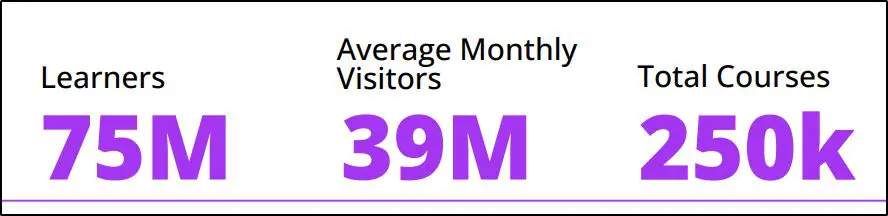
The plan behind the course is usually the weak link. Udemy, now part of Coursera after a merger that closed in May 2026, reaches more than 290 million learners across the combined company. The reach pays off when you pick a topic with proven demand, build a tightly focused course, and send your own audience through your coupon links.
In this guide, I’ll show you how to create a Udemy course step by step, from checking demand in Marketplace Insights to pricing and promotion. The guide also covers the 2026 revenue math, so you know what each sale is worth before you record a single lesson.
Compare the best Udemy alternatives for more pricing control
Is Udemy Worth It for Course Creators in 2026?

Udemy is worth it as a discovery channel and a low-risk way to test a course idea. Udemy works poorly as the only home for your teaching business, because the company controls the price, the discounts, and the relationship with your students.
I recommend Udemy most to two groups. The first is experts with no audience yet, who need the marketplace to find their first students. The second is creators with an audience who want a cheap entry product that introduces new people to their work.
| Pros | Cons |
|---|---|
| Free to publish, with no monthly fees | Udemy keeps 63% of sales it brings in |
| Built-in traffic and search inside the marketplace | Frequent sitewide discounts push prices to around $10 to $15 |
| Udemy promotes courses through email, ads, and recommendations | No access to student email addresses |
| Learners trust the brand and buy with confidence | Recorded video courses only, with no live cohorts, coaching, or memberships |
| A quick way to test whether a topic sells | Limited room for personal branding |
Since the merger, Coursera hasn’t announced changes to Udemy’s instructor terms. Keep an eye on instructor announcements over the next year, since a combined company with $115 million in planned cost savings may revisit payouts.

How Much Do Udemy Instructors Earn?
Udemy pays instructors a share of each sale, and the share depends on who brought the buyer. The same course can earn you $48 or $5 per sale, so this table matters more than any other number in this guide.
| How the student bought | Your share | On a $49.99 sale | On a $12.99 discounted sale |
|---|---|---|---|
| Through your coupon or referral link | 97% | About $48.49 | About $12.60 |
| Through Udemy search, recommendations, or ads | 37% | About $18.50 | About $4.81 |
| Through a subscription (Personal Plan or Udemy Business) | A share of a 15% revenue pool, based on minutes watched | Varies | Varies |
Udemy calculates these shares after taxes and app store fees, so real payouts run a little lower. Class Central reported that Udemy cut the instructor share of subscription revenue from 25% to 20% in 2024, then to 15% in January 2026.
Subscriptions now drive most of Udemy’s business. Udemy’s full-year 2025 results show subscription revenue reached $566 million, or 72% of total revenue, while consumer course sales fell 9%. Expect more of your income to come from minutes watched and less from one-time sales.
Here’s what that means in practice. If 100 students buy your course organically at a $12.99 discount, you earn about $481. If 100 people on your email list buy through your coupon at $49.99, you earn about $4,849. An audience of your own changes the economics completely.
| Feature | Instructor |
|---|---|
| Cost to create and host courses | Free |
| Free and paid courses | Unlimited |
| Your share: sales via your coupon or referral link | 97% |
| Your share: all other marketplace sales | 37% |
| App store sales | Share is of net amount after Apple/Google's 30% fee |
| Extra income | Udemy Business & Personal Plan royalties |
To see how many students you need to hit an income goal, try our free How Many Students Do I Need Calculator.
Udemy Course Requirements
Udemy’s quality team reviews every course before it goes live, and Udemy sends back any course that misses the minimums. These are the requirements from Udemy’s course quality checklist.
| Requirement | Udemy’s rule |
|---|---|
| Video length | At least 30 minutes of video content |
| Lectures | At least 5 lectures |
| Video quality | HD, at 720p or higher |
| Audio | Clear and easy to hear, without distracting background noise |
| Free courses | Up to 2 hours of video |
| Content | Accurate, educational, and matching what the landing page promises |
Record and export at 1080p even though Udemy accepts 720p. Learners watch on laptops and TVs, and sharper text on slides and screen recordings looks more professional. My guide to video dimensions covers the export settings in detail.
How to Create a Udemy Course in 15 Steps
The steps below follow the order I recommend to course creators, starting with research and ending with promotion. Research takes the first five steps on purpose, because a well-made course on a topic nobody searches for won’t sell.
| Step | What to do | Tool or resource |
|---|---|---|
| 1. Pick a topic | Choose one practical skill inside your expertise that learners already buy | Udemy categories and search bar |
| 2. Check demand | Compare demand, competition, and revenue for your topic and its subtopics | Udemy Marketplace Insights |
| 3. Study top courses | Read outlines and three-star reviews of the top three courses to find gaps | Marketplace Insights top-earning courses |
| 4. Collect questions | List the real questions learners ask about your topic | Google autocomplete, Keywords Everywhere |
| 5. Set scope and objectives | Define what students will be able to do after the course | Learning Objectives Builder |
| 6. Find your angle | Pick one or two ways your course beats the competition | Course Idea Validator |
| 7. Outline the curriculum | Break the outcome into sections and short lectures | Course Content Mix Calculator |
| 8. Script lessons | Write a script or detailed outline for every lecture | Reading Time Calculator |
| 9. Add practice | Add quizzes, assignments, and downloadable resources | Udemy course builder |
| 10. Record | Set up a quiet room and a good microphone, then record one lecture at a time | Course Production Time Estimator |
| 11. Edit | Cut pauses and retakes, and add a short intro to each section | Camtasia or Descript |
| 12. Test | Submit one sample for free feedback before recording everything | Udemy Test Video |
| 13. Build the listing | Upload lectures and write a landing page around specific outcomes | Udemy course builder |
| 14. Set a price | Choose a list price that works with your coupons and Udemy’s sales | Online Course Pricing Calculator |
| 15. Make a trailer | Record a 1 to 2 minute promo video after you finish the course | Your editing tool |
Step 1: Pick a Topic You Can Teach Better Than the Top Course
Choose a specific skill within your expertise that Udemy learners already pay for. The best-selling Udemy courses focus on one practical outcome a learner can reach in 2 to 3 hours, such as “Technical SEO for Ecommerce Stores” instead of a general SEO course.
Start with Udemy’s categories. Open the Categories menu and browse the subcategories in your field to see which topics have the most courses and reviews.

Udemy’s strongest categories include programming, AI and machine learning, Excel, project management, digital marketing, personal development, investing, video editing, and graphic design. Pick from these only if the topic sits squarely inside your experience.
Next, type your topic into the Udemy search bar. The suggestions show what learners search for, and adding a second word narrows the list further.


Stick to two or three closely related topics across your courses. Students who finish one course buy the next one from an instructor they already trust, which matters more over time than chasing every trending niche.
Step 2: Check Demand in Udemy Marketplace Insights
Marketplace Insights is Udemy’s free research tool for instructors, and it shows student demand, competition, and revenue for any topic. Open it from your instructor dashboard and search for your topic.

Udemy suggests subtopics as you type, such as Digital Photography under Photography. Pick the most specific one that matches your course, since learners in each subtopic have different goals.

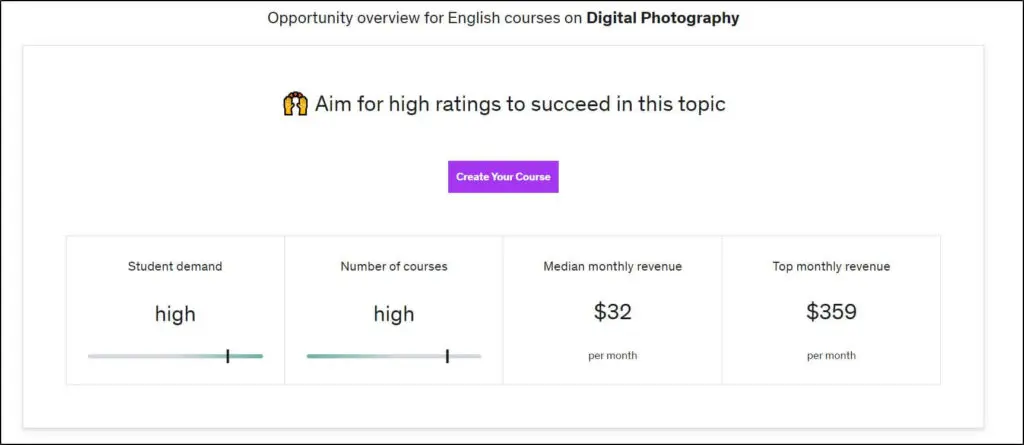
The overview shows demand, the number of competing courses, and median and top monthly revenue for the topic. Scroll down for the search trend and the keywords learners use.
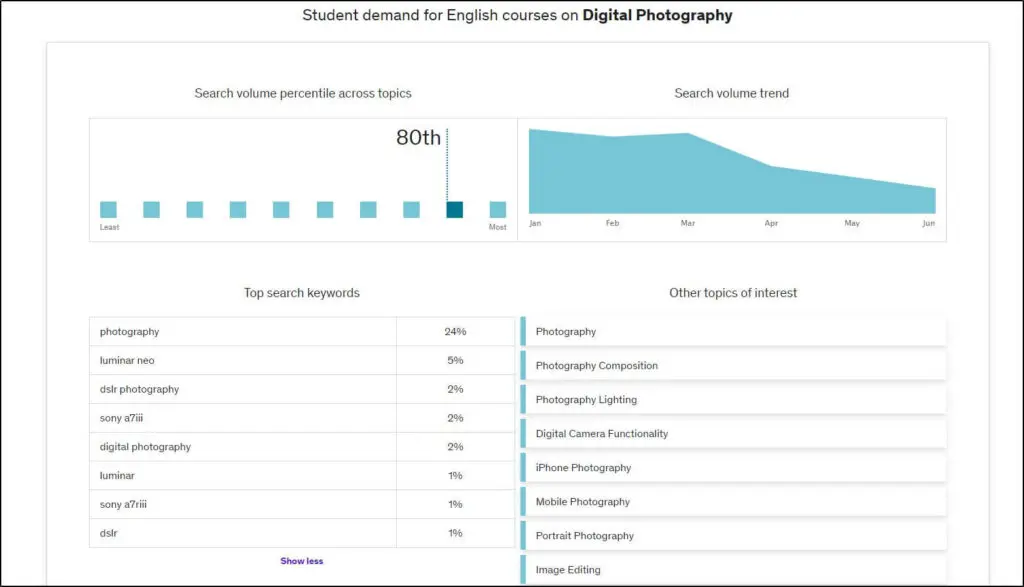
Look for topics with high demand and medium or low competition. In the Digital Photography example, demand looked strong but the search trend pointed down, which is a reason to look at a growing subtopic instead.
Step 3: Study the Top Courses and Their Reviews
Scroll past the stats in Marketplace Insights to see the top-earning courses in your topic, then open the top three in separate tabs.

Compare each course’s outline, number of sections, and lecture length. Then read the three-star reviews, which tend to name exactly what the course left out, such as outdated software, missing examples, or no downloadable files. Every gap you find becomes a selling point for your course.
Step 4: Collect Your Audience’s Questions
Gather the real questions learners ask about your topic before you outline anything. Start with the reviews from Step 3, then type your topic into Google and note the autocomplete suggestions.

Add question words like “what,” “how,” and “why” in front of your topic for more specific results. A Chrome extension like Keywords Everywhere adds search volume and trend data, which helps you spot the questions most people ask.
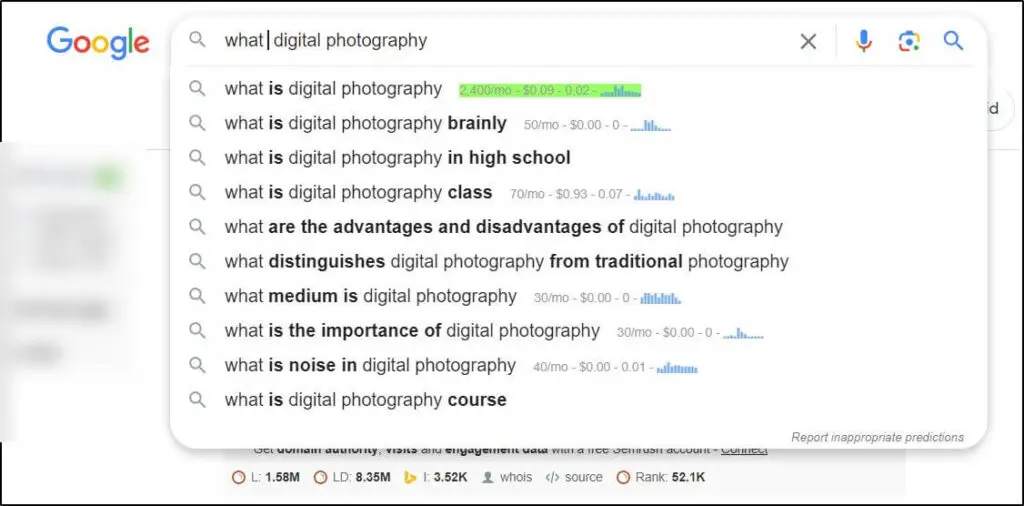
Keep every question in a spreadsheet. The list feeds Step 5 to set the scope and again in Step 7 to make sure every lesson answers a real question.
Step 5: Define the Scope and Learning Objectives
Write down exactly what a student will be able to do after finishing your course, and leave out everything that doesn’t serve that outcome. A clear scope keeps the course short enough to finish and specific enough to stand out in search results.
For example, an SEO course could cover only link building, keyword research, or site speed. Each of those makes a stronger Udemy course than one long program that tries to cover all of SEO.
Turn your outcome into measurable objectives with our free Learning Objectives Builder. Udemy’s course builder also asks for these on the Intended Learners page, so the work carries straight into your listing.
Step 6: Decide What Makes Your Course Different
A course needs a clear reason for a learner to pick it over a competitor with 10,000 reviews. Base that reason on the gaps you found in Step 3, then pick one or two of these angles and build around them.
- More current material: Cover the latest version of the software or the rules competitors haven’t updated.
- Real examples from your work: Walk through actual projects, client cases, or your own data.
- More practice: Add exercises, templates, and assignments students can apply right away.
- A clearer path for beginners: Teach the same skill in fewer, shorter steps.
- Expert interviews or bonus sessions: Bring in perspectives students can’t get elsewhere.
Check your course idea against real demand with our Course Idea Validator before you commit weeks of recording time.
Step 7: Outline Your Curriculum
Build your outline from the top down. Write the main learning outcome first, break it into sections, and then break each section into lectures.

The example above, a course on building a photography business, uses 11 sections and 96 lectures. Each section focuses on one part of the outcome, and each lecture covers one small, actionable step.

Keep most lectures between 2 and 7 minutes, which makes them easy to finish in one sitting and easy to update later. To balance video with quizzes, exercises, and reading, try our Course Content Mix Calculator.
Step 8: Script Your Lessons
Write a script or a detailed bullet outline for every lecture before you record. Scripts cut retakes, keep lessons tight, and make captions more accurate.
Read each script aloud once and time it. Our Reading Time Calculator has a speaking-pace mode that estimates how long each script will run on video. For more scripting techniques, see my guide to writing a podcast script, since the same principles apply to video lessons.
Step 9: Add Quizzes, Assignments, and Resources
Udemy’s course builder supports quizzes, coding exercises, assignments, practice tests, and downloadable files. Add at least one quiz or assignment to each section so students check their understanding before moving on.
Downloadable resources such as checklists, templates, and slide decks often show up in five-star reviews, and they cost little to create. My guide to creating online course quizzes covers question types and how to write them well.
Step 10: Set Up Your Equipment and Record
Audio quality matters more than video quality, because learners forgive an average picture but stop watching when the sound is hard to follow. A decent USB microphone and a quiet room improve a course more than an expensive camera does.
Record one lecture at a time, speak a little slower than in conversation, and keep going when you stumble, since you can cut mistakes in editing. My guides to recording equipment and setting up a simple home video studio cover gear for every budget.
Plan your recording schedule with our Course Production Time Estimator, which shows how many hours of recording and editing a finished hour of video takes at your quality level.
Step 11: Edit Your Lessons
Edit each lecture to remove long pauses, repeated takes, and anything that doesn’t move the student forward. Open the first lecture of each section with a short branded intro, and start the other lectures right on the content.
For screen-based lessons, Camtasia adds cursor highlights, callouts, and zooms that make software steps easy to follow. For talking-head lessons, Descript lets you edit by deleting words from the transcript, and my roundup of the best video editing software compares more options.
Keep your raw recordings in a separate folder from the edited files, because you’ll need them when you update the course or cut clips for promotion.
Step 12: Submit a Test Video
Before you record the whole course, send one short sample through Udemy’s Test Video feature. Udemy’s team gives free feedback on audio, video, and lighting, which can save you from re-recording an entire course because of a microphone problem.
Step 13: Build Your Course and Landing Page
Udemy’s course builder walks you through every part of your listing, from intended learners and curriculum to the landing page, pricing, and promotions. Open it from the instructor dashboard and work through the checklist on the left.

In the Curriculum section, create your sections first, then add lectures, quizzes, and files to each one. Give every lecture a clear title and a one-line description of what the student will learn.
The landing page uses a fixed template, so the wording carries the weight. Use your course title and subtitle for the main keyword learners search, and write the “What you’ll learn” bullets as specific outcomes taken from your learning objectives.
Step 14: Set Your Price
Udemy lets instructors choose a list price from preset tiers, typically between $19.99 and $199.99 in the US. Udemy also runs frequent sitewide sales that drop many courses to around $10 to $15, so price your course knowing most organic buyers will pay the discounted price.
Study the prices of the top courses in your topic before you decide. A higher list price makes your own coupon discounts feel more valuable to your audience, while Udemy’s sales handle the marketplace buyers. Our Online Course Pricing Calculator and my guide to pricing online courses can help you set a defensible number.
Step 15: Create a Course Trailer
A promo video of 1 to 2 minutes shows prospects who you are, what they’ll learn, and why your course is different. The trailer does the most work before your course has reviews, when learners have little else to judge it by.
Here’s an example from a best-selling copywriting course on Udemy.

Open with the outcome, show a quick sample of the teaching, and end by inviting the viewer to enroll. Record the trailer last, once you finish the course and know its strongest moments.
How to Promote Your Udemy Course
Promotion decides whether you earn 97% or 37% of each sale, so start with the people who already know you. Every sale you drive through your coupon or referral link pays you almost the full price.
- Email your list: Send a launch sequence with your coupon link. If you don’t have a list yet, my guide to building an email list shows how to start.
- Share on social and YouTube: Post short lessons from the course with your referral link, and add the link to your video descriptions.
- Collect early reviews: Ask your first students for honest feedback. Udemy’s policies bar offering rewards in exchange for reviews, so ask without incentives.
- Engage with students: Answer Q&A questions quickly and post educational announcements, since quick, helpful answers often show up in reviews.
- Update the course: Refresh outdated lectures each year and add a section when your field changes. Udemy shows the last update date on the landing page, and a recent date reassures buyers.
Some instructors launch their first course free to collect reviews, since free courses attract many sign-ups. Udemy caps free courses at 2 hours of video, so plan a paid follow-up course that the free one leads into.
Udemy vs Your Own Course Platform
Udemy and a dedicated course platform do different jobs, and most successful creators use both. Udemy brings strangers to your work at a low price, and your own platform turns the best of those learners into higher-value customers.
| Factor | Udemy | Your own course platform |
|---|---|---|
| Cost to start | Free | A monthly plan, such as Thinkific from $82/mo billed annually |
| Pricing control | Preset tiers and frequent sitewide discounts | Any price you choose |
| Your share per sale | 37% to 97% | Almost 100%, minus payment processing |
| Student email addresses | No access | You own your list |
| Built-in traffic | Large marketplace | You bring your own audience |
| Products you can sell | Recorded video courses | Courses, coaching, memberships, communities, and live cohorts |
| Best for | Testing demand and reaching new learners | Building a business around premium offers |
Udemy Alternatives at a Glance
| Platform | A good Udemy alternative when |
|---|---|
| Thinkific | You want a full course site with your own pricing, branding, and student data |
| Kajabi | You want courses, email marketing, funnels, and a website in one paid tool |
| Teachable | You want a simple course storefront and fast setup |
| Podia | You sell courses, downloads, and coaching side by side on a small budget |
| LearnWorlds | You need interactive video, assessments, and certificates for training clients |
| Skool | Your course works best inside an active community |
| Skillshare | You teach short creative classes and prefer earning from minutes watched |
For a full comparison with pricing and fees, see my guide to the best Udemy alternatives.
Many creators teach the fundamentals on Udemy and sell the advanced program, coaching, or community on their own site. Our free Online Course Platform Selection Tool matches you to the best fit in about two minutes, and my comparison of the best online course platforms covers each option in depth.
Sell courses on a dedicated course platform when you have an audience
Frequently Asked Questions (FAQs)
Can I sell the same course on Udemy and my own website?
Yes. Udemy’s instructor terms give Udemy a non-exclusive license, so you keep the right to sell the same material elsewhere. Many creators keep a shorter version on Udemy and sell an expanded edition with coaching, templates, or community access on their own platform, which avoids competing with themselves on price.
Who owns a course published on Udemy?
Instructors keep ownership of their course content on Udemy and grant the company a license to host, market, and sell it to students. If you unpublish a course, students who already enrolled keep access, so plan any major changes as updates rather than removals.
How does Udemy pay instructors?
Udemy pays instructors monthly through PayPal or Payoneer, depending on your country. Earnings from each sale become payable after Udemy’s refund window closes, so your first payout arrives a few weeks after your first sales. Set up your payout method and tax details in the instructor dashboard before you publish.
Do I need to be an expert to teach on Udemy?
Udemy expects practical experience and the ability to explain a skill clearly, but doesn’t ask for degrees or certifications. Learners judge you through your preview lectures, your trailer, and reviews. Teaching a narrow skill you use every day often sells better than a broad topic you know only in theory.
What can students access in a free Udemy course?
Free Udemy courses include video content, but paid courses add certificates of completion, Q&A, and direct messages with the instructor. Free courses are also limited to 2 hours of video. Treat a free course as a lead-in to a paid course rather than as your main product.
How do Udemy subscriptions affect my earnings?
Udemy includes selected courses in its Personal Plan and Udemy Business subscriptions. Instructors in those programs share a pool of subscription revenue, now 15%, divided by how many minutes students spend watching each course. Longer, engaging courses earn more from subscriptions than courses students abandon early.
Will the Coursera merger change Udemy for instructors?
Coursera completed its merger with Udemy in May 2026, creating a combined company with more than 290 million learners and 95,000 instructors. Coursera hasn’t announced changes to Udemy’s instructor terms so far. Watch Udemy’s instructor announcements, since revenue share and pricing rules could change as the companies combine.
Should my first Udemy course be free?
A free first course makes sense when you have no audience and need reviews and students fast. Paid courses earn money from day one and attract more committed learners. A good middle path is a paid course launched with a limited number of free or heavily discounted coupons for your first reviewers.
Your Next Step After Your First Udemy Course
Publishing your first Udemy course teaches you more about course creation than any guide can, from scripting and editing to writing a landing page that converts. Use that experience right away.
Pick your topic this week and run it through Marketplace Insights before you buy any equipment. Once the course goes live, watch which lectures get the most questions, since those questions point to your next course or a premium offer on your own platform.
Udemy works best as the first step in a bigger plan. Build your email list from day one, send your audience through your coupon links, and use what you learn to grow a course business you fully control.

Jeff Cobb, Founder of Learning Revolution
Jeff Cobb is an expert in online education and the business of adult lifelong learning. Over the past 20+ years he has built a thriving career based on that expertise – as an entrepreneur, a consultant, an author, and a speaker. Learning Revolution is a place where Jeff curates tips, insights, and resources to help you build a thriving expertise-based business. Learn more about Jeff Cobb here.
Table of Contents
Related Posts
10 Best Udemy Alternatives To Sell Online Courses
Teachable vs Udemy (2026) | Which Online Course Platform Is Right For You
Marketing You Can Offload, Marketing You Can’t