

TL;DR: Is Satori the Right Online COaching Platform for You?
Satori is coaching practice management software built specifically for solo coaches and small practices running 1:1 or group programs. It centralizes client discovery, onboarding, scheduling, contracts, billing, coaching logs, and reporting into one system.
Think of it as an operations engine for coaching delivery, not a growth or marketing platform. If your main problem is operational chaos such as missed intake forms, manual invoicing, scheduling back-and-forth, scattered session notes, Satori solves that cleanly and at a price that makes sense.
But if your main challenge is generating clients, building landing pages, hosting courses, or scaling beyond 150 active clients, you will hit Satori’s limits quickly.
Satori Pricing:
$33/month (Essentials) to $124/month (Leader), billed monthly. Annual billing saves roughly 17%.
Free trial: 15 days, no credit card required, plus a 30-day money back guarantee.
Best for: Solo life coaches, executive coaches, health coaches, and boutique coaching practices who want one clean operational system without paying for marketing features they won’t use.
Skip it if: You need native Zoom automation, built-in landing pages, course delivery, or a multi-coach team setup.
Try Satori for Free
Note: This page contains affiliate links. If you purchase through links on this page, we may earn a commission at no additional cost to you.
I’ve been using coaching platforms, including Satori, for years and work with consultants and coaching businesses at Tagoras, Leading Learning, and Learning Revolution.
In my experience, most coaches who are past their first handful of clients are running some version of the same patchwork.
Scheduling in one tool, payments in another, contracts emailed manually, intake forms collected through Google Docs, session notes scattered across a notes app, and ICF certification hours tracked in a spreadsheet.
At a certain point, the seams between those tools start consuming real time.
You spend your week doing administration when you should be coaching. The client experience gets fragmented. Something falls through the gap. A form doesn’t go out. An invoice sits unpaid because there’s no automatic follow-up.
Satori’s answer to that is a single system built around how coaching relationships actually work, from the first discovery call to the final session of a program.
But does it actually deliver what it promises?
In this detailed Satori review, I’ll explain what this platform actually offers and whether you should use it for your coaching business.
Satori Product Snapshot (2026)
| Category | Coaching practice management software / coaching CRM |
| Best for | Solo coaches, boutique practices, 1:1 and small-group programs |
| Pricing | $33 – $124/month (3 paid tiers + free Scholar plan) |
| Free trial | 15 days, no credit card required |
| Client limits | 10 (Essentials) / 50 (Pro) / 150 (Leader) active clients |
| Core features | Discovery calls, scheduling, coaching programs, client portal, contracts, billing, coaching log, basic reporting |
| Notable gaps | No native Zoom integration, no website builder, no mobile app, no goal tracking, no course hosting |
| Integrations | Google/Apple/Outlook Calendar, PayPal, Stripe, Mailchimp, Zapier, Zoom (via Zapier only) |
| ICF certification | Yes — coaching log tracks and exports hours for ICF submission |
| Compliance | GDPR-compliant, New Zealand Privacy Act |
| Support | Live chat + email, ~23 min median first response time |

Read: The best online coaching platforms for modern edupreneurs
What Is Satori?

Satori is online coaching software developed by Audacity International, a New Zealand-based company. It covers the full operational lifecycle of a coaching engagement: qualifying prospects, onboarding clients, scheduling sessions, delivering structured coaching programs, managing contracts and payments, and tracking coaching hours for ICF certification.
However, Satori is not a course platform, a website builder, a landing page system, a marketing automation tool, or a community platform.
That deliberate narrowness is both its clearest strength and its primary limitation. We’ll come back to which side of that line you sit on.
Here’s a quick list of the main tools and features you get with Satori.
- Discovery session offers — create a bookable discovery call with a custom intake questionnaire attached
- Single-link client enrollment — one URL covers package purchase, agreement signing, scheduling, and payment
- Coaching program builder — build multi-session packages with intake forms, check-ins, and session sequencing
- Session check-in prompts — send clients a reflection or agenda prompt before each session; you see their response before the call
- Session notes — private coach-side notes attached to each client engagement record
- Client portal — client-facing dashboard for scheduling, rescheduling, agreements, billing history, and shared resources
- Availability and scheduling — set availability rules, buffer times, and session types with automatic timezone conversion
- Google, Apple, and Outlook Calendar sync — Satori sessions appear in your external calendar
- Coaching agreements — generate contracts from your own template and collect e-signatures
- Group coaching sessions — run cohort-based programs alongside 1:1 work (Pro plan and above)
- Billing automation — subscriptions, payment plans, installment billing, custom billing cycles, and scheduled invoices
- Stripe and PayPal integration — no platform transaction fees beyond standard processor rates
- Client reviews collection — request and collect testimonials from paying clients (Pro plan and above)
Who Satori Is Really For
Before pricing and features, this question matters more: does Satori fit how you actually run your practice?
Satori fits well when you are a solo life coach, executive coach, health coach, or performance coach running structured 1:1 programs, typically three to six months with recurring sessions, intake forms, and installment billing.
It also works for coaches running small group programs once you’re on the Pro plan. The platform is designed around depth of engagement rather than volume of clients, which means it suits high-touch boutique practices more naturally than scaled operations.
It fits particularly well when you sell packages (not just one-off sessions), when you offer payment plans on high-ticket programs, and when your biggest operational pain is the time you spend on admin between sessions.
Coaches working toward ICF certification will find the built-in coaching log and certification hour tracking genuinely useful. It is one of the few coaching platforms that handles that natively.
It does not fit coaches who need native Zoom scheduling, built-in landing pages, a website, or any course delivery infrastructure.
It also does not fit multi-coach organizations well at the lower pricing tiers. And if you plan to scale to hundreds of active clients, the 150-client ceiling on the Leader plan will eventually become a constraint.
More on that shortly.
Read: The best online course platforms with coaching features
Satori Pricing and Plans
Satori now has three paid tiers, a free Scholar plan, and annual billing that saves two months of cost.
| Plan | Monthly Price | Active Clients | Coaching Programs | Session Bookings | Key Additions |
| Essentials | $33/mo | 10 | 3 | 60 | Full platform access, scheduling, client portal |
| Pro | $49/mo | 50 | 10 | 120 | + Group coaching, custom branding, client reviews |
| Leader | $124/mo | 150 | 50 | Unlimited | + Concierge onboarding, dedicated account manager, VA logins, custom domain |
| Scholar | Free | Unlimited (pro-bono) | — | — | For coaches in ICF certification training |
A few things worth being clear-eyed about here.
The Essentials plan caps at 10 active clients. For a coach just launching, that may feel like enough headroom. But a coach running 25 weekly 1:1 clients lands directly on the Pro plan. Most established coaches buying Satori will be starting at $49/month, which is where the real product begins — group coaching and custom branding are locked to Pro and above.
Satori does not charge transaction fees beyond standard Stripe or PayPal rates. That matters if you’re processing volume, because some platforms add their own percentage cut on top of payment processor fees.
The 30-day money-back guarantee is separate from the trial. You get 15 days free to evaluate; if you sign up and decide within 30 days of your subscription that it’s not right, you can get a refund.
| Satori’s Strengths | Satori’s Weaknesses |
| Single-link client onboarding genuinely replaces multi-step manual workflows | No native Zoom integration — video call automation requires Zapier workaround |
| Built around coaching workflows, not adapted from general business software | No dedicated mobile app — browser-only, mobile-responsive |
| Strong billing flexibility: payment plans, subscriptions, installment billing, custom cycles | Essentials plan caps at 10 active clients — most established coaches need Pro immediately |
| Client portal is clean and clients consistently find it easy to navigate | Group coaching and custom branding locked to Pro ($49/mo) and above |
| ICF coaching log and certification hour export built in | No goal tracking, course hosting, landing pages, or community features |
| Support team is responsive and accessible (~23 min median first response) | Calendar sync is one-directional — external events don’t block Satori availability |
| No platform transaction fees beyond standard Stripe/PayPal rates | Intake forms release all at once when client books multiple sessions — not timed by session |
| 15-day free trial, no credit card required, 30-day money-back guarantee | Scaling above 150 clients requires looking elsewhere |
| GDPR-compliant, encrypted connections, daily backups | Limited customization at Essentials tier — branding requires Pro |
My Experience With Satori’s Core Features
Let me now explain in more detail how Satori’s main features work together.
Feature #1: Client Discovery and Onboarding
This is Satori’s main strength in my experience.
Its coaching discovery flow is built around a single link. You configure your discovery session offer: intake questionnaire, availability windows, session length, and a custom message.
You share the link.
The prospect answers your qualifying questions, books a time, and gets a confirmation. You receive their responses before the call happens, so you walk in with context on their goals and situation.
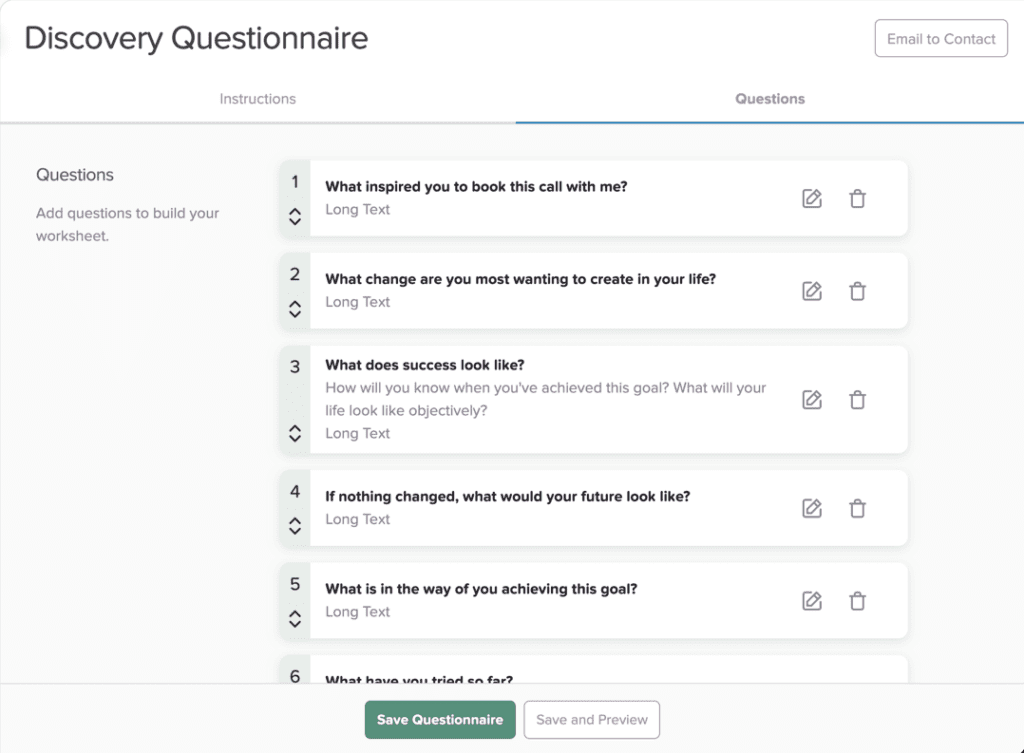
Once a discovery call converts to a paying engagement, the same single-link logic continues.
The client clicks, reviews the coaching package, signs the agreement, schedules their first session, and pays, all from one URL you send them.
You configure that sequence once.
That said, this onboarding flow is not infinitely flexible. Custom branding on booking pages is a Pro plan feature. If you’re an executive coach where a polished, white-labeled client experience is part of how you signal premium positioning, the Essentials plan won’t get you there. A corporate executive coach billing $500/hour sends a different signal with a branded portal than a $200/month beginner coach does.
One problem I’ve seen is that when a client books multiple sessions at once, Satori releases all associated intake forms simultaneously rather than timing each form to release just before the relevant session.
For coaches building structured multi-month programs where you want specific reflection prompts dripped at the right moments, this is a real workflow gap.
Feature #2: Scheduling and Calendar
Satori’s scheduling handles the core needs such as availability rules, timezone conversion, calendar sync (Google, Apple, Outlook), buffer times between sessions, and automated reminders that reduce no-shows.
The timezone handling is especially solid.
It translates your availability into the client’s local time in the booking interface, which removes a common source of missed sessions for coaches with international clients. That sounds minor until you’re running sessions across five time zones.
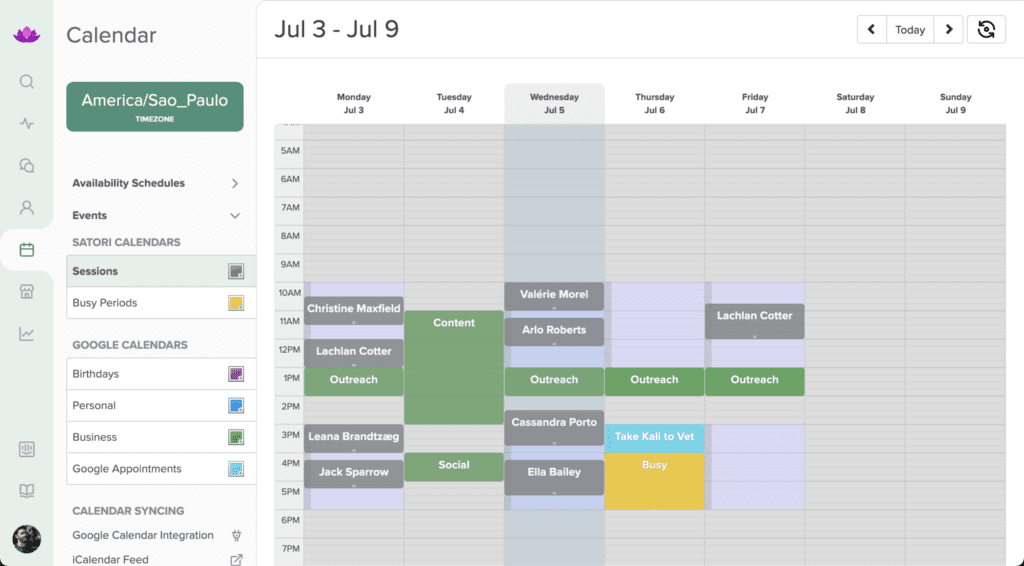
Where it falls short is calendar sync depth. Satori sessions push to your external calendar, but external calendar events don’t block Satori availability automatically.
If you have a busy outside schedule and don’t manually block time in Satori, double-bookings can happen (trust me, it’s very frustrating when that happens).
Another major issue is that Satori does not natively integrate with Zoom. You can connect them through Zapier, but that setup adds friction. For example, meeting links don’t auto-populate in booking confirmations, and the connection requires ongoing configuration to stay stable.
If your sessions are almost entirely Zoom-based, test this workflow carefully during the trial before committing. CoachVantage, by comparison, handles Zoom natively.
Feature #3: Coaching Program Delivery
This is the feature layer that separates Satori from simpler scheduling tools, and where the coaching-specific design shows most clearly.
You can build structured programs with intake forms, session packages, check-in prompts, session notes, and progress tracking tied to each engagement.
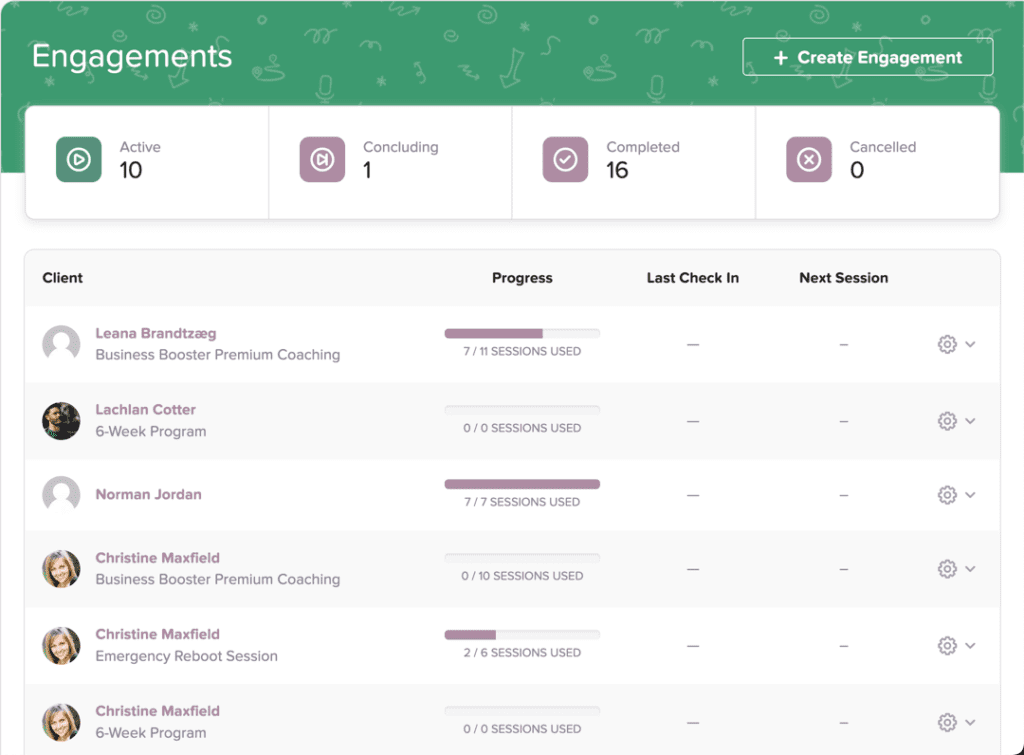
The check-in prompt feature is particularly well thought through. For example, before each session, Satori sends your client a brief agenda or reflection prompt and you see their response before you get on the call.
That changes the quality of session prep significantly as it allows you to start from a shared context.
Session notes, agreements, and resources attach to the coaching engagement record and remain visible in the client portal over time. For coaches managing 3–6 month programs, that running history is genuinely useful. It also feeds directly into the coaching log, which tracks paid versus pro-bono hours and exports a certification report for ICF submissions.
If you’re working toward ACC, PCC, or MCC credentials, this is a concrete operational benefit for your business.
What’s missing are course content hosting, video lessons, curriculum structure, goal tracking, and anything resembling a community space.
Satori manages the live coaching relationship.
But it does not deliver self-paced content alongside it. If your model blends 1:1 coaching with structured course modules, you’ll need a separate tool for the course side.
Feature #4: How Satori Feels to Your Clients
Satori’s client portal is clean, minimal, and organized. Your clients see their schedule, agreements, billing history, shared resources, and session notes in one place.
They can reschedule a session, download a shared file, or check their next appointment without emailing you. For clients who value being treated professionally and not having to dig through their inbox, that experience reinforces your positioning as a serious practitioner.
But the experience does not feel dynamic, transformational, or community-driven.
There’s no progress dashboard, no goal visualization, no comment threads, no sense of momentum beyond the next session.
For executive coaching or performance coaching where the relationship is transactional and professional, that minimalism works.
For transformational life coaching or coaching programs where emotional engagement and visible progress tracking are part of the value delivery, clients may experience the portal as sparse.
Feature #5: Billing and Payments
This is one of Satori’s genuinely strong areas, and it matters more than it might initially appear.
Satori handles subscriptions, one-time payments, custom billing cycles, payment plans, and discounts. For high-ticket programs (anything from $3,000 to $15,000) the installment billing automation changes the conversion math meaningfully.
When a prospect can say yes to four automatic monthly payments instead of a single upfront payment, your close rate on discovery calls naturally improves.
Satori manages the billing schedule and handles failed payment follow-up automatically.
There are no platform transaction fees on top of Stripe or PayPal rates. You keep the full amount minus standard processor costs.
When I last used Satori, applying a discount required creating a separate offer at the discounted price rather than applying a code to an existing offer.
It appears to have improved, but if promotional pricing and discount codes are central to how you sell, verify the current state of this during your trial.
Feature #6: Reporting and Business Dashboard
Satori’s reporting is functional rather than deep. Your reporting dashboard shows revenue over the last 30 days, expected revenue for the next 30 days, active engagements, upcoming sessions, and pipeline view.

For a solo coaching practice, that’s enough to understand whether your business is healthy and whether your billing is on track.
What you won’t find are things like funnel conversion data, discovery-to-client close rates, marketing attribution, or advanced segmentation.
Satori is not a marketing analytics tool. But in my experience, if a report you need doesn’t exist, the support team is quite responsive to requests and creates custom reports for you.
The coaching log remains the most operationally specific reporting feature. For ICF certification candidates, the ability to export categorized hours on demand is something very few platforms handle as cleanly.
Satori’s Scalability Ceiling
Satori is great for beginner and mid-tier coaches. But as your business starts to scale, the platform has some clear limitations.
The 150-client cap on the Leader plan is real and worth planning around. A coach running standard 1:1 programs with 25 active clients needs the Pro plan immediately.
A coach running group cohorts of 20 people across multiple programs will count those numbers toward their active client limit and hit thresholds faster than expected.
Satori is optimized for depth of engagement per client, not volume of clients across the board.
For example, a boutique practice with 30–60 active clients at any time — charging $3,000–$10,000 per engagement — fits the platform extremely well.
But a scaled coaching business running hundreds of lower-ticket clients through group programs will need to evaluate whether the client caps work for their model before committing.
Satori as a Coaching CRM
I’ve seen people describe Satori as a coaching CRM, which is partially accurate and worth unpacking.
I can tell you from experience that it is not a traditional CRM in the sales and marketing sense. There’s no lead scoring, no pipeline stages, no marketing automation, no email sequences, and no contact management for cold prospects.
Within an active coaching relationship, however, it does function as a delivery CRM: session history, session notes, agreements, payment records, intake responses, and engagement logs are all tied to the client record.
That makes it a strong operational record-keeping tool for active clients.
Think of it as a delivery CRM rather than a marketing CRM as it manages relationships once they exist, not the process of building them.
If you want a true CRM for prospecting and pipeline management, Satori does not replace HubSpot, Zoho, or purpose-built sales tools. It replaces the operational chaos after someone becomes your client.
When Should You Get Satori? My Honest Verdict
If you’re a new coach selling structured packages like a three-month program, a six-session engagement, or anything with a defined scope and a real price tag, get Satori.
Start on the Pro plan at $49/month. It will replace the Calendly-Stripe-Google Docs patchwork immediately, and your clients will have a cleaner experience from day one than most established coaches offer.
During your 15-day trial test the Zoom-Zapier connection before you commit. The meeting link won’t auto-populate in booking confirmations without setup.
If that friction bothers you, CoachVantage handles Zoom natively and is worth a look. But if Zoom automation is not a dealbreaker, Satori is where I’d start.
If you’re a more established coach asking whether to switch to Satori from your current setup, the question is whether your main problem is operational like scattered tools, manual invoicing, inconsistent onboarding, time lost to admin? Satori solves that.
If your main problem is generating clients, building an audience, or hosting courses, Satori does not solve that and won’t try to.
Satori is not a coaching platform with an LMS, course features, or a marketing system. It’s the operations layer for coaching delivery.
It is not the most feature-rich coaching platform but it is certainly one of the most coherent.
For coaches whose business model is high-touch, package-based coaching, and whose biggest pain is the back-office chaos that comes with growth, that coherence is exactly what you need.
Frequently Asked Questions (FAQs)
What is Satori?
Satori is a coaching practice management software. It handles client discovery calls, onboarding, session scheduling, coaching program delivery, contracts, billing, and coaching hour tracking in one platform. It is built specifically for coaches rather than adapted from general business software.
Does Satori have a free trial?
Yes — 15 days with full platform access, no credit card required. There is also a 30-day money-back guarantee after you start a paid subscription.
Does Satori integrate with Zoom?
Not natively. Zoom can connect through Zapier, but the meeting link does not auto-populate in client booking confirmations and the setup requires ongoing maintenance. This is the most consistently cited limitation among active Satori users who run video-call-heavy practices.
Is Satori good for life coaching?
Yes. Life coaches are one of Satori’s core user groups. The platform’s discovery questionnaires, structured program packages, session check-in prompts, and client portal map directly to how most 1:1 life coaching engagements run.
Is Satori a coaching CRM?
Partly. Satori functions as a delivery CRM — it manages active client relationships including session history, notes, billing, and contracts. It is not a marketing CRM and does not handle lead generation, prospect pipelines, or email automation.
What are the best alternatives to Satori?
CoachVantage is the closest competitor for solo coaches, adding native Zoom and landing pages at a similar price. Paperbell is simpler and cheaper for early-stage coaches. Coaches Console is more comprehensive but significantly more expensive. Kajabi Coaching makes sense if course delivery is your primary business model.
Does Satori have a mobile app?
No. Satori is mobile-responsive in the browser but there is no dedicated iOS or Android app. Coaches who need to manage active client workflows from a phone on the go will notice this.
Can Satori track ICF certification hours?
Yes. Satori’s coaching log tracks and categorizes coaching hours — paid and pro-bono — and exports a report formatted for ICF certification submissions. This is one of the few coaching platforms that handles ICF tracking natively.
What is the Satori Scholar plan?
A free plan for coaches actively pursuing a coaching certification. It allows unlimited pro-bono client work. You apply for it on the Satori website.
Can multiple coaches use Satori together?
Limited support for multi-coach use exists on the Leader plan (virtual assistant logins). Satori is primarily designed for solo practitioners. Coaching organizations managing multiple coaches at scale will likely need a different platform.
Table of Contents