

TL;DR: Podia vs Thinkific — Which One Should You Pick?
Podia and Thinkific are both leading online learning platforms built for completely different audiences. Thinkific is a specialized e-learning platform for professionals looking to create in-depth and tailored learning experiences for their customers. Podia is a lightweight all-in-one platform that offers a little bit of everything without going too deep.
I recommend Thinkific because it’s a superior online learning platform built for scalability.
Note: This page contains affiliate links. If you purchase through links on this page, we may earn a commission at no additional cost to you.
I’ve used both Podia and Thinkific to sell courses and digital products for years.
Both let you sell courses, coaching, and memberships, and both offer email marketing features.
But that doesn’t tell you anything about the actual utility of their features.
Since I’ve used them extensively, understand that these platforms are not close substitutes.
Thinkific is a stronger learning platform. Podia is more affordable and includes email marketing out of the box.
The right choice depends on whether you want to create an excellent learning experience for your customers or want an affordable platform that offers a little bit of everything without going too deep.
In this detailed comparison, I’ll help you compare the core use cases, features and actual cost of Podia and Thinkific so that you can choose the platform that fits your needs.
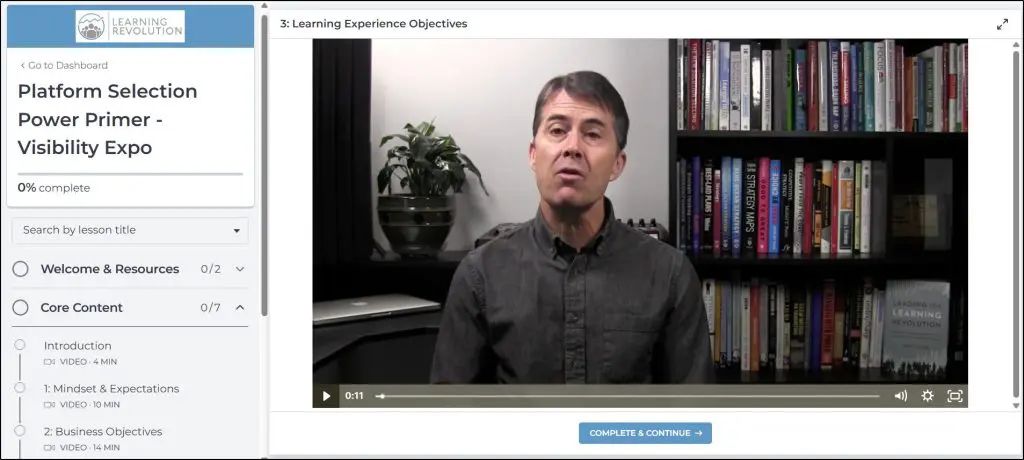
Yes, that’s me in one of my courses hosted on Thinkific
Podia vs Thinkific: The Main Differences
Thinkific is built around the learning experience. Its course builder, assessment tools, and learner management features are the best in its price range for course creators who care about how students progress through content.
Podia is built around simplicity and affordability. It trades depth for an all-in-one approach that includes email marketing and webinar hosting at a lower base price.
These two platforms share the same audience on the surface but serve different needs underneath.
| Podia | Thinkific | |
| Best for | PodiaSolo creators who want one tool covering courses, email marketing, and memberships without paying for separate software. Good fit if you sell digital products alongside courses, want webinars built in, and don’t need deep student assessment features. Best used as an affordable all-in-one starting point. | ThinkificCourse creators who care about the quality of the learning experience they deliver. Right fit if you need quizzes, graded assignments, certificates, compliance controls, or structured progression through content. Also better for selling to corporate or business clients. You’ll need a separate email tool for marketing. |
| Pricing | ||
| Starting price | $33/mo (Mover, annual). A 5% fee on every sale applies on this plan, so your real cost goes up with revenue. Shaker at $75/mo removes that fee entirely. | $74/mo (Start, annual). No transaction fee if you use Thinkific’s built-in payments. Using your own Stripe adds a 2% surcharge on the Start plan. |
| Free trial | 30 days, no credit card needed. No free plan exists. | 30 days, no credit card needed. No free plan exists. |
| Courses | ||
| Course creation | Clean and simple. You build lessons with video, audio, text, or PDFs. Easy to set up, but you can’t enforce a lesson order or require students to finish a video before moving on. | More control over how students move through content. You can lock lessons, require video completion, set prerequisites, and drip content on a schedule. Better for structured learning programs. |
| Quizzes and assessments | Basic multiple-choice questions only. No surveys, no graded assignments, no way to submit work for your review. | Full toolkit: quizzes, surveys, graded assignments, compliance controls, and multiple exam types. Students can submit work; you can review and score it. |
| Certificates | Completion certificates included on both plans. | Completion certificates included from the Start plan, with more customization options than Podia. |
| Email marketing | ||
| Email tools included | A full email platform is built in. You can send broadcasts, build automations, segment your list, and email anyone who has signed up, whether they bought a course or not. First 100 subscribers free; paid tiers above that. | Automated sequences for new leads and abandoned cart emails are included. Broadcasting to your full student base requires the Grow plan ($149/mo). You can’t email contacts outside your course school at any plan level. |
| Memberships | ||
| Recurring memberships | Available on both Mover and Shaker. You can charge monthly or annual fees for access. | Available from the Start plan ($74/mo) and above. Not included on the Basic plan ($36/mo). |
| Marketing tools | ||
| Affiliate program | Available on Shaker ($75/mo) only. Not included on Mover. | Available from the Start plan ($74/mo). Included at the same tier as most other core features. |
| Webinars | Native webinar hosting on both plans. You can run live, pre-sell, and recorded webinars without a third-party tool. | No native webinar hosting. Live sessions run through Zoom, which integrates from the Start plan. You need an active Zoom account. |
| PayPal for students | Shaker only ($75/mo). Not available on Mover. | Grow plan only ($149/mo). Not available on Start or Basic. |
| Branding | ||
| Remove platform branding | Shaker only ($75/mo). On Mover, “Powered by Podia” appears in your student experience. | Grow plan only ($149/mo). On Basic and Start, Thinkific branding appears on your site and student emails. |
| Try Podia For Free Now | Try Thinkific for Free Now | |
What Is Podia?

Podia is a lightweight all-in-one platform designed for solo creators and small business owners who want to sell courses, digital downloads, and memberships from one place without complex setup.
I’ve been using it since 2018 and have recommended it to many course creators in my community.
What it does well is simplicity.
You can go from signup to a live course page faster on Podia than on almost any other platform. Its interface doesn’t fight you and support is genuinely responsive.
Plus, the email marketing tool is included rather than sold as an add-on, which matters a lot at the price point Podia operates at.
But Podia lacks depth.
It doesn’t let you customize learning experiences like a specialized platform and its website builder doesn’t offer much design control.
And the moment your business needs more than basic course delivery and email, you start hitting Podia’s edges.
Core features:
- Unlimited courses, digital downloads, and memberships on both plans
- Built-in email marketing with automations, broadcasts, and sequences
- Website and landing page builder with basic customization
- Webinar hosting including live, pre-sell, and recorded webinars
- Course certificates on both plans
- Affiliate marketing on Shaker only
- Community feature on both plans
- Zapier actions on Shaker only
- PayPal on Shaker only

What Is Thinkific?
Thinkific is an online course platform where I currently host six different courses across Learning Revolution, Leading Learning, and Tagoras.
It is among the top online learning software that lets you create in-depth learning journeys for your customers and offer your content in a fully branded environment.
Thinkific’s strength is the learning experience it lets you build. Its course builder gives you fine control over how students progress through content. Quizzes, assignments, compliance tools, and completion certificates are built in at the Start plan.
The site builder is more flexible than Podia’s. And for creators who sell to business clients or corporate learners, Thinkific has features Podia simply doesn’t.
Its weakness is pricing. Thinkific looks affordable at the Basic plan ($36/month annually) until you realize that memberships, certificates, bundles, and payment plans all require the Start plan at $74/month. And if you use your own Stripe account instead of Thinkific Payments, a transaction surcharge applies on every sale.
Core features:
- Drag-and-drop course builder with drip content and lesson sequencing
- Memberships, subscriptions, and course bundles (Start and above)
- Quizzes, assignments, surveys, and completion certificates (Start and above)
- Student compliance controls including mandatory video completion
- Site builder with HTML and CSS editing (Start and above)
- Native email automation for lead nurture and abandoned cart recovery
- Zoom integration for live sessions (Start and above)
- Affiliate management (Start and above)
- App store with third-party integrations

Podia vs Thinkific Pricing: What Does Each Platform Actually Cost?
Pricing on both platforms is more complicated than the headline number. Podia charges a 5% transaction fee on its cheaper Mover plan. Thinkific charges a per-transaction surcharge if you use your own Stripe account. Both of these can change your real cost significantly.
Podia Pricing
Podia has two paid plans. There is no free plan. Both come with a 30-day free trial and no credit card required to start.
- Mover: $33/month (annual) or $39/month (monthly)
- Shaker: $75/month (annual) or $89/month (monthly)
The most important thing to understand about Podia’s pricing is the transaction fee.
On Mover, Podia takes 5% of every paid sale on top of Stripe’s standard 2.9% + $0.30. On Shaker, that 5% disappears entirely.
| Mover | Shaker | |
| Annual price | $33/month | $75/month |
| Monthly price | $39/month | $89/month |
| Platform transaction fee | 5% | 0% |
| Courses and students | Unlimited | Unlimited |
| Email marketing | Yes (100 subs free) | Yes (100 subs free) |
| Affiliate marketing | No | Yes |
| PayPal | No | Yes |
| Zapier actions | No | Yes |
| Remove Podia branding | No | Yes |
| Free migration | Up to 20 products | Up to 30 products |
Thinkific Pricing
Thinkific has four plans. Basic, Start, Grow, and Expand. There is no free plan.
Basic, Start, and Grow each come with a 30-day free trial. Expand and Plus require a sales conversation.
- Basic: $36/month (annual) or $49/month (monthly)
- Start: $74/month (annual) or $99/month (monthly)
- Grow: $149/month (annual) or $199/month (monthly)
- Expand: $374/month (annual)
I recommend the Start plan if you’re a beginner. Basic doesn’t include memberships, certificates, bundles, or payment plans for students.
If any of those are part of your business, you’ll upgrade within weeks. Starting on Basic and then realizing mid-launch that memberships require Start is a painful and entirely avoidable situation.
You should also understand how Stripe surcharge impacts pricing. If you use Thinkific Payments (their built-in processor), there is no surcharge.
If you connect your own Stripe account, Thinkific charges an additional fee per transaction on top of Stripe’s standard rate.
| Plan | Stripe Surcharge (own Stripe) |
| Basic | 5% |
| Start | 2% |
| Grow | 1% |
| Expand | 0.5% |
| Plus | None |
My strong recommendation is to use Thinkific Payments from the start unless you have a specific reason to need your own Stripe account. It processes at the same rate as Stripe and removes the surcharge entirely.
Podia vs Thinkific Pricing Comparison
| Podia Mover | Podia Shaker | Thinkific Start | Thinkific Grow | |
| Annual price | $33/mo | $75/mo | $74/mo | $149/mo |
| Transaction fee | 5% | 0% | 0% (Thinkific Pay) | 0% (Thinkific Pay) |
| Email marketing | Full | Full | Lead sequences + cart | Lead sequences + cart + mass email |
| Memberships | Yes | Yes | Yes | Yes |
| Certificates | Yes | Yes | Yes | Yes |
| Affiliate tools | No | Yes | Yes | Yes |
| Remove branding | No | Yes | No | Yes |
Comparing Podia Shaker vs Thinkific Start makes sense because they cater to similar end users (and they cost virtually the same.)
Podia Shaker at $75/month includes full email marketing and affiliates. Thinkific Start at $74/month includes better course creation, quizzes, assignments, compliance tools, and Zoom.
What Podia and Thinkific Actually Cost As Revenue Scales
You’ll only get a real sense of pricing once your business scales with any of these platforms. Transaction costs and Stripe fees play a decisive role here.
Let’s say your selling a $100 course on Podia Mover ($33/month (annual). 5% platform fee. Stripe 2.9% + $0.30 per transaction.)
| Monthly Revenue | Platform Fee | Transaction Fee (5%) | Stripe Fees | Total Out of Pocket |
| $500 | $33 | $25 | $17 | $75 |
| $2,000 | $33 | $100 | $64 | $197 |
| $5,000 | $33 | $250 | $160 | $443 |
| $10,000 | $33 | $500 | $320 | $853 |
| $30,000 | $33 | $1,500 | $960 | $2,493 |
Now take the same example for Podia Shaker ($75/month (annual). 0% platform fee. Stripe 2.9% + $0.30 per transaction. Based on $100 course price.)
| Monthly Revenue | Platform Fee | Transaction Fee | Stripe Fees | Total Out of Pocket |
| $500 | $75 | $0 | $17 | $92 |
| $2,000 | $75 | $0 | $64 | $139 |
| $5,000 | $75 | $0 | $160 | $235 |
| $10,000 | $75 | $0 | $320 | $395 |
| $30,000 | $75 | $0 | $960 | $1,035 |
The break-even between Podia Mover and Shaker is $840/month in revenue on annual billing.
Above that, Shaker costs less.
At $5,000/month, staying on Mover costs $208/month more. At $10,000/month, it costs $458/month more.
That’s $5,496/year going to Podia in transaction fees that disappear entirely if you upgrade.
Now let’s compare thinkific plans the same way.
Thinkific Start: $74/month (annual). 0% fee using Thinkific Payments. Stripe 2.9% + $0.30 per transaction if using own Stripe, plus 2% surcharge.
Using Thinkific Payments (recommended):
| Monthly Revenue | Platform Fee | Processing (Stripe) | Total Out of Pocket |
| $500 | $74 | $17 | $91 |
| $2,000 | $74 | $64 | $138 |
| $5,000 | $74 | $160 | $234 |
| $10,000 | $74 | $320 | $394 |
| $30,000 | $74 | $960 | $1,034 |
At comparable revenue levels, Podia Shaker and Thinkific Start cost almost exactly the same when both use their built-in payment processors.
But they serve different purposes as you’ll understand when I explain their features.
Podia vs Thinkific Features: What Can You Actually Do With Them?
I’m comparing the five areas that matter most for course creators choosing between these platforms.
Feature #1: Course Creation
Podia
Podia’s course builder does the job without getting in the way. You structure courses into sections and lessons, add video, audio, PDF, or text content to each lesson, configure drip schedules, and set up upsells or bundles.
The interface is genuinely clean and first-timers rarely get stuck.
What it doesn’t do is give you control over how students move through content. You can’t enforce lesson order or require video completion before accessing the next lesson. You can’t create graded assignments where students submit work for your review.
Surveys don’t exist natively, and while certificates are included, the customization options are limited.
Thinkific
Thinkific’s course builder is the best I’ve used at this price point. You can have unlimited chapters and lessons, mix content types freely across lessons, enforce lesson sequences, require video watching before advancing, and offer free preview lessons to prospective buyers.
Adding quizzes, assignments, and downloadable files to specific lessons is straightforward.
The compliance tools matter in practice. If you’re building a certification program or corporate training where you need to prove students completed specific content, Thinkific gives you the controls to enforce that. Podia doesn’t.
Winner: Thinkific. The gap in course creation depth is significant, not marginal.
Feature #2: Student Experience
Podia
The student experience on Podia is clean and functional. The course page shows the curriculum with chapters and lessons listed in order. The lesson view puts the main content in the center with the course outline in the sidebar. It works. Students rarely complain about navigation confusion.
What’s missing is a progress bar. Thinkific shows students exactly how far along they are in a course. Podia doesn’t, which may seem minor but affects completion rates in practice.
Thinkific
Thinkific’s student experience is its strongest asset. The lesson page is distraction-free, with the video or content taking up most of the screen and the course navigation in a clear sidebar. The progress bar is visible throughout. Students can track exactly where they are in the course at a glance.
For structured learning programs where completion matters, Thinkific’s student-facing experience is noticeably better.
Winner: Thinkific
Feature #3: Email Marketing
Podia
This is where Podia wins decisively over Thinkific at comparable price points. Both Mover and Shaker include Podia Email, which handles broadcasts, automated sequences, tagging, and segmentation.
The first 100 subscribers are free. Above that, you pay based on list size at rates that are genuinely competitive with standalone email platforms.
A coach on Shaker with 5,000 subscribers pays $75 + $20 = $95/month total, which covers their course platform and email tool. Paying $74/month for Thinkific Start and then $79/month for a tool like Kit separately costs $153/month for the same capability.
Podia Email is not ActiveCampaign or even MailChimp. Complex behavioral sequences with conditional branching and lead scoring will hit its ceiling.
But for welcome sequences, launch campaigns, and regular student communication, it covers everything most course creators need.
Thinkific
Thinkific includes lead nurture email sequences and abandoned cart emails through TCommerce on all plans.
On the Grow plan ($149/month), you get Mass Email to broadcast to your existing student base. But at no plan level can you email contacts who aren’t already in your Thinkific school.
For external list building and marketing, you need a separate email tool alongside Thinkific.
The email tools Thinkific includes are useful. They’re just not a substitute for a dedicated email platform.
Winner: Podia for course creators who want email marketing included. If you already pay for a dedicated email tool and won’t drop it, this advantage disappears.
Feature #4: Assessment and Teacher Features
Podia
Podia offers course certificates, basic multiple-choice questions within lessons, and the ability to add downloadable files as assignment content.
That’s the full range.
There are no graded assignments, no surveys, no compliance controls, and no formal exam features. For straightforward course delivery, this works.
For anything more structured, it runs out quickly.
Thinkific
Thinkific’s assessment toolkit is genuinely comprehensive at the Start plan level. You can create quizzes, surveys, graded assignments with student submissions, and multiple exam types. Completion certificates are automatically issued when students meet criteria you define. You can enforce video watching, set lessons as prerequisites to others, and enable drip courses with time-based unlocking.
For coaches building certification programs, educators who need to verify content completion, or anyone selling training to corporate clients with compliance requirements, Thinkific’s features are meaningfully better.
Winner: Thinkific.
Feature #5: Course Marketing
Podia
Podia gives you a complete affiliate management system on the Shaker plan, discount coupons, upsells, product bundles, course previews, landing pages, and embeddable sales widgets.
The webinar hosting is genuinely strong for a platform at this price, supporting live, pre-sell, and recorded webinars natively.
Thinkific
Thinkific includes affiliates from the Start plan, discount coupons, order bumps, post-purchase upsells, free lesson funnels, landing pages, and embeddable course widgets.
Zoom integration for live sessions is included at Start. The app store gives you access to dozens of third-party tools for specific marketing goals.
What Thinkific doesn’t include natively is a full email marketing platform, which means any serious marketing effort beyond lead capture sequences requires an external tool. Podia doesn’t have that gap.
Winner: Draw. Thinkific has a more complete integration story. Podia includes more natively at lower cost. Which matters more depends on how you market.
Podia vs Thinkific Pros and Cons
| Podia | Thinkific | |
| Strengths | Email marketing included | Superior course builder |
| More affordable entry price | Quizzes, surveys, certificates, compliance | |
| No product or student limits | Better student experience | |
| Webinar hosting native | Affiliate tools from Start plan | |
| Simpler setup and interface | Stronger site builder | |
| Weaknesses | 5% fee on cheaper plan | No native email broadcast below Grow |
| Thin analytics | Stripe surcharge if not using Thinkific Pay | |
| Limited site customization | Memberships need Start plan ($74/mo) | |
| No compliance or assignment tools | Higher cost for comparable features | |
| No marketplace for discovery | Limited webinar hosting |
Verdict: Podia vs Thinkific | Which Is Right For You?
I recommend Thinkific 9 out of 10 times when comparing it with Podia. The reason is simple.
Podia tries to offer a little bit of everything and ends up offering your platform that really isn’t built for scaling. It lacks depth and is only good as long as you’re a beginner or don’t have a large customer base.
Thinkific on the other hand, is built for scaling. It doesn’t have native email marketing like Podia but that’s its only drawback in this comparison.
In my experience, Thinkific’s course creation and learning experience features are far superior. It lets you create programs where you can tailor your content to the needs of your learners.
So, unless you need a lightweight all-in-one platform, Thinkific is the way to go for any serious e-learning professional.
Frequently Asked Questions
Is Podia better than Thinkific?
Not really. Thinkific is better for course creation quality, student assessments, and learning experience. Podia is a lightweight all-in-one platform if you need email marketing included. But it lacks depth. For creators who want a dedicated learning platform, Thinkific wins. For those prioritizing total cost with email included, Podia is the stronger value.
Which is cheaper, Podia or Thinkific?
Podia Mover ($33/month) is cheaper to start, but the 5% transaction fee makes it more expensive than Podia Shaker once you exceed $840/month in revenue. Podia Shaker ($75/month) and Thinkific Start ($74/month) cost virtually the same. Thinkific Basic ($36/month) is cheapest overall, but it excludes memberships, certificates, and bundles.
Does Podia have a free plan?
No. Podia discontinued its free plan in late 2024. Both plans come with a 30-day free trial with no credit card required.
Does Thinkific have a free plan?
No. Thinkific discontinued its free plan as well. It offers a 30-day free trial on Basic, Start, and Grow plans with no credit card required.
Can I migrate from Podia to Thinkific (or vice versa)?
Podia offers free migration of up to 20 products on Mover and 30 on Shaker, including course content and student email addresses. Thinkific allows data export, but course content doesn’t export in a portable format. If you’re not committed to a platform, don’t build a large video library natively on either one. Keep your video on a host like Vimeo and embed it.
Which platform is easier to use for beginners?
Both are genuinely beginner-friendly. Podia has a slight edge in simplicity of initial setup. Thinkific’s course builder has more options but is still intuitive enough for non-technical users. Neither requires any coding knowledge.
Does Podia charge transaction fees?
Yes, on the Mover plan only. Podia takes 5% of every paid sale, separate from Stripe’s 2.9% + $0.30. On Shaker, the platform fee is 0%.
Does Thinkific charge transaction fees?
Thinkific charges 0% platform fees when you use Thinkific Payments. If you use your own Stripe account, it charges an additional surcharge per transaction: 5% on Basic, 2% on Start, 1% on Grow. Use Thinkific Payments to avoid this entirely.
Which platform is better for membership sites?
Both support memberships, but you need Podia’s base plans or Thinkific’s Start plan and above. If you’re building a subscription model around structured courses with completion tracking and certificates, Thinkific handles that better. If you want memberships bundled with email marketing at the lowest total monthly cost, Podia is more efficient.
Which platform is better for selling digital products?
Podia handles digital downloads natively across both plans without any limits. Thinkific supports digital downloads as well. If digital products (not courses) are your primary business, Podia’s interface for managing them is more straightforward.

Jeff Cobb, Founder of Learning Revolution
Jeff Cobb is an expert in online education and the business of adult lifelong learning. Over the past 20+ years he has built a thriving career based on that expertise – as an entrepreneur, a consultant, an author, and a speaker. Learning Revolution is a place where Jeff curates tips, insights, and resources to help you build a thriving expertise-based business. Learn more about Jeff Cobb here.
Table of Contents
Related Posts
Podia Review (2026): Is The New Community Angle Worth Using?
Are Thinkific’s Email Marketing & Automation Features Worth Using (2026)
New Podia Pricing (2026): Use Fee Calculator To Find Actual Costs (No Free Plan)