
TL;DR — What Is Be.Live And Is It Worth Using (2026)
Be.Live is a browser-based live streaming platform built to help creators, educators, and sellers run professional live streams without technical complexity. It solves a simple problem: going live across multiple platforms, engaging viewers, and—where relevant—turning live sessions into sales, all from one place.
Be.Live Plans at a glance
Free plan – Limited monthly streams, basic branding, useful for testing the platform.
Starter ($14.16/mo billed annually) – For light, regular streaming with basic multistreaming.
Pro ($24.16/mo billed annually) – Unlimited streaming, more destinations, higher video quality, and AI engagement tools.
Growth ($38.33/mo billed annually) – Built for frequent streamers with larger teams, more guests, and longer storage.
What Be.Live lets you do – Main features
Go live from your browser: No downloads or complex setup required.
Multistream in one click: Broadcast to YouTube, Facebook, LinkedIn, Amazon Live, and RTMP destinations at the same time.
Run guest and panel sessions: Bring multiple people on screen without asking them to install software.
Engage viewers on screen: Highlight comments, add lower thirds, and use simple engagement widgets.
Sell on Amazon Live: Showcase products, display carousels, and promote affiliate or owned products during streams.
Record and reuse streams: Save broadcasts and trim them into clips for repurposing.
Add basic branding: Logos, backgrounds, layouts, and overlays to keep streams on-brand.
Best for
Edupreneurs using live streaming to build trust, engagement, and audience
Creators who want a simple alternative to OBS
Amazon Live sellers and affiliates
Coaches running live Q&A, demos, or group sessions
Not for
Creators needing advanced production control or broadcast-grade setups
Those wanting native eCommerce outside Amazon
Users expecting deep video editing or advanced audience automation
High-end live events with complex scene switching and audio workflows
Try Be.Live For Free
If you want to grow your brand’s influence, increase audience engagement, and drive eCommerce sales, seriously consider live streaming your content more often. Why? Because live videos retain audience attention 10-20 times longer than recorded content.
But the quality of your live content heavily depends on your live streaming platform’s features and capabilities. If it offers high-quality streaming, storage, branding, and audience engagement features, you can easily turn raw video streams into professional content that drives results.
This is where Be.Live comes.
If you’ve never heard of this live streaming platform, this detailed Be.Live review will help you decide if it’s the right choice for your streaming needs.
Let’s dive in.

Be.Live Product Snapshot (2026)
| What Be.Live Is | A browser-based live streaming platform designed to run interactive, branded live sessions across multiple platforms |
| Core Problem It Solves | Reduces the technical friction of going live so hosts can focus on engagement, teaching, and guiding viewers toward action |
| Primary Use Case | Multi-platform live streaming with real-time audience interaction |
| Who It’s For | Edupreneurs, coaches, and creators who want live engagement without complex production workflows |
| Standout Capability | Embedded live commerce via Amazon Live, allowing products and affiliate items to be showcased and purchased during the stream |
| How Commerce Works | Uses Amazon Live’s native product carousel and shopping experience (no built-in cart outside Amazon) |
| Supported Platforms | YouTube, Facebook, LinkedIn, Amazon Live, and custom RTMP destinations |
| How It’s Commonly Used | Live workshops, Q&A sessions, coaching calls, demos, and product-linked educational streams |
| What It’s Not | A full eCommerce platform or advanced video production/editing tool |
| Starting Price | Free plan available; paid plans start at approximately $14/month (billed annually) |
What Is Be.Live?

Be.Live is a browser-based live streaming platform built for people who use live video to engage an audience and drive outcomes, not to manage complex production setups.
It allows edupreneurs, coaches, and creators to run professional live sessions across multiple platforms from a single interface, without relying on desktop software or technical workflows.
At its core, Be.Live solves a practical problem: running consistent, interactive live streams becomes harder as soon as you move beyond a single camera and a single platform.
Managing guests, layouts, comments, and multiple destinations often pulls attention away from the content itself. Be.Live exists to simplify that process so hosts can focus on teaching, discussion, and engagement rather than tools and setup.
The platform is designed for live workshops, coaching calls, Q&A sessions, interviews, and demonstrations. These are formats where real-time interaction matters more than production complexity.
Everything runs in the browser, making it easy to start a session, bring in guests, share screens or slides, and broadcast without technical friction.
How Be.Live stands out with live commerce
Where Be.Live separates itself from many general live streaming tools is in its support for Amazon Live. This matters for edupreneurs whose business model includes selling products, tools, or recommendations alongside their educational content.
Be.Live lets you stream directly to Amazon Live and showcase products during the broadcast using Amazon’s native shopping experience. Viewers can see featured products, explore them, and purchase without leaving the stream.
This makes it possible to sell your own products (where applicable) or earn affiliate commissions by demonstrating and discussing relevant tools, books, or resources in real time.
In practice, this creates a clear path from live engagement to revenue. You can use live sessions on platforms like YouTube or Facebook to teach and build trust, then run product-focused streams on Amazon Live that turn that trust into sales, without changing tools or workflows.
At a high level, Be.Live gives you the ability to:
- Run live streams directly from your browser
- Broadcast to multiple platforms from one place
- Host sessions with guests, panels, or co-hosts
- Share screens, slides, and demonstrations live
- Manage and highlight audience comments during a stream
- Create branded, on-screen layouts without design work
- Record live sessions and reuse them afterward
- Stream to Amazon Live and sell or promote products during broadcasts
Taken together, Be.Live is best understood as a live engagement and monetization platform rather than a production or editing tool. It’s built for edupreneurs who want live video to be a repeatable, business-relevant channel—not a technical project.
Be.Live Pricing & Free Trial (2026)
Be.Live gives you a free plan (no credit card needed) so you can test the studio before paying.
If you like the workflow, there are three paid plans: Starter, Pro, and Growth.
Pricing below is based on annual billing.
Free plan + paid plans
- Free — $0: 3 streams/month, basic branding (with watermark), 2 on-screen participants, 720p.
- Starter — $14.16/mo (billed annually as $170): 7 streams/month, 3x multistreaming, 4 on-screen participants, 30 days storage, 2 team members, 720p.
- Pro — $24.16/mo (billed annually as $290): unlimited streaming, 5x multistreaming, 8 on-screen participants, AI Comment Assistant, 60 days storage, 4 team members, 1080p.
- Growth — $38.33/mo (billed annually as $460): unlimited streaming, 8x multistreaming, 10 on-screen participants, AI Comment Assistant, 90 days storage, 6 team members, 1080p
Be.Live plan comparison table
| Plan | Price (Annual billing) | Key limits & features | Best for |
|---|---|---|---|
| Free | $0 | 3 streams/mo, 2 on-screen participants, 720p, custom branding + watermark, lower thirds | Testing Be.Live, occasional simple streams |
| Starter | $14.16/mo (=$170/yr) | 7 streams/mo, 3x multistreaming, 4 on-screen participants, 30-day storage, team: 2, 720p | Light but consistent streaming + basic multistream |
| Pro | $24.16/mo (=$290/yr) | Unlimited streaming, 5x multistreaming, 8 on-screen participants, AI Comment Assistant, 60-day storage, team: 4, 1080p | Regular creators who want better quality + stronger engagement |
| Growth | $38.33/mo (=$460/yr) | Unlimited streaming, 8x multistreaming, 10 on-screen participants, AI Comment Assistant, 90-day storage, team: 6, 1080p, more Amazon scaling | Frequent streaming, teams, panels, and heavier commerce workflows |
Be.Live Strengths vs Weaknesses
| Pros | Cons |
|---|---|
| Runs entirely in the browser with no software downloads | Lacks advanced studio controls found in tools like OBS (scene switching, audio routing, transitions) |
| Easy to set up for non-technical users | Limited control over stream layouts beyond preset templates |
| Supports multistreaming to major platforms from one dashboard | Multistream limits depend heavily on plan tier |
| Native Amazon Live integration for live selling | E-commerce features are Amazon-only, no native checkout for your own site |
| Built-in audience comment aggregation across platforms | Engagement features are basic compared to dedicated interaction tools |
| AI Comment Assistant helps surface comments automatically | AI comment selection lacks fine-grained rules or moderation logic |
| On-screen branding with logos, lower thirds, and overlays | Branding customization is functional but not deeply flexible |
| Allows multiple on-screen guests without software installs | Guest limits increase only on higher-priced plans |
| Records live streams automatically (plan-based storage) | Recording storage duration is capped and tier-restricted |
| Simple trimming and repurposing tools included | Editing tools are very basic and not suitable for polished post-production |
| Team access available on paid plans | Team seats are limited and scale slowly with pricing |
| Stable option for live coaching, Q&A, and product demos | Not designed for high-production or broadcast-grade live shows |
Be.Live Features | Live Video Streaming To Multiple Platforms
Be.Live offers a wide range of live streaming features to help you create high-quality, engaging video content. Let’s discuss them in more detail.
Create Engaging Live Streams To Multiple Platforms
Be.Live allows you to live stream your video content to multiple social networks and RTMP platforms from a single source. Currently, you can use Be.Live for multi-streaming on Facebook, YouTube, LinkedIn, and Amazon Live.
In addition, you can use Be.Live’s RTMP support to broadcast your content to dozens of other platforms with live streaming tools like OBS.
Creating a new stream in Be.Live is pretty straightforward.
You just need to click the “Set destination” button and choose as many platforms as you want from the support platform drop-down.

Let’s say you choose YouTube from this list. In that case, Be.Live simply pops up a new window where you can connect your YouTube account with it. Once connected, you can start the live stream. After that, you can add more destinations like Facebook or an RTMP connection to stream your content.
Be.Live also gives you the option to schedule your stream if you want to announce it early to your audience. You can choose the time and date of your stream to get a stream link where your audience can watch your content once it goes live.
During a stream, you can choose to disconnect any platform you want. For example, if you only want to run a limited section of your stream on LinkedIn, you can simply say goodbye to your LinkedIn audience after that specific section and disconnect from the platform without impacting the rest of the connections.
So, overall, going live on multiple platforms is quite simple with Be.Live but comes with all the necessary streaming options, as you’ll see in the later sections.
Run Pre-Recorded And Real Time Live Streams
Be.Live allows you to create highly engaging live streams with pre-recorded or real-time content. You can use your laptop’s webcam or an external camera to shoot your video content and broadcast it live to any of your connected social media and video platforms.
But if you don’t want to broadcast live, you can shoot your content but schedule it for later. This way, Be.Live stores your video and plays it at the scheduled time.
Alternatively, you can run pre-recorded streams by uploading recorded videos from your computer or embedding it from an external source like YouTube or Facebook.

Once again, you have the option to play the content immediately or create a premiere to run it live at a scheduled time later.
So let’s say you run a monthly live workshop or course with a small group of students. Instead of delivering your content live every time, you can simply record one of your sessions and play them as a pre-recorded stream for your new students.
You can, of course, join at the end of the session for a live Q&A session if you want. But this approach saves you a lot of time without compromising content quality or audience experience.
Another way to create highly engaging streams with Be.Live is using a split screen. The split screen feature allows you to broadcast content from two different sources on one screen. For example, you can show yourself on one half of the screen and play a presentation or show an image or recorded video on the other half.
This is ideal for tutorials, lengthy presentations, or even giving detailed product demos to your potential customers.
Presentations And Screen Sharing
Apart from live streaming real-time and pre-recorded content, you can use Be.Live to deliver highly engaging workshops and presentations thanks to its screen sharing and presentation features.
With screen sharing, you can show a specific application’s window, your entire desktop, or your browser tab in your live stream. You can switch between these video sources during the stream as needed.

You can also switch between system sounds and your microphone during the stream, allowing you to use the relevant audio source as needed. In addition, your broadcast guests can also share their screens with your audience. But we’ll talk about it later in more detail.
Similarly, Be.Live allows you to upload PDF, PPT, and PPTx presentation slides to your live stream and treats them differently from regular images or videos.
Once you upload a presentation file, you can switch between the slides using the arrow keys. Be.Live shows you all the slides in your presentation separately below the broadcast screen, where you can drag and drop slides to change their order.
Apart from the “Slides” feature, you can also upload and broadcast presentations with Be.Live using Live Sales or by uploading multiple images from the file upload section.
Broadcast To Unlimited Viewers With Multiple Hosts
With Be.Live, there’s no limit to the number of people who can view your broadcast across multiple channels. So, you can stream without worrying, even if you’re broadcasting to your YouTube, Facebook, and LinkedIn profiles simultaneously with several thousand viewers.
You also have the option to invite up to eight on-screen guests to your broadcasts. Guests have more privileges than regular viewers. You can enable their mic and allow them to share their views with your audience, invite them on stage and let them co-host your session, and allow them to share their screen to present any content.
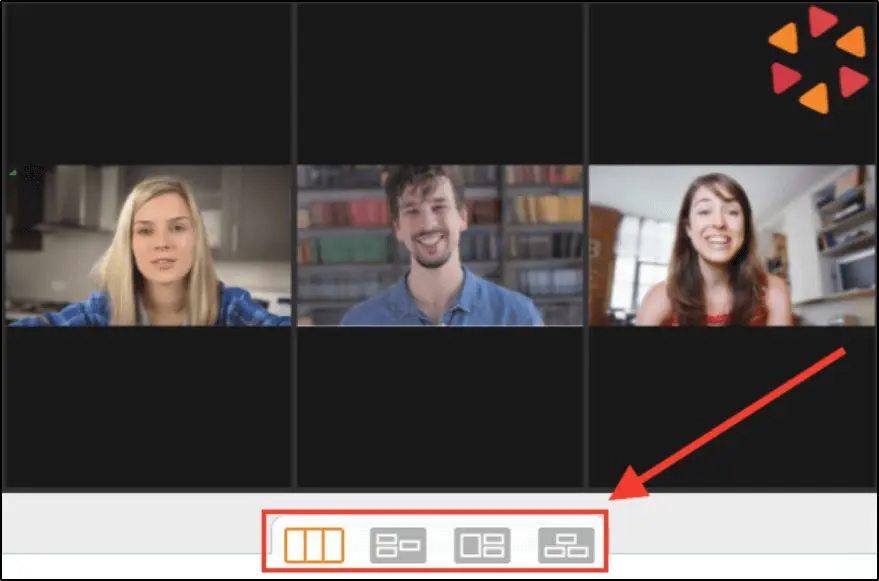
Depending on the number of on-screen guests in your broadcast, you can also choose different display layouts.
Adding guests to your live broadcast makes it more valuable for your viewers. You can add a guest before or during a live broadcast by simply sharing an invitation link with them. Your guests don’t even need to be Be.Live users to join your broadcast and can do so from their smartphones as well.
Skyrocket eCommerce Sales With Amazon Live Videos
One of Be.Live’s unique selling point (USP) is its seamless integration with Amazon Live, using which you can skyrocket your Amazon store and affiliate sales.
Amazon Live is Amazon’s influencer program that allows you to create live and pre-recorded video streams on Amazon and sells directly to your audience during a broadcast.
With Be.Live, you can stream high-quality video content directly to Amazon Live and integrate with your Amazon listings to drive in-video sales with the Live Sales feature.

Here’s how it works.
To broadcast your content to Amazon Live, choose Amazon Live from the destination menu and set up your stream by adding your stream key and URL.
Once connected, you can use Be.Live’s Live Sales feature to add Amazon product listings to your video. Be.Live fetches product pictures and allows you to show them on a split screen during your broadcast.
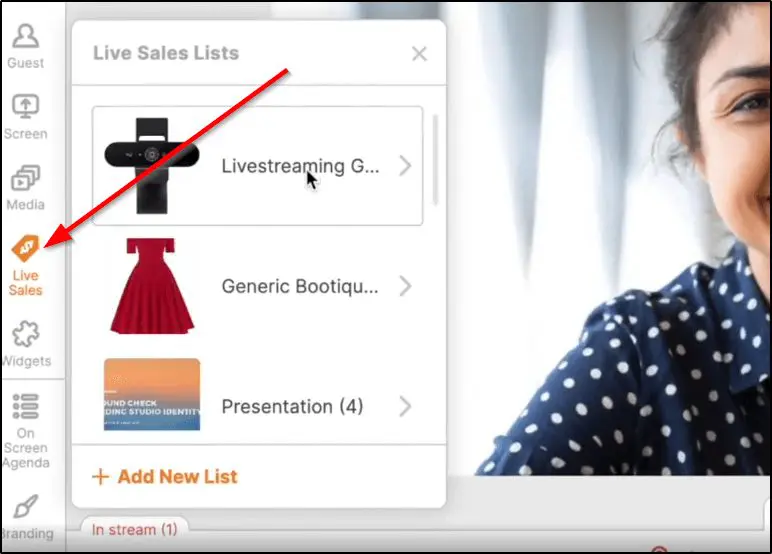
You can use multiple cameras to show your product from different angles and make your broadcast more engaging.

You can switch between products using the arrow keys and add new products to your stream from the Live Sales product list. Be.Live shows product information like product name, price, comments, and reviews on your broadcast screen, creating a more valuable and richer shopping experience.
So, if you’re looking to sell on Amazon or already use Amazon Live, Be.Live can make your content more professional and drive more sales.
Create Fully Branded Live Streams
Be.Live allows you to create streams with your own branded look and feel. For example, you can upload your brand’s logo to give it a distinct and professional look. In addition, you can use the background editor to match your brand’s colors and completely transform your stream’s look and feel.
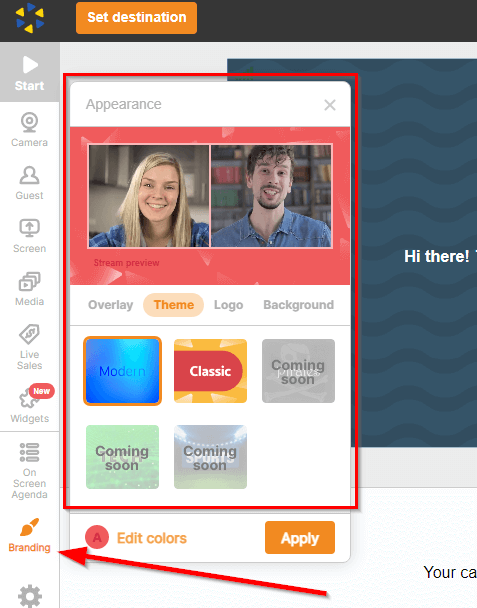
You can also remove your background, use a background template, or upload an image from your computer to use as your stream’s background.
And if you’re streaming from outdoors or somewhere busy, you can easily blur your video’s background to minimize distractions for your viewers.
In short, Be.Live allows you to customize your stream’s appearance and make it your own.
Skyrocket Audience Engagement With Be.Live
Lengthy live stream sessions can sometimes become boring and monotonous. This is why keeping your viewers engaged in different creative ways is critical to retain your viewers all the way.
This is where Be.Live’s engagement features come in handy.
Its most prominent engagement feature is the Comment Assistant. It is an AI-powered tool that helps you find positive comments from audiences across your streaming channels and displays them in your broadcast to all your viewers.

So, for example, if you’re streaming to YouTube and Facebook Live at the same time, you don’t need to switch between tabs to check comments. Instead, Be.Live’s comment assistant automatically finds and highlights positive comments that you can display in your broadcast.
This encourages your viewers to actively participate in discussions and comment on your videos.
Widgets are another creative way to engage your viewers. With Be.Live’s widgets, you can add different effects and elements to your videos depending on your content theme.

You can also add running scripts and captions to your broadcast for announcements or to provide additional context to your content.
Polish And Repurpose Your Content With Video Editor
Be.Live is not only a powerful video streaming platform, but it also comes with video editing features that allow you to polish your content for professional pre-recorded streams.
Using the Be.Live editor, you can trim your content to remove unwanted sections and make it more concise. Plus, you can get insights into audience engagement peaks by viewing your content’s timeline of comments, likes, and views.

The video editor also increases your content’s reach by repurposing it into shorter and more engaging content snippets. This way, you can create multiple content pieces from a single live stream and achieve a higher ROI on your efforts.
For example, you can create 5-10 short clips from your hour-long live stream, add captions, and upload it to YouTube Shorts, TikTok, Instagram, Facebook, and any other relevant platforms for your audience.

Be.Live automatically moves your recorded streams to the broadcast section, where you can use them in the video editor. But you also have the option to record a new video inside the video editor or upload a video file from your computer to edit.
Verdict | Is Be.Live Worth Using For Live Streaming?
For most edupreneurs and creators who want to build audience engagement, run interactive sessions, and connect live content with business outcomes, Be.Live delivers enough quality in its core streaming features to be worth using.
Its interface is intuitive, setup is fast, and its combination of multi-platform streams, guest support, and engagement tools is solid for everyday use. The platform’s eCommerce strength — Amazon Live integration — gives it a clear edge if your monetization strategy includes showcasing products or earning affiliate revenue during live sessions.
When it’s a good choice
Be.Live makes sense when you:
- Want to teach, coach, or engage live without technical overhead.
- Are streaming regularly but don’t need broadcast-level production controls.
- Plan to sell products or affiliate items via Amazon Live as part of your business model.
- Prefer a simple all-in-one workflow instead of juggling OBS, separate chat managers, and multistream plugins.
- Need to bring on guests without asking them to install complex software.
When it’s not the best fit
Be.Live may not be ideal when you:
- Need professional broadcast features like advanced scene transitions, audio mixing, or full production control.
- Want native eCommerce outside Amazon Live, such as integrated checkout or direct digital product selling from your own site.
- Require deep video editing or post-production capabilities beyond basic trimming and repurposing.
- Have workflows that demand high-end analytics or granular control over audience data.
So, is it worth using?
Yes — for most edupreneurs and creators who want reliable, interactive live streaming without a technical barrier.
Be.Live offers enough quality in its streaming and engagement features to make it a useful platform, and its Amazon Live integration adds a meaningful eCommerce dimension that many alternatives don’t provide.
However, if your priority is broadcast-grade control, advanced editing, or native commerce separate from Amazon, you should consider tools that specialize in those areas instead.
Frequently Asked Questions (FAQs)
1. Is Be.Live good for online courses and live coaching?
Yes. Be.Live works well for live coaching sessions, Q&A calls, workshops, and masterclasses where interaction matters more than production complexity. It’s especially useful if you want a simple way to engage learners live without managing technical streaming software.
2. How is Be.Live different from OBS or Streamlabs?
OBS gives you deep production control but requires setup, plugins, and technical knowledge. Be.Live trades that complexity for speed and ease. If your priority is going live quickly, engaging viewers, and multistreaming without headaches, Be.Live is easier. If you want full broadcast control, OBS is stronger.
3. Can Be.Live stream to multiple platforms at the same time?
Yes. Be.Live supports multistreaming to platforms like YouTube Live, Facebook Live, LinkedIn Live, Amazon Live, and custom RTMP destinations. The number of simultaneous platforms depends on your plan.
4. Does Be.Live support Amazon Live selling?
Yes. Amazon Live is one of Be.Live’s standout features. You can display product carousels, show affiliate or owned products on screen, highlight comments, and run shoppable live streams designed to drive Amazon sales.
5. Can I sell my own products directly using Be.Live?
Not directly. Be.Live does not offer native checkout or embedded eCommerce for your own website. Its live selling tools are designed around Amazon Live. For selling your own products, you’d typically use live streams for engagement and direct viewers to external checkout pages.
6. How good are Be.Live’s engagement features?
Be.Live includes comment highlighting, lower thirds, and simple widgets that work well for live interaction. The AI Comment Assistant helps surface comments automatically. These tools are useful but basic. They’re designed for simplicity, not advanced moderation or complex audience automation.
7. Does Be.Live record live streams automatically?
Yes. Streams are recorded based on your plan, with storage limits ranging from 30 to 90 days. You can trim recordings and repurpose clips, but the editing tools are lightweight and meant for quick reuse, not full video production.
8. Is there a Be.Live free plan, or only a free trial?
Be.Live offers a free plan with limited monthly streams, fewer participants, and basic features. It’s suitable for testing the platform before moving to a paid plan. Paid plans unlock unlimited streaming, more destinations, higher quality, and team features.
9. Is Be.Live reliable for professional live streaming?
For browser-based live streaming, Be.Live is generally stable and reliable. That said, it’s not a broadcast-grade platform. If you need complex scene switching, advanced audio control, or high-end production workflows, you may find its limitations quickly.
10. Who should consider Be.Live instead of other live streaming platforms?
Be.Live is a good fit for edupreneurs, coaches, creators, and Amazon sellers who want a balance of ease, engagement, and monetization. If your goal is to build an audience, interact live, and turn attention into sales—without technical overhead—it’s a strong option.

ABOUT YOUR HOST
Learning Revolution founder Jeff Cobb is an expert in online education and the business of adult lifelong learning. Over the past 20+ years he has built a thriving career based on that expertise – as an entrepreneur, a consultant, an author, and a speaker. Learning Revolution is a place where Jeff curates tips, insights, and resources to help you build a thriving expertise-based business.
Table of Contents
Related Posts
How To Host A Virtual Conference: The Complete Guide (2026)
How to Live Stream On YouTube Using StreamYard (2026)
How To Convert PowerPoint To An E-Learning Course (Step-By-Step Guide)