
TL;DR – What is an Email Sequence & Why It Matters For Course Creators (2025)
An email sequence is an automated series of emails sent to subscribers on a schedule or when they take a specific action (signing up, adding a course to cart, finishing a module, etc.). For course creators, email sequences are critical because they:
– Nurture and convert leads into paying students.
– Drive consistent engagement and higher course completion rates.
– Generate repeat sales, referrals, and testimonials—all with minimal manual effort.
The Most Essential Email Marketing Sequences For Course Launches
Here are the most critical email sequences you should use at different stages of your online course launch.
Pre-Sale Sequences
1. Welcome Emails (3–5 emails) – Deliver the lead magnet, introduce your brand, and build an early relationship.
2. Lead Nurturing (5–10 emails) – Share valuable tips, case studies, and free content to earn trust and prepare leads to buy.
3. Content Updates – Notify subscribers about new blog posts, podcasts, or videos to stay top-of-mind.
Course Launch Sequences
4. Course Launch (10–15 emails) – Build excitement, share stories and case studies, and drive enrollments before doors close.
5. Browser Abandonment – Remind visitors who viewed the course page but didn’t add to cart to come back and enroll.
6. Abandoned Cart (3–5 emails) – Recover lost sales by prompting subscribers who left items in their cart to finish checkout.
7. Thank You Email – Reassure new students they made the right choice and guide them to start the course smoothly.
Post-Purchase Sequences
8. Student Welcome (1–3 emails) – Provide login details, curriculum schedule, and community links to kick off learning.
9. Upsell/Cross-Sell (1–2 emails) – Offer premium add-ons like 1-on-1 coaching or discounted related products before the course starts.
10. Course Engagement Emails – Keep students motivated with check-ins, success stories, and module previews to reduce drop-offs.
11. Re-engagement – Reach out to students who stop logging in or submitting work to help them resume learning.
12. Monthly Reports & Leaderboards – Highlight top performers and progress stats to inspire friendly competition and course completion.
13. Testimonial Request – Collect student feedback and success stories for future marketing and social proof.
14. Referral Request – Encourage students to share your course with friends in exchange for a small discount.
Emails for Non-Buyers
15. You Missed Out – Let non-buyers know enrollment has closed, share what they missed, and invite them to join the waitlist.
16. Winback Sequence (3–5 emails) – Reconnect with subscribers who never opened launch emails, learn their reasons, and offer a special deal.
17. Lead Nurturing (Ongoing) – Continue sending valuable tips and resources so prospects stay warm until the next launch.
18. Sunset Sequence – Give completely inactive subscribers one final chance to stay on your list before removing them to keep costs low.
I recommend using Kit, the best email marketing platform for creators, to configure these sequences.
If you ask me to choose only one marketing channel for your online course, I’ll tell you to go for email marketing.
And I’m not alone.
According to a recent survey by Teachable, 66% of online course creators who earned between $10K to $20K in the last 12 months chose email marketing as their number one customer source.
But to drive user engagement, revenue, and repeat course sales with email marketing, you need to set up the right email sequences.
If you’re not familiar with email automation or sequences, don’t worry.
Because in this article, I’ll explain how automated email sequences work and share the most critical email sequences you need to include in your online course’s email marketing strategy.
Sound good? Let’s dive in.
What Is An Email Sequence?
An email sequence is an automated series of emails that you can send to your subscribers based on well-defined targeting criteria and a specific timeframe using your email marketing software.
Unlike broadcasts or one-time emails sent to specific subscribers, email sequences run on a loop and are sent to any users who meet your targeting criteria.
A sequence can include anywhere from one to twenty (or even more) emails designed to achieve a specific goal. For example, a Welcome sequence aims to introduce your brand to your new subscribers and usually consists of 3 to 5 emails.
Similarly, an abandoned cart email sequence is sent to subscribers who leave your site without purchasing your course after adding it to their cart. It usually consists of 2 to 3 emails.
Once a website visitor signs up to your email list, they start getting automated emails based on your targeting criteria.
You can fully personalize your messages using tags and fields, and even set a maximum number of active sequences per subscriber to ensure that you don’t overburden them with your emails.
Here are the top email marketing platforms to create these email sequences
The Benefits Of Using Email Marketing Sequences For Online Courses
Think of automated email sequences as plug & play marketing campaigns that free up your time and keep driving sales and course engagement even when you’re sleeping. This is why they’re critical to the success of any online course or digital product.
Some of the main benefits of using automated email sequences are:
– They allow you to regularly engage your audience and build a relationship.
– They help you establish your credibility as an expert by sharing valuable free content and actionable advice with your subscribers.
– They give you uninterrupted access to your subscriber’s inbox.
– They deliver your marketing messages to your subscribers in different time zones at the exact time you want.
– They help you drive traffic to your sales pages.
– They help you drive repeat sales.
– They allow you to keep your students engaged throughout the course duration.
– They help you educate your customers and help them get the most value from your courses.
– They help you gather testimonials and referrals for your courses.
Using email sequences for marketing your online courses and digital products has numerous benefits. But to make them work properly, you need to have two things in place.
- The right email marketing software with the necessary automation features.
- A relevant lead magnet to attract subscribers interested in buying your product.
Let’s now dive deeper into the types and mechanics of email sequences.
Types Of Email Sequences For Online Course Creators
Email sequences are critical for your marketing strategy as an online course creator and digital product seller.
To help you better understand how to use them, let me first explain the broad email sequence types for selling and promoting online courses.
Pre-Sale Email Sequences
Pre-sale email sequences are automated emails that you send once your website visitor downloads a lead magnet to subscribe to your email list.
Their main goal is to build a connection with your subscribers, build your authority as an expert by sharing free valuable content, and prepare them to purchase your products.
Course Launch Sequences
Course launch sequences build hype around your online course, make an irresistible offer, and convert your subscribers into customers.
These are sales emails that position your product as the best option for your subscribers and convince them to buy from you.
Post Sale Email Sequences
Post-Sale email sequences are designed to maximize your customers’ engagement with your course content and ensure that they get the maximum value from it.
They’re critical for your course’s success and play a vital role in helping you achieve a higher course completion rate. In addition, they allow you to generate more testimonials and case studies that you can use in your next launch campaign.
With this brief background, let’s now dive right into the various email sequences you need for launching and running a successful online course.
Pre-Sale Email Sequences For Online Courses
Here are some of the most commonly used pre-sale email sequences for online course creators.
1. Welcome Emails (3-5 emails)
Welcome emails are perhaps the most profitable of the various email sequences. According to research, they have significantly higher open and click-through rates (CTR) than regular marketing emails.
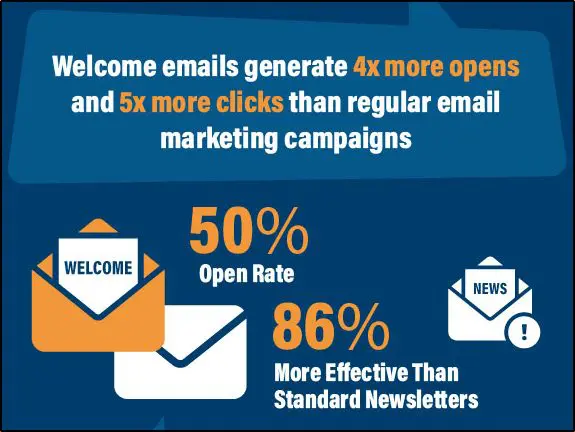
This doesn’t surprise me because users are quite motivated to take action when they sign up for your email list. This is the best time to introduce your brand, build a connection, and even turn them into buyers with a discounted offer.
So, what kind of emails should you include in a Welcome sequence? Typically, a Welcome sequence consists of 3 to 5 emails. Here’s a sample sequence to help you get started.
| Sent | Objective | |
|---|---|---|
| Welcome email | Immediately on sign up | To deliver the promised lead magnet and introduce your brand. Also, ask a quick question to get responses (e.g., tell me your biggest challenge with X?) |
| Tripwire email (optional) | 2 hours after signing up | To offer a heavily discounted product to convert your subscribers into buyers. The product could be a low-ticket product or limited-time access to a membership community. |
| Brand story | 1 day after signing up | Tell them your story, describe your journey, share your wins (e.g., brands you’ve helped or sites you’ve been featured on) |
| Follow up | 1 day after signing up | Check if your subscribers downloaded and used your free lead magnet. |
| Free value | 2 days after signing up | Share answers to the most common questions of your audience or share links to your most valuable free resources (blog posts, videos, etc.) |
| Free Value | 3 days after signing up | Share more free content along with links to your content |
| Questions | 4 days after signing up | Ask your subscribers to share their challenges that you can answer in a free blog post or video. |
2. Lead Nurturing (5-10 emails)
These emails are designed to strengthen your relationship with your subscribers and establish you as an expert. This is a critical email sequence and its quality plays a significant role in driving leads and customers for your premium course.
Most of the emails in this sequence will contain free value, tips, Q&As, and other resources to help your audience.
Here are a few ideas to help you get started.
| Objective | |
|---|---|
| Your story | Share something interesting from your journey and relate it to your audience’s struggles. |
| Free value #1 | Share tips, invite questions, link to a blog post or video |
| Free value #2 | Share tips, invite questions, link to a blog post or video |
| Free value #3 | Share tips, invite questions, link to a blog post or video |
| Case study#1 | Share a success story from your previous students, outline their challenges, and how they overcame them. |
| Case study#2 | Share a success story from your previous students, outline their challenges, and how your course helped them. |
| Soft invitation | Invite subscribers to join your course’s waitlist and get notified whenever you open the doors. |
3. Content Updates
Let your subscribers know via email whenever you publish a new blog post, guest post, podcast, or video. This is an easy way to keep them engaged and provide free value to build your credibility.
Here’s how Neil Patel shares content updates.

If you don’t publish too often but have past content in the bank, schedule weekly emails that share links to your best content one by one.
But if you publish too frequently (multiple content pieces per week), don’t send more than two updates per week. You could also send a weekly round-up email containing links to your recently published content.
Course Launch Sequences
You’ll send these emails once you open the doors to your online course and start actively promoting it to your subscribers.
Here are some of the email sequences you can use:
4. Course Launch (10-15 emails)
These are your money-making emails. Your launch sequence won’t have to work very hard if you’ve built a strong relationship with your subscribers using pre-sales emails.
However, if you’re already in launch mode and routing traffic from Facebook or other traffic sources to your email list, your course launch emails will have to do the heavy lifting.
So, what’s included in course launch emails?
Ideally, you should build momentum by sharing your own story, how your skillset transformed your life, and how it can help your subscribers.
Then proceed with your course announcement and offer a special early-bird price for subscribers who sign-up by a specific date.
Add dedicated case study emails to the mix to provide social proof of your course’s effectiveness.
Here’s an example of such an email from 10xFC, a premium freelancing course by CopyHackers.

The number of emails in a course launch sequence depends on your relationship with your subscribers and how aggressively you want to promote your offers. But it’s common for marketers to send daily emails during a two-week-long course launch.
As you get close to the end of the launch, increase social proof and case study emails since they do a great job at persuading unsure buyers.
On the final day, send up to three emails reminding your subscribers that the doors are closing.
5. Browser Abandonment
These emails are sent to the subscribers who visit your course’s landing page from one of your launch emails, browse your course details but bounce off without reaching the cart stage.
They are extremely effective in bringing back lost customers and can significantly boost your course sales.
According to studies, browser abandonment emails have an 80.9% higher open rate and 50.5% higher click-through rate than traditional emails.
What do you write in such emails? Nothing complicated.
You simply remind subscribers that your product is still available and invite them back to your sales page. You can add another email to your abandonment sequence asking the subscribers why they didn’t proceed with the purchase.
However, not every email marketing platform offers browser abandonment emails since they require user tracking and advanced automation features. So, if you don’t want to lose customers, choose an email marketing tool with browser abandonment and other necessary automation features.
Browser Abandonment Email Template
Subject line ideas
Still thinking about [Course Name]?
Ready to take the next step?
Your seat is waiting in [Course Name]
Body copy
Hi [First Name],
I noticed you checked out [Course Name] but didn’t finish signing up.
If you’re still interested in [key transformation – e.g., launching your first online course in 30 days], your spot is still open.
👉 [Return to the Course Page]
If something stopped you—questions about the course, a tech hiccup, or timing—just hit reply. I’ll personally help you sort it out so you can get started right away.
Don’t wait too long; enrollment is limited and spots fill fast.
See you inside,
Jeff
6. Abandoned Cart Emails (3-5 emails)
Abandoned cart emails are sent to your subscribers who visit your landing page, add your course to the cart, but leave your site without completing the purchase.
Like browser abandonment emails, abandoned cart emails also recover a large chunk of your lost sales because many customers abandon the purchase unwillingly or because of a tech issue. So, simply reminding them to come back can do wonders for your business.
According to studies, abandoned cart emails have an open rate of 49% and a click-through rate of 26%. Another study found that sending multiple abandoned cart emails results in more revenue.
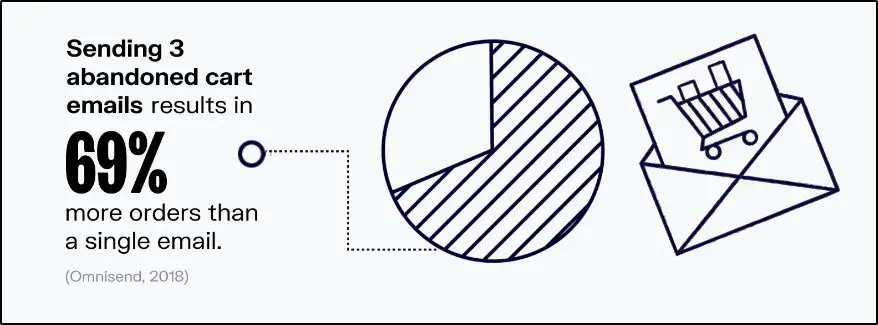
Ideally, an abandoned cart email sequence should have at least three email reminders sent every day from the abandonment day.
Its content should simply include a picture of your course and a reminder that the subscribers can still complete their purchase.
Abandoned Cart Email Template
Subject line ideas
Finish your [Course Name] enrollment today
Your cart is waiting (but only for 24 hours)
One click to join [Course Name]
Email body
Hi [First Name],
Looks like you started signing up for [Course Name] but didn’t complete checkout. No worries—your spot is still saved.
👉 [Complete Your Enrollment]
If you ran into a tech glitch, need help with payment, or just have a last-minute question, hit reply. I’ll personally help you finish.
Secure your place now so you don’t miss [key benefit—e.g., “launching your first online course in 30 days”].
– Jeff
P.S. To make things easy, I’ve held your cart for 24 hours. After that, seats may open to the waitlist.
7. Thank You Email
Thank you emails are sent to your customers when they sign up for your course by completing the purchase. Most marketers treat these emails as a formality.
However, you can use them to strengthen your relationship with your audience and motivate them to get the most out of your course.
Your email content should reassure your customers that they’ve made the right decision and, if possible, should include a link to a video message congratulating them for joining your premium customer base.
Thank You Email Template
Subject line ideas
Welcome to [Course Name]!
You’re in—let’s get started
Congratulations on joining [Course Name]
Email body
Hi [First Name],
Thank you for enrolling in [Course Name].
You’ve made a smart move toward [key outcome—e.g., “launching your first online course in 30 days”], and I’m excited to guide you every step of the way.
Here’s what to do next:
– Access your course dashboard: [Login Link]
– Watch the quick welcome video: [Video Link] (I’ll personally walk you through how to get the most out of the program.)
– Mark your calendar for our first live session: [Date & Time, if applicable]
If you have any questions or run into a snag, just reply to this email. I read every message and will help right away.
Welcome aboard—we’re thrilled to have you!
– Jeff
Post Purchase Email Sequences
Your job doesn’t end as a marketer when your customers purchase your course. Instead, the real work starts now.
Post-purchase email sequences have three main goals.
– To keep your students engaged with your course content and help them get the most value from your course.
– To drive more revenue opportunities through upselling and cross-selling.
– Generating testimonials and referrals for your future launches.
Here are some of the email sequences you can use in this phase.
8. Welcome Email (1-3 emails)
The welcome email sequence for your students is designed to get them excited about your course and provide them with the necessary information to navigate your course and get the most value from it.
You can design a 1-3 email Welcome sequence which includes:
- Your course curriculum, broken down into modules and lessons
- Dates when each module becomes accessible (for drip courses)
- Access details for your LMS
- Links to support groups and communities for the course
- Contact details of the course manager
You could also include a quick 15-minute call to get to know your students better for early-bird signups, but that’s completely optional.
Student Welcome Email Template
Subject line ideas
Your learning journey starts here
Welcome to [Course Name] – Here’s your roadmap
Let’s get you set up for success
Email body
Hi [First Name],
Welcome aboard! I’m excited to help you get the most from [Course Name]. Here’s everything you need to get started today:
1. Course Dashboard Access your course any time: [Login Link]
2. Curriculum & Schedule
Here’s how your learning unfolds:
Module 1: [Name] – available now
Module 2: [Name] – unlocks [Date]
Module 3: [Name] – unlocks [Date]
3. Support & Community
Join the student group: [Link]
Need help? Reach out anytime at [Support Email]
Optional Bonus for Early Birds
If you signed up during our early-bird window, you can schedule a quick 15-minute call with me here: [Calendar Link]
Take a few minutes to log in today and explore the first module. The sooner you begin, the faster you’ll see results.
Let’s make this an amazing journey
Jeff
9. Upsell/Cross-Sell Sequences
Once a user signs up for your premium high-ticket offer, you could use small upsells and cross-sells to maximize your revenue and increase your per-student ROI.
There are many ways to do this.
For example, you could offer a one-on-one consultation offer for an additional fee, or you could offer your other products at a discounted rate.
The upsell/cross-sell sequences should ideally be sent immediately after your welcome sequence BEFORE your course starts. That’s because your customers are still energetic about signing up for your program and are likely to take any attractive offers.
These sequences could include 1-2 emails encouraging customers to sign up and sharing the benefits of your offer.
Upsell/Cross-Sell Email Template
Subject line ideas
Take your [Course Name] results to the next level
Special upgrade for new students
Add one-on-one guidance to your program
Email body
Hi [First Name],
You’ve just joined [Course Name]—great decision.
While you’re setting up, I want to share an exclusive upgrade that will help you move even faster.
👉 Add a 1-on-1 strategy call with me at a student-only rate
During this private session, we’ll map out your exact next steps and remove any roadblocks before the course begins.
Prefer more self-paced learning? You can also grab [related product or mini-course] at [discount]% off, only for new students this week.
Both offers are available for the next 48 hours so that we can lock in scheduling before your first module goes live.
Choose your next step now:
[Upgrade to 1-on-1 Coaching]
[Add the Bonus Mini-Course]
Let’s make sure you get every possible advantage from day one.
– Jeff
10. Course Engagement Emails
Did you know that 85% of students never complete an online course after signing up?
Keeping students engaged till the end is among the top challenges of online course creators. Because if students don’t complete your course, they won’t be able to get value from it. As a result, you won’t create any success stories, testimonials, or referrals.
Course engagement emails play a vital role in ensuring that your students stay motivated throughout your course and consume all your content.
There are several ways to use these emails. For example:
- Check-in with your students every week to see if they have any problems accessing and using the course.
- Send a dedicated email before every module describing what students can expect and how to get the most from it.
- Follow up on their assignments and quizzes.
- Send motivational success stories of past students to show them what’s possible.
Use these emails even if you have a dedicated Slack or Facebook group for your students because sometimes students don’t check group messages.
11. Re-engagement Sequence
Re-engagement sequences are designed for students who stop signing in to their LMS to access your course content. You can also send these emails to students who do not submit quizzes and assignments or aren’t active in your course groups.
These emails aim to bring students back to your course and resolve any problems they face in accessing or implementing your lessons.
To use these emails, you’ll need to integrate your email marketing software with your online course platform or use an LMS that also offers email automation features.
You can define a specific time when emails are sent to inactive students.
What should you write in these emails?
Ask students what’s stopping them from accessing your course? Is it tech issues, a problem with course content, or a change of heart?
Whatever it is, try resolving it so they can get back to learning with you.
Re-Engagement Email Template
Subject line ideas
Haven’t seen you in [Course Name] lately
Need a hand getting back on track?
Let’s get you moving again
Email body
Hi [First Name],
I noticed you haven’t signed in to [Course Name] for a while. Is something getting in the way—technical issues, schedule changes, or a tricky lesson?
I’d love to help you get unstuck so you can keep making progress.
Just hit reply and let me know what’s stopping you.
In the meantime, you can jump back in anytime here: 👉 [Resume Your Course]
If it’s a tech problem, my team can usually fix it within a day. And if life got busy, we can help you create a lighter plan so you can finish at your own pace.
Let’s get you back to learning.
Jeff
12. Monthly Reports And Leaderboards
If you have multiple modules in your course with quizzes and assignments, it’s a good idea to share a monthly report highlighting the top three students who:
- Are the most active in your course groups
- Scored the highest marks in quizzes or assignments
- Implemented any of your lessons to achieve results
This would motivate other students to up their game, take your course more seriously, and apply your teachings to achieve results.
Monthly Report & Leaderboard Email Template
Subject line ideas
Your [Course Name] progress report & top students
See who crushed it this month 🎉
Ready to level up? Here’s the leaderboard
Email body
Hi [First Name],
Here’s your [Month] progress update for [Course Name].
This month’s standout students showed what consistent action can do:
🥇 [Student Name] – Highest quiz average (98%)
🥈 [Student Name] – Most active in our community discussions
🥉 [Student Name] – Best real-world implementation of lessons
Amazing work by all three!
Now it’s your turn. Jump into the next module and put your skills to work.
👉 [Continue Your Course]
Every quiz you take and lesson you complete moves you up the leaderboard—and closer to your goals. Keep going strong.
Jeff
P.S. We’ll announce next month’s top performers in the first week of [Next Month]. Aim high!
13. Testimonial Request
Towards the end of your course, email your students to share their thoughts on your course. Design a short survey with 2-3 precise questions to make their feedback more valuable. Of course, not all of them will respond, but even four or five responses are enough to help you put together testimonials for your next launch.
Testimonial Request Email Template
Subject line ideas
Can you share your experience with [Course Name]?
Quick favor: your feedback means a lot
Help others learn from your journey
Email body
Hi [First Name],
It’s been great having you in [Course Name], and I hope the lessons helped you [key outcome—e.g., “plan and launch your online course with confidence”].
As we wrap up, I’d love to hear your thoughts. Your feedback helps me improve the course and shows new students what’s possible.
👉 [Take the 2-Minute Feedback Survey]
The survey is just 3 short questions:
What result or change are you most proud of?
What part of the course helped you most?
Would you recommend it to others?
Even a few sentences can inspire future students and help me keep improving.
Thank you for being part of this journey and for sharing your story.
Gratefully,
Jeff
14. Referral Request
Ask your students to share your course with anyone who’d benefit from it. To motivate them, you can offer a 10% discount on your next product.
Referral Request Email Template
Subject line ideas
Invite a friend and get 10% off your next course
Share [Course Name] & earn a reward
Help someone grow—and get a thank-you gift
Email body
Hi [First Name],
I hope you’ve enjoyed [Course Name] and are already seeing results.
If you know a friend or colleague who’d benefit from this course, here’s a quick way to help them start—and get rewarded for it.
👉 Give 10% off & get 10% off
Share this special link: [Referral Link]
When they join using your link, they’ll receive 10% off their enrollment. As a thank-you, you’ll also receive 10% off your next product or course with me.
It’s a simple way to help someone else grow while saving on your own next step.
Thanks for spreading the word and for being such a key part of our community.
– Jeff
Emails For Non-Buyers
At the end of your launch sequence, some subscribers become customers. But some don’t.
Here are a few email sequences you can send to stay in touch with them and prepare them for your next launch.
15. You Missed Out
When your launch campaign ends, send this email to all the non-buyers. Its goal is to show them what they’ve missed out on.
But also tell them when you’ll open the doors to your course next.
You Missed Out Email Template
Subject line ideas
Enrollment has closed—but here’s what’s next
Doors are closed for [Course Name]
You just missed this round—join the waitlist
Email body
Hi [First Name],
We just closed the enrollment for [Course Name].
During the past week, hundreds of students joined to [key transformation—e.g., “build their first profitable online course”] and we’re excited to start working with them.
I’d love to have welcomed you too, but I completely understand that timing isn’t always perfect.
The good news: we’ll open doors again on [next launch date or approximate timeframe].
Join the early notification list here so you don’t miss the next enrollment window: 👉 [Join the Waitlist]
Meanwhile, you can stay connected with tips, resources, and updates by following along here: [Link to newsletter, blog, or community].
Thanks for a being a valuable part of my audience—I hope to see you inside the next session.
– Jeff
16. Winback Sequence
You’ll send this sequence to the subscribers who did not open any of your launch campaign emails despite signing up for your list by downloading your lead magnet.
Have three to five emails in this sequence and try to understand why a subscriber isn’t engaging with your content. Are they not interested in the topic? Don’t have the budget to purchase your product? Don’t find your product valuable enough?
Understanding their reasons would help you adjust your future launch strategy.
You can also include a special offer or a discounted product to win back your inactive subscribers.
Winback Email Template – First Email (of 3–5)
Subject line ideas
Still interested in [Course Name]?
Did my emails reach you?
Quick question about [Course Name]
Email body
Hi [First Name],
I noticed you signed up to hear about [Course Name], but didn’t open the launch emails. Before I remove you from future course updates, I’d love to know why.
Not the right time?
Not what you expected?
Something else?
Your feedback helps me create better resources and make sure I only send what matters to you. If you’re still curious, here’s a quick recap of the course and a special thank-you offer—[X% discount or bonus]—valid for the next 72 hours: 👉 [View Offer / Course Details]
Either way, thank you for being on this list. I only want to send emails you truly find useful.
– Jeff
17. Lead Nurturing
Keep sharing free value with your subscribers so that they stay engaged with your brand while your course is not open for enrollment.
This could include emails with tips, content updates, questions, case studies, success stories, etc.
18. Sunset Sequence
This sequence is for subscribers who do not engage with your brand despite your efforts. At the end of this sequence, you’ll remove them from your list because having inactive subscribers is an unnecessary cost.
But to give them one last chance, use this sequence to tell them they’ll be removed from your list after 24 or 48 hours if they do not confirm they still want to be on your list.
Sunset Sequence Email Template
Subject line ideas
Do you still want to hear from me?
Last chance to stay on the [Course Name] list
We’ll remove you tomorrow unless you click below
Email body
Hi [First Name],
You haven’t been opening our emails for a while now. I understand, priorities change – no issues. But I don’t want to bother you anymore if you’re not interested in my emails for now.
If you’d like to keep getting tips, updates, and early access to new courses, please click the link below within the next 48 hours:
👉 [Yes, Keep Me Subscribed]
If you don’t click this link, I’ll assume you’d rather not receive future emails and will remove you from the list. You can always rejoin anytime if you change your mind.
Thanks for being part of our community—whether you stay or go, I wish you success on your learning journey.
– Jeff
What Email Sequences Are You Using?
The automated email sequences I’ve shared in this article will play a vital role in driving sales for your course and keeping students engaged with your content. But you can come up with more sequences for your audience if you see the need.
However, make sure your email marketing software supports automation, and you’re using the right lead generation tools to build your email before designing your email sequences.
Frequently Asked Questions (FAQs)
1. What’s the best email marketing platform for automated course sequences?
For email marketing for online courses, pick a platform that supports email automation and browser/cart abandonment email sequences.
- ConvertKit – clean visual automation and tags for welcome and lead-nurturing sequences.
- ActiveCampaign – advanced segmentation, triggers for cart abandonment, and strong analytics on open rate and CTR.
- Kajabi – an all-in-one solution with built-in courses, checkout, and automated email templates.
These tools make it easy to run the exact email sequences in this article, from welcome to re-engagement.
2. How long should an email sequence be for an online course launch?
A full course launch email sequence typically runs 10–15 emails over 10–14 days, mixing stories, case studies, and deadline reminders.
- Abandoned cart emails: 3–5 emails spaced over 3–4 days.
- Browser abandonment emails: 1–2 emails within 24–48 hours.
- Welcome emails: 3–5 emails in the first week.
Use your open rate and click-through rate (CTR) data to shorten or extend based on audience response.
3. How do I personalize email sequences to boost open and click-through rates?
Personalization in email automation goes beyond first names.
- Segment subscribers by behavior triggers like module completion, cart abandonment, or browser abandonment.
- Send emails by subscriber time zone to improve open rates.
- Reference specific actions: “I noticed you downloaded the lead magnet yesterday…”
Personalized email sequences consistently lift CTR and conversions.
4. Can I reuse the same email sequences for future course launches?
Yes. Reuse your email sequences and templates by:
- Refreshing subject lines and updating case studies.
- Tweaking bonuses and pricing before each launch.
- Testing new CTAs to keep open rate and click-through rate (CTR) high.
This keeps the content evergreen and reduces workload while keeping conversions strong.
5. What metrics should I track to measure email sequence success?
Track these core KPIs for every email sequence:
- Open rate – gauges how well your subject lines perform.
- Click-through rate (CTR) – shows if your emails drive readers to the course page or cart.
- Conversion rate – reveals how many sign-ups or sales each sequence generates.
- Unsubscribe or spam rate – flags when content or frequency needs a change.
For student engagement emails, add lesson completion and quiz participation.
6. How do I write subject lines that increase email open rates?
To improve open rates across welcome, cart abandonment, and re-engagement emails, keep subject lines short (under 50 characters) and benefit-focused.
Examples:
- “Finish your enrollment today”
- “Module 2 unlocks now”
- “Your seat is waiting in [Course Name]”
Use urgency or curiosity but never overpromise. A/B test frequently to keep CTR strong.
7. When should I remove inactive subscribers from my email list?
If someone hasn’t opened or clicked any email sequence in 60–90 days, run a sunset email sequence first.
- Send 1–2 emails giving 24–48 hours to confirm subscription.
- Remove those who don’t click “Keep Me Subscribed.”
This improves deliverability, reduces cost, and protects the open rate of your active list.
8. What’s the difference between browser abandonment and cart abandonment emails?
Both drive course sales but trigger differently:
- Browser abandonment emails target people who viewed the sales page but didn’t add to cart.
- Cart abandonment emails target those who started checkout but didn’t pay.
Use lighter reminders for browsing and stronger urgency/incentives for cart recovery. Both sequences consistently raise CTR and conversions.
9. Can I send email sequences without a website or LMS?
Yes, you can run basic email automation with standalone tools like ConvertKit or MailerLite, but you’ll miss advanced triggers like quiz completions or student inactivity.
An integrated LMS with email marketing (e.g., Thinkific + ActiveCampaign or Kajabi) allows re-engagement emails, leaderboards, and progress-based email sequences with minimal manual work.
10. How often should I update my email templates and case studies?
Refresh your email templates and supporting case studies at least every 6–12 months.
- Update stats, screenshots, and testimonials to keep proof fresh.
- Re-test subject lines and CTAs to maintain a strong open rate and CTR.
Regular updates keep your email sequences competitive and evergreen for future course launches.
Table of Contents
Related Posts
The Complete Guide To Pricing A Masterclass (2026) | Free Pricing Calculator
11 Best Tools To Build And Grow Your Email List (2025)
21+ Email Marketing Best Practices For Online Course Creators (2025)