

TL;DR — What Is Kit (formerly ConvertKit) And Should Creators use It? (2025)
Kit is an audience-building and email marketing platform made for creators — especially course sellers, coaches, YouTubers, writers, and newsletter publishers. It helps you grow your list, send engaging emails, automate marketing, and sell digital products, all from one dashboard.
Pricing & Free Plan
Free Plan: Up to 10,000 subscribers, includes 1 automation, 1 sequence, unlimited emails, landing pages, and product sales.
Creator Plan: Starts at $33/month — adds unlimited automations, paid recommendations, and chat support.
Creator Pro: Starts at $66/month — includes A/B testing, advanced analytics, engagement scoring, and referral tools.
14-day free trial and 30-day money-back guarantee on paid plans.
Best For:
✅ Course creators, coaches, YouTubers, authors, and educators building a personal brand.
✅ Digital entrepreneurs who sell info products, memberships, or paid newsletters.
Not Right For:
❌ Large eCommerce stores selling physical products.
❌ Marketers needing advanced A/B testing, AI content generation, or complex team collaboration.
Main Capabilities — What You Can Do with Kit:
1. Build your audience using customizable landing pages, forms, and opt-ins.
2. Create and send newsletters from a built-in editor with your own public newsletter feed.
3. Automate your marketing with a visual builder — set triggers, drip campaigns, and multi-step funnels.
4. Segment subscribers with tags, conditional logic, and engagement tracking for personalized messaging.
5. Sell digital products and memberships directly through Kit Commerce with built-in payments.
6. Earn more through Kit Ads (newsletter sponsorships) and Paid Recommendations from other creators.
7. Create mini courses with TeachKit, a free built-in course builder for email-delivered lessons.
8. Connect your favorite tools through the Kit App Store, including Canva, Thinkific, Circle, and SavvyCal.
9. Track performance with deliverability insights, engagement scoring, and analytics dashboards.
In short, Kit replaces your email software, link tool, landing page builder, and payment processor with one creator-friendly system, giving you everything you need to grow, engage, and monetize your audience.
Try Kit For Free Now
I’ve been using Kit for over a decade, back when it launched as ConvertKit, a simple email marketing tool created by Nathan Barry, who was a blogger at the time.
Today, Kit (formerly ConvertKit) is one of the most popular audience building platforms for creators. Over the years, it has evolved from a basic email service into what the company now calls an “email-first operating system for serious creators.”
It’s designed for authors, coaches, YouTubers, and online course creators who want to grow their audience, automate engagement, and sell digital products through Kit email marketing.
However, Kit isn’t perfect for everyone. There are situations where it can be a complete misfit for your business.
So how do you decide?
In this ConvertKit review, I’ll break down what Kit offers, who it’s really built for, and whether it delivers on its promises.
Let’s dive in.
Read: The best email marketing platforms for course sellers
Kit Product Snapshot (2025) | What This Email Marketing Platform Offers
Before going any further, let me give you a bird’s eye view of what ConvertKit offers and how you can use it for your business.
| Category | What You Can Do With Kit |
| Free Plan (Newsletter Plan) | Manage up to 10,000 subscribers for free. Includes 1 basic automation, 1 email sequence, unlimited landing pages, forms, broadcasts, tagging, segmentation, and digital product sales. |
| Paid Plans | Creator Plan: $33/mo or $390/yr (up to 1,000 subs) — unlimited automations, paid recommendations, app integrations, and chat support.Creator Pro: $66/mo or $790/yr (up to 1,000 subs) — advanced A/B testing, analytics dashboards, referral systems, and engagement scoring. |
| Email Marketing | Send unlimited emails, automate campaigns, personalize content, and segment your audience based on behavior or interests. |
| Visual Automations | Use the drag-and-drop builder to welcome subscribers, nurture leads, or trigger emails based on actions like purchases or link clicks. |
| Landing Pages & Forms | Build no-code pages and opt-in forms to collect leads, deliver freebies, and grow your email list fast. |
| Commerce & Payments | Sell digital products, subscriptions, and memberships directly through Kit using Stripe (3.5% + 30¢ fees). |
| Paid Recommendations | Earn $1–$5+ per subscriber by promoting other creators’ newsletters through Kit’s recommendation network. |
| Kit Ads & Sponsorships | Run ads or partner with sponsors directly inside your newsletter for recurring income. |
| App Store Integrations | Connect 100+ creator tools — including Canva, Thinkific, Circle, Linktree, GIPHY, and SavvyCal — to streamline your workflow. |
| TeachKit | Create and deliver online courses for free to grow your list and sell expertise-based products. |
| Analytics & Insights | Access detailed dashboards, subscriber scoring, deliverability reports, and open-rate analytics. |
| Free Migrations | Moving from another platform? Kit’s team will transfer your subscribers, automations, and templates (for lists over 5,000 subscribers). |
| Trial & Guarantee | 14-day free trial on paid plans + 30-day money-back guarantee. No credit card needed to start. |

What is Kit and How Is It Different From Other Creator Platforms
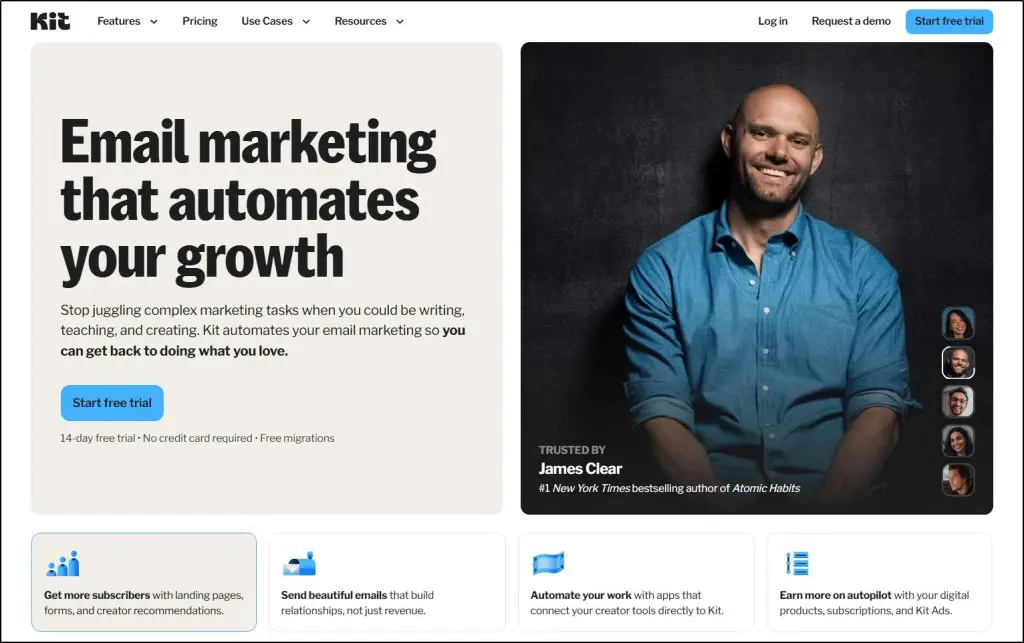
Kit (formerly ConvertKit) is an email marketing, automation, and audience building platform specifically for creators such as authors, podcasters, YouTubers, coaches, and online course sellers.
It helps you grow your audience, send personalized emails, and sell digital products or memberships without juggling multiple tools.
The company was founded in 2013 by Nathan Barry, a creator himself who wanted a simpler way to manage email marketing and automate sales. What started as ConvertKit has now evolved into Kit, an “email-first operating system” for creators who want more control over their audience and income.

Some of the world’s most successful creators—like Ali Abdaal, Nisha Vora, and James Clear—use Kit to connect with their email subscribers and grow their businesses.
Unlike traditional marketing tools like Mailchimp or ActiveCampaign, Kit email marketing focuses on the specific needs of solo creators and small creative businesses.
It’s intentionally simple, with clear pricing, creator-focused monetization options, and a clean interface that doesn’t overwhelm you with unnecessary complexity.
Here’s what Kit brings together in one place:
- Email marketing and automation with a visual workflow builder
- Landing pages and opt-in forms to grow your list
- Audience segmentation with tags and conditional logic
- Commerce tools to sell digital products, subscriptions, and paid newsletters
- Recommendations to cross-promote with other creators
- Kit Ads and sponsorships for newsletter monetization
- App Store integrations with tools like Canva, Thinkific, and Circle
- TeachKit, a free course builder that helps creators turn their expertise into revenue
In short, Kit gives creators a single, easy-to-use system to build, engage, and monetize their audience, without coding or managing multiple platforms.
Read: Email marketing best practices for online course creators
Kit (ConvertKit) Pricing & Free Plan | How Much Does It Cost?
Kit offers both a free plan and paid plans, depending on where you are in your creator journey.
All paid plans come with a 14-day free trial—no credit card required—and a 30-day money-back guarantee if you decide to cancel.
- Newsletter Plan (Free) – $0/month for up to 10,000 subscribers
- Creator Plan – Starts at $33/month (or $390/year) for up to 1,000 subscribers
- Creator Pro Plan – Starts at $66/month (or $790/year) for up to 1,000 subscribers
Pricing increases as your subscriber count grows. You can pay monthly or yearly (and get 2 months free on annual billing).
Kit Pricing Comparison (2025)
| Plan | Price (Monthly) | Subscriber Limit | Key Features | Best For |
| Newsletter (Free) | $0 | Up to 10,000 | 1 automation, 1 email sequence, unlimited landing pages & forms, tagging, segmentation, basic analytics, digital product sales, free recommendations | Beginners building an audience or testing Kit |
| Creator | $33 | Up to 1,000 | Unlimited automations & sequences, paid recommendations, Smart Recommendations, remove Kit branding, polls, RSS campaigns, App Store access, 24/7 email & chat support | Small creators ready to automate and monetize |
| Creator Pro | $66 | Up to 1,000 | All Creator features + advanced A/B testing, engagement scoring, analytics dashboard, Facebook custom audiences, referral system, edit links in sent emails, priority support | Established creators and online businesses scaling email operations |
The Newsletter Plan is generous for a free tier that’s enough to run a small newsletter or early-stage coaching business.
The Creator Plan adds serious automation and monetization features, while Creator Pro focuses on growth and optimization with deeper analytics and advanced targeting tools.
Kit Features | Email Marketing Tool Designed For Creators
Kit gives you tools for every stage of your creator journey.
It starts with your Creator Profile, a mini website that becomes your home base. From there, you can create newsletters, grow your audience, automate your email marketing, and sell digital products or subscriptions—all in one place.
It’s designed to replace the messy stack of tools most creators juggle for landing pages, forms, email automation, and digital sales.
Kit basically gives you a single system to build, engage, and monetize your audience.
Let’s take a deeper look at its core capabilities.
Feature #1: Email Designer & Broadcasts
Kit comes with a drag and drop email designer which you can use to create eye-catching HTML email designs or send plain text emails to your subscribers.
It is built for non-technical users, so you don’t need to have any coding skills to create email campaigns. Simply create an email broadcast and add elements such as images, files, videos, etc., to your email content.

Kit’s robust email designer allows you to add and edit different content blocks in real time. It also allows you to upload your brand logo and other frequently used images to your image library for instant access.
In addition, Kit’s integration with Unsplash provides you free access to thousands of high-resolution images that you can use in your emails.

Every image, video, and content block in the Kit email designer is fully customizable. If you’re familiar with HTML, you can switch to the HTML editing mode for advanced editing.
You can also add animated counters and call-to-action buttons to drive more conversions from your emails. And finally, you can create unlimited email templates for different email types so that you don’t need to create new messages from scratch.
Read: The best list building tools for creators
Feature #2: Newsletters — Build, Publish, and Grow Your Audience
At its core, Kit is still an email marketing platform. But newsletters are where it truly shines.
You can create and publish your newsletter directly inside Kit without needing WordPress, Substack, or any third-party platform.
Each creator gets a public newsletter feed and website, automatically generated from your email broadcasts. This acts as your online home base where new readers can browse past issues, subscribe, and even share your content.

Kit’s newsletter tools include:
- A built-in newsletter editor for writing and formatting your issues.
- Customizable landing pages and opt-in forms to grow your list.
- The ability to add links, polls, or recommendations directly in your emails.
- Analytics for open rates, clicks, and subscriber growth.
- Optional paid newsletters if you want to turn free readers into paying members.
You can send unlimited newsletters on any plan, even the free one (up to 10,000 subscribers). For creators running multiple newsletters, Kit’s tagging and segmentation system makes it easy to manage separate audiences and tailor your content for each.
Whether you’re publishing a weekly roundup, a course update, or a deep-dive essay, Kit gives you everything you need to write, send, and monetize your newsletter, all in one place.
Feature #3: Advanced Subscriber Management
Kit allows you to manage your email subscribers like a pro without any unnecessary complexities. It’s a subscriber-centric tool that uses tags and segments instead of lists for subscriber management.
Instead of creating new lists for every project—which causes contact duplication and other problems—simply tag your subscribers based on their behavior and engagement with your content.
Then use Kit’s advanced segmentation filters to organize your subscribers in any way you want. For example, you can segment subscribers based on location, last activity, lead source, specific lead magnets, or any other behavior.
A subscriber can have multiple tags and be part of multiple segments since Kit maintains a central subscriber profile with complete activity history.

Based on these subscriber tags, you can create new email campaigns, automation sequences, lead magnet deliveries, and other messaging strategies.
Feature #4: Marketing Automation, Sales Funnels, and Drip Campaigns
Marketing automation is critical to building an online course business. With Kit, you can create multi-step marketing sequences that target your subscribers in different stages of their buying journey.
In addition, you can create sales funnels to convert your subscribers into customers and brand advocates.
The best part? Once you automate everything with these funnels, you can have a completely hands-off business that keeps your subscribers engaged and drives passive income from your email list.
You can do all of this using Kit’s visual automation builder.

Here’s what you can do with Kit’s automation.
1. Assign Tags And Segments
With Kit, you can create rules to automatically assign tags to new or existing subscribers and segment them on predefined conditions.

This saves you countless hours by organizing your subscribers and giving you ready-to-use audience segments for your campaigns.
2. Create And Trigger Drip Campaigns
Kit allows you to create multi-step drip campaigns using If-Then-Else conditions. A drip campaign is a series of scheduled emails sent to specific subscriber segments based on pre-defined triggers.
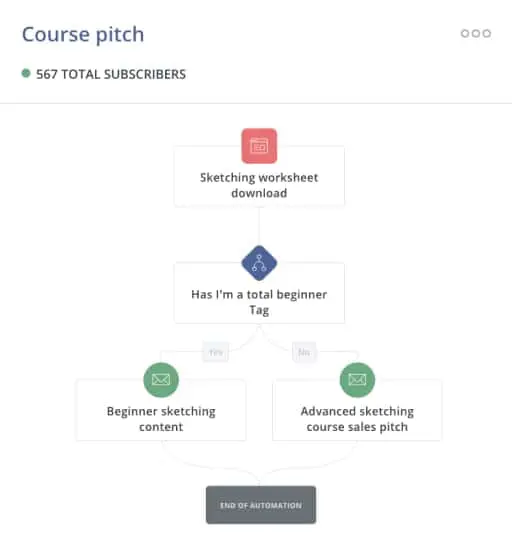
Using tags and segments, you can create long and complex email automation to be sent to any subscribers that meet your conditions.
3. Build Sales Funnels
With Kit’s visual funnel builder, you can create complete email journeys for your subscribers and transform them from strangers to customers and brand advocates on autopilot.
A funnel is a series of conditional steps in which you can serve different content types, including multiple drip campaigns, to your subscribers based on their actions.
Since funnels are often long and complex, you can use Kit’s funnel template library, which contains plug-and-play funnel templates for all kinds of email journeys.
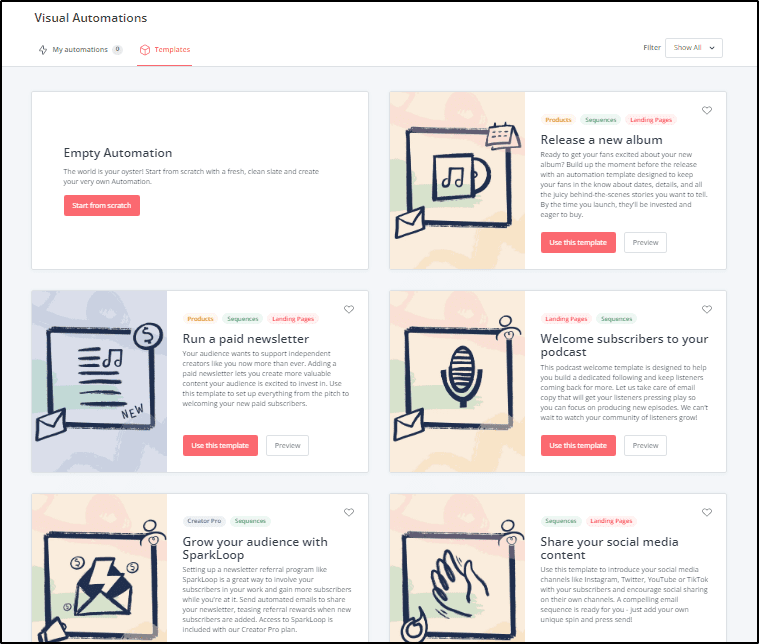
Alternatively, you can create a funnel from scratch using the visual funnel builder and offer it as a template to other Kit users.
4. Landing Page Builder And Opt-in Forms
You need high-converting landing pages and custom-designed opt-in forms to generate relevant and high-quality subscribers and leads for your business.
Thankfully, Kit’s robust landing page designer offers both.
You can use it to create responsive landing pages to collect leads, deliver lead magnets, and sell your products.

You can add or remove content blocks to your landing page using its drag and drop interface and edit any element you want. You can also access thousands of high-resolution Unsplash images to make your landing pages more attractive.
In addition, you can create customizable opt-in forms to gather more information about your subscribers and segment them accordingly.
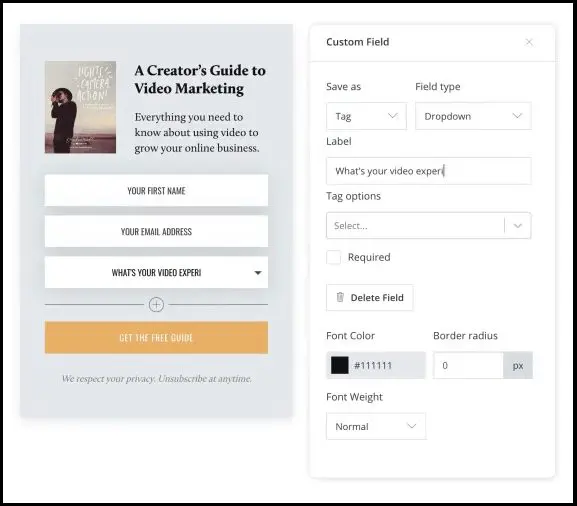
For example, you can add a dropdown to your opt-in form with multiple choices that describe your audience segments. Then, when a subscriber chooses one of those options, you can automatically apply specific tags and segment them for personalized targeting.
So, let’s say you’re building an email list for your freelancing course. To gather more specific information about your subscribers, you can add this dropdown to your opt-in form.
“What’s your expertise?”
“I’m a graphic designer
I’m a content writer
I’m a programmer
I’m a fiction writer
I’m a sales copywriter”
Knowing this would help you create different messaging strategies for writers, copywriters, designers, etc.
Feature #5: Creator Profile — Your All-in-One Link Hub
Kit’s Creator Profile replaces the old “link page” feature and acts as your public home base, a mini website where your audience can explore everything you offer in one place.
You can showcase your newsletter, digital products, courses, and social profiles on a single customizable page.
It’s perfect for adding to your Instagram bio, YouTube description, or email signature—giving your audience a clear next step wherever they find you.
Unlike traditional bio link tools, your Creator Profile connects directly to your Kit email list, product store, and automation workflows, making it easy to turn casual visitors into subscribers or customers.
You can personalize it with your brand colors, images, and call-to-action buttons, and update it anytime from your Kit dashboard.
For most creators, it’s an instant, no-code alternative to a website—simple, fast, and directly tied to your audience-building system.
Feature #6: eCommerce Tools To Sell Digital Products, Newsletters, and Subscriptions
Beyond audience growth, Kit helps you monetize your email list directly—no third-party tools needed.
You can sell digital products, paid newsletters, subscriptions, and coaching sessions, or even accept tips through virtual tip jars.
Every product you sell lives inside your Creator Profile and connects seamlessly with your email automations and subscriber segments, so your marketing and sales always stay in sync.
You can set flexible pricing options including one-time payments, installments, subscriptions, or pay-what-you-want.
All transactions are handled securely through Stripe, and Kit charges a flat 3.5% + $0.30 fee per sale, lower than many popular creator platforms.
Whether you’re selling your first eBook or running a paid membership, Kit gives you a clean, integrated way to grow your income, without juggling Gumroad, Substack, and multiple payment tools.
Feature #7: Recommendations & Creator Network
One of Kit’s most powerful growth features is its Creator Network, which helps you get discovered by new audiences through Recommendations.
You can recommend other creators in your email confirmation pages or newsletters, and in return, get recommended to their subscribers — creating a simple, organic growth loop.
It’s similar to Substack’s recommendation system but built directly into Kit, giving you full control over which creators you partner with and how often your profile appears.
The feature includes both Free Recommendations (to grow your list) and Paid Recommendations (to earn income for referring subscribers). You can easily choose which creators to feature, track results inside your dashboard, and even combine it with automations to instantly welcome new subscribers.
For small and mid-sized creators, this can quickly become a consistent way to grow your list, without relying on paid ads or complex funnels.
Feature #8: Kit Ads (Newsletter Sponsorships)
Kit Ads is one of the newest ways for creators to earn directly from their email newsletters. It connects you with brands that want to sponsor creator newsletters — so you can start generating revenue even with a small or mid-sized audience.
Once you join the Kit Ads program, Kit automatically matches you with relevant advertisers. You get to review and approve sponsorships, add ad placements to your newsletters, and get paid directly through your Kit account.
This feature is available on Creator Pro plans and integrates smoothly with Kit’s email designer and analytics. That means you can insert ads just like any other content block and track impressions or engagement within your dashboard.
For many creators, Kit Ads turns a regular newsletter into a consistent income stream, without needing to pitch brands or manage external sponsorship tools.
Feature #9: App Store & Integrations
Kit’s new App Store is one of the biggest upgrades since its rebrand from ConvertKit.
It turns the platform into a true creator hub — letting you connect your favorite tools for course creation, memberships, analytics, and design without touching a single line of code.

Inside the App Store, you’ll find direct integrations with platforms like Canva, Thinkific, Circle, Gumroad, Shopify, and Teachable, plus dozens of other apps covering automation, analytics, and design.
For example:
- You can design a newsletter banner in Canva and insert it right into your email editor.
- Sync Thinkific or Teachable courses to automatically tag new students.
- Connect Circle or Slack to send automated welcome emails when someone joins your community.
All integrations connect through your Kit dashboard, so you can see how each app contributes to your subscriber growth and revenue.
For creators who previously had to juggle tools like Zapier, Mailchimp, and ConvertFlow, Kit’s App Store makes everything simpler, letting you build a connected, automated system that runs smoothly in the background.
Feature #10: Deliverability & Insights
No matter how beautiful your emails are, they only matter if they reach your audience.
Kit has built a strong reputation for email deliverability, meaning your messages are far less likely to land in spam or promotions folders compared to many competitors.
Behind the scenes, Kit handles technical essentials like DKIM, SPF, and domain authentication, helping maintain a positive sender reputation for every creator.
It also gives you transparent deliverability metrics including open rates, click-throughs, bounce rates, and unsubscribes, letting you track exactly how your emails perform over time.
For users on the Creator Pro plan, you also get access to subscriber engagement scoring, A/B testing, and a detailed insights dashboard that shows which emails or automations are driving the most conversions.
These analytics make it easier to spot trends, identify inactive subscribers, and continuously refine your content strategy.
If you’re serious about growing a profitable newsletter or online course business, Kit’s reporting tools help ensure that every email you send actually makes an impact.
Feature #11: TeachKit (Free Course Builder)
TeachKit is a free, built-in course building app by Kit aimed at helping creators turn their email audience into paying students.
It allows you to create, host, and deliver basic courses or lessons directly through Kit, without needing an external LMS (Learning Management System).
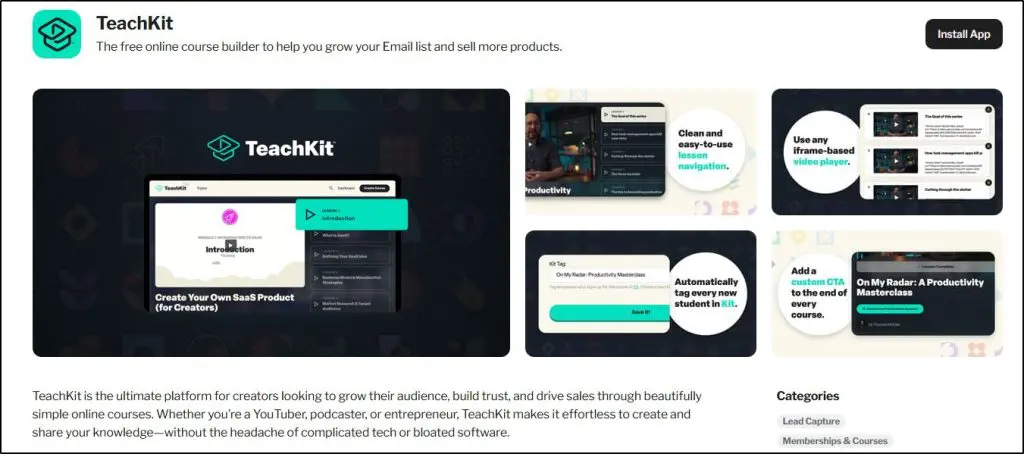
You can structure your content into modules, upload videos or files, and automatically deliver lessons via email or private access pages.
Because it’s integrated with Kit Commerce, you can sell access to your course, bundle it with newsletters or memberships, or even include it as part of a paid subscription.
However, TeachKit is still in its early stages. It lacks advanced LMS features like:
- Quizzes or progress tracking
- Certificates or completion badges
- Student discussion areas or communities
- Detailed reporting and analytics
In short, TeachKit is great for creators who want to validate a course idea quickly or add an educational layer to their audience business — but not ideal for those building a full-fledged e-learning experience.
If you’re serious about scaling your courses or want a richer learning experience, you’ll still need to integrate a dedicated course platform like Thinkific or Teachable, both of which connect seamlessly through the Kit App Store.
Kit Pros and Cons: What Are Its Strengths & Weaknesses?
| Pros | Cons |
|---|---|
| Excellent deliverability (99.8%) – Kit has one of the highest inbox placement rates in the industry, ensuring your emails actually reach subscribers instead of landing in spam. | No mobile app (yet) – While the browser experience is mobile-friendly, there’s still no dedicated iOS or Android app for managing campaigns on the go. |
| Built for creators, not corporations – Every feature is designed around solo creators, coaches, and digital entrepreneurs — not enterprise marketers. | Limited A/B testing – You can A/B test subject lines in broadcasts, but can’t test full content, automation timing, or audience segments yet. |
| Free plan for up to 10,000 subscribers – Way more generous than most email tools, and includes automations, product sales, and newsletters. | Basic course builder (TeachKit) – Good for testing or mini-courses, but lacks LMS features like quizzes, progress tracking, or certificates. |
| Visual automation builder – The drag-and-drop builder makes complex automations and funnels easy for non-technical users. | Not ideal for physical product sellers – Kit doesn’t support shipping tools, store catalogs, or eCommerce features for physical goods. |
| All-in-one creator platform – Combines email, automations, landing pages, digital product sales, sponsorships, and recommendations in one place. | No advanced AI tools yet – Aside from integrations like Lex for writing help, Kit doesn’t yet have built-in AI for email writing or optimization. |
| Strong monetization options – Sell products, memberships, subscriptions, or run paid recommendations and newsletter ads to earn directly. | Limited visual customization for newsletters – Kit’s email designer favors simplicity over flashy, design-heavy layouts. |
| Transparent and simple pricing – Straightforward plans with no hidden fees; only 3.5% + $0.30 transaction fee on product sales. | Basic analytics for free users – Engagement scoring, advanced deliverability reports, and detailed insights are only available on Creator Pro. |
| Constant product evolution – The new Kit App Store, paid recommendations, and TeachKit show steady innovation based on real creator feedback. | Migration perks only for larger lists – Free done-for-you migration is limited to paid users with over 5,000 subscribers. |
Kit vs. Mailchimp: What’s the Difference?
Kit and Mailchimp often get compared because both offer email marketing and automation. But they’re built for entirely different users.
Mailchimp is a general-purpose marketing platform designed for small businesses, eCommerce stores, and agencies. It comes with features like ads, social posting, and CRM tools that make sense for companies managing multiple clients or product lines.
Kit, on the other hand, is purpose-built for creators like authors, YouTubers, coaches, and online course sellers who want to grow an audience, nurture relationships, and sell digital products.
Here’s how they stack up:
| Feature | Kit (formerly ConvertKit) | Mailchimp |
|---|---|---|
| Focus | Built for creators, course sellers, and coaches | Built for small businesses and eCommerce stores |
| Free plan | Up to 10,000 subscribers | Up to 500 contacts |
| Automation | Visual builder, tag-based logic, easy workflows | Complex but harder to learn |
| Monetization | Built-in product sales, paid newsletters, sponsorships | Primarily focused on lead nurturing |
| Commerce tools | Sell digital products, memberships, and courses | Integrates with Shopify and WooCommerce for physical products |
| Recommendations & Ads | Yes — grow with cross-promotions and Kit Ads | No built-in creator recommendation network |
| Design flexibility | Simple, clean, text-first | Visual-heavy with prebuilt templates |
| Analytics | Solid reporting with deliverability insights | More advanced reporting and A/B testing |
| Best for | Individual creators and educators | Small businesses and marketing teams |
If you’re a creator selling digital products or courses, Kit is the better fit — it’s simpler, faster, and gives you the right tools to grow and monetize an audience.
If you run a physical eCommerce store or need advanced reporting and design flexibility, Mailchimp might be more suitable.
Kit Review Verdict | Is It the Best Email Marketing Software for Course Sellers?
Kit has come a long way since its early days as ConvertKit. What started as a simple email marketing tool is now a full creator platform that lets you grow your audience, automate sales, and earn directly from your subscribers ,all in one place.
It’s built for creators who sell knowledge whether that’s through courses, coaching, memberships, or newsletters. The interface is simple, the automation builder is powerful, and the new tools like TeachKit, Kit Ads, and Recommendations make it easier than ever to build a real business around your audience.
That said, Kit isn’t for everyone.
If you’re an advanced marketer who needs deep A/B testing, sophisticated reporting, or rich design customization, you might outgrow it fast. And if you sell physical products, Kit isn’t the right fit at all.
But if your business revolves around your expertise, audience, and content, Kit is one of the most creator-friendly email marketing platforms you can use in 2025.
It delivers everything most course sellers and digital entrepreneurs need, without overwhelming you with features you’ll never touch.
Frequently Asked Questions
1. Why did ConvertKit change its name to Kit?
ConvertKit rebranded to Kit in 2024 to reflect its broader mission as an “email-first operating system for creators.” It’s no longer just an email tool — Kit now includes digital product sales, newsletter sponsorships, recommendations, and even a free course builder.
2. Does Kit offer AI tools or automation assistance?
While Kit doesn’t yet have built-in AI writing tools, it integrates with apps like Lex for content suggestions and Senja for collecting and embedding testimonials. Automation inside Kit is still rule-based but highly intuitive with its drag-and-drop workflow builder.
3. Can I run multiple newsletters with one Kit account?
Yes. Kit uses tags and segments instead of separate lists, so you can manage multiple newsletters or audiences under one account. For example, one list can serve your course subscribers while another gets your weekly newsletter — all automated within the same dashboard.
4. Is Kit good for selling online courses?
Yes — especially for creators who sell smaller courses or digital lessons. The new TeachKit tool lets you deliver course content via email or private pages, though it’s limited compared to full LMS platforms. For larger courses, integrate Kit with Thinkific or Teachable.
5. How does Kit handle payments and fees?
All payments are processed through Stripe, and Kit charges a 3.5% + $0.30 transaction fee per sale. There are no extra charges for paid newsletters, memberships, or digital product sales.
6. Can I use Kit with my existing website or blog?
Yes. You can embed Kit’s opt-in forms, landing pages, and newsletters directly into WordPress or any other CMS. Kit also provides a free Creator Profile page that works like a mini website if you don’t already have one.
7. What makes Kit better than Substack or Beehiiv?
Kit gives you full ownership of your audience and email list, with flexible design, automations, and direct product sales. Substack and Beehiiv are great for publishing newsletters, but Kit offers more business tools — including digital product sales, paid recommendations, and sponsorships.
8. Does Kit integrate with other creator tools like Canva or Circle?
Yes. Kit’s new App Store connects you with 100+ creator tools, including Canva, Circle, Thinkific, Linktree, SavvyCal, and Transistor.fm. You can design assets, sync communities, and embed podcasts — all from inside your Kit account.
9. What kind of analytics does Kit provide?
You get detailed performance tracking for open rates, click-throughs, deliverability, and conversions. Creator Pro users also access subscriber engagement scores and advanced insights to track automation performance and optimize content.
10. Does Kit support team accounts or collaboration?
Yes, but with limits. The Newsletter plan supports one user, the Creator plan allows two, and Creator Pro offers unlimited users. It’s not built for large marketing teams, but great for solo creators or small teams managing a shared brand.
11. Can I migrate from Substack or Mailchimp to Kit?
Yes. Kit’s migration team handles everything for creators with over 5,000 subscribers on a paid plan — including imports of lists, tags, automations, and templates. Smaller lists can use Kit’s built-in import tool for a quick self-migration.
12. Is Kit GDPR and privacy compliant?
Yes. Kit is fully GDPR-compliant and offers double opt-in forms, subscriber data export options, and clear unsubscribe controls to help creators manage email privacy legally and ethically.

Jeff Cobb, Founder of Learning Revolution
Jeff Cobb is an expert in online education and the business of adult lifelong learning. Over the past 20+ years he has built a thriving career based on that expertise – as an entrepreneur, a consultant, an author, and a speaker. Learning Revolution is a place where Jeff curates tips, insights, and resources to help you build a thriving expertise-based business. Learn more about Jeff Cobb here.
Table of Contents
Related Posts
Skool vs Whop (2026): I’ve Used Both (Comparison & Verdict)
YouTube Earnings Calculator (2026): Check Your Channel Income (Updated RPM)
Satori Review (2026): I’ve Used It For Coaching (It Has Limitations)