

TL;DR — What Is LearnWorlds & Who Is It For? (2026)
LearnWorlds is an all-in-one e-learning platform built for creating structured, interactive online courses and training programs. Its core strength lies in learning experience design rather than just selling content. The platform focuses heavily on assessments, interactive video, certifications, SCORM support, and customization.
LearnWorlds Pricing Snapshot (2026)
Free trial: LearnWorlds offers a 30-day free trial on all plans.
Paid plans (monthly billing):
Starter – $29/month: Best for testing your first paid courses, but includes a $5 fee per enrollment.
Pro Trainer – $99/month: Best value for growing course businesses with no transaction fees.
Learning Center – $299/month: Built for full academies that need advanced reporting, automation, and white-label branding.
High Volume & Corporate: Designed for enterprise training, employee education, and large organizations.
LearnWorlds Core Features
Course & Program Builder – Create courses and memberships with structured learning paths
Interactive Video – Add questions, CTAs, and AI-powered interactions inside videos
Assessments & Certificates – Quizzes, exams, assignments, and completion certificates
AI Tools – AI assistant on all plans; advanced AI subtitles and video tools on higher tiers
SCORM & HTML5 Support – Import professional training content and corporate learning packages
Website & Funnel Builder – Build landing pages, funnels, and course websites without coding
Subscriptions & Payments – Sell one-time courses, memberships, bundles, and installments
Affiliate Management – Run an affiliate program to promote your courses
Integrations – Connect with 50+ tools plus Zapier for automation
Best For: Educators, coaches, and training businesses that want structured courses with SCORM, assessments, and control over the learning experience.
Not for: Creators who want the simplest setup or a marketing-first platform with built-in email automation.
Better Alternatives
– Thinkific – Better for creators who want a simpler setup with strong selling tools and fewer moving parts
– Kajabi – Better if your priority is marketing, funnels, and email automation over deep learning features
Try LearnWorlds For Free
There’s a lot of hype around LearnWorlds, especially its AI course creation features.
I’ve been a long-time LearnWorlds user, so I can tell you that it’s certainly an impressive platform.
Whether you’re an educator looking to build an expertise-based business, a trainer, or an entrepreneur looking to create and sell online courses, LearnWorlds offers a user-friendly platform packed with innovative tools.
But is it actually as good as people say it is?
To find out, let’s take a look at all the features that this all-in-one platform has to offer in this detailed LearnWorlds review.
LearnWorlds Product Snapshot (2026)
| Feature | LearnWorlds |
|---|---|
| Best For | Course creators, coaches, training businesses, and organizations that want deep learning features with strong customization |
| Platform Type | All-in-one online course & learning platform |
| Starting Price | $24/month (billed annually) |
| Free Trial | Yes — 30-day free trial |
| Transaction Fees | $5 per course enrollment on Starter plan; no fees on higher plans |
| Course Types | Courses, learning programs, memberships, subscriptions, bundles, coaching, webinars |
| AI Features | AI assistant available on all plans; AI translations, AI subtitles, and AI-powered interactive video on higher plans |
| Interactive Video | Yes — including in-video questions, CTAs, and AI-powered interactions |
| Assessments & Certificates | Yes — quizzes, exams, assignments, certificates |
| SCORM / HTML5 Support | Yes — SCORM & HTML5 supported (limits depend on plan) |
| Website Builder | Yes — built-in website & funnel builder |
| White-Labeling | Partial on lower plans; full removal of LearnWorlds branding on Learning Center plan |
| Mobile App | Yes — fully branded mobile app (higher plans) |
| Payment Gateways | Stripe, PayPal, Shopify, Klarna, Apple Pay, Google Pay, EU gateways |
| Marketing Tools | Funnels, coupons, affiliates, subscriptions, installments |
| Email Marketing | No native email marketing; integrates with major email platforms |
| Integrations | 50+ native integrations + Zapier |
| Support | 24/5 email support (Starter), 24/7 email support (Pro+), priority support on higher plans |

Read: The best online course platforms for edupreneurs
What Is LearnWorlds and How Is It Different From Other LMS Platforms?
LearnWorlds is an all-in-one e-learning platform that lets you build and run an online school. You can create courses and programs, host learning content, assess learners, sell access, and manage everything from your site to payments and reporting.
Where LearnWorlds really shines is the learning experience. It’s built for people who want more than “upload videos and sell.”
It gives you more control over how lessons flow, how learners interact, how progress gets tracked, and how learning outcomes get measured.
That’s why it fits educators, trainers, coaches running structured programs, and organizations doing customer training or internal training.
How LearnWorlds is different from other LMS and online course platforms
Many online course platforms focus first on marketing and checkout and keep course delivery simple. Traditional LMS tools often focus on corporate training management but feel stiff for creators.
LearnWorlds sits in the middle but leans learning-first:
- It prioritizes structured courses, assessments, certificates, interactive video, and reporting
- It supports SCORM/HTML5, which many creator-first platforms skip
- It gives you more design and customization control over the course player and school experience
- It still includes selling tools (funnels, coupons, affiliates, subscriptions), but the core DNA is instruction + engagement, not just selling
LearnWorlds course features (what it lets you do)
- Build structured courses with sections, lessons, and learning paths
- Add interactive video with in-video questions, buttons, and prompts
- Create assessments (quizzes, exams, assignments) and issue certificates
- Import SCORM/HTML5 training packages (plan limits depend on tier)
- Run live learning with Zoom/Webex and schedule 1:1 or group sessions
- Offer memberships and subscriptions (available on higher plans)
- Drip content by date or day to control pacing
- Create learner communities alongside your courses
- Track progress with reports, course insights, and scheduled reporting (higher tiers go deeper)
- Use built-in AI tools for things like course content support, translations, and (on higher tiers) subtitles and richer video workflows
Use the code “LEARNREV2046” when checking out at LearnWorlds and get 20% off the first 6 months of a Pro Trainer plan or higher!
LearnWorlds Pricing & Free Trial (2026) | How Much Does It Cost?
LearnWorlds does not offer a free plan. However, it provides a 30-day free trial on all paid plans, so you can test the platform without paying upfront.
There’s no long-term contract, and you can upgrade, downgrade, or cancel before renewal.
LearnWorlds offers three main paid plans, plus a custom enterprise option:
- Starter – Entry-level plan for creators launching their first paid courses
- Pro Trainer – Best value plan for growing course businesses
- Learning Center – Advanced plan for serious academies and training organizations
- High Volume & Corporate – Custom pricing for large teams and enterprises
LearnWorlds pricing comparison (monthly vs annual billing)
| Plan | Monthly Price | Annual Price (per month) | Transaction Fees |
|---|---|---|---|
| Starter | $29 / month | $24 / month | $5 per course enrollment |
| Pro Trainer | $99 / month | $79 / month | None |
| Learning Center | $299 / month | $249 / month | None |
| High Volume & Corporate | Custom | Custom | None |
Annual billing saves up to 20% compared to monthly plans.
Core features by plan
| Feature | Starter | Pro Trainer | Learning Center |
|---|---|---|---|
| Paid Courses | Unlimited | Unlimited | Unlimited |
| Free Courses | Limited | Unlimited | Unlimited |
| AI Tools | Yes | Yes (plus AI translations) | Yes (plus AI subtitles & AI interactive video) |
| Website Builder | 3-page website | Unlimited pages | Unlimited pages |
| Funnels & Popups | Basic | Advanced (15-page funnels) | Advanced (unlimited funnels) |
| Assessments & Certificates | Tests & quizzes | Full assessments & certificates | Advanced assessments |
| SCORM / HTML5 | Limited | Up to 20 SCORMs | Unlimited SCORMs |
| Interactive Video | Limited | Yes | Yes (AI-powered) |
| Communities | Unlimited | Unlimited | Unlimited |
| Subscriptions & Memberships | No | Yes | Yes |
| Affiliate Management | No | Yes | Advanced |
| Admins / Instructors | 1 admin | 5 admins | 25 admins + managers |
| White-Label (Remove Branding) | No | No | Yes |
| Support | 24/5 email | 24/7 email | 24/7 priority + onboarding |
LearnWorlds Pros & Cons | Main Strenghts & Weaknesses
Before we dive deeper, let’s take a quick look at the main strengths and weaknesses of LearnWorlds.
| Pros | Cons |
|---|---|
| Powerful course builder with deep control over structure, layout, and learning flow | Starter plan charges a $5 fee per course enrollment |
| Interactive video features that go beyond basic playback | Can feel overwhelming for first-time course creators |
| AI tools included on all plans, with advanced AI video features on higher tiers | Advanced AI and automation features are locked behind higher-priced plans |
| Strong assessment options including exams, assignments, certificates, and SCORM | No built-in email marketing system |
| SCORM and HTML5 support for professional training and corporate learning | Full white-labeling requires the Learning Center plan |
| Supports EU-specific payment gateways often missing from other platforms | Starter plan limits the website to just 3 pages |
| Built-in funnels, coupons, subscriptions, and affiliate management | Pricing jumps noticeably from Pro Trainer to Learning Center |
| Fully branded mobile app available on higher plans | Some features are more than most solo creators actually need |
| Flexible pricing models including one-time payments, memberships, and installments | Reporting and automation depth may be overkill for small schools |
| 30-day free trial on all plans with no long-term commitment | No lifetime deal or permanent free plan |
Overall, LearnWorlds leans heavily toward serious course businesses and training organizations. If you want deep learning features, structured programs, and control over the learner experience, the pros clearly outweigh the cons. But if you’re looking for simplicity or a low-cost starting point, some competitors may feel easier at first.
LearnWorlds Features and Functionality: Unlocking the Potential
Course Creation Tools
Here’s a detailed review of LearnWorlds’ course creation tools:
1. Course Builder
With LearnWorlds’ course builder and site builder, you’ll quickly become familiar with the platform in just 15-20 minutes.
There are multiple options available to you when it comes to building your course. For example, you can use the default course layout or select a page used in another course.
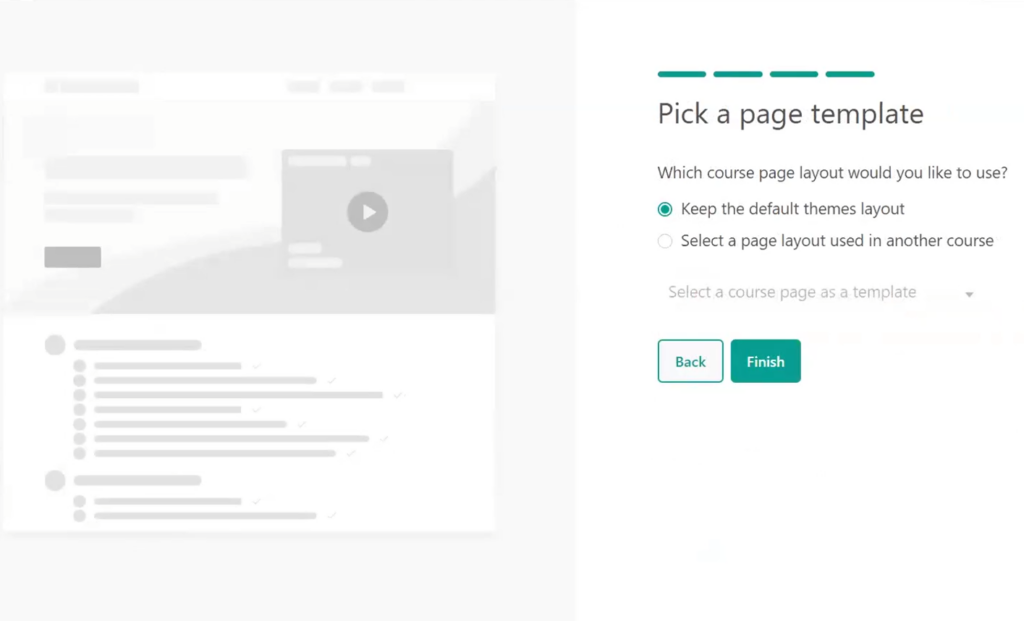
Once you’re comfortable, making adjustments, configuring course settings, and moving elements around becomes much more effortless.
As you open the dashboard, you must hit the “Create Course” button. It will initiate a step-by-step process that guides you through the course creation journey – from designing the layout to uploading content and configuring the pricing.
You’ll be prompted to enter your title and URL and configure the course access to determine how learners can access the course. These options include Paid, Draft, Coming Soon, Enrollment Closed, Free, and Private (more on this later).
If you opt for a paid course, you can set the price, and there’s also an option to offer a discounted price to incentivize learners to enroll.
One of the notable aspects is the inclusion of a preview of how it will appear and helpful tips throughout the course creation process. For instance, when setting the price, you’ll receive tips on effective pricing strategies to maximize your course’s value.
After that, you’ll have to pick the cover image and the course description and choose whether you want to drip-feed your course. Content drip functionality allows you to schedule the release of course content over time. You can choose to drip by days (i.e., 1 week, 2 weeks) or by specific dates. And to schedule the timely release of your content, there’s an option to set up email reminders.
After this, you’ll see a preview of your course layout with different sections you can customize and edit.
LearnWorlds’ course builder makes it super easy to modify the layout of course pages. For example, you can choose from different page layout options, rearrange content blocks, and determine the placement of various course elements.

You can also add different elements to your course pages wherever you want. The platform offers a range of visually appealing pre-designed elements for showcasing products, media and text, call-to-action buttons, events & calendars, FAQs, forms, pricing tables, and even creating pre-launch sections.
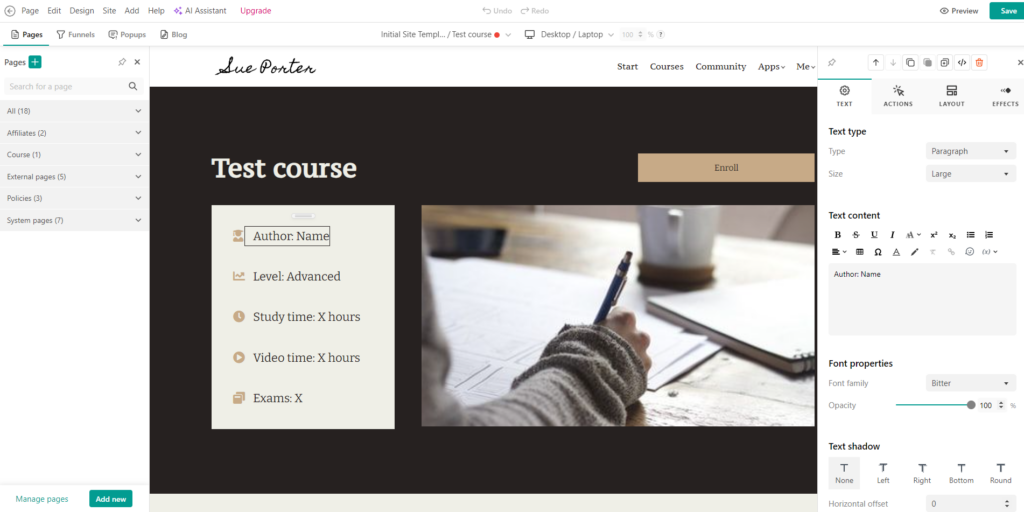
And this is just scratching the surface.
Here’s everything else you can add (and customize) to your course layout:
- Additional Pages: Customize pre-designed templates to add additional pages like About Us, Contact Us, Pricing, Blog, Thank You, etcetera.
- Course Appearance: Change the appearance of the columns (including the font, alignment, colors, and overall layout.).
- Conversion Funnel: Create a conversion funnel to visualize the flow and conversion path of potential customers into paying customers.
- Popups: Add a popup using pre-built templates to collect emails, display promotional offers & Coupons, notifications & announcements, Welcome Users, and more.
- Navigation Menu: Customize the navigation menu to suit your course structure and requirements. You can define the menu structure, including main sections, sub-sections, and links to important course components.
It also has a hierarchical structure to help you organize course materials into modules and lessons, ensuring seamless navigation for learners.

You can start by adding various content types to your sections, including interactive videos, documents, presentations, images, PDFs, and audio files, directly into the Course Builder. This also includes embedding videos from hosting platforms like YouTube, Vimeo, and Wistia, as well as SoundCloud audio.
Here are other media types you can add to your course sections:
- Conduct a 1:1 session or group session in your connected Calendly account.
- Exams (including Graded SCORM, text assignment, file assignment, video assignment, or audio assignment). Or you can create something from scratch.
- Live sessions (including Zoom meeting, Zoom webinar, and Webex meeting).
- Self-assessment options
- Forms
- Certificates
- Embed any external link in the course player
It’s also SCORM compliant and lets you create your own content using the built-in ebook authoring tool or the HTML editor.
Also, LearnWorlds latest innovation, the AI Assistant, utilizes the new cutting-edge generative AI technology to help youenhance course content creation and student engagement.
In summary, the course builder is user-friendly and offers impressive features. And with its newly designed user interface, it makes LearnWorlds a fierce contender among the top online course platforms.
Remember to use the code “LEARNREV2046″ when checking out at LearnWorlds and get 20% off the first 6 months of a Pro Trainer plan or higher!
2. Learner’s Engagement and Interactive Elements
LearnWorlds provides an impressive interactive video editor that includes the automatic generation of transcripts and subtitles, resulting in an immersive learning experience. You can also include elements like text, CTAs images, thumbnails, watermarks, course player’s skin, offers, and navigational buttons inside your videos.
Course creators can also set custom completion rules – i.e., conditions a learner has to meet for this learning activity to be considered ‘completed.’ This will help both instructors and course viewers set a benchmark to measure their progress and success.
Another standout feature is the inclusion of gamified questions. Instructors can pose interactive questions in between the course and then allow LearnWorlds’ to change the flow of the video based on learners’ answers.
Aside from the interactive video editor, LearnWorlds’ allows you to add and create custom quizzes and assessments within your courses. You can design quizzes with various question types, including multiple choice (with text, image, as well as video options), drop-down, true or false, fill-in-the-blanks, and the like.
Other assessment options include:
- Match and ordering
- Short text
- Text assignment
- File assignment
- Record video/audio
- Content blocks
These assessment options can come in handy to test learner knowledge, reinforce key concepts, and provide immediate feedback to learners.
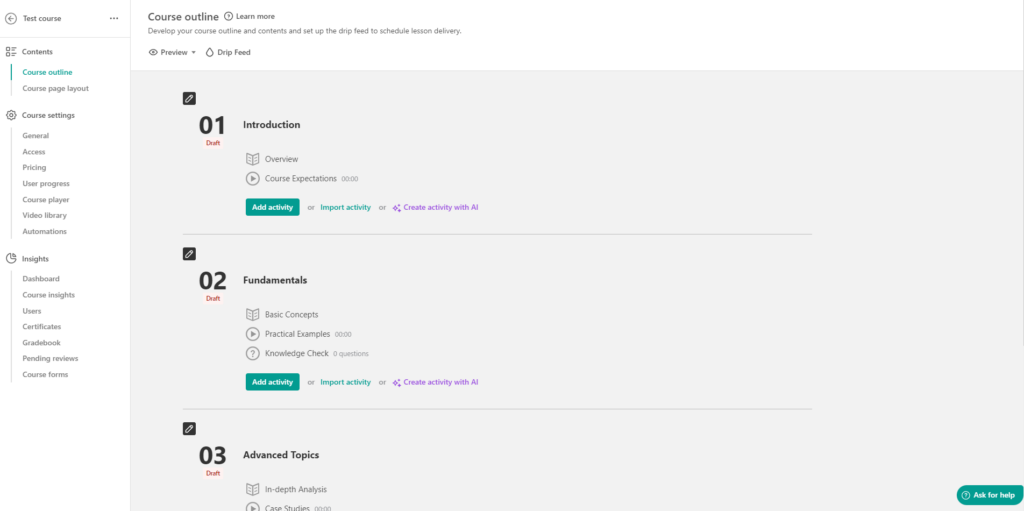
Of the various top online course platforms I’ve reviewed and used, LearnWorlds stands out as one of the top choices for its extensive range of assessment options and interactive video elements.
And that’s not it.
LearnWorlds has tons of other elements that you can add to your courses to create an interactive online school, including:
- Surveys and Feedback Forms: You can create customized forms to collect feedback, opinions, or suggestions from learners. You can also use these forms to cross-sell and upsell, gather leads, collect NPS (Net Promoter Scores), analyze the demographics of your learners, and a lot more.
- Discussion Forums: LearnWorlds offers discussion forums where learners can engage in interactive discussions with fellow learners. Instructors can also moderate and participate in discussions to foster a sense of active learning and peer-to-peer interaction.
- Webinars and Live Streaming: LearnWorlds provides native integration with Zoom and Webex to help you conduct live sessions and meetings. It also enables course viewers to schedule a 1:1 session or reserve their spot in a group session in your connected Calendly account.
- Set Custom User Roles: LearnWorlds allows you to create custom user roles with specific permissions and access levels. Some examples include admins, instructors, seat managers, reporters, affiliates, and any custom user role you want.
3. Payment Gateways and Pricing Options
LearnWorlds provides an extensive selection of payment gateway options, including Stripe, PayPal, Shopify, PagSeguro, and Klarna.
Additionally, it supports popular options like Google Pay, Apple Pay, Klarna, and Afterpay/Clearpay.

What sets LearnWorlds apart is its inclusion of EU-specific payment gateways like Bancontact, Sofort, Przelewy24, iDEAL, and Giropay, which is uncommon among even many top course platforms.
This diverse range of payment options makes LearnWorlds an attractive choice for course creators looking to reach a global audience.
LearnWorlds has also got you covered when it comes to handling taxes for your courses. They provide native integration with Quaderno, a worldwide tax compliance software. With this integration, you can sit back and relax as the system takes care of the nitty-gritty tax calculations for you.
When it comes to pricing options for your audience, LearnWorlds again offers a wide range of choices.
Let’s take a quick look at what pricing options you can set for your courses:
- One-time payments: LearnWorlds allows you to set a one-time payment for your courses. Learners can pay a single fee to gain access to the course content indefinitely.
- Free: The course will be accessible to anyone for free. Users will be able to sign up and study the course.
- Subscriptions: You can offer subscription-based pricing for your courses, providing learners with ongoing access to the course content for a recurring fee. LearnWorlds supports different subscription models, including monthly, annual, and more.

- Free Trial: You can also have a free trial period. You can also disable or enable requesting credit card details when you offer trial days.
4. Other Digital Products & Offerings
LearnWorlds offers multiple options for selling digital products beyond traditional courses. You also have the flexibility to monetize your expertise and content differently.
For instance, you can create bundles or packages that combine multiple courses or digital products together. This offers customers a convenient way to purchase multiple offerings at a discounted price, increasing the perceived value.
You can also create membership programs where learners can access exclusive content using the subscription model, configuring drip content, and setting up different access levels.
Here are some more digital products you can offer on the platform:
- Ebooks and PDFs: You can create and sell ebooks or PDF guides on a specific topic to complement your courses or as standalone products.
- Video Lessons: Apart from full-fledged courses, you can sell individual video lessons or mini-courses to cater to learners who prefer shorter content or specific topics.
- Coaching and Consultation Services: If you offer personalized coaching or consultation services, you can use LearnWorlds to sell and manage these services alongside your courses.
- Webinars and Live Events: LearnWorlds allows you to sell access to webinars, live training sessions, or virtual events.
- Other Digital Downloads: You can also sell digital downloads like audio files and presentations that supplement your course content.
Just like with everything else, with LearnWorlds, you’ve got a wide variety in terms of digital products you can sell as well.
Customization Options
Templates and Themes
LearnWorlds comes with ready-to-use outline templates that offer a structured framework that serves as a starting point for designing your course content.
These outline templates include:
- Assessment Courses
- Presell Courses
- Orientation Courses
- Mini Courses
- Live Courses
- Demonstrations/Workshops
- Professional Training Courses
- The X Days Challenge Courses
- Certification Courses
- Spotlight/Niche Topic Courses
- Traditional Academic Courses
- Drip Feed Courses
- Conceptual Change Courses
- Hybrid Courses
- Series of Invited Talks Courses
- Selling Digital Goods or Extra Services
- Complimentary to Physical Products Courses
- Bonus Courses
Aside from course outlines, LearnWorlds also provides a wide range of elements and themes for your course pages. These templates provide a solid foundation for your course content and can be customized to match your branding and style.
You can also add as many pages as you want (and make them your own with minimal tweaking).
For example, you’ll get attractive pre-designed templates for pages like:
- Landing page
- 1-Click Sales Funnel
- Courses
- About Us
- Contact Us
- Pricing
- Blog
- Error
- Thank You

With LearnWorlds’ layout designer, you can fully customize the look and feel of your online course.
You can choose from various color schemes, fonts, and layouts or create your own unique design. This allows you to create a branded learning environment.
An impressive feature of the editor is the ability to modify the layout while simultaneously previewing the changes, resulting in a seamless and cohesive editing experience.
And as we’ve already discussed above, you can add various elements such as text, images, videos, and interactive elements directly using the course builder.
Branding and White-Labeling
With LearnWorlds, you can easily upload your logo and customize the color scheme and typography throughout your online school.
The white-labeling option also lets you remove LearnWorlds’ branding and logos from your online school. This gives you complete control over the branding and allows you to present the platform as your own.
However, note that full white-labeling is only available with the relatively pricier “Learning Center” plan that starts at $249 per month.
Once you opt for the Learning Center plan, here’s everything you’ll get for complete white-labeling of your course:
- A fully white-label mobile app
- No trace of LearnWorlds branding
- A custom domain
- Branding in login/signup screens
- Branded email notifications
If having complete control over branding and presenting your online course as entirely your own is a priority, then this is definitely worth considering.
However, if you have a smaller audience or are just starting out, you can upgrade to the higher price of the “Learning Center” plan later on.
Third-party Integrations

LearnWorlds integrates with various third-party tools and platforms to enhance its functionality and provide users with a seamless experience.
These integrations include major payment gateways, analytics platforms for tracking user behavior, customer service tools, email marketing platforms for automated campaigns, CRM platforms for effective customer management, and more.
And if you still can’t find your preferred tool, LearnWorlds offers integration with Zapier to help you integrate thousands of apps and services. With the Zapier integration, you can create custom workflows and automate tasks between LearnWorlds and other supported applications.
E-commerce and Marketing Tools
1. Conversion Funnel
One aspect that stands out about LearnWorlds is how versatile they are when it comes to course page elements, student assessment options, themes, and now even conversion funnel templates.
You’ll get to choose from multiple ready-to-use marketing funnel templates that cater to different scenarios and marketing goals.
For example, if you want to capture leads and build your email list, there are templates specifically designed for creating lead magnets or opt-in forms.
Or, if you’re selling a course or hosting a webinar, LearnWorlds provides templates to streamline the registration process and generate excitement for your event.
What’s more, these templates have a modern and visually appealing design. The great thing is that if there’s anything you don’t like or want to change, you have the flexibility to easily move elements around and add your personal touch.
2. Email Marketing Integration
LearnWorlds does not have an in-built email marketing system of its own.
However, it seamlessly integrates with popular email marketing platforms, including Mailchimp, ActiveCampaign, AWeber, ConvertKit, GetResponse, Constant Contact, MailerLite, and Moosend.
This integration allows you to leverage the advanced features and functionalities of these platforms directly within your LearnWorlds account.
3. Coupons & Discounts
Like everything else, LearnWorlds makes it easy to create and customize coupons to offer discounts to your learners.
You can control the coupon’s name, code, discount value (percentage or fixed amount), expiration date, redemption limits, and more.

LearnWorlds also allows you to generate multiple unique coupon codes in bulk. This feature is particularly useful when you want to distribute coupons to a large audience or run marketing campaigns where each recipient receives a unique code.
4. Affiliate Management
After creating your course, one of the most challenging tasks is building awareness and reaching the right target audience. Seems like LearnWorlds understands this, and that’s why they offer an affiliate management program to help you promote your courses.
This way, existing learners can become your brand ambassadors and bring more customers to your online course.
You can define the terms and conditions, commission rates, and payout rules for your affiliates. This allows you to incentivize others to promote your courses and earn a commission for every successful referral.
Another bonus is the LearnWorlds affiliate dashboard to help you track your affiliates. You can view data on revenue, clicks, commissions, and overall affiliate performance.
5. Analytics and Reporting
LearnWorlds has separate dashboards for various course metrics.
For starters, you’ll get insights into user progress, user segments, revenue, canceled sales, and a lot more. You can also track exam results, generate grade reports, and monitor learner progress to provide feedback on their performance.
You’ll also get access to detailed course-level analytics, giving you a deep understanding of how your courses are performing. You can track metrics like the number of enrollments, top courses, most dropped-out courses, and the like.
LearnWorlds Alternatives | What Are Its Best Replacements?
LearnWorlds may not be the best fit if you want a very simple setup, built-in email marketing, or a platform that prioritizes sales and automation over structured learning. In those cases, there are several solid alternatives worth considering, depending on your goals.
- Thinkific – A good alternative if you want a cleaner, simpler course builder with strong selling tools and fewer advanced learning features to manage.
- Kajabi – Better suited for creators who prioritize marketing, funnels, and email automation over deep instructional design.
- Teachable – Works well if you want the fastest path to publishing and selling a course with minimal setup and complexity.
- LearnDash – A strong option if you want full control inside WordPress and need a customizable LMS for training or education websites.
Each of these platforms serves a different type of creator, so the right choice depends on whether your priority is learning depth, simplicity, or marketing power.
Is LearnWorlds Worth Using For Online Courses?
LearnWorlds stands out because it treats online education as a learning experience, not just a way to host and sell videos.
Its strength lies in structured courses, assessments, interactive video, and support for professional training standards like SCORM.
This makes it a strong fit for educators, coaches, and organizations that care about learner progress, engagement, and outcomes.
That depth, however, also means it can feel heavier than simpler platforms.
If your goal is to launch quickly with minimal setup or focus mainly on marketing and funnels, other tools may suit you better.
LearnWorlds works best when learning quality is the priority, not convenience alone.
And don’t forget to use the code “LEARNREV2046″ when checking out at LearnWorlds and get 20% off the first 6 months of a Pro Trainer plan or higher!
Frequently Asked Questions (FAQs)
1) Is LearnWorlds a full LMS or more of a course-selling platform?
LearnWorlds sits closer to a full LMS than most “sell a course” tools. It focuses on structured learning, assessments, reporting, and interactive video—not just checkout pages and marketing.
2) What does LearnWorlds cost in total once you start selling?
Your real cost depends on plan + sales volume. On the Starter plan, the big “extra” is the $5 per course enrollment fee, which can add up fast if you sell consistently.
3) Does LearnWorlds have a free plan?
No. LearnWorlds doesn’t offer a permanent free plan, but it does offer a 30-day free trial, which is usually enough time to test the platform properly.
4) How does the LearnWorlds free trial work—do you need a credit card?
LearnWorlds markets the trial as a 30-day test drive of core features. Whether a credit card is required can vary by signup flow or region, so it’s worth checking during signup before you commit.
5) Is LearnWorlds worth it for coaches running coaching programs?
Yes—especially if you want coaching plus structured learning. LearnWorlds supports sessions (1:1 and group) and lets you mix coaching with course content, programs, and progress tracking.
6) Can you use LearnWorlds for employee training or customer education without selling courses?
Yes. Many teams use LearnWorlds as a training portal even when they’re not “selling” courses publicly. The platform’s structured learning paths, reporting, and SCORM support fit training use cases well.
7) Is LearnWorlds good for building a coaching website?
It can be, especially if you want a branded site tied directly to your programs and checkout. Just note that the Starter plan limits you to a 3-page website, so most coaching businesses outgrow it quickly.
8) What payment gateways does LearnWorlds support?
LearnWorlds supports major options like Stripe and PayPal, plus multiple payment methods (like Apple Pay/Google Pay) and several EU-focused gateways. This is one reason it works well for international audiences.
9) Does LearnWorlds support subscriptions and memberships?
Yes—subscriptions and memberships are supported on higher plans (not the Starter plan). If recurring revenue is a key part of your business model, you’ll likely be comparing Pro Trainer vs Learning Center.
10) Is LearnWorlds SCORM compliant—and which plan do you need?
Yes, LearnWorlds supports SCORM/HTML5. The difference is the limits: Pro Trainer includes up to 20 SCORMs, while Learning Center supports unlimited SCORMs.
11) Does LearnWorlds integrate with tools like Google Sheets?
Direct Google Sheets integration isn’t typically the core promise. The practical path is using Zapier or automation tools to push data into Sheets through workflows.
12) Can LearnWorlds replace email marketing platforms like ConvertKit or ActiveCampaign?
Not really. LearnWorlds integrates with email tools, but it’s not a full email marketing platform. If email automation is central to your business, plan on using a dedicated email service.
13) Is there a LearnWorlds mobile app—and is it included in pricing?
LearnWorlds supports a branded mobile app experience on higher tiers. If mobile learning is a priority, confirm the exact mobile app availability and branding level for the plan you’re considering.
14) Does LearnWorlds offer a coupon code or discount?
LearnWorlds often runs promotions and creator discounts, and some partners provide coupon codes. If you’re seeing “LearnWorlds coupon code” searches, it’s worth adding a short section near pricing that confirms whether your page includes an active code and what plan it applies to.
15) What are the best LearnWorlds alternatives—and when should you pick them instead?
If you don’t need advanced learning features like interactive video or SCORM, you may prefer a simpler platform. If your priority is marketing automation and funnels, you may prefer a platform built around that. The “best” alternative depends on whether you want learning depth (LMS-style) or selling/marketing speed.

ABOUT YOUR HOST
Learning Revolution founder Jeff Cobb is an expert in online education and the business of adult lifelong learning. Over the past 20+ years he has built a thriving career based on that expertise – as an entrepreneur, a consultant, an author, and a speaker. Learning Revolution is a place where Jeff curates tips, insights, and resources to help you build a thriving expertise-based business.
Table of Contents



Do you know if the $29 plan includes certificates for learners upon successful completion?
It would provide for a basic certificate, but you need to go up to the next level if you want to be able to customize certificates.
hi,
can i start with starter and transfer to go trainer like in three months time?
Yes.
I was a professional educator for many years. I am now retired and I am interested in creating e a complete online ministry learning environment for churches, individuals and all cultures in many languages.
I have published several books and written professional learning materials during the 1970’s for a Christian publishing company called Alpha-Omega Publications in Tempe, Arizona.
My wife is somewhat tech. savvy, not myself. I desire to expand the school to satellite sites globally and will therefore need much assistance walking this project out unto finalization.
I look forward to your comments.
What’s the specific guidance you are seeking? If you are looking for general help creating and marketing a course, I’d encourage you to check out our partnership with courseCREEK: https://learningrevolution.mystagingwebsite.com/coursecreek/ – Jeff
Thanks for this wonderful review. Veri helpful.
However, there are two aspects you didn’t talked about:
1. Multi-idiom – I have students from more than one language. I have carefully sought for the multilanguage feature and didn’t find it.
2. Regarding payment gateway, what are the options?
What you can say about that?
It does support multiple languages. See https://support.learnworlds.com/support/solutions/articles/12000024731-how-to-set-language-translation-for-specific-interface-texts
For payment gateways, see https://support.learnworlds.com/support/solutions/articles/12000027007-payment-gateways