

LearnWorlds has just released a revolutionary interface overhaul that reimagines the platform from the ground up, blending sleek aesthetics with powerful functionality.
This isn’t just a cosmetic facelift – it’s a complete transformation of how you, as a creator, interact with and manage your online education ecosystem.
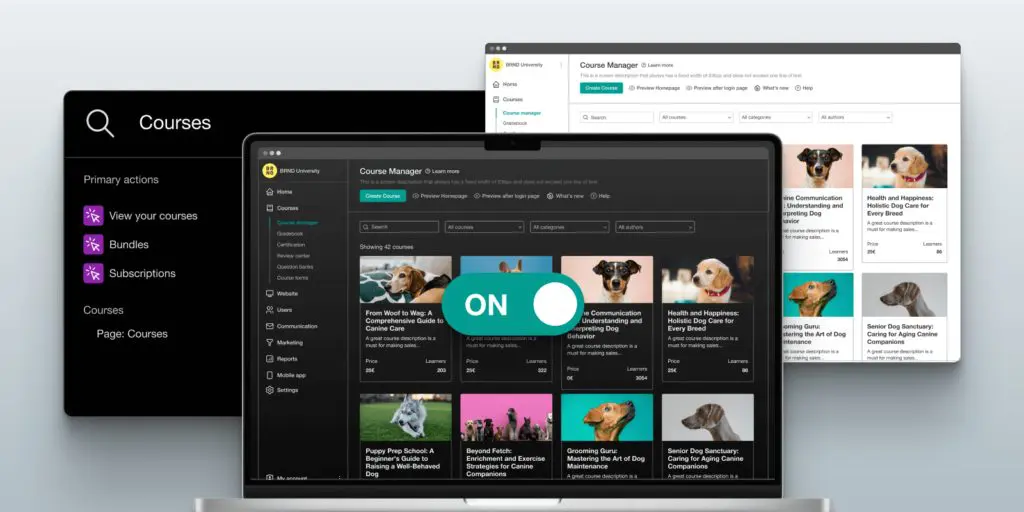
Read the rest of this guide where we share the latest updates in the LearnWorlds user interface.
In it, we’re not just focusing on the aesthetic or usability side of LearnWorlds features, we’re also exploring a new product-led way of using the platform to help you discover more efficient ways to manage and grow your business.
And if you’re not already familiar with the LearnWorlds platform, make sure to read our comprehensive review. You’ll see why it’s many features and functionalities make this SCORM-compliant platform a consistent top pick among the best online course platforms.
Now, let’s dive into that impressive and robust user interface.
1. Menu Design and Organization
The principle behind the new design is to help you do more in less time.
The platform is designed to make your job easier, allowing you to operate it to its full extent and discover its full functionality. Whether you’re working alone or with a small team, the whole goal of the new UI is to empower you to be more productive, more efficient, and ultimately more effective as a creator.
To this end, the main menu has been redesigned to be faster and more concise.
One of the first changes you’ll see when you login is that there is a different menu on the left and top.
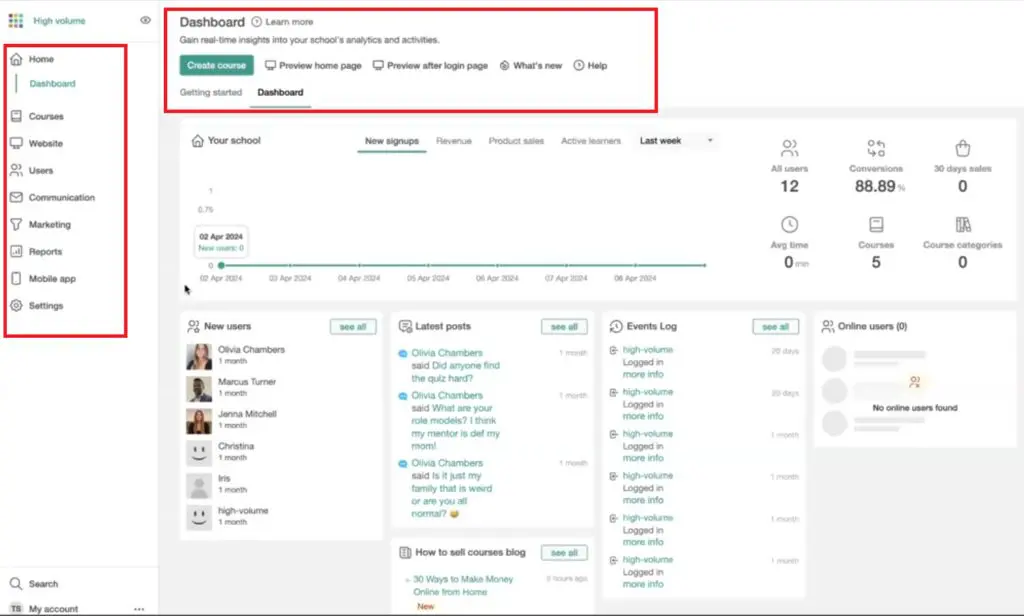
You’ll also see a different “My Account” at the bottom which has some new functionalities.

A lot of the old menus have been consolidated to make one easy-to-navigate menu. There’s no longer a second layer of the menu. With the first click of the category, you’re directed to the page immediately.
For example, when you click on “Courses”, you can view courses immediately. Click “Websites”, and you’re already on your website pages. The transitions are not only quicker, but they’re also smoother with the new UI.
LearnWorlds has revolutionized the entire navigation system, streamlining all menu items, and slashing the time you spend hunting for tools.

Use the code “LEARNREV2046” when checking out at LearnWorlds and get 20% off the first 6 months of a Pro Trainer plan or higher.
2. “Learn More” Button for In-Context Help
Oftentimes when building a new school or community, creators spend countless hours going back and forth with the support team.
LearnWorlds has a well-curated knowledge base with over 600 support articles that you can search to find answers to any question you may have about using the platform.
But, the new user interface makes things even easier for you by providing contextual help.
From any page on your dashboard, you can click “Learn more” and you will be presented with the most relevant articles and resources
This feature connects you to related resources cherry-picked from the vast library of courses, videos, webinars, and the LearnWorlds blog. No more time-consuming searches. The in-context assistance helps you understand and use each feature on the platform, helping to maximize the value you get from LearnWorlds.

3. Centralized Course Management
LearnWorlds has streamlined course management by centralizing all tools in one hub. With this latest UI update, you get one-click access to settings and reports, simplified learner progress monitoring, and improved efficiency in course management.
The central hub now includes Gradebooks, User Progress, and all course-related features so you don’t have to jump from menu to menu when working on your courses.
Additional enhancements include the following:
- Ability to clone previous course structures as templates
- Access to various automation templates (available to Pro users)
- Customizable User Progress Report templates
- Unified completion rules management
These changes aim to simplify your workflow and boost productivity.
All in all, the streamlined course management system is a standout aspect of the new UI that has been fine-tuned for peak performance.
4. Shortcut-Enabled Search Functionality
On the bottom left-hand side of the page, you’ll find the Search button. You can also use the shortcuts Ctrl+K (on PC) or Cmd+K (on Mac) to instantly access search wherever you are on the platform.
Start typing your query into the search box and the algorithm will bring up relevant results. Click “Enter”, and you will be taken directly to the page you requested.
Instant access is LearnWorld’s priority, and the new search tool eliminates delays, putting every feature at your fingertips for maximum efficiency and non-stop productivity.
Use the code “LEARNREV2046” when checking out at LearnWorlds and get 20% off the first 6 months of a Pro Trainer plan or higher.
5. Create a New Course Based on the Previous Course Layout
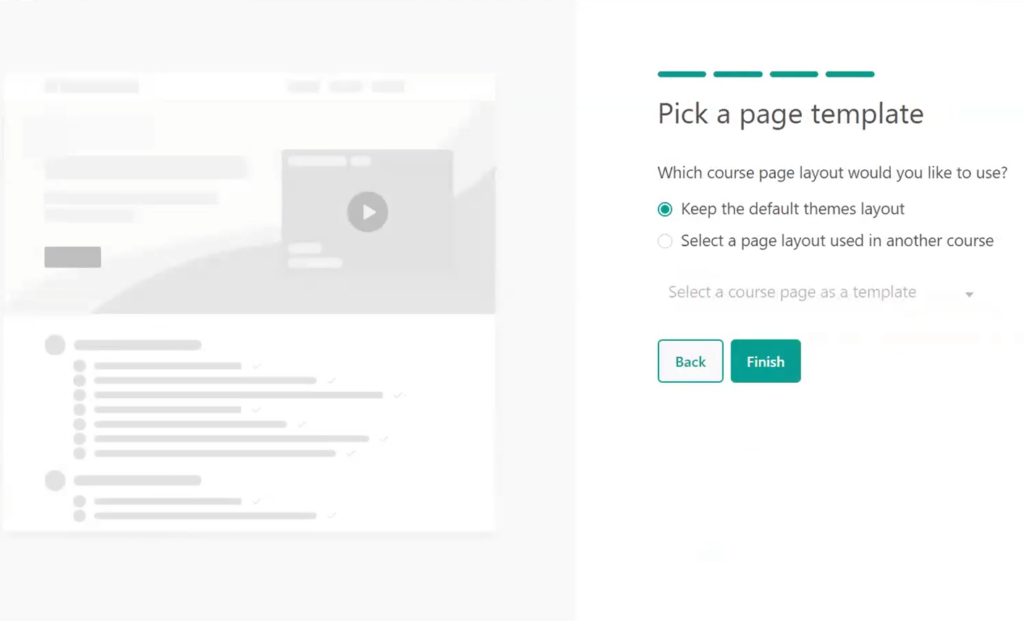
The new user interface gives you the option to select which existing layout you want to use when building a new course.
With just one click, you can clone any design. To replicate any previous course design, simply click “Select a page layout used in another course”.
This will open up all your courses so you can choose which page to use as a LearnWorlds course template.
6. LearnWorlds Video Library
Something new in the LearnWorlds video library is that you can now upload up to 15 videos concurrently. This greatly speeds things up, especially for creators who work with lots of videos. (Learn more about the top video editing tools for beginners.)

7. The Report Center
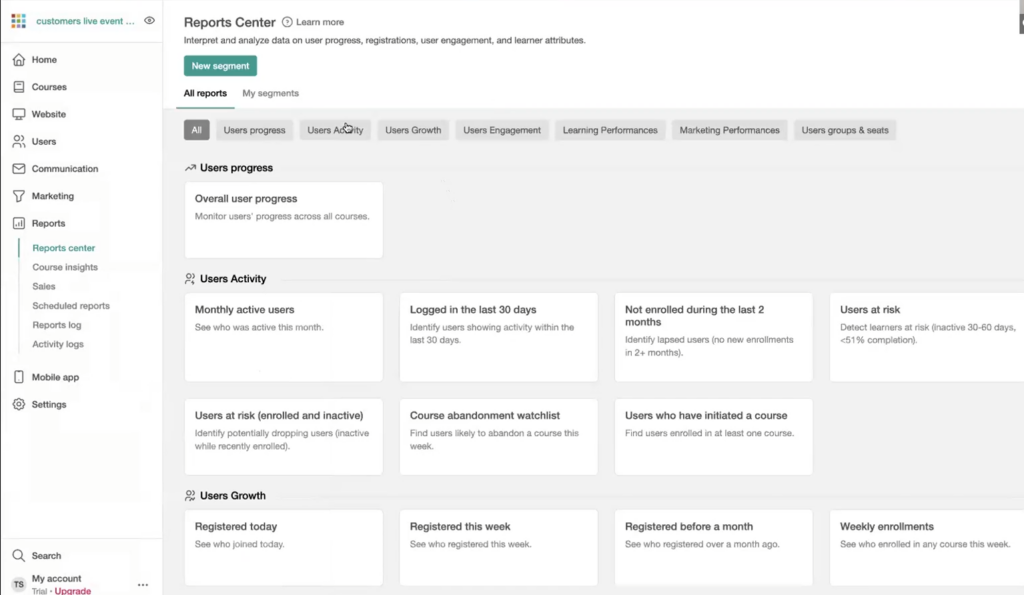
Another feature of LearnWorlds’ new UI is the unification of the reports, user progress, and segments in a single page with multiple pre-configured templates grouped in convenient categories.
The expanded functionality of the report center allows you to see metrics such as how many users signed up on any day, week, month, or year.
- Filter LearnWorlds courses according to free or paid.
- See who made in-app purchases.
- Access user engagement data to see which of the top contributors in your LearnWorlds community.
- Identify users by device (tablet, mobile, desktop, etc.
- Rank users based on how many community posts they have.
That’s not all, in the learning performances tab, you can identify the most certificate achievers, most accomplished learners, and most course enrollments.
You can also see which learners have the most unfinished courses, track their total study time, and identify users according to course average scores.
8. Dark Mode Feature
Not only has LearnWorlds integrated many highly-requested features, but they’ve also embraced modern design trends.
If you are concerned about reducing eye strain in low-light environments, you can now switch between dark and light mode on LearnWorlds.
You’ll find the toggle button under the “My Account” tab. A simple click and your entire environment changes into dark mode – the perfect feature if you prefer less contrast and want a more stylish touch to your learning environment.

What Else Awaits You in LearnWorlds’ New UI?
These are the big pillars of changes to the LearnWolds UI. However, they are not the only changes made to the platform.
It’s beyond the scope of this article to delve into them all, but here’s a quick look at the other noteworthy changes you’ll see:
New Feature Discovery Pages
Any time you click on a feature that you’ve yet to use, you’ll see this page which explains both usage and practical applications, helping you uncover valuable features you might have overlooked, and enhancing your platform experience.
Automations
The Automations feature used to be under “Users”, but now you can find it in course settings. This was done deliberately to help creators associate automations with courses because LearnWorlds’ developers realized that this was a severely underutilized feature of the platform.
Site Flavors
You can now create two different versions of your website with a couple of clicks on the LearnWorlds site builder. No need to stick with the design you chose when signing up.
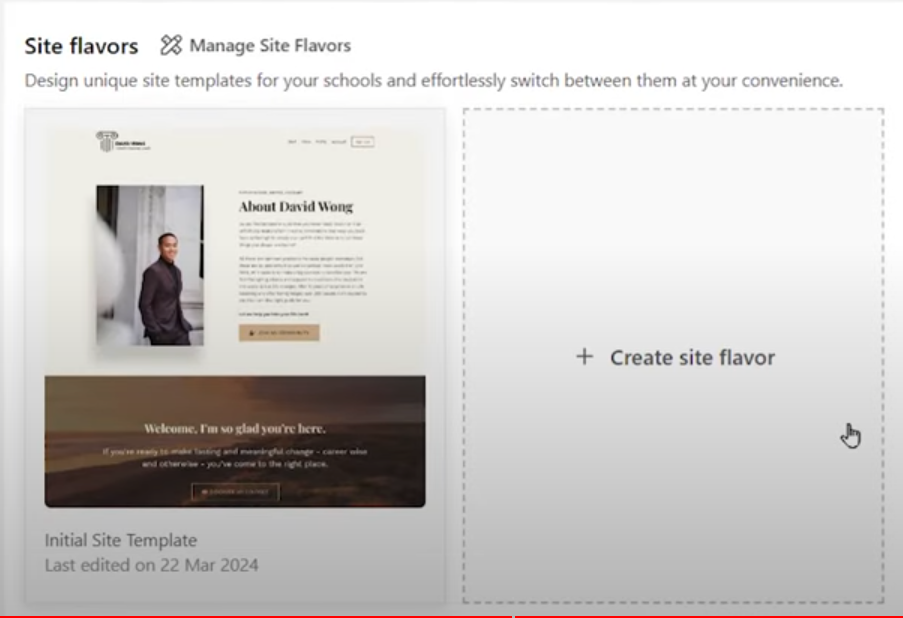
If, for whatever reason, you’re not pleased with your site’s appearance, or maybe you just want to provide users with a different experience you can switch between LearnWorlds templates effortlessly. Note that this feature is only available to Pro subscribers.
Editable Badges
In the LearnWorlds Gamification Engine tab (located under “Learning Apps”, you’ll find a variety of badges that you can edit to match your brand.

The Final Word
LearnWorlds understands that as a course creator, you’re passionate about delivering top-notch learning experiences. That’s why they’ve reimagined the platform with you at the center.
This isn’t just a facelift – it’s a major overhaul designed to supercharge your workflow and unleash your creative potential.
Every aspect of the course creation process has been streamlined, putting powerful tools at your fingertips. No more hunting for features or wading through endless menus. Now, you’ll find exactly what you need, when you need it. Whether you’re crafting engaging content, managing student interactions, or analyzing performance metrics, everything is just a click away.
Moreover, the LearnWorlds platform has integrated smart help systems and resource libraries directly into your workflow to ensure that instant guidance is always close at hand.
If you’re not already a user, sign up for a free LearnWorlds trial right now to discover the latest features in the platform’s updated interface. And use the code “LEARNREV2046” to get 20% off the first 6 months of a Pro Trainer plan or higher.

Jeff Cobb, Founder of Learning Revolution
Jeff Cobb is an expert in online education and the business of adult lifelong learning. Over the past 20+ years he has built a thriving career based on that expertise – as an entrepreneur, a consultant, an author, and a speaker. Learning Revolution is a place where Jeff curates tips, insights, and resources to help you build a thriving expertise-based business. Learn more about Jeff Cobb here.
Table of Contents
Related Posts
LearnWorlds Pricing (2026): What It Actually Costs and Whether It’s Worth It
LearnWorlds Review (2026) | Overhyped or A Top All-In-One Online Course Platform?
LearnWorlds’ AI Assistant: Transform Your Content Creation Process