

TL;DR: LearnWorlds Pricing | Detailed Breakdown of Its Paid Plans
LearnWorlds has four plans, three you can buy yourself and a custom plan for large organizations. Every plan starts with a 30-day free trial, no credit card. Prices on this page update automatically and were last checked in November 2026.
Billed annually: Starter $44/mo, Pro Trainer $79/mo, Learning Center $249/mo, Corporate (custom pricing)
Billed monthly: Starter $49/mo, Pro Trainer $99/mo, Learning Center $299/mo, Corporate (custom pricing)
What most people miss: The entry plan, Starter, charges a fee of $5 per paid enrollment. Once those fees cost more than the price gap to the middle plan, the middle plan becomes cheaper. I show you how to find that point below.
My take: The entry plan is fine for testing one course. The middle plan is the one I recommend for most serious course creators. The top self-serve plan, Learning Center, makes sense only when you need white-labeling, client groups, unlimited SCORM or automation.
Coupon: Use LEARNREV2046 at checkout for 20% off the first 6 months on the middle plan or higher.
Try LearnWorlds for free
I’ve run courses and programs for Leading Learning and Tagoras on LearnWorlds for several years. One of those courses, Presenting for Impact, has attracted thousands of customers on the platform. So I understand LearnWorlds pricing from paying for it and running real courses on it, beyond what the pricing page tells you.

LearnWorlds is strong where most course creators need it, with good course structure, assessments, interactive video, a polished learner experience and, more recently, AI. Pricing is where people get tripped up, and it usually comes down to the enrollment fee on the entry plan. At 50 paid enrollments a month, you’d pay the $49 plan price plus a fee of $5 per paid enrollment on each of those 50 sales.
Plan prices change from time to time, so this guide does two things. Every price, fee and limit comes from our Pricing Hub and updates when LearnWorlds changes it. I also show you the simple math to work out your own costs at any price, so the numbers stay right after a price change, along with which plan fits each stage of your business and the costs that sit outside the plan price.
Note: This page contains affiliate links. If you purchase through links on this page, we may earn a commission at no additional cost to you.

Read my detailed LearnWorlds review, based on years of hosting courses on the platform
LearnWorlds Pricing Plans: Full Comparison
Here’s a side-by-side look at the LearnWorlds plans before I go into each one. The limits column matters as much as the price, because the monthly active learner cap decides how big your school can grow on each plan.
| Plan | Monthly price | Annual price (per month) | Annual saving | Enrollment fee | Key limits | Best for |
|---|---|---|---|---|---|---|
| Starter | $49/month | $44/month | 10% | $5 per paid enrollment | 1,000 active learners/mo, 1 admin, 300 AI credits/mo | Testing your first course at low enrollment volume |
| Pro Trainer | $99/month | $79/month | 20% | None | 2,000 active learners/mo, 5 admins, 500 AI credits/mo | Growing course businesses and most serious creators |
| Learning Center | $299/month | $249/month | 17% | None | 2,000 active learners/mo, 25 admins, 1,000 AI credits/mo, 10 client groups | Branded academies, training teams and B2B training |
| Corporate | Custom | Custom | Custom | None | Custom learners, admins, client groups and AI credits | Large organizations and multi-school training |
LearnWorlds features by plan:
| Feature | Starter | Pro Trainer | Learning Center | Corporate |
|---|---|---|---|---|
| Enrollment fee | $5 per paid enrollment | None | None | None |
| Monthly active learners | 1,000 | 2,000 | 2,000 | Custom |
| Admins & team seats | 1 admin | 5 admins/instructors | 25 collaborators | Custom |
| AI credits per month | 300 | 500 | 1,000 | Custom |
| Extra AI credits add-on | ✗ | Monthly add-on | Monthly add-on | Monthly add-on |
| Paid courses | Unlimited | Unlimited | Unlimited | Unlimited |
| Unlimited video hosting & built-in community | ✓ | ✓ | ✓ | ✓ |
| Free courses & learning paths | ✗ | Unlimited | Unlimited | Unlimited |
| Course navigation & completion rules | Free navigation | Free & sequential | Advanced, with custom completion rules | Advanced, with custom completion rules |
| Certificates | ✗ | ✓ | ✓ | ✓ |
| Accredible & Credly credentials | ✗ | ✓ | ✓ | ✓ |
| SCORM & HTML5 | ✗ | 20 packages | Unlimited | Unlimited |
| Interactive video with AI | ✗ | Basic | Advanced | Advanced |
| Live classes via Zoom, Meet, Teams, Webex | ✗ | One account | Multiple accounts | Multiple accounts |
| 1:1 & group sessions via Calendly | One account | One account | Multiple accounts | Multiple accounts |
| AI subtitle translation | ✗ | ✓ | ✓ | ✓ |
| Video transcripts & subtitles | ✗ | Manual .srt upload | Auto-generated (6 hrs/mo) | Auto-generated (20 hrs/mo) |
| Assessments with AI | Essential question types | ✓ | ✓ | ✓ |
| Question bank & question import | ✗ | ✓ | ✓ | ✓ |
| Assignment responses | ✗ | File (20 MB) | File (20 MB), audio/video (40 sec) | File (50 MB), audio/video (180 sec) |
| Bundles, subscriptions & installments | ✗ | ✓ | ✓ | ✓ |
| Page funnels with AI | ✗ | 15 | Unlimited | Unlimited |
| Mass email credits per month | ✗ | 2,000 | 5,000 | 10,000 |
| Affiliate marketing | ✗ | Basic | Advanced | Advanced |
| Course & sales reporting | ✗ | Basic | Advanced | Advanced |
| Course & sales insights | ✗ | ✗ | ✓ | ✓ |
| AI Insights | ✗ | ✗ | ✓ | ✓ |
| Landing pages | ✗ | ✓ | ✓ | ✓ |
| Popup builder with AI | 2 popups | Unlimited | Unlimited | Unlimited |
| Blog with AI | ✗ | ✓ | ✓ | ✓ |
| White-label (no LearnWorlds logos) | ✗ | ✗ | ✓ | ✓ |
| Zapier | ✗ | ✓ | ✓ | ✓ |
| HubSpot integration | Tracking code only | Tracking code only | Advanced | Advanced |
| Branded mobile app | ✗ | Add-on | Add-on | Add-on |
| Email support | 24/5 | 24/7 | 24/7 | 24/7 |
| Phone support | ✗ | ✗ | ✗ | Yes, weekdays 8am–8pm GMT |
| Client groups (B2B training) | ✗ | ✗ | Up to 10 | Custom |
| Automation engine (triggers, conditions, delays) | ✗ | ✗ | ✓ | ✓ |
| AI Automations | ✗ | ✗ | ✓ | ✓ |
| Single sign-on, API & webhooks | ✗ | ✗ | Yes (3 SSO connections) | Yes (8 SSO connections) |
| Scheduled reports | ✗ | ✗ | 20/mo | Custom |
| LTI 1.3 activities | ✗ | ✗ | Unlimited | Unlimited |
| Setup help with a specialist | ✗ | ✗ | 2 hours | Dedicated success manager |
| Uptime guarantee | 99.90% | 99.90% | 99.90% | 99.95% |
| AI course and assessment creation | Yes; 300 credits/mo | Yes; 500 credits/mo | Yes; 1,000 credits/mo | Custom allowance |
Two details should shape your choice before features do. The first is the enrollment fee on Starter, which I break down below. The second is the learner cap. Each self-serve plan limits monthly active learners, as the table shows, and a school that outgrows the highest self-serve cap needs the custom Corporate plan whichever features it uses.
Annual billing saves 10% on Starter, 20% on Pro Trainer and 17% on Learning Center compared with paying monthly. The LEARNREV2046 coupon then takes another 20% off your first 6 months on Pro Trainer or higher, and the free trial lets you explore the platform before you pay anything.
The Part Most People Skip on the LearnWorlds Pricing Page
LearnWorlds looks affordable at first glance, because $49 a month is an easy number to get comfortable with. The catch is the fee of $5 that LearnWorlds charges on every paid enrollment on Starter, whatever your course costs.
Most people read the monthly price, sign up and start selling, and then their first full bill surprises them. I’ve worked with online course platforms for more than two decades, and LearnWorlds is one of the stronger ones for learning design, but its pricing has never been the clearest. Here’s how to work out what the fee means for you.
The Starter Plan: What It Costs You
Your real monthly cost on Starter is the plan price plus one enrollment fee for every paid sale. Pro Trainer has no enrollment fee, so its cost stays flat however much you sell. Here’s how the two compare as your sales grow, on monthly billing.
| Paid enrollments a month | Starter total cost | Pro Trainer cost |
|---|---|---|
| 5 | $49 + (5 × $5) | $99 |
| 10 | $49 + (10 × $5) | $99 |
| 25 | $49 + (25 × $5) | $99 |
| 50 | $49 + (50 × $5) | $99 |
| 100 | $49 + (100 × $5) | $99 |
How to find your break-even point: Subtract the Starter price from the Pro Trainer price, then divide the result by the enrollment fee. The answer is the number of paid enrollments a month at which both plans cost the same. Sell more than that, and Pro Trainer is the cheaper plan.
- On monthly billing: ($99 − $49) ÷ $5
- On annual billing: ($79 − $44) ÷ $5
The annual break-even point is usually lower, because the price gap between the two plans shrinks when you pay yearly. Our Break-Even Calculator runs the same math with your own course prices and sales.
The fee also hits low-priced courses hardest. A flat fee per sale takes a much bigger share of a $19 introductory course than of a $499 program, so divide the fee by your course price to see what share of each sale you give up.
Who should be on Starter
Starter makes sense in two situations. The first is testing a course idea while you expect sales to stay below your break-even point. The second is a school for a small, closed group where enrollment stays low. Check what Starter leaves out before you pick it.
| Feature | Starter | Pro Trainer | Learning Center | Corporate |
|---|---|---|---|---|
| Free courses & learning paths | ✗ | Unlimited | Unlimited | Unlimited |
| Certificates | ✗ | ✓ | ✓ | ✓ |
| Live classes via Zoom, Meet, Teams, Webex | ✗ | One account | Multiple accounts | Multiple accounts |
| Bundles, subscriptions & installments | ✗ | ✓ | ✓ | ✓ |
| Landing pages | ✗ | ✓ | ✓ | ✓ |
| Zapier | ✗ | ✓ | ✓ | ✓ |
If you’re launching a course with real marketing behind it, start on Pro Trainer. The math will push you there within a month or two anyway, and switching plans in the middle of a launch adds friction you don’t need.
Pro Trainer: The Plan Most Serious Course Creators Land On
$99/month, or $79/month billed annually, with no enrollment fees
Pro Trainer is where LearnWorlds becomes a real business tool. Beyond removing the enrollment fee, it adds the features most course businesses need once they start selling consistently.
- No enrollment fees on any sale
- Free courses and learning paths, so you can run lead magnets and onboarding courses
- Course certificates
- Subscriptions, memberships, bundles and installment payments
- Affiliate management, Zapier and more than 50 built-in integrations
- Landing pages, AI page funnels and mass email to your learners
- SCORM uploads, AI subtitle translation and interactive video with AI
- More admins, AI credits and active learners than Starter, plus 24/7 email support
Here’s how its allowances compare with Starter’s, in a table that updates whenever LearnWorlds changes its limits.
| Feature | Starter | Pro Trainer | Learning Center | Corporate |
|---|---|---|---|---|
| Monthly active learners | 1,000 | 2,000 | 2,000 | Custom |
| Admins & team seats | 1 admin | 5 admins/instructors | 25 collaborators | Custom |
| AI credits per month | 300 | 500 | 1,000 | Custom |
| SCORM & HTML5 | ✗ | 20 packages | Unlimited | Unlimited |
| Page funnels with AI | ✗ | 15 | Unlimited | Unlimited |
| Mass email credits per month | ✗ | 2,000 | 5,000 | 10,000 |
| Affiliate marketing | ✗ | Basic | Advanced | Advanced |
| Email support | 24/5 | 24/7 | 24/7 | 24/7 |
Here’s a screenshot from my LearnWorlds Pro Trainer account.
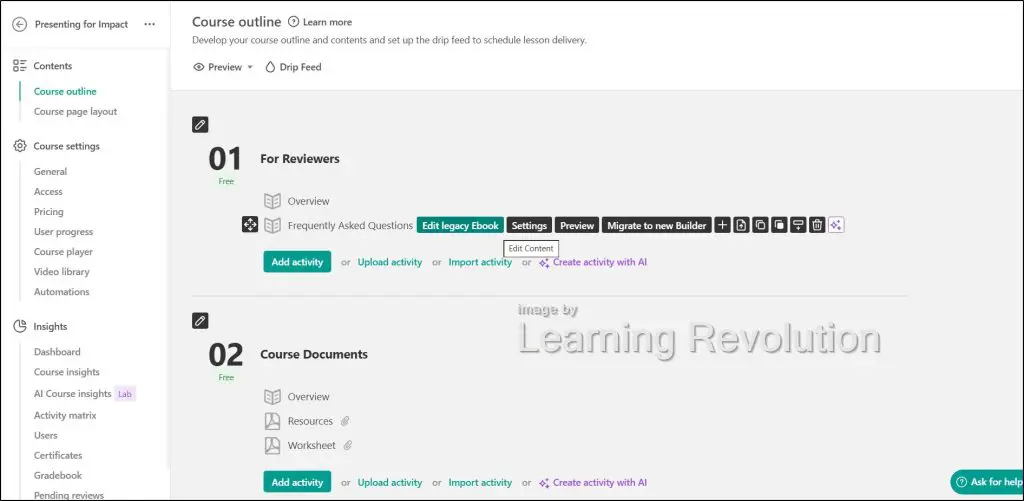
For most course creators building a real business, Pro Trainer covers everything they need for the first few years. Its limits start to matter once you run a serious academy or an organizational training program, where the SCORM package cap, LearnWorlds branding on your school, the missing automation engine and the learner ceiling all come into play.
What you still don’t get on Pro Trainer
White-labeling requires Learning Center. If removing LearnWorlds branding from your school matters to you or your clients, budget for $299/month, or $249/month on annual billing, because no plan in between offers it.
The SCORM cap on Pro Trainer works for most course creators, but it gets restrictive for corporate training, where you might import dozens of packages. Client groups for B2B training, the automation engine, scheduled reports, single sign-on and API access also need Learning Center.
The annual billing math
On annual billing, Pro Trainer costs $948 a year, paid upfront. Paying monthly instead means twelve payments of $99, so annual billing saves you 20%. The LEARNREV2046 coupon then takes 20% off your first 6 months.
- First 6 months with the coupon: 6 × ($79 × 0.8)
- Remaining 6 months: 6 × $79
- Compare with: 12 × $99 on monthly billing with no coupon
Confirm at checkout how the coupon applies to an annual plan before you pay upfront, since promotional terms can change.
Learning Center Plan: A Serious Jump That Needs a Specific Reason
$299/month, or $249/month billed annually, with no enrollment fees
Learning Center costs a lot more than Pro Trainer, so the upgrade needs a clear business reason. Here’s what it adds on top of Pro Trainer.
- Full white-labeling, with no LearnWorlds logos anywhere on your school
- Client groups for selling and delivering training to different companies
- An automation engine with triggers, conditions and delays
- Unlimited SCORM packages and LTI 1.3 activities
- Advanced interactive video, affiliate management, reporting and sales insights
- Course reports you can schedule and send
- Single sign-on, API access and full HubSpot integration
- Setup help with a LearnWorlds specialist
| Feature | Starter | Pro Trainer | Learning Center | Corporate |
|---|---|---|---|---|
| Monthly active learners | 1,000 | 2,000 | 2,000 | Custom |
| Admins & team seats | 1 admin | 5 admins/instructors | 25 collaborators | Custom |
| SCORM & HTML5 | ✗ | 20 packages | Unlimited | Unlimited |
| White-label (no LearnWorlds logos) | ✗ | ✗ | ✓ | ✓ |
| Client groups (B2B training) | ✗ | ✗ | Up to 10 | Custom |
| Automation engine (triggers, conditions, delays) | ✗ | ✗ | ✓ | ✓ |
| Single sign-on, API & webhooks | ✗ | ✗ | Yes (3 SSO connections) | Yes (8 SSO connections) |
| Scheduled reports | ✗ | ✗ | 20/mo | Custom |
| LTI 1.3 activities | ✗ | ✗ | Unlimited | Unlimited |
| Setup help with a specialist | ✗ | ✗ | 2 hours | Dedicated success manager |
That’s a big feature set, and most solo course creators and coaches need little of it. Check the learner row, too. If Learning Center carries the same learner cap as Pro Trainer, upgrading won’t help when learner volume is your problem.
When Learning Center makes sense
- You need white-labeling because you sell the learning experience to clients or corporate buyers as your own product. This is the most common reason I see.
- You sell training to several client companies and want a separate space for each one.
- You run a training organization that imports more SCORM packages than Pro Trainer allows and needs proper completion tracking.
- More people manage your school than Pro Trainer’s admin seats cover, or your tech stack needs single sign-on, the API or automated training flows.
If none of those apply to you right now, stay on Pro Trainer. The monthly difference is $299 minus $99, or $249 minus $79 on annual billing, and that money can fund marketing or course production instead.
The Costs LearnWorlds Doesn’t Show on the Pricing Page
LearnWorlds covers the core of an online school, including hosting, checkout and course delivery. Depending on how you run your business, you’ll likely spend money outside the plan price too. Here are the costs I’d budget for, and the allowances that decide when you hit them.
| Feature | Starter | Pro Trainer | Learning Center | Corporate |
|---|---|---|---|---|
| Monthly active learners | 1,000 | 2,000 | 2,000 | Custom |
| AI credits per month | 300 | 500 | 1,000 | Custom |
| Mass email credits per month | ✗ | 2,000 | 5,000 | 10,000 |
| Zapier | ✗ | ✓ | ✓ | ✓ |
| Branded mobile app | ✗ | Add-on | Add-on | Add-on |
Email marketing
LearnWorlds includes mass email from Pro Trainer up, with a monthly allowance that grows on higher plans, and Starter gets none. That covers announcements to your learners. For lead nurturing, automated sequences and re-engaging past students, you’ll want a dedicated email marketing tool. LearnWorlds connects with Kit, ActiveCampaign, Mailchimp and others, which all cost extra, and you can also buy extra LearnWorlds email credits.
AI credits
Every plan includes a monthly allowance of AI credits. Standard AI requests usually use one credit, bigger workflows use several and learner-facing tools such as AI Question, AI Activity, AI Canvas and AI Insights also draw from your allowance. Credits reset each billing period, and from the middle plan up you can add a monthly extra-credit add-on at checkout.
AI use is becoming routine for creators. In a creator survey we cover in our elearning statistics, 57.3% of creators said they use AI daily, so check your credit use in the first month before you assume the allowance is enough. My LearnWorlds review explains which AI features are worth spending credits on.
Branded mobile app
The branded iOS and Android app is a paid add-on, and Starter can’t add it at all. LearnWorlds offers the app at several price points but doesn’t publish them in its plan comparison, so confirm the cost before you commit if mobile learning matters to your audience.
Zapier
Zapier comes with Pro Trainer and above. If you’re on Starter and expect to automate work between LearnWorlds and your other tools, plan to upgrade.
Payment processing fees
Even with no enrollment fees on Pro Trainer and above, your payment gateway still takes its cut. Stripe or PayPal charges its standard processing fee on every sale, on top of your LearnWorlds plan. LearnWorlds also adds VAT for EU customers who don’t provide a valid VAT number.
Learner caps
Every self-serve plan caps monthly active learners. If your school regularly has more learners active in a month than your plan allows, you’ll need the custom Corporate plan, and that quote becomes the real cost of staying on LearnWorlds.
How to Work Out Your Real Monthly Cost
Add these together for an honest monthly figure you can compare with any other platform. The formula holds whatever LearnWorlds charges in future.
| Cost | How to calculate it | Applies to |
|---|---|---|
| Plan price | Monthly price, or the annual price divided by 12 | Every plan |
| Enrollment fees | Paid enrollments a month × $5 | Starter |
| Payment processing | Your gateway’s percentage and per-sale fee × sales | Every plan |
| Email marketing tool | Your email platform’s monthly price | Every plan, if you nurture leads |
| Add-ons | Branded app, extra AI credits, extra email credits | As needed |
How LearnWorlds Pricing Compares to Alternatives
Here’s how LearnWorlds compares with its main alternatives on annual billing. Prices update automatically, and the last column shows where each platform beats LearnWorlds, so you can judge the gap on value as well as price.
| Platform | Entry plan | Starts at (annual billing) | Plans and prices | Stronger than LearnWorlds for |
|---|---|---|---|---|
| LearnWorlds | Starter | $44/month | Starter $44/mo, Pro Trainer $79/mo, Learning Center $249/mo, Corporate (custom pricing) | Learning design, assessments, interactive video and SCORM |
| Thinkific | Start | $82/month | Start $82/mo, Grow $164/mo, Expand $374/mo, Plus (custom pricing) | A simpler start and built-in communities |
| Kajabi | Basic | $143/month | Basic $143/mo, Growth $199/mo, Pro $399/mo | Email marketing, funnels and selling many product types |
| Teachable | Starter | $29/month | Starter $29/mo, Builder $69/mo, Growth $139/mo, Custom (custom pricing) | Publishing and selling courses with little setup |
| Podia | Mover | $42/month | Mover $42/mo, Shaker $84/mo, Earthquaker $150/mo | Digital downloads and simple all-in-one selling |
At the mid-tier level, LearnWorlds Pro Trainer and Thinkific compete head to head. Thinkific is cleaner and simpler to start with, while LearnWorlds gives you more depth on the learning side, with interactive video, deeper assessments, SCORM below the top tier and finer control over how learners move through content. My Thinkific review covers that side.
Kajabi includes full email marketing and suits marketers more than educators. If your business runs on funnels, email sequences and digital products beyond courses, Kajabi makes more sense, and if it runs on learning quality and outcomes, LearnWorlds does. See my Kajabi review for the trade-offs.
Teachable, which I cover in my Teachable review, sits closer to simplicity than depth and suits creators who want to publish and sell courses without managing a complex platform. Before you pick its entry plan, check its transaction fee in our Teachable pricing guide. For a wider view, my guide to the best online course platforms compares them all.
Is LearnWorlds Worth the Price? My Verdict
LearnWorlds is worth the price for most people at the Pro Trainer level, but the right plan depends on what you’re building. Find your situation below.
| Your situation | Plan to choose | Why |
|---|---|---|
| Testing a course idea with few sales | Starter | Lowest entry price while sales stay below your break-even point |
| Solo educator or coach building structured programs | Pro Trainer | No enrollment fees, certificates, subscriptions and SCORM |
| Training business selling to client companies | Learning Center | White-labeling, client groups and automation |
| Organization with more learners than the self-serve caps allow | Corporate | Custom learner limits, uptime and support |
| Marketer selling content and growing an audience | Consider Kajabi or Podia | Stronger email marketing and funnels for less once you add an email tool |
If you’re a solo educator or coach building structured programs
Pro Trainer is worth it. Assessments, interactive video, certificates and subscriptions at $79/month on annual billing give you a real learning platform, where many rivals give you a video library. Email is the main gap, since the built-in mass email allowance covers announcements but not marketing. If memberships sit at the center of your model, compare our membership site platforms guide too.
If you’re a training business or organization
LearnWorlds is one of the better options at this price point. SCORM support, client groups, recertification and the reporting on Learning Center are hard to match without spending a lot more on dedicated LMS software. If your work involves corporate clients, compliance training or certification programs, Learning Center is worth the investment, as long as you stay within its learner cap. My guide to the best LMS platforms to sell courses compares the B2B options.
If you’re starting out with your first course
Start with the free trial and skip Starter. The trial gives you enough time to build your first course and see whether the platform fits how you work. When you’re ready to sell, work out your break-even point and go straight to Pro Trainer if you expect to sell more than that each month. My guide on how to sell courses online covers the launch side.
If you mainly want to sell content and grow an audience
LearnWorlds is a poor fit here, because its strength is learning design, and marketing automation comes second. If your business depends on email sequences, funnels and digital product sales more than structured learning, Kajabi or Podia will serve you better and likely cost less once you add the email tool LearnWorlds would need.
Overall, I recommend LearnWorlds at the Pro Trainer level for anyone who cares about the quality of the learning experience they deliver. It’s the platform behind several of our Leading Learning programs, the same community Celisa Steele and I serve through the Leading Learning Podcast. Starter is only worth it for a real testing phase, and Learning Center needs a specific business reason, but when that reason exists, the platform delivers.
LearnWorlds Pricing FAQs
Here are answers to the pricing questions people ask me most often before they pick a LearnWorlds plan.
Does LearnWorlds have a free plan?
No, LearnWorlds has no permanent free plan, but it offers a free trial on every plan, and you don’t need a credit card to start it. The trial gives you enough time to build a course and get a real sense of whether the platform works for you before you commit.
Can you avoid the enrollment fee without upgrading?
No, the per-enrollment fee is part of the Starter plan, and the only way to remove it is to upgrade to Pro Trainer or higher. No add-on removes it on Starter, so divide the price gap between the two plans by the fee to see when upgrading pays for itself.
Does the enrollment fee apply to free courses?
No, the fee applies only to paid enrollments. The Starter plan doesn’t offer free courses or learning paths, though, so you need Pro Trainer or higher if you want to run free courses as lead magnets or onboarding. Check the features table on this page for the current split.
Can you switch LearnWorlds plans at any time?
Yes, you can upgrade, downgrade or cancel before your next billing term renews, with no long-term contract on the self-serve plans. If you cancel an annual plan partway through the year, check the current refund terms with LearnWorlds first, because annual plans renew for the full term.
Is the LEARNREV2046 coupon code still active?
We keep the code on this page current. LEARNREV2046 gives you 20% off the first 6 months on Pro Trainer or higher. Apply it during signup, check that the discount shows before you pay and confirm how it applies to annual billing, since promotional codes can change.
How do I know which LearnWorlds plan is cheapest for me?
Compare Starter’s price plus your monthly enrollment fees with Pro Trainer’s flat price. Divide the price gap between the two plans by the enrollment fee to find your break-even point. If you expect to sell more enrollments than that each month, Pro Trainer is the cheaper choice.
What happens to your school if you cancel LearnWorlds?
Your school goes offline, and learners lose access to your courses. Export your learner data and keep copies of your original course files before you cancel. Moving to another platform takes real work, so treat your platform choice as a long-term decision and test it well during the trial.
Does LearnWorlds offer a nonprofit discount?
Yes, LearnWorlds offers discounts on Pro Trainer and higher plans to eligible registered nonprofit organizations. You need to contact LearnWorlds directly and describe your educational activities, and it’s worth asking before you buy an annual plan so the discount applies from the start.
How many learners can you have on LearnWorlds?
LearnWorlds counts monthly active learners toward its limits, total sign-ups don’t count and each self-serve plan has its own cap, shown in the comparison table on this page. Paid courses are unlimited on every plan, and schools that regularly go over the highest self-serve cap need a custom Corporate plan.
Does LearnWorlds include certificates on every plan?
No, certificates start on Pro Trainer. The Starter plan also leaves out free courses and learning paths, so if your students need proof of completion, Pro Trainer is the minimum plan. Learning Center adds scheduled reporting for training teams that track completions across groups.

Jeff Cobb, Founder of Learning Revolution
Jeff Cobb is an expert in online education and the business of adult lifelong learning. Over the past 20+ years he has built a thriving career based on that expertise – as an entrepreneur, a consultant, an author, and a speaker. Learning Revolution is a place where Jeff curates tips, insights, and resources to help you build a thriving expertise-based business. Learn more about Jeff Cobb here.
Table of Contents
Related Posts
13 Myths About Selling Online Courses Successfully (And What To Do About Them)
LearnWorlds Review | Overhyped or A Top All-In-One Online Course Platform?
Thinkific vs LearnWorlds (2026) | Comparing The Best Online Learning Platforms