

TL;DR — Podia in a Nutshell: Is It Worth Using Or Not Good Enough (2026)
Podia is an all-in-one creator platform that lets you build a website and sell courses, digital downloads, memberships, coaching, and webinars — all from one dashboard with built-in email tools and checkout.
In my experience, Podia gives you good-enough features across everything you need to run a creator business. It’s built for people who want one system that works well without diving into deep complexity.
The tradeoff is that it deliberately avoids advanced features that some creators eventually want as their businesses become more sophisticated.
Free Trial: 30-day full-access trial
No Free Plan: Podia discontinued it in 2024
Paid Plans
Mover: ~$33/mo billed yearly (~$39/mo monthly)
Shaker: ~$75/mo billed yearly (~$89/mo monthly)
Podia’s Main Features & Capabilities
Website & Blog: Simple site builder with basic SEO and custom domain Online Courses: Self-paced, drip, or scheduled lesson delivery
Digital Downloads: Sell files and bundles with presells and upsells
Memberships & Community: Free or paid access with built-in discussions
Coaching & 1:1 Offers: Sell sessions via external scheduling tools
Webinars & Replays: Sell live access and monetize recordings
Email Marketing: Newsletters, simple automations, tagging, revenue tracking
Checkout & Payments: Stripe and (Shaker) PayPal, coupons, payment plans
Marketing Tools: Upsells, waitlists, bundles, basic affiliate system
Best For: Creators and small teams who want speed, clarity, and fewer tools — and are comfortable trading deep customization for ease of use.
Not Right For: Creators who need advanced automation, complex funnels, deep learning analytics, or highly customized workflows.
Better Alternative for More Complexity: If you want deeper automation, advanced sales pipelines, and more control as your business grows, Kajabi is the stronger all-in-one alternative with more power, but also more complexity and a higher price tag.
Try Podia For Now
Over the past two decades, I’ve worked with just about every kind of learning business you can imagine, from solo creators launching their first course to established organizations running complex training programs.
One thing I’ve always admired about Podia is how consistently it has lowered the entry barrier for creators. It gives you the essentials to sell courses, coaching, memberships, and digital products without burying you in complexity.
But the real question with Podia has never been whether it’s good. It’s always been how long it stays good enough. As your business grows and the pressure is on, does Podia hold up?
I’ve used Podia since its early days as Upcoach, and I’ve seen both its strengths and its limits firsthand. In this article, I’ll explain not just what Podia is, but when it’s the right choice, and when you should look elsewhere, especially now that there’s no free plan.
Read: My shortlist for the best online course platforms
What Is Podia and How Is It Different?

Podia is an all-in-one platform built to help experts, edupreneurs and creators sell their knowledge online. It lets you create a website, sell online courses, coaching, memberships, webinars, and digital downloads, and manage email marketing from a single dashboard.
The platform is designed for solo creators and small teams who want to launch quickly without dealing with plugins, integrations, or technical setup.
Long before it became Podia, I used it in its earlier days as Upcoach, which focused heavily on coaching and community. That DNA is still visible in how Podia approaches simplicity and creator-first design.
What Podia is really trying to do is remove friction.
It’s not aiming to be the most advanced learning management system or the most powerful marketing automation tool. Instead, it targets creators who want to spend more time building and selling their offers and less time configuring software.
Coaches, course creators, consultants, authors, and membership site owners who value speed and clarity over endless customization tend to feel at home on Podia.
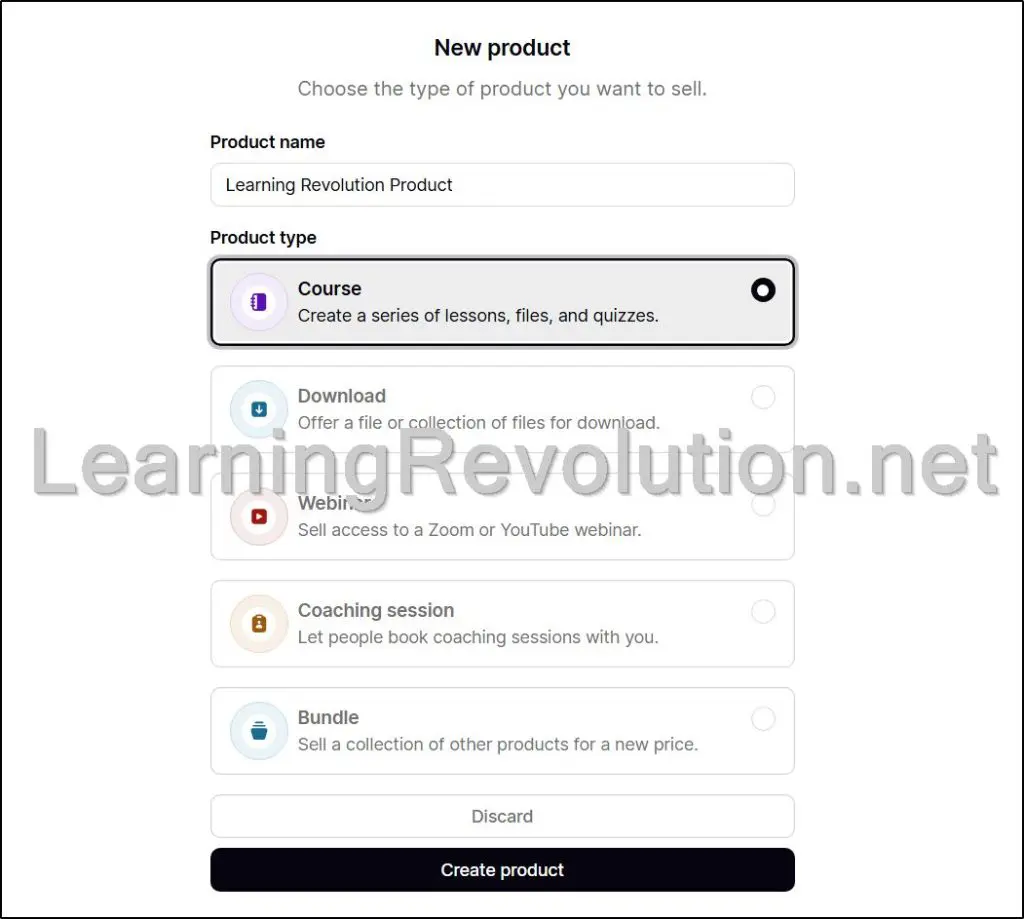
At a high level, Podia brings together:
- Website and blogging – A built-in site and blog to publish content and sell from one place
- Online courses – Self-paced or scheduled courses with video, files, drip content, and certificates
- Digital downloads – One-off products like ebooks, templates, audio, and bundles
- Coaching and services – Sell sessions using external scheduling tools
- Memberships and community – Paid or free communities tied to your products
- Email marketing – Newsletters, automations, segmentation, and sales tracking
- Payments and checkout – Stripe and PayPal (plan-dependent) with global tax support
Because Podia and Kajabi both call themselves “all-in-one,” they often get compared. The difference is in philosophy.
Kajabi is built for creators who want advanced funnels, deep automation, and more control as their business scales.
Podia is built for creators who want fewer moving parts and a gentler learning curve. Podia trades depth for ease, while Kajabi trades simplicity for power.
Neither approach is inherently better, but they serve very different types of businesses at different stages.

Podia Product Snapshot (2026) | Features, Pricing & Ideal User
| Category | Details |
| Platform type | All-in-one creator business platform (courses, memberships, coaching, community, and email marketing) |
| Best known for | Simplicity, low setup friction, built-in email |
| Starting price | $39/month (Mover plan, billed monthly) |
| Free plan | No (30-day free trial only) |
| Website builder | Yes – Pages, blog, custom domain, basic SEO tools |
| Online courses | Yes – Self-paced, drip, or scheduled lessons with hosted video |
| Digital downloads | Yes – Sell files, bundles, upsells, and presells |
| Coaching | Yes – Sell paid sessions using external scheduling tools |
| Memberships | Yes – Free or paid recurring access to content or community |
| Community | Yes – Built-in discussion areas tied to products or memberships |
| Webinars | Yes – Sell access to Zoom or YouTube Live sessions + replays |
| Email marketing | Yes – Newsletters, automations, tagging, and sales tracking |
| Checkout & payments | Stripe (Mover & Shaker), PayPal (Shaker only) |
| Transaction fees | 5% on Mover, 0% on Shaker |
| Affiliate system | Yes (Shaker only) – Built-in affiliate tracking |
| Integrations | Zapier, embeds, third-party tools |
| Typical upgrade path | Mover → Shaker → Kajabi / advanced LMS |
| Ideal business stage | Early to mid-stage creator businesses |
Podia Pricing and Free Trial (2026) | How Much Does It Cost?
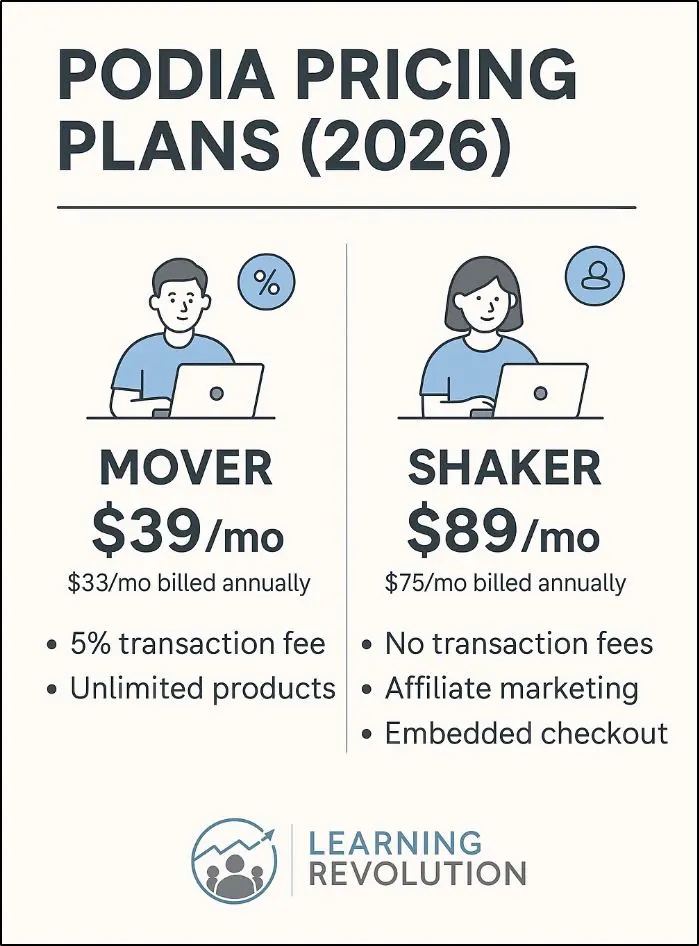
Podia keeps pricing intentionally simple, with one short trial and two paid plans.
Here’s what it offers.
- 30-day free trial: Full access to all features. No free plan anymore.
- Mover Plan – $33/month (billed yearly) or $39/month: Everything you need to run a creator business, with a 5% transaction fee.
- Shaker Plan – $75/month (billed yearly) or $89/month: No transaction fees, plus affiliate marketing, PayPal payments, and advanced selling tools.
What happened to Podia’s free plan?
Podia discontinued its free plan in 2024 and replaced it with a 30-day free trial, explaining that the free plan discouraged creators from launching and didn’t serve serious businesses well.
If you want a deeper analysis of Podia’s pricing plans and the detailed reasons behind scrapping its free plan, read my Podia Pricing Guide.
Podia Pros and Cons | Strengths & Weaknesses
| Pros | Cons |
| Very easy to set up and use, even for non-technical creators | Limited customization compared to advanced platforms like Kajabi |
| Truly all-in-one: website, products, email, and payments in one place | Not a full-featured LMS for complex learning experiences |
| Built-in email marketing included on all paid plans | Email tools are solid but not as deep as dedicated email platforms |
| Clean, distraction-free course and product delivery | Course assessments and reporting are basic |
| Supports many business models (courses, downloads, coaching, memberships) | Scaling large teams or multiple brands is difficult |
| Predictable pricing with no surprise add-ons | Mover plan includes a 5% transaction fee |
| Community features are simple and integrated | Community tools are not as robust as standalone community platforms |
| Free migrations lower the switching cost | No free plan anymore, only a 30-day trial |
| Fast setup for selling quickly and validating ideas | Limited control over advanced funnels and automation logic |
| Good choice for solo creators and small teams | Can feel restrictive as revenue, complexity, or volume increases |
Podia Features: A Deep Dive Into Courses, Coaching, Memberships & Marketing Tools
Podia is a complete solution for creating, marketing, and selling digital products without stitching together multiple tools. It brings your website, checkout, email marketing, and products into one place, which is exactly why so many solo creators and small teams are drawn to it.
But “all-in-one” can mean very different things in practice.
In this section, I’ll walk through Podia’s core features the way you actually use them, not the way they’re shown on marketing pages. For each area, I’ll explain what Podia does well, where it starts to feel limiting, and the point at which creators usually begin looking at platforms like Kajabi, Thinkific, or more specialized tools.
Feature #1: Website Builder & Core Platform Experience
You need a website because it becomes the home base for everything else you sell. Your courses, coaching offers, memberships, and digital downloads all need a place where people can understand who you are, what you offer, and why it’s worth paying for.
In Podia, the website is not a separate layer. It sits directly on top of your products, checkout, and email marketing, which keeps everything tightly connected.
Practically, this means your course sales pages, coaching offers, and membership sign-ups all live on the same site, use the same checkout, and feed directly into your email list.
Blog posts can be turned into emails, and product pages can be linked from anywhere on your site without extra integrations.
For solo creators, this setup removes a lot of moving parts and reduces the chance of things breaking as you grow.
Podia offers a small set of clean, modern themes that are designed to work well out of the box. You can adjust colors, fonts, layouts, and sections without touching code, which makes it easy to match your brand at a basic level.

For most early-stage creators, this is enough. You get a professional-looking site without spending weeks tweaking design details.
What Podia’s site builder is not is a full website platform. It’s not meant for complex content sites, advanced SEO strategies, or highly customized layouts. You won’t get theme-level overrides, plugin ecosystems, or granular design control. It’s a functional business website built to support selling, not a flexible publishing or branding system — and that limitation becomes more noticeable as your business scales.
Feature #2: Online Courses (Creation, Delivery & Student Experience)
Courses are at the heart of why many creators choose Podia. At a basic level, Podia makes it very easy to turn knowledge into a paid course without worrying about hosting, video delivery, or complicated setup.
You create a course, organize it into sections and lessons, upload videos, audio, files, or embeds, and publish. Everything lives inside the same platform as your website, checkout, and email list.
Podia supports self-paced courses, drip schedules, and scheduled releases, which covers the needs of most solo educators and coaches. Video hosting is included, so you don’t need to connect a third-party service just to get started.

From a student’s perspective, the experience is clean and distraction-free. Lessons load quickly, navigation is simple, and there’s very little clutter.
Where Podia starts to show its limits is depth. Course features are intentionally simple. You get basic quizzes, comments, and certificates, but you won’t find advanced assessments, branching logic, detailed learner analytics, or complex reporting. If your business depends heavily on structured learning paths, compliance training, or detailed progress tracking, Podia will feel thin.
Podia works best when courses are part of a broader creator business — combined with coaching, memberships, downloads, or email marketing. It’s less suited for course businesses that need a robust, LMS-first learning environment.
Feature #3: Digital Downloads & Product Bundles
Digital downloads are one of Podia’s strongest and most straightforward features. If your business includes ebooks, templates, worksheets, audio files, presets, or any kind of downloadable asset, Podia makes the setup almost frictionless.
You upload your files, create a simple sales page, set your price, and Podia handles hosting, checkout, and delivery automatically.
What works well here is flexibility. You can sell single files, multi-file products, or bundle downloads together with courses, coaching, or memberships.
Presells, coupons, payment plans, and upsells are built in, which makes it easy to test ideas or increase order value without extra tools.
Because downloads live inside the same system as your email list, buyers can be automatically tagged and added to follow-up sequences.
The experience stays intentionally simple. There’s no inventory management, licensing system, or advanced file protection beyond basic access controls. That’s fine for most creators, but it’s not designed for high-volume marketplaces or businesses that need granular control over file usage.
Where Podia really shines is as a fast way to monetize expertise. If digital products are a supporting revenue stream alongside courses or coaching, Podia fits naturally. If downloads are your entire business at scale, you may eventually want a more specialized setup.
Feature #4: Memberships & Recurring Access
Podia memberships are built around a clean, simple structure. You create a free or paid membership, set a monthly or yearly price, and decide what content members can access.
That content can include courses, posts, downloads, coaching resources, or community discussions.
Once someone joins, Podia handles login access, recurring billing, renewals, and cancellations automatically.
Access control is intentionally straightforward. A member either has access or they don’t. There are no complicated rules, branching permissions, or layered logic. This makes memberships easy to set up, easy to explain, and easy to manage, especially for solo creators and small teams running ongoing programs or private communities.
However, you start to feel Podia’s limits when you need things like multi-tier memberships with different drip schedules, corporate or seat-based access, behavior-based rules, or advanced automation and reporting.
At that point, Podia still works, but feels rigid.
Read: The best membership site platforms for edupreneurs.
Feature #5: Coaching & 1:1 Services
Podia treats coaching as a product, not a separate system. You create a coaching offer, set your price (one-time or recurring), and connect it to an external scheduling tool like Calendly, Acuity, SavvyCal, or any custom booking link. When someone buys, Podia handles the payment and then directs the client to book their session through your scheduler.
This approach keeps the mechanics simple. Podia does not try to replace dedicated scheduling tools. Instead, it focuses on selling and access, while letting best-in-class schedulers handle availability, time zones, reminders, and rescheduling.
From a business perspective, this works well because payment happens upfront, before any session is booked.
You can bundle coaching with other products too.
For example, a coaching package can include course access, downloads, or membership entry, all delivered automatically after purchase. Follow-up emails and onboarding can be handled through Podia Email without extra integrations.
What Podia does not offer is deep coaching management.
There’s no built-in session tracking, client notes, or progress dashboards. For most coaches selling 1:1 sessions or small packages, Podia’s model is efficient and reliable.
If your coaching business needs complex scheduling logic, client management, or enterprise-level workflows, you’ll eventually need a more specialized stack.
Read: The best online coaching platforms for edupreneurs
Feature #6: Community Features
Podia’s community feature is built to keep conversations tightly connected to your educational offers. Instead of running a separate platform, you can create discussion areas that sit alongside your courses, memberships, coaching programs, or digital products. Access can be free, paid, or automatically granted when someone buys a product.
Communities in Podia are organized around topics and threads, not algorithm-driven feeds. Members post, reply, and engage in a calm, focused environment.
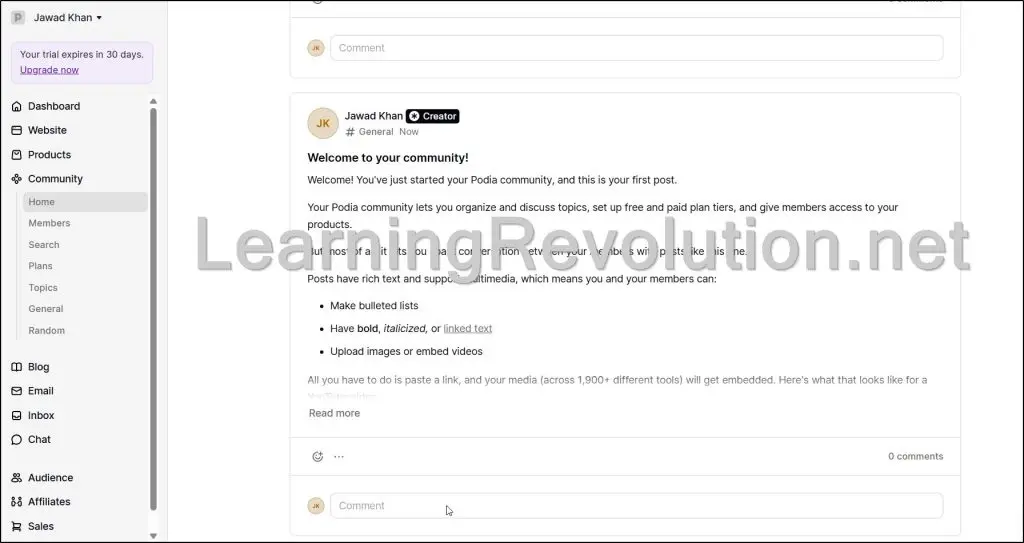
There are no ads, no distractions, and no competition for attention, which makes it easier to keep discussions centered on learning and outcomes.
This matters more than ever.
In an AI-driven world where information is everywhere, content alone is no longer a strong differentiator. What still matters is context, accountability, and shared progress. A tightly connected community around your courses or programs becomes the place where learning actually sticks and transformation happens.
However, with Podia’s Community features, the trade-off is depth of engagement tools. Podia keeps community features intentionally simple. There’s no gamification, live events system, or advanced moderation.
If the community supports your education business, Podia works well. If community is the product, platforms like Skool or Circle go further.
Read: The best online community management platforms for edupreneurs
Feature #7: Webinars & Live Events
Podia doesn’t try to replace Zoom or YouTube Live. Instead, it focuses on the business side of live events: selling access, collecting registrations, and monetizing what happens after the session ends.
You create a webinar product in Podia, set a price (or make it free), and build a sales or registration page. Attendees sign up and pay through Podia’s checkout, not Zoom’s registration pages. This gives you full control over branding and, more importantly, access to real customer data like email addresses and purchase history.
For the live session itself, you host the event on Zoom or YouTube Live and share the link with registered attendees. After the webinar, Podia automatically turns the replay into a digital product. You can sell it, bundle it with a course, include it in a membership, or use it as a lead magnet.
Follow-up emails, upsells, and post-event sequences all live inside Podia, which keeps the entire lifecycle in one place. What Podia doesn’t offer are advanced webinar features like breakout rooms or in-session engagement tools.
It works best for creators who see webinars as a revenue and relationship tool, not as a complex virtual event platform.
Feature #8: Podia Email Marketing & Automation
I see Podia’s email features as being designed to give you enough for running an education business, rather than trying to be a full-blown email marketing platform.
Podia Email lives directly inside your website and store, which means every subscriber, purchase, and interaction is already connected to your products. You can send newsletters and broadcasts, set up basic automations, and use tagging and segmentation based on real actions like course purchases, webinar registrations, or membership sign-ups.
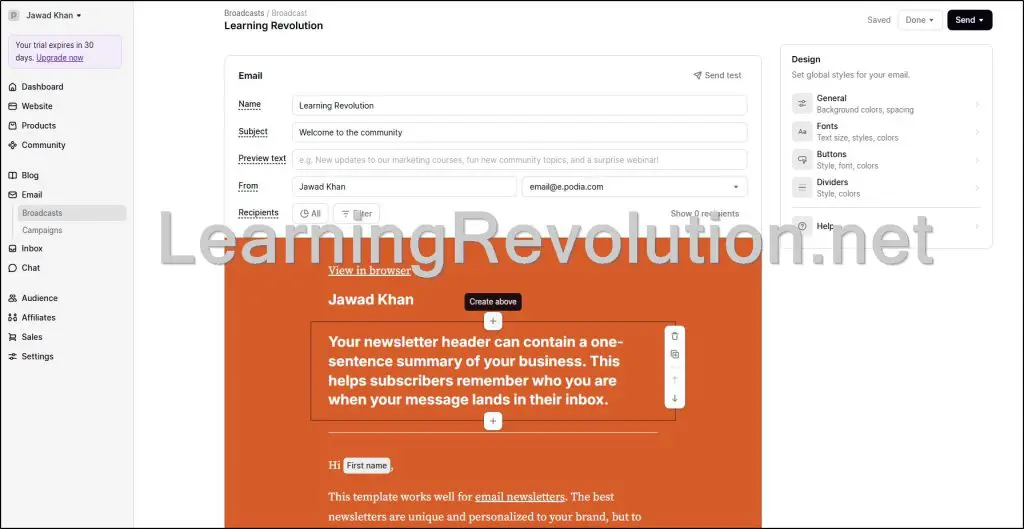
Activity-based triggers are practical and sales-focused. You can automatically send welcome emails, onboarding sequences, and follow-ups tied to what someone actually bought or engaged with. Because email and checkout live in the same system, Podia also shows you exactly how much revenue each email generates, which is genuinely useful and often missing in simpler tools.
Where Podia Email shows its limits is advanced automation. There’s no deep branching logic, scoring models, or complex multi-product funnels. For many creators, that’s a feature, not a flaw. It keeps email aligned with teaching and selling, without turning marketing into its own full-time job.
Read: The best email marketing platforms for course creators
Feature #9: Marketing Tools & Sales Features
Podia’s marketing and sales tools are built around reducing friction between interest and purchase. The focus isn’t on complex funnels, but on making it easy to sell more to the same audience without adding extra software.
You can create upsells that appear at checkout, increasing order value at the moment someone is already committed to buying. Presells let you validate ideas by collecting payments before content is fully created, which is especially useful for testing new courses or programs.
Bundles allow you to package courses, coaching, memberships, and downloads together into a single offer, often at a higher perceived value.
Waitlists help you gauge demand and build momentum before launch, while the built-in affiliate system makes it easy to let partners promote your products without external tools. These features work together in a simple, linear way, rather than through layered funnel logic.
What Podia intentionally avoids are advanced, multi-step funnel builders and heavy automation trees. For creators selling education, this usually keeps things focused.
If your business depends on complex launch mechanics or sales pipelines, you’ll eventually want a more specialized marketing stack like ClickFunnels, Kartra, or even Kajabi.
Feature #10: Checkout, Payments & Pricing Flexibility
Podia’s checkout is designed to be fast, clean, and conversion-focused. You don’t need to build separate sales flows or bolt on extra tools. Products, pricing, and payments all live in one place, which keeps the buying experience simple for both you and your customers.
Podia integrates directly with Stripe and PayPal, giving customers multiple payment options depending on your plan. You can offer one-time payments, subscriptions, or payment plans, which is especially useful for higher-priced courses, coaching programs, or memberships. Coupons can be created with limits and expiration dates, making them practical for launches or promotions.
Global tax handling is built in, so Podia can calculate and apply taxes where required without manual work. This is an underrated feature for creators selling internationally. Payouts are handled through your connected payment processor, so you get paid directly and quickly.
What Podia doesn’t offer is deep checkout customization or advanced pricing logic. There’s no conditional pricing or complex discount stacking. But for most education businesses, the balance Podia strikes between flexibility and simplicity is exactly what keeps checkout friction low.
Feature #11: Integrations, Automations & Extensibility
Podia is intentionally selective about integrations. The platform is built to work well on its own first, and then connect outward where it makes sense, rather than acting as a hub for endless third-party tools.
Out of the box, Podia integrates with essentials like Stripe, PayPal, scheduling tools, and analytics. For everything else, Podia relies mainly on Zapier. Through Zapier, you can trigger actions based on purchases, signups, or subscriptions, and connect Podia to CRMs, spreadsheets, or external email tools.
Embeds also play an important role. You can embed Podia checkout buttons, products, or opt-in forms on other websites, which makes it possible to use Podia as your selling engine while running content elsewhere.
Where Podia starts to feel closed is when you want deep, native integrations or custom logic inside the platform. There’s no marketplace of apps, limited webhook control, and fewer customization hooks than open systems like WordPress.
This is a conscious tradeoff. Podia favors stability and simplicity over extensibility, which works well until your business depends on highly customized workflows.
Feature #12: Support, Migrations & Platform Reliability
One area where Podia consistently stands out is support. Help is available through email and live chat, and responses tend to be human, practical, and fast. This matters more than most feature lists suggest, especially for creators running their business solo without technical backup.
Podia also offers free migrations on paid plans. Their team will manually move your courses, products, email lists, and automations from another platform. It’s a guided process with clear expectations, which lowers the risk of switching and removes a major barrier for creators who want to simplify their stack.
From a reliability standpoint, Podia has been around since 2014, serves over 150,000 creators globally, and operates as a sustainably profitable company. That reduces the risk of sudden shutdowns or aggressive pivots. The platform prioritizes steady improvements over rapid, flashy changes.
The tradeoff is pace. Podia doesn’t rush features or chase trends. For creators who value stability, consistency, and support they can rely on, this is a strength rather than a weakness.
When Podia Is Enough (And When It’s Not)
I want to be very clear here, because this is where most creators get confused. Too many comparisons frame Podia as a “beginner vs advanced” or “cheap vs expensive” decision. That’s the wrong lens.
Podia doesn’t suddenly stop working because you start making more money. I’ve seen creators do very well on Podia for years. What changes isn’t revenue, it’s the shape of the business.
Podia starts to feel limiting only when your business model itself becomes more complex: more moving parts, more edge cases, more conditional logic, more people involved. Until that point, it often feels refreshingly sufficient.
Let me explain.
Podia Is Enough When…
- Your funnels are mostly linear and easy to explain (opt-in → offer → delivery).
- Your business is offer-led: courses, coaching, memberships, downloads, workshops.
- You value speed, focus, and clarity over fine-grained control.
- You’re a solo creator or a very small team managing everything end to end.
- Email supports sales and delivery, not complex CRM or lifecycle marketing.
- You want fewer tools, fewer integrations, and fewer things that can break.
- You prefer launching and iterating over endlessly configuring systems.
In these cases, Podia reduces friction.
You spend more time teaching and selling, and less time managing software.
Podia Starts to Feel Limiting When….
- Automation becomes layered, conditional, and behavior-driven.
- Your learning design needs advanced structure (assessments, credentials, deep analytics).
- Email becomes your primary growth engine, not a supporting tool.
- You need complex segmentation, scoring, or branching funnels.
- Customization and integrations move from “nice to have” to mission-critical.
- Your business shifts from “creator-run” to process-heavy or team-driven.
At this point, Podia still works but it begins to feel constraining rather than enabling.
In short:
Creators don’t outgrow Podia because they make more money. They outgrow Podia when their business model becomes more complex.
And many creators never hit that point, which is why Podia remains a long-term home for a lot of businesses.
Is Podia Worth Using?
In my experience, Podia scales revenue and audience very well. You can grow a meaningful business, serve a loyal community, and sell multiple offers without feeling boxed in, as long as your model stays clear and intentional.
What Podia does not try to do is scale infinite complexity.
That’s not a flaw. It’s a design choice. The platform prioritizes momentum over configurability and clarity over control.
So the real question isn’t whether Podia is “good enough.” It’s whether its philosophy matches how you want to run your business.
If you want fewer moving parts and more focus on teaching and selling, Podia is a strong long-term home.
If you want deep automation, heavy customization, and enterprise-style systems, you’ll eventually want something else.
Frequently Asked Questions (FAQs)
Is Podia good for beginners?
Yes. Podia is one of the easiest platforms for beginners to launch courses, coaching, or digital products. It removes technical setup, hosting, and integrations, which helps new creators focus on building and selling rather than managing tools.
Can Podia replace WordPress?
For many creators, yes — but not in all cases. Podia can replace WordPress if you need a simple website, blog, and sales pages tied directly to your products. If content marketing, advanced SEO, or custom layouts are core to your strategy, WordPress offers more flexibility.
Is Podia better than Thinkific?
Podia and Thinkific serve different priorities. Podia focuses on simplicity and selling multiple offer types in one place. Thinkific is stronger as a course-first platform with more structured learning tools. Podia suits creator businesses; Thinkific suits education-first businesses.
Does Podia support certificates and quizzes?
Yes, but at a basic level. Podia supports simple quizzes and course completion certificates. It does not offer advanced assessments, grading logic, or accreditation workflows found in full LMS platforms.
Can you sell multiple products on Podia?
Yes. Podia allows unlimited products, including courses, downloads, coaching offers, memberships, webinars, and bundles. You can sell them individually or combine them into higher-value packages.
Is Podia good for memberships?
Podia works well for simple memberships with recurring access to content or community. It’s best for single-tier or straightforward paid communities. If you need multi-tier logic, corporate access, or complex permissions, Podia may feel limited.
Does Podia have landing pages?
Yes. Podia includes landing pages and sales pages built into the platform. These pages are designed for conversion and ease of setup, not for advanced design customization or complex funnel logic.
Can Podia handle email marketing on its own?
For many creators, yes. Podia Email covers newsletters, basic automations, tagging, segmentation, and revenue tracking. If email is your primary growth engine with complex logic, a dedicated email platform may be a better fit.
Does Podia integrate with external tools?
Podia integrates with Stripe, PayPal (Shaker plan), scheduling tools, analytics, and Zapier. Most advanced integrations rely on Zapier rather than native apps, which keeps the platform simple but limits deep customization.
Is Podia good for agencies or large teams?
Not typically. Podia is designed for solo creators and small teams. It lacks advanced roles, permissions, and reporting needed by agencies or enterprise-style operations.
Can I migrate from Kajabi or Teachable to Podia?
Yes. Podia offers free migrations on paid plans. Their team helps move courses, products, email lists, and automations, reducing the risk and effort of switching platforms.
How does Podia handle payments and payouts?
Podia connects directly to Stripe and PayPal (plan-dependent). Payments go straight to your account, and Podia does not hold funds. You can offer one-time payments, subscriptions, or payment plans.
Does Podia charge transaction fees?
Yes — but only on the Mover plan, which includes a 5% transaction fee. The Shaker plan removes transaction fees entirely.
Is Podia worth it without a free plan?
For creators serious about launching, the 30-day free trial is usually enough to evaluate the platform. Podia removed the free plan to encourage real launches rather than indefinite setup without selling.
When should I switch from Podia to Kajabi?
You should consider switching when your business needs advanced automation, complex funnels, deeper learning analytics, or enterprise-style workflows. Most creators upgrade because of complexity, not revenue.
Table of Contents
Related Posts
Podia vs Thinkific (2026): I’ve Used Both, Here’s My Verdict
Podia Pricing (2026): Use Fee Calculator To Find Actual Costs (No Free Plan)
Podia Blogging: Manage Your Blog and Other Digital Products in One Place