
TL;DR: How to Drive Traffic to Your Online Course Website
Driving traffic to a course website means attracting the right visitors from search, AI answers, social platforms, partners, and ads, then moving them onto your email list. These days ranking on Google is no longer enough, because AI Overviews and chatbots answer many questions without a click. Build channels you own, get cited where AI tools look, and use paid traffic to speed things up.
– Fix the foundation first with fast hosting and passing Core Web Vitals
– Open each section with a direct answer so AI Overviews, ChatGPT, and Perplexity can quote you
– Get mentioned on YouTube, Reddit, podcasts, and partner sites, which AI tools cite heavily
– Publish problem-solving content and free tools that AI summaries can’t replace
– Turn every visitor you can into an email subscriber with a free masterclass
– Use ads, retargeting, and affiliates to scale once your funnel converts
– Track AI referral traffic in GA4 alongside search, social, and email
To grow an online course business, you need a steady flow of the right visitors to your website and a way to turn them into subscribers and customers. For most course creators, Google has been the biggest source of that traffic, and it still matters. But the way people search has changed faster in the last two years than in the previous ten.
AI answers now sit on top of many search results.
In a Pew Research Center analysis of 68,879 Google searches by 900 US adults, people clicked a traditional result on 8% of visits when an AI summary appeared, compared with 15% when none did. Only 1% clicked a link inside the AI summary.
I’ve watched this shift play out at Learning Revolution. The lesson is clear, because course creators who depend on one channel take the biggest hit when that channel changes.
In this article, I’ll share organic and paid ways to drive traffic to your course website, including the answer engine optimization (AEO) and generative engine optimization (GEO) tactics that help AI tools cite and recommend you. For each one, you’ll get the what, the how, and the tools I’d use.
20 Ways to Drive Traffic to Your Course Website at a Glance
Here’s a quick overview of each strategy, how long it usually takes to work, and what it costs. Use it to pick two or three to start with rather than trying all 20 at once.
| # | Strategy | Channel | Time to results | Cost |
|---|---|---|---|---|
| 1 | Fast, reliable web hosting | Technical SEO | Immediate | Low |
| 2 | Core Web Vitals | Technical SEO | Weeks | Low to medium |
| 3 | Answer-first content for AI Overviews | AEO | 1 to 3 months | Free |
| 4 | Brand citations in AI answers | GEO | 3 to 6 months | Free to medium |
| 5 | Problem-solving blog content | SEO | 3 to 6 months | Time |
| 6 | Long-tail and conversational questions | SEO and AEO | 2 to 4 months | Free to low |
| 7 | Modern on-page SEO | SEO | Weeks | Free to low |
| 8 | Topical authority | SEO and GEO | 6 to 12 months | Time |
| 9 | Updating old content | SEO | Days to weeks | Time |
| 10 | Honest freshness signals | SEO | Days | Free |
| 11 | Internal links | SEO | Weeks | Free |
| 12 | Free tools and calculators | SEO and links | 3 to 6 months | Low to medium |
| 13 | YouTube videos | Video search | 3 to 12 months | Time |
| 14 | Short-form video | Social | Days to months | Time |
| 15 | Social | 1 to 3 months | Free | |
| 16 | Reddit, Quora, and communities | Communities and GEO | 1 to 3 months | Free |
| 17 | Podcast guest appearances | Partnerships | Weeks | Free |
| 18 | Free masterclass | Weeks | Low | |
| 19 | Meta and Google ads with retargeting | Paid | Days | Medium to high |
| 20 | Affiliates | Partnerships | 1 to 3 months | Commission only |
1. Choose a Fast and Reliable Web Host
Your web hosting service sets the ceiling on how fast and stable your site can be. Google treats HTTPS as a lightweight ranking signal, and page experience counts too, but speed works mostly through people. Slow pages lose visitors before they read a word, and a site that goes down during a launch loses sales.
Google doesn’t drop a page from results for loading slowly. What happens is quieter. Visitors leave, competitors with faster pages win the click, and your conversion rate falls. So choose a host built for performance, with SSL included, server-level caching, and a content delivery network.
| Host | Best for | Starting price |
|---|---|---|
| SiteGround | Small course and membership sites on WordPress | $2.99/mo billed yearly |
| Hostinger | Tight budgets and first sites | $2.99/mo billed yearly |
| Kinsta | Busy WordPress sites that need managed speed | $30/mo billed yearly |
| WP Engine | Growing businesses that want managed WordPress | $28/mo billed yearly |
If you sell through a hosted course platform such as Thinkific or Kajabi, the platform handles hosting for your course pages. Your blog still needs a fast home, though, whether that’s the platform’s blog or a WordPress site. My guide to the best web hosting services compares more options.
2. Pass Google’s Core Web Vitals
Core Web Vitals are three metrics Google uses to measure real visitors’ experience of loading, responsiveness, and visual stability. Since March 2024, Interaction to Next Paint (INP) has replaced First Input Delay as the responsiveness metric.
| Metric | What it measures | Good score |
|---|---|---|
| Largest Contentful Paint (LCP) | How fast the main content loads | 2.5 seconds or less |
| Interaction to Next Paint (INP) | How fast the page responds to clicks and taps | 200 milliseconds or less |
| Cumulative Layout Shift (CLS) | How much the layout jumps while loading | 0.1 or less |
Check your scores in the Core Web Vitals report in Google Search Console, which uses real visitor data, and test individual pages in PageSpeed Insights. The usual fixes are compressing and lazy-loading images, removing unused plugins and scripts, using a caching plugin, and reserving space for images and embeds so the page doesn’t jump.
Treat Core Web Vitals as a tiebreaker rather than a magic lever. Passing them won’t lift weak content, but failing them can cost you visitors on mobile. If the fixes get technical, a WordPress performance specialist on Fiverr can usually handle them in a day or two.
3. Write Answer-First Content for AI Overviews and AI Mode
Answer engine optimization (AEO) means writing content so search engines and AI tools can pull a clear answer from it. Google’s AI Overviews and AI Mode summarize several pages and link to the ones they draw on. An Ahrefs study of 300,000 keywords found that pages ranking first saw a 58% lower click-through rate when an AI Overview appeared. Being one of the linked sources is now how you keep some of that traffic.
According to Google’s own guidance, no special optimization is needed beyond solid SEO. A page only needs to be indexed and eligible for a snippet, and Google says you don’t need AI text files or special markup. In practice, content that gets quoted shares a few habits.
- Answer first. Open each section with a one- or two-sentence direct answer to the question in the heading, then explain.
- Use question headings. Phrase H2s and H3s the way people ask, such as “How much should I charge for an online course?”
- Add a TL;DR box. A short summary at the top gives AI tools and skimmers the main points in one place.
- Use tables and numbered steps. Comparisons, prices, and processes in structured form are easy to quote correctly.
- Add specifics. Numbers, named examples, and your own experience give AI tools something worth citing over a generic page.
- Keep structured data honest. Article, Person, Organization, and FAQ schema help machines understand your page, as long as the markup matches visible text.
- Write for people first. Clear, well-supported content serves readers and AI tools alike.
One expectation to reset is that Google limited FAQ rich results in 2023 to well-known government and health sites, so FAQ schema rarely creates expandable results anymore. FAQ sections still earn their place, because AI tools and voice assistants often pull answers from them. Plugins such as Rank Math or All in One SEO add the schema for you.
4. Get Your Brand Cited in ChatGPT, Perplexity, and Other AI Answers
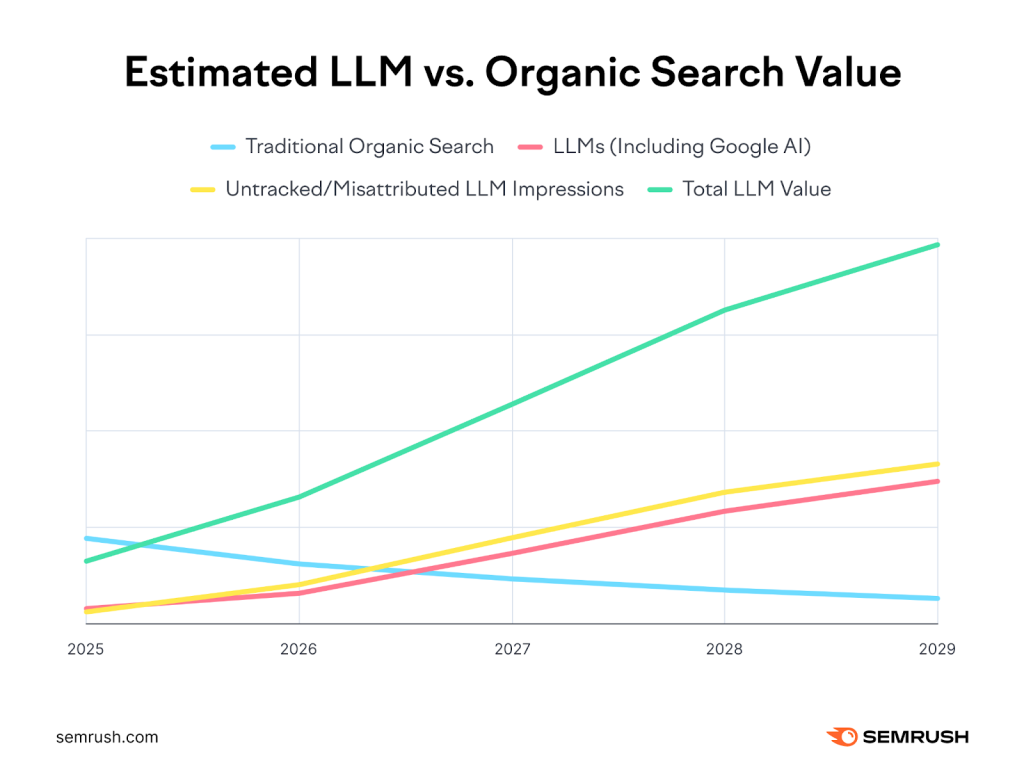
Generative engine optimization (GEO) means making your brand the one AI tools mention when people ask for recommendations. A Semrush study of 500+ marketing topics projected that AI search could send more visitors than traditional search by early 2028. The same study found the average AI search visitor was worth 4.4 times a traditional organic visitor, based on conversion rates. AI visitors arrive later in their decision, often after asking which course or expert to choose.
AI tools build answers from what the whole web says about you, including sites you don’t own. The same Semrush study found Quora and Reddit among the most cited sources in Google’s AI Overviews. Here’s how to show up in those answers.
- Make your entity consistent. Use the same name, title, and one-line description of your expertise on your website, LinkedIn, YouTube, podcast guest pages, and author bios. Add Person and Organization schema with sameAs links to those profiles.
- Get mentioned where AI tools look. Guest posts, podcast interviews, roundups, YouTube videos, and helpful Reddit or Quora answers all become sources AI tools read and cite.
- Publish original data. A survey of your students, a pricing benchmark, or results from your own courses gives AI tools a fact only you can supply.
- Let AI crawlers in. Check that your robots.txt and security settings don’t block OAI-SearchBot (ChatGPT search), PerplexityBot, or Bingbot.
- Submit your site to Bing Webmaster Tools. Bing’s index feeds Microsoft Copilot and other AI search tools, and IndexNow lets you notify Bing the moment you publish or update a page.
- Track AI referrals. In GA4, filter traffic by source for chatgpt.com, perplexity.ai, gemini.google.com, and copilot.microsoft.com to see which pages AI tools send people to.
You’ll see advice to add an llms.txt file. No major AI company has confirmed that it uses one, so treat it as optional and spend your time on the steps above. To see where you stand today, ask ChatGPT and Perplexity the questions your buyers ask, such as “What’s the best course on watercolor for beginners?”, and note which sites they cite.
5. Create Problem-Solving Blog Content
The best way to attract visitors from search, AI tools, and social media is to publish content that solves your audience’s problems. Your audience is searching for answers right now, and a blog on your course website makes you the expert who answers them. Your blog then feeds your sales funnel, since readers who trust your free advice are the ones most likely to buy.
The bar is higher than it was before AI. AI summaries now handle simple definitions, so the content that still earns clicks goes further, with step-by-step processes, real examples, templates, and opinions from your experience. A post titled “What is a sourdough starter?” gets summarized away, while “Why your sourdough starter isn’t rising, and the 5 fixes I teach students” earns the click.
Plan each post around one problem your future students have, answer it completely, and point to your course or free masterclass as the next step for readers who want more help.
6. Target Long-Tail and Conversational Questions
Long-tail keywords are specific search terms, usually three or more words long, with lower search volume and lower competition than broad terms. They tell you exactly what the searcher wants, and ranking for many of them often drives more traffic than sitting on page two for one broad keyword.
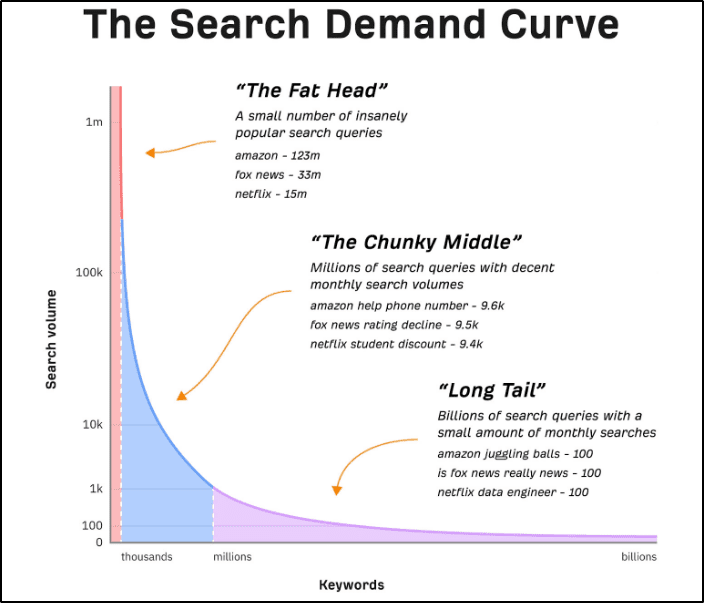
Queries have gotten longer and more conversational as people type full questions into AI Mode and chatbots. Longer questions work in your favor, since a course creator can answer specific questions far better than a generic site. Here’s where to find them.
- People Also Ask: Search your topic on Google and open the related questions box.
- Related searches: Scroll to the bottom of the results page for more long-tail ideas.
- Reddit and Quora: Search your topic on Reddit and read the questions people ask in their own words.
- AI tools: Ask ChatGPT or Perplexity a question in your niche and note the follow-up questions they suggest.
- Keyword tools: Semrush (from $139/mo) and Ahrefs show search volume and difficulty for each long-tail keyword.

Group related questions into one thorough article rather than writing a thin post for each, since one strong page can rank for dozens of variations.
7. Use On-Page SEO the Way Google Reads Pages Today
Publishing helpful content is only half the job. On-page SEO makes it clear to Google and AI tools what each page is about. Use your main keyword naturally in these places.
- Page title and H1 headline
- URL slug
- Meta description
- The first 100 words
- A few H2 or H3 headings where it fits naturally
- Image alt text that describes the image
Old advice about “LSI keywords” and exact keyword density no longer applies. Google understands topics and entities, so cover the subtopics, related terms, and questions a complete answer needs. Tools such as Surfer SEO and Clearscope compare your draft with top-ranking pages and flag missing subtopics.
Write titles for clicks as well as rankings. A specific, benefit-driven title stands out against an AI Overview, while a vague one gets skipped. My guide to social media SEO applies the same ideas to YouTube and other platforms.
8. Build Topical Authority Around Your Course Topic
Topical authority means covering your subject so completely that Google and AI tools treat your site as a trusted source on it. A site with 40 connected articles on dog training will outrank a general site with one great article on the same topic, because the depth shows real expertise.
To build it, map every question and subtopic around your course topic and cover them in separate, linked articles. If you teach a course on starting a bookkeeping business, your topic map might include:
- How to become a bookkeeper without a degree
- Bookkeeping certifications compared
- How much to charge for bookkeeping services
- The best bookkeeping software for small businesses
- How to find your first bookkeeping clients
- Common bookkeeping mistakes new freelancers make
Each article supports the others through internal links, and together they make it far easier to rank for competitive terms. Topical depth also helps with GEO, since AI tools favor sources that cover a subject in detail. My guide to the online course business shows how this content connects to what you sell.
9. Update Your Best Old Content
Updating existing posts is one of the fastest ways to gain traffic, because those pages already have links and history. Review your top posts every four to six months. Replace outdated stats with current primary sources, add new examples and screenshots, fix broken links, and rewrite sections that no longer reflect how things work.
Google Search Console shows you exactly where to focus with the following steps.
- Open Performance, then Search results, in the side menu.
- Turn on the Average position metric above the chart.
- Click the Pages tab to see your top pages.
- Click a page to filter the report to it.
- Open the Queries tab to see the searches that page ranks for.
- Sort by Position and look for relevant queries ranking 8 to 20.
- Update the page to answer those queries fully, often with a new section or FAQ.

Pages in positions 8 to 20 are close enough to move with a good update, and answering their queries directly also improves your chances of being cited in AI Overviews.
10. Show Real Freshness in Your Titles and Dates
For topics that change, such as software, pricing, or platform rules, searchers want the latest information. Adding the year to a title and showing a “last updated” date on the page signals that your content is current, and it often lifts click-through rates.
Only change the date when you’ve made a real update. Google’s guidance on dates asks sites to show dates accurately, and changing a date without changing the content can backfire with both Google and readers. Plugins like All in One SEO or WP Last Modified Info display the updated date for you.
11. Improve Your Internal Link Structure
Internal links help visitors find related pages, help Google discover and understand your content, and pass authority from strong pages to new ones. They’re also one of the few SEO levers fully under your control.

- Keep every important page within three clicks of your homepage.
- Link between pages that genuinely relate, such as a pricing guide and a pricing calculator.
- Use descriptive anchor text that tells readers what they’ll find.
- Add a link to your most important related page early in each post.
- Link new posts from older, high-traffic posts as soon as you publish.
- Find orphan pages with no internal links in a site audit tool and connect them.
Google sets no hard limit on internal links per page. Add as many as genuinely help the reader, and avoid stuffing them into every sentence.
12. Build Free Tools and Calculators
Free tools are one of the few content types AI summaries can’t replace. A chatbot can explain how to price a course, but people still click through to use a calculator that does the math with their own numbers. Tools also earn links naturally, because other sites reference useful free resources.
At Learning Revolution, we built a library of free creator tools, from an online course pricing calculator to a course idea validator. Each tool answers a specific question our readers have and links to the guides that go deeper.
Pick a calculation or decision your future students struggle with. A fitness coach could build a macro calculator, and a business coach could build a pricing or break-even calculator. AI coding tools make simple calculators possible without a developer, and a WordPress plugin or form builder handles the rest.
13. Create Actionable YouTube Videos
YouTube is one of the best traffic sources for course creators because it lets people see you teach before they buy. Videos also appear in Google results and AI answers, which gives the same content several ways to be found.
Create short, practical videos that answer the same questions you target on your blog, and link to a related blog post or free masterclass in the description and pinned comment. Anton Kraly, founder of the Dropship Lifestyle training program, uses his YouTube channel to send viewers to his courses.

Consistency matters more than production quality. My guides to starting a YouTube channel and setting up a simple home video studio will help you publish weekly without a big budget.
14. Use TikTok, YouTube Shorts, and Instagram Reels
Short-form video is the fastest way to reach new people, because platforms show short videos to viewers who don’t follow you yet. TikTok, YouTube Shorts, and Instagram Reels all push short clips hard, and one clip can reach thousands of people in a day.

Short videos rarely drive clicks directly, since viewers stay on the platform. Use them to build awareness and send people to your profile, where a link to your free masterclass or lead magnet does the converting. Record one longer video and cut it into several clips, then post the same clip to all three platforms to save time. My guide to TikTok for coaches covers formats that work.
Spread your effort across platforms rather than betting on one. TikTok’s US future has been uncertain since 2024, and YouTube Shorts has the added benefit of feeding your long-form channel.
15. Share Knowledge Natively on LinkedIn
LinkedIn suits course creators who teach professional skills, because its users are actively trying to grow their careers. Posts that teach one useful idea, carousels, and short videos get wide reach when they keep people on the platform.

Copywriter Joel Klettke built his business by posting practical advice on LinkedIn consistently. Follow the same approach. Post natively instead of sharing bare links, put your link in the first comment or your profile’s featured section, and start a LinkedIn newsletter to reach followers by notification. LinkedIn Live sessions work well for promoting a masterclass.
16. Answer Questions on Reddit, Quora, and Online Communities
Reddit and Quora have become two of the most important traffic sources on the web, because Google ranks their threads prominently and AI tools cite them often. A helpful answer in the right subreddit can send visitors for years and shape what AI tools say about your topic.
Communities punish self-promotion, so lead with help. Find subreddits and Quora spaces where your future students ask questions, read the rules, and answer thoroughly from your experience. Link to your content only when it adds something the answer can’t hold, such as a template or calculator, and disclose that it’s yours.
Facebook groups, Discord servers, Slack communities, and professional forums work the same way. If you already have a following on X, Threads, or Bluesky, keep it going, but most course creators get more traffic from communities where their buyers ask questions.
17. Be a Guest on Podcasts in Your Niche
Podcast guesting puts you in front of an engaged audience that already trusts the host, and each episode adds a link and a mention that AI tools can find. Listeners who hear you for 40 minutes get to know your thinking far better than any ad can show them.
I’ve co-hosted the Leading Learning Podcast with Celisa Steele for more than 450 episodes. The guests who make the most of it come with a clear point of view and one specific, free resource for listeners. Make your offer easy to remember, such as a short URL to a checklist or masterclass.
Start with smaller shows in your niche, which are easier to book and often have loyal audiences. Pitch a specific topic tied to the host’s audience, not a general bio. If you want your own show later, my guides on how to start a podcast and the best podcast hosting platforms cover the setup.
18. Offer a Free Masterclass to Grow Your Email List
Your email list is the one traffic source no algorithm can take away. An engaged email list lets you send visitors to a new post, launch, or offer whenever you choose, which matters more as search and social become less predictable.
For course creators, a free masterclass is one of the best ways to grow a list. Teach a valuable piece of your course live or in a recorded session that plays on a schedule, then invite attendees to buy. Adam Enfroy’s webinar funnel follows this model.

Run it with a webinar tool such as Demio (from $45/mo billed yearly) or WebinarJam (from $39/mo billed yearly), and follow up with an email sequence in Kit, which has a free plan. My guides to hosting an online masterclass and evergreen webinars walk through the setup, and my lead magnet ideas cover other options if webinars aren’t your style.
19. Run Meta and Google Ads, With Retargeting
Paid ads are the fastest way to get traffic once you know your funnel converts. Meta ads on Facebook and Instagram remain the main paid channel for most course creators, and Google and YouTube ads reach people searching for your topic.
Send ad traffic to your free masterclass or lead magnet rather than straight to a sales page, since cold visitors rarely buy a course on the first visit. Start with a small daily budget, test several creatives, and let Meta’s Advantage+ campaigns find the audience once you have a few winning ads. Track cost per lead and cost per sale, and stop any ad that isn’t profitable.

Retargeting shows ads to people who already visited your site or joined your list. Install the Meta Pixel and Google tag on your site, and add Meta’s Conversions API so you still track results when browsers block cookies. Upload your email list as a Custom Audience to show offers to subscribers and exclude existing customers. Expect smaller audiences than a few years ago because of privacy changes, but warmer visitors still convert far better than cold ones. My guide to high-converting Facebook ads covers ad setup step by step.
20. Recruit Affiliates to Promote Your Course
An affiliate program pays creators a commission for each sale they send you, so you only pay for results. Former students, complementary course creators, bloggers, and podcasters in your niche make the best affiliates, because their audiences already trust them.
- Recruit affiliates with a clean reputation and approve each one rather than accepting anyone.
- Agree on the channels affiliates can use, such as email and blog posts, to avoid spammy traffic.
- Use a course platform with built-in affiliate management, such as Thinkific, Kajabi, Teachable, or Podia.
- Give affiliates a low-priced tripwire offer or free masterclass to promote, so their audience converts easily.
- Pay a commission on upsells to your higher-priced programs to reward your best partners.
- Give affiliates ready-made emails, graphics, and talking points.
A small group of committed partners usually beats a large list of inactive ones, so invest in the relationships.
Ready to Drive More Traffic to Your Course Website?
No single strategy drives reliable traffic on its own anymore. Search still matters, but AI answers now capture many clicks, social platforms change their rules often, and ad costs rise. When Learning Revolution’s search traffic dipped in the past, my first instinct was to do more of the same. I learned that doing more of what’s not working isn’t the same as doing something about it. Spreading your effort across channels you own and channels you borrow is what protects your business.
If you’re starting from scratch, fix your site’s foundation, publish answer-first content around your course topic, and start building your email list with a free masterclass this month. Give organic channels six months to grow, add one community or partnership channel, and use paid ads only when your funnel converts. Then track every source in GA4, including AI referrals, and double down on what sends you buyers.
Frequently Asked Questions (FAQs)
How long does it take to see results from organic traffic strategies?
SEO and content marketing usually take three to six months to show consistent results, depending on your niche, competition, and how often you publish. Updating existing posts and fixing technical issues can work within weeks, while topical authority and AI citations build over six to twelve months.
What is the best traffic strategy for a brand-new course website?
Pair a free masterclass or lead magnet with one organic channel and a small ad budget. The masterclass turns visitors into subscribers, the organic channel builds long-term traffic, and ads give you early data on which messages convert before organic results arrive.
How do I get my course website mentioned in ChatGPT and AI Overviews?
Answer questions directly at the start of each section, cover your topic in depth, and earn mentions on video channels, discussion forums, podcast episodes, and other trusted websites. Keep your name and expertise consistent across profiles, and make sure your site doesn’t block AI search crawlers.
What is the difference between SEO, AEO, and GEO?
SEO helps your pages rank in search results. AEO, or answer engine optimization, structures content so search features and AI tools can pull direct answers from it. GEO, or generative engine optimization, works to get your brand cited and recommended inside AI-generated answers from tools like ChatGPT and Perplexity.
How much should I spend on paid traffic when starting out?
Start with $10 to $20 a day sent to a free masterclass or lead magnet, and test several ad creatives for a week or two. Scale only the ads that bring subscribers at a cost per lead your course sales can support, and stop the rest quickly.
Can I drive traffic without a blog or YouTube channel?
Yes. Podcast guesting, LinkedIn posts, Reddit and community answers, affiliates, and paid ads can all drive traffic without a content-heavy website. A blog or channel builds compounding search traffic over time, though, so most course creators add one once the business is running.
How do I track which traffic sources convert best?
Add UTM parameters to every link you share in emails, ads, and social posts, then compare sources in GA4 by conversions rather than visits. Create a custom channel group for AI referrals from ChatGPT, Perplexity, Gemini, and Copilot so you can see how that traffic converts.
How do I protect my course website from traffic drops?
Diversify across search, AI citations, social platforms, partnerships, and paid ads, and move as many visitors as possible onto your email list. An email list, a group of affiliates, and a reputation in your niche keep sales coming when an algorithm update cuts one channel.

Jeff Cobb, Founder of Learning Revolution
Jeff Cobb is an expert in online education and the business of adult lifelong learning. Over the past 20+ years he has built a thriving career based on that expertise – as an entrepreneur, a consultant, an author, and a speaker. Learning Revolution is a place where Jeff curates tips, insights, and resources to help you build a thriving expertise-based business. Learn more about Jeff Cobb here.
Table of Contents
Related Posts
How To Get Sponsors for Your Masterclass Sessions (Step by Step)
WP Engine Review | I Use It For My Sites But Should You? Pricing & Performance Tested
The Complete Guide To Pricing A Masterclass (2026) | Free Pricing Calculator