

TL;DR: What are the Best AI Voice Generation (TTS) Platforms?
An AI voice generator takes written text and converts it into realistic spoken audio using a trained voice model. You type a script, pick a voice, and download the audio in seconds. The best voice tools today sound indistinguishable from a real human narrator.
Here is a quick breakdown of the best platforms I’ve used.
1. ElevenLabs — Best overall for voice quality, cloning, and course narration
2. Wondercraft — Best for turning written content into finished podcast episodes
3. Revoicer — Best for creators who need emotion control across varied content types
4. Google AI Studio — Best free option for short clips and community content
5. Murf AI — Best for replacing or upgrading narration in already-recorded videos
6. WellSaid Labs — Best for corporate training, L&D teams, and technical course content
7. Speechify — Best as a personal reading and script review tool, with a capable voiceover studio on the side
8. Fish Audio — Best free-tier option with commercial rights included from day one
I remember just a couple of years ago trying a popular AI text to speech voice generator and immediately thinking, “is this the best we have?” The AI generated voice felt robotic and anyone could tell it wasn’t real.
Fast forward to 2026 and that’s no longer the case.
I routinely use AI voice generators that create unbelievably real sounds in different emotions, tones, and languages. No layman can differentiate them from a real human voice.
That’s how fast this particular industry is growing.
Just listen to this.
A December 2025 market report estimates the AI voice generator market will grow from $4.16 billion in 2025 to over $20 billion by 2031.
A lot of that growth comes from enterprises building these tools into their workflows. But creators can use them too, for online courses, educational videos, promotional social content, and even audiobooks and podcasts.
In simple words, you can use these voice generators to clone your own voice, or replace it with another professional sounding voice entirely, without your audience even noticing.
In this article, I’ll share the best AI text to speech voice generators I’ve used in the last year, and how you can include them in your workflow as a course creator, consultant, coach, or digital content creator.
Looking for the best AI video generators? Here are my top picks
Comparison of the Best AI Text to Speech Voice Generation Platforms for Course Creators (2026)
Before i get into the details, here’s my quick comparison and analysis of the top AI voice generators you should consider for your e-learning content.
| Tool | My Verdict | Main Strength | Weakness | Starting Price and Free Plan |
| ElevenLabs | The best voice quality on this list. Worth the cost if you produce in short modules and need cloning. | Voice realism with manual control over expressiveness and consistency | Free tier has no commercial license. V3 cloned voice drifts across long scripts split into multiple jobs | Free (no commercial use). $6/mo Starter with commercial license. $22/mo Creator with professional cloning |
| Wondercraft | The only tool here that builds the whole podcast for you, not just the voice | Turns written content into a finished audio episode with music, pacing, and multi-speaker formatting | 1 hour of generated audio per month on the starting paid plan gets tight fast if you produce regularly | Paid from approximately $29/mo billed annually. No open-ended free tier |
| Revoicer | A solid choice if you produce varied content types and want emotion control without ElevenLabs pricing | Emotion engine with 8 delivery styles including Friendly, Excited, Whispering, and Sad | The $67 lifetime Standard plan lacks multi-speaker and agency rights. Most regular users will end up on the $47/mo Pro plan | $67 one-time Standard (limited). $47/mo Pro for full features |
| Google AI Studio | A genuine free option for short clips. Not a production tool, but better than expected for 30-second community content | Free access to Gemini 3.1 Flash TTS with 30 plus voices across 70 plus languages | Developer-facing interface with no saved projects or workflow polish. Drifts on inputs longer than a couple of minutes | Free within API limits. No paid consumer tier |
| Murf AI | My pick for anyone who has already recorded course content and wants to replace or upgrade the narration without re-recording | Voice changer syncs a new AI voice to existing video timing, keeping the audio in sync automatically | Voice cloning is available but less precise than ElevenLabs or Fish Audio | $19/mo Creator. Free plan available but limited in features and usage |
| WellSaid Labs | The right tool if you run professional training programs and need consistent pronunciation across a large course library | Pronunciation library with Oxford Dictionary integration. Every voice built from licensed, royalty-paid voice actor recordings | No voice cloning at all by design. Starter plan caps you at 240 minutes of downloaded audio per year | $10/mo Starter (240 mins/year). $33/mo Pro (2,160 mins/year). 7-day free trial |
| Speechify | Genuinely useful as a reading and review tool. Studio is capable but read the cancellation terms carefully before you pay | Dual product covering both personal reading productivity and a full voiceover studio with 200 plus voices | Documented pattern of billing complaints and difficult cancellation across Trustpilot and Reddit | 7-day free trial. Studio pricing: verify on site before committing |
| Fish Audio | The strongest free-tier option for creators who need commercial rights from day one and want real emotion control | Commercial use included on free tier, emotion tags built into the script editor, voice cloning from 10 seconds of audio | Free tier caps each generation at 500 characters, roughly 70 to 80 words, so longer scripts need splitting | Free (8,000 credits/mo with commercial use included). $5.50/mo Plus billed annually |
What Is an AI Voice Generator?
An AI voice generator takes written text and turns it into spoken audio using a voice model trained on real human speech. You type a script, pick a voice, and the tool reads it back to you in seconds.
Older text to speech tools just mapped letters to sounds, so every sentence came out flat and evenly paced no matter what it actually said. The models behind today’s AI voice tools learned from thousands of hours of real speech, so they pick up on tone, pacing, and emotion the way an actual narrator would.
For example, the whole tone of a sentence would change if you just add a question mark at the end. This makes modern AI generated voices much more realistic and harder to detect.
When you use these text to speech AI tools to narrate a course lesson, create a podcast, or any audio that stretches for more than a few minutes, the ups and downs of your voice, the emphasis, the emotion, all of that is part of communicating effectively and getting your point across.
AI voice generators couldn’t do that perfectly a couple of years ago.
Today, they do it so well that they understand the overall context of your text and tailor their tone, emotion, and style to say what you’re trying to communicate, even if you don’t clearly tell them to do so.
Read: The best Generative AI Tools for course creators and edupreneuers
The Main Functions of AI Voice Generators
Course sellers and creators don’t all need the same thing from an AI voice generator. Some just want a script read back to them. Others want it to sound like their own voice, speak in another language, or carry the right emotion for a sales page. Here are the main functions these tools usually offer.
1. Text to voice
You type a script and get spoken audio back in a chosen voice. This is the core function, every tool on this list does it, and it’s the starting point most creators use it for, narrating a lesson, voicing a video, turning a blog post into audio.
2. Voice cloning
The tool trains on a sample of your own voice, or a voice you have rights to use, and produces new audio that sounds like that same person. Course creators use this to keep one consistent narrator across months of new lessons without booking studio time for every update, or create podcasts from their content.
3. Dubbing and translation
The same script or audio gets output in another language, sometimes keeping the original speaker’s tone and pacing intact. Creators expanding a course or channel into new markets use this instead of hiring a separate voice actor for every language.
4. Emotion and delivery control
Instead of reading everything in one flat register, the tool adjusts pacing, emphasis, and emotional tone to match what’s being said. This matters most to anyone selling something, telling a story, or building a sales page, where how something is said carries as much weight as the words themselves.
5. Multi-speaker and character voices
The tool generates distinct voices for different speakers inside the same piece of audio. Useful for dialogue-style lessons, multi-host podcasts, or any course built around a conversation instead of a single narrator reading at the camera.
Read: The best online course platform with AI features
7 Ways Course Creators and Edupreneurs Can Use AI Voice Generators
AI voice generators are not just for YouTube creators or marketing teams. Here are seven ways they fit directly into a course creator or coaching business workflow.
1. Narrating course modules. Turn written lesson scripts into professional audio without booking studio time or recording yourself every time you update a module.
2. Cloning your voice for consistent content. Record your voice once, clone it, and use it to narrate new lessons, updates, and course additions that all sound like you.
3. Repurposing written content into podcasts. Convert newsletters, blog posts, and lesson outlines into audio episodes your audience can listen to on the go.
4. Creating sales page and promotional voiceovers. Generate high-energy, persuasive audio for course landing pages, launch videos, and ads without hiring a voice actor.
5. Building multilingual versions of your course. Dub existing course audio into other languages using the same voice, opening your content to global audiences without re-recording everything.
6. Sending audio updates to your community. Drop short, personal-sounding voice notes into your membership or community instead of writing another email that goes unread.
7. Producing audiobook versions of your course content. Convert your course scripts or accompanying guides into downloadable audiobooks your students can consume as a standalone product or bonus.
The Best AI Text to Speech Voice Generators for Content Creators (2026)
Now I’ll share my experiences with these AI voice generation platforms in more detail. But I’ll be honest here. I’ve used these tools extensively for months, so I have a pretty good idea of their strengths and weaknesses.
However, the final AI speech file you generate depends heavily n your script, prompt, and settings. So to get the best out of any platform, you need to spend some time learning it.
Let me show you what these platforms can do.
1. ElevenLabs – The Overall Best AI Voice Platform for Course Creators

ElevenLabs is among the top AI voice generation platforms and the one I use most frequently. It offers text to speech, voice cloning, dubbing, and audio studio editing in one place which is more than enough for most course creators and coaches.
ElevenLabs comes with hundreds of realistic AI voices that fit almost every situation or creator’s needs. Plus, you can simply record and clone your own voice as a reusable AI narrator for your content.
Here’s a sample audio I generated with ElevenLabs.
Here’s the speech generation interface and the prompt I use in ElevenLabs.
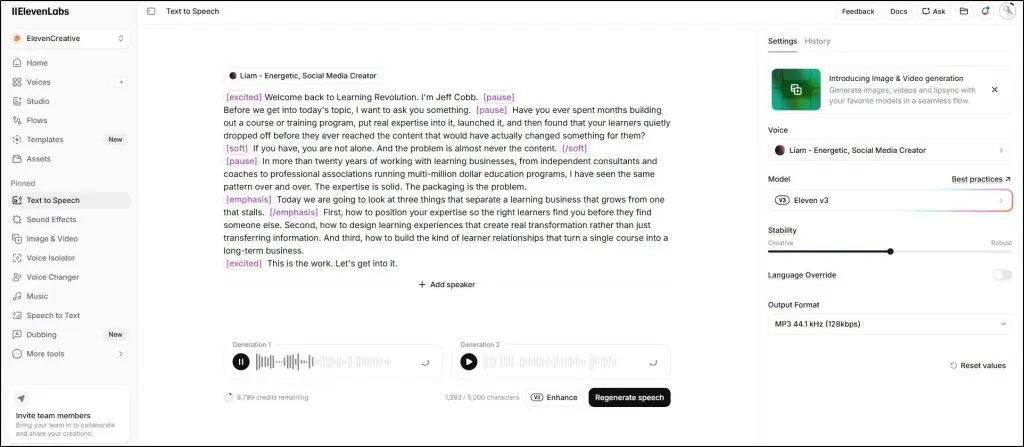
I especially love how much control ElevenLabs gives over the AI generated voice through its stability and similarity sliders that let you decide how expressive or consistent the output sounds.
For example, when I pushed the similarity slider too high on a cloned voice, the result was accurate but brittle, picking up small quirks from the original speaker that I hadn’t anticipated. In my experience, no other tool on this list gives you that kind of control without writing code.
ElevenLabs works best for coaches and consultants who want to record their voice once, clone it, and generate fresh module audio on demand without sitting at a microphone again.
For example, if you run a weekly membership and ship audio updates, one good voice clone on the Creator plan covers months of content without a single recording session. You can also use it for course content, podcasts, or social media videos.
When I first used ElevenLabs, two things caught me off guard.
- The free tier does not include a commercial license, so any audio you generate on it cannot go into a monetized YouTube video or paid course. You need at least the $6/month Starter plan before publishing commercially.
- The second issue showed up when I started narrating longer content. The V3 model shifts the cloned voice slightly between generation jobs when you split a long script. A course spread across dozens of modules means dozens of separate jobs, and the voice drifts across them. V2 and V2.5 stay consistent but give up some of the expressiveness that makes V3 worth using.
Overall I recommend ElevenLabs as an excellent AI voice generator for course creators. If voice quality is your top priority and you produce content in short, discrete modules rather than continuous multi-hour narration, this is the platform you should go for.
Read: The best AI presentation makers for course creators and edupreneurs
2. Wondercraft – The Best Platform for AI Podcasts and Interviews

Wondercraft is different from every other tool on this list. It is not a voice generator you use to produce an audio file and then assemble into something.
It started as a full podcast and audio production platform that takes your written content and turns it into a finished episode, complete with music, pacing, and multi-speaker formatting.
But Wondercraft has now evolved into a full AI video and audio content generation platform with much more than a regular AI TTS.
However, I rate it mainly for how easily it lets you create audio podcasts, interviews, and content in general.
Its voice library covers a wide range of accents and styles, and the multi-speaker feature means you can produce a conversation-style episode without a co-host. You can also clone your voice so you become the narrator across every episode you publish.
Here’s an a text to speech audio file I generated with Wondercraft.
Its timeline view makes it pretty easy to generate and edit audios.

I recommend Wondercraft because of how much of the production it handles on your behalf. For example, I took a long-form written piece, fed it in, and got back a two-host conversational podcast with intro music and natural transitions ready in minutes. No audio editing, no separate music search, no file stitching.
If you already produce written content, weekly newsletters, blog posts, detailed lesson outlines, use Wondercraft to repurpose all of it into audio. You can also use it for audio course introductions, promotional content, or turning a long PDF into something your audience can actually listen to.
But its usage limits and pricing are the main drawbacks for creators. The starting paid plan gives you one hour of generated audio per month. That sounds like a lot until you start producing regularly.
One hour covers roughly two to four podcast episodes, and if you are also narrating course modules alongside that, the limit gets tight quickly. You either manage your usage carefully or move to a higher plan.
Still, if you publish podcasts regularly, which I think every edupreneur should, Wondercraft is certainly worth trying.
3. Revoicer
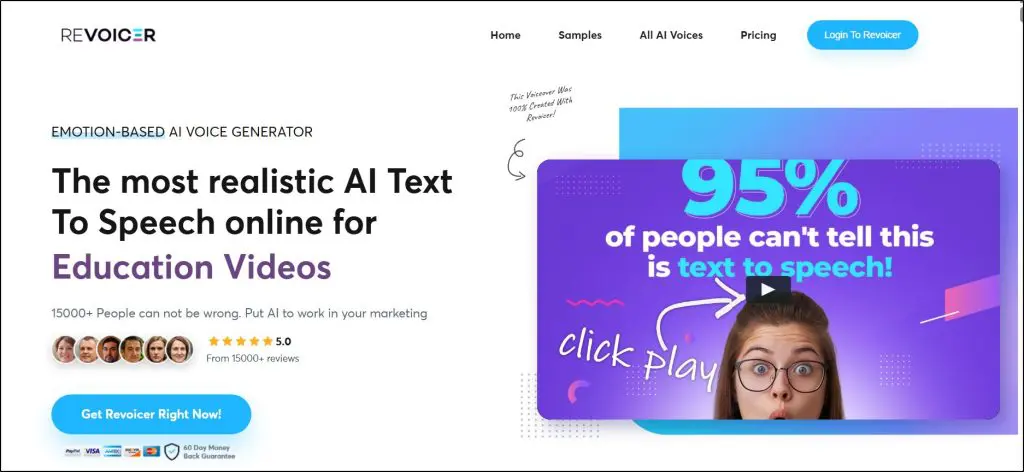
Revoicer is another top browser-based AI voice generator built specifically to give creators direct control over the emotional tone of every voiceover they produce.
You simply paste your text, pick a voice, choose an emotion, and download the MP3. There is nothing to install and no technical knowledge required.
Revoicer comes with 80 to 100 voices across American, British, Australian, Canadian, and Indian accents, plus 40 languages.
What I like about Revoicer the most at this price point is the emotion engine. It lets you choose not just the voice but the delivery, selecting from options like Friendly, Cheerful, Excited, Whispering, or Sad before you generate.
This is really useful for course creators and edupreneurs in general.
For example, a course module introduction benefits from a warm, encouraging tone. A sales video needs something with energy.
While writing this article, I generated the same script using Revoicer’s Excited setting and then its Friendly setting for the same voice, and the difference was immediately noticeable in how each would land with an audience.
Revoicer’s pricing looks attractive on the surface, and the $67 lifetime Standard plan is genuinely useful for occasional use. But it leaves out multi-speaker conversation videos, agency rights, and caps you at fewer credits than the Pro version.
If you produce content regularly, you will likely outgrow Standard and end up on the $47/month Pro plan anyway.
4. Google AI Studio – The Best Free AI Voice Platform for Short Content

Google AI Studio is not built for consumers but for developers using Google’s AI voice generation technology in their apps through its API. But it offers a free version that I use for quick, short audio generation for community responses or social media clips.
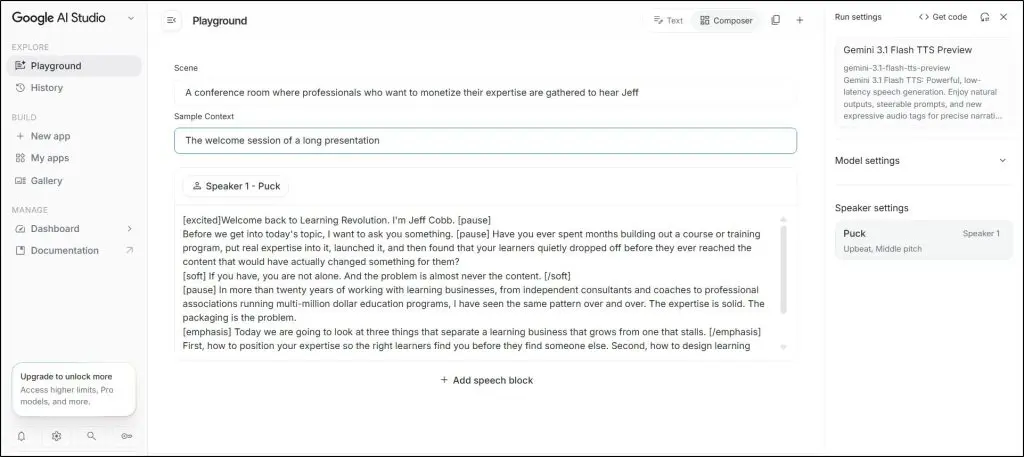
It gives you over 30 voices across more than 70 languages and allows you to nudge tone and delivery by adding simple audio tags directly into your script. Something like [excited] or [whispers] before a line shifts how the model reads it without any extra settings.
It gives you a three-layer delivery system that provides additional context to your prompt. Before you write a single word of script, you set a Scene and a Sample Context that shape how the voice performs across the whole audio.
For this test I described the scene as a conference room where professionals want to monetize their expertise, and the context as the welcome session of a long presentation. Then you add inline emotion tags on top of that.
Here’s a short audio clip I generated with Google AI Studio.
For reference, here’s the interface where I configured this audio in Google AI Studio.
Its voice quality holds up well for short work, the pacing feels natural and the pauses between phrases land without you having to engineer them. For example, I ran a short script through Google AI Studio alongside a paid tool I use regularly, and the Google output was close enough in quality that for a 30-second community clip, most listeners would not tell the difference.
If you want a quick voiceover for an Instagram reel, a short audio note for your course community, or a response clip for a student question, this gets it done at zero cost. You can also use it to test a voice style before spending credits on a paid platform.
Because it is built primarily as a developer platform rather than a consumer tool, the experience is more bare-bones than anything else on this list.
5. Murf AI
Murf is a browser-based text to speech platform used heavily by course creators, training teams, and L&D professionals in my community. It gives you 200 plus voices across 30 languages, a pronunciation library for consistent handling of technical terms, and a full studio editor that lets you sync generated audio directly to video footage.
Murf’s voice library is broad and covers a genuine range of ages, accents, and tones rather than a dozen variations of the same neutral narrator. You also get delivery controls, pitch, speed, emphasis, and pause length, that let you shape how a voice reads your script without regenerating from scratch every time.
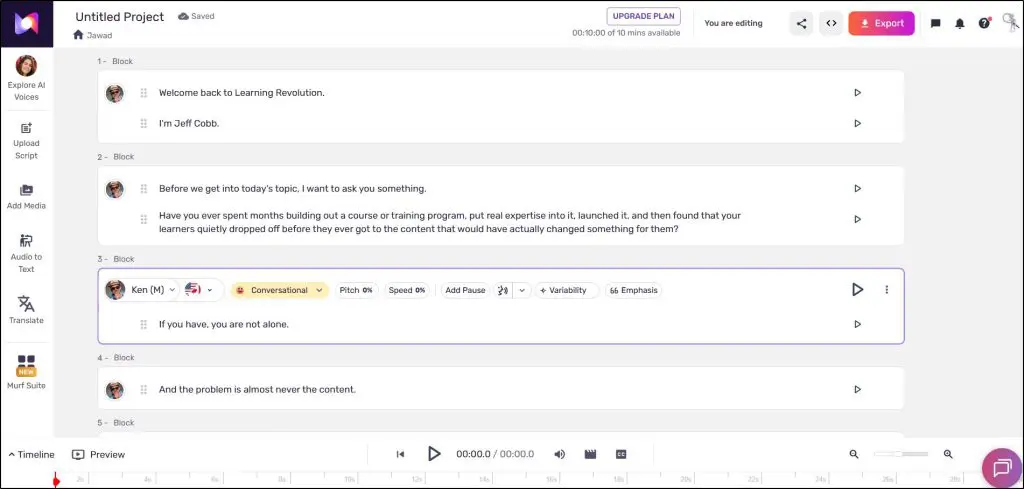
What I find most practical about Murf for course creators is the voice changer. If you have already recorded a screen capture or demo video with your own voice and want to replace the narration with a cleaner AI voice, Murf syncs the replacement audio to the existing video timing.
For example, I had a recorded walkthrough where the narration quality was inconsistent, and swapping it out in Murf saved me from re-recording the whole thing. That is a real time saver for anyone updating older course content.
Course creators producing educational or training content get the most from Murf because of how well it handles technical language. You can also use it for product demos, explainer videos, or localized content across multiple languages.
Voice cloning is available but I didn’t find it as convincing as Wondercraft or ElevenLabs. Murf is the better choice when you need a reliable, polished stock voice that handles your specific vocabulary correctly and you want a tool built around a clean editorial workflow rather than a raw generation engine.
6. WellSaid Labs – Best for Enterprise E-Learning Content

WellSaid Labs is a professional text to speech platform built specifically for teams producing training, course, and corporate communications content. If you’re running a corporate training and development program or high-end coaching services, I’d certainly recommend this platform.
WellSaid Labs has 280 plus natural-sounding voices, a pronunciation library with Oxford Dictionary integration, and direct plugins for Adobe Express and Premiere Pro.
Every voice on the platform comes from licensed recordings of real voice actors who receive royalties for each use, which makes it the only tool on this list built on ethical, compensated AI voice development.
The voice library covers accents across American, British, Australian, Canadian, Indian, South African, and several European options, each tagged by speaking style, narration, conversational, or promotional, so you pick the right fit for the content rather than guessing.
The pronunciation library is what draws course creators with technical vocabulary to WellSaid specifically.
You build a custom dictionary of terms, acronyms, certification names, or industry jargon, and WellSaid applies those rules consistently across every project.
Let’s say if your course covers medical terminology or financial certifications where mispronunciation undermines credibility, having a saved pronunciation set that applies automatically across every module matters more than it does for general content.
A consultant on my email list moved from ElevenLabs to WellSaid for exactly this reason (needing precise, repeatable control over how acronyms were read in business training videos).
You can also use WellSaid Labs for product demos, explainer videos, or any content where brand voice consistency across a large library matters.
But WellSaid does not offer voice cloning.
You work from stock voices only, which is a deliberate choice tied to their ethical model but still a hard limit if using your own voice is important to you.
7. Speechify Studio

Speechify is actually two products sharing one brand. The first is the reading app most people know, a text to speech tool that reads PDFs, documents, and books aloud to you as a personal productivity tool.
The second is Speechify Studio, a dedicated AI voiceover platform that directly competes with tools like Murf and ElevenLabs.
Speechify Studio gives you 200 plus voices across 60 plus languages, voice cloning, a pronunciation library, emotion and speed controls, and a drag-and-drop editing interface.
Here’s a sample audio I generated with Speechify Studio.
The studio interface is pretty simple and easy to use, especially if you’re looking for a quick text to audio conversion.
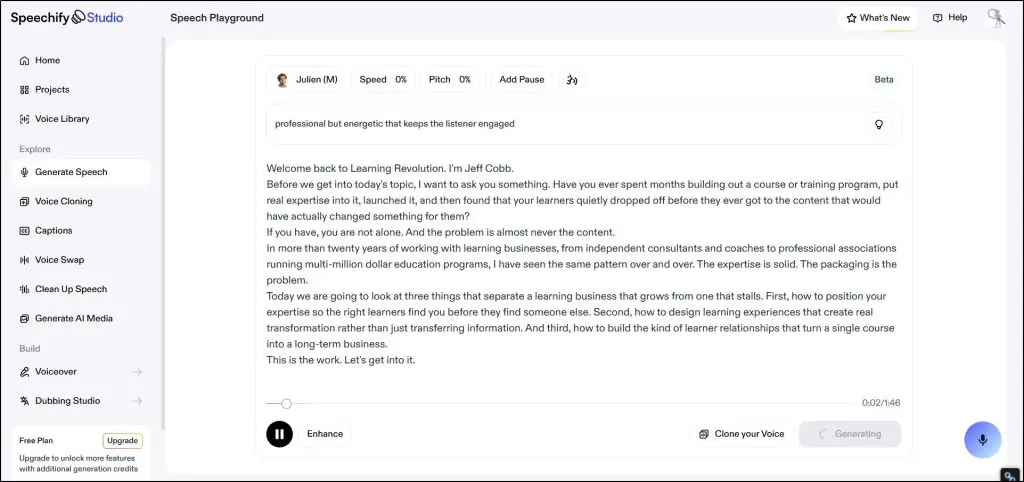
It covers the same use cases as most tools on this list including course narration, video voiceovers, audiobooks, ads, and dubbing.
The reading app side is genuinely useful for course creators too, just in a different way. For example, I listen back to course scripts through Speechify while doing other things, catching rhythm problems and repeated phrases I miss when reading on a screen. You can also use it to consume research material faster, or review a long outline by listening rather than reading.
The voice cloning in Speechify Studio works, though I’ve faced syncing issues a couple of times when matching cloned audio to video. For standalone audio narration it performs well enough.
8. Fish Audio – The Best Free Opensource AI Voice Platform
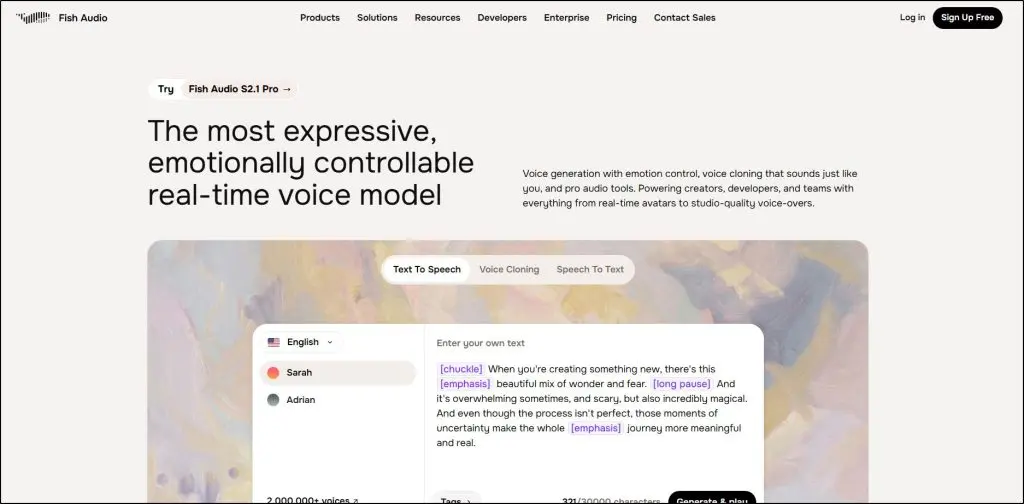
Fish Audio is a voice generation platform that handles text to speech, voice cloning, voice changing, and speech to text in one place. It has a library of over two million community-uploaded voices across accents, characters, and styles, which means the variety available goes well beyond what any single company could produce in-house.
What makes Fish Audio genuinely different from most tools at this price point is the emotion tag system. You drop tags directly into your script, [whispering], [excited], [emphasis], [long pause], and the model reads each line accordingly. It covers emotions and delivery styles that most tools bury in settings menus or do not offer at all.
The best part is that commercial use is included even on the free tier. That is a direct contrast to ElevenLabs, where the free plan blocks commercial publishing entirely.
Fish Audio’s free plan gives you 8,000 credits per month and up to 7 minutes of generation, which is limited but enough to test properly before committing. Voice cloning also works from just 10 seconds of audio, the lowest bar of any tool on this list that includes cloning.
Here’s a sample audio I generated with Fish Audio.
Here’s the interface you’ll use to create these audios.

Fish Audio works well for course creators who produce a mix of narration and promotional content and want one tool that handles both with emotional range.
You can also use it for audiobook narration, social media clips, or multilingual content across 13 languages using the same cloned voice.
The free tier’s 500 character limit per generation, around 70 to 80 words, means any script longer than a short paragraph needs to be split across multiple passes.
That is manageable for short clips but adds friction for full course modules. The Plus plan at $5.50 per month billed annually removes most of that friction and is one of the better value entry points on this list.
Which AI Voice Generator Do I Recommend?
I’ve used all eight tools on this list over the past year and some of them are a permanent part of my content creation workflow.
Here are the ones I recommend to you and my community members in general.
For most course creators and coaches, I recommend ElevenLabs.
I use it myself and still haven’t seen a better voice platform. The voice quality is the best on this list, the cloning is accurate enough that students in my membership have not flagged it as AI narration, and the controls give you real flexibility over how the output sounds. It is not perfect. The V3 model can drift when you split a long course across dozens of separate module generations, and the free tier will catch you off guard if you try to publish commercially without upgrading.
But for a coach or course creator producing content in modules rather than marathon sessions, it holds up better than anything else I have tested.
Wondercraft is the other platform I use frequently, especially for podcasts. Both are excellent choices.
If you run corporate training programs or manage L&D content for a larger organization, go with WellSaid Labs.
The pronunciation library alone makes it worth the investment if your content is full of technical terms, certifications, or acronyms that generic TTS tools mangle. The fact that every voice is built from ethically compensated voice actor recordings also matters if your organization has compliance or ethics requirements around AI use.
If you want a free solution before committing to a paid plan, start with Fish Audio.
Unlike most free tiers on this list, it includes commercial use rights from day one, so any audio you generate can go into a monetized course or YouTube video without upgrading first.
For even shorter work like community clips or quick social content, Google AI Studio is worth bookmarking alongside it.
But before you sign up for any paid plan on this list, I strongly recommend running your actual content through their free tier or trial first.
Generate a real lesson, not a demo sentence. Play with the platform for a week. See whether the voices match the tone your audience expects from you, and whether the workflow fits how you actually produce content.
Only after that should you commit to a subscription.

Jeff Cobb, Founder of Learning Revolution
Jeff Cobb is an expert in online education and the business of adult lifelong learning. Over the past 20+ years he has built a thriving career based on that expertise – as an entrepreneur, a consultant, an author, and a speaker. Learning Revolution is a place where Jeff curates tips, insights, and resources to help you build a thriving expertise-based business. Learn more about Jeff Cobb here.
Table of Contents