

TL;DR: Are HeyGen’s AI Avatar Videos Realistic Enough To Replace You?
HeyGen’s AI avatar feature clones your face, expressions, and voice from a short recording, then turns any script into a video of “you” saying it, no camera, no reshoot, required after that first clip.
How it works:
– Record 15 seconds of expressive video, or upload existing footage, to train your avatar
– HeyGen learns your face, movement, and voice from that footage, then clones your voice directly from it
– Choose Avatar V to clone yourself, or Avatar IV for a virtual character
– Write or paste a script and generate, matching lip movement to the audio phoneme by phoneme
– Change outfits, backgrounds, and settings from the same avatar without recording again
Benefits:
– Removes filming, lighting, and camera confidence as barriers to publishing video
– Costs a fraction of hiring a freelancer or agency once you factor in your own time
– Keeps your face and voice consistent across YouTube, Shorts, sales videos, and course lessons
– Handles captions and translation automatically
– Lets you scale video output without scaling your filming schedule
Limitations:
– Movement still has a slight stiffness a close viewer will notice, even with great source footage.
– Quality can dip on longer videos compared to short clips
– The platform isn’t always reliable, renders occasionally fail or mismatch the preview
– Avatar V’s realism costs more credits, so budgeting matters if you’re publishing often
– Best suited to talking-head content, not fast-cut, highly dynamic video
Try HeyGen AI Avatar for free
You already know you should be making video content. But you also know exactly why you’re not already doing it.
No time, no crew, and honestly, you’re unsure about being in front of the camera. I get it.
But that hesitation is hurting the growth of your coaching and course business.
Let me explain.
Research shows 98% of people trust YouTube creators more than influencers anywhere else, and over half of adult YouTube users are there specifically to learn how to do something.
Writing a good article used to be enough to prove you know your stuff. It isn’t anymore. Your audience needs to see and hear you teach before they trust you enough to buy.
I started using HeyGen’s AI Avatar feature a few months back, and I believe it can be an excellent solution for scaling high quality video content without actually facing the camera.
In this article, I’ll explain what HeyGen’s AI Avatar actually does, whether it’s good enough to replace your actual persona on video, and how it compares with creating videos yourself while being on camera.
Read: The best AI Tools for coaches, course sellers, and consultants
Why Video Is Non-Negotiable for a Coaching or Course Business Right Now
I didn’t buy into the “video is everything” hype for years. But I changed my mind once I looked at what’s actually driving buying decisions and expert positioning today in the AI-age.
Here’s what convinced me.
Video Is How Buyers Actually Decide Now
87% of viewers say YouTube videos help them decide what to buy faster, and 70% say they’ve actually bought something because of what they saw there. Your prospective coaching client or course buyer watches you, judges your energy and clarity, and decides whether you sound like someone worth paying to learn from, long before they read a word of your sales page.
Text Content Is Losing Trust, and Your Audience Notices
If you’re on LinkedIn, you must’ve noticed how everyone’s suddenly a thought leader with a long, polished post. Most of it reads the same because most of it comes from the same handful of AI tools.
Your audience has noticed this too. LinkedIn added a “seems like AI slop” button in August 2026, and more than a million people used it within the first two weeks. Posts flagged this way lost 40% of their views.
It actually hurts credibility. People reject text that feels like it came from a prompt instead of a person. Video sidesteps this problem entirely. Nobody can fake you speaking on camera the same way they can fake a paragraph. When your audience watches you teach, they know it’s actually you, not a script someone else wrote.
AI Search Engines Now Treat Video as an Expertise Signal
Long-form video makes up 94% of the video citations Perplexity and Google’s AI Overviews pull when answering questions in your niche. Show up consistently on video, and these tools start treating you as a credible source. Stay off camera, and you’re invisible to the exact tools your future clients increasingly use to find who to trust.
Your Audience Would Rather Watch You Than Read You
80% of people say they’d rather watch a video covering a topic than read an article about it. You can write the sharpest article in your niche. Most of your audience will still choose the video version of you over the written one, every time.
If you skip video, you’ll quietly lose trust, visibility, and buyers to competitors who show up on camera, or who have found a workaround.
What Is HeyGen’s AI Avatar
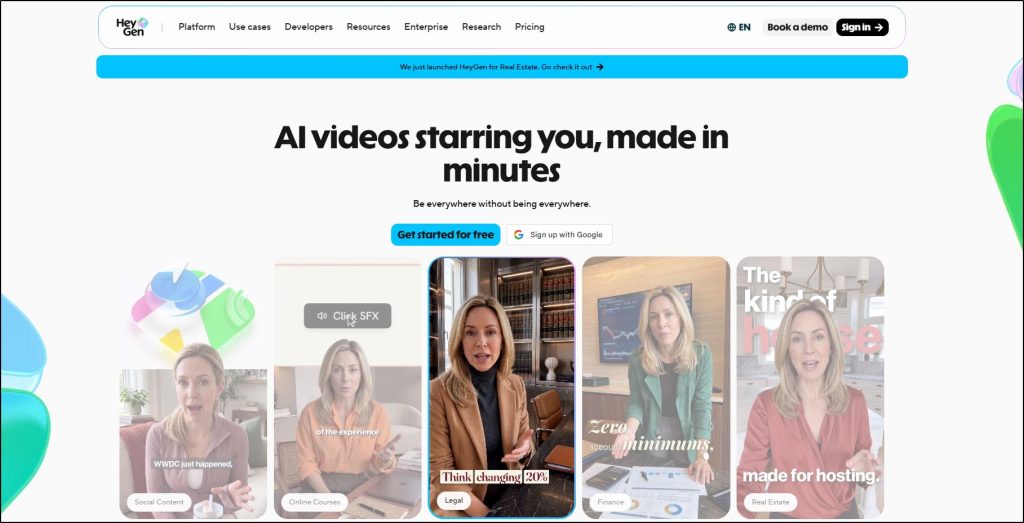
HeyGen is an AI video platform that turns a script into a finished video, complete with a presenter, voice, and captions, without a camera or crew.
It’s built for exactly what you’re trying to do as a busy, overwhelmed content creator.
It lets you create sales videos, course lessons, and social content in a few minutes that would normally take a full production setup.
AI Avatar is HeyGen’s most useful feature in my experience.
An AI avatar is a digital version of you that speaks any script you give it, with realistic facial expressions, natural lip sync, and hand gestures that match your tone.
Here’s an example of how its avatars look.

There are plenty of AI avatar tools out there, but HeyGen’s Avatar feature is deceptively realistic. When you feed it high quality footage and clean audio, it’s genuinely hard for an average viewer to tell they’re watching an avatar and not you.
So, once you create a polished avatar inside HeyGen, you can create as many videos as you want where the viewer sees you talking about different subjects without you actually getting in front of the camera.
Read: The best AI video generators and editors for edupreneurs
How HeyGen’s AI Avatar Cloning Actually Works
HeyGen lets you create a digital clone of yourself using existing footage, live recorded video, or photographs. For the best results, give it high quality video of you talking naturally and looking directly into the camera.
Let me walk you through the process I followed to create Jeff’s clone using HeyGen.
Step 1: To create your AI clone, HeyGen asks you to record a video with your webcam or smartphone, or upload existing video of yourself.
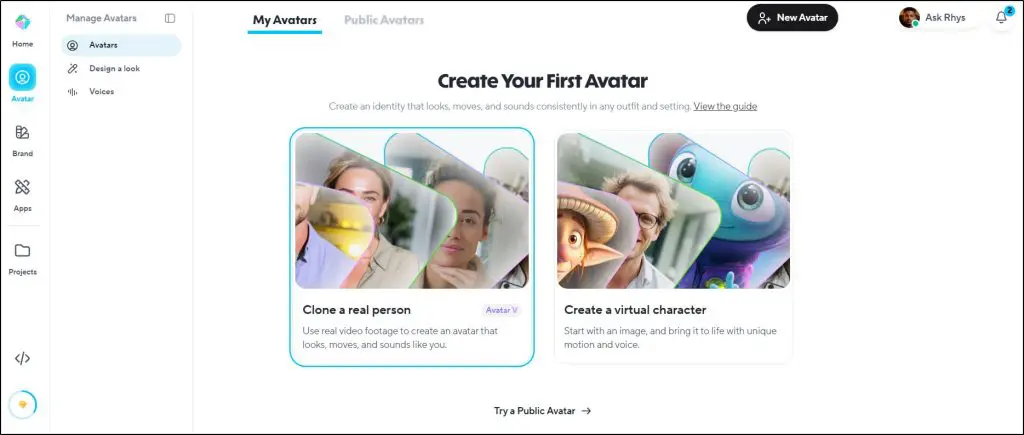
Step 2: It processes that footage using its AI models, which study your movements, expressions, body language, and voice to understand exactly how you appear and sound.
Step 3: Once it builds your avatar, it gives you full freedom to change how you look in any video. You can change your outfit, surroundings, background, and more. Show yourself in a high-end indoor studio, a refreshing outdoor location, a well-lit corporate office, or any other setting you want.

Step 4: To make this easier, HeyGen gives you pre-built templates for changing your appearance and surroundings, so you’re not designing every look from scratch.
Step 5: To create a video, you simply give HeyGen a script, and it turns that script into a realistic video of you saying it, in your voice.
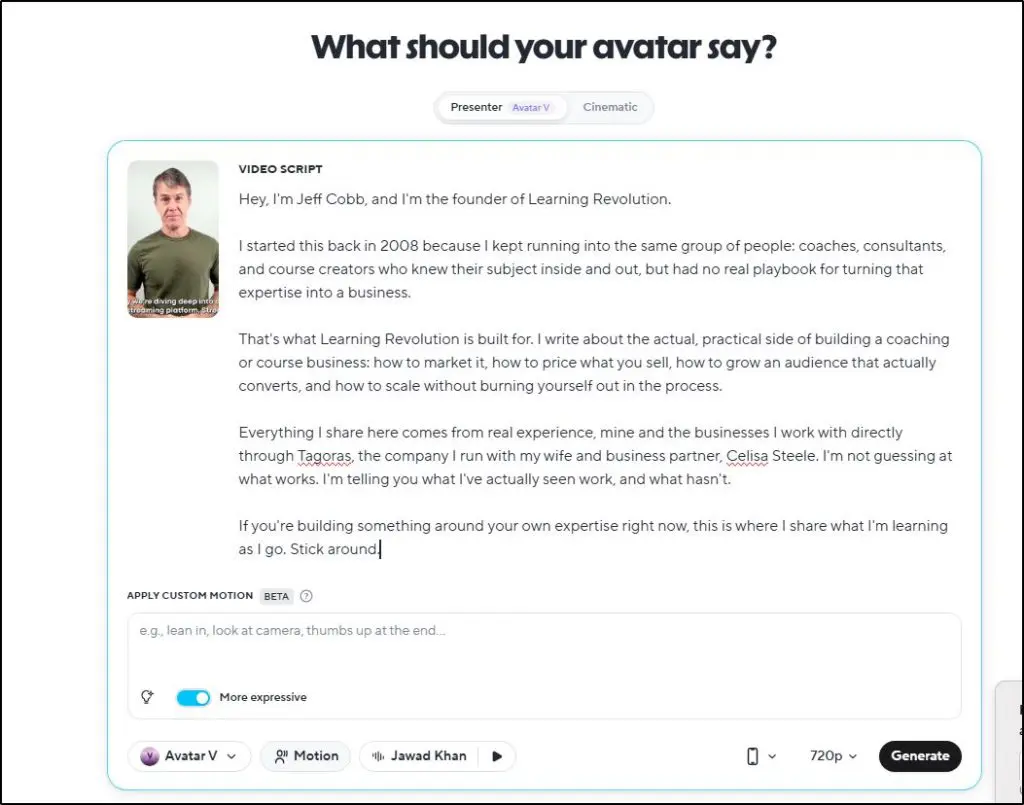
Once your avatar exists, steps 1 and 2 are done for good. After that, just choose a new script and a few minutes of processing to create new videos, with no camera, no lighting setup, and no filming yourself again.
But what about privacy?
Can anyone upload your video and create a clone? Not really.
Before generating an AI clone video of a real person, HeyGen runs a quick privacy check by asking you to verify your identity.
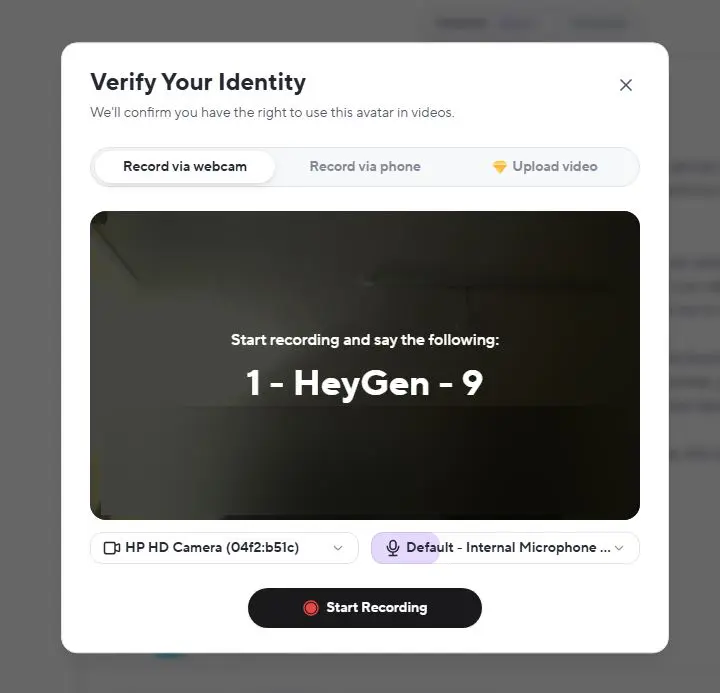
This is why it didn’t let me create Jeff’s video when I could prove my identity.
So, the platform is pretty safe to use in my experience.
What HeyGen Handles And Things You Still Need To Do
HeyGen automates the performance and rendering side of video production. Once your avatar is built, it takes a script and generates a video of you delivering it, matching your lip movements to the audio and producing footage that looks and sounds like you actually recorded it.
It can also add captions automatically and translate the finished video into other languages, which is useful if you’re trying to reach an audience beyond English speakers.
But it cannot think for you.
The research and structure of your script, and the actual argument you make in the video, are still your responsibility.
You also need to review the finished render before you publish it.
The preview you see during editing doesn’t always match the final output exactly, so it’s important to review the results before you post the video online.
Beyond that, you’d still need to build a thumbnail, format the video for whatever platform you’re posting to, write a caption or description, and decide how it fits into your broader content strategy.
HeyGen basically handles the content production part of your process only.
HeyGen Avatar V vs Avatar IV: What’s the Difference?
Before I go any further, let me quickly explain the difference between Avatar IV and Avatar V.
Both of these are HeyGen’s AI models for video creation and you can switch between them when creating videos.
Avatar IV is HeyGen’s engine for virtual characters, generated from a single photo or basic text prompt, with your look locked into place once you record it.
Avatar V is the superior, more modern model. It is a different architecture entirely, built to clone a real person by learning from your full source video rather than one frame, which is why it holds up better across longer videos and lets you change your outfit or setting after the fact instead of refilming.
Here’s a quick comparison between the two.
| Avatar V | Avatar IV | |
| Best for | Cloning a real person from your own footage | Virtual, 2D, 3D, or photo-based characters |
| How it’s built | Conditions on your full source video to learn identity and motion | Conditions on a single photo or frame, plus text prompts |
| Source footage | 15-second video recording required | Works from a single photo, no video required |
| Changing outfits or background | Yes, generate new looks after recording once, no reshoot needed | No, your recorded look is locked into the output |
| Identity stability on long videos | Built to hold your likeness steady across longer content | Can show subtle drift the longer the video runs |
| Motion control | Preset expression, gesture, and gaze controls, plus custom text prompts | Custom text prompts only |
| Credit cost | 48 credits per minute | 16 credits per minute (photo look), 31 credits per minute (video look) |
If you’re a coach or course creator cloning yourself for video production, Avatar V is the clear choice. It has the ability to record once and generate different outfits, angles, and settings without reshooting is exactly the workflow this article is built around.
But don’t default to V for everything.
It’s expensive and at 48 credits a minute against IV’s 16 to 31, your monthly credits disappear fast.
Use Avatar V where your likeness actually matters, your lessons, sales videos, and personal-brand content.
Use Avatar IV for lower-stakes videos, like a virtual character or a quick internal clip, where it doesn’t need to be recognizably you.
How To Get Started With HeyGen’s AI Avatars
If you run a coaching business, sell courses, or both, you can use HeyGen to build your personal brand, grow your social media audience, and ultimately drive sales. You can also use it for your course content videos and your sales videos.
Here’s how you can get started.
Step 1: Set up your account
Sign up on HeyGen’s site and choose a plan based on how much video you actually plan to produce. If you’re testing this out, start on a lower tier and upgrade once you know how often you’ll be generating videos. The account setup itself takes a few minutes and doesn’t require any technical knowledge.
Step 2: Record your training clip correctly
The quality of your HeyGen Avatar videos depends entirely on your input video footage.
To ensure your video is high quality:
- Use a high quality camera to record your video. If you’re uploading an existing video, make sure it’s the highest quality you have.
- Use a camera at eye level, not looking down at you from above or up from below.
- Light your face evenly, ideally with a window in front of you rather than behind you, since backlighting turns your face into a shadow.
- Keep your background simple and uncluttered.
- Wear something you’d actually wear on camera, since HeyGen is learning your real appearance, not a costume.
- Speak with normal energy and natural pacing, the way you’d talk to a client, not the flat delivery people default to when they know they’re being recorded for a system rather than a person.
Step 3: Create your AI avatar
HeyGen gives you two paths here. You can clone yourself from the footage you just recorded, which is what most coaches and course creators should do, since your face is your brand.
Or you can create a fully virtual character if you want a presenter who isn’t you, which some creators use for anonymous brands or fictional hosts.
For building your own personal brand, cloning yourself is the right call almost every time.
HeyGen not only clones your visual appearance but also your voice using ElevenLabs and other voice generation software.
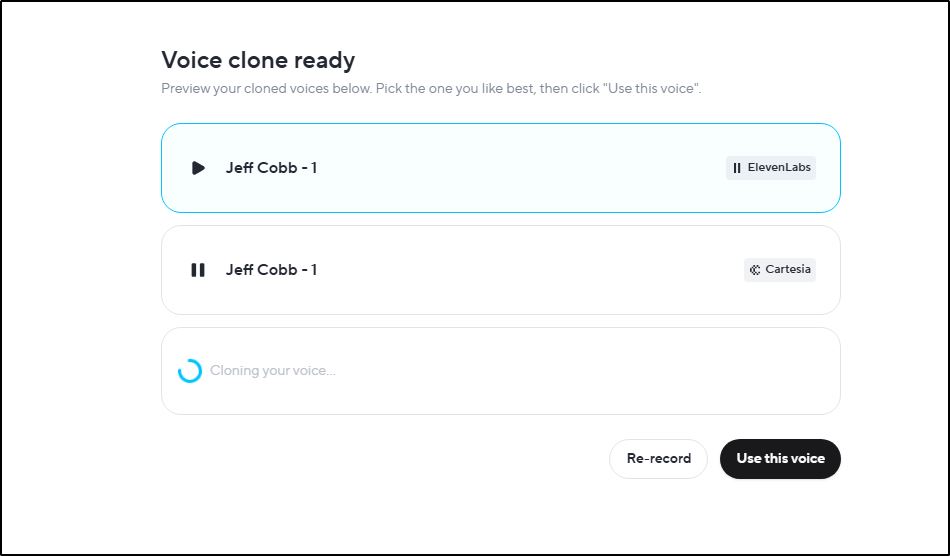
You can preview the generated voices before approval and re-record them if you’re not satisfied.
Once you approve the avatar, it becomes as asset you can use to generate countless videos.

Step 4: Generate your first video
Write or paste your script, select your avatar, and generate. This is the step you’ll repeat for every future video.
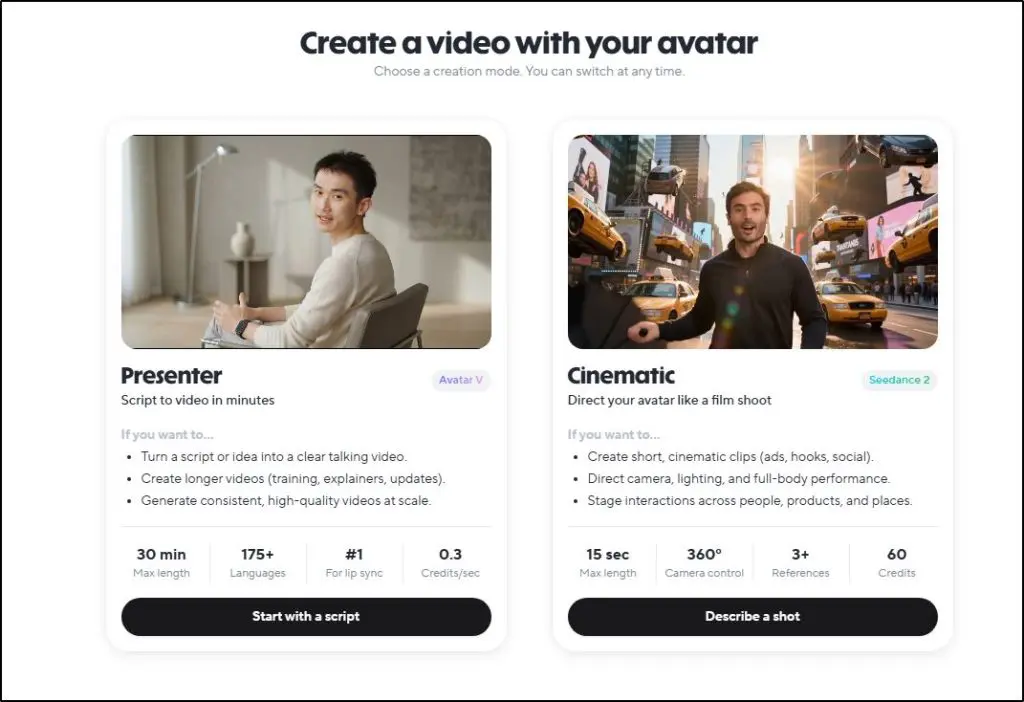
HeyGen lets you generate cinematic videos as well. But they don’t look as real in my opinion. For coaches and edupreneurs, presentation style videos are the way to go.
Step 5: Refine in the editor
Watch the finished render before you do anything else with it. Check that your pacing sounds natural, that captions are accurate if you’ve added them, and that nothing looks off in a way the preview didn’t show you.
Small adjustments here take a few minutes and save you from publishing something you’d want to redo.
Step 6: Set realistic expectations before scaling
Before you build a whole content calendar around this, make a handful of videos first and watch how they actually turn out.
This tool is strongest for talking-head content like explainers, course lessons, sales videos, the kind of video where you’re speaking directly to camera.
It’s not built to replace dynamic, fast-cut UGC-style content with a lot of movement.
Once you’ve seen a few finished videos and you’re comfortable with the quality, that’s when scaling up makes sense.
HeyGen vs. Manually Creating Videos: Which Is Cheaper?
Is using HeyGen cheaper than building your own studio and creating videos yourself?
Let’s dive into the numbers first, then I’ll talk about the other costs, like time and convenience.
HeyGen’s highest paid plan costs $49 a month. It gives you 1,000 credits, and credits burn differently depending on which avatar model you use.
Avatar V, the model you’d actually use to clone yourself, costs 48 credits per minute of video, which works out to about $2.35 per minute. For a typical 5-minute video, that’s roughly $11.75, so 1,000 credits gets you around 4 videos a month at that length.
Avatar IV costs less, 16 to 31 credits per minute depending on whether you’re using a photo or video look, but it locks your appearance in place and isn’t built to be a flexible clone of you, so it’s not really a substitute if your goal is showing up as yourself.
Now compare that with a basic home studio, which you’d need at minimum to create a professional-looking video.
A decent mic runs $50 to $100, a simple backdrop setup runs around $70, a basic lighting kit runs under $150, and editing software runs about $70.
Total one-time cost: roughly $270 to $870, depending on how much you already own and how far you go on quality.
That’s before you’ve filmed a single video.
You’d also need to edit your videos.
HeyGen handles editing automatically as part of generating the video. If you’re filming yourself, you’d either edit it yourself, outsource to a freelancer, or hire an agency.
Freelance editors on Fiverr typically charge $10 to $30 for short, simple videos, and $50 to $100 for longer, more polished ones.
Agencies usually charge in the range of $250 to $400 per video, or $1,500 to $5,000 a month for an unlimited retainer. A premium agency could go as high as $495 to $2,000 a month for unlimited editing.
Let’s compare all of them.
| Option | Typical cost | What you still handle |
| HeyGen Pro | 49/month(~11.75 per 5-min video) | Script writing, render review |
| DIY gear + Fiverr freelancer | 270–870 one-time, plus 10–80 per video | Filming, lighting, editing coordination, revisions |
| Boutique service | 250–400/video, or 1,500–5,000/month | Filming, footage delivery, feedback rounds |
| Premium agency retainer | 495–2,000/month | Filming, footage delivery, feedback rounds |
On raw numbers, HeyGen wins by a wide margin at almost any volume.
But the real comparison isn’t just dollars.
Every DIY and freelancer route above still requires you to film, which means time spent setting up, reshooting takes, and reviewing footage before it even reaches an editor.
That’s hours you’re not spending on coaching, sales calls, or building your course.
HeyGen removes that filming step entirely, which is the actual bottleneck once you try to scale past a video or two a month.
If you’re producing one video a quarter, the gear and a freelancer might make sense. But if you want to publish daily or weekly, the time you’d spend filming and coordinating edits adds up faster than the dollar difference does
The biggest advantage of HeyGen AI Avatar in my opinion is that it lets you scale massively. You can quickly cover the core topics of your niche and answer the most burning questions of your audience on your YouTube channel and get it rolling.
Once your content starts getting traction, you can hire just one freelancer or assign a team member to create new scripts, generate new videos, and upload them to your social media profiles, even when you’re not around.
HeyGen AI Avatar Videos vs Google Gemini: How Do They Compare?
Many creators in my Learning Revolution community have actually asked me about Google Flow and Gemini’s video capabilities vs HeyGen Avatar.
Both can generate a convincing digital version of you, but they’re built for different jobs.
Gemini’s avatar feature, powered by Google’s Veo model inside Flow, is designed for short, scene-based creative clips. HeyGen is built specifically for repeatable, scripted business video, the kind a coach or course creator actually needs week after week.
| HeyGen | Google Gemini / Flow | |
| Max length per video | Several minutes in one generation, no stitching required | 10-30 seconds per generation, extendable to about 2.5 minutes with visible quality drop |
| Consistency over a long video | Face and voice held steady throughout, since it’s one trained avatar model. But body movements can deteriorate | Appearance can drift after roughly a minute of stitched extensions |
| Built for scripted lessons | Yes, write a script and generate directly | Not designed for this, oriented around short creative scenes |
| Commercial licensing | Clearly included on paid plans | Not clearly defined for business use |
| Captions and translation | Built in | Not a core feature |
| Best fit for a coach or course creator | Course lessons, sales videos, FAQ answers, YouTube content | A short promo clip or a single striking scene |
For an L&D content creator producing lessons, module intros, or sales videos on a regular schedule, HeyGen’s is the better tool. Gemini’s avatar feature is worth having for short form cinematic content or even social media ads.
Ways to Use AI Avatar Videos As a Coach or Course Seller
If you want to generate coaching leads or sell courses, you need a solid personal brand built on video, because video earns more trust than text and people find it more engaging.
With HeyGen handling your video production, here are the different ways you can use it in your business to generate leads for coaching and courses.
1. Create more YouTube videos
YouTube is the best place to build your personal brand as a coach, consultant, or course seller. I discussed earlier that Perplexity and Google’s AI Overviews pull a large share of their video citations from YouTube, and that long-form content makes up the vast majority of those citations.
For an edupreneur, that means a HeyGen-produced YouTube video isn’t just content, it’s a chance to get your face and your name surfaced inside an AI answer someone else is reading.
Use it for full lessons pulled from your course, breakdowns of problems your ideal client faces, and the kind of in-depth content that’s too long to film comfortably but takes minutes to generate.
Read: The best platforms to sell online courses for modern creators
2. Generate Shorts, TikTok, and Reels to create awareness
Don’t underestimate the impact of short-form content on TikTok, Instagram Reels, and YouTube Shorts for your knowledge business.
Treat it as the top-of-funnel content you’d use to pull people toward your long-form content. It’s the introduction of your brand to people who might have the problems you solve but aren’t actively looking for a solution yet.
Thanks to modern social media algorithms, if you consistently create short-form content on your topic, the platforms will show it to people who are interested.
Make it fun and engaging, and don’t try to cover what you’d cover in a long-form video.
Ultimately, these quick, low-stakes value bites drive people to your main content, and from there to your email list.
3. Repurpose your best-performing articles and podcasts
If an article or podcast on your site already ranks and converts, you already know the topic works. Turn its core points into a script and generate a video version.
This gives you a second format for the same proven idea, drives more entry points into your funnel, and adds a video asset to a page that previously had none.
This helps both with on-page engagement and with the kind of AI answer engines that increasingly favor pages with video attached.
4. Answer your audience’s most common questions
Every coach has a list of questions prospects ask before they buy. Turn each one into a short, direct video answer.
These are cheap to produce, easy to place on a sales page or FAQ section, and they let a prospect see and hear you answer their exact objection before they ever get on a call.
This shortens your sales cycle instead of just filling your content calendar.
The Limitations and Drawbacks of HeyGen’s AI Avatar Videos
The more I’ve played around with HeyGen’s AI Avatar videos, the more I’ve realized that it still has a few limitations, which is understandable because it’s an evolving product.
But you should be aware of them before getting started.
1. Some body movement still look artificial
With excellent input footage, lip sync is accurate and facial expressions read as real in short clips. But gestures and body movement still have a slight stiffness that a sharp viewer will notice on close attention.
In my experience, you can minimize this drawback by creating videos where you’re sitting behind a desk and only your upper body is visible.
2. Quality drops on longer videos
I’ve noticed that the quality doesn’t stay consistent in longer videos, say 20-30 minutes. I’m a part of a few Reddit threads where multiple creators have reported more visible artifacts, timing issues, and rendering quirks as video length increases.
Plan your longer content with that in mind, and always watch the full render before publishing rather than assuming quality holds steady throughout.
Ideally, I’d just say keep your videos in the 5-7 min range.
3. The platform isn’t perfectly reliable
Renders occasionally fail, previews sometimes don’t match final output, and processing times vary more than you’d expect from a paid tool. Build a buffer into your publishing schedule instead of generating a video the same day it needs to go live.
4. Credits limit your video production
At 48 credits per minute, a Pro plan’s 1,000 monthly credits cover roughly 4 videos at 5 minutes each on Avatar V. If you’re publishing daily or producing longer lessons regularly, you’ll hit that ceiling faster than the sticker price suggests.
None of this makes HeyGen unusable.
But it means the tool is best suited for talking-head content like lessons, explainers, sales videos, FAQ answers.
Is HeyGen AI Avatar Worth Using?
It’s fascinating technology, and it’s certainly worth trying, even if you don’t use it for all your content. As I said, it’s an evolving product, but from what I’ve used, it’s already quite realistic, and most average internet users will find it hard to distinguish between it and your real footage. But it all depends on your input video quality. The better the input, the better the output. As someone who loves trying new stuff, I’d say take the free version for a ride and certainly try it out.
Frequently Asked Questions (FAQs) About HeyGen AI Avatar
Can I use HeyGen avatar videos commercially?
Yes, on paid plans. Commercial use rights come with plans at the Creator tier and above, meaning you can publish HeyGen videos on YouTube, your website, or in paid course content without licensing issues. The free plan’s commercial terms are unclear, so don’t build a business on it.
How realistic does the HeyGen AI avatar actually look?
Genuinely close to real, especially in short clips with good source footage. Lip sync and facial expressions read as natural, and most viewers won’t immediately clock it as AI. Where it shows is in longer videos and larger body movements, which still carry a slight stiffness.
Can I use my own voice instead of a stock one?
Yes. HeyGen clones your voice directly from the training footage you upload, so your avatar sounds like you without any extra setup. You can also select from HeyGen’s built-in voice library, or connect a third-party provider like ElevenLabs, though neither is necessary for most coaches.
How long does it take to render a video?
Rendering typically takes a few minutes per video, though times vary with video length and how busy the platform is at that moment. Longer videos and the higher-quality avatar engines take longer to process than short clips on the standard engine.
Is the free plan enough to test HeyGen before paying?
It’s enough to see if the avatar quality convinces you, but not enough to actually use. The free plan caps you at 3 videos a month, 3 minutes each, capped at 720p, with a permanent watermark. Treat it as a preview, not a working tool.
Will my audience be able to tell it’s an AI avatar?
Most casual viewers won’t, particularly in short, well-lit clips built from quality training footage. Closer attention on longer videos can reveal the giveaways: movement that’s slightly too smooth, and gestures that don’t quite match natural body language.
Can HeyGen translate my videos into other languages?
Yes. HeyGen can translate a finished video into other languages while keeping your avatar’s lip movements synced to the new audio, which is useful if your coaching or course audience spans multiple countries or language groups.
Table of Contents