

TL;DR: Circle vs Mighty Networks (2026)— What’s the Better Choice?
Both Circle and Mighty Networks help you build online communities—but they’re built for different goals.
🥇Circle is better if you want to run your entire creator business from one place—with modular courses, AI automations, live events, email marketing, and branded mobile apps. It’s ideal for creators focused on memberships, coaching, or scaling a community with minimal tech hassle.
🥇Mighty Networks is a stronger fit if you want a community-first platform with built-in course tools, feed/chat-based spaces, native livestreaming, and more layout control. It’s perfect for edupreneurs blending learning, events, and conversations in a flexible branded space.
💰Pricing Comparison:
– Mighty Networks starts at $79/month for unlimited members and spaces
– Circle starts at $89/month, with automation, email, and branded apps on higher tiers
🥇 Choose Circle if you want:
– All-in-one control over courses, community, email, and payments
– Automation workflows for onboarding, engagement, and badges
– AI Agents for 24/7 coaching and member support
– A polished UX with modular structure and advanced analytics
🥇 Choose Mighty Networks if you want:
– A dynamic community experience with chat, feeds, livestreams, and events
– Basic but reliable course creation (with cohorts, drip, and quizzes)
– Highly customizable “Spaces” that combine multiple features
– Branded mobile apps with full control (via Mighty Pro)
⭐ Our Take:
– If you want advanced automation, email marketing, and course delivery tools alongside your community, Circle gives you more leverage to grow and scale. Try Circle For Free
– But if you want a visually rich, engagement-first community with integrated learning, livestreaming, and event tools, Mighty Networks offers the better all-in-one environment for building real connection. Try Mighty Networks For Free.
Both Mighty Networks and Circle are two of the best online community platforms. What makes them stand out is how they challenge your same-old conventional online communities.
These platforms not only let you engage your audience with online communities – they are versatile hubs that also help you create and manage courses, events, and several other activities simultaneously.
But which online community platform should you use to connect and engage with your target audience?
To help you make an informed decision, we’ve compared Mighty Networks and Circle in complete detail, including their key features and customization options.
Mighty Networks vs. Circle.so | The Main Differences
Before diving deeper, let’s get a bird’s eye view of the main differences between Mighty Networks and Circle.so.
| Feature / Capability | Mighty Networks | Circle.so | 🏆 Winner |
|---|---|---|---|
| Platform Focus | All-in-one for community, courses, and events | Unified engagement hub with deep automation | 🔹 Circle — More focused on creator businesses with streamlined workflows |
| Community Structure | Flexible “Spaces” with multiple features per space | One feature per space for cleaner structure | 🔹 Mighty — More flexible and customizable for diverse use cases |
| Course Creation | Supports cohort, drip, quizzes, video, badges | Modular lessons (no quizzes, certificates) | 🔹 Mighty — Deeper native course-building capabilities |
| Live Events | Native livestreaming, events, Zoom support | Live Rooms, Streams, Events, co-hosting | 🔹 Circle — More versatile event formats and engagement tools |
| Automation | Advanced automations (by tier), AI Co-Host | Visual Workflows with triggers, badges, nudges | 🔹 Circle — More powerful and user-friendly automation builder |
| AI Tools | AI Co-Host, writing assistant, onboarding prompts | AI Agents + Community AI (custom-trained chatbots) | 🔹 Circle — More innovative and customizable AI capabilities |
| Gamification | Points, streaks, badges, leaderboards (coming soon) | Automated badges and scoring | 🔹 Mighty — Richer built-in gamification options |
| Mobile Apps | Full white-label iOS/Android apps (Mighty Pro) | Branded apps via Circle Plus | 🔹 Mighty — More advanced and customizable app experience |
| Customization | Rename/reorder features, layout control per space | Custom branding, JS/CSS, clean UI | 🔹 Mighty — More granular control over community layout |
| Analytics | Member cohorts, content performance, plan insights | Engagement dashboards, space-level stats, AI scoring | 🔹 Circle — Deeper insights with advanced analytics and activity scores |
| Integrations | Zapier, Zoom, Stripe, ConvertKit, 2,000+ embeds | Zapier, API, branded email, headless support | 🔹 Circle — Broader integration ecosystem and developer tools |
| Memberships & Monetization | Paid access to content, events, or spaces | Paid tiers, upsells, trials, in-app payments | 🔸 Draw — Both offer strong monetization options with slight edge to Circle on upsells |
| Email Marketing | Basic notifications & email updates | Full-featured Email Hub (add-on) | 🔹 Circle — Optional but powerful built-in email suite |
| Best For | Creators wanting control over structure and feature blending | Creators prioritizing automation, engagement, and AI | 🔸 Draw — Depends on your business style and tech comfort |
| Starting Price | $41/month (Community plan) | $89/month (Professional plan) | 🔹 Mighty — More affordable entry point with unlimited features |
Mighty Networks vs Circle Overview
Mighty Networks and Circle are two of the most popular online community platforms – both focusing on member engagement and combining courses and events with your community.
Mighty Networks is more holistic and offers more customization options with its ability to add multiple interactive features within a single community space. This versatility helps community creators to combine chat-based or feed-based communities, courses, events, and more under a single umbrella.
Mighty Co-Host is an AI-powered community platform that is available as part of the Mighty Networks package and includes a suite of new AI features.
On the other hand, Circle keeps things simple, allowing you to focus on one interactive feature at a time. It includes the option to create multiple spaces for discussions, courses, events, or content.
Both tools offer varied access levels (public, private, secret, paid) and diverse monetization options, supporting memberships, courses, and gated content.
Mighty Networks vs. Circle Pricing | How Much Do They Cost
Mighty Networks keeps things flexible and straightforward with unlimited usage even on entry-level plans, while Circle’s pricing is built around scaling with advanced automation, AI, and branded tools as you grow.
Let’s break down what each platform offers at every tier, plus a side-by-side table so you can compare their most important features.
Mighty Networks Pricing (2026)
Mighty Networks now has four tiers: Launch, Scale, Growth, and Mighty Pro. You can pay monthly or annually (annual billing gives you 2 months free).
| Plan | Price | Best for |
|---|---|---|
| Launch | $79/month | Starting a paid community and getting your first offer live fast |
| Scale | $179/month | Scaling beyond early revenue, adding programs, or migrating from another platform |
| Growth | $354/month | Advanced automations, more support, and access to branded app options |
| Mighty Pro | Custom | Full branded apps, dedicated strategy support, advanced reporting, and “unlimited everything” |
Mighty Networks Plan Comparison
Think of it like this: Launch gets you the core community + courses setup, Scale adds integrations and stronger structure, Growth adds higher-end automations and support, and Mighty Pro is the white-glove + branded app package.
| Feature | Launch | Scale | Growth | Mighty Pro |
|---|---|---|---|---|
| Members | Unlimited | Unlimited | Unlimited | Unlimited |
| Hosts / Moderators | 3 / 10 | 5 / 15 | 10 / 100 | Unlimited |
| Spaces | 20 single-feature | 40 multi-feature | 80 multi-feature | Unlimited |
| Streaming (hours/month) | 20 | 30 | 40 | 50 |
| Viewers per livestream | 100 | 200 | 1,000 | 3,000 |
| Automations | Basic | More | Advanced | Advanced + “unlimited everything” |
| APIs & Integrations | ❌ | ✅ | ✅ | ✅ |
| Migration services | ❌ | ✅ | ✅ | ✅ |
| Branded apps | ❌ | ❌ | ✅ | ✅ (custom branded apps) |
| Transaction fee | 2% | 1% | 0.5% | 0.5% |
Which plan should you choose?
- Launch: Best if you’re validating a paid community and want the essentials without overpaying.
- Scale: Best if you need integrations/APIs, more flexible spaces, or you’re migrating from another platform.
- Growth: Best if you want advanced automations, stronger support, and branded app options.
- Mighty Pro: Best if you want fully branded apps and hands-on strategy support.

Circle.so Pricing (2026)
Circle starts at a higher price point but builds in advanced automation, AI tools, and branded options as you move up. Ideal if you want to centralize your coaching, content delivery, and engagement flows.
| Plan | Price (Annual) | Best For |
|---|---|---|
| Professional | $89/month | Creators and coaches launching communities with basic automations and branded control |
| Business | $199/month | Growing teams that need custom fields, visual workflows, API access, and deeper analytics |
| Enterprise | $419/month | Large communities with AI agents, concierge onboarding, and advanced support |
| Circle Plus | Custom | Organizations wanting fully branded iOS/Android apps, in-app purchases, and a dedicated launch team |
Circle Plan Comparison
| Feature | Professional | Business | Enterprise |
|---|---|---|---|
| Workflows & Automations | 20 | Unlimited | Unlimited |
| AI Agents | ❌ | ❌ | ✅ |
| API Access (Headless/Admin) | ❌ | ✅ | ✅ |
| Branded Email Notifications | ❌ | ✅ | ✅ |
| Custom SSO | ❌ | ❌ | ✅ |
| Best For | Independent creators | Teams & programs scaling up | Enterprises & large brands with support needs |

Mighty Networks vs Circle In-Depth Comparison: Which Online Community Platform is Most Suitable For You?
While Mighty Networks takes a more holistic approach to community building, Circle is simpler in its approach. Let’s discuss the community-building features in detail:
Mighty Networks:
Mighty Networks is a modern community platform that has all the features you’ll need to educate, engage, and monetize your community. It also works as an all-in-one platform that helps you create online courses, memberships, and events and offer them as a part of your thriving community.
Mighty Network’s community comprises “Spaces,” which are like no-code containers akin to channels you’ll find on a typical chat platform.
You can mix and match native features within each space. You can also rename and reorder both features and spaces however you want.
Here’s a list of features you can add to your Mighty Networks spaces:
- Web pages (feature-rich content, embedded graphics, and even videos)
- Chat Community
- Feed-based Community
- Online Cohort-based Courses (for community-based learning)
- Single Event
- An Event Series
- A Member List
- A Discovery Tab (to highlight featured content, members, and events in a Space)
- Highlighted Hashtags
This means that within these Spaces, you can create and monetize courses and communities and even host paid events like seminars, workshops, expert question-and-answer sessions, and conferences.
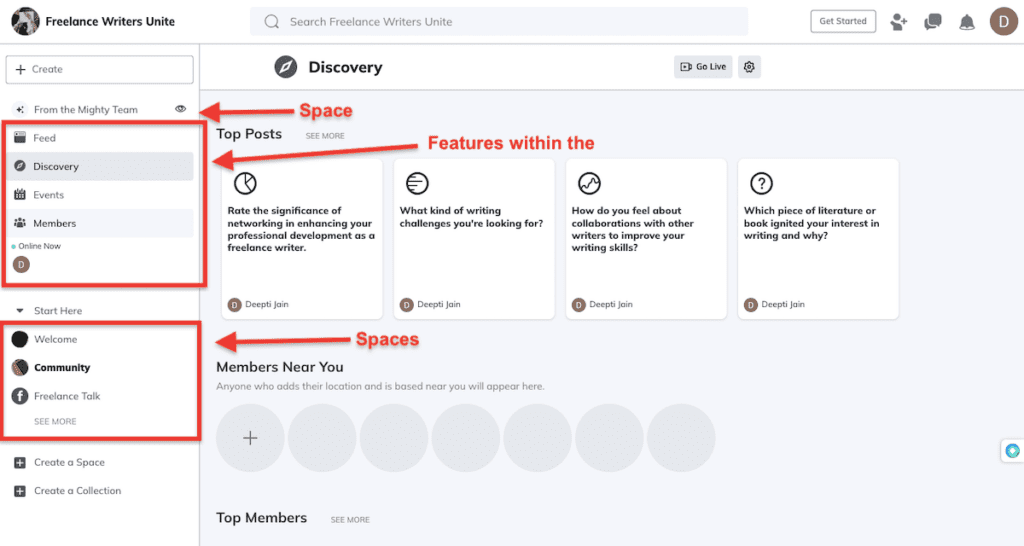
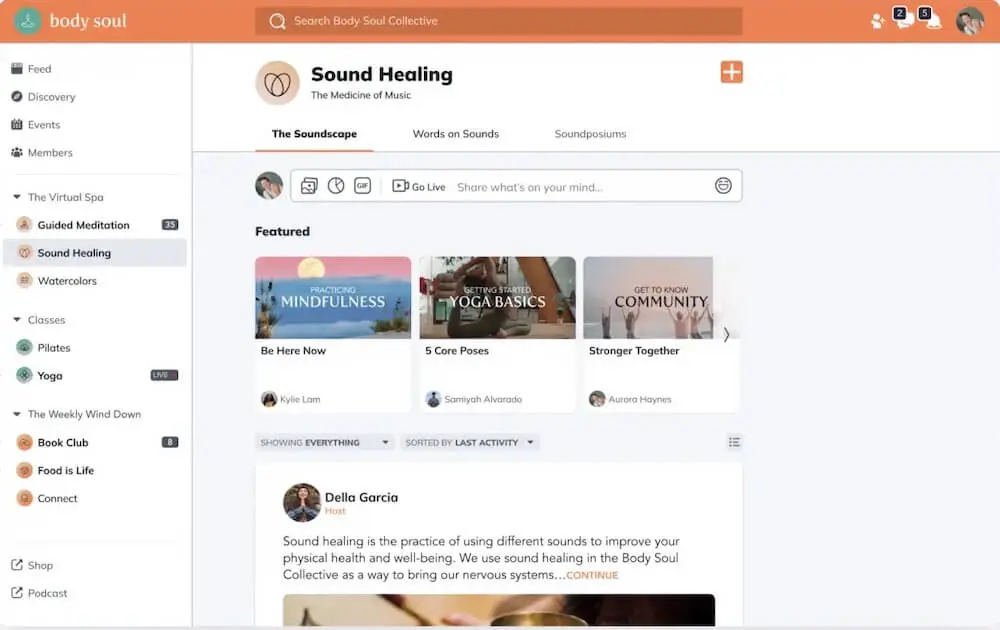
Related to the community feature, you can set up your community around either a chat or feed-based interface.
The “Chat” feature lets you connect members in real-time, allowing everyone to share messages, gifs, files, images, and emojis. You can also use it to accompany your cohort-based course to engage course viewers.

While a feed-based community doesn’t have a real-time chat, it lets you and your community members engage through quick posts, articles, polls, questions, events, and live streaming.
Mighty Networks isn’t merely a community platform. You can build a Space for Cohort-based Courses to build online courses with your community. The Course Community tab functions as a Feed where you and your members can post and interact, while there’s a separate tab for Course Materials.
One of the best things about Mighty Networks is how it lets you mix and match all these features within the Spaces. Create a community, toss in a course, and sprinkle it with an event or two – it’s up to you how you want to engage your audience.
As a whole, these Spaces can be public, paid, private, and token-gated (more on this later).
Circle:
Like Mighty Networks, Circle’s communities also contain “Spaces” to hold your content.
Within your online community Space, you can host and monetize:
- Courses
- Discussions
- Live streams
- Chat
- Events
You can organize your Spaces into groups, and for each individual “Space,” you can designate it as either private, open, or secret.
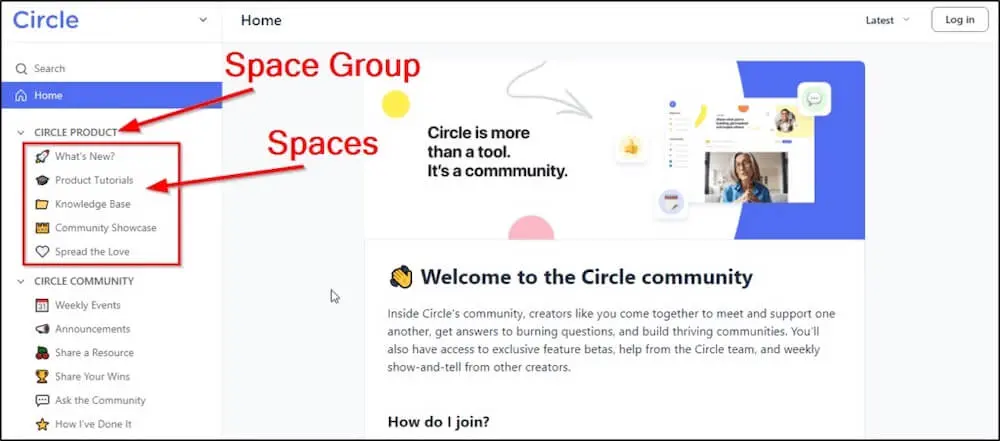
There’s one drastic difference between Mighty Networks’ space and Circle’s space.
Unlike Mighty Networks, where you could add multiple feature types to a single space, Circle limits each space to dedicated options. It can be either courses, chats, events, or discussions. You have the flexibility to choose specific features for each space, with the trade-off of focusing on one feature type per space.
Mighty Networks vs Circle: User Interface and Ease of Use
Circle and Mighty Networks – both online community platforms are known for their intuitive interface and beginner-friendly setup.
Let’s compare it in detail.
Mighty Networks:
As you sign up with Mighty Networks and start building your learning community, the first step is to share your community description.
Mighty Networks will ask you to share a few words or a phrase about your target audience, and they’ll help you craft the description and a name for your community. You can edit both the way you want or create from scratch.
It seems like a superfluous feature at first, but it’s especially helpful if you’re going through writer’s block or struggling to come up with an apt community description.
And that’s it – Mighty Networks will create a community for you, which includes:
- A landing page
- Social announcements
- Invite text
- A welcome post
- Community questions
Practically everything you need to bring together a community.
With a sidebar navigation panel that gives you quick access to different functions, Mighty Networks is intuitive and easy to move around.
For example, when you’re ready to add a new “Space,” simply navigate to the left-hand navigation panel and click on the “Create a Space” button. You’ll see preconfigured templates for each Space type that you can refine and customize however you want.

Each template comes with certain features turned on that you can always move around later.
For example, if you pick the cohort course template, it will come pre-configured with the following features:
- Feed
- Members list
- Table of Contents
- Discovery (to showcase featured content, top posts, top members, and members near you)
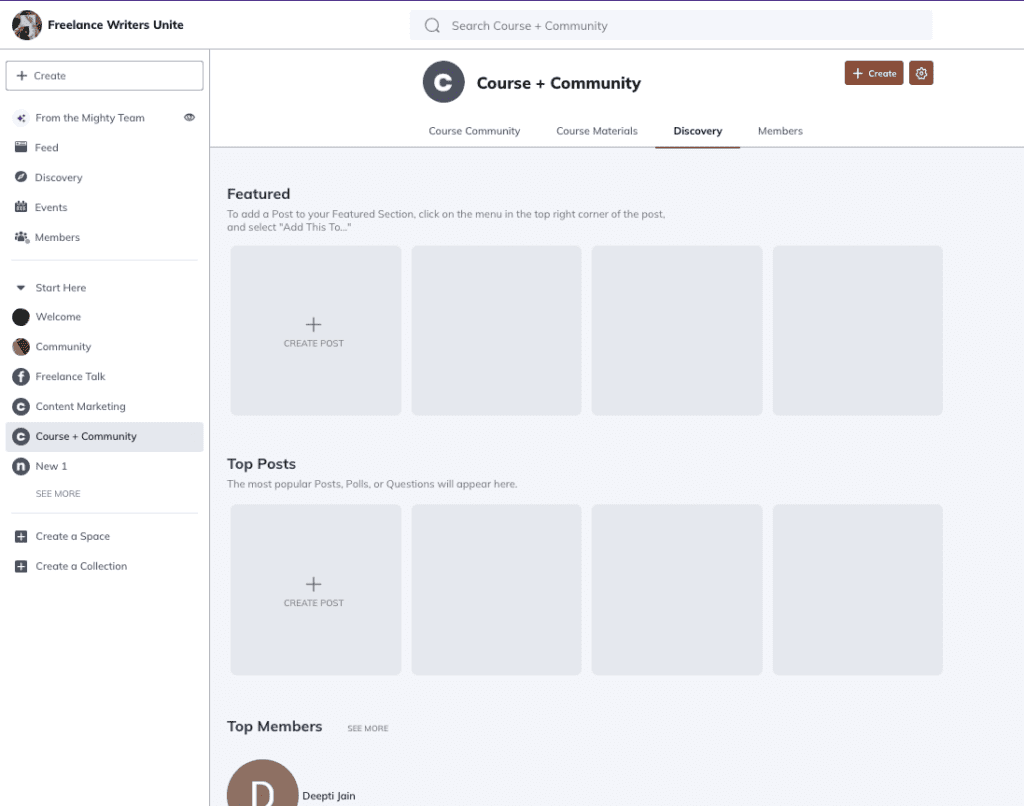
These templates give you a head-start, and you can customize the features within based on your requirements. You can also customize the colors, rename the features, turn features on and off within Spaces, add more features, and change the feature display order, among multiple other ways to fine-tune your community precisely the way you want.
You can also add your branding elements and upload your online course lessons with a simple click, all from a single dashboard.
Mighty Networks has an informative and feature-rich environment, so it may take some time to take it all in. That said, the interface is user-friendly and the community-building process is quick and straightforward.
Circle:
Circle emphasizes a simplified, streamlined design, offering a modern UI and intuitive layout.
As soon as you enter the dashboard, they present you with a step-by-step checklist to help you set up your community. While you don’t need extra help navigating Circle since it’s pretty beginner-friendly, they offer in-depth video tutorials with each step in the checklist.
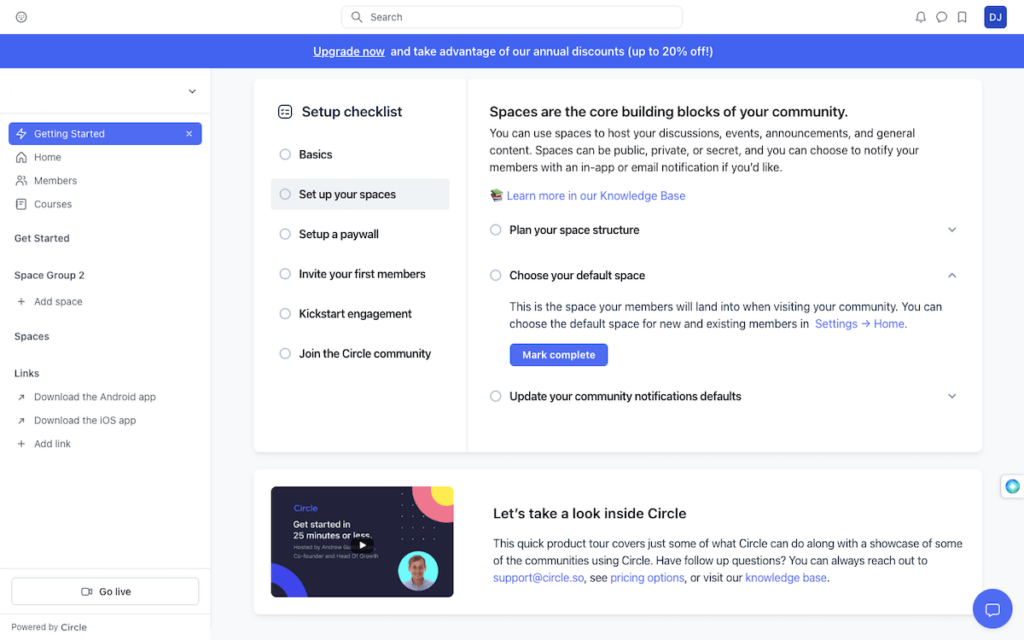
You can start with the basics, like picking your brand color, setting a logo, and finalizing your custom domain (or you can do it later after creating a space).
Creating a space is also a quick process. You just have to pick an option after hitting the “Add Space” option from the left navigation bar. They’ll give you the choice of five space types – courses, chats, events, posts, and members.
Next, you’ll be prompted to choose from different access types, decide the group to which you’d like the Space to belong, give it a name, and how you want to notify your members.
And voila, your space is ready.
Circle’s approach of dedicated feature spaces also contributes to a clearer UI. This makes it easier for both community creators and members to focus on one functionality at a time.
They also offer video tutorials every step of the way to help you with the process. You can also join the Circle’s community, where you can interact with creators like you and get answers to your queries. You’ll also get access to exclusive feature betas, help from the Circle team, and weekly show-and-tell from other creators.
Mighty Networks vs Circle: Member Engagement Features
Mighty Networks:
Mighty Networks’ “Spaces” concept that allows you to blend different features within your community areas on its own is quite an engaging feature. You get the freedom to mix and match interaction styles within a single space, making engagement more diverse and fun for your members.
Here’s what’s really unique about Mighty Networks: each feature within Mighty Networks comes with different ways to help you engage and interact with your community members.
For example, the chat-based community interface allows real-time interaction and supports messages, gifs, files, images, and emojis – making it a great option for immediate engagement and discussions.
Then you have the feed-based community interface that lets you interact using quick posts, articles, polls, questions, events, and live streaming. In fact, you have the option to livestream to your entire network or just in particular Spaces.
Members will be able to see your livestream directly from their feed and also get access to the full stream and live chat simultaneously.

Alternatively, you can create and monetize cohort-based courses, which integrate course communities with separate tabs for posting and interacting. This lets you sell your online course and maintain community engagement from a single point. The cohort-based interface also puts the emphasis on member challenges, events, and activities, not course content alone.
Again, the best part is how you can combine these all together – for example, combining community discussions with courses and events.
Another member engagement feature unique to Mighty Networks is its “Member Categories.” You can enable member categories based on their interest, occupation, and industry. Your members can pick one Member Category that resonates with them and can also select custom categories.
You can also enable “Member Location” to allow members to help them locate other members in their vicinity.
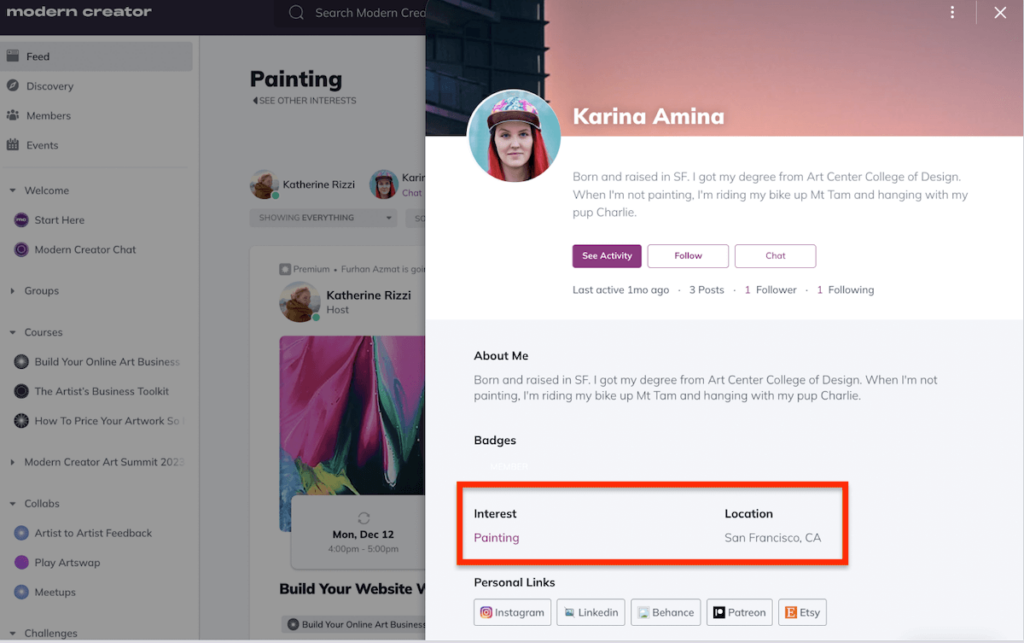
Now connections aren’t relegated merely to an online platform. Members who live nearby can also network offline, facilitating local connections and interactions.
While there aren’t many gamified engagement options for members, Mighty Networks does allow you to reward members for referring your community to other members. Plus, it shines the spotlight on the most active members, which also encourages others to be more active in the community.
Circle:
Unlike Mighty Networks, Circle offers dedicated spaces for specific features like courses, discussions, live streams, chats, and events.
You can host a diverse range of events – from group coaching calls to summits and from live Q&A to live streaming. In addition, Circle lets you set up detailed member profiles, display upcoming events, and enable RSVPs. To further engage and interact with the audience, you also have the option to host your event with multiple co-hosts and invite attendees to join on stage.
To make your course offerings within the community more engaging, Circle comes with features like drip lessons, cohort-based groups, live Q&As, and automated check-ins. This gives you and your course viewers the best of both worlds – course education as well as member engagement.
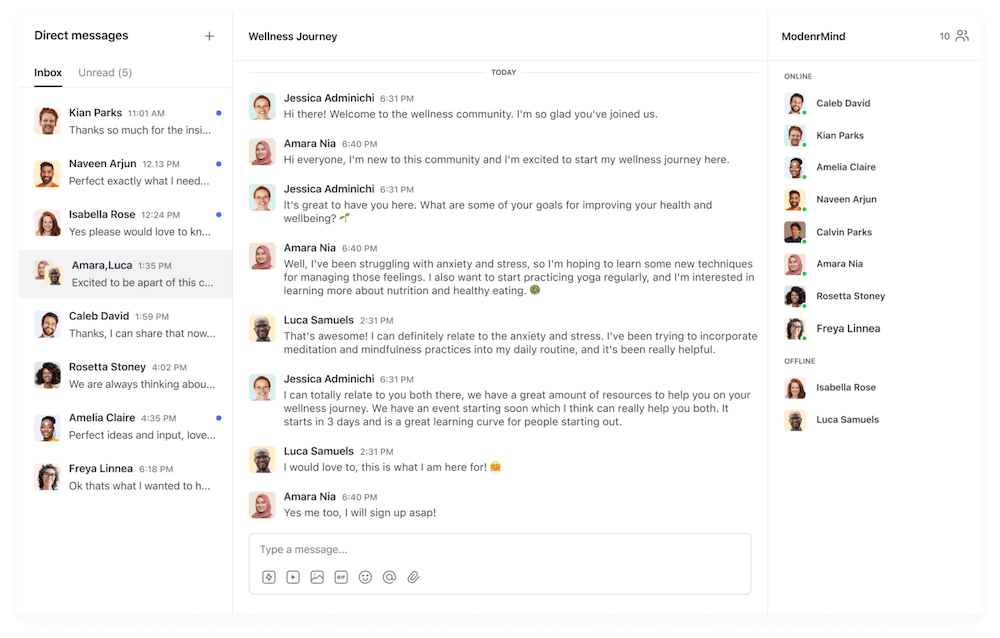
Coming to chat, Circle helps enhance communication by offering group chat rooms, private messaging, and regular chat. Then, you have detailed member profiles that help your members connect with other members based on their profiles and interests.
Circle offers another unique feature to foster engagement – that is, the ability to build engagement workflows in Circle to give your members a personalized experience. The best part? You can either choose from multiple pre-built workflow templates or build your own from scratch.
For example, you can set up an automated personalized message congratulating the members right after they complete a course.

Circle also lets you set up a personal home feed for your members to stay updated with the community. It also creates automated weekly email digests for continual member engagement, making sure your audience never misses out and keeps returning to your community.
Mighty Networks vs. Circle: Customization and Branding Dynamics
Both Mighty Networks and Circle prioritize a custom-branded experience, allowing you to design and personalize your community platform and align it with your brand’s identity.
This includes the ability to pick your own colors, logos, layouts, custom URLs, community names, space icons, and even choose from different community access.
Additionally, you can choose themes with either light or dark mode.
That said, both community platforms have their fair share of differences as well. Let’s discuss them in a bit more detail.
Mighty Networks:
As far as customization goes, Mighty Networks has a massive edge thanks to the ability to design your community layout just the way you want. You have the freedom to customize and configure each “Space” according to your preferences.
This includes mixing and matching different features, rearranging elements, and renaming components within Spaces, providing a tailored environment for community interaction.
Mighty Networks also changes the game with its branded websites and mobile apps for both iOS and Android. With the Mighty Pro plan, you can create white-labeled mobile apps, run events and live streams, and monetize your communities and courses on the go.
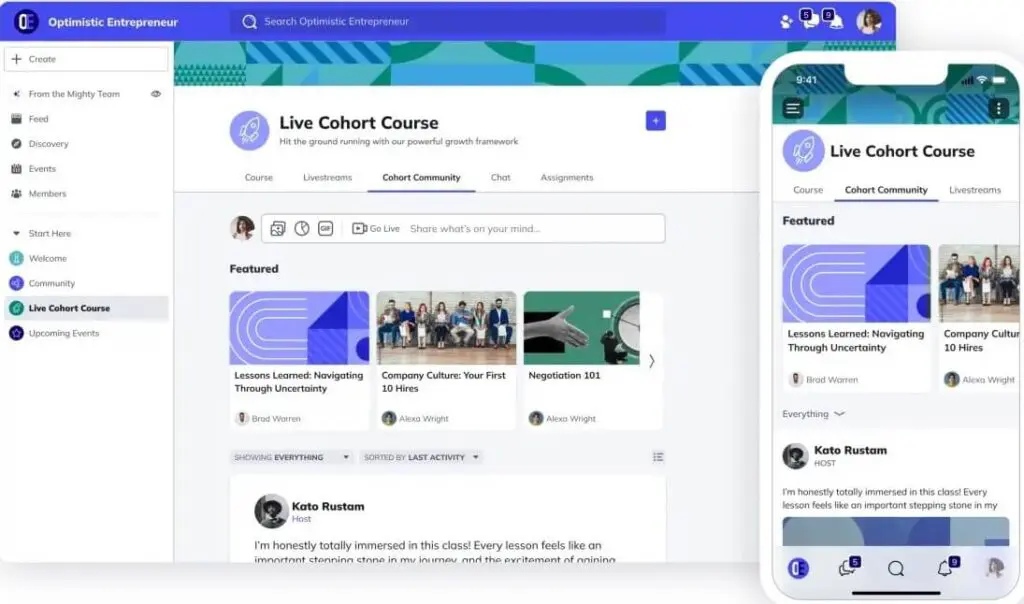
You can also send out branded custom push notifications to your members for your upcoming events, coaching calls, and programs. The app will be truly yours without any trace of Mighty Networks, and you’ll be able to create, manage, and list it on the Apple Store and Google Play the way you want.
Other than this, Mighty Networks also lets your community members personalize their member profiles to some extent. For example, they can add profile pictures, bios, and interests and pick from different member categories.
Circle:
Beyond the usual branding, like the ability to name your community, add your logo, select theme color, and pick a custom URL, higher tier plans let you use custom JavaScript/CSS for further customization.
You can also set up custom invite messages, nudges, and invitations for personal member onboarding.
Like Mighty Networks, Circle also offers a white-labeled mobile app but sans advanced functionalities like sending branded push notifications. Essentially, this means you can remove Circle’s branding and add yours, but it doesn’t offer the same level of customization and features as Mighty Networks.
Final Verdict: Mighty Networks.
Both platforms offer sufficient branding and customization options, but Mighty Networks stands out owing to its white-labeled mobile apps and the ability to completely customize the community layout.
Circle, on the other hand, is more basic in its approach to branding and customization. While it allows for branding removal and the addition of custom branding, it doesn’t match Mighty Networks’ level of customization and features.
Community Access and Monetization Options
Mighty Networks and Circle offer a range of monetization and community access options.
Here’s a detailed overview:
Mighty Networks:
Here are the options Mighty Networks allows creators to control how members join and engage with their communities:
- Public: “Public Spaces” are accessible to everyone.
- Private: “Private Spaces” are accessible only after the member requests access.
- Secret: “Secret Spaces” are invite-only.
- Paid: Only the members who pay for access can enter “Paid Spaces.”
To create paid access, where members can join by paying a fee, you can further set up different plans. You can set up recurring payments (monthly or annual subscriptions), offer free trials, and one-time payments.
Additionally, you can create paid courses within spaces, charge for events, and provide paid gated access to higher-tier content.
Mighty Networks supports up to 129 currencies and lets you receive payments via Stripe.
Note that Mighty charges a small fee on each transaction (3% with the Community plan and 2% with the Business plan).
Circle:
To begin with, you’ll have the following access options to your community spaces:
- Open
- Private
- Secret
- Paid
Like Mighty Networks, Circle helps you monetize your community by offering paid memberships and subscriptions, with features like one-time payments, recurring subscriptions, free trials, upsells, coupons, and discounts.
For recurring subscriptions, you can offer monthly, bi-weekly, quarterly, or annual subscriptions. Your members can pay through Stripe and choose from several local currency options, including USD, CAD, AUD, EUR, or GBP.
You can also gate access to certain spaces or content based on membership levels.
There’s also a small transaction fee on each transaction – 4% with the Basic plan, 2% with the Pro plan, 1% with the Business plan, and 0.5% with the Enterprise plan.
Mighty Networks vs. Circle: Member Analytics
Member analytics help you understand how your community is performing, whether your members feel engaged or not, and identify areas needing improvement.
Let’s see how Mighty Networks and Circle fare in terms of member analytics.
Mighty Networks:
Mighty Networks has separate analytics dashboards, “Mighty Insights,” that include:
- The Overview Dashboard
- Members Dashboard
- Content Dashboard
- Plan Dashboard (to track subscription revenue)

The “Overview Dashboard” gives you a quick glimpse of your members’ activity, including the Daily Active Member to Monthly Active Member ratios. This ratio helps evaluate the frequency of member engagement, indicating how often members return to the network.
The “Overview Dashboard” also shows how member behavior changes over time and tracks member visitation from different platforms. It also has heat maps that display peak activity times.
Next up, the “Member Dashboard” gives you insights into trends by day and cohort for Active and Contributing Members. It helps correlate changes in member activity with marketing or programming efforts, helping you identify strategies working in your favor.
On the “Content Dashboard,” you’ll get an idea of how members engage your content. The dashboard highlights the most interactive posts, the type of interactions (comments, cheers, RSVPs), and the preferences of top members.
The Content dashboard also helps you identify top contributors, popular post types, and member behaviors within each space. This helps you create content that resonates the most with your community.
Additionally, the “Plan Dashboard” reveals subscription data over time, offering insights into changes related to course cohorts, marketing initiatives, or media exposure, linking subscription variations to specific events.
The reports and graphs are visually appealing and easy to comprehend, even for novices. You can also download these analytics reports in CSV format to analyze them in Excel later. Charts and dashboards can also be exported as images or PDFs, allowing you to share them easily and include them in presentations.
Circle:
Circle doesn’t cut any corners when it comes to analytics, either.
Like Mighty Networks, Circle also has different dashboards for different types of data. Here’s how they divide those reports:
- Overview
- Members
- Spaces
- Posts & comments
- Messages
The “Overview Tab” offers a quick snapshot of member activity, engagement, and traffic. This shows you how your community is performing overall.
This tab also shows insights like daily active members, inactive members, and pending members. The graphs reveal patterns in members and community traffic based on popular times and days.
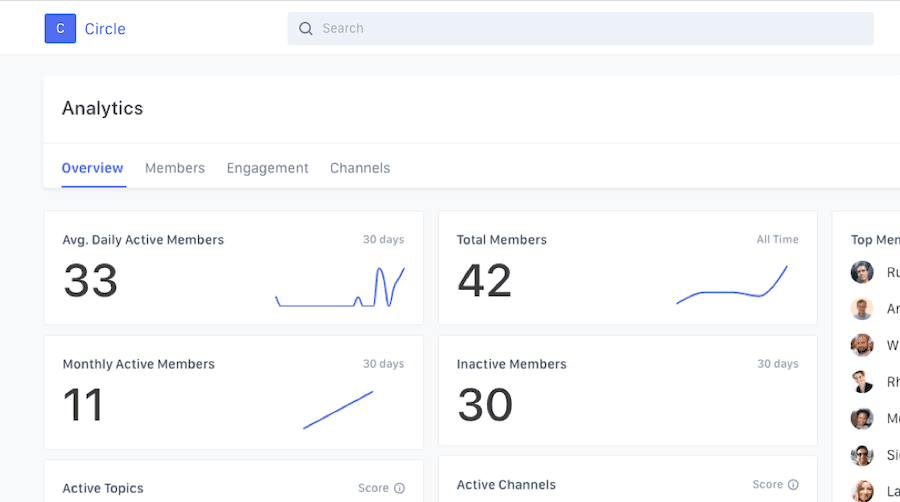
The “Member Tab” gives insights into member participation, including daily and monthly active members, top-engaging members, active commenters, post starters, and members appreciated for their contributions.
This tab gives you an idea about your members’ and community’s engagement levels.
Next, Circle shows engagement by space and space group, helping you determine which community is performing well and why. You can also see which space gets the most traction based on likes, posts, and comments.
Download options are also available for exporting data in multiple formats like CSV, XLSX, JSON, and PNG.
Exploring Third-party Integrations of Circle and Mighty Networks:
While these two platforms offer stellar community features, native integration with third-party apps can do wonders for audience engagement and optimizing your community.
Let’s find out which community platform has more to offer in this department.
Mighty Networks:
Mighty Networks enables integrations with a range of third-party tools to help you enhance the platform’s functionality.
First, it integrates with the popular automation tool Zapier to grow your business by setting up automated workflows. Zapier integration will also help you integrate with over 6000 other apps.
Aside from Zapier, it natively integrates with major business apps like ConvertKit, Zoom, Google Analytics, and Stripe.
Circle:
Circle completely blows Mighty Networks out of the water when it comes to third-party integrations. It offers native integration with thousands of apps to help you enhance your community and automate tasks.
Some of its most popular integrations include Airtable, Google Sheets, Slack, Teachable, WordPress, and Stripe, among thousands of other options.
If you still don’t find a tool you want, you can always use Circle’s integration with Zapier to automate your community workflows. It also has an API to help you create and update custom integrations in Circle.
Mighty Networks vs. Circle: Quick Pros and Cons
Here’s a quick rundown of Mighty Networks’ and Circle’s pros and cons before you finally choose your online community platform.
Mighty Networks Pros and Cons:
| Pros | Cons |
|---|---|
| ✅ All-in-one platform: Combines community, courses, events, and monetization in one place | ❌ No built-in email marketing: You’ll still need an external tool like ConvertKit or MailerLite |
| ✅ Flexible space setup: Mix multiple features (chat, feed, course, event) in one space | ❌ Learning curve: More customization means more setup time and UI complexity at first |
| ✅ Cohort-based courses: Includes drip content, quizzes, certifications, and community tabs | ❌ Advanced features locked behind higher plans: Livestreaming scale and automations need Business/Growth plans |
| ✅ Unlimited members and spaces on all plans: No scaling fees as you grow | ❌ Branded apps require Mighty Pro: Full mobile app branding starts at custom-priced tiers |
| ✅ Built-in live streaming + Zoom integration: No need for external tools for webinars or events | ❌ Limited API/integration ecosystem: Fewer developer options compared to Circle |
| ✅ Rich gamification: Badges, points, streaks, and member recognition tools | |
| ✅ Powerful community discovery features: Member matching, location search, interest tagging |
Circle Pros and Cons:
| Pros | Cons |
|---|---|
| ✅ All-in-one: Courses, community, memberships, live events, and AI-driven workflows in a single platform | ❌ Higher entry price: Starts at $89/mo, nearly double Mighty Networks’ base plan |
| ✅ Visual automation & workflows: Easily automate onboarding, nudges, badges, upsells | ❌ Course features are basic: No quizzes, certificates, or advanced grading |
| ✅ AI Agents & Community AI: 24/7 assistant bots and content tools to support members | ❌ Email add-on needed: Full email marketing requires extra cost via Email Hub |
| ✅ Branded mobile apps (Circle Plus): Done-for-you native iOS/Android apps and in-app purchases | ❌ Workspace per feature: One space = one feature type (chat, course, etc.), which may fragment experience |
| ✅ Headless API & integrations: Great for developers and tools like Zapier, ConvertKit, and analytics | ❌ Learning curve for advanced tools: Automation, AI Agents, APIs may require onboarding |
| ✅ Strong analytics & engagement tracking: Activity scores, space-level reports, detailed user data | ❌ Advanced features locked behind higher tiers: AI Agents, API, branded emails, and SSO require Enterprise or above |
Mighty Networks vs Circle: Selecting the Right Community Platform For Your Needs
If your business is built around structured learning, like courses with quizzes, drip content, certificates, and cohort-based experiences, Mighty Networks gives you more of what you need, at a lower starting price.
It also offers flexible community layouts, built-in live streaming, and enough automation (like onboarding flows and event triggers) for most education businesses. Ideal for coaches, educators, and group program creators who want a community-first but course-capable platform.
But if you’re building a coaching or membership business that depends on automations, audience segmentation, integrated email marketing, or AI-based engagement, Circle is the better fit, even though it comes at a higher starting cost.
It may not have advanced course features, but it shines when you want to systemize delivery, support, and engagement. Perfect for creators running premium memberships, paid communities, or recurring content businesses.
Pricing matters too.
- Mighty Networks starts at $41/month with unlimited members and usable course tools
- Circle starts at $89/month and scales up fast if you add email or branded apps
Both platforms offer some automation and course functionality, but lean in very different directions.
Confused? Take both Might Networks and Circle for a spin using their free trials to see which suits your business more.

Jeff Cobb, Founder of Learning Revolution
Jeff Cobb is an expert in online education and the business of adult lifelong learning. Over the past 20+ years he has built a thriving career based on that expertise – as an entrepreneur, a consultant, an author, and a speaker. Learning Revolution is a place where Jeff curates tips, insights, and resources to help you build a thriving expertise-based business. Learn more about Jeff Cobb here.
Table of Contents
Related Posts
Circle.so Review (2026) | Pricing, Features, Pros & Cons (My Experience)
Mighty Co-Host Review – Is This The Best AI-Powered Community Builder?