
TL;DR: 13 Steps To Livestream Your Events with Free and Paid Tools
Live streaming broadens global audience reach, cuts physical venue overhead, and generates multi-channel engagement—while serving as a continuous content-generation engine for search visibility and AI-driven repurposing.
1. Define clear business goals and success criteria to align your presentation format with measurable ROI.
2. Research audience pain points directly using AI tools, search trends, community forums, and surveys to craft high-value programming.
3. Build an exact chronological run-of-show with planned buffers and speaker assignments to prevent broadcast delays.
4. Select the best streaming destinations such as YouTube, LinkedIn, or TikTok while accounting for account-level access rules.
5. Multistream simultaneously across landscape and vertical feeds using studios like StreamYard or OBS to capture desktop and mobile viewers.
6. Invest in dedicated audio and stable lighting to guarantee crisp acoustics and clean visual presentation.
7. Secure a dedicated, wired Ethernet connection with at least 10–15 Mbps upload bandwidth to prevent dropped frames.
8. Route video feeds through an encoder to optimize bitrates, handle scene transitions, and manage multi-platform feeds.
9. Design lower-thirds, branded overlays, and audio levels beforehand to give the broadcast a professional studio look.
10. Run a comprehensive end-to-end rehearsal across multiple devices to catch audio clipping and stream buffering early.
11. Go live early with interactive audience prompts including live chats, polls, and clickable CTAs to drive viewer engagement.
12. Repurpose event recordings with AI clipping tools like Descript to generate short-form videos and recap articles immediately.
13. Promote the event aggressively across channels using dedicated landing pages, calendar invites, speaker networks, and countdown teasers.
Does your event even exist if it isn’t broadcast live on Facebook, YouTube, and other live-streaming platforms? With smartphone and internet penetration at an all-time high, consumers expect brands to live stream events and allow them to be in the audience irrespective of their location.
Thankfully, you don’t need a million-dollar budget or the latest cutting-edge technology to live-stream conferences, seminars, or any online or offline event. If you have a reliable internet connection and any mainstream internet browser, you can easily broadcast live events to as many platforms as you want.
How?
In this article, I’ll walk you through the process of live streaming an event and answer the most frequent questions marketers have when broadcasting content for the first time. In addition, I’ll share several free and paid live-streaming platforms you can use to get started.
Sound good? Let’s dive in.
Read: The best online course platforms with live streaming features
Why Live Stream An Event?
Live streaming an event opens up numerous opportunities to grow your audience, enhance brand awareness, generate more revenue, and build new partnerships. This is why 65% of B2B marketers say live virtual events are among their most profitable content assets.
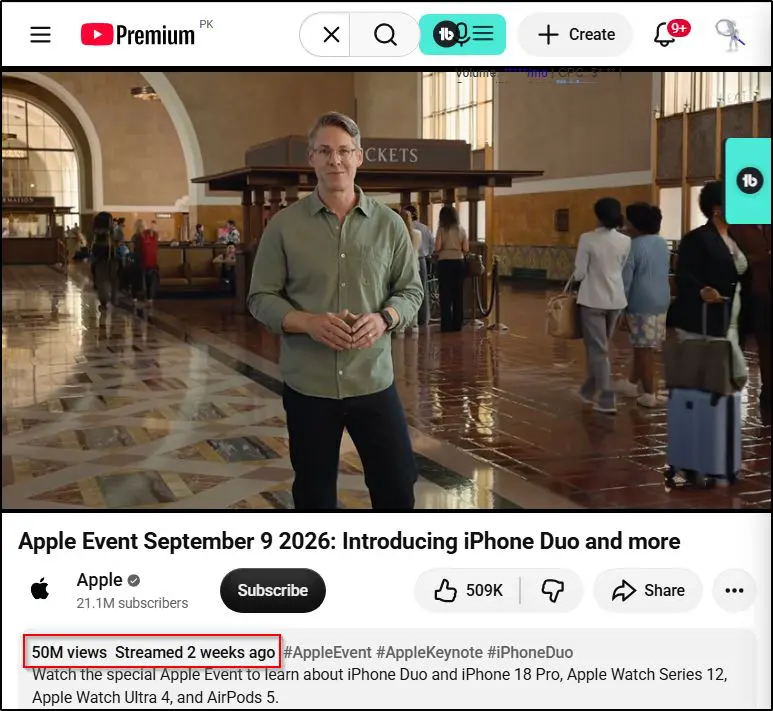
When it comes to live events, there aren’t many better examples than Apple. Its product launch events are live-streamed across multiple digital platforms, attract tens of millions of viewers worldwide, and drive massive hardware sales. Its annual keynote streams routinely rack up millions of views on YouTube alone.
Small businesses, entrepreneurs, e-learning professionals, and large organizations broadcast various types of events, including:
- Seminars
- Conferences
- Webinars
- Virtual summits
- Concerts
- Panel discussions
- Ceremonies
- Religious and cultural gatherings
- Sporting events
Let’s quickly discuss some of the ways live streaming your events can benefit your business.
Live Streaming Benefit #1: Reach A Wider Audience
Live streaming instantly turns your small local gatherings into global events that can be attended by thousands of people worldwide. You can stream your events directly to your website or multistream to YouTube, Facebook, LinkedIn, X (Twitter), and several other video platforms, reaching a potentially unlimited audience.
Live Streaming Benefit #2: Drastically Reduce Event Costs
Can you imagine the costs of hosting a physical event with 50K people in the crowd? Think about the venue, flying in speakers from different locations, security arrangements, crowd management, and everything else involved in holding such massive events.
With live streaming, you can host events with several hundred thousand viewers at a fraction of the cost of a physical event. With no physical boundaries and logistical challenges, you can focus on making your event successful instead of sweating over its arrangements.
Live Streaming Benefit #3: Increase Audience Engagement
An average US consumer spends over three hours a day using smartphones. It’s much easier to engage them with live-streamed events than in-person gatherings. Plus, the various engagement features, like comments, emojis, virtual stage, and screen sharing, make live-streamed events much more interesting for the audience.
Live Streaming Benefit #4: Enhance Brand Awareness
Live-streamed events allow you to reach a broader audience, increasing your brand awareness. The more live content you stream, the faster you become an authority because consumers see you as an active brand that creates quality content.
Live Streaming Benefit #5: Monetize Your Live Streams
Live streaming opens up several lucrative monetization opportunities. For example, globally streamed events can find a much wider range of sponsorship opportunities for different regions. You can sell multiple ticket categories offering different access levels to your event content. Many live-streaming platforms also allow you to run ads and sponsored content during broadcasts. Affiliate marketing is another attractive way to make money with live events.
Live Streaming Benefit #6: Repurpose Content For More Revenue
You can repurpose your live events into various content forms to generate more revenue and leads. For example, you can sell event recordings and on-demand replays as a digital product or repurpose different talks into blog articles, social media content, or podcasts. You may even publish exclusive e-books summarizing the event and its core findings.
Live Streaming Benefit #7: Build New Partnerships
Live events appeal to a global audience helping you attract partnership opportunities worldwide. You can collaborate with creators and influencers in different regions to offer greater value to your audience and drastically increase your event’s reach.
Live Streaming Benefit #8: Collect Valuable User Data
Every live-streaming platform collects user data and allows you to understand your audience dynamics. It helps you know your audience’s origin, needs, motivation, and engagement levels during your event. For example, you may find that your audience was most engaged during a specific speaker’s talk or when you discussed a particular topic. Using these priceless insights, you can optimize your content, offer greater value, and market your future events to the right audiences.
Check out our free tools for content creators
11 Steps To Live Streaming An Event
Live streaming an event involves several steps before, during, and after your event actually happens. Let’s discuss them in detail.
Step 1: Determine Your Event’s Goals
Why do you want to live stream an event? What do you want to achieve from it? What are the success criteria? What do you want your viewers to do after watching your live event?
These critical questions help determine your event’s direction, type, structure, and content. You must understand how live streaming benefits your business and fits your marketing strategy.
For example, an educational institute might want to broadcast its graduation ceremony live to increase its brand awareness and encourage future students to join its learning programs. In that case, its event ROI would be measured by the number of leads it generates.
For instance, Harvard University live streams its commencement class and graduation ceremonies every year, which inspires thousands of students worldwide.

Similarly, a live concert’s ROI could be calculated through sponsorships and advertising revenue.
Knowing your goals also helps determine how much you can invest in an event and the live-streaming features you’ll need to achieve a positive ROI.
So, before getting into the technical details of live streaming an event, make sure you know exactly why you’re doing it and adopt the best possible route.
Step 2: Understand Your Audience’s Needs
Once you’ve determined your event goals and success metrics, the next step is to understand your audience’s problems, needs, and questions. This will help you create problem-solving content and make your event more valuable for your audience.
So, ask yourself,
- What does my audience care about the most?
- What would compel them to attend my event?
- What tangible value does my event offer?
- What precise problems does it solve?
Ideally, your goal is to find common ground between your business goals and your audience’s needs/wants. Because unless your event offers value, your audience won’t show up.
For example, you can run a live seminar on building a dropshipping business from scratch and invite speakers to walk your viewers through each step of the process. For someone looking to start a dropshipping business, your event is a goldmine of practical information and gives them a solid reason to attend.
You can use the following sources to get more audience insights and give viewers a solid reason to attend your event.
Keyword Research: Use Ahrefs, SEMRush, Ubersuggest, or any other keyword research tools to find the keywords people search for in your niche.

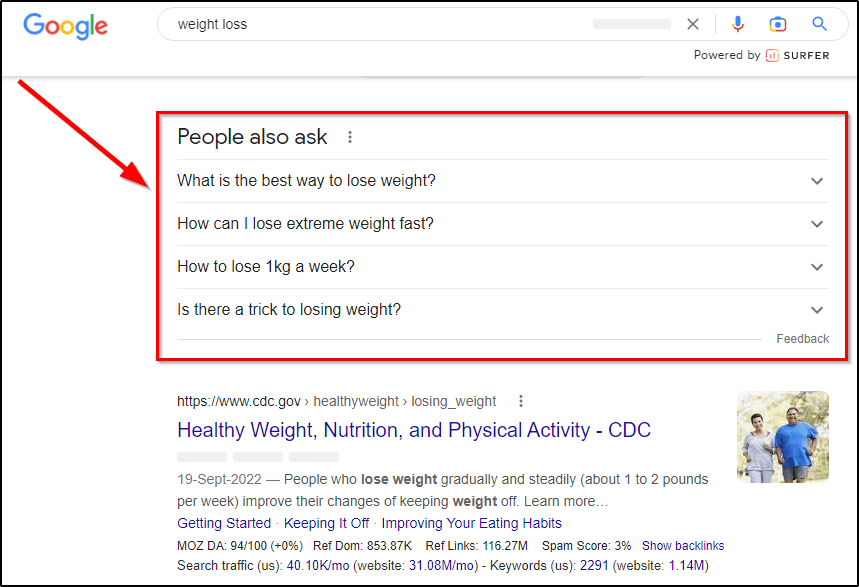
People Also Ask: Search for your topic and scroll down to the People Also Ask section in Google Search results which lists the most common questions of your audience.
Surveys: If you have an email list or a social media following, run surveys to ask people their most burning questions.

Discussion Forums: Explore discussion threads on Quora, Facebook Groups, LinkedIn, and niche-specific forums to understand your audience’s real needs.
Step 3: Plan And Outline Your Event’s Program
When you’re hosting a live event, the margin for error is minimal. So, you must plan extensively and make sure everything is precisely how you want.
Start with your event’s format. Based on your goals and audience preferences, it can be a webinar, seminar, conference, virtual summit, concert, ceremony, or any other type that serves your goals. The technical requirements for hosting indoor and outdoor events are drastically different. So, make sure you consider them before deciding.
Next, create a detailed program outline that chronologically lists everything that will happen during your event. Be as detailed as possible to avoid confusion and inaccuracies. For example, list the activity (a talk or a presentation), its start and end times (plus a small buffer), format, and the responsible person (you or a guest), like this sample outline.

Finally, choose a suitable date and time for your event to ensure success. Dive deep into your analytics to find where most of your audience comes from and plan your event with their time zone in mind.
Step 4: Choose Your Live Streaming Platform
Keeping those conditions in mind, here are the most common destination platforms:
- YouTube Live (ideal for long-tail search discovery and high-resolution video) – read our full guide on YouTube live streaming.
- LinkedIn Live (best for B2B audiences, though you need an approved Creator profile or Page) – read our guide on LinkedIn Live streaming.
- Facebook Live (great for community groups and established business pages)
- X (requires an active X Premium subscription to broadcast or connect an RTMP stream)
- TikTok Live (powerful organic reach, but accounts typically require at least 1,000 followers or approved access to unlock live broadcasting) – read our TikTok streaming guide.
- Twitch (popular for tech, creative workflows, and community-driven Q&As)
You can directly broadcast live content from any platform by creating an account, channel, or page. However, if you want to broadcast to multiple platforms simultaneously, you’ll need a reliable multi-streaming studio.
Popular multi-streaming platforms include:
- OBS Studio (free, open-source software encoder)
- StreamYard (browser-based, beginner-friendly, and handles multistreaming effortlessly)
- Restream (robust cloud-based distribution to dozens of channels at once)
- Castr and OneStream (excellent for scheduled pre-recorded streams and multi-platform RTMP delivery)
Many of these platforms also support dual-format streaming—allowing you to simultaneously broadcast a horizontal feed (16:9) to YouTube or LinkedIn and a vertical feed (9:16) to TikTok or YouTube Shorts to maximize mobile discovery.
Step 5: Choose Your Live Streaming Equipment
The quality of your event’s broadcast largely depends on your live-stream equipment. The more you invest, the better results you can get.
But your live streaming equipment may vary depending on your event type, budget, desired production quality, and broadcasting platforms. Still, here’s a list of equipment to get you started.
Camera: If you have an iPhone or any other smartphone with a decent camera, you can easily live stream events with clear and crisp video quality on the go. However, smartphone cameras lack the detail of professional camcorders, DSLRs, or EFT cameras. So, to stream 4K or 1080p videos with high picture detail, invest in professional cameras with advanced options. You’ll also need multiple professional cameras to cover your event from different angles.
Microphone: Your stream’s audio quality is often more important than the video. Because viewers can settle for an average picture quality with clear audio. But it’s almost impossible to retain viewers for inaudible videos.
So, even if you’re using a smartphone for your live stream, don’t rely on its microphone. Instead, use a quality Bluetooth or wired mic. However, if you’re in an outdoor setting with high surrounding noise, you must invest in professional XLR mics with noise-reduction features to ensure clear audio quality.
Lighting: Your event space must be well-lit and clearly visible in your video to keep your viewers engaged. This is why professional lighting equipment is critical for your video quality. If you’re in an outdoor setting with natural light, ensure your cameras properly focus on the subject. You might still need panels or flood lights to ensure consistency in lighting. But when shooting indoors, use LED panels, ring lights, or key lights to illuminate the surroundings.
Internet connection (Upload Speed & Wired Connection): Novice streamers often check their download speed and assume their connection is ready. For live streaming, upload speed is what counts. You need a steady, unthrottled upload speed of at least 10–15 Mbps for a stable 1080p stream (and 25+ Mbps for 4K). Whenever possible, plug directly into your router with a wired Ethernet cable because even fast Wi-Fi connections can drop packets and cause sudden stream stuttering or buffering.
Tripod stand: Whether you’re using a professional camera or a smartphone for video streaming, you’ll need a tripod stand or a stabilizer to keep your camera steady and ensure your viewers get a clear view of the event.
Step 6: Connect Your Encoder
A video encoder is a critical part of live streaming because it converts your raw footage into a digital video file compatible with various streaming platforms.
It allows you to control your video bit rate, reduce buffering, modify audio and video quality, and convert your video into different live-stream formats. Encoders also enable you to add effects, camera transitions, and information cards to make your live streams look more professional.
You’ll need an encoder to process your video content if:
- You’re using any device other than your webcam or smartphone to stream content.
- You want to live stream to multiple platforms simultaneously.
Depending on your production budget and desired quality, you may use hardware or software encoders for your live stream.
Hardware encoders are dedicated devices that encode your video into streamable content. They’re pretty expensive but provide the highest quality results and are ideal for professional streaming as they can handle hi-resolution content and large data volume. Some hardware encoders can also stream your content directly without a computer.
On the other hand, software encoders are more affordable, offer numerous features and integrations, and provide reasonable results for most event types. They are software products installed on a computer or accessible from a browser. But they cannot work independently like hardware encoders.
The multi-platform lives streaming tools we discussed earlier (OBS, Wirecast, etc.) are examples of software encoders. They’re ideal for beginners and non-savvy streamers as they automatically manage your stream quality and bit rate.
However, they’re not as reliable as hardware encoders when it comes to performance and handling large data volumes.
Step 7: Set Up Your Staging, Graphics, and Audio Feeds
Before testing your transmission, build your visual layout and audio pipeline inside your streaming software. A raw webcam feed works, but custom branding makes your event look like a polished broadcast.
- Add Overlays and Lower-Thirds: Set up graphic banners displaying speaker names, titles, event branding, and calls to action (like your website URL or registration link).
- Configure Scenes: If your event includes slides, prepare different layouts (e.g., full-screen speaker, side-by-side speaker and presentation deck, and a branded “Starting Soon” waiting screen).
- Run an Audio Soundcheck: Audio issues will ruin a stream faster than low video quality. Set your audio levels so voices sit consistently in the green-to-yellow range (-12 dB to -6 dB) on your audio mixer, avoiding redline clipping and distortion.
Step 8: Test Your Live Stream
You’re now ready to live stream your event. But to ensure everything is in order, run a test transmission before the event. Ask multiple users from your team to view the event on different devices to get comprehensive feedback.
Focus on the following aspects of your stream during the test run.
- Video quality
- Lighting and on-screen object visibility
- Audio quality
- Effects and transitions
- Smooth camera switching.
- Stream connectivity and buffer time
- Result across devices
Address any improvement areas to ensure your stream is set to go live.
Step 9: Go Live
Your big day has finally arrived because it’s time to go live.
Ideally, go online before your scheduled time to ensure everything is in order. Also, have multiple team members attend the event to experience it from a user’s perspective.
Depending on your live-streaming software, engage your audience with live chat, Q&A, emojis, audio/visual effects, stage appearances, and other features.
Use CTAs in the form of clickable links and buttons during the event to drive action, generate leads, and increase sales.
Step 10: Save Your Event Recording
Most live-streaming tools automatically save a high-definition recording as soon as the broadcast ends. Rather than letting that footage sit on a hard drive, leverage modern AI tools to quickly repurpose the recording into an entire content campaign:
- Generate Short-Form Viral Clips: Use AI clipping tools like Descript to automatically analyze your recording, identify high-engagement moments, add dynamic captions, and export them as 9:16 vertical clips for TikTok, YouTube Shorts, and Instagram Reels.
- Publish Summaries and Show Notes: Run the audio transcript through AI models to extract key takeaways, generate a structured recap blog post, or draft newsletter summaries for attendees.
- Offer On-Demand Access: Gate the full replay behind an email sign-up form on your landing page to continue capturing leads long after the event has concluded.
- Package as a Digital Course or Asset: If the event delivered intensive training, split the footage into modular chapters and host it as a mini-course or premium workshop resource.
How To Promote Your Live Event
Your live stream’s success largely depends on your marketing and promotional strategies to attract viewers. Because the more viewership and hype your event gets, the better sponsors you’ll attract.
Here are some quick tips to promote your live event.
1. Create A Dedicated Event Landing Page
Start your promotional activities by getting a dedicated domain and landing page for your event. This page will be the center of all your marketing activities, provide information about the event, create hype, and attract sign-ups for event announcements.
The website and landing pages of Content Marketing World, a leading annual marketing conference, are great examples.

2. Create Social Media Events And Premieres
If you’re broadcasting your event on multiple platforms, create its Facebook event page, YouTube premiere, and Google Calendar link that users can easily add to their schedule for reminders.
3. Use A Dedicated Social Media Hashtag
Create a dedicated event hashtag to use across your social media profiles and in all your promotional content. This allows people to easily track your event and stay in the loop.

4. Share Promotional Messages To Create Excitement
Create short videos for TikTok, YouTube Shorts, Facebook, X (Twitter), and any other relevant platforms creating hype for your event, sharing its program, speaker list, and anything else your audience values.
5. Share Event Preparation Videos
A few days before the event, post event preparation videos and show your viewers how you’re putting effort into your event. This creates anticipation and acts as a reminder for people to attend your event.
6. Ask Your Speakers To Spread The Word
If you have multiple speakers at your event, ask them to share short video messages on their social media profiles promoting the event, using your event hashtag, and asking their followers to attend.
7. Offer Incentives To Increase Sign Ups
You can announce a live giveaway, an opportunity to get on stage, engage directly with the speakers, or any other incentive to encourage live viewership.
Are You Ready To Live Stream Your Event?
Live streaming an event isn’t as complicated as it used to be, thanks to high-quality smartphone cameras, internet connectivity, and feature-rich live streaming tools.
The challenge, however, is choosing the most suitable live-streaming platform to broadcast your events professionally on multiple websites. To make your choice easier, we’ve written a comprehensive guide to live-streaming platforms giving you an in-depth look at the core features, benefits, and pricing of the best available tools.
As you’ve seen in this guide, once you choose the right platform, live streaming your event is pretty straightforward.
Let me know if you have any questions in the comments section.

ABOUT YOUR HOST
Learning Revolution founder Jeff Cobb is an expert in online education and the business of adult lifelong learning. Over the past 20+ years he has built a thriving career based on that expertise – as an entrepreneur, a consultant, an author, and a speaker. Learning Revolution is a place where Jeff curates tips, insights, and resources to help you build a thriving expertise-based business.
Table of Contents
Related Posts
10 Steps to High-Converting Meta Ads (Facebook & Insta)
9 Step Facebook Marketing Strategy For Coaches & Course Sellers
Circle AI Review | Is It Actually Useful for Community Owners?