

TL;DR: Skool vs Kajabi: How Do These Platforms Compare (2026)
Skool is a community-first platform built around a central activity feed, simple course hosting, and internal discovery. Kajabi is an all-in-one digital business platform with course hosting, website builder, email marketing, funnels, and automation.
Starting price:
Skool starts at $9/month (+10% revenue share) or $99/month (2.9% fee).
Kajabi starts at ~$149/month with no revenue share.
The main differences between Skool and Kajabi:
Skool is optimized for engagement and offering the community as the product, with courses to support monetization. Kajabi is a much bigger creator platform optimized for courses, community, marketing, automation, and running your entire online business. Skool offers built-in discovery but minimal marketing tools. Kajabi offers full email, funnels, and automation but no discovery.
Best for:
Choose Skool if you’re a beginner and the community is your main product along with courses.
Choose Kajabi if you have a bigger budget and want to run your complete online education business from one platform.
Note: This page contains affiliate links. If you purchase through links on this page, we may earn a commission at no additional cost to you.
I’ve been a paying Kajabi customer since 2017. I’ve built courses on it, helped clients run their entire knowledge businesses on it, and watched it evolve from a straightforward course platform into a full creator business system. I know what it does well and where it frustrates people.
I’ve also worked with Skool since 2021, both as a member inside other people’s communities and as a consultant helping clients launch and grow their own Skool communities.
So when people ask me whether they should use Skool or Kajabi, my answer is almost never about features. It’s about where they are in their business.
Skool and Kajabi are not really competing for the same creator. Skool is built for coaches, solopreneurs, and creators who want community to be the actual product.
Kajabi is built for creators who have already established an audience and want to run a complete business from one place (courses, email marketing, funnels, coaching programs, automations, and community all under one roof).
The mistake I see most often is someone starting out and investing in Kajabi because it looks professional and complete. They spend the first few months learning the platform instead of building their audience. Kajabi rewards people who already have something to market. If you don’t have an email list or an existing audience to bring over, Kajabi’s most powerful features sit unused while you pay $149 a month for the privilege.
The opposite mistake is just as common. A creator builds a thriving Skool community, starts generating real revenue, and then realizes Skool gives them no way to run a proper email campaign, segment their audience, or sell a second product to existing members without stitching together a stack of external tools.
Choosing between Skool and Kajabi is a business stage decision. This comparison will help you figure out which stage you’re at and which platform fits where you’re going.
Looking for the best platforms to sell online courses? Here are my top picks
The Main Differences Between Skool and Kajabi
Let me start this article by clearly showing the main differences between Skool and Kajabi. This will help you understand what they’re designed for.
| Category | Skool | Kajabi |
| Platform Overview | A community-first platform that combines a discussion feed, simple course hosting (“Classroom”), calendar, and Stripe payments inside one interface. The community feed is the center of everything. | An all-in-one business platform that includes a website builder, landing pages, email marketing, sales funnels (“Pipelines”), course hosting, automations, checkout pages, and a community feature. |
| Best For | Coaches, creators, and solopreneurs who want to sell access to a community and keep members engaged daily. | Course creators, educators, and businesses that want one platform to run their website, email list, sales funnels, products, and community. |
| Primary Growth Model | Internal discovery. People can browse Skool communities, search topics, and find your group inside the platform. | No built-in discovery. You must drive traffic from YouTube, SEO, ads, social media, or your email list. |
| Platform Behavior | Feels like a focused social platform. Members log in and see one main activity feed. | Feels like a private business portal. Members log into your branded site and access specific products or areas. |
| Default Engagement Style | Single central feed + points + levels + public leaderboard. Encourages daily posting and quick interaction. | Structured community areas. No competitive leaderboard system driving behavior by default. Engagement depends on your content and email reminders. |
| Community Architecture | One main feed with optional categories. If you want separate programs, you usually create separate communities. | Community channels + access groups. You can create different areas for different products and gate them by purchase or membership tier. |
| Course Experience | Simple modules and lessons inside the “Classroom” tab. Basic progress tracking. No advanced quizzes, certificates, or course analytics. | Full course builder with modules, lessons, drip scheduling, assessments, downloads, product bundles, and better control over how content is structured. |
| Marketing Stack | No built-in email marketing. No funnel builder. No landing page builder. You need external tools for those. | Built-in email broadcasts, automated sequences, landing pages, opt-in forms, sales pages, checkout pages, and pipeline builder. |
| Automation | Very limited native automation. Mostly manual management unless you connect third-party tools. | Behavior-based automations. You can tag users, trigger emails after purchases, unlock content, and build automated onboarding flows. |
| Website & Branding | Limited customization. Most communities look visually similar and run on a Skool subdomain. | Full website builder with custom domains, themes, branding control, and design flexibility. |
| Monetization & Offers | Recurring memberships connected to Stripe. Simple pricing setup. Limited offer types. | Subscriptions, one-time payments, payment plans, bundles, upsells, order bumps, multiple products under one account. |
| Analytics & Reporting | Basic revenue tracking and engagement stats. | Revenue reports, product performance, email analytics, funnel conversion tracking. |
Skool vs Kajabi: An Overview of These E-Learning Platforms
Skool and Kajabi are both online course platforms with built-in community features. But they are built for different types of creators.
Skool is primarily a community platform with course hosting built in. Its core focus is engagement, discussion, and member interaction.
Kajabi is an all-in-one course platform and marketing system. It combines website building, email marketing, sales funnels, automation, and product delivery in one platform.
Let me describe both the platforms in more detail based on my experience.
What Is Skool?
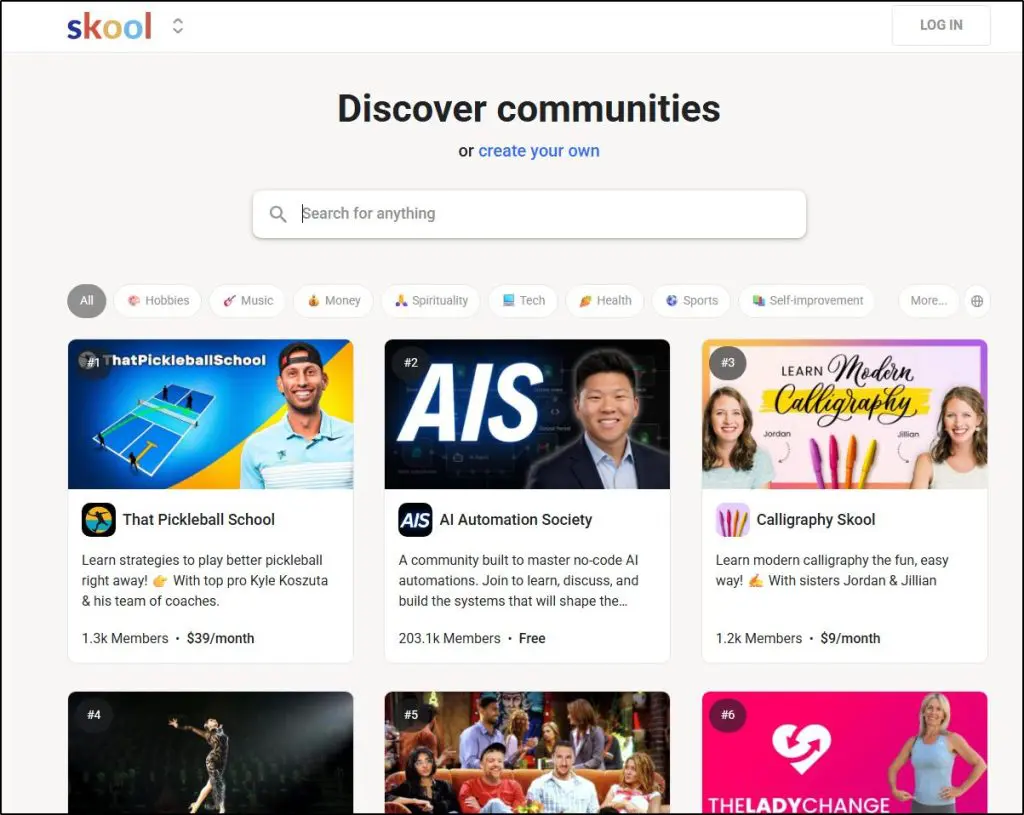
Skool is an online community and course platform founded by Sam Ovens. It combines a discussion feed, course hosting (“Classroom”), event calendar, and Stripe payments inside a single interface.
I’ve been using it since 2021 both as a member of other communities and as a consultant for my clients who’ve built Skool communities and sold courses on the platform.
Skool is structured around three main tabs: Community, Classroom, and Calendar.
The Community tab is a centralized feed where members post and comment. The Classroom hosts structured lessons and modules. The Calendar manages live calls and recurring sessions.
Skool attracts coaches, accountability groups, online educators, and creator-led communities where engagement matters as much as content.
It gets millions of monthly visitors who can search through its public directory of online communities and discover communities based on their interests.
However, it lacks any notable marketing features and doesn’t give you much control over your community’s appearance.
The Main Skool Features
- Centralized community feed (all discussions in one place)
- Classroom tab for structured lessons and progress tracking
- Built-in event calendar for live sessions
- Gamification system with points, levels, and public leaderboards
- Internal discovery system where users can browse and find communities
| Skool Strengths | Skool Weaknesses |
| Members immediately land in one active feed — low navigation friction | Limited brand customization (most communities look similar) |
| Points and leaderboard system create habit loops | Difficult to segment multiple programs inside one workspace |
| Fast setup with minimal configuration required | Course tools are basic compared to full LMS platforms |
| Strong mobile usability for daily check-ins | No built-in email marketing or funnel builder |
| Stripe integration is simple and native | Limited automation and behavioral workflows |

Read my detailed Skool review for a deeper analysis
What Is Kajabi?

Kajabi is an all-in-one digital product platform founded in 2010. It combines course hosting, website building, email marketing, checkout pages, automation rules, and sales funnels inside one system.
I’ve maintained a paid Kajabi subscription since 2017 and I genuinely consider it the best all-in-one platform for serious creators who have the resources and audience to fully utilize Kajabi’s features.
However, it’s often an overkill for beginners.
Unlike Skool, where the community feed is the core interface, Kajabi is structured around Websites, Products (courses, coaching, memberships etc.), Pipelines, Email Campaigns, and Automations.
Communities are just another feature in Kajabi
When your customers log into Kajabi, they don’t land in a social feed. They see a business dashboard that lists their courses and products.
You create:
- Online courses
- Coaching programs
- Membership sites
- Digital downloads
- Landing pages
- Email sequences
- Sales funnels
All under one branded domain.
In my experience, Kajabi attracts course creators, subject matter experts, and knowledge businesses that want control over branding, customer data, lifecycle marketing, and monetization structure.
It is optimized for running a digital business, not just running a community.
The Main Kajabi Features
- Full course builder with modules, lessons, drip scheduling, and assessments
- Built-in website and landing page builder with custom domains
- Native email marketing with broadcasts and automated sequences
- Sales funnel builder (“Pipelines”) with opt-in pages and checkout flows
- Behavior-based automations and tagging system
- Community areas with access control and segmentation
- Stripe and PayPal payment integrations
| Kajabi Strengths | Kajabi Weaknesses |
| Complete marketing system built in (email, funnels, pages) | Higher monthly cost than Skool |
| Strong branding control with custom domains | Steeper learning curve for beginners |
| Advanced automation rules tied to user behavior | Community engagement feels secondary to courses and funnels |
| Flexible monetization models (subscriptions, bundles, payment plans) | No internal discovery or built-in traffic source |
| Detailed business analytics and revenue tracking | Can feel complex if you only need a simple community |

Read my Kajabi review for a deeper analysis
Skool vs Kajabi Pricing Comparison: Which Platform Offers Better Value
The difference between Skool and Kajabi becomes very clear when you compare their pricing models.
Skool uses a low monthly fee + revenue share model.
Kajabi uses a higher fixed monthly subscription with no revenue share.
Here’s how that plays out.
| Pricing Aspect | Skool | Kajabi |
| Entry Price | $9/mo | ~$149/mo (Basic plan) |
| Revenue Share | 10% on Hobby plan | None |
| Reduced Fee Option | Pro $99/mo with 2.9% fee | No revenue share on any plan |
| Includes Unlimited Members | Yes | Yes (plan limits apply to contacts/products) |
| Built-In Email Marketing | No | Yes (native email campaigns & sequences) |
| Funnel Builder | No | Yes (Pipelines feature) |
| Website Builder | No | Yes (full site + landing pages) |
| Automation | Minimal | Full behavior-based automations |
| Best For Low-Cost Launch | ✅ | ❌ |
Read: The best Skool alternatives for community + courses
Skool Pricing
Skool keeps pricing simple.
Hobby — $9/month: You get access to the full platform: unlimited members, courses, calendar, and community features. However, Skool takes a 10% transaction fee on paid memberships.
Pro — $99/month: Same features. The transaction fee drops to 2.9%.
There are no feature restrictions between Hobby and Pro. The only difference is how much revenue you give up.
- At $9/month, Skool is one of the cheapest ways to launch a paid community.
- The 10% fee becomes expensive quickly once revenue grows.
- If you generate consistent recurring income, upgrading to Pro is almost mandatory.
- You will likely need external tools for email marketing and landing pages.
Skool pricing favors creators who want to start fast with minimal upfront cost.
Kajabi Pricing
Kajabi uses a flat monthly pricing model. No revenue share.
- Basic — ~$149/month: Includes website builder, email marketing, automation, checkout pages, pipelines, and course hosting.
- Growth — ~$199/month: Adds advanced automation, removal of Kajabi branding, and more admin capabilities.
- Pro — ~$399/month: Designed for larger businesses with higher contact limits and multiple sites.
Kajabi does not take a percentage of your revenue. You only pay Stripe or PayPal processing fees.
- Kajabi has a much higher upfront monthly cost.
- You do not give up a percentage of your revenue.
- You do not need external tools for email marketing, funnels, or landing pages.
- It replaces multiple software subscriptions if you use its full stack.
Kajabi pricing favors creators who already have revenue or want a full business infrastructure.
Looking for the best platforms to build an online community? Here are my top picks
How Much Will You Earn From Your Membership: Skool vs Kajabi
Let’s assume you charge $49/month for your community and grow to 200 paying members
That’s: 200 × $49 = $9,800/month revenue
Now let’s compare what you actually keep using each platform.
1. Skool (Hobby Plan — $9/mo + 10%)
Platform fee: 10% of $9,800 = $980
Monthly plan fee: $9
Total platform cost: $989
Revenue you keep (before Stripe fees): $8,811
2. Skool (Pro Plan — $99/mo + 2.9%)
Platform fee: 2.9% of $9,800 = $284.20
Monthly plan fee: $99
Total platform cost: $383.20
Revenue you keep (before Stripe fees): $9,416.80
3. Kajabi (Basic Plan — ~$149/mo, No Revenue Share)
Monthly plan fee: ~$149
Platform revenue share: None
Total platform cost: ~$149
Revenue you keep (before Stripe fees): ~$9,651
Kajabi or Skool: Which Platform Lets You Keep More Revenue
At $49/month × 200 members = $9,800/month revenue
| Plan | Monthly Plan Fee | Platform % Fee | Total Platform Cost | You Keep (Before Stripe Fees) |
| Skool – Hobby | $9 | 10% ($980) | $989 | $8,811 |
| Skool – Pro | $99 | 2.9% ($284.20) | $383.20 | $9,416.80 |
| Kajabi – Basic | ~$149 | None | ~$149 | ~$9,651 |
- Skool Hobby becomes very expensive once revenue grows.
- Skool Pro is significantly better and competitive.
- Kajabi keeps the most revenue at this scale because it does not take a percentage.
- However, Kajabi requires a much higher upfront commitment.
The larger your recurring revenue becomes, the more attractive fixed pricing models look compared to revenue-share models.
Comparing The True Cost of Skool and Kajabi: What Features Will You Actually Need?
Pricing tables only tell part of the story.
But the costs and value for money are quite different when actually start using a platform.
The main question you should ask: What tools will you realistically need to run your business?
Because many beginners don’t need everything Kajabi offers. And many Skool users eventually need tools that Skool does not include.
Let me share a few scenarios.
Scenario 1: Beginner With No Audience, Simple Paid Community
You want:
- A private community
- Basic course lessons
- Stripe payments
- Weekly live calls
- No complex email funnels
With Skool
You can realistically operate on:
- Skool Hobby ($9/mo + 10%)
- Stripe (processing fees only)
You do not need:
- A funnel builder
- Advanced automation
- Email marketing software
Your true cost can remain extremely low at the start and Skool is financially efficient at this stage.
With Kajabi
Even if you only use:
- Community
- One course
- Basic checkout
You still pay ~$149/month minimum.
You are paying for:
- Email marketing
- Funnels
- Website builder
- Automation
- Pipeline builder
Even if you do not use them.
For a beginner who just wants to run a community, Kajabi is expensive and underutilized.
Scenario 2: Growing Creator With Email List and Funnel Strategy
Now you want:
- Landing pages
- Email broadcasts
- Automated onboarding sequences
- Upsells and bundles
- Lead magnets
- Segmented email marketing
With Skool
You will likely need:
- Email marketing tool (ConvertKit, ActiveCampaign, etc.) → $29–$99+/mo
- Landing page builder (if separate) → possibly extra
- Automation tool (Zapier, Make, etc.) → additional cost
Suddenly, your stack might look like:
- Skool Pro: $99/mo
- Email software: ~$49/mo
- Automation: ~$20/mo
Now your real monthly cost is closer to $170+. And you still do not have the same integrated automation depth as Kajabi.
With Kajabi
At ~$149–$199/month:
You get:
- Email campaigns
- Automated sequences
- Landing pages
- Funnels
- Checkout flows
- Behavioral automations
You may not need any additional tools.
In this scenario, Kajabi becomes cost-efficient because it replaces multiple subscriptions.
Experience Cost: Community Feel vs Business Infrastructure
Pricing tables only tell you what you pay. They don’t tell you what you get for that payment in terms of daily experience, for you and for your members.
Skool is built around visible activity. Members land in a feed, see what others are doing, earn points, climb a leaderboard, and get pulled back into the platform through that cycle. That engagement loop happens largely on its own once your community has some momentum. You don’t have to engineer it.
Kajabi’s community works differently. Members log in to access courses and products. The community exists inside that experience but doesn’t drive it. If you want engagement, you build it through email reminders, structured prompts, and program design. Kajabi gives you the tools to do that, but the work falls on you rather than the platform.
Neither approach is wrong. They reflect what each platform is actually optimized for. Skool is a community engine. Kajabi is a business operating system. The question is which one your business needs right now.
Comparing the Main Features of Skool and Kajabi
By this point you probably have a clear sense of what each platform is built for. But let’s get specific, because the feature differences between Skool and Kajabi are where most people get tripped up when making their decision.
Feature #1: Online Community
This is where Skool and Kajabi diverge most sharply, and it comes down to one thing: what does a member see when they first log in?
On Skool, they land directly in the community feed. The posts, questions, wins, comments are all right there, immediately visible.
There’s no navigation decision to make. Members just start scrolling and participating. That design choice is deliberate and it works. Skool adds points, levels, and a public leaderboard on top of that feed, which creates a habit loop that keeps people coming back daily.

Communities on Skool feel alive quickly, even with a relatively small member count, because the platform is engineered to surface activity and reward participation.
On Kajabi, members log into a dashboard that shows their courses and products. The community is a tab they have to navigate to.
If your goal is daily community engagement, that extra click matters more than you’d think. I’ve seen Kajabi community spaces go quiet not because the content was bad, but because members simply forgot to check in.
Kajabi has no leaderboard system driving that behavior. Engagement depends on how well you structure your email reminders and program prompts, which means the work falls on you rather than the platform.
If community engagement is your primary metric for success, Skool handles it more naturally than Kajabi does.
Feature #2: Courses
Skool’s course area, called the Classroom, sits alongside the community feed as a supporting tab. You build modules and lessons, upload videos, drip content on a schedule, and track basic completion.
For most coaches and creators selling access to a curriculum alongside a community, that’s enough.

What Skool doesn’t give you is quizzes, certificates, detailed student analytics, or any kind of assessment structure. If you need those things, Skool will frustrate you.
Kajabi’s course builder is considerably more structured. You get categories, subcategories, drip scheduling, downloadable resources, assessments, and the ability to bundle courses into offers. You can monitor individual student progress in ways Skool simply doesn’t support.

Kajabi also lets you attach courses to funnels, payment plans, and automation sequences, so a student who completes a course can automatically receive an upsell email or get tagged for a different product offer.
I’d recommend Skool’s course tools to anyone running a community-led program where discussion and peer interaction carry most of the learning value. I’d point someone toward Kajabi’s course builder when they need structured delivery, completion tracking, or when courses are the primary product rather than a supporting element.
Feature #3: Marketing and Audience Growth
This is the sharpest difference between Skool and Kajabi, and it’s the one most people underestimate before they commit to a platform.
Skool has no email marketing, no landing page builder, and no funnel system. What it does have is a built-in discovery engine. Skool runs a public directory of communities that gets millions of monthly visitors. People browse it by topic, find communities that match their interests, and join.
If your community is active and well-positioned, Skool’s discovery engine can bring you members organically without any marketing spend. I’ve seen clients build meaningful paid communities on Skool without an email list simply because they showed up consistently and Skool’s algorithm surfaced them to the right people.
Kajabi works in the opposite direction. There is no discovery engine, no internal directory, no way for someone to stumble onto your program inside the platform. You own the traffic problem entirely.
What Kajabi gives you in return is a complete marketing system: email broadcasts, automated sequences, landing pages, opt-in forms, checkout pages, and its Pipeline builder for pre-built funnel flows. Once you have an audience, Kajabi gives you everything you need to convert and retain them inside one system.

The practical implication is this: if you’re starting from scratch with no audience, Skool gives you a path to early growth that Kajabi simply doesn’t offer. If you already have an email list or a social following, Kajabi’s marketing stack will serve you far better than Skool’s minimal tools ever could.
Feature #4: Payments and Offers
Skool’s payment setup is straightforward. You connect Stripe, set a recurring membership price, and Skool handles the rest. There’s not much flexibility beyond that. You can’t easily offer one-time purchases, payment plans, or product bundles inside Skool without working around its limitations. For a single-offer community business, that simplicity is actually a feature. For anyone running multiple products at different price points, it becomes a ceiling fast.
Kajabi gives you considerably more control over how you structure and sell offers. Subscriptions, one-time payments, payment plans, product bundles, upsells, and order bumps are all available natively. You can connect payment events to automations, so a purchase triggers an onboarding email sequence, unlocks specific content, or tags the member for a follow-up offer. That kind of connected monetization is where Kajabi earns its price tag for established businesses running a real value ladder.
Feature #5: Automation and Integrations
On Skool, automation is minimal. You manage most things manually or you connect external tools through Zapier or webhooks. There are no native behavior-triggered workflows inside the platform.
A new member joins and you handle their onboarding yourself, or you build a Zapier automation that connects Skool to your email tool. It works, but it adds cost and complexity that Kajabi users don’t face.
Kajabi’s automation system is one of its strongest features and one of the most underused by beginners who aren’t ready for it. You can tag members based on actions, trigger email sequences after purchases, unlock content automatically, and build multi-step onboarding flows without touching a third-party tool.
For a creator running several products and managing hundreds or thousands of customers, that native automation layer saves significant time. For someone just starting out, it adds a learning curve that slows them down before they’ve built any momentum.
Feature #6: Coaching Programs
Skool handles group coaching reasonably well. You post prompts in the feed, schedule recurring calls in the Calendar tab, share resources in the Classroom, and the community discussion naturally supports the coaching experience. What Skool doesn’t have is any structured coaching infrastructure.
There’s no client intake system, no private 1:1 dashboard, and no way to automate follow-ups or track individual client progress inside the platform. Group accountability coaching fits Skool well. Structured 1:1 coaching programs run better elsewhere.
Kajabi lets you package coaching as a proper product. You can sell 1:1 or group coaching offers, gate access by purchase, attach onboarding email sequences that trigger automatically, and build a structured program that combines community access, course content, and scheduled sessions under one offer.
For coaches who want their program to feel professional and organized from the moment a client buys, Kajabi gives you that infrastructure. I’ve helped clients build coaching programs on Kajabi that run almost entirely on autopilot up to the point of the live session itself.
Feature #7: Live Events and Sessions
Both Skool and Kajabi handle live events the same way at the core level: you schedule the event inside the platform and paste in a Zoom link. Neither platform hosts native live video. When the session starts, members click through to Zoom in a separate window.
Where they differ is in what surrounds the event. Skool keeps it simple. You create the event in the Calendar, members see it inside the community interface and receive a notification, and they show up. It works cleanly and requires minimal setup.
Kajabi wraps more infrastructure around events. You can collect registrations, trigger automated reminder emails at custom intervals before the session, and connect the event to offers or funnels. For a free community call, Skool’s approach is perfectly sufficient. For a paid workshop or a launch event where follow-up sequences and registration data matter, Kajabi gives you meaningful advantages that Skool simply doesn’t have.
Kajabi vs Skool: My Verdict On the Right Platform for You
I don’t recommend Kajabi to beginners who don’t yet have an audience, who are working with a limited budget, or who simply need a straightforward way to run a community and sell a course.
Kajabi is a powerful platform, and I’m a premium user myself.
But its power only helps if you’re ready to use it. Otherwise, you’re paying for features you won’t fully leverage.
For most beginners, Skool is the safer and more practical starting point. It’s easier to manage, more engaging out of the box, and lets you focus on building real community momentum.
You can grow your brand, validate your course idea, and generate revenue without getting buried in funnels and automation.
Once you’re ready to build a larger value ladder, offer coaching, layered memberships, digital products, and use proper email marketing, that’s when Kajabi makes sense.
Before that stage, it’s often overkill, even for many mid-tier edupreneurs.
Detailed Skool Comparisons With Other Platforms
Check out my detailed Skool comparisons with other course and community platforms
Frequently Asked Questions (FAQs)
Is Skool better than Kajabi?
Skool is better if you want a community-first platform with built-in discovery and daily engagement. Kajabi is better if you need email marketing, sales funnels, automation, and full business infrastructure in one system.
Is Kajabi worth it for beginners?
Kajabi is powerful, but most beginners don’t need its full marketing stack. If you don’t yet have traffic or an email list, you may underuse features like Pipelines and automation.
Does Skool replace Kajabi?
No. Skool replaces the community portion of Kajabi but does not include email marketing, landing pages, funnel builders, or lifecycle automation. It focuses on engagement, not marketing infrastructure.
Does Kajabi have built-in community features?
Yes. Kajabi includes community spaces tied to products and membership tiers. However, it does not use gamification (points, leaderboards) like Skool to drive daily activity.
Does Skool have email marketing?
No. Skool does not offer built-in email campaigns or automation. You must integrate tools like ConvertKit, ActiveCampaign, or MailerLite for email marketing.
Does Kajabi have built-in discovery like Skool?
No. Kajabi does not offer an internal discovery directory. You must bring traffic through SEO, YouTube, ads, or email marketing.
Which platform is better for selling online courses?
Kajabi offers a more structured course builder with assessments, drip content, and bundling. Skool supports course delivery but is not designed as a full LMS.
Which platform is better for memberships?
Skool works well if the membership is built around discussion and accountability. Kajabi works better if the membership includes layered offers, automation, and upsells.
Does Skool take a percentage of revenue?
Yes. On the Hobby plan, Skool takes 10% of membership revenue. On the Pro plan, the fee drops to 2.9%.
Does Kajabi take a percentage of revenue?
No. Kajabi charges a flat monthly subscription and does not take a revenue share. You only pay payment processing fees through Stripe or PayPal.
Can you use Skool and Kajabi together?
Yes. Some creators use Kajabi for website, email marketing, and funnels, while using Skool purely for community engagement. This works best once revenue justifies both subscriptions.
Is Skool good for coaches?
Skool works well for group coaching and accountability communities. However, it does not include advanced onboarding automation or 1:1 coaching workflows.
Is Kajabi good for coaching programs?
Yes. Kajabi allows you to package coaching as a product, automate onboarding emails, and connect coaching offers to funnels and payment plans.
Do Skool and Kajabi offer live streaming?
No. Both platforms rely on Zoom integration. Events are scheduled inside the platform, but the live video runs in a separate window.
Which platform scales better long term?
Kajabi scales better for structured digital businesses with multiple offers and automated marketing. Skool scales well for engagement-driven communities but requires external tools for advanced marketing.
What are alternatives to Skool and Kajabi?
Alternatives include Circle (community-first platform), Thinkific (course-first platform), and Teachable (course-focused with simpler marketing tools). The right choice depends on whether you prioritize engagement, course depth, or marketing automation.
Table of Contents
Related Posts
Kajabi vs Thinkific (2026): I Use Both But Don’t Recommend Them To Everyone
Kajabi Pricing (2026): Use Fee Calculator To Find Actual Cost
Skool Pricing Analysis + Fee Calculator (2026) | It Starts Cheap But Gets Expensive