
TL;DR: What Thinkific Is, How It Works, and Whether It Fits Your Goals (2026)
I’ve been creating and evaluating online courses for more than twenty years, and Thinkific remains one of the best-balanced platforms for experts, coaches, trainers, and edupreneurs, in my experience. You can build courses, memberships, communities, coaching programs, and digital downloads without touching code or complex tech. It’s simple, reliable, and has evolved fast with strong AI tools and built-in marketing (perfect for 2026 and beyond).
Thinkific Pricing & Free Trial
Starting Price: $36/month (annual billing)
Free Plan: None (discontinued in 2024)
Free Trial: 30-day extended trial (via Learning Revolution)
Key Thinkific Features
AI Tools: Thinker AI assistant, AI lesson ideas, outlines, and sales copy
Drag-and-Drop Course Builder: Multimedia lessons, quizzes, assignments
Memberships & Subscriptions: Build recurring revenue
Built-In Email Marketing: Onboarding, promos, abandoned cart recovery
TCommerce: Payments without needing Stripe/PayPal setup
Student Analytics: Track engagement, drop-off points, and lesson performance
Upsells & Order Bumps: Increase average order value Integrated
Communities: Live events, discussions, posts, engagement tools
Thinkific Digital Downloads: Sell templates, PDFs, guides, audio files, and more
Who Thinkific Is Best For
Creators, coaches, trainers, and small businesses that want:
– A clean, user-friendly platform
– Courses + community + memberships in one place
– Simple but effective marketing tools
Who It’s Not Ideal For
– Businesses needing advanced CRM-style automation
– Creators who rely heavily on webinars or complex funnels
– Brands wanting deep gamification or custom mobile app control
Try Thinkific For Free
Note: This page contains affiliate links. If you purchase through links on this page, we may earn a commission at no additional cost to you.
I’ve been building online courses for two decades and helping corporate training teams and edupreneurs launch and scale their learning businesses.
I’ve used Thinkific extensively in my own work, and in my experience, it hits a rare balance: great features, simplicity, and fair pricing. That’s why it’s the platform I recommend most often.
Over the years, Thinkific has evolved far beyond a basic course builder. Today, it lets you run courses, memberships, communities, coaching programs, and even sell digital downloads from one dashboard.
Thinkific also added several major updates through 2025 like AI-assisted course creation, integrated email marketing, abandoned cart recovery, better analytics, and the new Thinker AI teaching assistant, making it one of the most evolved course platforms for 2026.
But it still isn’t the right choice for everyone.
In this review, I’ll walk you through my hands-on experience with Thinkific, break down its features, pricing, and limitations, and help you decide whether it’s the right platform for your learning business.
Let’s dive in.
Read: The best online course selling platforms for edupreneurs
Thinkific Product Snapshot (2026)
A concise overview of Thinkific’s capabilities, pricing, limitations, and standout features.
| Category | Thinkific Highlights (2026) |
|---|---|
| Free Plan | ❌ No free plan (discontinued in 2024) |
| Free Trial | ✅ 30-day free trial on all paid plans |
| Starting Price | 💰 $36/month (billed annually on Basic) |
| SCORM Support | 📘 Plus plan only (enterprise-level feature) |
| AI Features | Thinker AI Assistant, 🤖 AI course builder, AI lesson suggestions, AI-powered sales pages & landing pages |
| Products You Can Sell | Courses, memberships, digital downloads, communities, coaching, bundles |
| Course Creation | Drag-and-drop builder, templates, multimedia support, quizzes, assignments (Start+), compliance tools (Start+) |
| Site & Branding | Custom domain, landing pages, theme library, HTML/CSS editing (Start+), remove branding (Grow+) |
| Commerce & Payments | Thinkific Payments (TCommerce), BNPL (Affirm/Klarna/AfterPay), coupons, subscriptions, payment plans, bundles (Start+), post-purchase upsells, abandoned cart emails (all plans) |
| Communities | 1 community on Basic, 1 on Start, 3 on Grow, Unlimited on Plus; threaded replies, profiles, notifications; 5 community live events on Basic, unlimited on Start+ |
| Digital Downloads | Basic: 5 downloads; Start/Grow/Plus: Unlimited |
| Analytics | Basic reports (Basic/Start), Thinkific Analytics dashboards (Grow+), advanced/custom reporting (Plus) |
| Email Marketing | Built-in email broadcasts & automations (welcome emails, reminders, segmentation, abandoned cart recovery) Limitations: Not a full marketing automation tool; no complex workflows, limited behavioral triggers, lacks advanced segmentation compared to ConvertKit/Kajabi |
| Admin & Team Features | 1–Unlimited admin accounts (depending on plan), course admins, group analysts (Grow+), API & webhooks (Grow+), SSO (Plus) |
| Support | Email & chat (Basic/Start), priority support + phone (Grow), dedicated success team (Plus) |
| Integrations | Zapier, email tools (Mailchimp, ConvertKit), CRM, analytics tools via App Store |
Quick Verdict | Is Thinkific Worth Using in 2026?
For most people who want to sell online courses, memberships, or communities, Thinkific is an excellent option. With its new features like native email marketing, more payment options, and embedded AI-tools, along with its usual user-friendliness and affordability, Thinkific is my top choice.
However, if you require advanced email marketing tools with more sophisticated sales funnels and marketing features, only then I’d recommend Kajabi instead of Thinkific.
For content creation alone, Thinkific offers the best value for money.

Thinkific Overview: Build, Sell, and Scale Your Online Education Business
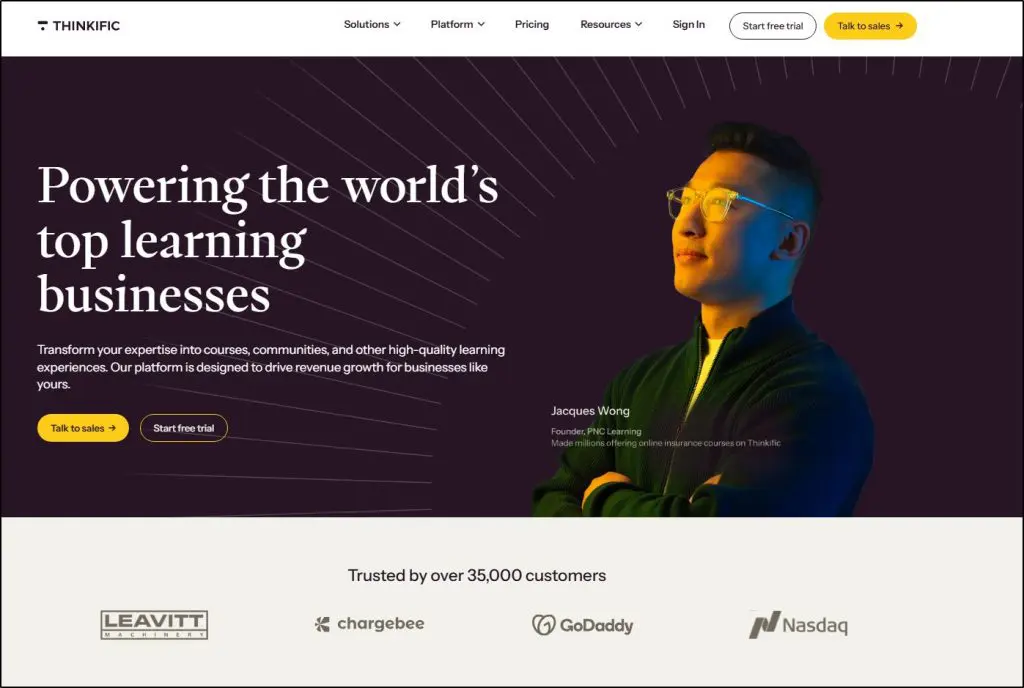
Thinkific is an online platform that lets you host, create, sell, and market online courses, memberships, and communities.
It gives you a fully functional website for your online learning programs with integrated payment solutions. You only need to get a Thinkific account, upload or create your learning content, and start selling them as fully hosted online courses your customers can access on their desktop or mobile devices.
But despite all these features, Thinkific’s biggest strength is its user-friendliness.
Its founders are educators themselves and built the perfect platform for empowering professionals and experts to monetize their knowledge without any coding skills.

This screenshot from one of Thinkific’s own courses gives you a glimpse of what students experience on the platform. This look is completely customizable with your branding and theme.
From AI-powered content tools to built-in sales funnels and a mobile app for learners, Thinkific is constantly evolving to help creators launch and grow faster.
How Creators Use Thinkific
Not sure if Thinkific fits your needs? Here are the most common ways creators use it:
- Selling Online Courses – Whether you’re teaching a business skill, a creative craft, or a fitness program, Thinkific makes it easy to create, host, and sell courses.
- Building a Membership Site – Want predictable, recurring income? Offer exclusive content through a subscription-based model.
- Creating a Private Learning Community – Increase engagement and retention by giving students a space to interact, ask questions, and support each other.
- Selling Digital Downloads – Monetize workbooks, templates, checklists, and eBooks as standalone products or bundled with your courses.
- Running Coaching Programs – Deliver structured coaching sessions with customized learning paths, assignments, and student interactions.
Powerful Features That Make Thinkific Stand Out
Let’s take a quick look at the features (before diving deeper) that make Thinkific a top choice for course creators.
1. Effortless Course Creation with AI-Powered Tools
You don’t need to be a designer or tech expert to create a high-quality online course. Thinkific’s drag-and-drop builder lets you put together lessons with videos, quizzes, PDFs, and interactive content in minutes.
Need to speed things up? AI Creator Tools help generate lesson ideas, structure course outlines, and suggest improvements—so you can focus on what matters most: teaching.
2. Engage & Grow Your Audience with Community Features
A course is just the start. Engaged students stay longer and buy more, and Thinkific helps with that through built-in communities, live Q&As and group discussions, and automated notifications.
Some creators even use Thinkific just for community-building and coaching, skipping traditional courses altogether.
3. Monetization & Sales Features
Creating great content is one thing, but selling it? That’s where Thinkific makes a difference.
- Sales Funnels & Free Lesson Funnels – Convert visitors into paying students with built-in lead generation tools.
- Bundles & Upsells – Increase revenue by offering course packages, add-ons, and premium upgrades.
- Abandoned Cart Recovery – Automatically follow up with potential students who left their cart without completing a purchase.
4. Branding & Customization
Your brand should stand out, not Thinkific’s.
- Custom Domains & White Labeling let you build a professional, branded site.
- A flexible course website builder allows you to customize landing pages, sales pages, and course layouts without hiring a web developer.
5. Seamless Mobile Learning with the Thinkific App
Students today expect to learn on the go, and with Thinkific’s mobile app, they can. Courses are optimized for mobile, so students can watch lessons, complete quizzes, and track progress from anywhere.
6. Integrations & Smart Business Tools
- Detailed Analytics & Payment Options – Track student progress, revenue, and engagement in one dashboard.
- Built-in Email Marketing – No need for extra tools—Thinkific lets you email students, send promotions, and automate follow-ups.
- Spotify Collaboration (UK Only) – Monetize educational content directly through Spotify.
Looking for Thinkific alternatives? Here’s our recommended list
Thinkific Pricing Plans & Free Trial | What Does It Cost (2026)?
Thinkific offers four pricing plans for different business needs. We’ve analyzed these plans in detail in our Thinkific Pricing Analysis.
But here’s a quick snapshot.
Basic Plan ($49/mo or $36/mo annually) – Best for solo creators ready to monetize with unlimited courses and essential tools.
Start Plan ($99/mo or $74/mo annually) – Best for course businesses needing memberships, bundles, certificates, and team accounts.
Grow Plan ($199/mo or $149/mo annually) – Best for established creators who want advanced analytics, priority support, and full branding control.
Thinkific Plus – Best for enterprise-level businesses needing custom features, onboarding, and dedicated support.
✅ Free Trial – All plans come with a 30-day free trial. But it no longer offers a free plan (discontinued in 2024)
✅ Zero Transaction Fees – Keep what you earn using Thinkific Payments (only payment processor fees apply).
Thinkific Pricing Plan Comparison
| Feature / Plan | Basic | Start | Grow |
|---|---|---|---|
| Monthly Price | $49 | $99 | $199 |
| Annual Price | $36/mo ($432/yr) | $74/mo ($888/yr) | $149/mo ($1,788/yr) |
| Courses | Unlimited | Unlimited | Unlimited |
| Communities | 1 Community / 5 Spaces | 1 Community / 10 Spaces | 3 Communities / 20 Spaces |
| Community Live Events | 5 | Unlimited | Unlimited |
| Admin Accounts | 1 Site Admin | 1 Site Admin + 2 Course Admins | 2 Site Admins + 5 Course Admins |
| Digital Downloads | 5 downloads | Unlimited | Unlimited |
| Custom Domain | ✅ | ✅ | ✅ |
| Custom HTML/CSS Editing | ❌ | ✅ | ✅ |
| Memberships & Bundles | ❌ | ✅ | ✅ |
| Completion Certificates | ❌ | ✅ | ✅ |
| Assignments & Compliance Tools | ❌ | ✅ | ✅ |
| Bulk Emailing | ❌ | ❌ | ✅ |
| Thinkific Analytics | ❌ | ❌ | ✅ Full Analytics Dashboard |
| Remove Thinkific Branding | ❌ | ❌ | ✅ |
| Affiliate Reporting | ✅ | ✅ | ✅ |
| AI Course Builder & AI Sales Pages | ✅ | ✅ | ✅ |
| Abandoned Cart Recovery | ✅ | ✅ | ✅ |
| TCommerce (Thinkific Payments) | ✓ All payment types (credit card, BNPL, Apple/Google Pay) | ✓ | ✓ |
| API & Webhooks | ❌ | ❌ | ✅ |
| Support | Email & Chat | Email & Chat | Phone + Priority Chat |
| Best For | Solo Creators | Growing Course Businesses | Established Brands & Scaling Teams |
Thinkific Pros & Cons — Comparing Its Strengths vs. Weaknesses
| Pros (What Thinkific Does Well) | Cons (Where Thinkific Falls Short) |
|---|---|
| Easy course creation: Drag-and-drop builder + templates help anyone create a course without tech skills. | Not a full marketing automation platform: Lacks advanced workflows, behavior triggers, and funnel automation. |
| Built-in communities: You can host discussions, accountability groups, and coaching spaces without Facebook. | Community tools are basic: Not as engaging or feature-rich as Skool, Circle, or Mighty Networks. |
| TCommerce is powerful: Accepts Apple/Google Pay, BNPL, subscriptions, and payment plans with no platform transaction fees. | Limited website design freedom: Good for simple sites but not suitable as a full brand website. |
| No transaction fees: You keep 100% of revenue when using Thinkific Payments. | SCORM is locked behind the Plus plan: Not accessible to regular creators or small businesses. |
| AI tools save time: AI course builder and AI sales pages help speed up production and launches. | Basic plan limits live events: Only 5 community live events per month on Basic. |
| Multiple product types: Sell courses, memberships, communities, coaching, and digital downloads from one platform. | Advanced features require higher plans: Certificates, assignments, compliance tools, analytics, and HTML/CSS editing are not on the Basic plan. |
| Great student experience: Clean lesson layout, smooth video streaming, strong mobile learning via Thinkific mobile app. | Weak blogging capabilities: Not designed for content marketing or SEO growth. |
| Strong analytics on Grow+: Detailed insights into enrollments, revenue, engagement, and learning behavior. | No native webinar system: Requires Zoom or third-party tools; no automated webinar funnels. |
| Simple but effective built-in email: Onboarding, reminders, and abandoned cart emails without external tools. | Email tool is limited: No visual automation builder, no deep segmentation, no CRM functionality. |
| Low maintenance: Hosting, uptime, SSL, backups — everything managed for you. | App ecosystem is limited: Fewer integrations compared to WordPress, Kajabi, or standalone CRMs. |
| Ideal for small teams: Easy admin controls, course admin roles, and group analysts on Grow+. | No creator mobile app: Students have an app, but creators cannot manage courses from a mobile app. |
Thinkific Examples | Courses And Online Learning Programs Built On Thinkific
Before we dive into Thinkific’s features and capabilities in more detail, let me show you some real world examples of live online courses, memberships, and learning programs built using Thinkific.
Thinkific Example #1: CopySchool
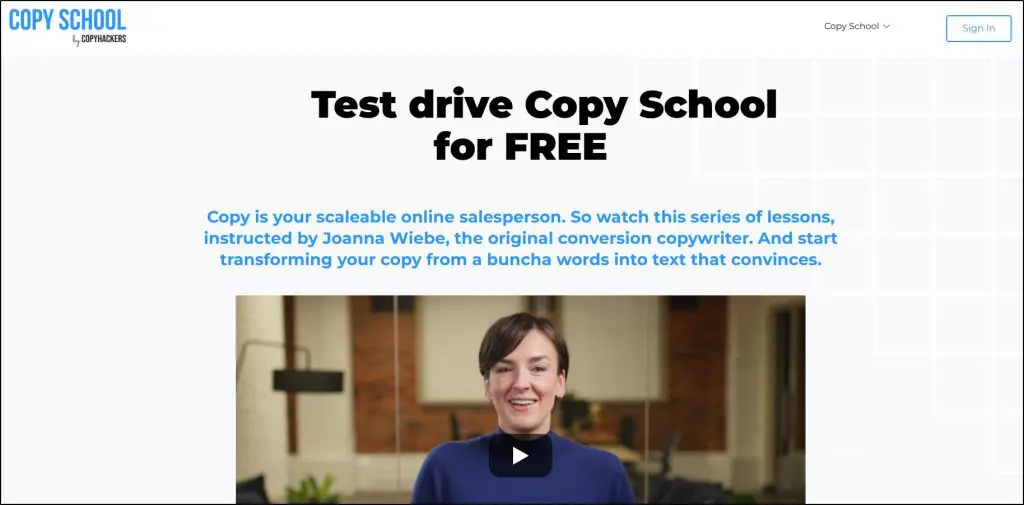
Copy School by ScopyHackers is among the world’s most popular conversion copywriting membership programs.
It is a high-ticket membership that offers access to the full range of copywriting courses by Joanna Wiebe and some of the leading copywriters. In addition, it includes live coaching calls and a community to engage with professional copywriters and mentors.
The program is fully hosted and built on Thinkific and attracts thousands of customers every year.
It is a great example of Thinkific’s scalability as an e-learning platform.
Thinkific Example #2: The Personal Development School

The Personal Development School is an online academy hosted and built with Thinkific. It offers memberships, courses, coaching, and community access for customers looking to learn about building better relationships and improving as individuals.
It’s another excellent example of Thinkific’s capabilities and shows how it empowers non-technical professionals by giving them everything they need to monetize their expertise without worrying about the technical stuff.
Impressive, right?
You can view more Thinkific examples here.
In-Depth Reviews Of Thinkific’s Key Features
When you search for the “best online course platforms,” Thinkific is frequently recommended. But is it worth the hype?
Let’s find out in this in-depth review of its key features.
1. Thinkific’s Course Creation Tools
If you’re serious about creating an online course, you need a platform that makes the process as smooth as possible. That’s where Thinkific shines. Whether you’re just starting or have years of experience, you’ll appreciate how easy it is to build and organize your course content.
Effortless Drag-and-Drop Course Builder
Forget about struggling with tech. With Thinkific’s drag-and-drop builder, you can create your course in minutes. Upload videos, PDFs, quizzes, and interactive lessons by simply dragging them into place.

It’s built for people who want to focus on teaching, not wrestling with complicated software.
Pre-Designed Course Templates to Get You Started Faster
Not sure where to start? Thinkific has pre-designed course templates that make setup easy:
- Blank Course – Perfect if you want full creative control.
- Pre-Sell Course – Great for testing demand before creating content.
- Mini-Course – Ideal for lead magnets and free trials.
- Flagship Course – Best for premium, high-value programs.
- Webinar Replay – Repurpose live sessions into evergreen content.
- Membership Resource Library – Store exclusive content for paying members.
These templates help you get up and running quickly so you can start selling sooner.
SCORM Compliance
If you create corporate training or compliance courses, you’ll love this update. Thinkific now supports SCORM compliance, meaning you can upload interactive e-learning content from tools like Articulate Storyline and Adobe Captivate.
This makes it easier to offer structured, interactive learning experiences that meet professional training standards.
2. Community Creation Tools
A strong learning community makes a huge difference in student engagement and retention. Thinkific includes a built-in community builder that allows you to create, customize, and monetize your own learning space. You can use it alongside your courses or as a standalone product.
Thinkific lets you integrate courses with community spaces so students can discuss lessons, ask questions, and connect with peers—all in one place. This helps boost student engagement and retention.
Inside a Thinkific community, students can interact with you and each other through posts, comments, discussion forums, and live events. Since it operates under your brand, you don’t have to worry about third-party ads or distractions pulling students away.
What You Can Do with a Thinkific Community
- Community Spaces: Organize discussions by creating dedicated spaces for different courses or topics.
- Live Events: Schedule and manage live sessions like webinars and Q&A to foster real-time interaction.
- Engagement Tracking: You can see which students are participating and identify ways to improve engagement.
- Member Profiles and Mentions: Enhance personalization with member profiles and @mentions to facilitate connections.
- Moderator Roles: Assign moderator roles to trusted members to help manage discussions and maintain community standards.
- Notifications: Keep members informed and engaged with push, mobile, web app, and activity email notifications.
- Threaded discussions: Makes it easier for students to engage in conversations.
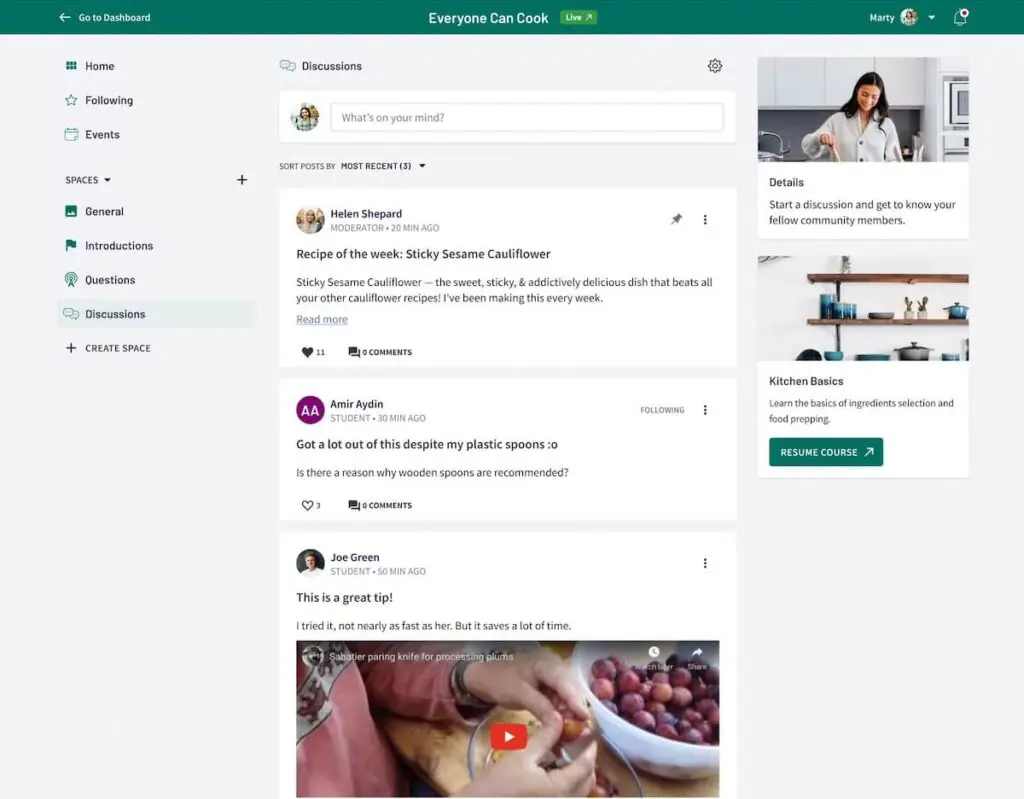
With both free and paid community options, some course creators use communities as an added benefit to their courses, while others sell access separately as part of a membership or higher-tier offer.
Either way, it’s an excellent way to keep students engaged, increase retention, and build stronger brand authority.
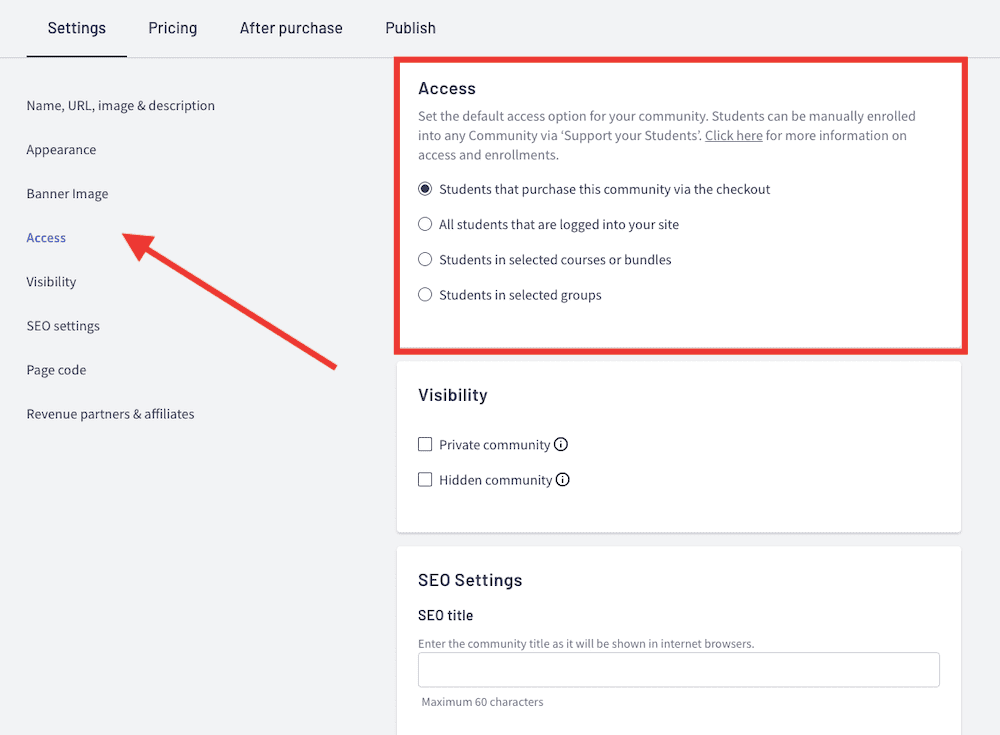
If you’ve ever struggled to keep students motivated after they purchase a course, a Thinkific community can be a game-changer. It gives learners a reason to keep coming back and interacting with your content, which can lead to more upsells and long-term revenue growth.
3. Course Pricing Options And Payment Flexibility
The way you price your courses and accept payments can make or break your online business. Thinkific offers flexible course pricing and payment options so you can maximize revenue and offer students the best purchasing experience.
You can charge for your courses in three main ways:
- One-time payment – Sell your course for a fixed price, ideal for standalone training programs.
- Payment plans – Allow students to pay in monthly installments instead of a lump sum. For example, you can let customers pay for a $999 course in three or four monthly installments.
- Recurring subscriptions – Charge students on a monthly or yearly basis for continuous access to content. The customers can access your content as long as they keep paying.
These options make it easy to cater to different budgets and learning styles.
TCommerce: Thinkific’s Built-in Payment System
Instead of relying on third-party payment processors, Thinkific now offers TCommerce, a built-in alternative to Stripe and PayPal.
With TCommerce, you get:
- Faster payouts with no need for external integrations.
- Multiple payment options, including credit cards, Google Pay, and Apple Pay.
- Seamless checkout to reduce abandoned carts and increase conversions.
- Buy Now, Pay Later with Affirm, Klarna, and Afterpay.
TCommerce is available on all Thinkific plans, making it easy for beginners to start accepting payments without extra setup.
Group Orders for B2B Sales
If you sell courses to businesses or organizations, Thinkific now supports group orders. This lets companies buy multiple course enrollments at once, making it easier to scale your sales beyond individual students.
After-Purchase Flows: Upsells & Cross-Sells
Boost your revenue by offering upsells and cross-sells after checkout. With Thinkific’s new after-purchase flows, you can:
- Offer additional courses at a discount.
- Suggest digital downloads, memberships, or coaching packages.
- Customize thank-you pages with special one-time offers.
This feature helps increase your customer lifetime value (LTV) and encourages students to invest more in your offerings.
4. Thinkific Course Site Builder and Customization Options
Your course site should reflect your brand. Thinkific’s site builder allows you to customize everything from the layout to branding elements, so your course website feels like an extension of your business.
Branding and White-Labeling Options
Thinkific lets you remove Thinkific branding and create a site that feels like it’s 100% yours. You can use a custom domain, add your logo, and apply brand colors and fonts across your pages.
Here’s an example of a site created with Thinkific (more examples here)

For most course creators, this is more than enough. But if you want full control over the design—down to every button and layout element—you’ll need custom CSS or JavaScript. Thinkific does allow this, but it’s not as open-ended as a WordPress or Webflow setup.
Custom Website Themes and Layouts
Thinkific offers three primary themes—Vogue, Vision, and Empire—each with customizable styles. You can personalize:
- Colors, fonts, and images.
- Landing pages and course layouts.
- Sections like pricing options, testimonials, and call-to-action buttons.
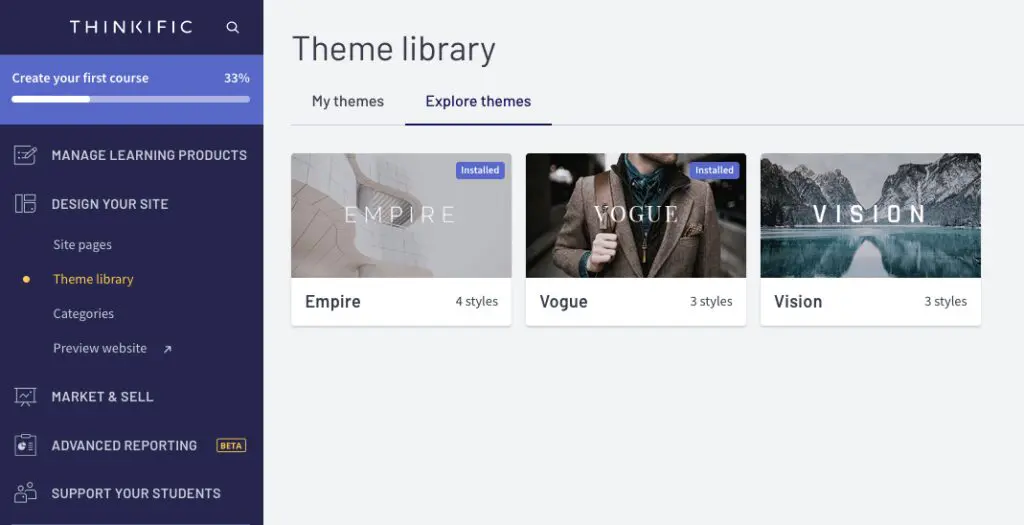
These themes are clean, modern, and mobile-friendly, but they’re not as diverse as what you’d get with an external website builder. If you’re expecting dozens of theme options, you won’t find that here.
Advanced Customization With CSS and JavaScript
If you have coding skills, Thinkific site builder supports custom CSS and JavaScript, allowing for deeper personalization. This is useful if you want to tweak the design beyond the standard options, such as adding an interactive image slider or a custom video player.
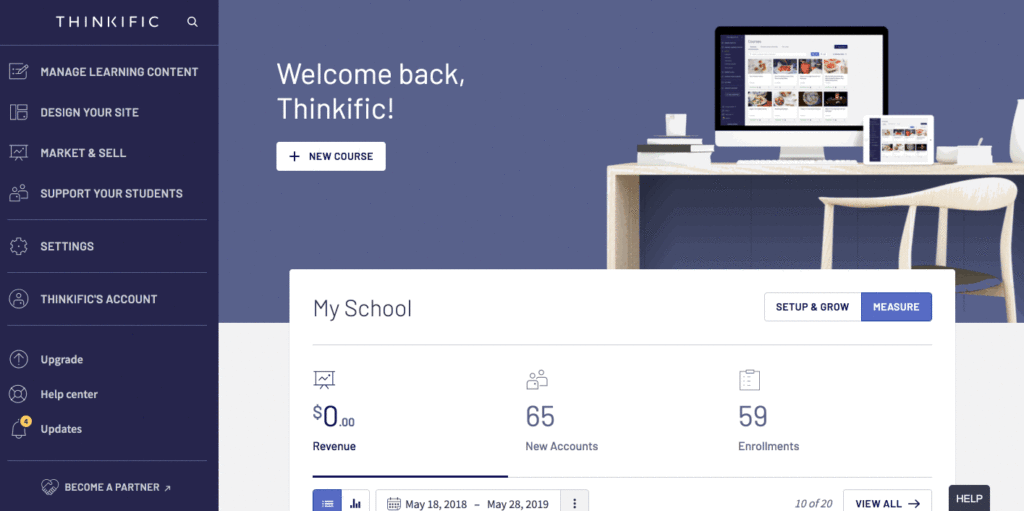
Site-wide CSS customizations
Site Sections and Content Blocks
With Thinkific site builder, you can add sections like:
- Pricing plans and offers.
- Course overviews and video previews.
- Countdown timers for promotions.
- Lead capture forms for growing your email list.
By utilizing these Thinkific customization features, you can build a professional-looking course website that stands out. Whether you want a minimalist design or a feature-packed sales page, Thinkific’s site builder gives you the flexibility to create a platform that aligns with your business goals.
5. Course Marketing and Sales Tools
Thinkific offers a variety of marketing and sales tools.
Lead Generation – Contact Forms & Sales Funnels
Thinkific makes it easy to capture leads directly from your course pages. You can embed contact forms on landing pages and sales pages to collect student emails. This is especially useful if:
- You want to build an email list for future promotions.
- You offer free resources (like mini-courses or PDFs) to attract new students.
- You need a way to follow up with interested buyers before they commit.
It’s a simple but effective tool for turning website visitors into paying students. However, Thinkific doesn’t include advanced automation—if you want segmented email follow-ups or autoresponders, you’ll still need an external email marketing tool like ConvertKit or ActiveCampaign.
AI-Powered Sales Pages
One of Thinkific’s latest updates is AI-powered landing pages. Instead of building pages from scratch, you answer a few questions, and Thinkific automatically generates a sales page complete with SEO-optimized copy, lead capture forms, and a checkout link.
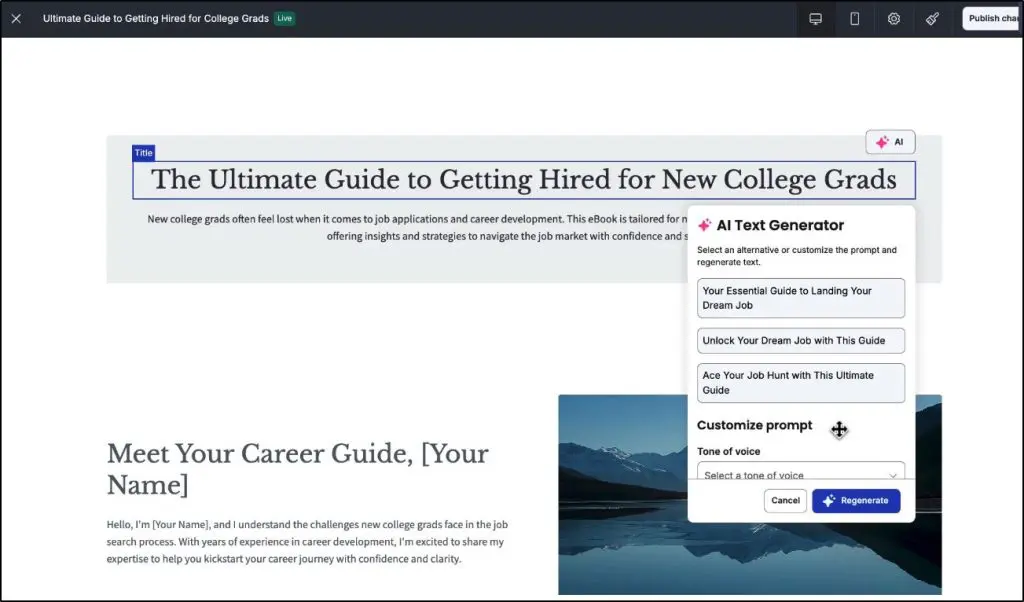
This new feature has several advantages:
- Saves time—no need to write copy or design from scratch.
- Optimized for conversions with lead forms and checkout integration.
- Mobile-friendly and built to work across all devices.
However, it has a few limitations as well:
- Limited design flexibility—you can tweak text and images, but full page control isn’t available.
- Not a full funnel builder—if you need multi-step sales sequences, you may still prefer ClickFunnels or Leadpages.
For creators who want a simple, ready-made sales page, this feature is a big win. But for those who love deep customization, it may still feel restrictive.
Abandoned Cart Recovery – Great for Sales, But Paywalled
Thinkific’s abandoned cart recovery feature automatically sends reminder emails to students who added a course to their cart but didn’t check out. This is one of the best ways to recover lost revenue, especially if you sell higher-ticket courses.
This feature is now available on all plans, including Basic.
Affiliate Marketing – Useful, But Could Use More Flexibility
Thinkific has built-in affiliate marketing tools that let you recruit partners to promote your courses in exchange for a commission. This is great if you have:
- Industry connections who can drive sales for you.
- A student base that wants to refer new learners.
- A coaching business that benefits from referrals.
However, the affiliate reporting is a bit basic. If you need detailed performance tracking or custom payout options, you may still want a dedicated tool like Refersion or Post Affiliate Pro.
Discounts, Bundles & Upsells
Thinkific makes it easy to create promotions and coupons to increase conversions. You can:
- Offer percentage-based or fixed-price discounts.
- Run limited-time promotions.
- Create bundles of multiple courses at a discount.
- Offer upsells or add-ons right after checkout.
6. Thinkific Email – Native Email Marketing Features
Thinkific’s built-in email marketing tool is a huge upgrade for course creators who don’t want to juggle multiple platforms. It lets you create email broadcasts and basic automation sequences to engage your audience.
Let’s break it down.
Automated Emails
Before Thinkific Email, if you wanted to send welcome emails, course reminders, or follow-ups, you had to integrate with a third-party email tool. Now, you can handle basic email automation directly from Thinkific.
You can set up automated emails for:
- Onboarding sequences – Guide new students through your course.
- Reminder emails – Nudge students to complete lessons or attend live sessions.
- Sales sequences – Send time-sensitive offers to convert leads into buyers.
This makes Thinkific Email way more convenient for those who just need a simple but effective email system without extra costs or integrations.
However, it’s not as powerful as Kit (now ConvertKit) or Kajabi when it comes to behavior-based automation. If you need deep segmentation, conditional triggers, or multi-step workflows, a third-party tool might still be the better option.
Audience Segmentation
Thinkific Email lets you segment your audience based on student actions, like:
- Who has enrolled but hasn’t started the course.
- Who has completed a certain percentage of the course.
- Who has abandoned their cart.
This is great for personalized outreach but still basic compared to full-fledged email marketing platforms.
How Thinkific Email Ties into Sales Funnels & Abandoned Carts
In the marketing section, we talked about abandoned cart recovery emails – Thinkific Email powers this feature. If someone leaves without checking out, Thinkific can automatically send a follow-up email to remind them to complete their purchase.
It also connects with upsell flows, meaning if a student buys one course, you can send a follow-up email offering them a bundle deal or a coaching add-on.
However, Thinkific Email isn’t built for full sales funnels. If you want a multi-email sequence with conditional logic, you’ll still need an external tool like ActiveCampaign or Mailchimp.
7. Thinker AI and Other Useful AI Features
Thinkific has added several AI tools over the past year, but the one that stands out most is Thinker, the AI teaching assistant that lives inside your course player.
Thinker answers student questions in real time using your own course content (nothing external) so learners get accurate, contextual help right when they need it.

When someone gets stuck, they click the Thinker button, ask a question, and get a sourced response that links back to the exact lesson where the concept is explained.
In my experience, this keeps students moving and dramatically reduces the number of repeated questions that usually land in your inbox.
Thinkific also includes AI tools on the creator side.
The AI course builder helps outline lessons and structure your material faster, while the AI sales page generator gives you a solid starting point for persuasive copy.
These features don’t replace your expertise, but they do save time and remove the friction of staring at a blank page.
8. Thinkific Analytics – Detailed Audience Insights
Previously, Thinkific’s analytics were functional but basic—you could track enrollments, revenue, and student progress, but deeper insights were missing. With Thinkific Analytics, you now get more advanced reporting dashboards that help you:
- Track revenue trends to understand your sales performance over time.
- Analyze student engagement to see which lessons are resonating and which might need improvement.
- Monitor conversion rates so you can see where potential students drop off in the sales funnel.
For creators who want to optimize their courses and marketing, these insights are quite useful.

Revenue & Orders Dashboard
Thinkific’s Revenue Dashboard gives you a clear snapshot of your earnings, broken down by:
- Total revenue over time – so you can spot income trends.
- Which products generate the most sales – so you know what to double down on.
- Payment method breakdowns – useful if you offer payment plans or subscriptions.
The Orders Dashboard adds another layer by letting you:
- See detailed order history – including refunds and abandoned purchases.
- Track where your buyers come from – whether it’s organic search, social media, or paid ads.
This means you can adjust your pricing strategy and marketing budget based on real data instead of guessing.
Enrollment & Engagement Dashboards
If you’ve ever wondered why some students complete your course while others drop off, the Enrollment and Engagement dashboards will give you answers.
- Track enrollments over time – so you can see patterns in student sign-ups.
- Identify which courses are the most popular – useful if you’re creating new offers.
- Measure completion rates and time spent per lesson – to pinpoint where students are losing interest.
- Quiz & assignment performance – so you know if students are actually learning.

This is super useful for improving your content. For example, if a large number of students drop off at a certain lesson, that’s a clear sign something needs fixing.
Marketing & Conversion Tracking
One of Thinkific’s biggest new features is the Marketing Dashboard, which helps you:
- See which landing pages convert best so you can focus on high-performing sales pages.
- Track where your leads are coming from whether it’s SEO, ads, or social media.
- Monitor lead-to-customer conversion rates so you know if your free trials or webinars are actually working.
This data-driven approach helps you refine your sales strategy and scale your business faster.
Custom Reports (Only on Thinkific Plus)
For most course creators, the built-in dashboards are enough. But if you run a large-scale course business, these custom reports can be incredibly useful for refining your strategy.
- Segment data by course, student type, or time period.
- Export reports for deeper analysis (useful if you work with a team or external consultants).
- Apply advanced filters to track specific trends over time.
Overall, the new Thinkific Analytics are a huge upgrade from its previous reporting interface. If you want a reliable built-in analytics tool that gives you enough data to optimize your courses and marketing, Thinkific Analytics is great.
9. Student Recognition and Engagement Tools
Thinkific offers a variety of student recognition and engagement features to create a community-like atmosphere and give learners that extra push to crush their learning goals.
Completion certificates are a great way to give your students a tangible reward for completing their courses. You can create these certificates from one of seven different templates.
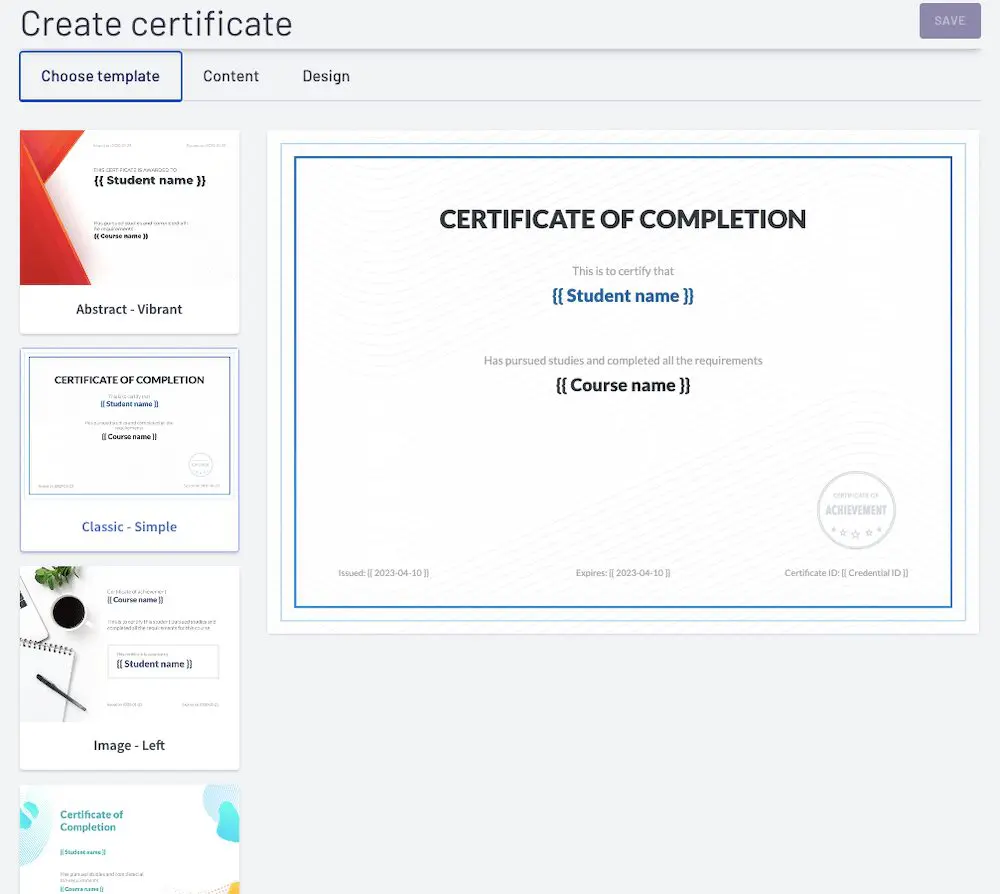
You can further customize them with your course name, logo, colors, and other information.
Thinkific allows you to automatically issue certificates each time a student completes a course.
Other features include:
- Quizzes & Exams: Thinkific lets you create multiple-choice questions with more than one correct answer and add embedded images, videos, or audio files to make quizzes more engaging.
- Assignments: You can accept and give feedback on student submissions and control student progress.
- Drip Schedule Content: Thinkific’s drip content feature allows you to create a series of lessons that will be released over time. This helps students stay motivated, engaged, and inspired while they are working through your course.
10. Third-Party Integration – Thinkific App Store
Thinkific provides native integration with multiple third-party apps to help you streamline your course creation and management process. You can integrate with tools like Mailchimp, ConvertKit, Zapier, and many more to automate email marketing, lead generation, and other tasks.
It also lets you integrate with payment gateways like PayPal and Stripe to accept payments from your students.
Integrating these apps with your dashboard is quick, thanks to Thinkific’s built-in app store, where you can find and install apps with a few clicks. You can browse apps by categories, such as email & marketing, selling & conversion, learning experience, and site design.
Thinkific also offers an API that helps you to build custom integrations with your own tools and applications.
11. Digital Downloads
Thinkific Digital Downloads lets you sell eBooks, templates, guides, and other digital products alongside your courses. It’s a straightforward way to offer additional value to your audience.
You get 5 digital downloads on the Basic plan, while the higher plans offer unlimited digital downloads.
What You Can Sell as Digital Downloads
Thinkific supports a wide range of file types, meaning you can offer:
- eBooks & PDFs – Great for deep-dive learning materials.
- Templates & Spreadsheets – Perfect for coaches, educators, and business professionals who want to provide reusable resources.
- Workbooks & Checklists – Helps students apply what they’ve learned in a structured way.
- Audio & Music Files – A good option for podcasters or voice-over artists selling recorded content.
- Digital Prints & Artwork – Useful for designers, artists, or photographers who want to sell their work.
This flexibility makes Thinkific a decent alternative to platforms like Gumroad or Podia if you’re already using it to host courses. However, if digital downloads are your main business, a dedicated e-commerce platform might offer more control over pricing and marketing.
How Digital Downloads Fit Into Your Business Strategy
Thinkific gives you two ways to use digital downloads:
- Sell them as standalone products: If you want to monetize without creating a full course, you can sell eBooks, templates, or guides individually.
- Bundle them with courses: Add exclusive worksheets, templates, or bonus materials to increase the value of your courses.
One big advantage is that learners can access downloads directly from their course dashboard, making the experience seamless.
Is Thinkific Easy To Use?
User Interface and Navigation
Yes, Thinkific is easy to use for both the instructor and students.
The interface is intuitive, sleek, and user-friendly, making it easy for students to navigate through their courses. For instructors, it’s simple to manage assignments and track student progress.
When you sign in to Thinkific, you are greeted by a checklist that guides you through the course creation process step by step – a helpful feature for novices.

This makes it easy for beginners to navigate the platform and ensures that you don’t miss any important steps in the course creation process.
Aside from this checklist, you can easily find what you’re looking for using the navigation menu on the left-hand side. Learn how to learn create your first course on Thinkific with our step-by-step guide.
For the course creation or community creation process, Thinkific has pre-built themes and a drag-and-drop builder that allows you to easily create your course content and structure. No coding is required! You can also reorder, duplicate, or delete your lessons with a few clicks.
Thinkific User Testimonial:
As Simon Bacher, Co-Founder of the Ling App, says,
I love the easy-to-use, intuitive user interface and powerful features with customizable themes. This course building doesn’t need coding skills because templates are available, enabling drag-and-drop editing. There’s no limit to the number of lessons or chapters you can include in a Thinkific course. The only limitation is you can’t create or add multiple video lessons unless you upload them.
Simon Bacher
Customer Support
Thinkific provides various customer support options to help you with any issues you may encounter. The platform offers a searchable knowledge base that contains articles, tutorials, and frequently asked questions on various topics related to course creation, marketing, and management.
If you need more immediate help, you can use the Live chat option – available on paid plans from 6 am – 5 pm PT, Monday to Friday.
For creators with the Grow plan or higher, you can even book a call directly with their Support Team. This option is available Mon to Fri 6 am – 5 pm PT.
Thinkific User Testimonial:
Lisa Richards, CEO and Creator of the Candida Diet, who has used Thinkific to create a few of their Candida courses, shares her experience with Thinkific’s customer support,
When it comes to customer support, Thinkific is quite robust, offering comprehensive self-service options like a knowledge base, a help center, and user forums. We’ve also found the customer support representatives highly knowledgeable, empathetic, and helpful.
However, there have been times when the response time for our support requests has been slow, causing a lot of frustration on our end. There are also countable times when we’ve received generic responses from the support staff that didn’t quite address our concerns. With that being said, we’d still give Thinkific a 7/10 for providing satisfactory customer support.
Lisa Richards
Thinkific Review | Is It The Best Online Course Platform For You?
Thinkific is a robust and user-friendly platform for creating and selling online courses. Its drag-and-drop course builder, built-in marketing tools, and easy-to-use analytics make it a great choice for both novice and experienced course creators.
Thinkific’s integrations with third-party apps and ability to offer flexible payment plans further enhance its appeal.
However, if more advanced marketing features are non-negotiable, you might want to go for Thinkific’s competitor Kajabi.
Despite these minor limitations, Thinkific is often a top choice for those looking to create and sell online courses.
Frequently Asked Questions About Thinkific (2026)
These questions address topics users actively search for but are not fully answered in the main review.
1. Does Thinkific support private or hidden courses?
Yes. Thinkific lets you create private, hidden, and invite-only courses. Creators use this for employee training, client-only programs, and premium mentoring tiers.
2. Can Thinkific replace my CRM?
Not fully. Thinkific stores student info and progress, but it isn’t built as a CRM. Most creators connect it to HubSpot, ActiveCampaign, or ConvertKit through Zapier or direct integrations.
3. Does Thinkific integrate with WordPress or WooCommerce?
Yes. You can embed Thinkific pages on WordPress or sell access via WooCommerce using plugins and Zapier. But Thinkific is not a native WordPress LMS.
4. Does Thinkific have an API for developers?
Only on Grow and Plus plans. The API lets you automate enrollments, sync users, trigger workflows, and build custom apps.
5. Can I use Zapier with Thinkific?
Yes. Zapier triggers and actions allow automations like enrolling students after a purchase, tagging leads, or updating CRM records.
6. Can Thinkific host digital downloads like PDFs and templates?
Yes. You can attach PDFs, worksheets, e-books, templates, and resource files to your lessons. Thinkific also has a separate Digital Downloads feature on higher plans.
7. How does Thinkific handle payments?
Thinkific supports Stripe, PayPal, Thinkific Payments (TCommerce), subscriptions, payment plans, and one-time purchases. Your region determines available processors.
8. Does Thinkific support SCORM or Tin Can (xAPI)?
Partially. Thinkific offers SCORM support in Thinkific Plus. For other plans, you must convert SCORM content into videos, PDFs, or text lessons before uploading.
9. Is Thinkific good for selling memberships?
Only on the Start plan and above. The Basic plan does not include memberships or bundles.
10. Does Thinkific offer phone support?
Phone support is available only on the Grow plan and Plus. Basic and Start users rely on chat and email.
11. Can I run live classes on Thinkific without third-party tools?
Not directly. Thinkific connects with Zoom, Loom, and webinar tools, but it does not have native live-class streaming.
12. Does Thinkific allow white-labeling?
Full white-labeling (removing Thinkific branding) starts on the Grow plan. The Basic and Start plans still include Thinkific branding.
13. Is Thinkific good for corporate or enterprise learning?
Yes — but you need Thinkific Plus for advanced SSO, SLAs, additional admin accounts, security controls, and enterprise-scale training.
14. Does Thinkific have a mobile app?
Yes. Thinkific offers a branded mobile app experience for creators on Thinkific Plus. This is not available on regular plans.
15. How does Thinkific compare to WordPress LMS plugins like LearnDash?
Thinkific is fully hosted, easier to use, and requires no technical setup. LearnDash gives more control and flexibility but requires WordPress hosting, plugins, and more maintenance.

ABOUT YOUR HOST
Learning Revolution founder Jeff Cobb is an expert in online education and the business of adult lifelong learning. Over the past 20+ years, he has built a thriving career based on that expertise – as an entrepreneur, consultant, author, and speaker. Learning Revolution is a place where Jeff curates tips, insights, and resources to help you build a thriving expertise-based business.
Table of Contents




Hi Jeff. Thanks for all this. I wanted to share that I joined Thinkific earlier this year, primarily attracted to their community feature. What I didn’t realize at the time is that their community feature is extremely lacking in even the most basic functions, which makes community engagement very difficult to create. For examples, members of the community aren’t notified when a post is made, leaving many posts going unresponded to. There’s no simple like button for people to show agreement or to simply acknowledge a post. If a person makes a mistake in their post, not only can they not edit it, they also cannot delete it. Post notifications, like buttons, and the ability to edit or delete a post are all VERY basic functions. Though the support staff is very friendly and responsive, there seems to be too little interest in making the community feature a valuable, usable feature. Had I known this, I would have chosen a different platform. So I thought others might like to know.
Hi Jeff and all,
You guys are very experienced. I am just starting to offer on-line courses after many years of onsite teaching, and have been researching on the best tool. I am kind of between Teachable and Thinkific (leaning toward Thinkific) now. Thanks to Jeff’s reviews I have learned a great deal about both, but after reading people’s comments and their experiecnes –sincere thanks for sharing them!–I am more confused on which one to choose, or a different one. Assuming there is no issue with emailing students at Pro/Growth level of thinkific, I would like to choose Thinkfic.
I am not sure though if I should start with Free, Basic, and Pro/Growth (I did read their features).
Your experience and suggestions?
Thanks!
Kathy
Thinkific is good at some things, but really rips you off for money with their growth plan.
You pay for the Pro plan and learn that:
You can’t see how many people are enrolled in a course.
You can’t see a list of people in the course.
You can’t message people in the course.
Unless you pay extra for their growth ad on. What a rip off. Ruzuku lets you do all these things on their basic plan.
Other problems: There reviews feature sucks. It only shows a limited number of reviews that you have to select. Very cumbersome interface. On top of that you can edit the reviews and even get rid of ones you don’t like. Whats the point?
I am kind of stuck with Thinkific but I keep finding they try to get every dime from you.
Thanks for taking the time to share your experience, Eric. I had to reach out to Thinkific on some of your points as I am on the Growth plan, so couldn’t really double check what you say about the Pro plan. Here’s what a Thinkific representative says:
From my perspective – which, admittedly is influenced by years of working with much higher-priced systems than Thinkific – the level of functionality Thinkific provides is a bargain even at the Growth plan and higher levels. – Jeff
Thanks Jeff! I found the information about Zapier on their support page called Integrate with Zapier, where it states, “Level 1 – Triggers (Basic plan & above)
As part of any paid plan, you can use Triggers to send information out of Thinkific and into another app. This works well for automating tasks to happen as a result of events on your Thinkific site. Level 2 – Triggers and Actions (Growth plan & above)
Our Level 2 Zapier integration has both Triggers and Actions for Thinkific, allowing you to send information in as well as out.” The only plan presently above their Growth plan is their Premier plan. This information can also be somewhat surmised by clicking on the Growth plan pricing page on their website where they discuss what features they add to the Pro plan for their optional fee. Truthfully, I think this information is a little too hidden, as it’s not even fully clear on their Growth plan features page, and is not spelled out in their Full Feature Comparison page.
Thank you for planning to deliver my comment to Thinkific. I’ve seen comments made by a representative of Thinkific that they made this change as it costs a lot to them to maintain students, which is why they changed their focus of receiving money from transactions to active student numbers, and that in the future they will be adding more new services to the Growth plan. They stated that people in plans from Basic up were interested in these additional full features which is why they decided to place them all in an optional Growth plan. I wonder if their very popular Business plan they had wasn’t inspiring others to move to a higher-featured plan, and due to more integrations with Active Campaign among others that they’ve started was costing them more than they were recovering from course creators.
I do not want to completely discourage anyone from using Thinkific. They do seem to have a stronger feature model than even Teachable, with better reported support, and a much stronger community. But I do think this makes one pause to consider implementing an LMS solution located on one’s website instead of the cloud.
Thanks again, Sherri. I’ve verified on the Thinkific site and have updated the table to reflect your comments. These terms definitely changed since I did the review (which wasn’t all that long ago). I agree they could be clearer about all of this – particularly with people who were already on the Pro plan. That said, I don’t find the Growth plan unreasonable, particularly since it is based on active (which, in most cases, would be paying users). I may be somewhat biased because I come from a world where e-learning platforms carry much higher price tags than even Thinkific’s most expensive plan. Still, I think it is a very good value for the money. – Jeff
Hi Jeff, This is a great article and is helping me a lot to make a decision on where I want to sell online courses! Really nice research! One thing I noticed that may be incorrect: You listed under Pro that Zapier ingoing actions and Active Campaign is included; I think only outgoing zaps are included for Pro. Ingoing zap actions and Active Campaign direct integration are included if you purchase the optional Growth package. The Growth package needs to be purchased also if you want to white-label the product completely.
In addition, I saw from their closed Facebook Studio group that many class creators are upset as the new Growth package price per user includes all those who are active students, and only excludes those who are completing a free trial or who have expired from their courses. This is concerning to me as someone who would like my product white-labeled, integrated with Active Campaign including incoming zap actions, and give lifetime access to those I sell my class to. With this model, you will easily pay the $499 a month upper limit for the growth package, as all those who purchased the class in previous months are also included in the active student numbers.
The basic plan or the Pro plan does look like a good way to start though for those who are interested. Thinkific does offer a lot of tools and help to create an online class with their how-tos, forums and tight-knit community. I see many, however who are concerned. They have grandfathered those who were in the Business plan by Oct 2018 to stay with the same previous features and price for at least two years, but have said there are no ongoing guarantees of anything further. I understand needing to increase their price over time, but I think it would be much easier to sell extras that used to be in their Business Plan that are now in their Growth package, if people paid via additional cost per transaction vs. total active users.
Thanks for taking the time to leave such thoughtful comments on the review, Sherri. I’ll double check on Zapier. I was pretty careful about what was or wasn’t included when I wrote this, but I may have made a mistake or it may have changed in the meantime. I’ll also make sure Thinkific is aware of the perspective you have shared here. – Jeff
Jeff, I read your book years ago, when I was considering making the leap into the e-learning field. Since then, I’ve been a CANVAS user because I teach hybrid classes at a local college as an adjunct. Now that I’m committing to ramping up my business, your reviews are the BEST I’ve come across. Your attention to detail and counsel are greatly valued. Your insight has convinced me to follow my gut on THINKIFIC and go with their platform. All my best, Dan
Hey Dan – Thanks so much for taking the time to comment and say so. If there are any specifics about Thinkific you are still wondering about, just let me know. If I don’t have the answer, I can most likely connect you with someone who does. That said, I don’t think you will go wrong with them, and I am fan of following your gut and getting to it! – Jeff