

TL;DR – Is Uscreen Worth Using For Memberships?
Uscreen is an all-in-one video membership platform that lets creators, educators, and businesses launch branded streaming websites and apps, host live events, build communities, and monetize through subscriptions, pay-per-view, rentals, and more.
Starting Price: $149/month + $1.99 per subscriber (Growth Plan)
Best For: Video-focused membership site owners like fitness trainers, online coaches, educators, and media companies who want to own their audience, create a premium streaming experience, and generate recurring revenue.
Strengths:
– HD video hosting with Netflix-style browsing
– Branded mobile + TV apps (no coding)
– Built-in community features
– Flexible monetization models 24/7 support and free migration help
– Detailed analytics and reporting
Limitations:
– High per-subscriber fees as you scale Limited website customization
– Live streaming hours capped unless you pay for add-ons
Worth Using? If video is at the core of your membership business, Uscreen is one of the most robust platforms available, but you’ll need to budget for the per-subscriber pricing model.
Try Uscreen For Free
I’m all for using YouTube, Facebook, Instagram, or any other social platform to grow your reach.
But what I always tell my audience is this: don’t build your empire on rented land. The day one of these platforms changes its algorithm, your entire business can come crashing down.
If you’re in a video-heavy niche or you mainly interact with your audience through video, you need to route traffic from your social profiles to a platform you actually control.
Uscreen lets you do exactly that. It’s a Netflix-style video membership platform where you own the audience, the brand, and the revenue.
But is it right for you? How much does it cost? Does it include the membership and community features you need? I’ll help you answer all of that in this detailed Uscreen walkthrough.
What is Uscreen?

Uscreen is a dedicated video membership platform built for creators, coaches, educators, and businesses who want to sell and deliver video content under their own brand. Instead of relying on social platforms or juggling multiple tools, you get one place to host your videos, manage members, and generate recurring revenue.
With Uscreen, you can launch a Netflix-style streaming website and mobile/TV apps, run live events, build a private community, and offer flexible membership plans, all without touching code.
Core Features & Capabilities:
- Branded streaming website with drag-and-drop customization
- HD video hosting and Netflix-style catalog for easy browsing
- Mobile + TV apps (iOS, Android, Roku, Apple TV, Fire TV)
- Live streaming with chat, calendar reminders, and PPV options
- Built-in community with channels, polls, challenges, and UGC
- Multiple monetization models (subscriptions, PPV, rentals, bundles, downloads)
- Marketing tools (coupons, email broadcasts, abandoned cart, win-back campaigns)
- Real-time analytics on engagement, revenue, and video performance
- Payment integrations (Stripe, PayPal, Authorize.net) and global currencies
- Free migration for members, payments, and content
Unlike MemberPress or Kajabi, Uscreen is built specifically for video delivery and monetization, not general digital products.
Its focus is on creating a premium streaming experience with apps, HD playback, and a Netflix-style library.
Compared to Mighty Networks, it offers far stronger video hosting and live streaming capabilities, while still giving you robust community tools.
In short, if video is the heart of your membership, Uscreen’s entire platform is designed around making it look and perform like a professional streaming service.

Looking for a more conventional membership platform? Here are my top picks
Uscreen Product Snapshot
| Area | Details |
|---|---|
| What It’s For | Hosting, streaming, and monetizing video content while building a branded membership business. |
| Main Goal | Help creators earn recurring revenue by combining video, community, and apps in one platform. |
| What It Lets You Do | Launch your own branded website and apps, host live streams, create a Netflix-style catalog, build a community, and offer flexible paid memberships. |
| Starting Price | $149/month + $1.99 per subscriber (Growth Plan). |
| Integrations | Payment gateways (PayPal, Stripe, Authorize.net), email marketing tools, automation platforms (Zapier), analytics tools, affiliate programs, and more. |
| Mobile & TV Apps | Launch fully branded mobile and TV apps (e.g., iOS, Android, Roku, Apple TV) without coding. |
| Video Management | Upload, organize, and deliver HD video content with a Netflix-style catalog. |
| Live Streaming | Host secure live events with live chat, calendar reminders, and pay-per-view options. |
| Community Features | Public/private channels, challenges, polls, and user-generated content to boost engagement. |
| Monetization Tools | Subscriptions, rentals, pay-per-view, bundles, digital downloads, promotions, and coupons. |
| Marketing & Retention | Automated campaigns, email tools, gated Zoom links, win-back offers, and churn reduction features. |
| Analytics & Reporting | Real-time insights into watch time, engagement, revenue, and subscriber growth. |
| Best For | Membership site owners whose core offering is video content—fitness trainers, educators, online coaches, media companies, and creators who want branded apps and community engagement. |
| Not For | Owners who primarily sell text-based courses, downloadable resources, or products outside of video content; those on very tight budgets who can’t manage per-subscriber fees. |
| Alternatives | Vimeo OTT, Kajabi, Patreon, Mighty Networks. |
Uscreen Pricing Plans and Free Trial | How Much Does It Cost
Uscreen does not offer a free plan, but you can try it with a 14-day free trial, no credit card required.
It currently has three premium plans:
- Growth Plan – $149/month + $1.99 per subscriber
- App Essentials Plan – $449/month + $0.99 per subscriber
- Custom Plan – Contact Uscreen for pricing + $0.99 per subscriber
| Plan | Monthly Price | Main Features |
|---|---|---|
| Growth Plan | $149 + $1.99/subscriber | Unlimited bandwidth, 100 hrs video storage, 1 hr live streaming, chat & email support, Netflix-style catalog, gated Zoom links, analytics, marketing tools |
| App Essentials | $449 + $0.99/subscriber | Everything in Growth plus 2 mobile apps, onboarding support, migration support, optional storage/live streaming add-ons, advanced analytics |
| Custom Plan | Contact Uscreen + $0.99/subscriber | Everything in App Essentials plus 5 TV apps, API access, group subscriptions (B2B), white labeling, VIP support, end user support |
You can get an additional 20% discount on annual billing.
Understanding Uscreen’s Per Subscriber Fee
The base monthly price covers access to Uscreen’s platform and tools. But it does not include any subscribers. Every active subscriber is charged separately each month.
For example, in the Growth Plan, you pay $1.99 per subscriber per month.
How Uscreen’s billing works:
| Component | What You Pay |
|---|---|
| Base Platform Fee | Fixed, based on your chosen plan |
| Subscriber Fee | Charged monthly for every active subscriber |
| Additional Fees | Optional add-ons like extra storage or live streaming |
Example: If you’re on the Growth Plan ($149/month) with 100 subscribers:
- Base Fee: $149
- Subscriber Fee: 100 × $1.99 = $199
- Total: $348 for that month (excluding add-ons)
This means…..
- You pay in proportion to your audience size and costs rise as subscribers grow.
- There are no included subscribers in the base fee.
- Optional add-ons like extra storage or live streaming hours can increase the total cost.
Uscreen Pros & Cons
Before we dive deeper into Uscreen’s features and capabilities, let’s quickly review it’s main strengths and weaknesses.
| Pros | Cons |
|---|---|
| Excellent Video Experience: HD playback, Netflix-style catalog, and user-friendly browsing make it ideal for video-heavy memberships. | High Ongoing Costs: Per-subscriber fees on top of base pricing can add up quickly as your audience grows. |
| Branded Apps on Multiple Platforms: Launch mobile and TV apps without coding — a big plus for accessibility and brand presence. | Not Ideal for Non-Video Memberships: If your main content is text, downloads, or other formats, the platform is overkill. |
| Strong Community Features: Built-in channels, polls, challenges, and UGC keep members engaged without external tools. | Limited Website Design Flexibility: The site builder works for basics but lacks the depth of WordPress or Webflow. |
| Flexible Monetization Models: Subscriptions, rentals, PPV, bundles, digital downloads, and coupons. | No Free Plan: Only a 14-day trial; entry pricing may be steep for small or new creators. |
| Customer Support & Migration Help: 24/7 chat/email support, onboarding, and free migration for content, members, and payments. | Limited Customization for Checkout: Few branding options unless you edit the code directly. |
| Wide Range of Integrations: Connect payment gateways, email tools, analytics, automation platforms, and affiliate programs. | Extra Costs for Add-ons: Additional storage and live streaming hours require paid add-ons. |
| Data-Driven Insights: Detailed analytics for engagement, revenue, and content performance to guide decisions. | Live Streaming Hours Are Limited: Only 1 hour included in base plans; more requires add-on packs. |
How Uscreen Works & How To Get Started
Uscreen isn’t a marketplace or platform where people can discover your profile organically. It gives you the tools to create a video based membership but you have to bring your own traffic and audience.
Getting started with Uscreen is pretty simple.
Step 1: Create your account and brand your site
Sign up, pick a plan, connect your domain, choose a theme, and set your colors, logo, and page text so everything looks like your brand.
Step 2: Upload and organize your videos
Add your videos, group them into series or collections, and write short descriptions. You can also add trailers and let members download or save videos into playlists.
Step 3: Set your pricing and offers
Choose how people can buy: monthly or yearly subscriptions, free trials, one-time purchases, rentals, bundles, or downloads. Connect Stripe, PayPal, or Authorize.net to get paid.
Step 4: Turn on community features
Create public or private channels for discussions, post updates, run polls or challenges, and let members share their own short videos if you want.
Step 5: Schedule and run live streams
Pick a date, set a topic, and go live with built-in chat. You can sell tickets for pay-per-view events or include them in memberships. Calendar reminders help more people show up.
Step 6: Launch your apps
Publish your own iOS and Android apps (and TV apps on higher plans) without coding. Use push notifications to keep members coming back.
Step 7: Promote and keep members
Send emails, offer coupons, use gated Zoom links for private sessions, and turn on automated reminders for members who haven’t logged in.
Step 8: Track your results
Check your dashboard for revenue, new signups, watch time, and your most popular videos. Use this info to decide what to create next.
Step 9: Grow over time
Bring in your existing members, payments, and videos with Uscreen’s free migration help. Add more storage, live streaming hours, or business features as you need them.
Who is Uscreen Good For?

This all-in-one video membership platform is ideal for both first-time and experienced content creators, who want to monetize their content beyond social media.
The platform focuses on video streaming and offers built-in tools to distribute and monetize your content.
It’s a valuable solution for a variety of use cases that leverage recurring viewership as it brings together membership management and video hosting. Its built-in tools make it easy for you to create revenue from the value you provide through a membership model.
Here are a few examples of Uscreen use cases to give you a better idea of what this membership platform can do for different types of creators.
- Video Creators: Uscreen is a membership platform designed for video creators. As a content owner, you can launch your own membership website and apps. Easily sell your videos to audiences all over the world, and leverage the platform’s powerful video monetization models to make money from subscription plans, ads, pay-per-view, and in-app purchases.
- Online Course Creators: While it’s not a course hosting platform, per se, Uscreen allows you to design and build video courses, bundle them together, and sell them on the platform.
- Coaches: Use the platform’s scheduling and payment integrations to sell your coaching packages to a global audience and generate a healthy source of recurring revenue for your coaching business.
- Influencers: Uscreen is one of the best platforms to create a lucrative revenue stream. It has social media integrations and other tools that allow you to build and maximize your income through various video monetization strategies.
From education and fitness to entertainment, corporate training, and communications, one of the main reasons why so many users prefer this high-end solution over other streaming platforms is that it offers a modern, user-friendly interface, customizable themes, and easy integrations with other tools and services.
Uscreen Membership & Content Creation Features
Let’s now take a deeper look at Uscreen’s main features, tools, and capabilities.
1. Ease of Use: Is Uscreen Easy to Use?
Uscreen’s user experience is one of the areas where the platform shines. Although it’s a comprehensive solution that caters to a wide range of business needs, Uscreen is incredibly easy to use. It has a modern interface with simple navigation.
As soon as you sign up, you’re guided through a very simple and intuitive process to set up your Uscreen account. Simply answer a few short questions and the platform will automatically set up your dashboard with all the required features right at your fingertips.

From the learner’s perspective, the dashboard is easy to navigate. There are intuitive menus to guide you through any process, whether it’s watching a video, joining a chat, or getting support. As soon as users sign up, they can set up a profile and communicate with you or other learners via comments or in the chat during live broadcasts.
From the admin point of view, Uscreen’s polished interface and robust backend admin features make it easy to handle everything behind the scenes. Create, design, and sell videos and bundles with a world-class watching experience. You can ensure a superior viewing experience by tweaking the theme and site options using the simple drag-and-drop editor.
2. All-in-One Membership Platform
This comprehensive membership platform for video creators has everything you need to manage and grow your business.
The extensive range of features includes the following:
- On-demand videos
- Full HD live streaming
- Global content distribution
- Community management
You get all of these tools and more on one easy-to-use platform. You can build a video streaming site, create landing pages, conduct giveaways, keep subscribers up to date with email broadcasts, and develop referral programs to generate leads.
Uscreen also takes care of billing, analytics, monetization tools, video hosting, and end-user support, allowing you to build and scale a successful membership business without all the hassle.

3. Netflix-Style Viewing
A standout feature of Uscreen is its video content management system (VCMS) and video delivery system which offer Netflix-style viewing. Netflix creates a captivating viewer experience that has helped grow its empire to what it is today.
Uscreen’s user experience and user interface design are similar to that of the giant streaming service to ensure a premium video experience and smooth video delivery – both of which facilitate continuous watching.
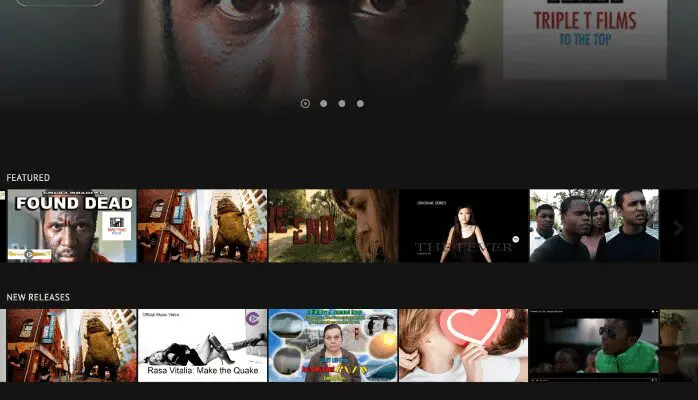
In addition to helping you create immersive experiences, the Netflix-style design increases video viewership thanks to the intuitive interface that makes it easy for members to discover new content or binge-watch your videos.
While enjoying your videos, members can easily download, comment, and even curate playlists of their own.
This is a great feature that gives content creators powerful tools for organizing, managing, and presenting their library of videos in an engaging, user-friendly way.
You can categorize your videos into series, or themes, or use any other filters that make it easier for your users to find what they are looking for.
It’s also very easy to update your content on your dashboard, keeping your viewers engaged with your latest videos.
Furthermore, the platform gives you scheduling flexibility and full control over the availability of your content by allowing you to set specific release dates for your video content. You can also set expiration dates to auto-remove any video or collection from your catalog.
And perhaps the best part: Uscreen’s superior Full HD video playback experience.
Suppose you’re a course creator who has put tons of production effort into your video content. In that case, you’ll appreciate the quality of the platform’s video playback which rivals popular platforms like Netflix, as well as the video page design which will truly impress your learners.
When browsing your video catalog, learners are presented with clear thumbnails and detailed descriptions of your videos. You can even include a preview of each video or collection to give them a quick look at your teaching style.
4. Dynamic Live Streaming Experiences
As a creator, you can deliver secure and superior PPV live-stream events through Uscreen. If you currently use any other webinar platforms, it might make sense to replace them with Uscreen if you focus mainly on video content in your business.
Like most other live streaming tools, your Uscreen viewers will have access to live chat. As the event host, you can create a registration page and use the pre-recording, replay, and live event countdown features to enhance your event.

The real-time user interactions allow you to build dynamic live streams whereby you can interact with viewers in real time to help boost engagement and cultivate brand loyalty.
The native live-streaming feature is easy to set up and delivery is smooth for a seamless interactive experience. You can also integrate calendar tools to make it easier for viewers to follow your programs which helps to boost your live stream attendance rates.
Pro Tip: Use Uscreen’s new Simultaneous Viewing Limits feature to optimize your content revenue and protect your video content from end-users who share their passwords with others. With this feature enabled, multiple users can log in, but only one can watch your content at any given time.
5. Built-In Community Hub
Recent surveys show that people are more likely to renew their membership subscriptions if they feel connected to a vibrant community. Uscreen has built-in community-building tools that allow you to cultivate a community around your brand.
For instance, if you are a photography enthusiast, you can share how-to videos on Uscreen and build your community through the platform’s built-in features to add more value to your product.
Native community features include the following:
- Post Feed: The community supports video content up to 60 seconds long. Videos in the post feed are auto-played when they become visible on the screen. Members can like and comment on any post in the community feed. You can even create stunning post feeds and use widgets to embed them on your Uscreen website.
- Live Q&As: Use live Q&As to build stronger connections with your members. Q&A sessions help to boost engagement on your channel and allow your viewers to ask questions and get instant answers.
- Polls: Incorporate polls in your community engagement strategy to discover the sort of content your audience likes and give them a say in the products or projects you develop for the community. Members can also post their own polls and others can like and comment on poll posts.
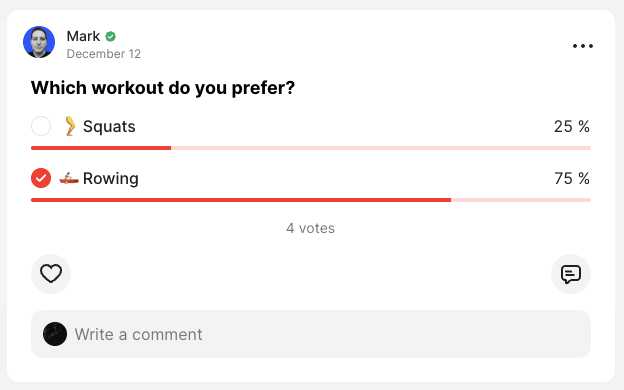
Additional community features include:
- Channels: Uscreen lets you create public and private channels so you can segment your community interactions for more relevancy. You can create as many different channels as you want for different groups, topics, or interests, or use the channels feature to create knowledge bases for members to easily find answers and resources.
- User-Generated Content: This feature lets your community members post their own videos on the platform. This encourages active participation and helps to develop a stronger sense of community and member support by personalizing your online community.
- Links to Catalog Videos: You can link directly to your catalog videos within community posts to increase views and encourage discussions around your content.
- Community Challenges: Uscreen has tools to set up fun challenges that you can use to engage your audience members and keep them involved with your content for longer.
Uscreen’s community features are designed to encourage participation among viewers which is a key factor in building a thriving community around your product.
Real-time interaction allows followers to feel connected and involved. They can discuss topics and share their own experiences and tips with other members.
Uscreen’s effortless blending of your video library with community posts and chats makes it easy for you to build a thriving community, and keep up with community engagement so you can grow your membership and keep your business profitable.
6. Community AI Assistant
Leverage the platform’s built-in Community AI Assistant to help you create regular admin posts to foster an engaged community. The tool simplifies the entire process of creating posts for your community.
To access the AI tool, simply click “AI Assistant” on your Community page (visible only to admins). Start by setting the tone of voice and choosing the type of audience so that the AI-generated posts not only align with your goals but also resonate with your audience.
Next, choose whether you want to generate titles or compose your own. The AI can provide you with several compelling post titles if you prefer. Simply click “generate titles”, and you’ll get as many titles for your posts as you need. If you want to create your own titles, click “generate post”.

Review the generated text to make sure that it perfectly aligns with your brand and message. You can use this tool to generate fresh ideas and content for many of your Community activities. Just remember that personalization is key.
As a creator, you need to edit the content to ensure that your personality shines through, so make sure to review all posts and personalize them accordingly before publishing them to the community.
7. Flexible Video Monetization
Another area where Uscreen excels is in video monetization. Many online course platforms focus on facilitating one-time sales of fixed content, which means that you’d have to launch more courses to grow your revenue.
In contrast, Uscreen allows you to continuously monetize your knowledge-based content so you can enhance your product and establish deeper, lasting relationships with your audience.
Uscreen offers a complete video monetization solution with a range of flexible revenue models, including:
- Subscription tiers
- Unit pricing
- Rentals
- Pay-Per-View
- Digital Downloads
- Bundles
- Promotions
This means that you can price your content however you like for maximum control of your income stream. In other words, you’ll be able to create a consistent and predictable monthly income.
You can sell your video content directly through the platform and accept global payments easily. All you have to do is create an offer and connect either PayPal, Stripe, or Authorize.net. If you’re not yet ready to use these payment processors, you can opt for the free Uscreen gateway.
Once your payment tool is connected, you’ll then be able to define user access to specific content for recurring subscriptions. You also have the option to create bundles and charge in different ways, whether it’s a fixed price, rental, free video, etc.
The free video option can also be used to create and distribute free online courses. Once you’ve configured these settings, the platform automatically generates a checkout page for you.
The single-page checkout process is well-optimized and prioritizes membership plans. For example, you can give customers the option to sign up for your membership or purchase one video on the same checkout page.
Unfortunately, the customization options for the checkout page are quite limited. However, you can add more information to the subscription as you create the offer. This way, you’ll be able to speak more to your brand and products. Alternatively, you can dive into the code editor to make changes there.
You can leverage any or all of these opportunities to create a source of recurring income that can sustain your video business long-term.
8. White-Label Mobile and TV Apps
One of Uscreen’s most prominent features is the ability to create branded mobile and TV apps. These membership apps are a great way to connect and interact with your members on the devices they use the most, whether it’s Android smartphones, Android TV, Amazon Fire TV, Roku Box, or any other major platform.

The apps also give you extra flexibility concerning your content distribution strategies. Members will always be just a tap away from enjoying your videos and live streams, and interacting with other community members. You can also use the app to send push notifications to get your audience’s attention at any time during the day.
The platform makes it extremely easy for users to create apps. No tech skills are required to launch your membership app, and you’ll never have to touch a single line of code.
For example, say you’re a cooking enthusiast who wants to offer clients more than just how-to videos. You can use Uscreen to launch a membership-based cooking app where your members get access to premium content and features. This also opens up opportunities for users to access your video content anywhere and be able to watch your videos on the go.
You might offer membership tiers that range from access to daily recipes to premium options such as custom-tailored meal plans and exclusive cooking webinars.
This way, you can monetize your expertise effectively while building a community of loyal enthusiasts willing to invest more in their lifestyle. You’ll also be able to take payments and send push notifications right inside the mobile app.
9. Drag-and-Drop Page Builder
Uscreen lets you build a website with a beautiful, high-converting storefront, landing pages, and sales funnel automation. The entire process is simple and intuitive, and you get a wide range of customizable options.
Uscreen’s simple drag-and-drop builder lets you create and customize your site to match your brand even if you have zero technical knowledge. If you can point and click a mouse, you can build a website on Uscreen.
No design experience is necessary, either. There’s a range of beautiful website templates to choose from, all of which are fully customizable to match your brand identity.
The platform allows you to make backups of your website, and you can even access the code editor to create pixel-perfect designs.
While not as powerful as dedicated website builders like WordPress or Wix, this site builder provides all the tools you need to create a basic, yet fully-functional website for your business.

In addition to building beautiful websites, you can also create high-converting landing pages that you can personalize for any goal. For example, you can create landing pages to help you generate leads on your website. There are various template designs for opt-in pages, sales pages, and other static pages for your website.
Furthermore, you can add and organize preconfigured sections or blocks to your pages and customize them using the simple site by editor.
You also get access to community building tools which makes it easier for creators to grow and retain the following. You can manage everything from one place without the need to switch from one tool to another.
10. Real-Time Analytics and Reporting
Uscreen provides robust and detailed audience and content analytics right out of the gate. It reports on financial, subscriber, and content statistics, as shown in the dashboard image below:
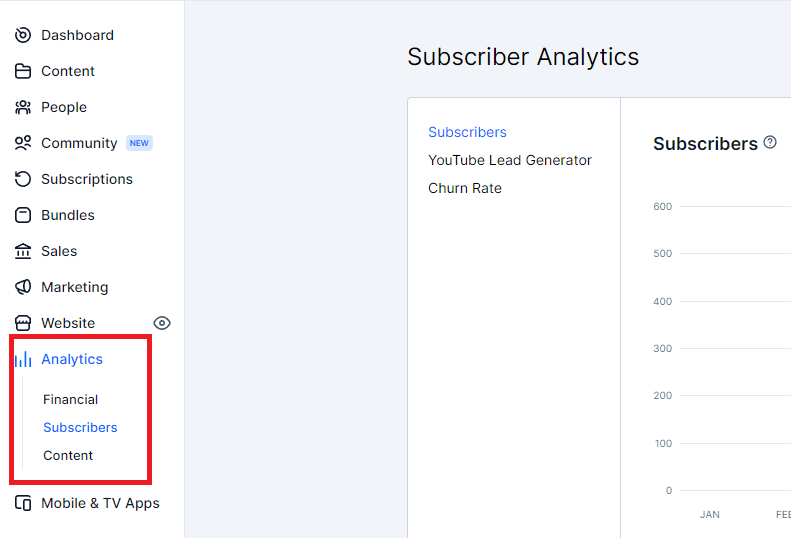
You’ll be able to see things such as the total number of views, and total watch-time hours, and you can use Uscreen’s real-time video analytics to get valuable insights into things such as:
- Viewer engagement
- Lead conversion
- Revenue generation
Such insights can help you better understand your audience so you can optimize your video content and marketing strategies accordingly.
You can narrow things down by requesting reports for any given period- whether it’s days, weeks, or months. Uscreen provides reports on any type of data you need, no matter how seemingly inconsequential, such as the country someone is logging in from, or the browsing device they are using.
Uscreen also provides you with deep insight into sales activity. You can analyze your video store to see how well it’s performing each month. Create and send invoices, generate payouts, and receive monthly annual sales reports and coupon redemption reports right out of the box.
If you need even more granular data, you can integrate third-party analytics tools such as Google Analytics and Google Tag Manager – which, when used together, can provide you with a full view of your viewers’ activity, interests, and preferences.
Uscreen has tons of built-in video marketing tools but you can also use integrations to track different pixels, leads, social media, and web traffic to see which of your marketing efforts are paying off and which ones aren’t. You’ll then be able to do more of what works so you can enhance your results.
11. Additional Features
Here are a few other interesting features that help Uscreen stand apart from all the other video platforms.
- YouTube Lead Generator: This is a cool new marketing feature that Uscreen recently launched. It allows you to nurture your YouTube audience by capturing emails through a lead generation URL.
- Coupons: Create discounts and promotions to entice more customers to purchase your products.
- Abandoned Cart: Use simple automation to encourage visitors to complete their orders on your site.
- Gift Cards: Allow users to buy your products as a gift for someone else or purchase gift cards that their family and friends can redeem in your store.
- Churn Reduction: This feature is designed to help you collect user feedback to optimize your campaigns and prevent cancellations.
- Win-back Campaigns: Offer canceled subscribers an extended trial to allow them to try again for free.
- Protected Content: Your content on Uscreen is under layers of protection, including encryption, IP tracking, and innovative download protection technology.
These are simple built-in automation features that you can use to retain more customers without the need to integrate your CRM and other tools.
The Win-back Campaigns feature, in particular, is a powerful tool that will help you retain more of your subscribers. It also comes with a short survey that you can enable and send it together with the email containing the discount.
This way, you’ll be able to understand why the person might be canceling their membership and use that information to help you optimize retention.
Wrapping Up – Is Uscreen Right For You?
There’s no denying that Uscreen is a solid on-demand video service for creators. It’s a comprehensive video streaming platform that empowers you to grow profitable membership businesses.
Everything you need is in one place and there’s no need for your viewers to hop from one platform to another. While the platform’s primary focus is on recurring memberships, it’s also well-equipped to help you sell your videos via one-time purchases and pay-per-view rentals.
You’ll not only be able to create and monetize your video content on Uscreen, but you’ll also avoid leaving money on the table as a creator, thanks to built-in features like the YouTube lead generator.
All in all, this is a powerful yet easy-to-use video membership platform with the tools you need to build a thriving community that is 100% your brand.
Are you ready to build a successful video membership business that generates a predictable recurring revenue stream? If so, sign up for a free trial to start using Uscreen right away!
Frequently Asked Questions (FAQs)
1. Can I use my own domain name with Uscreen?
Yes. Uscreen allows you to connect your own custom domain so your streaming site looks fully branded. You’ll just need to update your DNS settings with your domain provider.
2. Does Uscreen support multi-language content?
Yes. Uscreen supports subtitles and multiple audio tracks, making it possible to deliver content to a global audience. You can also translate site text for different languages.
3. Can I integrate Uscreen with my existing email marketing tools?
Yes. Uscreen integrates with popular tools like Mailchimp, ConvertKit, and ActiveCampaign, as well as automation platforms like Zapier, so you can connect it to almost any email system.
4. Is there a limit on how many videos I can upload?
There’s no fixed limit on the number of videos, but each plan includes a set amount of storage. You can purchase extra storage if you need it for large libraries.
5. Can I drip release my video content on Uscreen?
Yes. Uscreen lets you schedule videos to release at specific dates and times, which is useful for keeping members engaged over a longer period.
6. Does Uscreen allow me to sell physical products?
Not directly. Uscreen is focused on digital video content, but you can link to your online store or integrate with platforms like Shopify using buttons and custom pages.
7. Can I run an affiliate program for my Uscreen membership site?
Yes. Uscreen integrates with affiliate tracking tools so you can let partners promote your content and earn commissions for bringing in new subscribers.
8. Can viewers watch content offline?
Yes — if you have mobile apps through Uscreen, members can download videos to their devices and watch offline.
9. Does Uscreen handle taxes like VAT or GST automatically?
Yes. Uscreen has built-in tools to handle sales tax, VAT, and GST for various regions, so you can stay compliant without needing extra software.
10. How many people can manage a Uscreen account?
Uscreen allows multiple admin and team member roles. You can assign different permissions for content creators, community managers, or support staff.

Jeff Cobb, Founder of Learning Revolution
Jeff Cobb is an expert in online education and the business of adult lifelong learning. Over the past 20+ years he has built a thriving career based on that expertise – as an entrepreneur, a consultant, an author, and a speaker. Learning Revolution is a place where Jeff curates tips, insights, and resources to help you build a thriving expertise-based business. Learn more about Jeff Cobb here.
See also:
- How to Sell Your Online Video Course
- How to Create a Simple Home Video Studio for Online Courses
- How To Create Effective Video-Based Learning
- 15+ Platforms to Create and Sell Online Courses
Table of Contents


Great article and super informative. Thanks Jeff!