

TL;DR — What Is an LMS and How to Choose One (2025)
A Learning Management System (LMS) is software that allows you to create, manage, deliver, and track online learning experiences—primarily for employee training, customer education, or academic programs.
LMS vs. Online Course Platforms: The key difference? LMS platforms are designed for internal training and compliance, not for selling courses. If your goal is to market and monetize courses, platforms like Thinkific or Teachable are built for that.
Types of LMS:
1. Cloud-based LMS: Hosted online, easy to scale (e.g., TalentLMS, Docebo).
2. Self-hosted LMS: Installed on your own servers for full control (e.g., Moodle, Totara).
3. WordPress LMS: Plugins that turn your WordPress site into an LMS (e.g., LearnDash, LifterLMS).
How to Choose the Right LMS (Quick Steps):
Step 1: Define your goals – Are you training employees or selling courses?
Step 2: List required features – Prioritize what you truly need.
Step 3: Read real customer reviews – Look for consistent feedback.
Step 4: Check tool integrations – Ensure it works with your existing tech stack.
Step 5: Set your budget – Consider long-term and hidden costs.
Step 6: Evaluate support quality – Good help matters when issues arise.
Step 7: Request a demo – Test usability and get team feedback.
Keep reading if you want more details and examples of how businesses use LMS platforms.
I recommend TalentLMS as the best overall LMS platform for most business types.
Did you know that 90% of U.S. organizations that invest in employee training rely on a learning management system (LMS)?
This isn’t surprising.
The LMS market is booming, projected to surpass $60 billion by 2030, as companies double down on skill development to stay competitive.
But what exactly is an LMS? Who should use it?
And how does it differ from an online course platform? Should you use an LMS to sell online courses, or does another option make more sense?
In this detailed guide, I’ll not only help you understand the pros and cons of using an LMS with examples but also give you a quick comparison of when it makes sense to use an online course platform instead of an LMS.
Plus, I’ll also give you concrete tips on finding the best learning management system for your business needs.
Let’s dive in.
What Is A Learning Management System (LMS)?
A Learning Management System (LMS) is software that helps you organize, deliver, and track learning programs online within your organization.
Think of it as the platform behind an organization’s learning hub where users can access courses, take quizzes, and check their progress, while instructors or administrators handle enrollment, design courses, monitor results, and create reports.
Learning Management Systems are popular in workplaces and schools because they simplify how training and education happen.
For example, companies use them to run compliance training, ensuring employees complete required courses and keep their certifications updated.
Shopify Academy is an excellent example of how the world’s leading companies use LMS platforms.
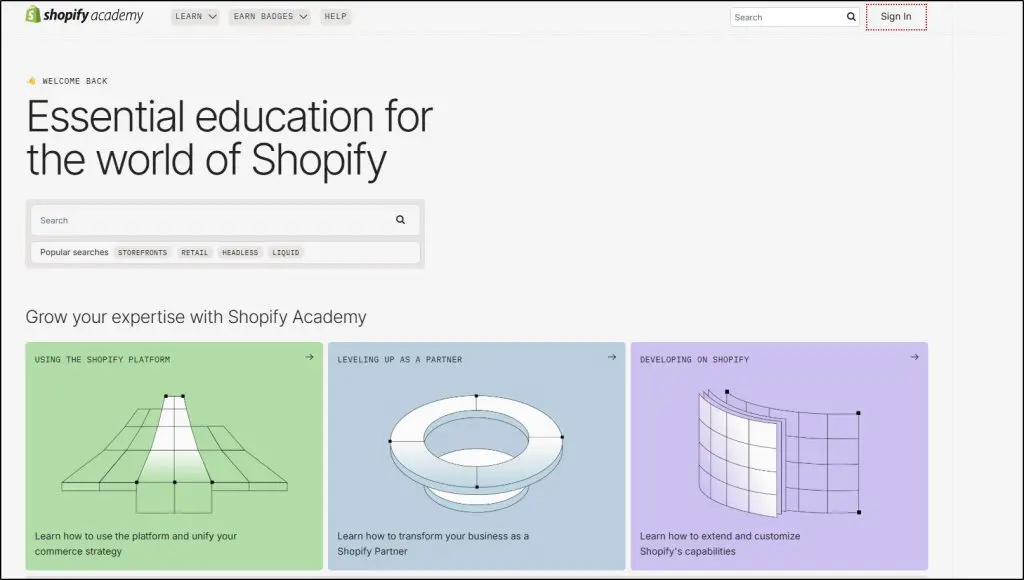
Shopify has designed this academy for its partners, developers, and potential customers who wish to learn more about the product and become proficient users.
However, LMS use isn’t limited to corporations or course creators.
Universities and training institutes use them to deliver lectures, let students join discussions, and manage assignments, all in one place.
Some key functions of an LMS include:
- Managing Users: Add and organize learners, instructors, and admins, each with specific roles.
- Delivering Content: Store and share videos, readings, quizzes, and more in a way that’s easy for learners to follow and aligns with your teaching style.
- Tracking Results: Keep an eye on learner progress, test scores, and course completion with reports.
- Collaboration: Enable group discussions or live sessions for a more engaging learning experience.
These tools make LMSs ideal for businesses and schools that need to handle structured learning programs efficiently. However, if you’re selling online courses, you might find LMSs lacking in marketing tools or options for customizing the learner’s journey.
LMS vs. Online Course Platforms – What’s The Difference
Before diving deeper into this post, let’s clear any confusion about the differences and similarities between LMSs and online course platforms.
Learning Management Systems or Software (LMS)
LMS platforms were originally designed to manage and deliver training within organizations and educational institutions.
Their primary audience is corporate employees or students who typically don’t pay directly for access to courses. In a corporate setting, companies use LMSs to train employees, monitor compliance, and manage certifications.
Similarly, academic institutions rely on LMSs for course delivery, grading, and tracking student progress. Payment for courses often happens outside the LMS through tuition fees or employer funding.
So classic LMS platforms don’t include tools for selling or marketing courses.
Additionally, LMSs adhere to e-learning standards like SCORM, xAPI, or CMI5, ensuring compatibility and easy integration within corporate and institutional systems.
However, this compliance can sometimes make LMS platforms less flexible for creating, marketing, and selling courses independently.
Online Course Platforms
Online course platforms, on the other hand, are built to empower solo entrepreneurs, professionals, and edupreneurs by giving them the tools to monetize their expertise. These platforms cater to people selling directly to end users who pay for their courses.
Platforms like Thinkific, Teachable, and LearnWorlds don’t just help you create and deliver content, they also provide tools for marketing, lead generation, payment collection, and community engagement.
For example, If you’re a yoga instructor selling classes or a marketing expert sharing strategies, an online course platform equips you with everything from course creation to payment collection to student engagement.
Unlike LMSs, most online course platforms aren’t standards-compliant. This may sound like a disadvantage, but it offers more flexibility. Content created in these platforms isn’t locked in, so you can move it to another platform with ease.
See our roundup of best online course platforms.
Can You Sell Online Courses With An LMS?
The short answer? Yes, you can sell online courses with an LMS but it’s not always straightforward, and there are some limitations you should know.
Traditionally, LMS platforms were built for delivering and tracking courses rather than selling them. They were designed for internal training in organizations or educational settings, not for edupreneurs looking to market and sell courses to the public.
For instance, corporate LMS users like HR teams or university faculty weren’t concerned with e-commerce. They were focused on course access, progress tracking, and compliance training.
This lack of sales focus is why many classic LMS platforms still don’t include robust e-commerce features like payment gateways, marketing tools, or lead generation capabilities. If your goal is to build a course business, these missing pieces can be a dealbreaker.
Some modern LMS platforms, like LearnDash and Absorb LMS, are starting to integrate e-commerce features, but these tend to work best for larger businesses or organizations with complex training needs.
On the other hand, online course platforms like Thinkific, Teachable, and Kajabi are purpose-built for selling courses. They include tools for creating courses, managing sales pages, collecting payments, and engaging your audience.
Plus, they don’t lock your content into proprietary systems, making it easier to move your courses to another platform if needed.
While LMS platforms are evolving, if selling courses is your primary focus, an online course platform might be a better fit for your needs.
Top Learning Management System (LMS) Examples
There are dozens of customizable and industry-specific Learning Management Systems (LMS). Some are designed for large enterprises spread across multiple geographic locations while others are built for small businesses and educational institutes.
Here are some of the most prominent LMS platforms.
- Talent LMS
- LearnDash
- Academy Of Mine
- Canvas LMS
- Docebo
- LearnUpon
- Absorb LMS
- LifterLMS
You can read about the best LMS platforms in the detailed roundup by our team here at the Learning Revolution. We’ve analyzed the strengths and weaknesses of different LMSs and shared our recommendations.
Who Uses Learning Management Software? 4 Popular Use Cases
There’s a huge market for Learning Management Systems because they enable corporations, institutes, and even individuals from different industries to deliver customized learning experiences.
The most common LMS use cases include customer training, partner training, employee onboarding, employee development and retention, compliance training, and sales enablement
Let’s quickly discuss some of these example use cases to understand how different companies in different industries use LMS platforms.
1. Corporate Training & Development
Large corporations, especially in finance and tech, rely on LMS platforms to train their employees on complex systems and evolving regulations.
For instance, a fintech company might use an LMS to teach their teams about compliance updates or advanced analytics tools.
The platform ensures that employees across different departments and locations can learn consistently and track their progress in real time.
2. Customer Training for SaaS Companies
Software-as-a-Service (SaaS) businesses often use LMSs to educate their customers on how to make the most of their tools.
Let’s say you’re running a project management software company. An LMS can host tutorials, webinars, and certification courses to help your customers and their teams onboard faster, boosting product adoption and reducing churn.
3. K-12 and Higher Education
Schools and universities use LMS platforms to create interactive, blended learning environments for students. A university, for example, might offer online courses with assignments, quizzes, and discussion forums all managed through the LMS. Professors can track student engagement, while students enjoy the flexibility to learn at their own pace.
4. Franchise Training for Consistency Across Locations
Franchise businesses like fast-food chains or retail brands need standardized training for their employees across all locations.
An LMS ensures that every franchisee follows the same procedures and meets the same standards. For example, a global coffee chain might train baristas on customer service, safety protocols, and new menu launches using an LMS.
5. Selling Online Courses
As I’ve already mentioned, classic learning Management Systems aren’t built for selling online courses directly to consumers.
However, modern LMS platforms have evolved to meet the growing potential of the online course and digital products industry.
Some LMS platforms now include marketing and eCommerce tools that empower course creators to generate leads, accept payments, and even build a loyal customer base—all within the same system.
For instance, platforms like LearnDash, LearnWorlds and Thinkific allow edupreneurs to host their courses while also providing features like sales funnels, email marketing integrations, and affiliate management.
This means you can not only deliver your course content but also handle every step of the sales process.
Why Use An LMS For Your Business? 5 Key Benefits
What’s the need to invest thousands of dollars in deploying an LMS platform? Why not simply use video conferencing or other communication tools to deliver training?
Let’s discuss some of the main benefits of LMS platforms to answer these questions.
1. Create A Tailored Learning Environment For Your Organization
Generic training environments don’t engage learners effectively. An LMS empowers you to build a fully customized learning experience that mirrors your organization’s culture, goals, and requirements.
Add your branding, create job-specific learning paths, and ensure every detail aligns with your mission.
For example, Accenture developed a role-specific LMS for their teams, allowing employees to focus on learning paths tied directly to their KPIs. This strategy led to a 27% increase in employee retention and higher course completion rates.
2. Identify Training Needs And Track Your Workforce Skill Set
Imagine knowing exactly what your team excels at and where they need support. An LMS delivers this clarity through real-time analytics. Track progress, pinpoint skill gaps, and measure outcomes—all from one dashboard.
Take Pfizer, for instance. Their LMS tracks the proficiency of sales reps across markets, highlighting areas where additional training is needed.
Their LMS platform enabled them to manage the learning needs of over 83000 employees worldwide from a central learning management dashboard.
3. Build Learning Tracks To Achieve Specific Outcomes
Investing in training without understanding your team’s current skill levels is like shooting in the dark. An LMS gives you the clarity you need by recording and analyzing your employees’ skills across roles and departments. It identifies gaps and shows you exactly what to prioritize for development.
For example, a software development company planning to offer AI application services can use an LMS to pinpoint which employees need upskilling in machine learning, data science, or AI frameworks. They can then create focused learning tracks to equip their team with the skills required to take on such projects.
Without an LMS, tracking progress or measuring the impact of training becomes chaotic and time-consuming. With one, you can align employee growth with organizational goals, ensuring every training effort moves your business forward.
4. Scale Your Training Programs With Time
As your team expands, the demands for consistent, high-quality training increase. Manually managing this process quickly becomes overwhelming, but an LMS simplifies it by automating key tasks like course enrollment, progress tracking, and report generation.
For example, imagine a fast-growing retail chain hiring hundreds of new employees across multiple locations.
With an LMS, the company can deliver uniform onboarding programs, track employee progress, and ensure everyone meets the same training standards without overburdening HR or trainers.
Plus, as new roles emerge or business goals shift, you can easily update content or add new courses without disrupting ongoing training.
5. Save Time And Money
Traditional training methods include booking venues, flying in trainers, and scheduling time off work. This is both expensive and time-consuming.
LMS platforms replace all that with virtual learning environments accessible 24/7.
It might cost a few thousand dollars to deploy an LMS upfront but it instantly makes learning resources more accessible and saves millions in the long run.
Types Of Learning Management Software [With Examples]
Learning Management Systems (LMS) come in various forms and types depending on their end use and business requirements.
Understanding these types will help you choose the right platform for your business. Here are the main LMS types with a few prominent examples.
1. Cloud-Based LMS Platforms
Most mainstream LMS platforms are cloud-hosted, making them accessible from anywhere with an internet connection. To access them you simply need to go to their website and log in using your credentials.
Cloud LMS platforms are easy to set up and maintain since the provider handles updates, security, and technical support. Tools like TalentLMS and Docebo are popular examples of this type.

They’re perfect for remote teams, global organizations, or businesses that don’t want the hassle of managing on-site servers. For instance, e-commerce or consulting firms often rely on cloud-based LMS platforms to train employees across different locations and offer consistent onboarding experiences.
2. Self-Hosted or On-Premises LMS
Self-hosted LMS platforms are installed on your organization’s own servers, offering full control over customization, data security, and user management.
This makes them ideal for industries like healthcare, government, and finance, where strict compliance and privacy regulations are essential.
Moodle and Totara are common examples. While self-hosted LMS platforms require more IT resources for maintenance and updates, they provide unmatched flexibility for organizations with unique training needs or highly specific workflows.
3. WordPress LMS Platforms
WordPress LMS platforms are plugins that transform a WordPress website into a fully functional learning management system. These platforms, such as LearnDash and LifterLMS, are designed for ease of use and cost-effectiveness, making them a favorite among solo course creators, bloggers, and small businesses.
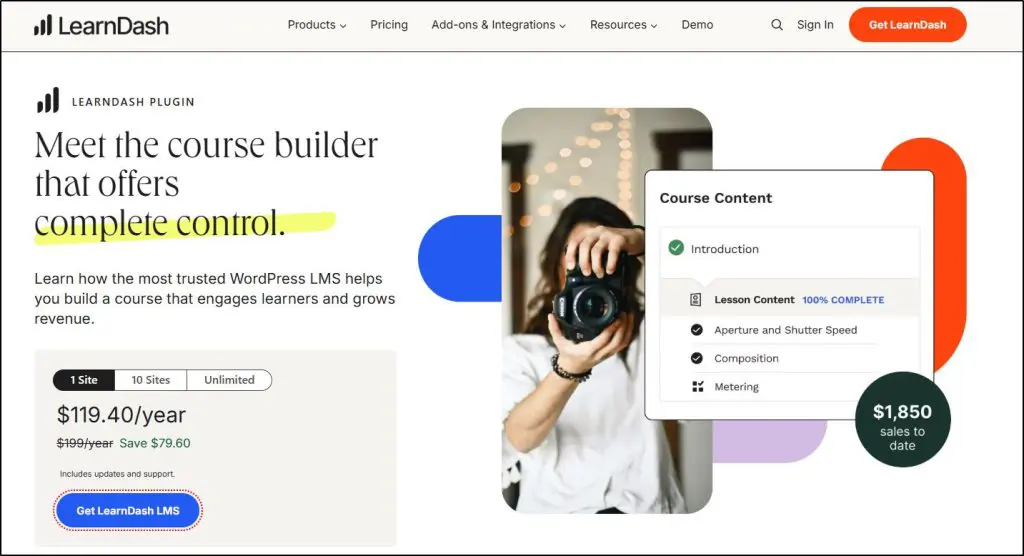
With these tools, you can manage courses, collect payments, and track user progress—all from your WordPress dashboard.
For instance, a fitness coach could use a WordPress LMS to deliver workout courses and manage subscriptions directly from their existing website.
If you want to create a learning portal on your existing WordPress website instead of sending users to a third-party platform, WordPress LMS platforms are worth checking out.
How A Learning Management System Works | Key Features & Functionalities
There are certain core functionalities you’ll find in most learning management systems (LMS). Together, these features create a seamless workflow for managing, delivering, and tracking learning programs.
Whether you’re training employees, onboarding clients, or running an online course, these features help you deliver an engaging and impactful learning experience.
Let’s break them down in more detail.
1. Website and Landing Pages
The ability to create a course homepage or landing page is a key feature in many LMS platforms, but how this feature works varies significantly.
Classic LMS platforms like TalentLMS or Docebo typically offer internal course libraries that appear like basic dashboards where learners can browse available courses and access training materials.
These are functional but limited, focusing on internal navigation for existing users rather than external promotion.
In contrast, modern cloud-based LMS platforms like LearnWorlds and Thinkific offer advanced website and landing page builders.
These tools allow you to create fully customizable, branded pages to showcase your courses, including multimedia content, testimonials, and course details, and even collect payments.
For example, here’s a course index page on Smart Marketer Academy.
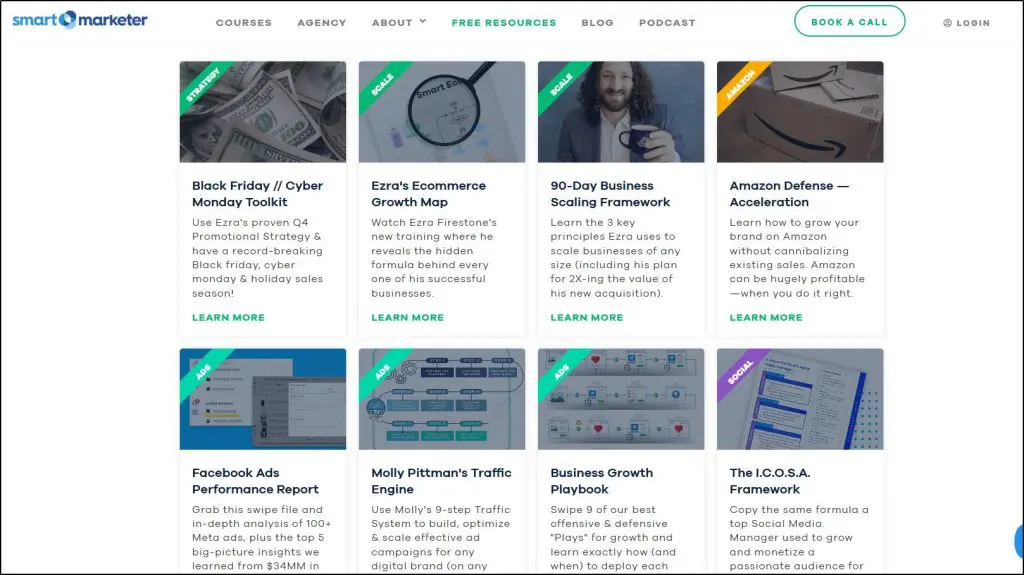
This distinction also highlights the difference in focus. Classic LMS platforms cater to internal employee training, while modern LMSs are built to help edupreneurs and businesses attract and engage external audiences effectively.
2. Content Creation
At the heart of any LMS is its ability to let you create and structure your course content. Depending on your training goals, you can design courses with multiple modules, lessons, quizzes, and assignments.
Most LMS platforms support various content formats, including text, videos, audio, PDFs, and even SCORM or xAPI-compliant files.
For instance, if you’re a corporate trainer, you can create a structured onboarding course with instructional videos, downloadable guides, and quizzes to test comprehension.
An academic institution might build semester-long courses with graded assignments and interactive content.
Modern LMS platforms like LearnDash, LifterLMS, and Thinkific streamline the process with intuitive drag-and-drop interfaces.
For example, here’s a screenshot from the content creator inside Lifter LMS.
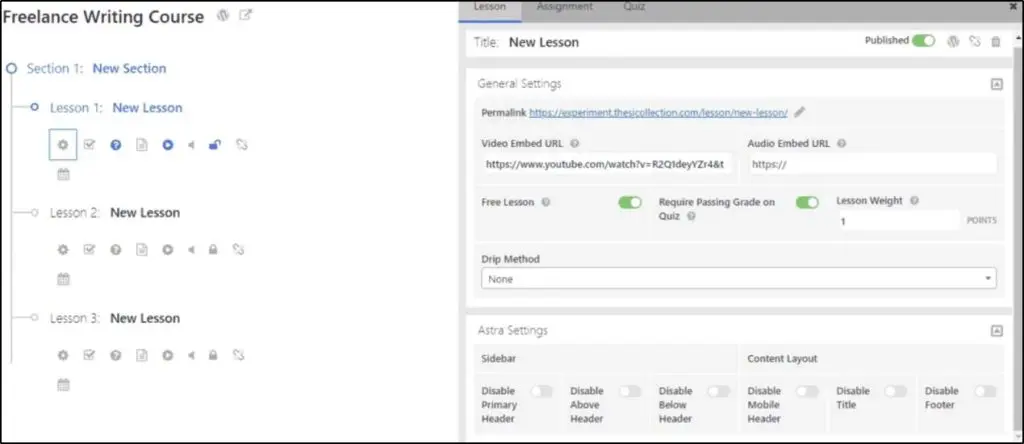
This feature allows you to visually design your courses by simply dragging elements into place, saving time and making course creation accessible even for non-technical users.
Additionally, many LMS platforms offer version control and easy updating, so learners always access the most current information.
The quality and usability of these features play a critical role in shaping the overall user experience of an LMS. When features are intuitive, well-integrated, and user-friendly, they make the platform easy to navigate for both admins and learners.
3. Learner Management
Learner management features enable you to organize and monitor your learners effectively.
Whether you’re onboarding new users, segmenting your audience, or tracking progress, this functionality ensures that everything runs smoothly.
Admins can create user profiles, assign learners to specific courses, and group them by teams, departments, or skill levels. For example, a corporate trainer might group employees into beginner, intermediate, and advanced categories based on their expertise, allowing for tailored learning paths.
Additionally, learner management tools allow you to track engagement and performance. You can monitor who has completed which courses, their test scores, and even the time spent on lessons.
For larger organizations, advanced reporting features enable you to extract insights across different learners or teams, helping you measure the effectiveness of your training programs.
For example, platforms like LearnWorlds and Moodle provide dashboards that visually represent learner data, making it easy to identify trends and adjust strategies accordingly.
This is particularly valuable for ensuring compliance training deadlines are met or identifying high performers for leadership roles.
4. Learner Engagement
Keeping learners engaged is critical for the success of any training program, and modern LMS platforms are packed with features designed to make learning interactive and rewarding.
One of the most common tools is gamification, where elements like badges, points, and leaderboards motivate learners to complete their courses. For example, platforms like TalentLMS allow you to set milestones and reward learners with certifications or badges as they progress.
Quizzes and interactive assessments are other key features that enable learners to actively participate in their training.
You can include multiple-choice questions, drag-and-drop exercises, or scenario-based questions to make lessons more dynamic.
Modern LMS platforms also include discussion forums and live chat to foster collaboration. Learners can interact with instructors or peers, ask questions, and share ideas, creating a community-like feel.
5. Analytics & Reporting
One of the most valuable aspects of an LMS is its ability to provide detailed reporting and analytics. These tools give you insights into how your learners are engaging with your courses and how effective your training programs are.
For example, platforms like Docebo and SAP Litmos allow you to generate reports that show course completion rates, quiz scores, time spent on modules, and user engagement trends.
This data helps you measure the ROI of your training initiatives and identify areas for improvement.
Customizable dashboards give you a bird’s-eye view of your program’s performance. For instance, you can track how many employees have completed mandatory compliance training or how a specific department is progressing through a skill development program.
How To Choose the Best Learning Management System For Your Business
I’ve walked you through the purpose, benefits, use cases, and key functionalities of LMS platforms. Now, let’s focus on how to pick the best LMS for your business.
Whether you’re an edupreneur selling online courses or a company training employees, these steps will help you find the perfect fit.
Step 1: Consider Your Business Goals
Why are you considering an LMS? Is it to sell courses to the public, enhance employee skills, or train partners and clients? Clarify your primary objective upfront, as it influences your platform choices.
For instance, if you want to sell courses, prioritize features like eCommerce tools, landing pages, and marketing automation. Platforms like Kajabi or Thinkific might suit your needs.
If your goal is internal training, look for robust tracking, reporting, and compliance tools offered by systems like Absorb LMS or Docebo.
Think long-term. Should the LMS scale with your business or serve short-term goals? By aligning your needs with your business goals, you’ll narrow your options effectively and avoid wasting time on mismatched platforms.
Step 2: Finalize The Features You Need
What kind of learning experience do you want to provide? Is it an engaging environment with gamification and interactive activities, or a formal setup where employees can learn at their own pace without deadlines or certification requirements?
Your vision will shape the features you need in an LMS. To simplify your decision-making, create a feature wishlist. Divide it into “must-have” features like tracking progress or reporting and “nice-to-have” features like gamification or advanced analytics.
This clear prioritization will help you compare LMS platforms and choose the one that aligns with your goals and provides the best learning experience for your users.
Step 3: Analyze Customer Reviews
Now that you’ve outlined your LMS needs and shortlisted some options, dive into customer reviews to refine your choices. Start with trusted platforms like Capterra, G2, and TrustPilot.
But don’t just glance at the average star ratings, they can be misleading. Research shows that dissatisfied users are more likely to leave reviews, so ratings often skew negative. Instead, focus on recurring patterns in the reviews. If multiple users flag the same issue, like poor customer support or a confusing interface, it’s probably a genuine problem.
Pay extra attention to reviews about the features you consider “must-have.” If a feature critical to your business goals consistently gets criticized, it’s a red flag.
For deeper insights, look for reviews from technical experts on blogs or platforms like Reddit and Quora, where users often share honest, firsthand experiences.
Don’t skip this step because spending time here ensures you avoid tools that might cause frustration later.
Step 4: Check Third-Party Integration
Make sure the LMS you choose integrates seamlessly with your existing tools and systems. This is crucial because your LMS should complement your current workflow.
For example, if you already use email marketing platforms, landing page builders, or project management tools, your LMS should sync with them. Integration allows you to automate tasks like email follow-ups for course progress or syncing learner data with your CRM.
If direct integration isn’t available, platforms like Zapier can help bridge the gap. But if neither is an option, that LMS might not be a good fit.
Remember, reinvesting in new software to accommodate an LMS can be costly and unnecessary. Prioritize tools that align well with your existing tech stack to save time and money.
Step 5. Lock Your Budget
Before you dive deeper into evaluating LMS platforms, establish a clear budget. Knowing how much you’re willing to spend upfront saves you from wasting time on platforms that don’t fit your financial capacity.
Consider the total cost of ownership, not just the subscription fee. Does the platform charge extra for additional users, advanced features, or integrations? Are there hidden costs like implementation fees, support upgrades, or training expenses?
For example, platforms like Docebo offer scalable plans but may cost more as your organization grows. On the other hand, smaller solutions like TalentLMS provide affordable pricing for startups and small businesses.
Think about long-term affordability too. If your LMS needs to grow with your business, opt for pricing models that remain sustainable as you scale.
Step 6. Evaluate Customer Support Standards
No matter how feature-rich an LMS platform is, poor customer support can turn it into a frustrating experience. Before finalizing your choice, thoroughly evaluate the level of support the platform provides.
Check if the LMS offers 24/7 support or has limited hours that may not align with your working schedule. Is support available via multiple channels, like live chat, email, or phone?
Look for platforms that provide a dedicated account manager for smoother onboarding and faster issue resolution.
Don’t skip reviewing their knowledge base, tutorials, or community forums. A comprehensive support library can save you time when troubleshooting common issues.
Step 7. Request A Demo
Before making a final decision, always request a demo of the LMS platform. This is your chance to see the software in action and determine if it meets your needs.
During the demo, test the key features that are on your must-have list. For example, if you need robust analytics or gamification options, ask the demo team to walk you through those specific functionalities. Take note of how intuitive the interface feels—both for you as an admin and for learners.
Involve your team during the demo. If IT, HR, or marketing will use the LMS, get their feedback. A second set of eyes can highlight potential issues or opportunities you might miss.
Ask questions about setup time, scalability, and any hidden fees. Some LMS platforms, like Absorb LMS, offer detailed demos tailored to specific business needs, which can give you a clear picture of how the platform integrates into your operations.
Ready To Choose The Best Learning Management System For Your Business?
Whether you’re a solo edupreneur or a growing organization, your LMS will define the learning experience, which directly affects satisfaction, retention, and outcomes.
Even the best courses can fall flat on a poorly designed LMS. On the other hand, a user-friendly and engaging platform can elevate your content and keep learners coming back for more.
Take the time to evaluate your options and weigh the factors we’ve covered in this guide. From defining your goals to testing the platform with a demo, every step plays a critical role in making the right choice.
For more specific advice and tools to simplify your decision-making process, download our Platform Selection Guide and take the first step toward delivering a seamless learning experience.
Frequently Asked Questions (FAQs)
1. Do I need an LMS if I’m only training a small team?
Yes. Even small teams benefit from an LMS by organizing training, tracking progress, and ensuring consistency, especially if you’re planning to grow.
2. Can I migrate from one LMS to another later?
It depends on the platform. Some support content export via SCORM/xAPI, while others may require manual migration or third-party tools.
3. What’s the difference between SCORM, xAPI, and CMI5?
These are technical standards that ensure your course content works across different LMSs. SCORM is the most widely supported, while xAPI and CMI5 offer more advanced tracking.
4. Is it possible to white-label an LMS with my branding?
Yes, many LMS platforms offer white-label options so you can customize logos, colors, and domains to match your brand.
5. Can an LMS be used for in-person or blended learning programs?
Absolutely. Many LMSs support blended learning by combining online modules with live sessions, workshops, or classroom activities.
6. How secure is learner data in most LMS platforms?
Reputable LMS providers follow industry-standard data security protocols (e.g., SSL encryption, GDPR compliance), but always confirm before choosing.
7. What kind of content can I upload into an LMS?
Most LMS platforms support videos, PDFs, audio files, quizzes, SCORM packages, and HTML content. Some also support interactive tools like H5P.
8. How do LMS pricing models usually work?
Pricing varies—some charge per user, some offer flat monthly fees, and others use tiered plans based on features or usage.
9. Can I use an LMS on mobile devices?
Yes, many modern LMS platforms are mobile-friendly or offer native apps for learners to access content on the go.
10. How long does it take to implement an LMS?
It ranges from a few hours (for simple setups) to several weeks (for enterprise deployments with complex integrations or content migration).
Table of Contents
Related Posts
Skool vs Whop (2026): I’ve Used Both (Comparison & Verdict)
YouTube Earnings Calculator (2026): Check Your Channel Income (Updated RPM)
Satori Review (2026): I’ve Used It For Coaching (It Has Limitations)