

TL;DR: What Is a Teachable Membership Site and Is It Right for You?
Teachable lets you create a membership site where users pay monthly or yearly to access your courses, community, coaching, and digital downloads. You can bundle products into tiered memberships with different pricing, access levels, and even offer free trials.
You can start memberships like:
– Offer courses + memberships as bundled subscriptions
– Offer a standalone membership with community access and downloadable resources
– Run coaching-based memberships with live sessions and replays
– Build a content vault or insider club with regular content drops
Teachable Membership Pricing
– Starts at $29/month (Starter plan – includes 1 product & 7.5% transaction fee).
As you grow, scale to the higher-paid plans.
Best for:
– Course-first creators who want to add memberships without switching platforms
– Coaches or educators offering structured content + live sessions.
– Small teams or solo entrepreneurs who want simple membership management without plugins or third-party tools.
No Ideal For:
– Site owners needing gamification, advanced drip logic, badges, or detailed member progress tracking.
– Communities that rely heavily on real-time chat, advanced segmentation, or 3rd-party community tools (like Circle)
– Large-scale publishers needing enterprise-level membership tools or bulk member management.
In short, Teachable is great if you want a simple, course-focused membership model with built-in content delivery, payment, and community tools. But if you need advanced gamification, LMS-level reporting, or deep community features, you may want to explore platforms like Mighty Networks, Podia, or Circle + a course platform.
Try Teacchable Memberships For Free
Teachable is a popular platform that makes it easy to launch and manage a membership site, offering robust tools for content creation, payment processing, and community engagement.
Whether you’re an educator, coach, or content creator, Teachable allows you to monetize your expertise by offering subscription-based access to your courses and resources.
In this guide, we’ll walk you through the steps to set up your own membership site on Teachable, from planning and setup to marketing and retention strategies. But first, the basics.

What is a Teachable Membership Site?

A membership site is a type of online platform where users pay a recurring fee to access exclusive content, resources, and a community of like-minded individuals. This content can vary widely, including video courses, articles, downloadable resources, live webinars, forums, and more.
Membership sites often operate on a subscription model, with users paying weekly, monthly, or yearly fees to maintain access.
Learn more about our top membership platform picks here.
How Membership Sites Differ from Regular Courses
While both membership sites and regular courses offer educational content, they differ significantly in structure and approach. Here are a few ways membership websites are different from regular courses.
- Content Access: Regular courses are typically one-time purchases where students pay for a defined set of content. In contrast, membership sites provide ongoing access to content that is regularly updated or expanded upon.
- Revenue Model: Courses usually involve a one-time fee, whereas membership sites operate on a subscription basis, leading to a more predictable and continuous revenue stream.
- Community Engagement: Membership websites often emphasize community engagement, offering features like discussion forums, group coaching sessions, or live events. This creates a more interactive and supportive environment compared to standalone courses.
- Content Delivery: With courses, the content is often delivered in a linear, structured way. Membership sites can offer more flexibility, with content delivered at intervals, available on demand, or unlocked as members progress.
Overall, a membership site can be a dynamic and lucrative addition to your online business strategy, providing ongoing value to your members and a sustainable income stream for you.
Key Benefits of Having a Teachable Membership Site
As previously stated, membership sites offer an advantage over one-time course sales because they provide a reliable, recurring revenue stream. Members continue to pay as long as they find value, making it easier to predict and stabilize your income.
Other key benefits include the following:
- Community Building: Membership sites foster a sense of community and belonging among members. This can lead to increased engagement, as members interact with each other, share experiences, and provide feedback. It also allows you to build a loyal audience that feels connected to your brand.
- High Perceived Value: By offering ongoing access to exclusive content, tools, and support, you increase the perceived value of your offerings. This can justify higher subscription prices and encourage members to stay subscribed.
- Scalability: Once your Teachable membership site is set up, scaling it becomes easier. You can continue to add content, attract new members, and offer higher-tier memberships without significantly increasing your workload.
What is the Learner Experience Like on Teachable?
Learners can view membership tier options on your Membership sales page, where they can choose between free, monthly, and yearly plans and select the tier that best suits their needs.
After purchasing a tier, learners can access all included products through the “My Membership” page in their account. They can browse your members-only content by section and click on any available product. Learners can also manage their subscriptions anytime from their profile.
Pro Tip: You can see how your membership site content appears to learners by navigating to the membership tier and clicking “Preview as a student.”
Core Features of Teachable’s Membership Sites
Here are some of the most prominent features on Teachable that will help you launch and manage a successful membership site.
1. Ease of Use
When it comes to creating and managing memberships, Teachable makes the entire process extremely easy.
The dashboard is simple to navigate and there are prompts to help you through any process you choose. For instance, with just a few clicks, you can bundle your online course, community, coaching, and digital downloads into tiered pricing levels.
This setup lets you control product access according to a learner’s tier plan. Each tier can be uniquely tailored in terms of pricing and included content.
Here are the simple steps to creating a membership tier:
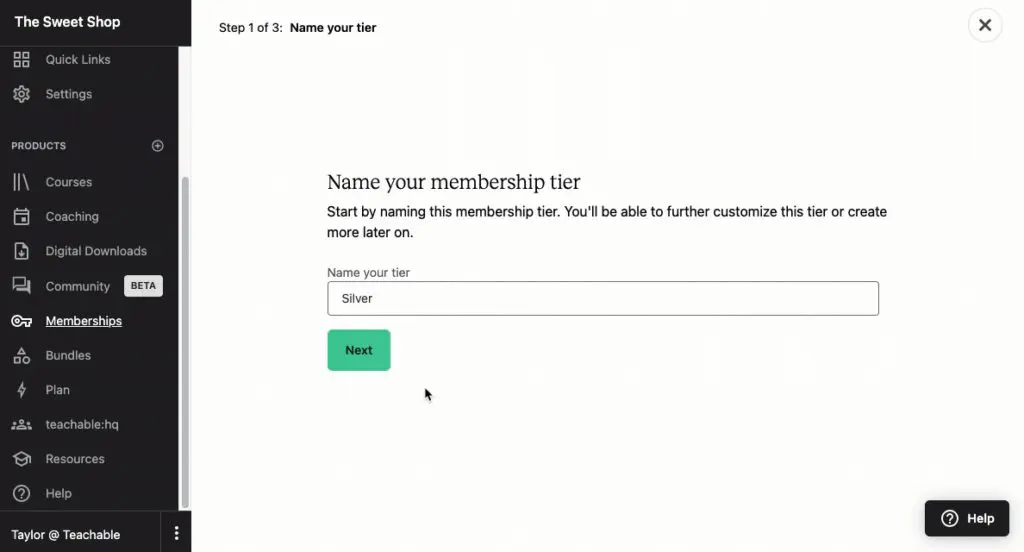
Go to the “Memberships” tab in the left-hand admin panel of your school, then click on Create a Membership Tier.
In the “Name” field, input the desired tier name, and click “Next”.
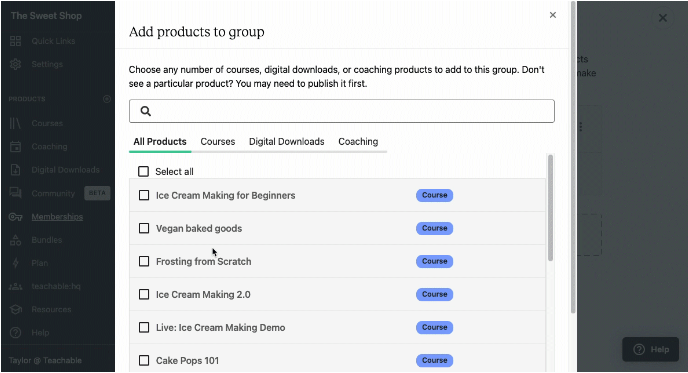
Use the “Sections” to add and organize your published products within the tier. After adding products, click “Next”.
Set the tier price by selecting the currency from the dropdown menu. You can also choose to set a monthly and/or yearly price for your online space. To offer the membership for free, select the “Offer for free” option. Click “Next”.

Once the tier is set up, you can continue editing and publishing or return to the Membership page.
If your school is on the Pro plan or higher, you can add more tiers to your membership to provide extra levels of access to products and services. Simply navigate to the Membership page and select “Create a new tier”. As you can see, this offers you a lot more flexibility than a simple private Facebook group.
2. Seamless Management of Membership Tiers
On your Membership dashboard, you can manage each membership tier separately. Each tier can have its own distinct pricing, content access, and settings. To update a tier, simply click the “Edit” button. If you need additional assistance, you can click the “Help” button located on the bottom right-hand side of the page. Once you’re satisfied with the results, click “Publish”.
You can easily manage product access from your dashboard.
After creating and publishing a tier, all learners enrolled in that tier will have access to the products included within it. You can modify their access at any time by adding or removing products from both new and existing sections.
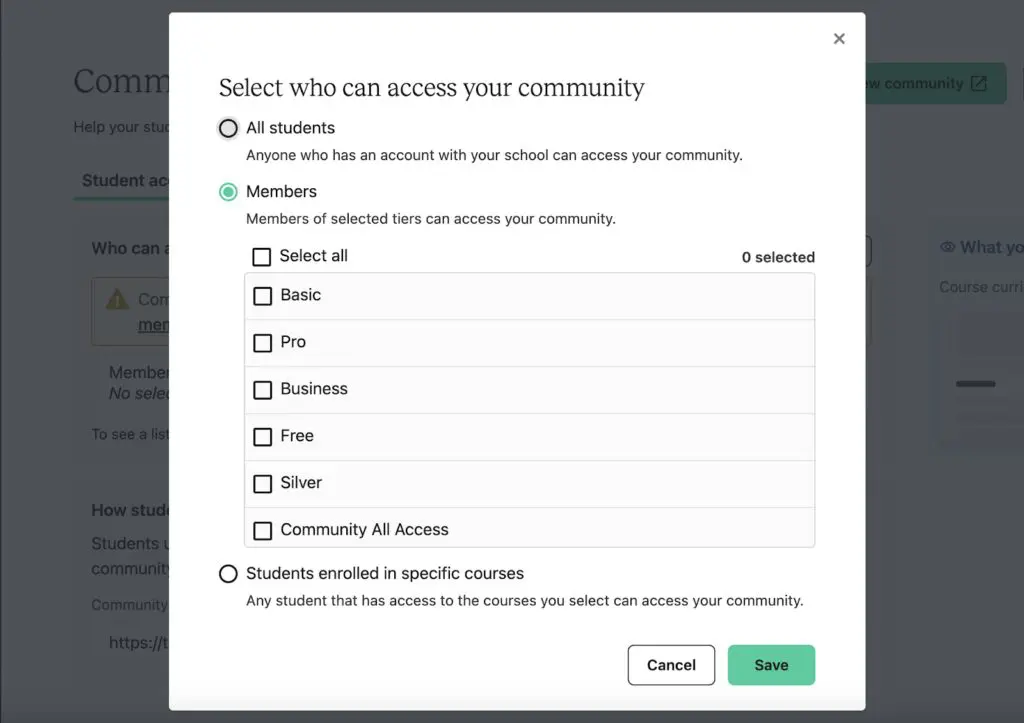
You can make quick pricing adjustments.
You can adjust a tier’s pricing at any time using the “Pricing” tab. You can create a free tier, or set prices on a monthly or annual basis. Additionally, you can offer a tier as a free trial, with options for 7, 14, 30, or 90 days. The trial period starts when a student enrolls.
Just keep in mind that pricing changes apply only to new members; existing members will retain their original price.
3. Conversion-Optimized Sales Page
Teachable’s membership sites come with a customizable membership sales page that you can alter to match your brand using the simple page editor blocks.
The membership pricing block will automatically show all published and visible tiers, making it easy for you to keep track of your content and offers.
4. Detailed Membership Settings
In the membership dashboard, use the “Settings” tab at the top of the page to modify various settings. Here are some of the things you can do:
- Change the name of your membership product
- Add an optional subtitle
- Upload a product image
You can also adjust the Visibility settings to control whether your Membership product appears on the “All Products” page.
Teachable Memberships Pricing Plan
Teachable Memberships are built into the core Teachable platform, no need for plugins or add-ons. To use memberships, you’ll need to be on one of their paid plans (Starter or higher).
There’s no free plan but all paid plans come with a 14 day trial.
Starter – $29/month
Great for testing your first membership with basic tools and 1 published product (7.5% transaction fee).
Builder – $69/month
Ideal for serious creators who want 0% transaction fees and the ability to offer up to 5 published products and full memberships.
Growth – $139/month
Best for growing businesses offering multiple memberships, with white labeling, admin roles, and up to 25 published products.
Advanced – $309/month
Designed for high-volume businesses with 100+ products, advanced admin controls, and unlimited integrations.
You can learn more about pricing in my detailed Teachable Pricing article.
Should You Create a Membership Site on Teachable?
A membership business model is ideal for creators and entrepreneurs seeking to generate recurring revenue with the potential for limitless growth.
It’s also perfect for those who want to build and engage with a community, fostering customer loyalty, trust, and superfans.
This model works across various niches and industries and suits different types of content, from educational to entertaining.

While many industries can benefit, it’s particularly effective in industries where long-term commitment drives results, such as wellness, fitness, or talent-focused membership sites.
It’s also a great fit for education, such as business coaching or language learning, as it aligns with the continuous nature of teaching and learning.
Are Teachable Memberships Sites Good Enough?
In conclusion, setting up a membership site on Teachable offers a fantastic opportunity to generate recurring revenue while building a dedicated community around your online courses.
By leveraging Teachable’s features, such as tiered pricing and exclusive communities, you can create a robust membership experience that engages and retains your audience.
Whether you’re sharing insider knowledge, fostering a supportive community, or offering valuable bonus content, a well-structured membership site can significantly enhance your business and provide ongoing value to your members.
If you’re ready to unlock the potential for sustained growth and success in your knowledge business, sign up for a free trial on Teachable to start planning your membership site today!
Frequently Asked Questions (FAQs)
Can I offer both a course and membership on Teachable?
Yes. You can sell one-time courses and recurring memberships side-by-side using Teachable’s product bundling options.
How do I pause or cancel a learner’s membership?
You can cancel or manage subscriptions from your admin dashboard under the student’s profile.
Does Teachable support drip content for memberships?
Yes. You can drip content by scheduling when specific lessons or modules become available.
Can I offer discounts or coupons for memberships?
Yes. Teachable allows custom coupons for any tier or product, including memberships.
Are Teachable memberships mobile-friendly?
Yes. Members can access content and communities via mobile devices and browsers.
What happens if a member fails a payment?
Teachable automatically retries failed payments and sends reminders. You can also manually cancel or reactivate access.
Can I integrate Teachable memberships with an external community like Circle or Slack?
Yes, via integrations or Zapier, but Teachable also includes its own built-in community feature.
Can I migrate members from another platform to Teachable?
Yes. You can manually import users or use Teachable’s API and tools for migration.
Is there an email automation feature built into Teachable for memberships?
Yes, Teachable offers event-based email automation to onboard, nurture, or re-engage members.
Can I view analytics or churn data for my membership site?
Yes. Teachable provides insights into enrollments, revenue, churn, and more via your dashboard.
See Also:
- 19+ Membership Site Examples Worth Emulating
- 15 Ways to Promote a Membership Site
- Membership Site Pricing Strategy | Everything You Need To Know
Table of Contents
Related Posts
Teachable vs Thinkific (2026) | Detailed Comparison (Why Thinkific Wins)
Teachable Review (2026) | I Was a Fan For Years, Not Anymore
Teachable Pricing (2026): Use Fee Calculator To Find Hidden Costs