

TL;DR: Is Teachable Worth Using?
Teachable is a solid platform for selling online courses, coaching, and digital downloads. But it’s fallen behind in marketing tools, retired its free plan, and its Starter plan has high transaction fees. It’s only worth using if you already have a marketing stack and just want a simple delivery system for courses or coaching.
Free Trial & Pricing (2026)
Teachable does not offer a free plan anymore. However, you can start with a 7-day free trial on any paid plan.
Paid Plan (billed annually)
Starter – $29/month (7.5% transaction fee), 1 published product, basic tools
Builder – $69/month (0% fee), 5 published products, email marketing, affiliate program
Growth – $139/month, 25 products, white-label branding, student translation tools
Advanced – $309/month, 100+ products, unlimited integrations, API, webhooks
Standard payment processing fees apply (e.g., 2.9% + $0.30 per US card transaction).
Top Features of Teachable
– Create and sell courses, coaching programs, and digital downloads
– Student engagement tools like quizzes, certificates, and course compliance
– Built-in community and comments for interaction and peer support
– Flexible payments with subscriptions, upsells, and Buy Now, Pay Later
– Basic analytics to track student progress and revenue performance
When you should use Teachable: Only if you already have marketing tools in place and need a simple system to deliver courses, coaching, memberships, or a community.
When you shouldn’t use Teachable: In most cases, Teachable isn’t worth it for coaches or digital product sellers who also need robust built-in marketing tools.
Try Teachable For Free
Better Alternative: Thinkific — It offers stronger marketing tools, better automation, and no transaction fees, even on the lower plans.
Teachable has been one of the top online course and coaching platforms since 2014, helping creators earn over $2 billion to date.
But with the online course space evolving rapidly, has Teachable kept up and is it still worth using today? What exactly does it offer, and who is it best suited for?
I’ve been a Teachable user from the early days, and I’ve seen its highs, lows, and everything in between.
In this updated review, I’ll give you my honest take on where Teachable shines, where it falls short, and when you should (or shouldn’t) choose it.
And if you want to see how Teachable measures up, learn more about other top picks for best online course platforms.
Teachable Product Snapshot (2026): What Does It Offer?
Before diving deeper, let me show you what Teachable can do for you.
| Feature / Product | What It Offers |
|---|---|
| Online Courses | No-code builder, AI outline generator, quizzes, certificates, drip content |
| Coaching | 1:1 scheduling, milestones, intake forms, customizable pages |
| Digital Downloads | Sell PDFs, templates, audio/video files, spreadsheets; ideal for quick offer creation |
| Memberships | Subscription tiers, gated content, free trials, bundled content |
| Communities | Interactive discussion spaces linked to course content |
| AI Tools | Outline generator, quiz builder, subtitle & translation automation |
| Free Plan or Trial | No free plan anymore but it offers a 7-day trial and a 30-day money back guarantee. |
| Starting Price | $29/month Starter Plan (with 7.5% transaction fee) on annual billing |

What Is Teachable?
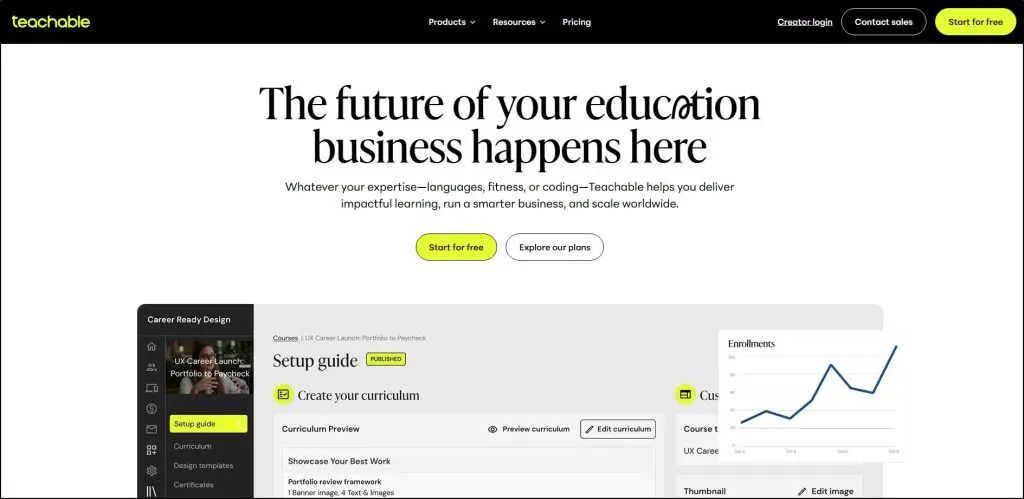
Teachable is a platform that lets you sell online courses, coaching sessions, digital downloads, memberships, and communities, all from one dashboard.
It’s built for creators, coaches, and entrepreneurs who want to turn their knowledge into a real, income-generating business without needing a web developer or stitching together multiple tools.
Here’s exactly what Teachable lets you do:
- Create Online Courses: Build full courses using a no-code drag-and-drop builder, add video, quizzes, text, and files, and deliver content via drip schedules or full access.
- Offer Coaching Programs: Set up one-on-one or group coaching with appointment scheduling, milestone tracking, intake forms, and custom pages.
- Sell Digital Downloads: Upload and sell PDFs, templates, audio files, or video assets as standalone products or bundled with courses.
- Launch Memberships: Create subscription-based offers with gated content, free trials, tiered pricing, and recurring payments.
- Host Online Communities: Add dedicated community spaces to your school where students can post, reply, and engage around specific products or topics.
- Use AI-Powered Tools: Instantly generate course outlines, quizzes, and subtitle translations to speed up course creation and make content more accessible.
- Accept Global Payments
Built-in checkout system with Teachable:Pay handles sales tax (VAT, GST, US sales tax), manages payouts, and supports PayPal, Apple Pay, and credit cards. - Boost Sales with Marketing Tools: Add coupons, order bumps, and upsells; send automated abandoned cart emails; and run affiliate programs to drive more revenue.
- Track Everything with Analytics: Access dashboards to see course completion rates, student progress, sales reports, and video engagement heatmaps (on higher plans).
- Customize Your School: Add your branding, custom domain, and even white-label your site on advanced plans—no coding needed.
Teachable gives you everything you need to sell courses, coaching, and digital products—without overwhelming you. Unlike Kajabi or Thinkific, it doesn’t try to be an all-in-one marketing machine or advanced LMS.
Instead, Teachable focuses on being the most user-friendly and accessible platform for non-technical creators and coaches.
You get clean, focused tools for selling, engaging, and growing without needing third-party tools or complicated setups.
Teachable Pricing (2026) | Is It Still Free?
Teachable retired its popular free plan in early 2025. Now, every paid plan comes with a 7-day free trial, giving you full access to test the platform before committing.
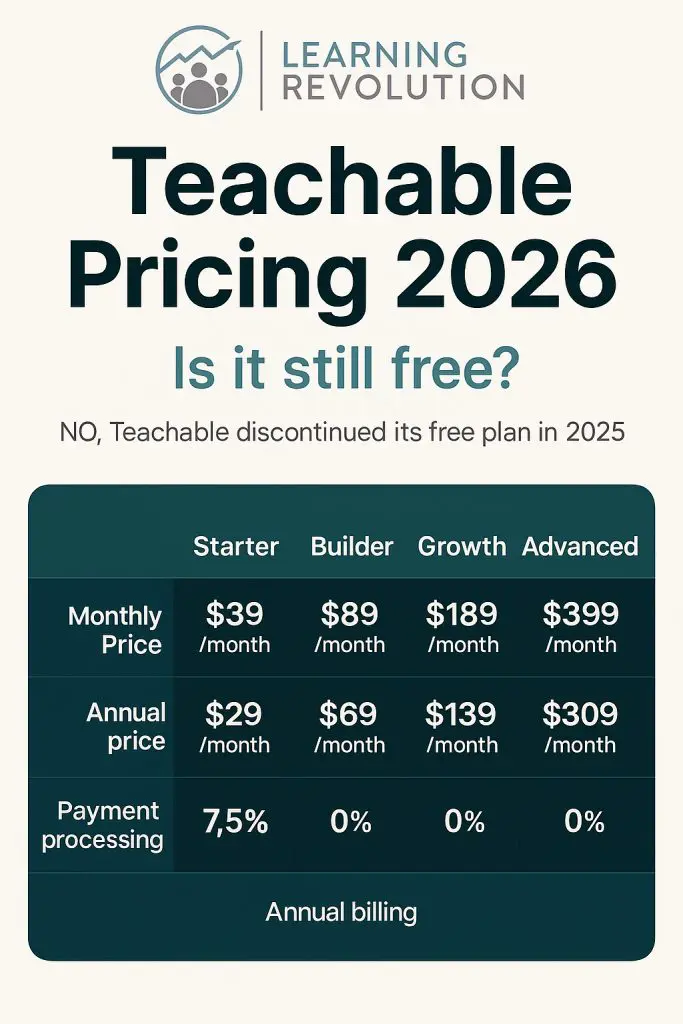
You can choose between monthly or discounted annual billing.
Teachable Plans:
- Starter – $39/month: Best for launching your first course with core features and a 7.5% transaction fee.
- Builder – $89/month: Great for creators ready to grow, with 0% fees, more product slots, and affiliate tools.
- Growth – $189/month: Ideal for scaling businesses needing AI tools, branding control, and advanced analytics.
- Advanced – $399/month: Built for large teams and high-volume creators who need maximum flexibility and support.
Teachable Pricing Comparison Table
Let’s dive deeper into what these pricing plans offer.
| Plan | Starter | Builder | Growth | Advanced |
|---|---|---|---|---|
| Monthly Price | $39/month | $89/month | $189/month | $399/month |
| Annual Price | $29/month | $69/month | $139/month | $309/month |
| Transaction Fees | 7.5% | 0% | 0% | 0% |
| Published Products | 1 (unlimited drafts) | 5 (unlimited drafts) | 25 (unlimited drafts) | 100 (unlimited drafts) |
| Student Limit | 100 | 1,000 | Unlimited | Unlimited |
| Bundles & Memberships | Included | Included | Included | Included |
| Communities | Included (unlimited) | Included (unlimited) | Included (unlimited) | Included (unlimited) |
| Affiliate Program | No | Yes | Yes | Yes |
| AI Tools (Captions, Quizzes) | Pay-per-use | Pay-per-use | Unlimited use | Unlimited use |
| Custom Branding | No | Limited | Full | Full |
| Email Marketing | No | Yes (basic campaigns) | Yes (enhanced) | Yes (enhanced + full control) |
| Analytics & Reporting | Basic | Standard | Advanced | Advanced + API |
| Support | Email only | Email + Live Chat | Priority Support | Dedicated Manager |
All plans also include:
- Unlimited draft products
- Unlimited bundles and community spaces
- Student progress tracking, certificates, quizzes, and course compliance tools
- iOS and Android student app access
- Global payment processing with Teachable:Pay
- Built-in tax handling (US sales tax, VAT, GST)
Read our detailed Thinkific vs. Teachable comparison
Teachable Features: Designed To Empower E-learning Professionals
I often recommend Teachable to professionals and experts who have very little technical knowledge. Because this is where Teachable really shines.
It’s for the purists.
It doesn’t try to be everything. It’s not a full-stack funnel builder. It’s not trying to replace your email tool or CRM.
It is a solid learning platform built for people who want to teach, share, and sell their expertise without getting lost in tech.
So as you go through its features, don’t expect bells and whistles. Expect clarity, simplicity, and everything you need to build and grow a course-based business.
All the features we’re about to discuss, reside in your Teachable School.
What is Teachable School?
On Teachable, everything starts with your School. This is your branded hub where all your learning products live.
Inside a single school, you can create and sell multiple products, including:
- Online courses (with structured lessons and quizzes)
- Coaching programs (for 1:1 or group sessions)
- Digital downloads (like PDFs, templates, or guides)
- Memberships (bundled access to multiple products with recurring billing)
You manage everything, including sales, content, students, and analytics from one clean dashboard. Your school has its own custom domain, branded design, and unified student experience.
Find out the best Teachable alternatives
Feature #1: Online Course
Teachable lets you structure courses with sections and lessons using video, audio, PDFs, and text. You can drip content, set course compliance rules, and track student progress.
You can also add graded quizzes, downloads, and completion certificates to boost engagement. Live sessions aren’t native but can be embedded from Zoom, YouTube, or Vimeo.
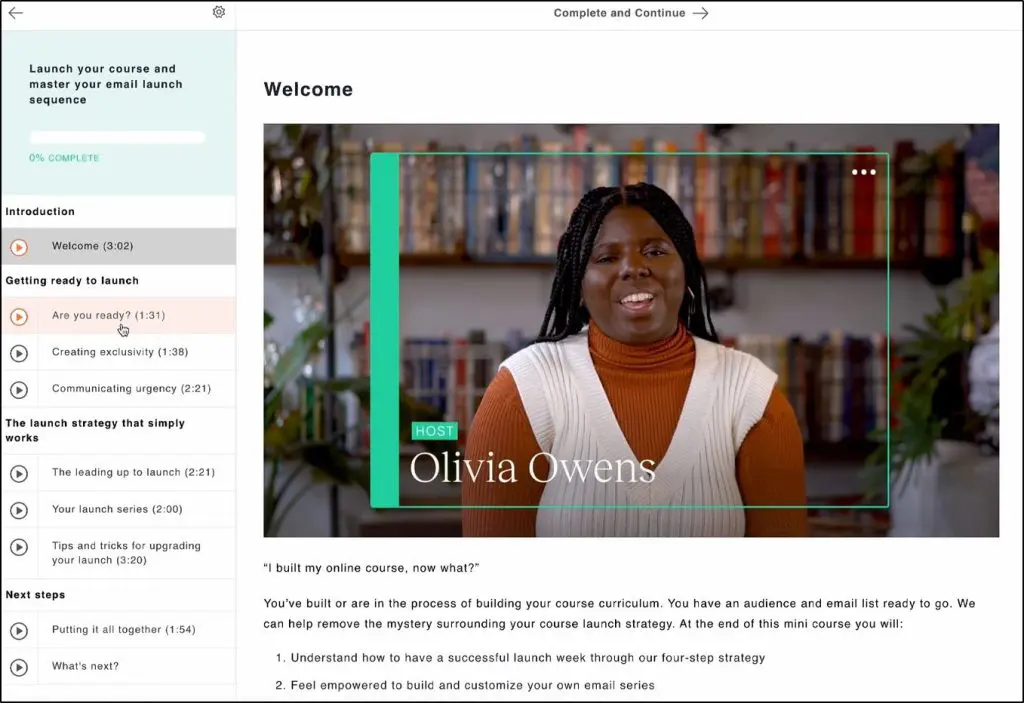
Students can access content on a desktop or via Teachable’s mobile app with offline viewing. The drag-and-drop builder makes organizing your course simple, while built-in AI tools help draft outlines, generate subtitles, and translate lessons, saving you hours of manual work.
It’s all pretty straightforward and designed perfectly to help you launch your first course.
Feature #2: Online Coaching
Just like courses, coaching is a standalone product type inside your Teachable school and it’s one of the areas where Teachable truly shines.
If you’re a consultant, trainer, or coach who sells 1:1 or group sessions, this feature gives you a dedicated space to structure and manage your coaching business without needing third-party tools.

Here’s what you get:
- Milestone-based coaching plans with scheduled tasks and meeting links
- Client messaging and file sharing right inside Teachable
- Custom intake forms to qualify and onboard the right clients
- Integrated calendar scheduling for Zoom and other meeting tools
- Drag-and-drop sales page builder to promote your coaching services
- Upsells and order bumps to increase your average client value
- Built-in payments and tax handling with Teachable:Pay
This is ideal if you want a lightweight, easy-to-manage coaching system tied directly into your course or digital product ecosystem.
Feature #3: Memberships
Teachable lets you create membership tiers that give students ongoing access to exclusive content, product bundles, or coaching, all under one subscription.
Set monthly or annual pricing, offer free trials, and deliver fresh content regularly to increase engagement and retention.
Members get a dedicated dashboard to manage their plan, and you get built-in tools for upsells, abandoned cart recovery, and global payments.
It’s a great way to boost lifetime value without constantly chasing new customers.
Feature #4: Online Community
Teachable’s community feature gives your students a place to talk to each other and to you, without leaving your course platform. No Facebook groups. No Slack. It’s all right there inside your school.
Your community is not tied to individual courses. That means it’s a central space where all your students across any product can come together.
You can create multiple spaces within that community to organize conversations by topic, course, level, or anything else that makes sense for your business.
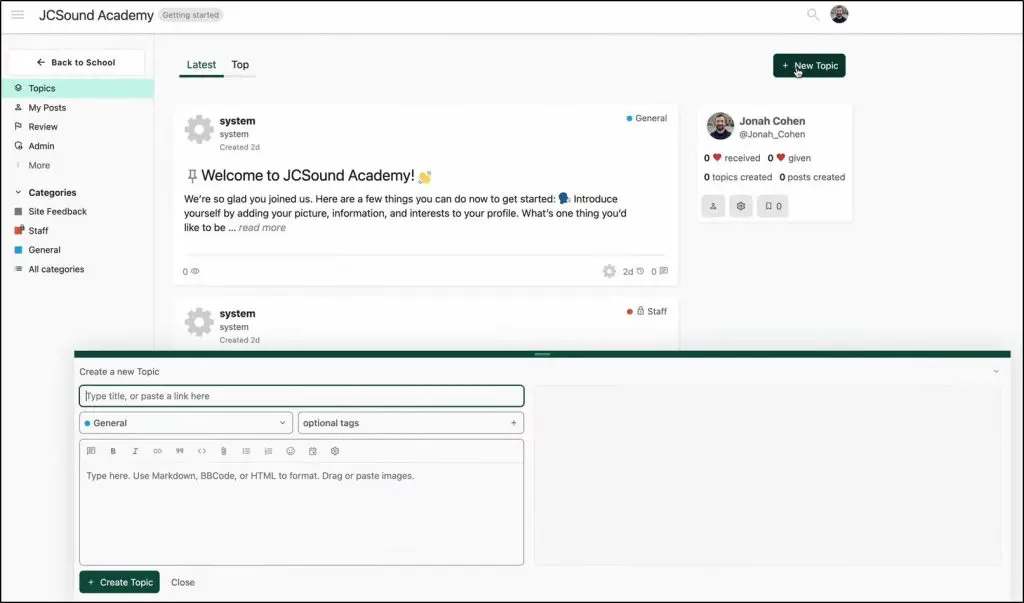
For example, you might create a space for general Q&A, one for advanced students, and another just for peer feedback. You can control who sees what, so someone enrolled in Course A doesn’t have to see discussions from Course B unless you want them to.
You also sell access to your community as a standalone product. Some creators run paid mastermind groups or private discussion groups using just this feature. It works well because it’s built into the same system as your courses, coaching, and memberships, so your students don’t need a separate login or platform to stay engaged.
Now that AI tools are everywhere and content is easy to find, what really sets you apart is you. The human connection. The personal touch. That’s what people pay for.
It makes your course sticky. And that’s good for both impact and business.
Feature #5: Digital Downloads
Digital downloads are standalone files, templates, PDFs, audio, spreadsheets, or guides that you can sell on their own or alongside your courses. It’s perfect for content you’ve already created and want to monetize fast.
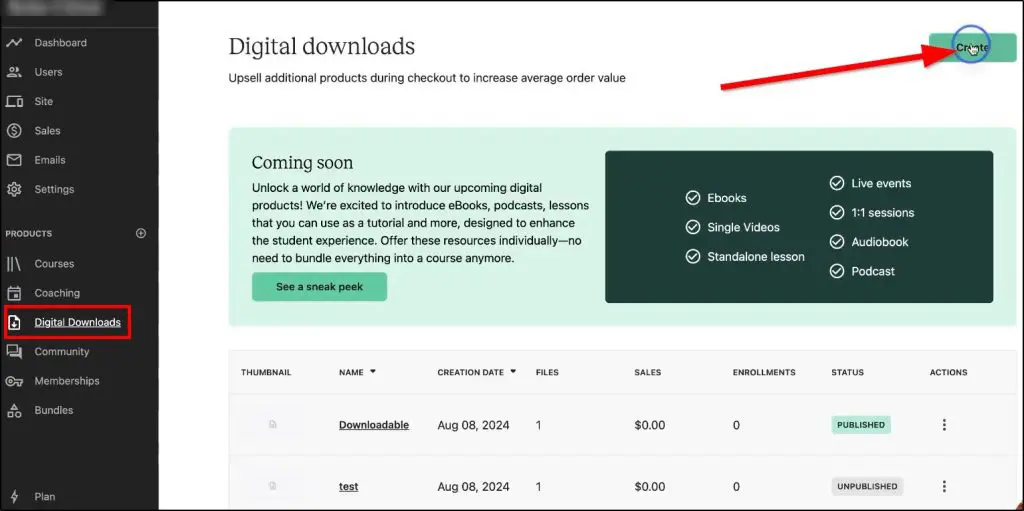
Teachable lets you upload files directly or link to external content like a Canva template or Google Sheet. You add a name, price, description, and thumbnail, and Teachable creates a clean product page with a “Buy Now” or “Download” button. Customers can purchase and access the file instantly.
You can use downloads as upsells, bundle them with your courses, or offer them free to grow your email list.
Feature #6: Instructor Tools
Teachable gives you a solid set of tools to teach like a pro—even if you’re not one yet. You can track student progress, see who’s falling behind, and follow up manually or through automated emails.
Need to assess understanding? You’ve got quizzes (auto-graded), short answer assessments, and course compliance tools like required video completion or passing a quiz before moving on.
Want to acknowledge progress? You can issue completion certificates, offer bonus content, or create milestones.
And if someone needs a push, you can lock lessons until certain steps are done or send reminders to help them stay on track.
Teachable doesn’t try to gamify everything, but it gives you just enough control to keep students engaged and accountable.
Feature #7: Student/Customer Tools
Teachable gives your students a clean, distraction-free experience where they can focus on learning, not figuring out how to use the platform.
Students can take your courses on a desktop or using Teacchable’s mobile app.
When a student logs in, they see everything they’re enrolled in. If they leave a lesson midway and return days later, they’ll pick up exactly where they left off, no starting over. Progress is tracked automatically.
There’s also course compliance to make sure students complete each step before moving on (like watching at least 90% of a video).
There’s no built-in note-taking, though. And students don’t get automated reminders if they go inactive, you’d have to use external email tools for that.
Feature #8: Website Builder
I get asked a lot about Teachable’s site builder. Can you really build a full website on Teachable, or is it just a landing page? The answer is: yes, you can build a real multi-page site, but it’s basic.
Teachable gives you a drag-and-drop page builder to create things like a homepage, about page, contact, and even individual sales pages for each course or product. It’s enough to get a clean, working site up without writing code.

You can use a custom domain, add some basic SEO, and collect leads with email forms. But don’t expect a blog or lots of flashy theme choices. Right now, Teachable offers just three main course page templates—Classic, Simple, and Colossal. They’re well-designed, mobile-friendly, and you can pick a different one for each course, but that’s it. No theme marketplace like WordPress. If you want deeper customization, you’ll need to tinker with code or use custom CSS.
So yes, you can build a simple, branded site with multiple pages on Teachable. But if blogging or design variety is important to you, you might want to pair it with an external site builder.
Feature #9: Sales & Marketing
This is where Teachable falls behind more advanced platforms like Thinkific or LearnWorlds. Its sales and marketing tools are designed for beginners, not for creators looking to scale with complex funnels or automation.
Still, you do get a few built-in tools that cover the essentials:
- Coupons – Create discount codes to drive urgency.
- Upsells & Order Bumps – Increase order value with one-click add-ons at checkout.
- Affiliate Program – Invite partners to promote your products and track their commissions.
- Bundles – Package multiple products into one offer.
- Lead Magnets – Offer free downloads in exchange for emails.
- Abandoned Cart Recovery – Send basic reminders to users who don’t complete checkout.
- Subscriptions – Charge recurring payments for ongoing access.
- Student Referrals – Let students invite friends with a personal link.
- SEO Controls & Tracking Pixels – Basic fields for page optimization and ad tracking.
That said, email marketing is where Teachable really shows its limits.
You can send:
- Broadcast emails to your entire list.
- Notifications tied to course progress (like welcome emails or completion messages).
But it doesn’t support:
- Automated email sequences.
- Segmentation based on behavior or purchases.
- Visual funnel builders.
- Advanced campaign tracking or A/B testing.
If email is a big part of your sales engine, you’ll need to connect Teachable to an external service like ConvertKit, MailerLite, or ActiveCampaign using integrations or Zapier.
Feature #10: Analytics
Teachable gives you the core reports most creators need to run a healthy course business, but don’t expect deep data slicing or custom dashboards.
Here’s what you can track:
- Sales Reports – Total sales, earnings, refunds, affiliate payouts, and chargebacks.
- Course Reports – Lecture views, video watch stats, quiz results, and course leaderboards.
- Student Progress – Completion rates for each student, video watch behavior, and quiz scores.
- Third-Party Integrations – You can connect Google Analytics 4, Google Tag Manager, and Hotjar for deeper insights into visitor behavior.
There’s no real-time funnel tracking, cohort analysis, or lifetime value (LTV) tracking built-in. But if you’re just starting out or running a lean operation, this level of reporting covers the basics, without needing to touch any code.
If you outgrow it, you’ll want to plug into more advanced tools through integrations or Zapier.
Feature #11: Teachable Payments
Teachable has a native payment system called Teachable:pay that handles the financial side of your business without needing to glue together third-party plugins.
You can take payments through cards, PayPal, Google Pay, Apple Pay, Buy Now Pay Later, and even mobile wallets, depending on your plan and region.
It supports subscriptions, one-time payments, payment plans, and international currencies. You also get tools like:
- Order bumps and upsells (to increase cart value)
- Abandoned cart emails (to recover lost sales)
- Affiliate payouts and tracking
- Student referral links
It also takes care of sales tax and VAT automatically, so you don’t have to deal with compliance headaches, especially if you sell internationally.
You get your payouts daily, weekly, or monthly—whatever works for your setup.
If you don’t want to use Teachable:pay, you can still use Stripe or PayPal directly, but you’ll miss out on many of the integrated tools.
Teachable Pros And Cons
Before we conclude this review, here’s a summary of Teachable’s main strengths and weaknesses.
| Pros | Cons |
|---|---|
| Beginner-friendly course builder that’s easy to learn and navigate | Limited marketing tools—no advanced funnels or email automation |
| Supports all product types—courses, coaching, memberships, and communities | 7.5% transaction fee on the Starter plan cuts into your margins |
| Built-in tax handling for US sales tax, VAT, and GST in 200+ countries | No free plan anymore, even for testing basic features |
| Clean, fast checkout with upsells, order bumps, and Buy Now, Pay Later options | Design is restrictive—limited layout flexibility, few themes, no blog |
| Automated payouts and global payment support via teachable:pay and Stripe integration | Email tools lack segmentation, personalization, and scheduling features |
Is Teachable Worth Your Money? Honest Opinion
Teachable stands out for its simplicity. It gives you a solid, distraction-free way to build and deliver courses, coaching programs, digital downloads, and communities. If all you need is a clean, dependable product delivery system, it’s a great choice.
But if you plan to market your products, grow an audience, or run campaigns without relying on external tools, Teachable simply doesn’t cut it.
It lacks the built-in marketing power you’d expect at this price point. For that, Thinkific is the better deal, as it offers far more value without sacrificing ease of use.
Frequently Asked Questions (FAQs)
1. Can you use your own domain with Teachable?
Yes, you can connect a custom domain to your Teachable school, but only on the Builder plan and above.
2. Does Teachable allow bulk uploading of students?
Only the Growth plan and higher allow you to import students in bulk using CSV files.
3. Can I host multiple schools or brands under one Teachable account?
No, each Teachable school is its own standalone site. You’d need separate accounts for different brands.
4. Is Teachable mobile-friendly for students?
Yes, Teachable offers free iOS and Android apps for students.
5. Can I drip course content to students?
Yes, Teachable allows you to release lessons over time with drip scheduling—even on lower plans.
6. Does Teachable support SCORM or xAPI?
No, Teachable does not support SCORM or xAPI content. It’s more suited for native video, text, and quiz-based learning.
7. Can I sell my courses in different currencies?
Yes, Teachable:Pay supports multiple currencies and international payments in 200+ countries.
8. Are there built-in tools for quizzes and assessments?
Yes, you can add auto-graded quizzes, multiple-choice questions, and short-answer assessments.
9. Can you restrict access based on course compliance?
Yes, Teachable offers course compliance settings to control progress, quiz passing, and lesson unlocking.
10. Can I offer certificates of completion?
Yes, course certificates are available on Builder plan and above, and can be customized.

Jeff Cobb, Founder of Learning Revolution
Jeff Cobb is an expert in online education and the business of adult lifelong learning. Over the past 20+ years he has built a thriving career based on that expertise – as an entrepreneur, a consultant, an author, and a speaker. Learning Revolution is a place where Jeff curates tips, insights, and resources to help you build a thriving expertise-based business. Learn more about Jeff Cobb here.
Table of Contents





Hi Jeff,
What if I just wanted to add courses to my website to supplement products I sell? I don’t want to sell courses but I do want a learning course for our products. The courses are meant for employees and business affiliates to learn more about the products.
Gustavo – Depending on the nature of the course and what you are using for your Web site, you could do this with a simple membership plug-in like Memberpress. That said, it’s also possible to offer courses for free on Teachable and some of the other platforms, so there is also no reason you could not point people there for courses.
Hi, do you have a recommendation for a multilingual course?
Depends on the language. Most of these will handle Romance/Germanic languages. If you need something like Chinese, Arabic, etc., you might want to consider Moodle. – Jeff
Have you looked at Thinkific to compare the two platforms? I’d be interested on your observations on this!
Yes, see https://learningrevolution.mystagingwebsite.com/teachable-vs-thinkific/.
Wow! This was such a detailed, thorough and helpful review. Thank you so much.