
TL;DR: What is Wondercraft And Is It Worth Buying? Pricing, Features and Our Verdict (2026)
Wondercraft is an all-in-one AI audio creation platform. It turns your ideas, documents, or URLs into fully produced podcasts, audiobooks, or ads —complete with scripts, natural-sounding voices, music, and captions—without any studio gear.
Our Experience With Wondercraft
We’ve used Wondercraft for the past couple of years to produce AI podcasts and voiceovers for Learning Revolution and client projects. It consistently saves hours of scripting, recording, and editing while keeping audio quality professional.
Wondercraft Pricing (billed annually, ~30 % savings)
1. Free – $0 / 6 credits per month (about 72 minutes of audio per year)
2. Creator – $25/mo – 100 credits, 1 voice clone, 3 custom voices, 300+ voices in 30 languages
3. Pro – $45/mo – 200 credits, 5 voice clones, 1,000+ voices in 50 languages, AI sound effects & translation
4. Business – from $60/seat/mo – 800 pooled credits, team collaboration, brand kits, private share pages
5. Enterprise – custom – unlimited clones/brand kits, SSO/SOC2 security, large-volume API
Core Capabilities
– AI podcast & audiobook script generation
– 300–1,000+ ultra-realistic AI voices with accents & emotions
– Personal voice cloning & custom voice design
– Multi-language dubbing and AI-powered sound effects
– Built-in music library and video/shorts generation
– One-click publishing with public or private share pages and SEO-indexed episode pages
Best Use Cases
– Repurposing blog posts or newsletters into podcasts or audiobooks
– Producing branded audio ads and faceless YouTube/TikTok clips
– Delivering multilingual learning content and internal company updates
– Scaling podcast output for agencies and content teams
Best For
Solo creators, educators, newsletter writers, agencies, and businesses that need regular, high-quality audio or video without the cost of a studio.
Not Ideal For
Live or highly conversational multi-speaker shows, creators needing flawless pronunciation without any manual tweaks, or occasional podcasters who won’t use enough credits to justify a paid plan.
👉Try Wondercraft for free and see what it can do.
Creating high-quality podcasts, audiobooks, or any audio content used to require expensive gear, a soundproof studio, and hours of recording and editing. For many aspiring creators, this was a dealbreaker.
But AI has changed the game.
Wondercraft AI promises to create studio-quality audio without a mic, studio, or even your voice.
With AI-generated scripts, ultra-realistic voice cloning, and seamless audio production, Wondercraft aims to turn any written content into a professional audio experience in minutes.
But does it live up to the hype? Can AI-generated voices truly replace human narration?
In this review, we’ll take Wondercraft for a spin and see how well it handles podcast creation, audiobook narration, and voice cloning.
Let’s dive in.
Wondercraft at a Glance — Capabilities & Best Uses
| Area | What it Does | Best Uses |
|---|---|---|
| Creation flow | Turn ideas, docs, or URLs into scripts; chat-style prompting (Wonda agent) to plan, write, and refine. | Fast podcast/audiobook creation from blogs, briefs, or internal docs. |
| Voices & cloning | 300–1,000+ AI voices (plan-dependent), accents, emotions; clone your voice; import pro voice clones; pronunciation control. | Personal brand podcasts, consistent brand VO, natural ads, training audio. |
| Languages & dubbing | AI translation/dubbing across 30–50 languages (plan-dependent) while keeping voice timbre close. | Multilingual podcasts, global L&D rollouts, internal comms across regions. |
| Script → Studio | Segment-based episodes (intro/sections/outro), preview lines, adjust tone/pace; director-style controls (Pro+). | Narrative shows, explainer series, audiobook chapters with consistent pacing. |
| Music & SFX | Royalty-free music & sound effects; AI SFX generation (Pro+); auto ducking/fades. | Polished intros/outros, ad beds, ambient layers for audiobooks/meditations. |
| Video & avatars | Audiograms, captions; AI video generation & avatar library/custom avatars (coming). | Faceless YouTube/Shorts, social clips, visual promos for episodes. |
| Collaboration | Multi-user workspaces (Business+), comments, approvals; brand kits (voice, copy, colors). | Agency/client workflows, team edits, brand-safe rollouts. |
| Publishing & sharing | Public/SEO share pages; private links; high-fidelity WAV (705 kbps). | One-click sharing for stakeholders; host pages for SEO discovery. |
| API & automations | API access (Creator+), batch speech generation. | Bulk VO for product updates, course libraries, ad variants at scale. |
| Security & compliance | SOC 2 & GDPR; SSO/SAML, MFA (Business/Enterprise); data not used for model training. | Enterprise, gov, healthcare, finance, or any compliance-sensitive org. |
| Credits model | 1 credit ≈ 1 minute of generated speech; credits also cover SFX/video/avatar gen; paid plans roll over month to month. | Predictable budgeting for weekly shows or bulk content runs. |
| Where it shines | Realistic voices, fast idea-to-audio, multilingual reach, low setup, team features. | Solo creators, newsletters → audio, L&D pods, internal comms, ad testing. |
| Mind the gaps | Occasional pronunciation tweaks; monthly credits can cap heavy users; some video/avatar items are coming soon. | Long unscripted, multi-guest “live” shows may still prefer traditional tools. |

Wondercraft: Key Practical Weaknesses for Creators
Wondercraft has several strengths we’ll cover throughout this article. But it has a few weaknesses that can impact your business.
| Area | Practical Weakness & Impact |
|---|---|
| Pronunciation & Accuracy | AI voices can mispronounce acronyms or niche terms, so you may need to add custom pronunciations or regenerate sections, adding extra editing time. |
| Credit Limits | Each minute of audio uses one credit; heavy weekly shows or multilingual dubs can quickly drain the monthly allowance, and you can’t buy one-off top-ups—upgrading is the only fix. |
| Free Plan Constraints | The free plan’s 6 credits/month and limited voice library are enough for short tests but too small for full episodes or exploring different styles. |
| Multi-Speaker Conversations | Wondercraft works best with scripted dialogue and struggles with live or unscripted round-table discussions, making it a poor fit for natural multi-guest shows. |
| Translation/Dubbing Quality | Multilingual dubbing sometimes produces awkward phrasing or timing, so every translated episode needs careful review before publishing. |
| Video & Avatar Features | Built-in video editor, AI avatars, and Creative Marketplace are still rolling out, meaning creators counting on these features may need interim tools. |
| Editing Flexibility | Director Mode allows pitch and speed tweaks but lacks deep waveform editing, so complex sound design may still require pro DAWs like Adobe Audition. |
| Export & Hosting | While Wondercraft provides share pages and RSS feeds, advanced analytics or ad-insertion usually require a dedicated podcast host. |
| Team Scaling Costs | Business plan credits and seats can become expensive as teams grow, so agencies may need custom deals to keep costs predictable. |
What Is Wondercraft AI And What Can You Do With It?
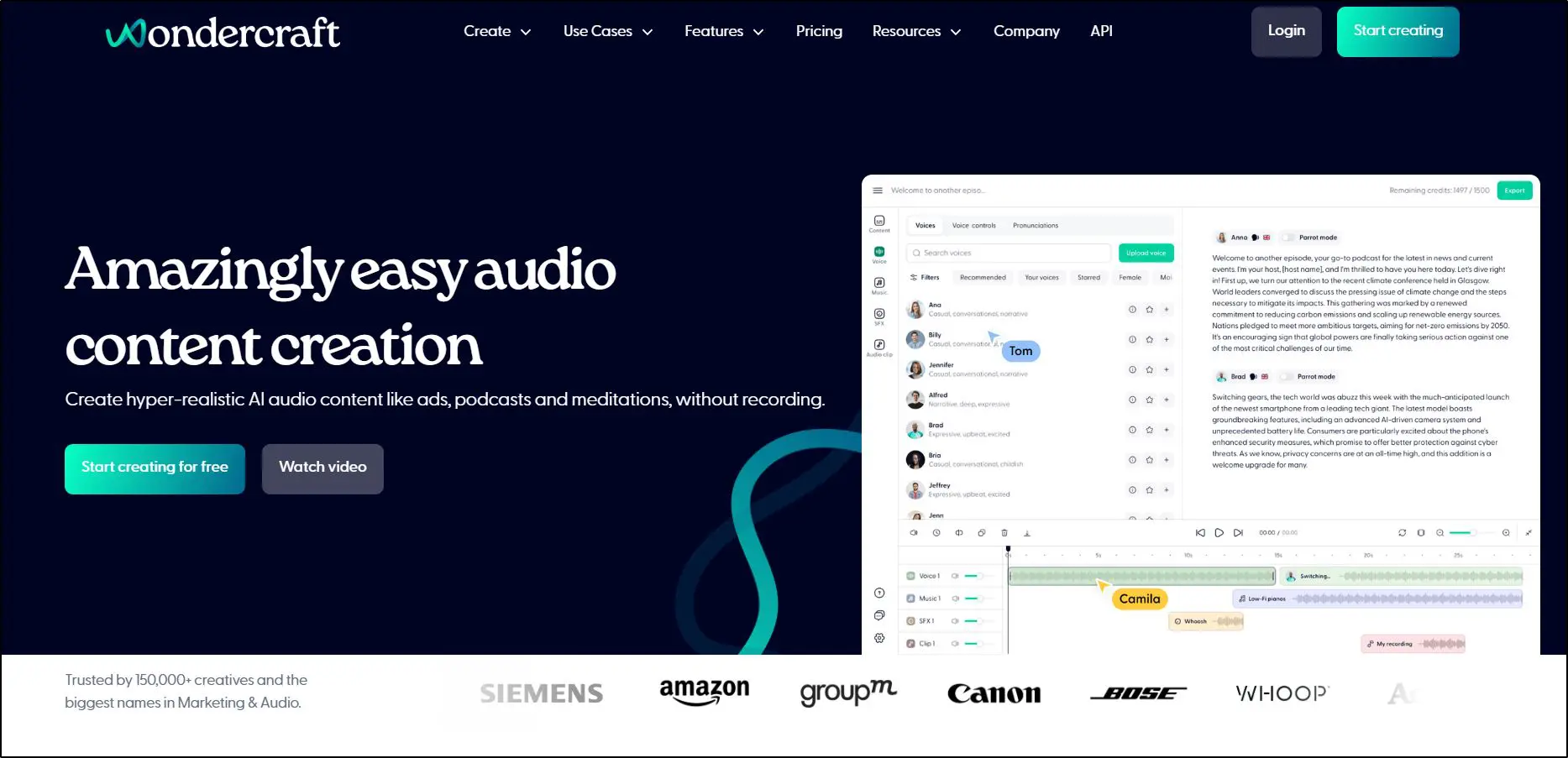
Wondercraft AI is an AI-powered content creation platform that helps you produce audio podcasts, audiobooks, ad narrations, and sales content without recording your voice, writing scripts from scratch, or setting up a studio.
Instead, you can create content using conversational AI prompts or ready-to-use prompt templates for different use cases.
With Wondercraft, you don’t need a mic, a soundproof room, or even a computer—a smartphone with an internet connection is enough.
Still skeptical?
Listen to this podcast discussion, fully generated with Wondercraft AI using one of our writer’s voices along with an AI voice.
Impressive, right?
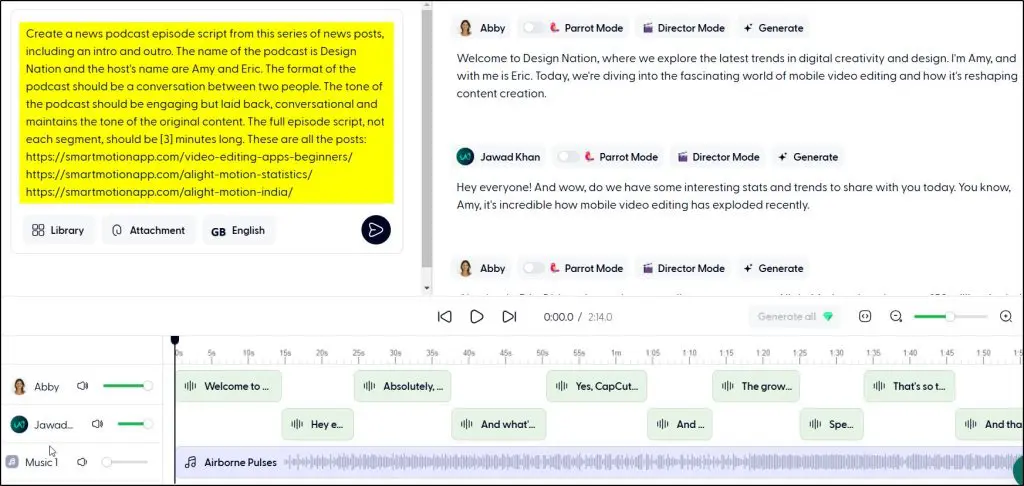
Do you know how Wondercraft wrote the script for this? We only described what we wanted and gave it a few article URLs as information sources. Its AI capabilities did the rest.
Here’s the prompt we used.
That’s just one of its features.
What Can You Create with Wondercraft AI?
Wondercraft uses advanced generative AI technology to streamline the entire audio content creation process.
Here’s what you can do with it:
- Generate AI-powered podcast scripts in seconds.
- Convert blog posts or articles into podcasts or audiobooks.
- Create realistic discussion podcasts with a host and multiple guests by extracting content from a script or URLs.
- Clone your voice to narrate content naturally.
- Choose from over 500 ultra-realistic AI voices in multiple languages and accents.
- Add AI-generated music and sound effects to enhance production quality.
- Publish and distribute podcasts directly to platforms like Spotify with a single click.
Whether you’re an online course creator, marketer, author, or podcaster, Wondercraft can help you turn written content into professional audio effortlessly.
But does it truly replace human narration? Can AI-generated voices keep listeners engaged?
Let’s break down its core features and see how well it performs.
Wondercraft Pricing & Free Plan (2026 Update)
Wondercraft lets you start free and upgrade only when you need more credits or pro-level controls. All paid plans include Wondercraft’s complete generative-AI toolkit for audio, sound effects, video, and avatar creation. Prices below are billed annually (≈30 % savings).
| Plan | Yearly Price | Credits / Month | Key Features & Highlights |
|---|---|---|---|
| Free | $0 | 6 credits | Great for testing. Create up to ~72 minutes of AI audio per year with 40 starter voices and unlimited AI script generation. |
| Creator | $25/mo (≈$35 if paid monthly) | 100 credits | 1 voice clone, 3 custom voices via Voice Design, 300+ AI voices across 30 languages, royalty-free music & SFX, public SEO-indexed share pages, API access. Coming soon: built-in video editor and 5 library AI avatars. |
| Pro | $45/mo (≈$65 if paid monthly) | 200 credits | Everything in Creator plus 1,000+ AI voices across 50 languages, 5 voice clones, up to 25 custom voices, private share pages, AI content translation, AI sound-effects generation, import professional voice clones, high-fidelity WAV (705 kbps). Coming soon: 30 library AI avatars, 1 custom AI avatar, advanced audio editing, AI video generation, and Creative Marketplace access. |
| Business | from $60/seat/mo (≈$360/mo for 5 seats on annual plan) | 800 credits shared | Everything in Pro plus team collaboration with roles, branded & private share pages, brand kits for voices/colors, 25+ voice clones (up to 50 for larger teams), advanced export options, invoice billing. Ideal for agencies and larger content teams. |
| Enterprise | Custom | Custom | Tailored for big organizations needing enterprise-grade security (SOC2+), unlimited voice clones and brand kits, SAML/SSO, dedicated account manager, certified-translator localization, private Slack support, onboarding, custom avatars, and large-volume API access. |
How Wondercraft AI Works | An Overview Of Its Main Features (2026)
If you’ve used ChatGPT or Gemini, you already understand the basics of AI-powered content creation. You get a similar interface with Wondercraft where you can enter your prompts for content generation.
But instead of text, Wondercraft creates high-quality audio, transforming your prompts into podcasts, audiobooks, and voice narrations without needing a mic, studio, or expensive gear.
The best part? You can use hyper-realistic AI voices or even clone your own voice, making AI-generated audio sound just like you.
Getting Started with Wondercraft AI
You can create audio content with Wondercraft in multiple ways.
Once you sign in to your account, you can use any of the following tools to create your AI audio.
- Blank Studio – A multi-track AI-powered studio where you can upload audio files, generate AI voices, or mix both to create professional content.
- AI Audio Assistant – Struggling with what to say? Wondercraft’s AI assistant generates scripts for podcasts, audiobooks, or narrations instantly. Just type in a topic, and it handles the rest.
- Upload an Audio – Already have a recording? Enhance it with AI-powered tools, mix it with AI-generated voices, clean up background noise, or improve overall audio quality.
- AI Audio Templates – Want to save time? Use pre-made podcast or audiobook templates, swap out the script, and get a fully produced episode in minutes.
What Makes Wondercraft Different?
Some of my favorite Wondercraft features include:
- AI Voice Cloning: Upload a short clip of your voice, and Wondercraft clones it in minutes—allowing you to generate podcasts or audiobooks in your own voice without recording.
- Multi-Language Dubbing: Want to expand your audience? Automatically dub your podcasts or audiobooks into multiple languages while keeping your voice intact.
- Realistic AI Voices: Choose from hundreds of human-like AI voices in various tones and emotions—so your content never sounds robotic.
- Seamless Publishing: Wondercraft generates an RSS feed for podcasts, so you can publish to Spotify, Apple Podcasts, and other platforms with one click.
- Professional Editing: Add music, sound effects, and seamless transitions without needing complex editing software.
Whether you’re a beginner looking to start a podcast, an author turning your book into an audiobook, or a content creator repurposing blog posts into audio, Wondercraft AI makes the process effortless.
Let’s take a closer look at some of its main features.
Feature #1: Generate AI Podcast Scripts
Inside a show, you can create multiple podcast episodes. Each episode consists of an intro, outro, and multiple content sections.
But you’ll need a script to get things moving.
The best way to do this is by using Wondercraft’s AI script assistant.
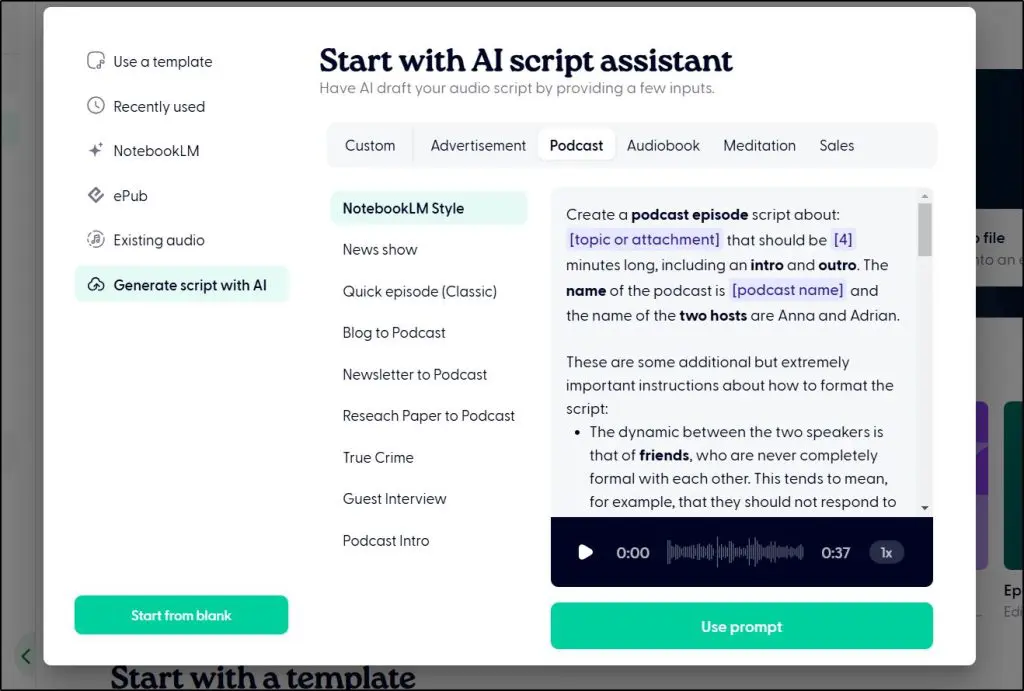
It’s an automated tool that comes with script prompts for dozens of audio content types. Simply use these fill-in-blank prompts to generate any kind of script you want.
For example, you can generate an audiobook specifically for kids or an interview podcast like the one I shared earlier.
But if you don’t want to use the AI script assistant, you also have the option to write a custom prompt.
Just describe your episode to Wondercraft, and it automatically generates scripts for the intro, outro, and one segment of the show.
For example, we created a podcast episode about freelance writing and gave Wondercraft the main points we wanted to discuss. We set the tone to be conversational and our episode duration to 3 minutes.

Then, we clicked “Generate the script” to put Wondercraft to work.
And it took hardly 30 seconds to give us the script for our episode.
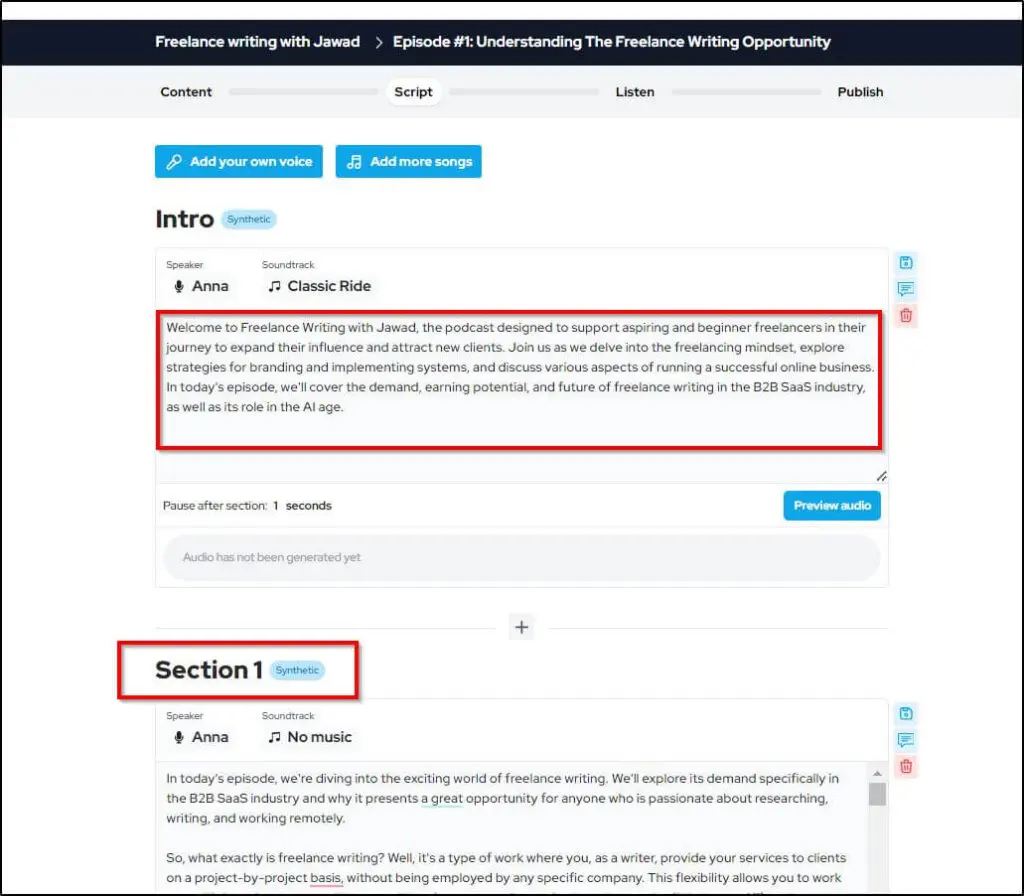
This script is editable, so you can make any changes, remove sections, or add information. We used ChatGPT to expand this script because it was a bit light on information.
You can also pull the script from a published blog post or article by sharing its URL. Wondercraft not only fetches content from online sources but also converts it into a conversational podcast script.
These options open up lots of possibilities for content creation.
For example, you can repurpose your blog posts into podcasts or even your competitor’s content to generate a script.
Similarly, you could simply ask Gemini or ChatGPT to generate a podcast script summarizing the previous week’s industry news and convert it into a weekly round-up podcast.
Once you have the script, the next step is to generate its audio.
Rating: 7/10 – overall good, but its script had a few inaccuracies we had to edit.
Feature #2: Generate A Podcast With AI Voiceover
This is where Wondercraft comes into its own.
It offers 500+ male and female AI voices in different tones, accents, and themes.

You can choose a different AI voice for every section of your podcast. For example, you can have the intro in a woman’s voice and the core episode content in a male’s voice. Similarly, you can change tones depending on the content style and theme.
To find appropriate AI voices, you can choose different search filters, including age, accent, and gender. Every voice also comes with a short preview to make your choice easier.
Once you select an AI voice, you can generate its preview using your script.
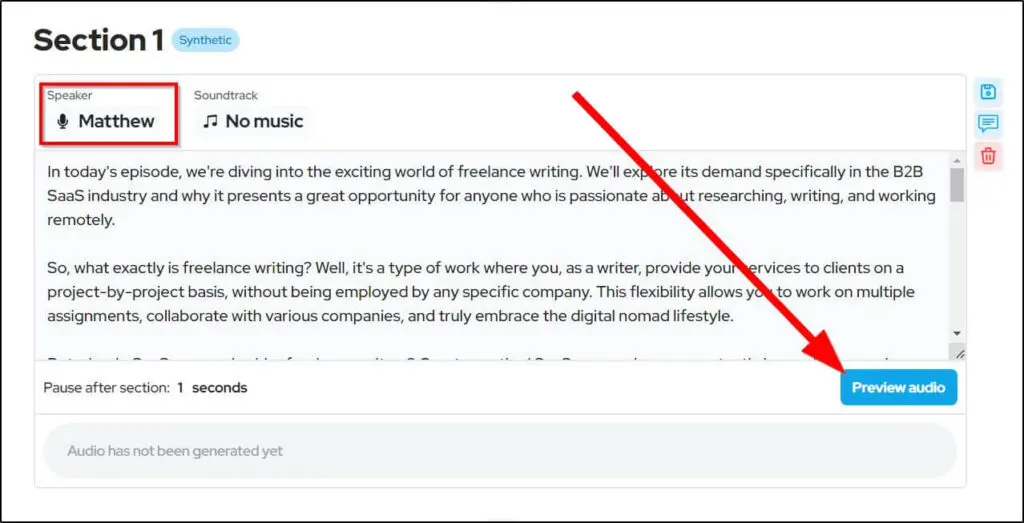
Wondercraft takes a few seconds to generate your audio script preview, depending on its length. But once it’s ready, it appears under the relevant podcast section, where you can listen to it and decide if it sounds the way you want.
Here’s an AI-generated audio of our script.
We chose a middle-aged British man’s AI voice with a storytelling style. And the results are pretty impressive.
It doesn’t sound robotic, a problem you encounter with most other AI Voice generators. Plus, the AI voice takes proper pauses and adds subtle tone changes to make the audio engaging.
However, it mispronounced the word SaaS, which made the audio unusable.
But Wordcraft has a solution to this problem.
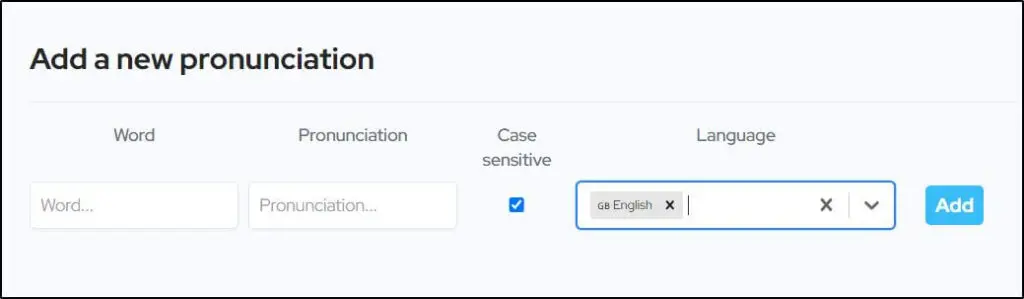
It allows you to add new pronunciations for specific words in a language. So, the next time you create an AI audio, Wondercraft uses the modified pronunciation.
Besides AI voice generation, Wondercraft has a library of intro and outro music soundtracks for different content themes.
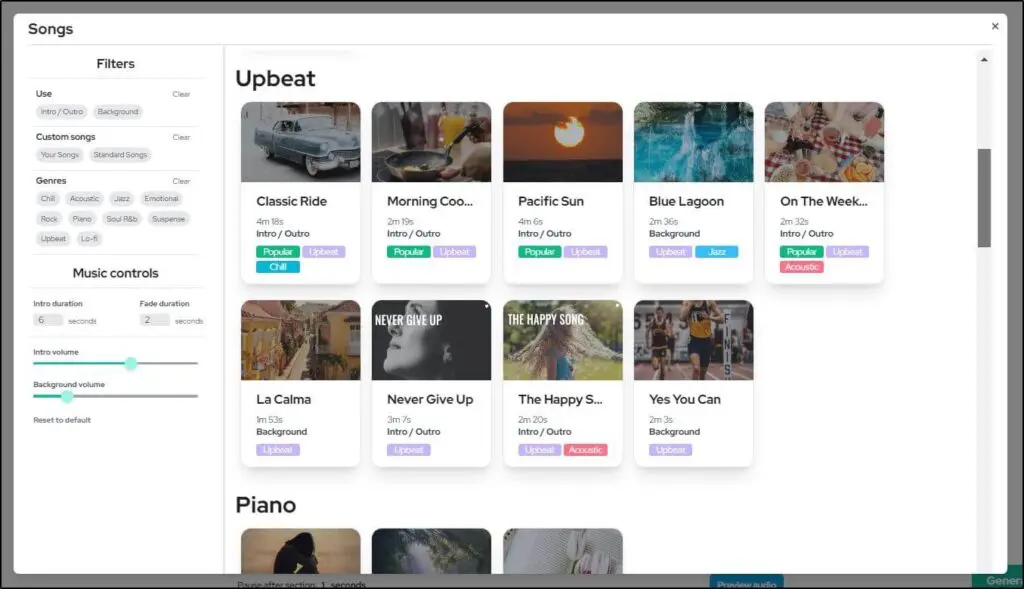
Wondercraft automatically applies the fade-in and fade-out effects to your intro and outro soundtracks and lowers their volume when your AI voice starts.
This ensures the music isn’t too loud and your AI audio speech is clearly audible.
Overall, Wondercraft’s AI voices are very impressive and realistic. Once you generate the audio for every podcast section, you can publish your show as a single audio file.
Apart from using Wondercraft for podcasts, you can use its AI voice features to turn blog posts into audio files, create YouTube video narration, record audiobooks, and create different forms of audio content for digital platforms.
Rating: 8/10 – Impressive AI voices with a slight problem with some pronunciations.
Feature #3: Clone Your Voice For Podcasts
If you already have a podcast with a dedicated following or want to start a show with your personal touch, you’ll love this feature.
Wondercraft’s AI voice cloning feature allows you to use your voice to generate AI audio for your podcasts. This means you can publish high-quality podcasts at scale without compromising your personal brand.
Imagine how much time and resources this would save.
Here’s how to use it.
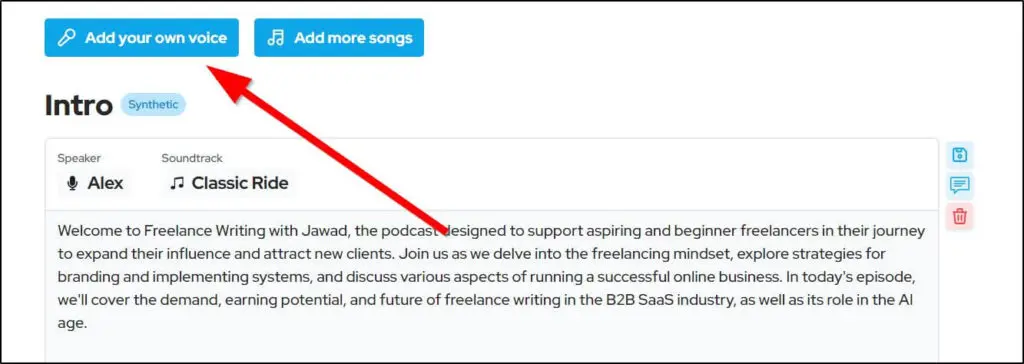
When choosing an AI voice for your script, click “Add your own voice” instead of choosing from Wondercraft’s AI voice list.
You can record your voice directly on your computer or make a quick voice recording with your smartphone and upload it to Wondercraft.
For best results, read a long passage with varying tones in a relaxed tone and speed. This allows Wondercraft’s AI technology to understand your voice patterns and replicate them in different situations.
Once your voice is uploaded and processed, you can save it to your AI voice library and use it like any other pre-recorded voice in Wondercraft.
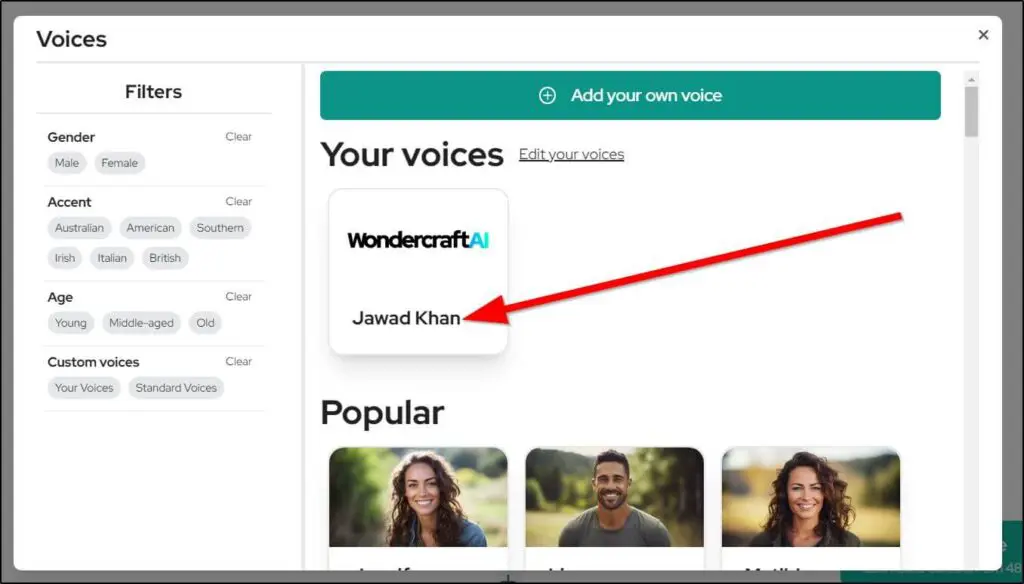
How well does it clone your voice? We were quite impressed because it maintained our voice’s originality and generated a natural-sounding AI audio file.
However, the results largely depend on the quality of your voice input. So, make sure you follow the guidelines we shared in this section.
Rating: 9/10 – Very impressive voice cloning quality you can confidently use to publish AI podcasts.
Feature #4: Extract Podcast Show Notes
Show notes are a powerful way to promote your podcast on your website, social media, and podcast directories. They highlight the key points discussed in your show and give your audience a quick overview.
With Wondercraft, you don’t need to write the show notes yourself.
Instead, when you publish your podcast, Wondercraft’s AI technology automatically generates detailed show notes with timestamps and speaker names.
It also generates a quick summary paragraph of your show that you can use as its meta description on different platforms.
Show notes differ from transcripts.
Your show’s transcript is the text version of your content and contains every word you or your guests have spoken.
Show notes contain highlights only and give viewers a sneak peek into your show, helping them decide if it’s worth their time.
Rating: 9/10 – This feature saves time and simplifies your podcast promotion.
Feature #5: Dub Podcasts In Multiple Languages
Multi-language dubbing is one of the most fascinating features of Wondercraft AI. It helps you expand your content’s reach by dubbing it in 19 languages, making it available to new audiences, and allowing you to drive more traffic.
The translation and dubbing happen instantly, thanks to AI.
Once you create your script and publish it in your primary language, you can dub it in any language you want.
Imagine tailoring your content to over a billion people around the world who speak Mandarin or Hindi languages. Or, dubbing your content in Spanish, the second most widely used language on the internet.
However, this feature is not available for multi-speaker podcasts yet. Plus, you should carefully listen to the translated podcasts to detect any awkward transitions.
But overall, this is a handy feature that opens up new markets and audiences for your brand.
Rating: 7/10 – This is one of Wondercraft’s best features, but it can be much more useful if they improve the accuracy of the translations.
Feature #6: Publish Video Podcasts And Short-Form Social Media Clips
According to a survey, most podcasters find it challenging to grow their audience, expand their content reach, and find new listeners.
So, if you’re a new podcaster, don’t make the mistake of sticking to audio podcasts only. By repurposing your content for YouTube, Facebook, Instagram, TikTok, and other visual platforms, you grow your podcast much faster.
Thankfully, Wondercraft makes this part pretty straightforward.
No need to use a video editor, write captions, or use animated audiograms. Instead, let Wondercraft do the heavy lifting for you.
When you publish an audio podcast, Wondercraft instantly creates its video version with an engaging audio gram and highlighted captions.

Even better, it allows you to download your video podcast with different dimensions for YouTube, Facebook, and other platforms.
Besides long-form videos, Wondercraft can also create short-form videos for TikTok, Reels, and YouTube Shorts using AI-generated visuals from its stock library. These clips are similar to how Pictory generates AI videos.
See our list of the best AI video generators and editors for creators.
Once your video is ready, you can customize its look by changing the background color and caption styles and adding your brand’s logo. It also allows you to save your brand styles as a template for future clips.
Rating: 7/10 – Handy feature to promote your podcasts. However, the AI-generated visuals aren’t always accurate.
Feature #7: Podcast Hosting And Publishing
Wondercraft AI not only creates your podcasts but also provides you with server space to host your show and distribute it to all major podcast directories, including Spotify, Google Podcasts, and Apple Podcasts.
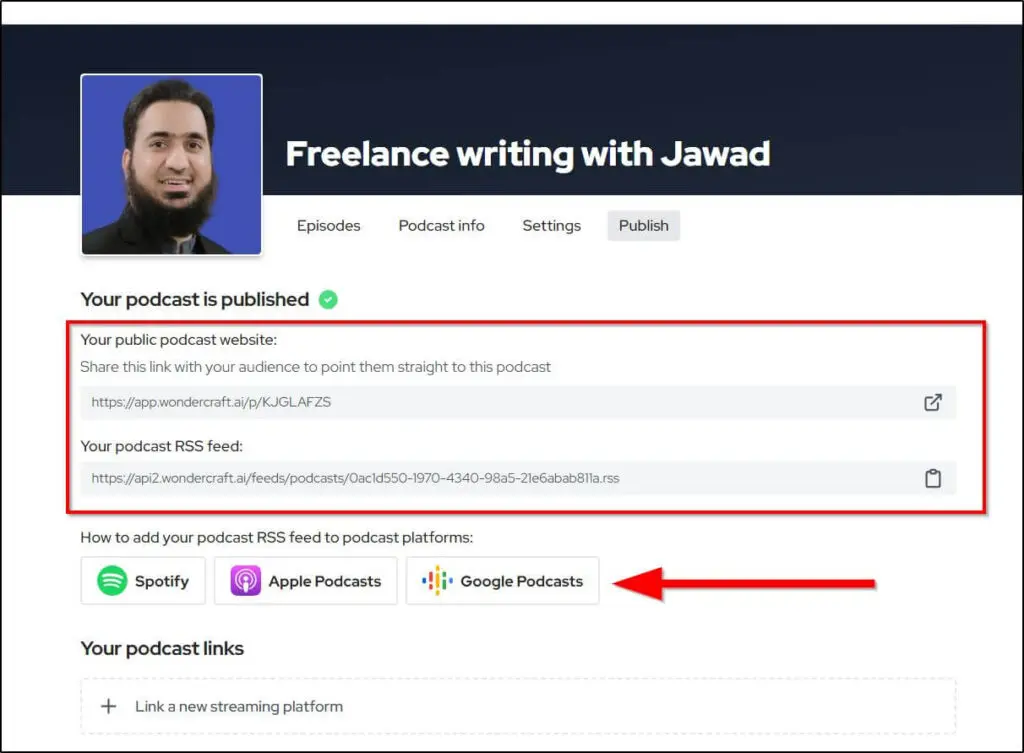
You get a public podcast website that anyone can visit to learn more about your show and listen to your content. Similarly, you get a podcast RSS feed link to submit your show to different podcast directories.
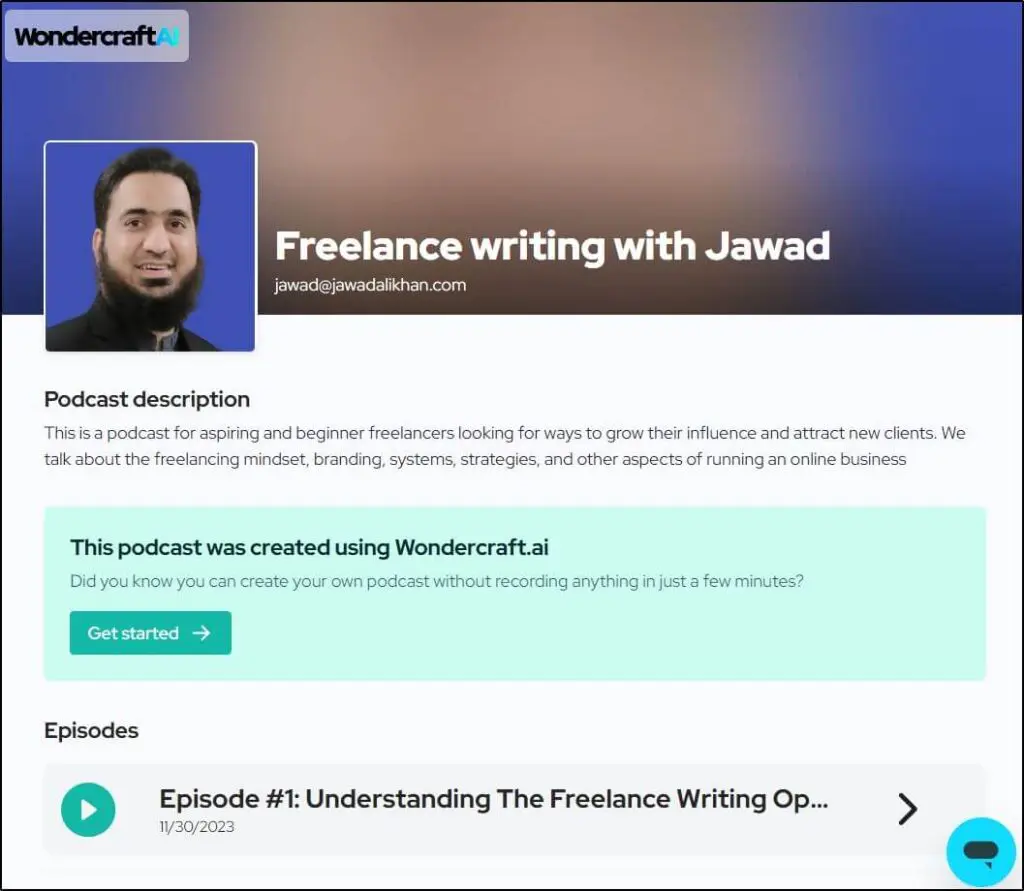
Every episode is hosted on a dedicated page with its own description and detailed show notes. This helps you podcast episodes rank individually for different keywords in search results and attract new listeners.
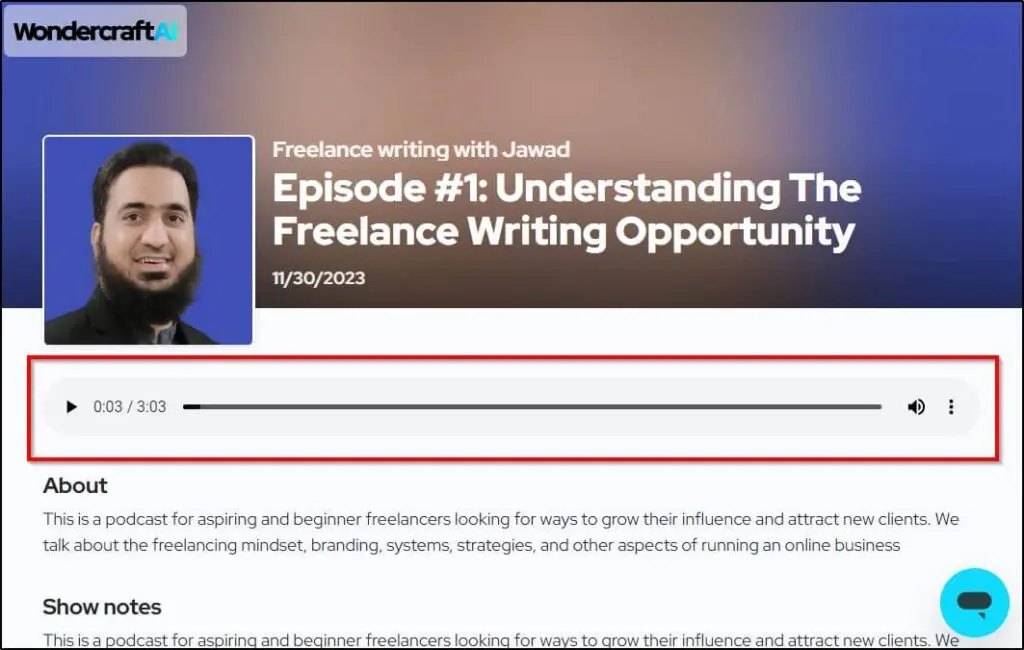
You can also customize the appearance of your podcast website from your show’s settings.
Rating: 9/10 – Attractive minimalist podcast sites ideal for generating SEO traffic.
Wondercraft AI Podcast Use Cases & Examples
Wondercraft’s two core features are AI voice and script generation. Here are different ways creators can use them to drive growth.
Repurpose Your Written Content
If you have blog posts, articles, or any written online content sitting quietly in your website’s archives, Wondercraft can make it come to life again.
You can repurpose blog posts into podcasts or generate an audio version of your weekly newsletter to engage your subscribers.
The Informationist, a popular newsletter sharing financial advice, publishes an audio version of its emails using Wondercraft AI.
Use Podcasts For Marketing
If you’re struggling to generate business leads or want to grow your brand authority, podcasting is the best way to go. With Wondercraft, you can easily publish podcasts on all popular platforms without investing hundreds of dollars and spending hours on content production.
Grow A YouTube Channel
Wondercraft can help you grow a Faceless YouTube channel using AI. You can generate video podcasts and short clips for your channel to build a separate traffic source for your site.
Create Multilingual Content For SEO
Wondercraft can help you reach global markets and cater to international audiences through AI podcast dubbing. Plus, Wondercraft automatically generates a transcript of your translated content which you can use to optimize your site for international SEO. This opens two unique traffic and branding sources for your business that can benefit you in the long term.
For example, if you’re an online course creator, you can use this feature to create tailored versions of your courses, webinars, or masterclasses in different languages targeting different regions.
Wondercraft Pros & Cons | Strengths & Weaknesses Of AI Audio Podcasts
Let’s quickly summarize some of the main strengths and weaknesses of Wondercraft AI before reaching our verdict.
| Pros | Cons |
|---|---|
| AI voices sound highly realistic, with 500+ premium voices that can mimic natural speech patterns, emotions, and accents. | The free plan is too limited, offering only 6 credits per month, which is not enough to produce full episodes. |
| AI-assisted dubbing translates podcasts into 19+ languages while keeping voice tone and style intact. | AI script generation sometimes produces repetitive phrases or factual inaccuracies, requiring manual edits. |
| Supports WAV format for high-quality audio exports, ensuring professional-grade sound. | The Creator plan offers only 100 credits per month, limiting content production for frequent podcasters. |
| Multi-user workspace lets teams collaborate in real time, leave comments, and manage approvals within the platform. | Wondercraft does not host podcasts, meaning users must export files and upload them to platforms like Spotify or Apple Podcasts. |
| Director Mode allows users to adjust pitch, speed, and tone manually for more precise AI narration. | |
| Multi-user workspace lets teams collaborate in real-time, leave comments, and manage approvals within the platform. |
Is Wondercraft The Right AI Podcast Generator For You?
Like generative AI technology, Wondercraft is still a new product that’s quickly evolving.
But it’s already an impressive tool that can help you grow your business with AI-generated podcasts.
Should you buy it? Depends on what you want to achieve with it.
If you’re a serious podcaster with a plan to use this content type for your business growth, Wondercraft can be a gamechanger.
Similarly, if you’re short on time or resources but still want to publish podcasts, Wondercraft can be a great choice.
But if you’re looking to build a personal connection with your audience, rarely use podcasts in your marketing funnel, or want to create conversational podcasts with multiple speakers, Wondercraft might not be a good fit.
Overall, we believe most podcasters and digital content creators would benefit from this tool.
Frequently Asked Questions (FAQs)
1. Can I use Wondercraft to create paid commercial voiceovers or ads?
Yes. All paid plans include full commercial rights for the audio you generate, so you can safely use it in client projects, ads, or monetized podcasts.
2. Does Wondercraft keep or use my audio to train its AI models?
No. Wondercraft is SOC 2 and GDPR compliant and explicitly states that your recordings and cloned voices are not used to train any AI model.
3. How do credits work if I edit or re-generate parts of a script?
Credits are based on output minutes. Re-generating or re-recording sections deducts credits only for the final generated audio length, not for text edits alone.
4. Can I import my own music or sound effects instead of using Wondercraft’s library?
Yes. Creator plans and above allow you to upload custom music and sound effects, so you can maintain a consistent brand sound.
5. What happens if I run out of credits mid-month?
Wondercraft doesn’t sell one-off top-ups. You’ll need to upgrade your plan or wait until your monthly credits renew.
6. Does Wondercraft support dynamic ad insertion or advanced podcast analytics?
Not yet. While it provides RSS feeds and share pages, dynamic ad insertion and deep analytics typically require a separate hosting or analytics platform.
7. Can I record a live interview directly inside Wondercraft?
No. Wondercraft is built for scripted or pre-planned content. Live or spontaneous multi-guest conversations are better recorded with tools like Riverside or Zoom and then enhanced in Wondercraft.
8. Is there a way to fine-tune the style or emotion of AI voices?
Yes. The Pro plan introduces Director Mode and advanced voice controls to adjust pitch, speed, and emotional tone.
9. Will my unused credits roll over if I cancel my subscription?
No. Credits roll over only while an active subscription is in place. Cancelling stops rollover immediately.
10. Can Wondercraft handle enterprise security reviews and legal compliance checks?
Yes. The Enterprise plan supports custom MSAs, DPA assurances, SAML/SSO, and detailed security questionnaires for large organizations.
Table of Contents