
TL;DR — Teachable vs. Thinkific: Which Platform Is Superior? (2026)
Thinkific is the stronger platform for most course creators because it gives you more of what an expertise-based business actually needs: better course structure, real memberships and communities, no transaction fees, and automation that works without duct-taping tools together.
Teachable still makes sense if coaching is your entire product and you want built-in scheduling without adding Calendly. Outside of that, it hasn’t kept pace.
One thing worth being clear about: neither platform replaces a real email marketing tool like Kit for building and marketing to an external list.
Thinkific’s “email” is automated sequences and cart recovery. Teachable’s is basic course notifications. Both platforms need Kit if list marketing matters to your business.
No Free Plans: Neither Teachable nor Thinkific offers a free plan anymore. Both now start with paid-only options with free trials.
📦 Pricing Plans (2026) (annual billing)
1. Teachable
Starter – $29/mo → 1 product only, 7.5% transaction fee
Builder – $69/mo → 5 products, no transaction fee
Growth – $139/mo → 25 products, white-label site, AI tools
Advanced – $399/mo → 100 products, full integrations
2. Thinkific
Basic – $36/mo → Unlimited courses, 1 community, no transaction fees
Start – $74/mo → Unlimited everything, edit HTML/CSS, automation
Grow – $149/mo → Analytics, group orders, API access Plus – Custom → SCORM, CRM, onboarding, scaling support
🔑Teachable vs Thinkific: Top 5 Core Features Compared
1. Course Creation – Both are strong, but Thinkific offers more structure (prerequisites, compliance)
2. Monetization & Checkout – Teachable:Pay vs. Thinkific’s TCommerce (Thinkific wins on automation)
3. Email Marketing & Automation – Thinkific wins with native funnels, cart recovery, and lead nurturing
4. Memberships & Communities – Thinkific offers more flexibility (sell standalone communities, host live events)
5. Coaching – Teachable is better here with built-in scheduling and client tracking (no external tools needed)
✅ Verdict: Thinkific is a much superior platform for most use cases, Teachable has a niche audience.
Thinkific is best for course creators, coaches, and membership site owners who want built-in marketing, automation, and the ability to scale. Teachable is best for solo creators or coaches who want a simple, plug-and-play platform and don’t mind using external tools for email or sales funnels.
Try Thinkific For Free (30 Days with our link)
Try Teachable For Free – 14 Days
Note: This page contains affiliate links. If you purchase through links on this page, we may earn a commission at no additional cost to you.
I’ve run six courses across three businesses on Thinkific. I’ve also used Teachable extensively with clients. They look similar from the outside in terms of their course builder, checkout, student management.
However, under the hood they’ve diverged in ways that change the decision entirely depending on what kind of learning business you’re building.
This comparison is my honest read on where each platform actually delivers and where it doesn’t.
I’ll give you my verdict upfront: Thinkific is the platform I’d recommend to most edupreneurs. .
But I’ll also tell you the one situation where I’d still point someone toward Teachable.
The Main Differences Between Teachable And Thinkific
Teachable and Thinkific are among the top platforms for selling online courses and memberships, and they have a lot of similarities, which can be confusing for a new user.
So, to make their unique strengths and weaknesses crystal clear, let’s start with their main differences.
| Feature | Teachable | Thinkific | Winner |
| Best For | Best for beginners who want an easy, no-fuss way to create and sell courses, coaching, and memberships without relying on third-party tools. | Best for creators who need advanced marketing, automation, and community features to scale their business. | Depends on Needs (Teachable for simplicity, Thinkific for growth) |
| Course Creation | Easy-to-use course builder with AI-assisted outlines, quizzes, and transcripts. Limited structured learning paths. | More control with structured learning paths, advanced compliance settings, and deeper progress tracking. | Thinkific (More flexibility & structure) |
| Memberships | Basic membership tiers, but lacks deep customization for content access and engagement. | More advanced membership tools with flexible content bundling, better student engagement, and native community integration. | Thinkific (Better for scaling memberships) |
| Coaching | Built-in coaching tools (scheduling, intake forms, progress tracking) for 1:1 and group coaching without extra tools. | Coaching isn’t a standalone feature but can be bundled with courses and communities. Requires third-party scheduling tools. | Teachable (Best for dedicated coaching) |
| Online Community | Built-in community feature (added in 2024) but must be linked to a course or membership. Cannot be sold separately. | Full-featured community platform with Spaces, live events, and deeper engagement tools. | Thinkific (More engagement & growth potential) |
| Student Engagement | Quizzes, certificates, course compliance, and discussion threads. Decent engagement but limited beyond courses. | Better engagement features including gamification, deeper progress tracking, and interactive discussions. | Thinkific (More interactive & engaging) |
| Email Marketing | Only basic email notifications. No built-in marketing automation. Requires external email tools. | Built-in email automation for abandoned cart recovery, sales sequences, and lead nurturing. | Thinkific (More powerful email tools) |
| Sales Funnels | Upsells, order bumps, and abandoned cart emails, but lacks full funnel automation. | AI-powered sales funnels, landing pages, and lead capture forms to turn visitors into students. | Thinkific (More complete funnel system) |
| Automation | Basic automation for payments and student access. No engagement or marketing workflows. | Advanced automation for onboarding, engagement triggers, and sales processes. | Thinkific (More scalable automation) |
| AI | AI helps create course outlines, quizzes, and transcripts. | AI assists in course creation, sales pages, and marketing funnels—helping with both content and selling. | Thinkific (More AI-powered growth tools) |
| SCORM Support | No native SCORM support. Requires workarounds or external tools. | Available only on Thinkific Plus plans. Supports SCORM courses with interactive elements like quizzes and simulations. | Thinkific |
| Starting Price | $29/month + 7.5% transaction fee. | $36/month (Start Plan). | Thinkific (zero transaction fee makes it cheaper) |
| Free Trial | 14-day free trial. | 30-day free trial (with our link only) | Thinkific (Longer trial) |
| Free Plan | No free plan (discontinued in 2025) | No free plan (Discontinued in 2024). | Draw |
| Sign Up Now | Free 14-Day Trial | Free 30-Day Trial |
Teachable vs. Thinkific – Who Should Choose Which Platform?
Before I get into the details, let me give you a straightforward answer to who exactly should choose Thinkific or Teachable.
Pure coaches — Teachable. Built-in scheduling, intake forms, and client tracking without needing Calendly. Only makes sense if coaching is your entire product.
Course creators — Thinkific. Better structure, no transaction fees, unlimited products. Thinkific Start at $74/month outperforms Teachable Builder at $69/month on almost every feature that matters.
Membership site owners — Thinkific. Memberships don’t exist on Teachable until Growth at $139/month. Thinkific Start includes them at $74/month with communities and recurring billing built in.
Coaches who also sell courses — Thinkific. Once coaching is an upsell rather than your whole business, Thinkific’s platform depth wins. Adding Calendly for scheduling is a minor trade-off.
Consultants selling to organizations — Thinkific Grow. Group orders, bulk enrollment, and invoicing are Grow-only features. Teachable has no equivalent.
Creators who need SCORM — Neither. Look at LearnWorlds Learning Center at $249/month. Teachable has no SCORM support. Thinkific only has it on Plus at custom pricing.
Creators who want email + courses in one tool — Kajabi. At $143/month it includes a full email platform with external lists and funnels. Thinkific’s email only reaches people already in your school.

Teachable vs Thinkific – An Overview Of These Top e-Learning Platforms
Teachable and Thinkific were among the first platforms to make online course creation simple for non-technical professionals. They helped kick off the online course boom and have remained top choices for edupreneurs ever since.
But over the years, they’ve taken different paths.
Teachable has stayed focused on what it does best—courses, coaching, and monetization. Thinkific, on the other hand, has kept its strong course creation tools but expanded into marketing and audience-building features, making it more of an all-in-one platform (though not as well-rounded as Kajabi).
Let’s break down what each one offers.
What Is Teachable, And What Does It Offer

Teachable is a self-hosted cloud platform that helps creators package their knowledge into sellable courses, memberships, and coaching programs—without needing a separate website, content hosting, or third-party tools.
In my experience, Teachable is one of the most user-friendly online course platforms out there. That’s why it’s often my first recommendation for educators, entrepreneurs, and industry experts who want to launch and scale their online learning businesses without technical headaches.
However, its strength is also its limitation.
While Teachable is great for beginners and even experienced professionals looking for a simple, no-fuss solution, I hesitate to recommend it to those who need a more advanced or well-rounded platform with deeper marketing tools.
But that’s not what Teachable is built for.
Instead, Teachable excels at course creation. From uploading content and structuring lessons to engaging students through quizzes and discussions, the platform makes it incredibly easy to create and deliver content.
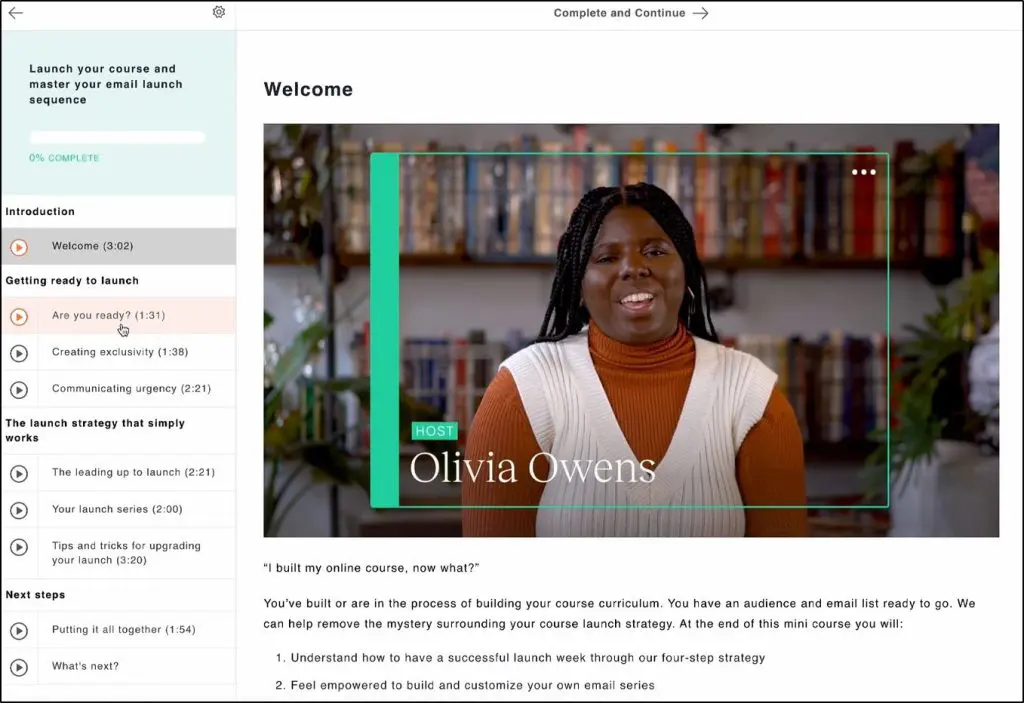
Whether you’re running self-paced courses, live coaching, or community-driven learning, Teachable gives you everything you need.
But what really makes Teachable stand out is its built-in monetization features. Unlike many course platforms that rely on third-party payment processors, Teachable lets you handle subscriptions and memberships, process payments directly (without extra integrations), and manage taxes automatically.
This means fewer integrations, lower fees, and a more streamlined selling experience.
Here’s what you can do with Teachable:
- Create and sell online courses (self-paced, cohort-based, or live)
- Launch membership programs with exclusive content
- Build dedicated online communities for student engagement
- Sell digital downloads like eBooks, guides, and templates
- Create course websites and landing pages—no coding needed
- Offer one-on-one or group coaching with built-in scheduling
- Collect payments directly (subscriptions, one-time payments, Buy Now Pay Later)
- Use AI-powered tools to speed up course creation (outlines, quizzes, transcripts)
- Increase revenue with upsells, order bumps, and abandoned cart emails
In short, if you’re looking for a powerful and user-friendly online course creation or coaching platform, Teachable is definitely worth considering.
Teachable Examples
Thousands of creators worldwide use Teachable to sell courses, memberships, digital products, and coaching programs.
Here are a few examples.
Teachable Example #1: Tailored Tutors

Tailored Tutors is a premium A Level tutoring academy serving thousands of students worldwide. It’s an excellent example of how Teachable helps you scale e-learning businesses.
Teachable Example #2: Product Marketing Alliance
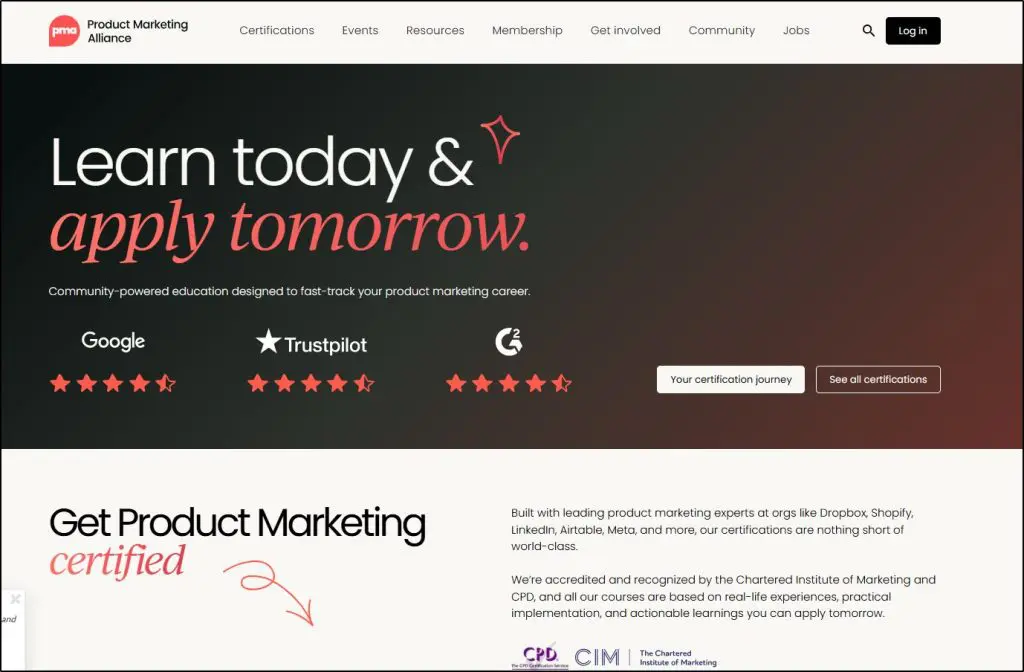
Product Market Alliance is an elite certification and membership program for tech marketers looking to level up their skills under the supervision of leading product marketers. The academy is well-known in the software marketing industry, with over 10,000 registered students.
Teachable Example #3: Jewelers Academy

Jewelers Academy is a classic example of how Teachable empowers non-technical professionals, allowing them to monetize their expertise and build successful e-learning programs without worrying about the technical details.
What Is Thinkific And What It Does Offer
Thinkific has been my go-to online course platform for years because it strikes the perfect balance between world-class course creation, memberships, and communities while constantly improving its email marketing, automation, and audience engagement tools.
Unlike platforms that only focus on hosting courses, Thinkific has evolved into a complete business platform for creators who want to grow beyond one-time course sales.
You can build a full learning experience with live lessons, interactive communities, and memberships while also using its built-in email automation, sales funnels, and lead capture tools to drive growth.
One of the biggest improvements in recent years is Thinkific’s ability to help you engage and retain students. Its community features now include private groups, live events, and push notifications, making it easier to keep learners active.

Meanwhile, its AI-powered landing pages and funnels take care of the marketing side, so you don’t need separate tools to capture leads or automate sales.
For monetization, Thinkific makes it easy to bundle courses, communities, and memberships, while also giving you full control over pricing, subscriptions, and payment plans.
You can sell digital downloads, offer Buy Now, Pay Later options, and even use upsells and order bumps to increase revenue—all without relying on third-party integrations.
Here’s what you can do with Thinkific:
- Create and sell online courses (self-paced, scheduled, or cohort-based)
- Offer live lessons and webinars inside your course without extra software
- Build online communities with engagement tools, discussions, and live events
- Launch membership programs with exclusive content and recurring revenue
- Sell digital downloads like eBooks, guides, templates, and audio files
- Create fully customizable course websites and landing pages
- Use built-in email marketing (abandoned cart emails, sales funnels, and lead nurturing)
- Automate sales and marketing with AI-generated funnels, order bumps, and upsells
- Collect payments directly (subscriptions, one-time payments, Buy Now Pay Later)
If you’re looking for a platform that combines powerful course-building tools with built-in marketing, sales automation, and audience engagement, Thinkific is one of the best all-in-one options available.
Thinkific Examples
Some of the world’s most successful e-learning businesses in dozens of different industries use Thinkific. Here are a few examples.
Thinkific Example #1: Pop That Mumma
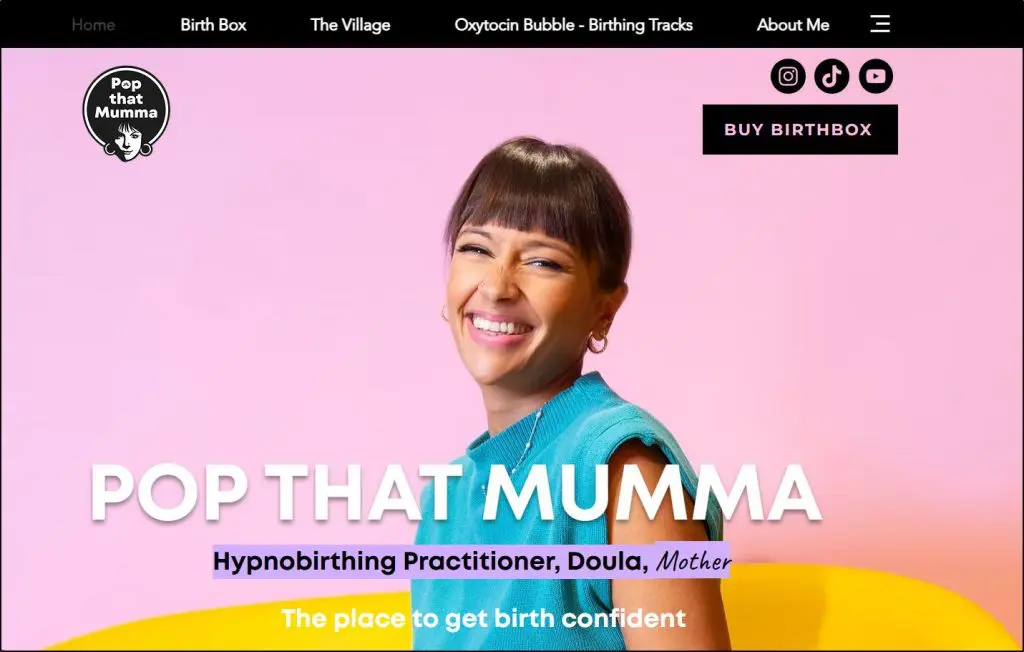
Poppy launched a membership program using Thinkific, where she helped soon-to-be mothers by sharing her pregnancy experiences. This simple idea not only helped Poppy impact thousands of lives but also led her to financial freedom.
Thinkific Example #2: Senna Filter

Senna, an exhausted biochemistry major, used Thinkific to share her expertise in Microsoft Excel with the world. Again, a simple idea. But with Thinkific, Senna scaled it to multiple seven figures in just a few years.
Thinkific Example #3: CopySchool by CopyHackers

CopySchool is considered by many to be the gold standard in conversion copywriting. Joanna Wiebe, the founder of CopyHackers, has hosted the program on Thinkific, where she has trained thousands of copywriters for some of the world’s most influential organizations.
Teachable vs. Thinkific Pricing: Do They Offer Free Plans?
Unfortunately, no!
Both Thinkific and Teachable retired their free plans and only offer free trials now.
They have multiple pricing plans, but their structure, value, and transaction fees vary quite a bit.
Here’s a quick side-by-side breakdown.
| Plan | Teachable | Thinkific |
|---|---|---|
| Free Plan | ❌ No longer offered | ❌ No longer offered |
| Free Trial | 14-day trial on all plans | 30-day trial on all plans |
| Entry Plan | Starter $39/month (monthly billing) $29/month (annual billing) ✅ 1 published product ✅ 7.5% transaction fee | Basic $49/month (monthly billing) $36/month (annual billing) ✅ Unlimited courses ✅ 0% transaction fee |
| Mid-Tier Plan | Builder $89/month (monthly billing) $69/month (annual billing) ✅ 5 published products ✅ 0% transaction fee | Start $99/month (monthly billing) $74/month (annual billing) ✅ Unlimited live lessons, downloads, memberships ✅ Edit HTML/CSS |
| Growth Plan | Growth $189/month (monthly billing) $139/month (annual billing) ✅ 25 published products ✅ White-label site, custom permissions | Grow $199/month (monthly billing) $149/month (annual billing) ✅ 3 communities, advanced analytics, group orders |
| Advanced Plan | Enterpise Custom pricing ✅ 100 published products ✅ Unlimited integrations, subtitle translation | Thinkific Plus – Custom pricing ✅ SSO, CRM integrations, SCORM, onboarding support |
| Transaction Fees | ✅ 7.5% on Starter ✅ 0% on Builder and above | ❌ No transaction fees on any plan |
| Published Product Limits | ❌ Yes (1–100 depending on plan) | ✅ Unlimited on all plans |
| Student Limits | ❌ Starter: 100 students ❌ Builder: 1,000 ✅ Unlimited from Growth onward | ✅ Unlimited on all plans |
- Teachable still has a lower starting price at $39/month, but charges a 7.5% transaction fee on its Starter plan and limits you to only 1 published product.
- Thinkific starts at $49/month, but gives you unlimited courses, students, and 0% transaction fees right from the entry-level plan.
- Teachable does not offer a free plan anymore, and neither does Thinkific, but Thinkific’s 30-day trial gives you more time to evaluate its platform.
- If you’re a coach or digital creator starting small, Teachable’s $39 Starter plan may suffice—but only if you’re okay with product limits and paying fees on every sale.
- For anyone aiming to scale, sell more products, or run memberships and communities, Thinkific’s Start or Grow plan is a better long-term deal.
Teachable and Thinkific Full Cost Breakdown at Every Revenue Level:
Subscription pricing alone is almost meaningless on its own. What you actually pay is plan fee + platform transaction fee (Teachable Starter only) + payment processing fee on every single sale.
Let’s compare the actual running cost of Thinkific and Teachable in different scenarios as your revenue scales.
Let’s assume you’re selling a $199 course, platform native payment processor (teachable:pay / Thinkific Payments), annual billing.
If you find these tables too complex to undrstand, simpluse our pricing calculators for Thinkific and Teachable to know exactly how much they charge for different plans
Scenario 1: Teachable — What the 7.5% Actually Costs You
Teachable Starter’s $29/month headline looks cheap. The 7.5% platform fee is what changes the calculation entirely.
Teachable Starter ($29/mo)
| Monthly Revenue | Plan Fee | Teachable’s 7.5% Cut | Stripe Processing | Total Per Month | Total Per Year |
|---|---|---|---|---|---|
| $1,000/mo | $29 | $75 | $31 | $135 | $1,614 |
| $3,000/mo | $29 | $225 | $92 | $346 | $4,146 |
| $5,000/mo | $29 | $375 | $153 | $557 | $6,678 |
| $10,000/mo | $29 | $750 | $305 | $1,084 | $13,009 |
| $20,000/mo | $29 | $1,500 | $610 | $2,139 | $25,670 |
At $10,000/month Teachable’s transaction fee alone is $750. The plan itself is $29. The transaction fee is the real cost.
Teachable Builder ($69/mo) — Platform fee drops to zero
| Monthly Revenue | Plan Fee | Transaction Fee | Stripe Processing | Total Per Month | Total Per Year |
|---|---|---|---|---|---|
| $1,000/mo | $69 | — | $31 | $100 | $1,194 |
| $3,000/mo | $69 | — | $92 | $161 | $1,926 |
| $5,000/mo | $69 | — | $153 | $222 | $2,658 |
| $10,000/mo | $69 | — | $305 | $374 | $4,489 |
| $20,000/mo | $69 | — | $610 | $679 | $8,150 |
Teachable Growth ($139/mo)
| Monthly Revenue | Plan Fee | Transaction Fee | Stripe Processing | Total Per Month | Total Per Year |
|---|---|---|---|---|---|
| $1,000/mo | $139 | — | $31 | $170 | $2,034 |
| $3,000/mo | $139 | — | $92 | $231 | $2,766 |
| $5,000/mo | $139 | — | $153 | $292 | $3,498 |
| $10,000/mo | $139 | — | $305 | $444 | $5,329 |
| $20,000/mo | $139 | — | $610 | $749 | $8,990 |
Teachable Starter crossover point: Starter becomes more expensive than Builder at approximately $500/month in revenue. Above that Builder is cheaper every single month. If you’re validating and expect to pass $500/month quickly, start on Builder.

Scenario 2: Thinkific — Using Thinkific Payments (No Surcharge)
Thinkific charges zero platform transaction fees when you use Thinkific Payments. You pay the plan fee and Stripe’s processing rate — nothing else.
Thinkific Basic ($36/mo)
| Monthly Revenue | Plan Fee | Platform Fee | Stripe Processing | Total Per Month | Total Per Year |
|---|---|---|---|---|---|
| $1,000/mo | $36 | — | $31 | $67 | $798 |
| $3,000/mo | $36 | — | $92 | $128 | $1,530 |
| $5,000/mo | $36 | — | $153 | $189 | $2,262 |
| $10,000/mo | $36 | — | $305 | $341 | $4,093 |
| $20,000/mo | $36 | — | $610 | $646 | $7,754 |
Thinkific Start ($74/mo)
| Monthly Revenue | Plan Fee | Platform Fee | Stripe Processing | Total Per Month | Total Per Year |
|---|---|---|---|---|---|
| $1,000/mo | $74 | — | $31 | $105 | $1,254 |
| $3,000/mo | $74 | — | $92 | $166 | $1,986 |
| $5,000/mo | $74 | — | $153 | $227 | $2,718 |
| $10,000/mo | $74 | — | $305 | $379 | $4,549 |
| $20,000/mo | $74 | — | $610 | $684 | $8,210 |
Thinkific Grow ($149/mo)
| Monthly Revenue | Plan Fee | Platform Fee | Stripe Processing | Total Per Month | Total Per Year |
|---|---|---|---|---|---|
| $1,000/mo | $149 | — | $31 | $180 | $2,154 |
| $3,000/mo | $149 | — | $92 | $241 | $2,886 |
| $5,000/mo | $149 | — | $153 | $302 | $3,618 |
| $10,000/mo | $149 | — | $305 | $454 | $5,449 |
| $20,000/mo | $149 | — | $610 | $759 | $9,110 |
As you can see, thinkific Start costs you just $379/month if you’re selling a $199 course and your revenue is $10K per month. Considering the features you get with Start, it offers the best value for money in my experience.
Scenario 3: Thinkific — If You Use Your Own Stripe Account
Thinkific charges a surcharge if you use your own Stripe instead of Thinkific Payments: 5% on Basic, 2% on Start, 1% on Grow. This is Thinkific’s most commonly misunderstood cost. The fix is simple — use Thinkific Payments and there is no surcharge at all.
Thinkific Basic ($36/mo) — Own Stripe at 5% surcharge
| Monthly Revenue | Plan Fee | Thinkific Surcharge (5%) | Stripe Processing | Total Per Month | Total Per Year |
|---|---|---|---|---|---|
| $1,000/mo | $36 | $50 | $31 | $117 | $1,398 |
| $3,000/mo | $36 | $150 | $92 | $278 | $3,330 |
| $5,000/mo | $36 | $250 | $153 | $439 | $5,262 |
| $10,000/mo | $36 | $500 | $305 | $841 | $10,093 |
| $20,000/mo | $36 | $1,000 | $610 | $1,646 | $19,754 |
The 5% surcharge on Basic turns Thinkific’s cheapest plan into one of the most expensive options in the market. At $10,000/month you’re paying $841 all-in — more than double the $341 you’d pay using Thinkific Payments on the same plan. This is an easy mistake to make during account setup and a painful one to discover later.
Thinkific Start ($74/mo) — Own Stripe at 2% surcharge
| Monthly Revenue | Plan Fee | Thinkific Surcharge (2%) | Stripe Processing | Total Per Month | Total Per Year |
|---|---|---|---|---|---|
| $1,000/mo | $74 | $20 | $31 | $125 | $1,494 |
| $3,000/mo | $74 | $60 | $92 | $226 | $2,706 |
| $5,000/mo | $74 | $100 | $153 | $327 | $3,918 |
| $10,000/mo | $74 | $200 | $305 | $579 | $6,949 |
| $20,000/mo | $74 | $400 | $610 | $1,084 | $13,010 |
In comparison, Thinkific Start has a 2% surcharge when you’re using your own Stripe for payments. So, if your revenue is $10,000/month, selling a $199 course, you’ll pay approximately $579 per month, much cheaper than Basic but with much better features.
Scenario 4: Head-to-Head — Cheapest Plan at Every Revenue Level
Courses only. Thinkific Payments. Annual billing.
| Monthly Revenue | T-Starter | T-Builder | T-Growth | Th-Basic | Th-Start | Th-Grow | Cheapest |
|---|---|---|---|---|---|---|---|
| $1,000/mo | $135 | $100 | $170 | $67 | $105 | $180 | Th-Basic |
| $3,000/mo | $346 | $161 | $231 | $128 | $166 | $241 | Th-Basic |
| $5,000/mo | $557 | $222 | $292 | $189 | $227 | $302 | Th-Basic |
| $10,000/mo | $1,084 | $374 | $444 | $341 | $379 | $454 | Th-Basic |
| $20,000/mo | $2,139 | $679 | $749 | $646 | $684 | $759 | Th-Basic |
Thinkific Basic is the cheapest option at every revenue level, by a meaningful margin. The caveat is that Basic doesn’t include memberships, certificates, or bundles. If those are in your plan, you’re on Thinkific Start — which is still $5/month cheaper than Teachable Builder at comparable revenue, and comes with significantly more features.
The $38/month difference between Thinkific Basic and Start is fixed regardless of your revenue. You’re paying $38/month for memberships, bundles, certificates, compliance tools, payment plans, and Zoom. If any of those are part of your business model, that $38 is worth it from day one.
Scenario 5: The Email Cost — And Why You Can’t Compare Platforms Directly
Before any cost table, a clarification that most comparisons skip.
What “built-in email” actually means on Teachable and Thinkific:
| Platform | What It Includes | What It Cannot Do |
|---|---|---|
| Teachable Builder | Enrollment confirmations, basic drip to enrolled students | Broadcast to external list, full sequences, reach non-students |
| Thinkific Start | Automated lead sequences, abandoned cart recovery | Manual broadcasts, reach anyone outside your school |
| Thinkific Grow | Everything above + manual broadcast to existing students only | Reach external contacts, replace a real email tool |
These are not email marketing tools. They are course notification systems with some automation bolted on. Comparing Teachable’s “email” to Thinkific’s “email” is not a meaningful comparison because neither replaces Kit, ActiveCampaign, or any real list marketing tool if building and marketing to an external audience is part of your model.
If you want to run proper email marketing like sequences to cold leads, broadcasts to your full subscriber list, funnels that work before someone buys, you need Kit (formerly ConvertKit) or equivalent on top of either platform. Kit costs $0/month up to 1,000 subscribers, $25/month up to 5,000, $50/month beyond that.
Total cost with Kit added:
| Monthly Revenue | Kit Cost | T-Builder alone | T-Builder + Kit | Th-Start alone | Th-Start + Kit | Th-Grow alone | Th-Grow + Kit |
|---|---|---|---|---|---|---|---|
| $1,000/mo | $0 | $100 | $100 | $105 | $105 | $180 | $180 |
| $3,000/mo | $25 | $161 | $186 | $166 | $191 | $241 | $266 |
| $5,000/mo | $25 | $222 | $247 | $227 | $252 | $302 | $327 |
| $10,000/mo | $50 | $374 | $424 | $379 | $429 | $454 | $504 |
| $20,000/mo | $50 | $679 | $729 | $684 | $734 | $759 | $809 |
Once Kit is in the picture, Teachable Builder and Thinkific Start sit within $5/month of each other at every revenue level — the exact plan fee difference. The cost gap is negligible. At that point the decision is entirely about features, not price: Thinkific Start includes memberships, bundles, certificates, compliance tools, and payment plans that Teachable Builder does not.
The one scenario where the native email comparison becomes meaningful: Thinkific Grow gives you broadcast email to your existing student base without adding Kit. If your email marketing needs are limited to re-engaging current students rather than building an external list, Grow removes the need for Kit entirely — at $149/month all-in versus $119-134/month for Builder or Start plus Kit.
What Teachable & Thinkific Actually Cost: Summing It Up
Let me quickly sum up all the tables and show you what Teachable and Thinkific actually cost as your revneue scales.
Total Monthly Cost as Revenue Scales $199 avg course price · Annual billing · Platform native payments · All fees included (plan + platform fee + Stripe processing)
| Monthly Revenue | Teachable Starter | Teachable Builder | Teachable Growth | Thinkific Basic | Thinkific Start (Best Value) | Thinkific Grow |
|---|---|---|---|---|---|---|
| Plan fee | $29/mo | $69/mo | $139/mo | $36/mo | $74/mo | $149/mo |
| Platform fee | 7.5% per sale | None | None | None | None | None |
| $1,000/mo | $135 | $100 | $170 | $67 | $105 | $180 |
| $3,000/mo | $346 | $161 | $231 | $128 | $166 | $241 |
| $5,000/mo | $557 | $222 | $292 | $189 | $227 | $302 |
| $10,000/mo | $1,084 | $374 | $444 | $341 | $379 | $454 |
| $20,000/mo | $2,139 | $679 | $749 | $646 | $684 | $759 |
| Memberships | ✗ | ✗ | ✓ | ✗ | ✓ | ✓ |
| Certificates | ✓ | ✓ | ✓ | ✗ | ✓ | ✓ |
| Course bundles | ✗ | ✗ | ✓ | ✗ | ✓ | ✓ |
| Payment plans | ✗ | ✗ | ✓ | ✗ | ✓ | ✓ |
| White-label | ✗ | ✗ | ✓ | ✗ | ✗ | ✓ |
| Broadcast email | ✗ | ✗ | ✗ | ✗ | ✗ | Students only |
| Product limit | 1 | 5 | 25 | Unlimited | Unlimited | Unlimited |
| Student cap | 100 | 1,000 | Unlimited | 10,000 | 10,000 | 10,000 |
My three main takeaways from this are:
Teachable Starter is a fee trap. At $10,000/month you’re paying $1,084 — nearly three times what Thinkific Basic costs at the same revenue. The $29 plan fee is irrelevant. The 7.5% platform fee is the real number.
Thinkific Basic wins on cost at every revenue level — but it’s a limited plan. No memberships, certificates, or bundles. If those are in your plan, Thinkific Start at $5/month more than Teachable Builder gives you everything Builder doesn’t have: memberships, bundles, certificates, compliance, payment plans, Zoom.
Teachable Builder vs Thinkific Start comparison is the real decision for most people. $100/month vs $105/month at $1,000 revenue. $374 vs $379 at $10,000. A $5/month difference at every level but Thinkific Start’s feataures are far superior.
Comparing The Main Features Of Teachable And Thinkific
Okay, now that I’ve given you a fair idea of the unique strengths and weaknesses of Teachable and Thinkific, let’s dive deeper into their core features.
I’ve published detailed reviews of both these tools here on Learning Revolution. But my goal in this section is to give you a more comparative analysis that makes your decision easier (instead of simply listing everything these platforms offer)
So, I’ll focus on critical features that matter the most to an e-learning business.
Feature #1: Course Hosting And Content Creation
Both Teachable and Thinkific allow you to easily upload and organize course content like videos, PDFs, quizzes, and multimedia. But Thinkific offers more control over structuring courses, while Teachable makes creation faster with AI-powered tools.
Teachable’s AI Course Starter helps beginners quickly generate course outlines, quizzes, and transcripts. This is great if you want a fast start without overthinking your curriculum.
For example, I gave it a one line description of my Forex Trading course and it generated a pretty impressive course outline within seconds.

However, its course structuring features are limited—for example, it lacks progress-based unlocks, graded quiz requirements, or the ability to restrict lesson skipping. Drip scheduling is also basic, only allowing time-based releases (e.g., unlock Module 2 after 7 days).
Thinkific not only supports AI-generated course outlines but also lets you structure courses with more flexibility.
You can create cohort-based courses, set prerequisites (e.g., students must complete a module before moving forward), and use advanced compliance settings like requiring a quiz pass or 90% video watch time before unlocking the next lesson.
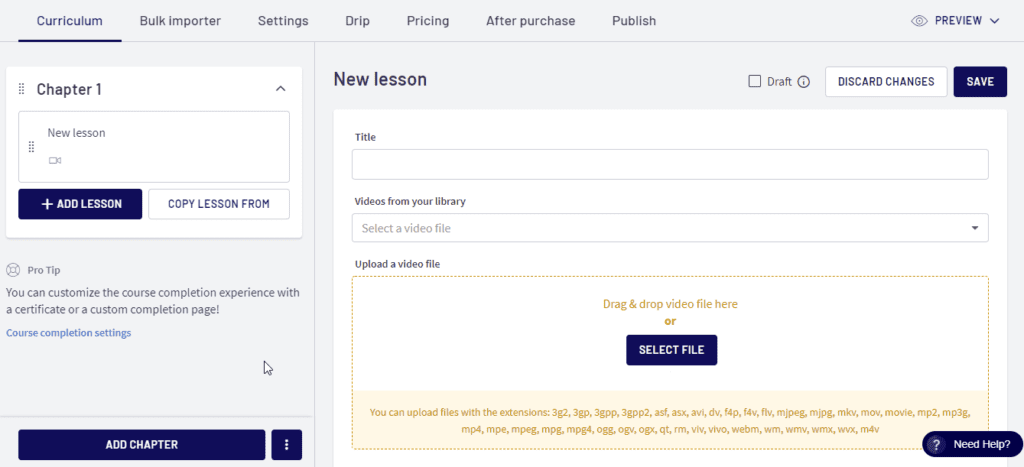
AI also powers Thinkific’s Funnels, helping optimize how courses are marketed and sold.
Winner: Thinkific
Feature #2: Memberships & Online Communities
Both Teachable and Thinkific let you create memberships and online communities, but Thinkific offers deeper engagement, moderation tools, and analytics.
Teachable’s membership feature is straightforward. You can set up subscription-based content, drip-feed lessons, and create member-only access to courses or digital downloads.
Teachable also introduced a dedicated community feature in 2024 that allows creators to build student communities with discussion categories, moderation tools, and student interactions.
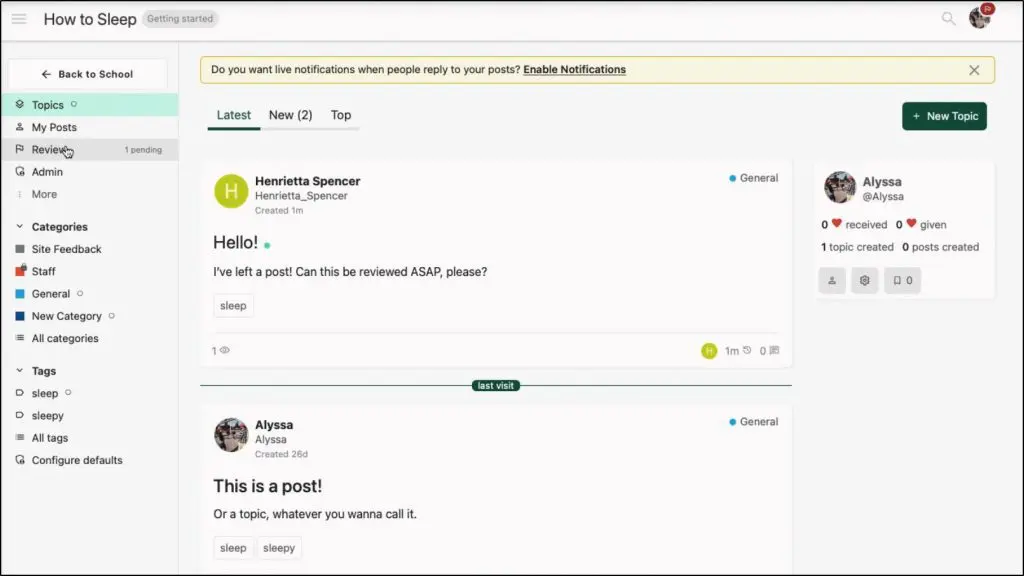
However, its community feature is tied to course enrollments or memberships—you can’t sell a community as a standalone product. Plus, it doesn’t have the functionality to host live events or enable push notifications for student activity.
Check our list of the top online community platforms
Thinkific, on the other hand, has a full-fledged community platform that works with or without courses where you can:
- Create Spaces (topic-based discussion rooms)
- Host live events (Q&As, coaching calls, AMAs)
- Send push notifications (mobile + desktop)
- Use Community Analytics (track engagement, top contributors, inactive members)
Thinkific also gives you more control over moderation. You can assign community moderators and organize discussions into nested threads for better conversations.
So, overall, Thinkific is the clear winner here.
Winner: Thinkific
Feature #3: Online Coaching
If you’re only selling coaching, Teachable is the better option. Its built-in coaching features let you schedule sessions, collect intake forms, track client progress, and handle payments, all without needing external tools.
It’s a great choice for solo coaches or beginners who don’t need advanced marketing and automation.
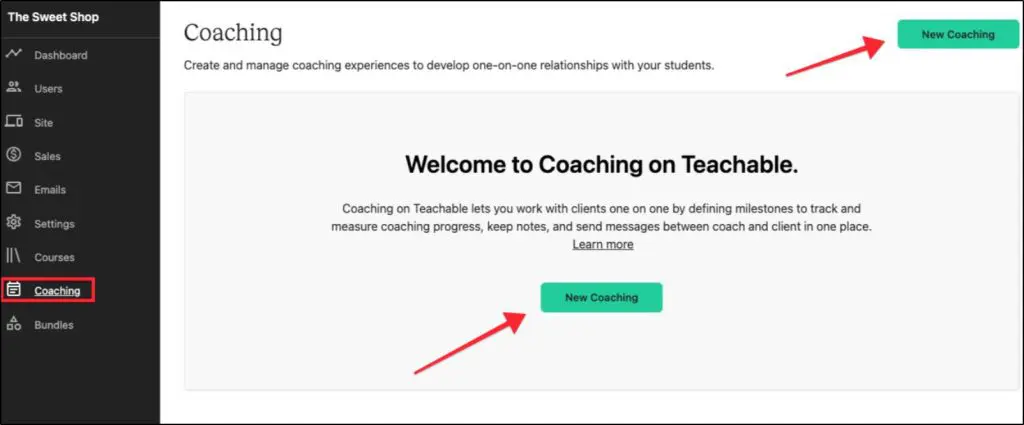
But for most of my clients, that’s usually not the case.
Instead, they offer coaching as a high-ticket upsell alongside their lower-priced courses or memberships. In that case, Thinkific is still the better choice, even though it requires integrating a third-party scheduling tool like Calendly or Acuity.
Why? Because Thinkific’s marketing automation, communities, and memberships make it easier to sell and upsell coaching as part of a larger learning business.
The slight inconvenience of using an external scheduler is a small trade-off for having everything else built into one platform.
So, if coaching is your entire business, go with Teachable. But if you’re using coaching to complement courses or memberships, Thinkific is worth the extra step.
Winner: Draw
Feature #4: Website Builder, Sales Pages, And Design Customization
When you create an online course business, you need a website where students can browse your offerings, enroll in courses, and learn more about you.
Both Teachable and Thinkific provide built-in website builders, allowing you to create a homepage, course catalog, about page, and any other pages you need—without coding. You can connect a custom domain or use a Teachable or Thinkific subdomain if you don’t have one.
However, Thinkific gives you more flexibility in design and structure, while Teachable offers a simpler but more restrictive page builder.
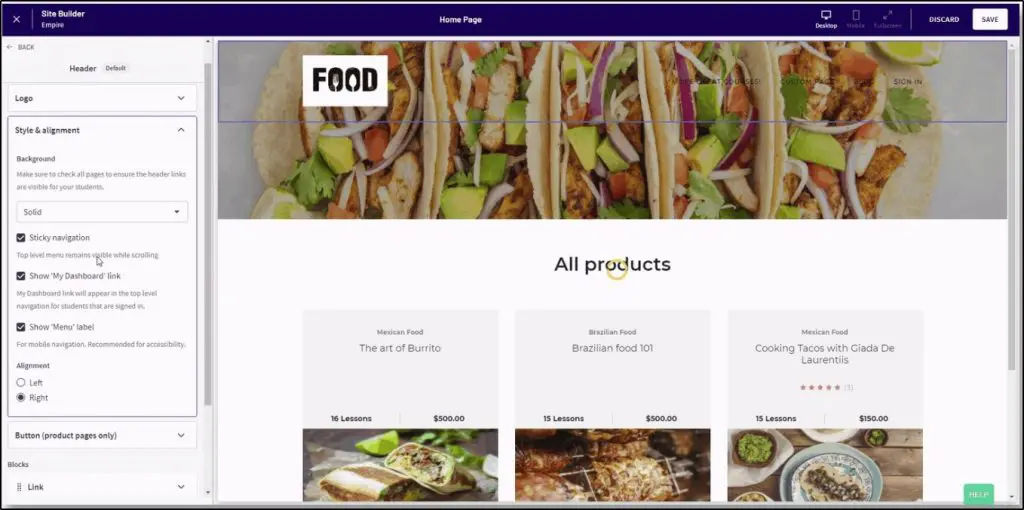
Thinkific has a drag-and-drop site builder, giving you control over layouts, colors, fonts, and navigation. You can also customize HTML/CSS for advanced design tweaks. This makes it ideal for creators who want a fully branded course website.
Teachable, on the other hand, has a more structured approach. You can edit colors, fonts, and logos, but you’re limited to pre-set layouts. It’s faster to set up but not as flexible if you want a more customized look.
Winner: Thinkific
Feature #5: Sales Pages and AI-Powered Landing Pages
Once your website is live, you’ll need sales pages to convert visitors into students.
Teachable offers basic sales pages for each course, where you can add text, images, videos, testimonials, and pricing options. It’s functional but lacks deep customization or marketing automation.
Thinkific takes things a step further. Its AI-powered landing pages don’t just help you build a good-looking page—they also generate conversion-optimized copy, so you don’t need to write from scratch.
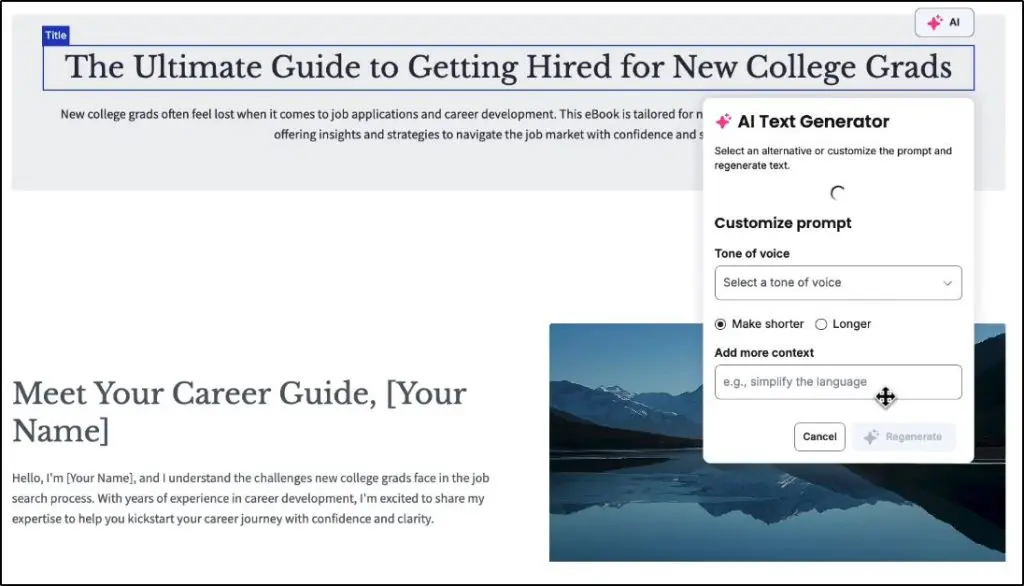
More importantly, Thinkific’s landing pages are tied to a full sales funnel system. You can capture leads with free downloads, automate follow-up emails, and trigger upsells when a student makes a purchase—all without third-party tools.
For example, let’s say you’re a personal finance coach selling a budgeting course:
- You create an AI-generated landing page offering a free “Expense Tracker Spreadsheet” to collect leads.
- The visitor enters an email sequence, receiving a budgeting tip every two days.
- A week later, they get a limited-time discount for your paid course.
- If they add the course to their cart but don’t check out, Thinkific automatically emails them a reminder.
- When they enroll, Thinkific offers an upsell—maybe a membership community or one-on-one coaching.
This level of automation isn’t possible on Teachable without third-party integrations.
Winner: Thinkific
Feature #6: Sales, Marketing, & Automation
Creating an online course is just the first step—getting people to buy it is where many course creators struggle.
Both Teachable and Thinkific provide sales and marketing tools, but they approach it very differently.
Teachable focuses on simplicity—it gives you basic tools like coupons, upsells, and order bumps to increase sales. It also offers a basic email notification system, but no built-in email automation or advanced funnel-building tools. To run a full marketing strategy, you’ll need third-party tools like ConvertKit, Mailchimp, or ActiveCampaign.
Thinkific, on the other hand, has significantly expanded its marketing capabilities. With email automation, AI-powered sales funnels, and built-in lead capture tools, it now offers a complete marketing system without requiring external software.
Email Marketing: Teachable vs. Thinkific
Teachable’s email system is extremely limited—you can send course-related notifications (like enrollment confirmations), but you can’t automate sales emails, nurture sequences, or abandoned cart reminders. If you want to capture leads and convert them into paying students, you’ll need a separate email provider.
Thinkific now includes full email marketing automation, allowing you to:
- Send automated welcome emails when someone signs up for a freebie or course.
- Recover lost sales with abandoned cart reminders.
- Run sales sequences that nurture leads over time.
- Create segmented email lists based on student actions (like completing a course or joining a membership).

For example, if someone downloads a free digital guide from your Thinkific landing page:
- They’re automatically added to an email sequence.
- They receive a series of emails introducing them to your paid course.
- If they don’t buy, Thinkific can send a discount offer or a student success story to push them toward purchasing.
- If they add the course to their cart but don’t check out, Thinkific sends an abandoned cart reminder—helping you recover lost sales.
With Teachable, none of this is possible natively. You’d need to connect an external email marketing tool, set up automation workflows, and manually integrate everything.
Sales Funnels & Lead Capture
Teachable gives you basic checkout and upselling features, but it doesn’t offer a built-in funnel system. You can create sales pages and add order bumps, but you’ll need an external tool like GoHighLevel, ClickFunnels, Leadpages, or Kartra to build a complete sales funnel.
Thinkific, on the other hand, now provides a fully automated funnel system.
- AI-generated sales pages that write optimized copy for you.
- Lead magnets (freebies like eBooks, templates, or mini-courses) that automatically collect emails.
- Automated follow-up emails that nurture leads into paying customers.
- One-click upsells and order bumps to increase revenue at checkout.
For example, if you’re selling a fitness course, you can:
- Offer a free “7-Day Meal Plan” download in exchange for an email.
- Automatically add them to a 5-email sequence that teaches them about your fitness method.
- Send a special discount offer after a few days.
- If they enroll, immediately offer an upsell—like a one-on-one coaching session or membership community.
With Thinkific, this entire process runs on autopilot—no need for third-party tools.
Automation & AI-Powered Marketing
Both platforms allow basic automation for handling payments, granting course access, and sending notifications.
But Thinkific now includes:
- AI-powered email sequences that generate optimized content.
- Abandoned cart recovery automation to win back lost sales.
- Smart funnels that automatically segment and nurture leads.
Teachable still lacks these capabilities, making it less effective for creators who want an all-in-one marketing and sales system.
Winner: Thinkific
Feature #7: Built-in Payment Processors: Teachable:Pay vs. Thinkific’s TCommerce
Both Teachable and Thinkific offer built-in payment processing, but they take different approaches.
Teachable:Pay – A Creator-Friendly Payment System
Teachable:Pay is Teachable’s native payment processor, designed to simplify payments for course creators. Instead of relying on Stripe or PayPal, Teachable:Pay handles everything for you, including:
- Instant payouts (daily, weekly, or monthly—depending on your plan).
- Automatic sales tax calculation and remittance (including EU VAT & US sales tax).
- Buy Now, Pay Later (BNPL) options through Klarna and Affirm.
- Multiple payment methods, including PayPal, credit/debit cards, Apple Pay, and Google Pay.
- Built-in affiliate payouts so you can automatically share revenue with partners.
Because Teachable:Pay is directly integrated into the platform, you don’t need third-party payment gateways or additional setup. It also comes with advanced fraud protection, reducing chargebacks and ensuring smooth transactions.
But here’s the catch—Teachable’s Starter plan charges a 7.5% transaction fee on every sale.
If you upgrade to the Builder plan ($89/month) or higher, you won’t pay any platform transaction fees. However, standard payment processing fees still apply (like 2.9% + 30¢ for U.S. card sales or 4.99% + 49¢ for international PayPal).
Thinkific’s TCommerce – A Complete Payment & Sales System
Thinkific’s TCommerce is an even more comprehensive payment solution, offering:
- Instant access to multiple payment options, including credit/debit cards, Apple Pay, Google Pay, and Cash App.
- Buy Now, Pay Later (BNPL) through Affirm, Klarna, and Afterpay.
- Order bumps and one-click upsells to increase revenue at checkout.
- Abandoned cart recovery emails to recapture lost sales.
- Automated subscription and payment management (smart retries for failed payments).
- Automated tax collection & remittance (like Teachable:Pay).
- Seamless integration with QuickBooks & Xero for accounting.
Thinkific does not charge any additional transaction fees, meaning you keep more of your revenue—you only pay standard Stripe/PayPal processing fees.
One major advantage of TCommerce is its advanced sales automation features. For example:
- If a student abandons their checkout, Thinkific can automatically send a reminder email to nudge them to complete the purchase.
- If a customer’s subscription payment fails, Thinkific retries the payment three times automatically, recovering up to 50% of failed transactions.
- You can sell in bulk using Group Orders, making it easy to sell to businesses or organizations.
Teachable:Pay does not have these built-in sales recovery and automation features, which means you’d have to use external tools to recover failed payments or optimize conversions.
Winner: Thinkific
Feature #8: Student Engagement & Learning Experience
If students don’t engage with your content, they won’t complete your course. And if they don’t complete it, they won’t get results. This isn’t just bad for them—it’s bad for your business.
A successful student is more likely to recommend your course, leave a positive review, and buy more from you in the future. That’s why engagement tools aren’t just “nice to have”—they directly impact your revenue.
Both Teachable and Thinkific offer engagement tools, but Thinkific gives you more ways to make learning interactive and keep students coming back.
Teachable includes quizzes, course compliance rules, and completion certificates. It offers multiple-choice quizzes but doesn’t support more advanced question types like short-answer or file upload responses.
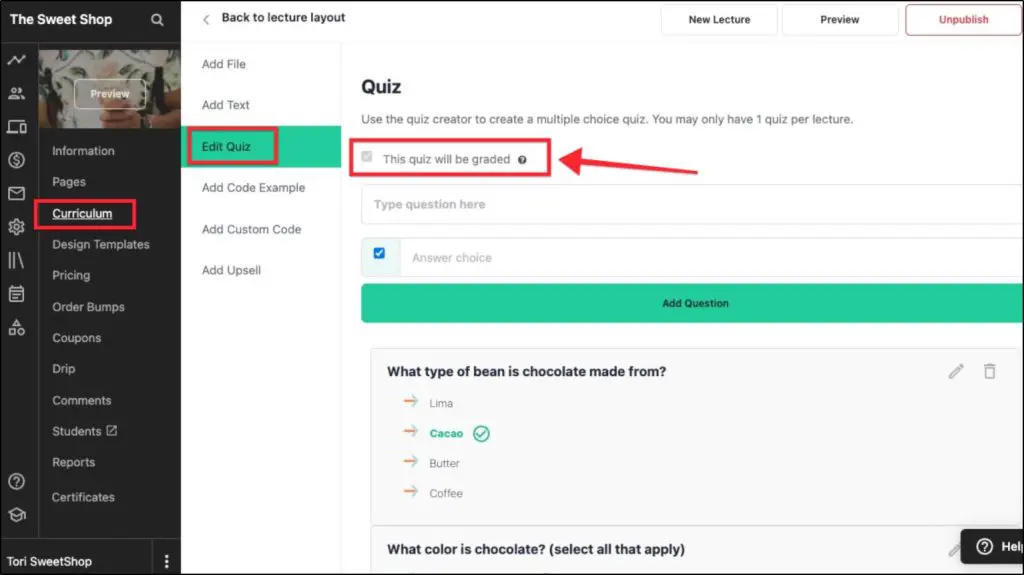
You can enforce lesson completion requirements (e.g., making students watch 90% of a video before progressing). It also allows lesson comments, but discussions are limited to individual lessons—there’s no way to create ongoing group conversations across a course.
Thinkific, on the other hand, provides deeper engagement options like course-wide discussion forums, live lessons, and interactive student communities.
For example, a fitness coach could create a weekly challenge thread where students post progress updates, get peer support, and instructors can engage in one place.
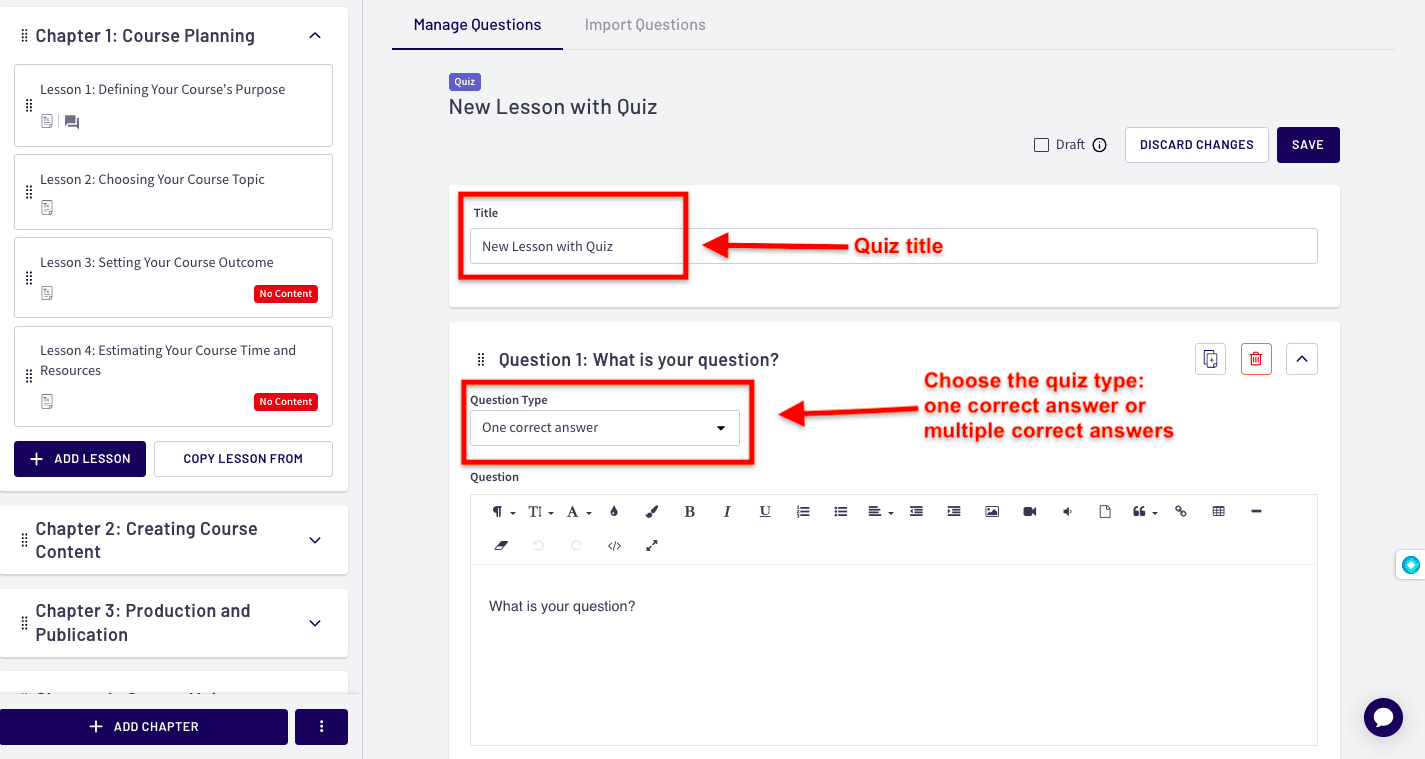
It also supports more advanced quizzes, including multiple-choice, short-answer, and assignments where students can upload files for instructor feedback.
In terms of learning experience, both platforms allow students to log in from any device and pick up where they left off.
However, Thinkific’s student dashboard is more structured—when a student logs in, they’re taken directly to the next lesson in their enrolled course.
In contrast, Teachable takes students to the course homepage, requiring them to manually navigate to their progress.
Additionally, Thinkific allows course creators to customize the learning environment more with custom course player themes and progress tracking widgets that help students stay on track.
Winner: Thinkific
Feature #9: Ease Of Use And User Experience
There’s no denying that Teachable is the easiest and most beginner-friendly course platform. Its simplicity is its biggest strength—but that’s also because it doesn’t offer the same level of customization and advanced features as Thinkific.
If you just want a straightforward way to create and sell courses without getting into complex settings, Teachable does an excellent job.
But Thinkific isn’t difficult to use either. Yes, it has a steeper learning curve compared to Teachable, but that’s because it offers more control over how your courses, memberships, and communities work.
That doesn’t mean it’s confusing—both platforms are built for non-technical users—but Thinkific requires a bit more setup if you want to take advantage of its advanced features.
One key difference is how much freedom you have in structuring your course business. With Teachable, you’re working within a more guided, plug-and-play system—which is great if you don’t want to worry about configurations.
Thinkific, on the other hand, gives you room to grow. It may take a little longer to set up, but once you do, you’ll have more flexibility to create unique learning experiences that fit your business model.
Winner: Draw
The Main Pros And Cons Of Teachable And Thinkific
Now that we’ve compared the platforms in detail, let’s take a brutally honest look at the biggest pros and cons of each. I’ll focus on less obvious points that haven’t been covered as much yet.
Teachable: Pros & Cons
| Pros | Cons |
| Teachable is easy to use, even for complete beginners. | It offers limited control over course structure. For example, it doesn’t have prerequisite lessons, progress-based unlocks, or graded assignments. |
| Built-in coaching features for scheduling, intake forms, and client tracking. | It offers a limited-feature community platform that cannot be sold as a standalone product. |
| Handles payments, taxes, and payouts automatically through Teachable:Pay. | Teachable retired its free plan in 2025. |
| AI-powered course creation tools generate outlines, quizzes, and transcripts. | No real email marketing features. It only sends basic course notifications, no automation. |
| Native affiliate payout system lets you automatically pay partners. | Website customization is restrictive (limited layouts, no full drag-and-drop editor.) |
Thinkific: Pros & Cons
| Pros | Cons |
| Thinkific offers more control over course structure. For example, it supports prerequisite lessons, graded assignments, progress-based unlocks, and compliance settings. | Slightly steeper learning curve due to more advanced customization options. |
| Full membership and community features with Spaces, live events, engagement tracking, and push notifications. | No built-in coaching schedule. You’ll need third-party tools like Calendly. |
| AI-powered sales funnels automate lead capture, email sequences, and upsells. | No free plan—only a 30-day free trial. |
| Built-in email marketing for abandoned cart recovery, sales sequences, and lead nurturing—no need for third-party tools. | Starts at $49/month vs. Teachable’s $39/month, though it includes more features. |
| Customizable course websites with a true drag-and-drop builder and custom domain support. | Affiliate payouts require third-party integrations like Rewardful. |
| No transaction fees on any plan—you keep 100% of your revenue. | Some advanced analytics (e.g., student engagement heatmaps, cohort tracking) are only available on higher plans. |
Thinkific vs. Teachable Verdict | Which Is the Better Platform in 2026?
If you’re looking for the best all-in-one platform to sell online courses, memberships, or communities, Thinkific is the better choice in 2026.
Here’s why:
It gives you everything Teachable does—and more.
Both platforms offer strong course-building tools, flexible pricing, and global payment support. But Thinkific goes further with built-in email marketing, AI-powered sales funnels, automation, and community features—none of which are available natively on Teachable.
It’s a better long-term solution.
If you’re planning to grow beyond just selling a few courses, Thinkific gives you the tools to scale—without adding a bunch of external tools. You can sell memberships, host live events, run email sequences, and build a full student experience in one place.
It’s actually cheaper once you start selling.
Teachable’s Starter plan is $39/month but charges a 7.5% transaction fee. Thinkific’s Basic plan is $49/month with no platform fees. So even though Thinkific costs $10 more upfront, you’ll save money as soon as you start making consistent sales.
For most creators, Thinkific is the smarter investment. It’s more powerful, more scalable, and includes the built-in tools you need to grow your online education business—without relying on third-party software.
Teachable only makes sense if you want the simplest setup, don’t need built-in email or automation, or already have your own tools for that.
But if you’re serious about turning your courses into a real business, Thinkific clearly wins. It’s just a much stronger platform with far better long-term value.
Frequently Asked Questions (FAQs)
Is Thinkific worth the extra cost over Teachable?
At comparable plan levels, Thinkific Start ($74/month annually) costs $5/month more than Teachable Builder ($69/month annually) and includes memberships, course bundles, certificates, compliance tools, payment plans, and Zoom integration that Builder doesn’t have. Once transaction fees are factored in, Thinkific Basic is actually cheaper than every Teachable plan at every revenue level when using Thinkific Payments.
Which platform is better for coaches: Teachable or Thinkific?
If coaching is your entire product, Teachable is the better choice. Its built-in coaching tools handle session scheduling, intake forms, client tracking, and payments without needing Calendly or any third-party scheduler. If you offer coaching as an upsell alongside courses or a membership, Thinkific is the stronger platform overall. The Calendly integration is a minor inconvenience compared to what Thinkific gives you on the course, membership, and automation side.
Can I switch from Teachable to Thinkific without losing my students?
You can export your student list as a CSV and manually re-enroll them on Thinkific, but the process is not automated. Course content does not export in a portable format — you will need to rebuild your courses on the new platform. If your videos are hosted natively in Teachable rather than embedded from Vimeo or YouTube, migration is significantly more time-consuming. The practical advice: host video content externally now so a future migration only involves rebuilding course structure, not re-uploading everything.
Can I migrate from Teachable to Thinkific or vice versa?
Yes, but it is not automated. You will need to manually export your content and student data and recreate your courses and funnels on the new platform. Some platforms offer concierge migration assistance on higher-tier plans.
Does either platform support SCORM files?
Only Thinkific supports SCORM content, and only on its Plus plan. Teachable does not support SCORM files.
Do Teachable and Thinkific support live classes?
Thinkific supports live lessons through native Zoom integration on Start and higher plans. Teachable requires third-party integrations for live classes.
Which platform has a built-in affiliate program?
Teachable has a built-in affiliate program starting on the Builder plan. Thinkific requires third-party tools such as Rewardful or FirstPromoter for affiliate tracking.
Which platform offers built-in email marketing?
Neither platform replaces a dedicated email marketing tool for building and marketing to an external list. Thinkific includes automated lead sequences and abandoned cart recovery on all plans, plus manual broadcast email to existing students on the Grow plan. Teachable includes basic enrollment notifications only. Both platforms require Kit or a similar tool if external list marketing is part of your business model.
Are there any free plans available?
No. Both Thinkific and Teachable discontinued their free plans. Thinkific offers a 30-day free trial on Basic, Start, and Grow. Teachable offers a 7-day free trial with a 30-day money-back guarantee.
Is there a mobile app for students?
Teachable offers an iOS app for students. Thinkific does not offer a native mobile app unless you are on the Plus plan, which includes a branded mobile app add-on.
Table of Contents
Related Posts
Kajabi vs Thinkific (2026): I Use Both But Don’t Recommend Them To Everyone
Podia vs Thinkific (2026): I’ve Used Both, Here’s My Verdict
Thinkific Review (2026) | I Run 6 Courses on It But It’s NOT For Everyone (With Examples)