

TL;DR: Thinkific Digital Downloads (2026)
Thinkific Digital Downloads is a product type for selling or giving away files such as PDFs, templates, eBooks, audio, and video. Thinkific builds the product page with AI, handles checkout, and delivers the file after purchase or sign-up.
What you can do
– Offer a file as a free lead magnet in exchange for an email address
– Sell it for a one-time price or a monthly payment plan
– Add paid downloads as order bumps at checkout
– Upload files up to 2 GB in document, image, audio, or video formats
What to know before you start
– Start allows 5 digital downloads, and Start and up remove the cap
– You can’t delete, archive, or hide a download once you create it
– The thank-you page and purchase emails can’t be customized
Best for: Course creators, coaches, and consultants who want a lead magnet, a low-priced first offer, or a checkout add-on on the same platform as their courses.
Try Thinkific free for 30 days
Note: This page contains affiliate links. If you purchase through links on this page, we may earn a commission at no additional cost to you.
Not every buyer is ready for a full course on day one. A checklist, a template, or a short guide gives them a smaller first step, and it gives you a way to start the relationship.
Thinkific Digital Downloads lets you sell or give away those files on the same platform that hosts your courses, communities, and coaching. In this guide, I’ll walk through how it works today, what changed recently, where it falls short, and the ways I’d use it to grow a learning business.
New to Thinkific? Read my complete Thinkific review first.
Read: What are digital downloads and how to create them
What Is Thinkific Digital Downloads?
Thinkific Digital Downloads is a product type inside Thinkific for delivering files instead of lessons. Upload the file, choose whether it’s free or paid, and Thinkific creates a landing page, a checkout, and the delivery steps for you.
A download stands on its own as a product, so it doesn’t need a course around it. It still connects to the rest of your business, through order bumps at checkout, bundles with courses and Thinkific Communities, or as the first offer in an email sequence.
Digital Downloads come with every Thinkific plan. The main difference between plans is how many you can create.

Read: The best online course selling platforms for edupreneurs
Key Features of Thinkific Digital Downloads (2026)
Thinkific has reworked Digital Downloads around AI-generated product pages and tighter delivery controls. Here’s what it offers.
| Feature | What it means for you |
|---|---|
| AI-built product and landing page | Describe your audience and what they’ll get, and Thinkific drafts the product name, description, and landing page. You can edit everything in a visual editor. |
| Large, flexible files | Upload files up to 2 GB in document, image, audio, or video formats, including PDF, Word, Excel, PowerPoint, EPUB, MP3, and MP4. |
| Three pricing options | Offer the file as a free lead magnet, for a one-time payment, or on a monthly payment plan with immediate access. |
| Order bumps | Add a paid download to the checkout of another product so buyers can grab it with one click. |
| Protected delivery | Buyers must log in to download, which stops link sharing, and you can set an access period after which the link expires. |
| Lead capture | Each free download triggers a new-lead event, so you can send leads to your email tool through Zapier or webhooks. |
| Mobile access | Buyers can open their downloads in the Thinkific mobile app and in branded apps. |
One related change matters if you read older guides. Thinkific retired its Free Download Funnel in August 2024 and now points creators to Digital Downloads for file-based lead magnets. My Thinkific Funnels review covers the two funnel types that remain.
How to Create a Digital Download on Thinkific
Setting up a download takes a few minutes, and the process follows five steps.
- Step #1: Start a new product. Go to Products > Digital Downloads and click New digital download.
- Step #2: Let AI draft it, or start blank. Describe your audience and what they’ll learn, and Thinkific’s AI writes the name, description, and landing page, or you can skip this and build from scratch.
- Step #3: Upload your file. Choose the content type, upload the file and a product image, and save.
- Step #4: Set the price. On the Pricing tab, choose a free lead magnet, a one-time payment, or a monthly payment plan, and set an access period if you want one.
- Step #5: Edit the landing page and publish. Adjust colors, text, and images, then publish when you’re ready, since the page stays in draft until then.
Once it’s live, share the landing page link in your blog posts, emails, and social profiles, or attach the download to another product as an order bump.
For more on producing the content itself, see my guide to Thinkific’s AI content creation tools.
What Your Buyers and Leads Experience
Let me walk you through the user journey of Thinkific Digital Downloads.
If You Offer a Paid Download
Buyers check out on the landing page and land on a download page right away. They also get an email with the download link, plus your welcome email and receipt if you have those turned on.
To download, buyers need to log in to their account, so a forwarded link won’t work for someone else. Thinkific records the sale in your Orders and Transactions tables rather than in Enrollments, and the download doesn’t appear on the student dashboard.
If a buyer loses the email, you can copy the product link from the product card and send it yourself.
If You Offer a Free Lead Magnet
Visitors enter their contact details on the landing page instead of going through checkout, then get the file right away. Each sign-up counts as a new lead, so you can connect Zapier or a webhook to add them to your email platform, or nurture them with Thinkific’s built-in email tools.
If you need help choosing what to give away, my list of lead magnet ideas is a good place to start.
Limitations to Know Before You Start
Digital Downloads works well for simple file sales, but a few rules can catch you out.
- No delete or archive: Once you create a download, you can’t permanently delete or archive it.
- No hidden products: You can’t make a download private or hide it from your site.
- Unpublishing removes access: If you unpublish a download, buyers lose access too, even after paying.
- Fixed emails and thank-you page: You can’t customize the purchase emails or the thank-you page.
- AI landing pages only: Downloads always use the AI page builder and can’t switch to classic site pages.
- No subscription pricing: You can charge once or through a monthly payment plan, but not an ongoing subscription.
- Only paid downloads work as order bumps: A free lead magnet can’t sit in someone else’s checkout.
What Types of Digital Downloads Can You Create on Thinkific?
Because Thinkific accepts documents, images, audio, and video, almost any file you already use in your teaching can become a product. Common formats include:
- Templates
- Trackers
- Checklists
- eBooks
- Workbooks/Worksheets
- Calendars
- Graphic design elements
- Stock photos
- Illustrations
- Guides
- Artwork/Digital prints
- Audio files such as guided meditations or podcast bonus episodes
- Short video tutorials and recorded workshops
The easiest wins usually come from repurposing material you’ve already made, such as a worksheet from a course module or the slides from a webinar.
Ideas: Where Digital Downloads Fit on Your Value Ramp
I’ve long recommended building a Value Ramp, a sequence of offers that starts free and rises in price and value as people come to trust you. Selling education depends on trust, and the more something costs, the more trust a buyer needs before they say yes.
Digital downloads work best at the bottom of that ramp, where they turn strangers into leads and leads into first-time buyers.
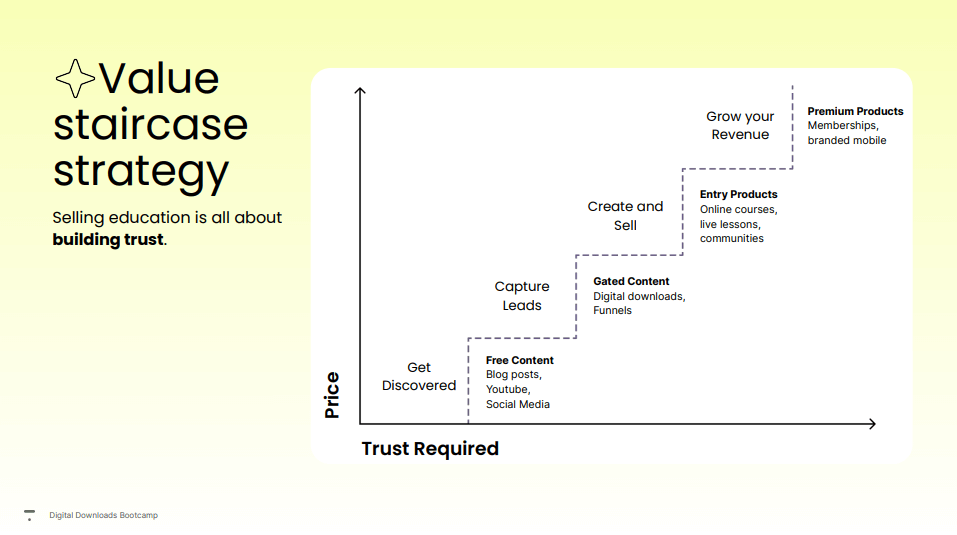
Here are practical ways to use them at each step.
- Free lead magnet: Turn the most useful worksheet from your course into a free download. A leadership coach might give away a one-page meeting agenda template, then email new leads about the full course.
- Low-priced first purchase: Sell a template pack or toolkit between $7 and $27 as a tripwire offer. A small payment turns a lead into a customer, and customers buy again far more readily than strangers.
- Order bump at checkout: Add a companion workbook or audio version to your course checkout. Buyers who already said yes to the course often add a related file for a small extra cost.
- Bonus for bundles: Bundle a premium resource library with a course or community on Start or above to make the higher-priced offer easier to choose.
- Consultant toolkit: Package the frameworks you use with clients, such as a process audit template, and sell it to companies that aren’t ready to hire you yet. Buyers of the toolkit make warm leads for a paid engagement.
- Payment plan for a premium asset: Offer a larger asset, such as a complete video workshop, on a monthly payment plan with immediate access.
If you’re working out what to charge, my guide on how to price online courses applies to downloads too. For inspiration from real schools, see these Thinkific examples.
Pair your downloads with a recovery plan as well. Thinkific sends abandoned cart emails automatically when someone starts checkout and leaves, as long as you use Thinkific Payments, which Thinkific previously called TCommerce. Baymard Institute puts the average online cart abandonment rate at around 70%, so that recovery email earns its keep.
Thinkific Digital Downloads Pricing
Digital Downloads come with every Thinkific plan. Start lets you create up to 5 downloads, which covers a lead magnet and a few paid files. Start and higher plans remove that cap and add bundles and payment plans, which most creators building a Value Ramp will want.
Use Thinkific Payments to keep costs down. If you connect your own Stripe account instead, Thinkific adds a surcharge on every sale on the lower plans. My Thinkific pricing guide breaks down every fee by plan.
You can test everything with a 30-day free trial through our link.
| Plan | Billed monthly | Billed annually (per month) |
|---|---|---|
| Start | $109 | $82 |
| Grow | $219 | $164 |
| Expand | $499 | $374 |
| Plus | Custom | Custom |
| Feature | Start | Grow | Expand | Plus |
|---|---|---|---|---|
| Courses & students | ||||
| Published courses | Unlimited | Unlimited | Unlimited | Unlimited |
| Current students | 10,000 | 10,000 | 10,000 | Custom |
| Video bandwidth | 200 GB/mo | 400 GB/mo | 1,000 GB/mo | From 7,500 GB/mo |
| Digital downloads | Unlimited | Unlimited | Unlimited | Unlimited |
| Coaching & webinars | Unlimited | Unlimited | Unlimited | Unlimited |
| Certificates, assignments, private courses | ✓ | ✓ | ✓ | ✓ |
| Zoom lessons in courses | ✓ | ✓ | ✓ | ✓ |
| SCORM | ✗ | ✗ | ✗ | ✓ |
| Learning paths | ✗ | ✗ | ✗ | ✓ |
| Community | ||||
| Communities | 1 | 3 | 10 | Unlimited |
| Spaces per community | 10 | 20 | 200 | Unlimited |
| Selling | ||||
| Paid memberships / subscriptions | ✓ | ✓ | ✓ | ✓ |
| Bundles & payment plans | ✓ | ✓ | ✓ | ✓ |
| PayPal payments | ✗ | ✓ | ✓ | ✓ |
| Site & admin | ||||
| Remove Thinkific branding | ✗ | ✓ | ✓ | ✓ |
| Support | Email & chat | Phone & priority chat | Phone & priority chat | Dedicated success team |
| Branded mobile app | $199/mo add-on | $199/mo add-on | $199/mo add-on | Included on select contracts |
| AI & integrations | ||||
| Thinker AI teaching assistant | ✗ | ✗ | ✗ | ✓ |
| Thinkific MCP (Claude, ChatGPT) | ✗ | ✗ | Not listed | ✓ |
| Marketing | ||||
| Email Automation | ✓ | ✓ | ✓ | ✓ |
| Landing Pages | ✓ | ✓ | ✓ | ✓ |
| Site Builder | ✓ | ✓ | ✓ | ✓ |
| Transaction Fee (without Thinkific Payments) | 2% | 1% | Confirm with Thinkific | 0 |
| Administrators | 2 | 6 | 15 | By plan |
| Maximum learners per group | 50 | 100 | Unlimited | Unlimited |
| Bulk student email | ✗ | ✓ | ✓ | ✓ |
| Email white-labeling | ✗ | ✗ | ✓ | ✓ |
Pros and Cons of Thinkific Digital Downloads
| Pros | Cons |
|---|---|
| Included on every Thinkific plan | Start caps you at 5 downloads |
| AI drafts the product and landing page for you | You can’t delete, archive, or hide a download |
| Free lead magnet, one-time, and payment plan options | You can’t customize purchase emails or the thank-you page |
| Paid downloads work as one-click order bumps | No ongoing subscription pricing |
| Files up to 2 GB, including audio and video | Unpublishing removes access for past buyers |
| Login-protected delivery stops link sharing | Downloads don’t appear on the student dashboard |
Are Thinkific Digital Downloads Worth Using?
Yes, if you already sell courses on Thinkific or plan to. Digital Downloads gives you a lead magnet, a low-priced first offer, and a checkout add-on without paying for a separate tool like Gumroad, and every sale lands in the same customer list as your courses.
Digital Downloads is a weaker fit if downloads are your whole business. The 5-product cap on Start, the lack of subscriptions, and the fixed emails will frustrate a dedicated digital product seller. In that case, compare Thinkific with the options in my Thinkific alternatives guide, or see how it stacks up in Podia vs Thinkific, Teachable vs Thinkific, and Kajabi vs Thinkific.
If you’re starting from scratch, my walkthrough on creating your first course in Thinkific shows how to build the course your downloads will lead to. Connect downloads to the rest of your stack with Zapier, and keep buyers engaged on the go with the Thinkific mobile app.
Start your free Thinkific trial and publish your first digital download today.
Frequently Asked Questions
What is Thinkific Digital Downloads?
Thinkific Digital Downloads is a product type for selling or giving away files such as PDFs, templates, eBooks, audio, and video. Thinkific creates the landing page with AI, runs checkout, and delivers the file after purchase or sign-up. Downloads can stand alone or connect to your courses through order bumps and bundles.
Is Thinkific Digital Downloads included on every plan?
Yes. Digital Downloads come with every Thinkific plan at no extra cost. The Basic plan allows up to 5 download products, while Start and higher plans allow unlimited downloads and add bundles and payment plans. Standard card processing still applies to paid downloads.
What file types and sizes can you upload to Thinkific Digital Downloads?
Each file can be up to 2 GB. Thinkific accepts documents such as PDF, Word, Excel, PowerPoint, and EPUB, images such as PNG and JPG, audio such as MP3 and WAV, and video such as MP4 and MOV. File names can run up to 255 characters.
Can you use a Thinkific digital download as a free lead magnet?
Yes. Choose the free lead magnet option, and visitors enter their contact details to get the file instantly. Each sign-up counts as a new lead and triggers Thinkific’s New Lead event, so you can send leads to Mailchimp, Kit, or another email tool through Zapier or a webhook.
Can you sell a digital download on a subscription or payment plan?
You can sell a download for a one-time price or through a monthly payment plan, and buyers get access right away, before they finish paying. Thinkific doesn’t offer ongoing subscription pricing for downloads. For recurring revenue, include downloads in a membership or bundle instead.
Can buyers share a Thinkific download link with others?
No. Buyers need to log in to their Thinkific account to download the file, so a shared link won’t work for anyone else. An optional access period also makes the link expire after a set time. Any file a buyer has already saved to their device stay with them.
Can you add a digital download as an order bump?
Yes, as long as the download has a price. Thinkific lets you add a paid digital download as an order bump at the checkout of another product, so buyers can add it with one click. Free lead magnets don’t work as order bumps.
Where do customers find their Thinkific downloads?
After checkout, buyers land on a download page and receive an email with the download link. They can also open downloads in the Thinkific mobile app and branded apps. Downloads don’t appear on the student dashboard, so if a buyer loses the email, copy the product link from the product card and send it.
Can you delete a digital download on Thinkific?
No. Thinkific doesn’t let you permanently delete, archive, or hide a digital download. Unpublishing is possible, but buyers then lose access to the file as well, even if they paid. Remove the product link from your marketing before you unpublish, and give buyers a heads-up first.
How do digital downloads fit into a Value Ramp?
Digital downloads work best at the start of a Value Ramp. A free checklist or template captures leads, a low-priced toolkit turns leads into first-time buyers, and a paid workbook added as an order bump raises the value of each course sale. Each step builds the trust buyers need for your higher-priced offers.

Jeff Cobb, Founder of Learning Revolution
Jeff Cobb is an expert in online education and the business of adult lifelong learning. Over the past 20+ years he has built a thriving career based on that expertise – as an entrepreneur, a consultant, an author, and a speaker. Learning Revolution is a place where Jeff curates tips, insights, and resources to help you build a thriving expertise-based business. Learn more about Jeff Cobb here.
Table of Contents
Related Posts
Thinkific vs LearnWorlds (2026) | Comparing The Best Online Learning Platforms
What Are Digital Downloads? Ideas, Examples & Selling Platforms
8 Best Thinkific Alternatives (2026): Which Competitors Can Replace It?