

TL;DR: Is Teachable Community Worth Using?
Teachable’s Community feature is included with all paid plans, starting at $59/month (billed annually). It lets you build private spaces for learners, sell memberships, and drive engagement—without adding another platform.
✅ Great if you’re already using Teachable for courses or coaching
❌ Not worth using as a standalone community platform
What You Get:
– Integrated community tied to your products and memberships
– Channel-style discussions, tagging, mentions, and post gating
– Access control based on product purchase or membership tier
What’s Missing:
– No event scheduling, gamification, or analytics
– No AI community features or multiple branded communities
👉 Verdict: Ideal as an add-on to your Teachable learning business—not a replacement for Circle or Mighty Networks.
Try Teachable Community For Free
Teachable Community is a built-in feature across all paid Teachable plans, at no extra cost. You can use it to build a thriving online community around your courses, coaching, memberships, or even as a standalone product to generate recurring revenue.
In a world where AI has made information easy to find, your real advantage is personal connection. That’s what people pay (and return) for.
But is Teachable’s community feature strong enough to replace dedicated platforms like Circle or Mighty Networks?
What does it give you and what does it leave out? That’s what we’ll evaluate in this article.
You can also read our complete Teachable review to learn more about this robust all-in-one course platform.

Teachable Community: Product Snapshot (2025)
Before we dive deeper, here’s a bird’s-eye view of the Teachable Community feautre and what it offers.
| Feature | Details |
|---|---|
| Availability | Included on all paid Teachable plans (Starter, Builder, Growth, Advanced, Custom). |
| Standalone Use | ✅ Yes — build and sell access to a community even without a course or coaching product. |
| Product Integration | ✅ Seamlessly integrates with Courses, Coaching, Memberships, and Digital Downloads. Bundle access with any product. |
| Membership Monetization | ✅ You can sell exclusive community access via memberships and assign access by tier. |
| Separate Communities / Spaces | ❌ One community per school, but you can create multiple Categories and Topics, with access gated by product or tier. |
| Access Control | ✅ Restrict specific categories or threads to learners in particular courses, memberships, or coaching programs. |
| Login System | ✅ One unified login for all Teachable products, including community. |
| User Roles | 3 roles: Admin, Moderator, Learner — Pro+ plans can create custom roles. |
| Structure & Organization | Organized by Categories and Topics (like channels and threads). Supports replies, likes, pins, and tags. |
| Search & Tagging | ✅ Full keyword search across posts and replies. Use tags (not hashtags) to organize content and improve discovery. |
| Hashtag Support | ❌ Not supported. Manual tagging system only. |
| Branding & Custom Domains | ✅ Supports custom domain (e.g. community.yoursite.com) and visual brand matching. |
| Engagement Tools | 💬 Threaded replies, mentions, onboarding prompts, post likes, and private spaces by tier/product. |
| Mobile Access | 📱 Mobile browser-friendly. Community is accessible through the Teachable iOS student app. No dedicated app for community only. |
| Livestreaming | ❌ No native livestreaming inside the community. You can embed Zoom/YouTube links manually into posts or courses. |
| AI Features in Community | ❌ No AI tools like conversation summarization, auto-suggested replies, or engagement analytics are available in community. |
Who is the New Teachable Communities For?
Teachable Communities is designed for all types of creators seeking to build an online learning environment that fosters community and engagement among members.
Here are a few use-case examples to give you a better idea of who can benefit from this exciting new feature.
- Course Creators: Use the Teachable community feature to build a private community, controlled by you, that helps you spark genuine connection between you and your learners, and between the learners themselves.
- Online Coaches: Drive engagement and boost the value of your coaching program by making conversation the center of the learning experience. You can also manage your coaching needs with Teachable Coaching.
- Membership Site Owners: Create a sense of connection and provide members with a safe community space where they can interact with others, express themselves freely, and gain inspiration.
- Standalone Product: If you haven’t yet created a product, you can use Teachable Community as a standalone product to create a new source of income from membership subscriptions.
If you already have a product, such as an online course or coaching package, building a community of your own is a great way to boost the value of your offering. It also helps to increase your authority and makes it easier to offer personalized engagement and develop deeper relationships with your learners. (Coaches: Learn more about building a community around your coaching here.)
However, you can benefit from Teachable communities even before you create your product. It’s the perfect platform for creators who want to test and validate their content and ideas before devoting their time to developing an entire course or coaching program.
The best part about using this platform is that the community you create is all your own. There’s no need for you to rely on social platforms like Facebook or LinkedIn, on which your learners may or may not be active.
What Are The Benefits of Having a Teachable Community?
One of the biggest benefits of using Teachable Communities is that it has a single, simple interface that combines learning with authentic connections. Only the best community platforms offer that.
Teachable makes it easy for you to bring your learners together to engage with you and each other, get their questions answered, and build a deep sense of connection.
Here’s a list of some of the core benefits of creating a community on Teachable:
- Increased authority
- Relationship development
- Personalized engagement
- Tiered membership options
- Stable income
- Recurring revenue
- Enhanced product value
- Easy membership management
If you’ve already done the work of creating a digital product and attracting learners, a community can help you enhance their learning experience and add more value to your product.
Features of Teachable Communities
1. Ease of Use: How Easy Is It To Use Teachable Communities?
With Teachable, there’s no longer a need to integrate third-party tools to build a community around your product. You can now enjoy a fully seamless digital experience using just one login.
You can host your learning products (online courses, coaching packages, digital downloads, and more) and your community with a single login for convenience and ease.
![New topic with arrow pointing to green box that says [+ new post]](https://www.learningrevolution.net/wp-content/smush-webp/Teachable-Communities-6-1024x559.jpg.webp)
Having all of your knowledge products on one platform will also prevent learner confusion and simplify their login processes. This, in turn, will make it easier for you and your learners to engage so you can more effectively help them achieve the desired transformation.
Getting Started With Teachable Communities
You can build your Teachable community in three key steps:
Step #1: Creating your Community: This is where you turn on the community in your Teachable account and determine which users have access to which content. This is also where you create the structure and categories of your community for more focused learning.
To do this, simply navigate to the “Community” tab on your sidebar (as shown in the image below) and follow the prompts to create your community.

Step #2: Enabling Your Community: Once your community is created, you then have to enable it so that your learners have access to it. You can do this for all your learners or based on specific courses or coaching packages.
Teachable makes it easy for you to build the community you want and provide your learners with the features they need.
Learners can post and reply to relevant threads about your content in a private and secure environment. Your Teachable community even lets learners go one step further in building connections with each other.

Step #3: Engaging Your Community: The final step includes making sure that your learners know where your community is and how to access it.
You can embed your community into any of your products (courses, coaching programs, etc.) for easy access. For example, it will show up as an option in the sidebar of your online course so learners can access it there.
You can also email your learners a link to the community to let them know that it’s available to them.
Just make sure to provide learners with an incentive to join your community and start engaging. You can use bonuses and videos as a way to get them to take action.

As you can see, there’s a lot you can do with your Teachable community. Just remember that an online community does not run itself. You’ll need to set clear guidelines and expectations for how members of your community interact with you and each other. This ensures that everyone knows the rules for posting and engaging with others on the platform.
2. Organize Your Teachable Community with Flexible Tools
Now that you’ve created your community, you can seamlessly connect it with your other products on Teachable.
Teachable allows you to organize your community using categories and topics. Within your online community, you can create categories and topics to help you organize and manage discussions and conversations around your topics.
These categories are displayed in the sidebar navigation of your Teachable community.

Make sure to tag your topics to make it easy for your learners to search for relevant information. You can create tags from new topics or reuse existing tags in future topics.
3. Manage Your Teachable Community With Ease
Your Teachable community can be divided into three types of users: admins, moderators, and learners.
Each of these user roles has specific default permissions that allow them to run your Teachable community.
Here’s a closer look at each community user role:
- Admin: Admin users have the highest level of access in your community. Their permissions include things such as the ability to impersonate non-admin level users, change website settings, create groups, and read any personal messages. They can also amend site customizations, create/delete/modify categories, or view private categories.
- Moderator: Those with moderator status have a lower level of access than admins. Their limited permissions allow them to assist you in running your online community. They can edit all users and posts, but they cannot add or remove categories, or change any of the community website settings. Whenever a moderator posts, a shield icon is shown next to their name which helps to differentiate their posts from those of other members.
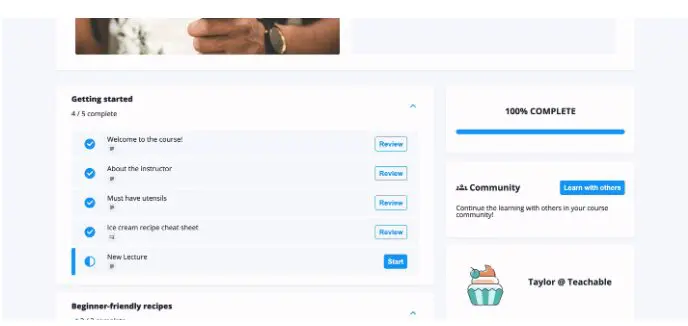
- Learner: This is the basic level access that allows users to post comments and posts in your Teachable community. Once your community is enabled, the learners can view different spaces by selecting “Learn with Others” within their course curriculum. They will be able to see topics (displayed as single posts in each category) and replies, and they can pose their own topics and join existing conversations. All of this helps to increase engagement among your community users.
4. Enhance the Learner Experience With Teachable Communities

If you’ve already done the work of building an online course or coaching program and attracting learners to your product, a community can help you enhance learning and increase the value of your offer.
Learn more about how to grow and scale your online coaching business with Teachable Coaching.
Enhance Student-Driven Learning Through Dynamic Conversation
Conversing with peers is a catalyst for impactful learning. The Teachable Community feature empowers learners to actively shape their educational journey through organic, meaningful dialogue.
By placing open and lively discussion at the center of the learning process in your Teachable school, learners can lead themselves toward a richer understanding of course material.
They can freely pose questions, share insights, analyze concepts, and make connections guided by their innate curiosity. This shifts learners into the driver’s seat, allowing them to guide targeted conversations that most effectively further their unique interests and learning needs.
By enabling organic peer-to-peer interactions, the Community enriches overall comprehension and investment in the material, leading to better academic outcomes. The path to success is through placing dynamic, student-driven conversation at the heart of a truly engaging learning experience.
Pros and Cons of Teachable Communities
As with all other community platforms, Teachable has its own set of pros and cons. Listed below are some of its most notable benefits and drawbacks to give you a better idea of the software’s capabilities and limitations.
✅ Teachable Community: Pros & Cons for Community Builders
| Pros (What Community Builders Will Like) | Cons (What May Limit You) |
|---|---|
| ✅ Integrated with your courses, coaching, and memberships — makes community part of the learning experience. | ❌ No native livestreaming or events — you have to use and manually link external tools like Zoom. |
| ✅ Access control by product or tier — gate categories/topics based on course enrollments or membership level. | ❌ Only one community per Teachable school — no support for separate spaces with independent branding or structure. |
| ✅ Clean, distraction-free environment — no social feed noise, no algorithm interference. | ❌ No built-in event calendar, scheduling tools, or recurring group sessions like in Circle or Mighty Networks. |
| ✅ Taggable and searchable posts — learners can find relevant threads easily via keyword search and manual tags. | ❌ No hashtag support or rich community discovery (e.g. trending topics, top contributors). |
| ✅ Threaded discussions with likes, mentions, and pinned posts — solid foundation for structured engagement. | ❌ No gamification, badges, points, or reputation systems to drive long-term participation. |
| ✅ Mobile access via browser and iOS app — works well on most devices. | ❌ No AI tools for moderation, summarization, or engagement recommendations. |
| ✅ Custom branding and custom domain support — lets you make it feel like part of your own platform. | ❌ No built-in analytics or insights into member behavior, engagement, or content performance. |
| ✅ Single-login system — one login for students to access all products and community. | |
| ✅ Simple to set up — you can create and launch a functional community in minutes. |
Teachable Community Alternatives: Comparison Table
To give you a fair idea of how good (or bad) Teachable Community really is, let’s compare it with some of its top alternatives specifically for building a community.
| Feature | Teachable | Kajabi | Circle | Mighty Networks | Thinkific |
|---|---|---|---|---|---|
| Standalone Community | ✅ Yes | ✅ Yes | ✅ Yes | ✅ Yes | ✅ Yes |
| Course Integration | ✅ Deeply integrated | ✅ Native integration | ✅ Modular (separate spaces) | ✅ Native w/ cohort tools | ✅ Directly linked UX |
| Live Streaming | ❌ External only | ✅ Built-in (Live Rooms) | ✅ Live Rooms & Co-hosting | ✅ Native livestreaming | ✅ Zoom-based |
| Events Calendar & Scheduling | ❌ No | ✅ Yes | ✅ Yes | ✅ Yes | ✅ Yes |
| Multiple Community Spaces | ❌ One community per school | ✅ Channels per product | ✅ Multiple “Spaces” | ✅ Flexible “Spaces” | ✅ Private/public “Spaces” |
| Content Gating | ✅ By course/product/tier | Per channel access | ✅ Per space or group | Per space, plan, or token | ✅ Private/public spaces |
| Member Roles & Permissions | ✅ Admin, Mod, Learner | ✅ Admin, Mod | ✅ Full role control | ✅ Full role control + gamification roles | ✅ Admin, Mod, Learner |
| Search & Discovery | ✅ Keyword + Tags | ✅ Basic search | ✅ Smart search + filters | ✅ Smart search + hashtags | ✅ Keyword + trending |
| Automation & Workflows | ❌ None | ✅ Challenges & reminders | ✅ Visual workflows + AI nudges | ✅ Automations by tier | ✅ Weekly digests only |
| AI Tools in Community | ❌ None | ❌ None | ✅ AI agents, content suggestions | ✅ AI co-host, onboarding assistant | ❌ None |
| Gamification | ❌ None | ✅ Challenges | ✅ Badges, scoring (via automation) | ✅ Points, badges, streaks | ❌ None |
| Analytics & Insights | ❌ Not available | ✅ Basic engagement data | ✅ Detailed dashboards, space-level reports | ✅ Mighty Insights: Members, Content, Plans | ✅ Basic analytics + top contributors |
| Member Directory & Profiles | ✅ Profiles, mentions | ✅ Yes | ✅ Yes + custom fields | ✅ Yes + location, interests | ✅ Profiles + @mentions |
| Moderation Tools | ✅ Admin/Mod only | ✅ Admin/Mod tools | ✅ Full mod roles | ✅ Custom roles, content flags | ✅ Community Moderator Role |
Verdict: Should You Use Teachable Community?
Teachable Community isn’t designed to be a standalone platform—and honestly, it’s not worth using on its own. If you’re trying to build a community-first business or want robust engagement features like livestreaming, gamification, advanced moderation, or mobile apps for both iOS and Android, platforms like Circle or Mighty Networks are much better suited.
But if you’re already using Teachable—or considering it to run your courses, coaching, or digital downloads—its built-in community is a valuable bonus. It adds learner interaction, product-specific discussions, and membership support without needing another tool or login.
Use Teachable Community if:
- You’re running a learning business and want a simple, integrated way to build community.
- You’re selling memberships, coaching, or bundles on Teachable and want to boost engagement.
- You prioritize ease-of-use over depth of features.
Look for alternatives if:
- Your community is the core product, not an add-on.
- You need native livestreaming, mobile apps, or advanced automation and analytics.
- You want multiple spaces, paid tiers, and a community-led growth model.
Bottom line:
Teachable Community is best used as a complement to your course or coaching business—not as a replacement for dedicated community platforms.
Frequently Asked Questions (FAQs)
Can I migrate my existing community from Circle or Mighty Networks to Teachable?
Teachable doesn’t offer automated migration tools, but you can manually recreate categories and invite members via email. Content migration would need to be done manually.
Is there a way to charge for access to just the Teachable community without selling a course?
Yes, you can sell access through standalone memberships or bundle the community into a digital product with zero content.
Can learners get notified when someone replies to their posts or mentions them?
Yes, Teachable sends email notifications for mentions, replies, and new activity in followed threads.
Does Teachable Community support private messaging between users?
No, there is currently no native private messaging or direct chat between learners inside the community.
Can I run cohort-based learning inside Teachable’s community?
While not built for cohorts, you can simulate them using gated topics/categories tied to cohort-based courses or memberships.
How do I keep engagement high in a Teachable community?
You can pin threads, use onboarding prompts, tag users, and connect posts to your course content to spark discussions.
Can I moderate posts or approve content before it goes live?
Teachable doesn’t currently support pre-moderation, but admins and moderators can delete or edit posts after publishing.
Is it possible to integrate third-party tools like Slack or Discord with Teachable Community?
There’s no official integration, but you can manually embed links or use Zapier for limited automation between platforms.
Can I download or back up my community content?
There is no built-in export feature for community content. You’d need to manually copy content or use a third-party scraping/export tool.
How does Teachable Community compare with using a private Facebook Group?
Teachable offers more control, no distractions from ads or unrelated content, and a clean UX—but lacks the viral growth, discoverability, and social tools of Facebook.

Jeff Cobb, Founder of Learning Revolution
Jeff Cobb is an expert in online education and the business of adult lifelong learning. Over the past 20+ years he has built a thriving career based on that expertise – as an entrepreneur, a consultant, an author, and a speaker. Learning Revolution is a place where Jeff curates tips, insights, and resources to help you build a thriving expertise-based business. Learn more about Jeff Cobb here.
See Also:
- Teachable Review 2024 – Is This Online Course Platform Right for You?
- 10 Best Online Community Platforms
- Teachable Coaching Review: Is This the Best Online Coaching Platform for You?
- Teachable Community Review: Is It The Right Community Platform For You?
- Teachable AI Review: Is This the Best AI Suite to Drive Efficiency?
- Teachable vs. LearnWorlds 2024: An In-Depth Comparison of Leading Online Course Platforms
Table of Contents
Related Posts
Teachable vs Thinkific (2026) | Detailed Comparison (Why Thinkific Wins)
Teachable Review (2026) | I Was a Fan For Years, Not Anymore
Teachable Pricing (2026): Use Fee Calculator To Find Hidden Costs