

TL;DR: IONOS Review | Is It a Good Home for Your Course or Coaching Website?
What it is: IONOS, formerly known as 1&1, is one of Europe’s largest web hosting companies. It sells web hosting, WordPress hosting, a website builder, email and servers, with phone support and a personal consultant on its plans.
Who it’s for: Course creators, coaches, consultants and small businesses who want a low first-year price, email included and someone to call when they need help.
Who it’s not for: Anyone who wants several WordPress sites on one plan, or who wants a long refund window. The money-back guarantee only covers your first billing cycle.
Price: From $1/mo for the first year on the bestselling WordPress plan, then the regular rate. Read the renewal section before you buy.
AI features: An AI website builder on every WordPress plan, an AI assistant for text, images and posts on higher plans and a wider set of paid AI business tools.
My verdict: IONOS is a sensible, low-cost choice for a single course or coaching website, especially if you value phone support. Check the contract terms before you sign up. See IONOS plans.
I’ve built and run websites for my own businesses for more than 20 years. Learning Revolution runs on WP Engine, a managed host, and I’ve hosted other sites on Bluehost, a budget host, since 2015.
Each time I look at a new host, I start with the same question. What will this cost me in year three, and what happens when something breaks?
IONOS answers the second half of that question better than most budget hosts. Its plans come with phone support and a personal consultant, which is rare at this price. Its first-year prices are among the lowest you’ll find, too. The trade-offs sit in the contract terms, the refund rules and the one-site limit on its WordPress plans.
In this review, I’ll explain what IONOS is, what each plan includes, what renewal costs, how the contract and refund terms work and which plan fits a course seller, coach, consultant or small business.
Note: This page contains affiliate links. If you purchase through links on this page, we may earn a commission at no additional cost to you.
IONOS at a Glance | Product Snapshot
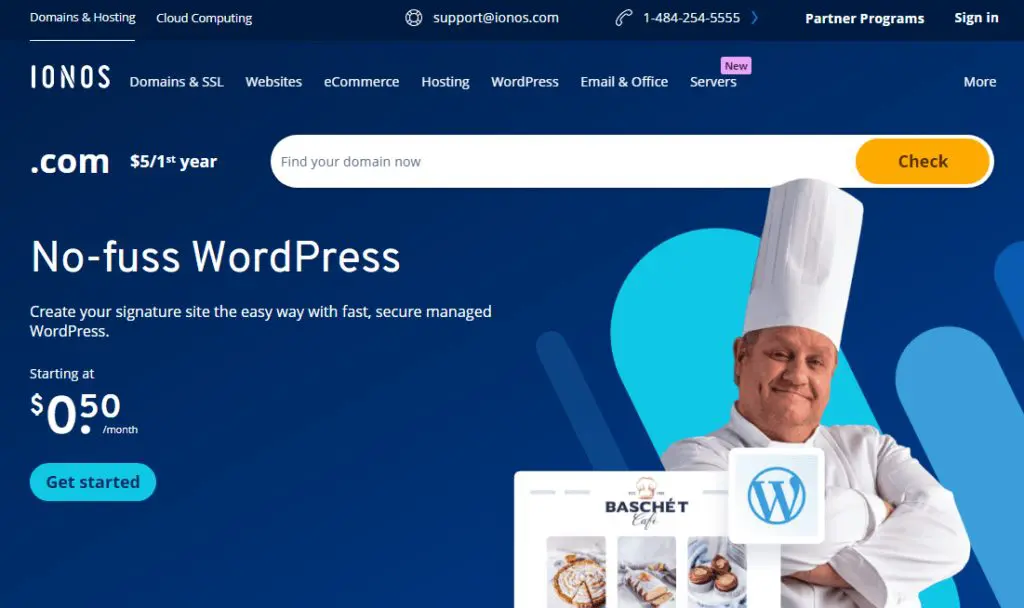
Here’s the short version of what you get and where IONOS stops.
| Category | IONOS |
|---|---|
| What it is | A large web hosting company, formerly 1&1, selling hosting, WordPress hosting, a website builder and servers |
| Best for | Course creators, coaches and small businesses who want a low first-year price and phone support |
| Not for | Several WordPress sites on one plan, or buyers who want a full refund well into the first year |
| Starting price | $1/mo for the first year on the bestselling WordPress plan |
| Renewal | Renews at $12/month |
| Money-back guarantee | 30-day money-back guarantee, limited to setup fees and the first billing cycle |
| Included on WordPress plans | Free domain for a year, email, SSL, automatic backups, malware scanning and an AI website builder |
| Support | 24/7 phone, chat and email, plus a personal consultant |
| AI tools | AI website builder, an AI assistant on higher plans and paid AI business tools |
| Uptime guarantee | 99.99% on hosting plans |
Comparing hosts? See my guide to the best web hosting services for creators and experts.
Quick Verdict: Is IONOS Worth It?
Yes, for a single course or coaching website on a tight budget. IONOS includes email, a free domain, automatic backups and malware scanning, its WordPress plans come with an AI website builder and its support team answers the phone around the clock.
Go in knowing three things. The lowest first-year price on the bestselling plan jumps sharply at renewal. Each WordPress plan covers only one website. And the money-back guarantee refunds setup fees and your first billing cycle, not a full prepaid year. If you need several sites or more flexibility, look at Bluehost, Hostinger or ScalaHosting.
What Is IONOS?
IONOS is a web hosting company. Web hosting stores your website’s files on a server that’s connected to the internet around the clock, so visitors can reach your site any time. IONOS is based in Germany, began life as 1&1 and says it serves millions of customers, with data centers in the US and Europe.
It sells more than hosting. You’ll find WordPress hosting, general web hosting, a drag-and-drop website builder, business email, domains, servers and cloud products, plus a growing set of AI tools for small businesses. For a course creator, the two products that matter are WordPress hosting and the website builder.
IONOS isn’t a course platform. It won’t host video lessons or manage enrollments on its own the way Thinkific or Kajabi do. You can turn an IONOS WordPress site into a course site with a plugin such as LearnDash, but most people use it for their main website and keep courses on a platform.
| IONOS is | IONOS is not |
|---|---|
| A low-cost host with email and a domain included | A course platform with built-in enrollments and video hosting |
| A host with 24/7 phone support and a personal consultant | A host with a long, full refund window |
| A one-stop shop for hosting, email, domains and AI tools | A multi-site host on its WordPress plans |
| Backed by a 99.99% uptime guarantee | Fully managed WordPress hosting |
What Do You Get With an IONOS Web Hosting Account?
An IONOS WordPress hosting account gives you everything you need to put one website online and run it.
- Storage space for your website: Space on fast NVMe drives for your website’s files and pages, from 25 GB on the entry WordPress plan.
- A free domain name: A custom web address, such as yourname.com, free for the first year.
- Professional email: Mailboxes on your own domain, such as hello@yourname.com, from one on the entry plan to 10 on the top plan.
- An AI website builder: A tool that drafts your WordPress site from a description, plus an AI assistant for text, images and posts on higher plans.
- WordPress installed for you: WordPress set up for you, with current PHP versions available.
- Automatic backups: Copies of your site you can restore, plus a year of Jetpack Vault backups on higher plans.
- A free SSL certificate: A wildcard certificate that covers your domain and its subdomains.
- Security scanning: Malware and vulnerability scans, with automatic malware removal on the top plan.
- 24/7 support: Phone, chat and email support, plus a personal consultant.
How I Evaluate a Web Host for a Course Business
I sell my courses on Thinkific, while Learning Revolution runs as its own WordPress site, and the Leading Learning Podcast has its own website too. The website is the front door, where people find your content, join your email list and click through to your courses. If it’s slow, broken or offline, that whole path stops.
We run Learning Revolution on WP Engine with WP Rocket for caching and Smush for image compression, and I’ve hosted other sites on Bluehost since 2015. Here’s the checklist I use for any host at this price, and how IONOS measures up.
| What I check | Why it matters for a course business | How IONOS does |
|---|---|---|
| Backups | One bad plugin update can wipe out your sales pages or sign-ups | Automatic backups, plus a year of Jetpack Vault on higher plans |
| Support | When a sales page breaks, you want a person quickly | 24/7 phone, chat and email, plus a personal consultant |
| Renewal price | Hosting is a long-term cost, so year three matters as much as year one | Modest on most plans, steep on the bestselling plan |
| Risk when you sign up | You want a way out if the host doesn’t suit you | Refund limited to setup fees and the first billing cycle |
| Room to grow | You may add a podcast site, a membership or client sites | One site per WordPress plan, more on web hosting plans |
| You need a professional address from day one | Included on every plan |
IONOS scores best on support and email, and weakest on room to grow and refund terms. That makes it a better fit for one focused website than for a business that expects to run several.
If you haven’t built a site before, my guide on how to create a WordPress website walks you through it.
IONOS Pricing and Plans | How Much Does It Cost?
IONOS sells three WordPress hosting plans, Start, Grow and Boost, plus four general web hosting plans. For a course or coaching website built on WordPress, the WordPress plans are the place to start. The prices below are IONOS’s regular first-year and renewal rates on a 1-year term. I’ve ignored short-term sales such as Black Friday.
| Plan | Billed annually (per month) | Key limits | Notes |
|---|---|---|---|
| Start | $5 | 1 website, 25 GB NVMe storage, 1 email address | Renews at $8/month |
| Grow | $1 | 1 website, 50 GB NVMe storage, 5 email addresses, 12 months of Jetpack Vault backups | Renews at $12/month |
| Boost | $12 | 1 website, 75 GB NVMe storage, 10 email addresses, automatic malware removal | Renews at $17/month |
Start costs $5/mo for the first year. It covers one website, 25 GB of storage and one email address, with automatic backups, malware scanning and the AI website builder.
Grow costs $1/mo for the first year, and it’s IONOS’s bestselling WordPress plan. It adds 50 GB of storage, five email addresses, a year of Jetpack Vault backups and the AI assistant for text, images and posts.
Boost costs $12/mo for the first year. It adds 75 GB of storage, 10 email addresses, more server performance and automatic malware removal.
| Feature | Start | Grow | Boost |
|---|---|---|---|
| Websites | 1 | 1 | 1 |
| NVMe storage | 25 GB | 50 GB | 75 GB |
| Email addresses (2 GB each) | 1 | 5 | 10 |
| Free domain (first year) | ✓ | ✓ | ✓ |
| Backups | Automatic | Automatic plus 12 months of Jetpack Vault | Automatic plus 12 months of Jetpack Vault |
| Security | Scanning | Scanning | Scanning and automatic malware removal |
| AI Website Builder | ✓ | ✓ | ✓ |
| AI Assistant for text, images and posts | ✗ | ✓ | ✓ |
| Performance level | 3 | 4 | 5 |
The Renewal Price Shock, Explained
IONOS charges a low price for your first year, then its regular rate. On two of the three WordPress plans, the jump is modest. On the bestselling plan, the first year is close to free and the renewal is the regular price, so the jump looks dramatic.
| Plan | First year | After the first year |
|---|---|---|
| Start | $5/mo | Renews at $8/month |
| Grow | $1/mo | Renews at $12/month |
| Boost | $12/mo | Renews at $17/month |
When I plan a hosting budget, I use the renewal price as the real cost and treat the first year as a discount. On that basis, IONOS is competitive with other budget hosts. Here’s how to keep renewal from catching you off guard.
- Budget for the renewal price from day one. Treat it as your real hosting cost from year two.
- Check your contract term and notice period. IONOS contracts have a minimum term and a notice period, which you’ll find in your account’s contract details.
- Set a reminder before renewal. Give yourself at least a month to decide whether to stay, switch plans or cancel.
- Plan for the domain renewal. Your free domain renews at the normal price after the first year.
IONOS Web Hosting Plans and What They Cost
If you need more than one website, IONOS’s general web hosting plans allow unlimited websites with much more storage. They include daily backups, a free domain for a year and email, and the two higher plans add a CDN.
| Plan | What you get | First year | After the first year |
|---|---|---|---|
| Essential | 100 GB NVMe storage, 1 email account, 10 databases | $4/mo | Renews at $8/month |
| Starter | 200 GB NVMe storage, 2 email accounts, 100 databases | $6/mo | Renews at $10/month |
| Plus | 350 GB NVMe storage, 4 email accounts, 250 databases, CDN | $1/mo | Renews at $14/month |
| Ultimate | 500 GB NVMe storage, 5 email accounts, 500 databases, CDN, malware repair | $10/mo | Renews at $18/month |
These plans don’t include the WordPress-specific AI tools, but you can still install WordPress with one click. For an independent expert running a main site, a podcast site and a few landing pages, they’re often the better value.
Refund and Contract Terms
IONOS offers a 30-day money-back guarantee on hosting, but it works differently from most hosts. Its terms limit the refund to the setup fee and the monthly fee for your first billing cycle. You claim it within 30 days of your first order, through your control panel or by contacting support.
New domains, SSL certificates and features you add yourself aren’t refundable, and switching from one package to another ends your eligibility. After that, IONOS contracts run for their minimum term with a notice period for cancelling, so check both dates in your account. That’s why I’d pick your plan carefully up front and treat the first month as your trial.
Which IONOS Plan Should You Choose?
Choose based on how many websites you need and how much help you want from AI tools. Here’s what I’d pick in each situation.
| Your situation | Plan to choose | Why |
|---|---|---|
| Coach or course creator with one simple website | Start | Lowest long-term price for one WordPress site |
| Course business with a blog, lead magnets and sales pages | Grow | More storage, more mailboxes, Jetpack backups and the AI assistant |
| Site that earns most of your revenue | Boost | More performance and automatic malware removal |
| Independent expert with several brands or a podcast site | Plus | Unlimited websites, more storage and a CDN |
| Small agency or freelancer hosting client sites | Ultimate | Unlimited websites, the most storage and malware repair |
| Coach who wants the simplest possible site | The IONOS website builder | Drag-and-drop editing with AI, no WordPress to manage |
If you’re unsure, start with Grow. It’s the plan I’d recommend to most edupreneurs with one WordPress site, because the extra mailboxes, Jetpack backups and AI assistant cover what a growing course business needs. Budget for the renewal price from year two, though.
IONOS Features in Detail | What Can You Do With This Host?
IONOS’s features lean toward support and convenience, with email, domains, backups and AI tools in one account. Here’s each major feature, what it does in plain terms and where it stops, followed by a closer look at the ones that matter most for a course or coaching business.
| Feature | What it does | Where it stops |
|---|---|---|
| Control panel | Manages your hosting, domains, email and contracts in one account | Lots of products mean lots of menus |
| WordPress hosting | WordPress installed with current PHP versions and developer tools | One website per WordPress plan |
| AI website builder and assistant | Drafts your site and writes text, images and posts | The assistant comes with the middle plan and up |
| Backups | Automatic backups, plus a year of Jetpack Vault backups on higher plans | Jetpack Vault comes free for 12 months only |
| Security | Wildcard SSL, malware and vulnerability scanning | Automatic malware removal only on the top plan |
| Mailboxes with 2 GB each on your own domain | Mailbox numbers depend on your plan | |
| Free domain | A custom domain free for the first year | Renews at the normal price after that |
| Developer tools | SSH, SFTP, WP-CLI, git and cron jobs | Most course creators won’t need them |
| 24/7 support | Phone, chat and email, plus a personal consultant | Quality depends on who you reach |
Feature #1: Phone Support and a Personal Consultant
This is what sets IONOS apart from most budget hosts. You can reach support by phone, chat or email around the clock, and IONOS assigns a personal consultant to guide you through setup and decisions about your account.
For a course business, phone support matters most during launches, when a broken sales page costs sign-ups by the hour. Talking a problem through with a person usually gets it fixed faster than a chat thread. Before you call, have the broken page and what changed right before it broke ready.
Feature #2: WordPress Setup and Performance
IONOS installs WordPress for you and runs it on fast NVMe storage, with current PHP versions available. IONOS rates each plan by performance level, from 3 on the entry plan to 5 on the top plan. Higher levels give your site more server resources for busy periods.
Hosting is only part of speed. Large images, heavy page builders and too many plugins slow a site down on any host. On Learning Revolution, we use WP Rocket for caching and Smush to compress images, and the same habits apply on IONOS. Our guide on how to increase WordPress site speed covers the rest.
Feature #3: Backups
Every WordPress plan includes automatic backups you can restore if something breaks. The middle and top plans also include 12 months of Jetpack Vault, a WordPress backup service that saves copies of your site outside your hosting account and lets you restore them from your WordPress dashboard.
After those 12 months, decide whether to keep Jetpack or switch to another backup plugin that stores copies off-site. Every site that earns money needs at least one backup you control. Our website security tips explain why.
Feature #4: Security
Every plan includes a wildcard SSL certificate, which puts the padlock in the browser bar for your domain and its subdomains, such as courses.yourname.com. IONOS also scans your site for malware and known plugin vulnerabilities, and the top plan removes malware automatically when it finds it.
On the lower plans, you’ll get an alert and fix the problem yourself or with support’s help. Add strong passwords, two-factor login and regular plugin updates, and you’ve covered the main risks for a course or coaching site.
Feature #5: Email and Your Domain
Every plan includes email on your own domain, with 2 GB of storage per mailbox, so you can email prospects and students from an address such as hello@yourname.com. The number of mailboxes grows from one on the entry plan to 10 on the top plan.
Your domain is free for the first year and renews at the normal price after that. Send newsletters and course announcements through a dedicated email marketing tool, since hosting mailboxes aren’t built for bulk sending. Our email marketing best practices guide explains what to look for.
Feature #6: The Website Builder Option
If you’d rather not manage WordPress, IONOS also sells a drag-and-drop website builder with AI. It writes text, creates images and builds pages from a description of your business, and its higher plans add online booking, SEO help and an online store.
For a coach who needs a simple site with a booking page, it’s a reasonable shortcut. For a course creator who plans to publish lots of content and grow through search, WordPress gives you more control and room to grow.
IONOS AI Tools | Who Needs Them?
IONOS offers more AI products than most hosts. Some come with your hosting plan, and others are separate subscriptions for small businesses. An AI agent or assistant here means software that handles a task for you, such as answering a website visitor or drafting a page, based on what you tell it.
| Tool | What it is | What it lets you do | Who needs it |
|---|---|---|---|
| AI Website Builder | A tool that drafts your WordPress site from a description | Get a first site live quickly | Anyone building a first site |
| AI Assistant for WordPress | An assistant inside WordPress for text, images, pages and posts | Draft content without leaving your site | Course creators who publish regularly, on the middle plan and up |
| AI Chat Assistant | A chatbot for your website | Answer common visitor questions around the clock | Coaches and consultants who get repeat questions |
| AI Receptionist | An AI that answers your business phone | Take calls and route enquiries when you’re busy | Service businesses with a phone line |
| AI Search Manager | A tool for improving how your business shows up in search | Get suggestions to improve your visibility | Small businesses doing their own SEO |
| MCP Server | A connection that lets AI assistants read your IONOS cloud setup | Ask an AI assistant questions about your cloud resources | Developers using IONOS cloud products |
Most course creators only need the website builder and the WordPress assistant, both of which come with the hosting plans. The chat assistant can help a coach who answers the same pre-sale questions every week. Start with one task and check the AI’s answers before you rely on it.
AI is already part of how many creators work. In a creator survey we cover in our elearning statistics, 57.3% of creators said they use AI daily. If you use AI to draft site content, my guide on how to humanize AI content explains how to keep it sounding like you.
When to Use IONOS, and When Not To
IONOS suits many single-site course and coaching businesses. It’s the wrong choice in a few situations, so here’s how to decide.
| Choose IONOS when | Look elsewhere when |
|---|---|
| You want phone support and a personal consultant | You want several WordPress sites on one plan |
| You want email and a domain included | You want a full refund well into your first year |
| You want a low first-year price | You dislike minimum contract terms and notice periods |
| You want AI tools for content and website visitors | You want a host to manage every WordPress update for you |
| You run one focused course or coaching website | You run a busy WordPress course or membership site with many students |
How Course Sellers, Coaches and Small Businesses Use IONOS
Here’s what a sensible IONOS setup looks like for each type of business.
- Course sellers on a hosted platform: Run your main WordPress site on the middle WordPress plan with your blog, lead magnets and sales pages, and link to your course platform on a subdomain. Capture emails with a lead magnet on the site.
- Course sellers on WordPress: Start small with LearnDash or LifterLMS on the top WordPress plan, and plan a move to managed hosting as student numbers grow. Our LearnDash vs. LifterLMS comparison helps you pick the plugin.
- Coaches and consultants: Use the website builder or a WordPress plan for your services and booking page, and add the chat assistant once you get repeat questions. Add a blog over time to become known as an expert.
- Independent experts: Choose a web hosting plan with unlimited websites for your main site, podcast site and landing pages.
- Small businesses: Keep hosting, email and domains with one provider, and lean on the personal consultant during setup.
Whatever your setup, your website is the asset you own. It holds the content that builds your reputation, which we call authority assets, and it stays put if you change course platforms.
IONOS Alternatives | How Prices and Features Compare
Here’s how IONOS compares with the hosts edupreneurs most often weigh against it.
| Host | Starts at | Renewal | Best for | Winner for |
|---|---|---|---|---|
| IONOS | $5/mo | Renews at $8/month | Single sites that want phone support | Phone support and a personal consultant |
| Hostinger | $2.99/mo | Renews at $10.99/month | Beginners and non-technical owners | Ease of use and multiple sites |
| Bluehost | $3.99/mo | Renews at $9.99/month on 36 months ($11.99 on 12 months, $15.99 monthly) | WordPress beginners who want a known brand | Staging and 10 sites on the entry plan |
| ScalaHosting | $2.95/mo | Renews at $11.95/month | Growing sites that want room to scale | Refund terms and cloud upgrades |
| SiteGround | $2.99/mo | Renews at $17.99/month on 12 months ($14.99 on 24 months) | Sites that want premium shared hosting | Daily backups and dashboard |
| WP Engine | $28/mo | Regular rate after a first-year discount | Established sites that earn revenue | Managed hosting and staging |
For more detail, read my Hostinger review, Bluehost review, ScalaHosting review, SiteGround review or WP Engine review, or see the full best web hosting services guide.
IONOS Pros and Cons
Here’s the balance as I see it.
| IONOS pros | IONOS cons |
|---|---|
| 24/7 phone support and a personal consultant | One website per WordPress plan |
| Low first-year prices | Refund limited to setup fees and the first billing cycle |
| Email and a free domain included | Minimum contract terms and notice periods |
| AI website builder on every WordPress plan | The bestselling plan renews at many times its first-year price |
| Wildcard SSL and malware scanning | Automatic malware removal only on the top plan |
| 99.99% uptime guarantee | Jetpack backups included for 12 months only |
Is IONOS the Best Web Host for Edupreneurs?
For edupreneurs running one focused WordPress site who value being able to call someone, IONOS is a solid, low-cost choice. Email, a free domain, backups and AI tools come included, and the support setup is unusually personal for budget hosting.
It isn’t the best fit if you plan to run several sites, want flexible refund terms or expect heavy traffic from students logged into a WordPress course.
Bluehost and Hostinger give you more sites for the money, ScalaHosting offers better refund terms and a managed host like WP Engine, which we use for Learning Revolution, suits sites that earn most of your revenue.
Our guide on using SEO to sell online courses shows how your website supports your course sales whichever host you choose.
Should You Choose IONOS?
Choose IONOS if you want a low-cost home for one course or coaching website with email, a domain and phone support included. Start on the middle WordPress plan, read your contract term and notice period before you sign and budget for the renewal price from year two.
Skip it if you need several sites on one plan or a longer refund window. In that case, a multi-site host such as Bluehost, Hostinger or ScalaHosting is the better fit.
IONOS Review FAQs
Here are short answers to the questions course creators and small business owners ask most about IONOS.
Is IONOS good for beginners?
Yes, especially for beginners who want to talk to someone. IONOS includes 24/7 phone, chat and email support, a personal consultant, an AI website builder and email with a free domain. Each WordPress plan covers one website, and the contract terms are stricter than at some hosts, so read them before you sign up.
How much does IONOS cost after the first year?
IONOS charges a low first-year price, then its regular rate. On two WordPress plans, the renewal increase is modest. On the bestselling plan, the first-year price is close to nothing and the renewal costs several times more. Your free domain also renews at the normal price after the first year.
Does IONOS have a money-back guarantee?
Yes, a 30-day money-back guarantee on hosting, but it refunds only the setup fee and the monthly fee for your first billing cycle. New domains, SSL certificates and added features aren’t refundable, and switching packages ends your eligibility. Claim it within 30 days of your first order through your control panel or support.
Is IONOS the same as 1&1?
Yes, IONOS is the current name of the company formerly known as 1&1, a large hosting provider based in Germany. It sells web hosting, WordPress hosting, a website builder, email, domains, servers and cloud products, and it says it serves millions of customers, with data centers in the US and Europe.
Can I sell online courses on IONOS?
Yes, by installing WordPress and adding a course plugin such as LearnDash or LifterLMS, or by linking your site to a course platform like Thinkific. IONOS hosting suits a website that links to a course platform. For a busy WordPress course site with many logged-in students, a managed WordPress host handles the load better.
Which IONOS plan is best for a course or coaching business?
The middle WordPress plan suits most single-site course and coaching businesses, with 50 GB of storage, five mailboxes, a year of Jetpack backups and the AI assistant. If you need several sites, a web hosting plan with unlimited websites is the better value. Budget for the renewal price from year two.
Does IONOS offer phone support?
Yes, IONOS offers 24/7 support by phone, chat and email, and it assigns a personal consultant to help with setup and account decisions. That’s rare among budget hosts and useful for course creators during launches, when a quick phone call can fix a broken sales page faster than a chat thread.
Does IONOS have AI tools?
Yes, every WordPress plan includes an AI website builder, and the middle and top plans add an AI assistant for text, images, pages and posts. IONOS also sells separate AI tools for small businesses, including a website chat assistant, an AI receptionist for phone calls and an AI search manager.

Jeff Cobb, Founder of Learning Revolution
Jeff Cobb is an expert in online education and the business of adult lifelong learning. Over the past 20+ years he has built a thriving career based on that expertise – as an entrepreneur, a consultant, an author, and a speaker. Learning Revolution is a place where Jeff curates tips, insights, and resources to help you build a thriving expertise-based business. Learn more about Jeff Cobb here.
Table of Contents
Related Posts
MasterStudy LMS Review (2026) | Is It The Right WordPress LMS For You?
Thrive Apprentice Review (2026) | Is This WordPress LMS Worth It?
Sensei LMS Review (2026) | A Useful But Limited WordPress LMS Plugin