

TL;DR: Kajabi Mobile App Review (2026): What It’s Good For And Where It Lets You Down
Kajabi has three apps. The free Kajabi app lets members take your courses, join your community, and listen to your podcasts on their phones. Kajabi Creator lets you check sales and manage contacts. The Branded App puts your own app in the app stores.
• What the member app does well. One login for courses, community, coaching, podcasts, and Backstage, with a resume button and saved progress.
• Where it lets you down. Stability. Playback can stop, pages can load slowly, and login codes sometimes arrive late. I can’t confirm offline downloads, so plan as if members need a connection.
• Cost. The Kajabi app and Kajabi Creator are free on every plan. The Branded App costs $199 a month, or comes included with Pro.
• Branded App catch. You need your own Apple and Google developer accounts, publishing takes 6 to 8 weeks, and the app stores take 15% to 30% of in-app sales.
• Use it for short lessons, audio, community check-ins, and coaching resources on the go.
• Don’t rely on it for long video courses, live meetups, or members with poor connections. Keep the browser version as your main experience.
Try Kajabi For Free
Most of your members will open your course on a phone at some point. They’ll listen during a commute, check the community while waiting in line, or finish a short lesson before bed.
So the mobile experience matters, even when you build everything on a laptop.
Kajabi’s answer is a free app that holds everything a member buys from you. It does that job reasonably well on a good day. On a bad day, it can frustrate you and your members in ways that a web browser rarely does.
I’ve been a Kajabi customer for years, and I want this review to be practical.
I’ll explain what each Kajabi app is for, whether it does that job, where it falls short, and how you should use it in your business.

Kajabi Mobile Apps Snapshot (2026)
| Kajabi app | Kajabi Creator | Kajabi Branded App | |
|---|---|---|---|
| Who it’s for | Your members | You and your team | Your members, under your brand |
| What it does | Courses, community, coaching, podcasts, Backstage | Sales, notifications, contacts, lesson video uploads | Everything in the Kajabi app, plus your own screens and in-app sales |
| Cost | Free on every plan | Free on every plan | $199/month, or included with Pro |
| Branding | Your color and site icon | None | Your app name, icon, colors, and store listing |
| Push notifications | No | Alerts for your own account | Yes, unlimited |
| Setup | None | None | Developer accounts, a DUNS number, and 6 to 8 weeks |
Quick Verdict | Is The Kajabi App Any Good?
The Kajabi app is good enough as a companion. It gives members a tidy place to resume a lesson, read the community, and play a podcast episode, and it costs you nothing.
It isn’t reliable enough to be the only way members reach your content. Some days the app plays smoothly. On others, it freezes partway through a video, drops audio when the phone locks, or takes too long to load a page. If your program depends on long videos, live meetups, or members who learn mostly on their phones, treat the browser as the main experience and the app as a convenience.
The Branded App is a separate decision. At $199 a month, with app store fees and weeks of setup, it pays off only for creators with a large, active membership who want to sell inside the app and send push notifications.
What Is The Kajabi App?
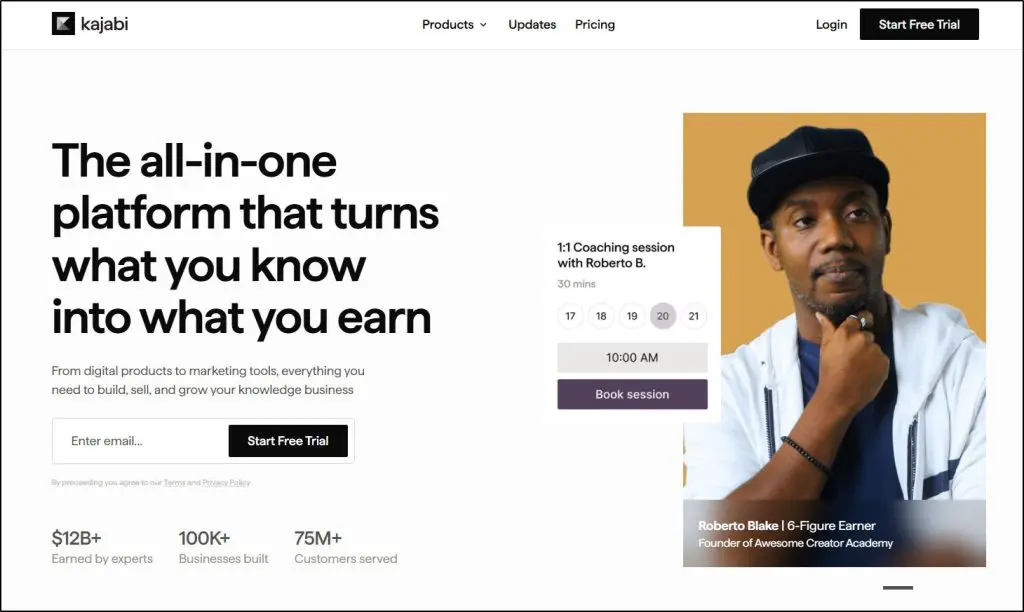
“The Kajabi app” can mean three different products, which confuses many creators.
- Kajabi app: The free app your members download from the App Store or Google Play. It shows every Kajabi product they’ve bought, from any Kajabi creator, in one place.
- Kajabi Creator: A free app for you as the business owner. It shows your sales, notifications, and contacts, and lets you upload lesson videos from your phone.
- Kajabi Branded App: Your own app, listed in the app stores under your name, built on Kajabi’s app. It’s a paid add-on.
Kajabi also publishes a separate app for Cofounder, its AI assistant, which I cover in my Kajabi AI review. The rest of this guide focuses on the member app, the creator app, and the Branded App.
Here’s a quick comparison of the three app types.
| What it can do | Kajabi app | Kajabi Creator | Kajabi Branded App |
|---|---|---|---|
| Who uses it | Your members | You and your team | Your members, under your brand |
| Take courses and resume lessons | Yes | No | Yes |
| Read and reply to lesson comments | Yes | No | Yes |
| Join the community (post, comment, channels) | Yes | No | Yes |
| Moderate the community | Yes, with an admin login | No | Yes, with full admin access |
| See coaching sessions, invites, and replays | Yes | No | Yes |
| Use Backstage client portals | Yes | No | Yes |
| Listen to private podcasts | Yes | No | Yes |
| Search across courses | Yes | No | Yes |
| Show only your products | No, shows all Kajabi purchases | Not applicable | Yes |
| Your app name and icon in the stores | No | No | Yes |
| Branding | Your brand color and site icon | None | Colors, icon, app name, store listing, screenshots |
| Custom welcome and onboarding screens | No | No | Yes |
| Push notifications to members | No | Alerts for your own account only | Yes, unlimited |
| Sell inside the app | No | No | Yes, courses and community products |
| View sales, revenue, and opt-ins | No | Yes | No |
| Get purchase, refund, and failed payment alerts | No | Yes | No |
| Manage contacts and grant or revoke offers | No | Yes | No |
| Upload lesson videos from your phone | No | Yes | No |
| Build pages, emails, or funnels | No | No | No |
| Offline downloads | Not documented | Not applicable | Not documented |
| Setup | None | None | Apple and Google developer accounts, Google Cloud, DUNS number, 6 to 8 weeks |
| Cost | Free on every plan | Free on every plan | $199/month, or included with Pro |
What The Kajabi Member App Does
The Kajabi Member App is the app your customers use to access your courses, coaching offers, community, and other products in Kajabi.
To use it, they need to download the Kajabi app, sign in with the email they used to buy, and confirm with a link or a six-digit code.
Everything they own appears together.

Feature #1: Courses
Members can browse modules, open lessons, and pick up where they stopped with a resume button. Progress saves as they go, and members can read and reply to lesson comments without leaving the lesson. A search bar works across all their courses at once.
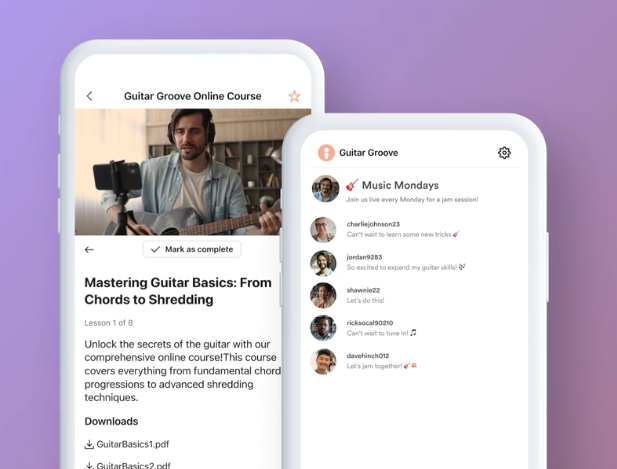
This suits short lessons well. A ten-minute video or an audio lesson fits the way people use a phone.
Where it falls short. The app can frustrate you during longer lessons. Video can freeze partway through, and leaving full screen sometimes sends you to a different lesson than the one you were watching. The back button doesn’t always return you to the page you expect, which makes moving through a long program tedious. Kajabi’s help pages don’t list offline downloads, so members on a plane or a weak connection may be stuck.
Feature #2: Community
The app includes a native version of Kajabi Communities. Members can post, comment, and follow channels, and you can sign in with your admin email to moderate from your phone. Community is where the app earns its place, because most community activity happens in short bursts.
Where it falls short. Live meetups are the weakest part. Audio can drop when the speaker changes, and members sometimes have to leave and rejoin to hear everyone. If meetups are central to your program, ask members to join from a laptop.
Feature #3: Coaching And Backstage
Coaching clients can see upcoming and past sessions, session details, calendar invites, and any resources or replays you share. Backstage clients reach their private portal in the app too. For a coaching client, that’s the right scope, because they mostly need their next session and their homework.
Where it falls short. The app shows the session and leaves the call itself to whichever tool you meet in. My Kajabi Coaching review covers the live video side.
Feature #4: Podcasts And Audio
Members can stream private podcast episodes, read show notes, and resume where they left off. Audio is the format that suits a phone best, and a private podcast is one of the easiest ways to make a course mobile-friendly.
Where it falls short. Background play has been unreliable. Audio can stop when the screen locks or when a member switches to another app, and headphone controls don’t always respond. For a commute listener, that’s the one thing that has to work.
Where The Kajabi Member App Lets You Down
Kajabi’s member app has a decent rating in both stores, so many members use it without trouble. Still, it has some technical issues in my experience.
- Stability varies by update. An update can fix one problem and introduce another, and Android phones seem to suffer more than iPhones.
- Playback is the weak point. Freezes, restarts, and lost background audio affect video and audio alike.
- Navigation is clumsy. Back buttons and full-screen exits don’t always take you where you expect.
- No push notifications. The free app can’t send them, and you only get them with the Branded App.
- Little branding. Members see Kajabi’s app with your color and icon, alongside courses they bought from other creators.
None of this makes the app useless. It means the app should support your program, and your program shouldn’t depend on it.
The Kajabi Creator App | For Running Your Business
Kajabi Creator is the app for you, the course creator or coach, selling online learning programs to your audience.
- Dashboard: Offers sold, net revenue, new customers, opt-ins, and page views for a date range you choose
- Notifications: Alerts for purchases, failed payments, refunds, new opt-ins, and enrollments
- Create: Record or upload a video and add it to a lesson
- Contacts: View, filter, tag, and add notes to contacts, and grant or revoke offers
- Sites: Switch between Kajabi sites if you run more than one
The most useful feature here is granting or revoking an offer. When a member emails to say they can’t access a course, you can fix it from your phone in a minute.
Where it falls short. Kajabi Creator is a monitoring tool. You can’t build pages, edit emails, or set up a funnel from it. For anything beyond a quick check, such as building Kajabi funnels, you’ll go back to the desktop.
The Kajabi Branded App | Is It Worth $199 A Month?
Kajabi’s Branded App is a feature that lets you publish a mobile app for your e-learning business.
The Branded App puts your business in the app stores under your own name, brand identity, and icon. Members download your app instead of Kajabi’s, and they see only your products.
It adds several things the free app lacks.
- Your branding: App name, icon, colors, store description, and screenshots
- Custom screens: A welcome screen, an onboarding carousel, and a links menu
- Push notifications: Unlimited, and targeted to the members you choose
- In-app sales: Courses and community products sold inside the app, with app sign-ups tagged in Kajabi for automations
It costs $199 a month on Basic or Growth, and it’s included with Pro. Over a year, the add-on comes to $2,388.
Where it falls short. The setup is real work. You need your own Apple Developer and Google Developer accounts, a Google Cloud account, and a DUNS number for your business. Kajabi says publishing typically takes 6 to 8 weeks, and the app stores can reject a submission. Apple and Google take 15% to 30% of in-app sales, and you can’t change a price after you create an in-app offer.
Design control is also narrower than the marketing suggests. You can customize the welcome screen, onboarding, and home screen. You can’t add custom code, your website design doesn’t carry over, and you can’t hide individual courses from the courses tab.
My view is that the Branded App makes sense for creators with thousands of active members who return weekly, such as a fitness program or a large membership. Push notifications and your own icon on their home screen keep those members coming back. For a course with a few hundred students, the money does more good elsewhere.
What You Should Use The Kajabi App For
| Use the app for | Use a browser instead for |
|---|---|
| Short video and audio lessons | Long video lessons and full courses in one sitting |
| Private podcasts and audio programs | Live meetups and group calls |
| Community posts and replies | Downloading worksheets and working through files |
| Checking coaching sessions and resources | Members with weak or no connection |
| Quick admin fixes in Kajabi Creator | Building pages, emails, and funnels |
If you design your program with this split in mind, the app becomes a useful extra. Keep lessons short, offer audio versions, and point members to the browser for anything that needs focus or a stable call.
Kajabi App Pricing | What Will It Cost You?
The member app and Kajabi Creator come free with every Kajabi plan. The Branded App is the only paid part.
- Basic: $143/month on annual billing or $179/month paid monthly. Free apps included, Branded App for $199/month extra
- Growth: $199/month on annual billing or $249/month paid monthly. Free apps included, Branded App for $199/month extra
- Pro: $399/month on annual billing or $499/month paid monthly. Branded App included
| Feature | Basic | Growth | Pro |
|---|---|---|---|
| Products (courses, coaching, downloads) | 5 | 50 | Unlimited |
| Contacts | 2,500 | 25,000 | 100,000 |
| Communities | 1 | 1 | 3 |
| Websites | 1 | 1 | 3 |
| Admin users | 2 | 11 | 26 |
| AI credits | 0 | 500 | 1,000 |
| Cohort courses | ✗ | ✓ | ✓ |
| Affiliate program | ✗ | ✓ | ✓ |
| Advanced automations & webhooks | ✗ | ✓ | ✓ |
| Remove Kajabi branding | ✗ | ✓ | ✓ |
| Custom code editor | ✗ | ✗ | ✓ |
| API access | ✗ | ✗ | Yes ($25/mo value) |
| Branded mobile app | ✗ | ✗ | Included ($199/mo value) |
| Kajabi Payments fee | 2.9% + $0.30 | 2.8% + $0.30 | 2.7% + $0.30 |
| Fee with 3rd-party gateway | 2% | 1% | 0.5% |
If you’re on Growth and want the Branded App, compare the $199 add-on with the price gap to Pro. Pro also raises your product and contact limits and adds more communities, so it may be the better deal. Kajabi offers a 14-day free trial and a 30-day money-back guarantee. My Kajabi pricing guide covers every plan in detail.
Kajabi Mobile App Pros And Cons
| Pros | Cons |
|---|---|
| Free member app on every plan | Playback can freeze, restart, or stop in the background |
| Courses, community, coaching, podcasts, and Backstage in one app | Navigation can send members to the wrong page |
| Resume button and saved progress | Offline downloads aren’t documented |
| Passwordless sign-in with a link or code | Sign-in fails when the code email doesn’t arrive |
| Admins can moderate the community from the app | Live meetup audio can be unreliable |
| Kajabi Creator handles quick admin fixes | No push notifications without the Branded App |
| Branded App adds your own icon and push notifications | Branded App costs $199/month and takes 6 to 8 weeks to publish |
| In-app sales for courses and community | Apple and Google take 15% to 30% of in-app sales |
Who Should Rely On The Kajabi App?
- You run a course or membership on Kajabi. Recommend the free app as an extra, and keep the browser as the main way in. The same advice applies on most membership site platforms.
- Your program is audio-first or community-first. The app fits well, because it works best in short sessions.
- Your program depends on long videos or live calls. Point members to the browser and treat the app as optional.
- You have thousands of members who return every week. The Branded App is worth a serious look, especially if you’re already on Pro.
- Mobile is the core of your product. Compare Kajabi with platforms that put more into their apps, such as the options in my guide to online community platforms. My Mighty Networks review and Circle review cover two of the strongest.
Overall, the Kajabi app does its basic job. It gives members a convenient place to keep up with your content, and it costs nothing. It also has enough rough edges that I wouldn’t build a program around it. For the full platform, read my Kajabi review or compare Kajabi alternatives, and plan your offer with our free creator tools.
Kajabi Mobile App FAQs
Is the Kajabi app free?
Yes. The Kajabi member app and the Kajabi Creator app are free on every Kajabi plan. The Branded App costs $199 a month, or comes included with the Pro plan.
What can members do in the Kajabi app?
Members can take courses, join your community, see coaching sessions and resources, use Backstage, and listen to private podcasts. Progress saves, and a resume button returns them to their last lesson.
Can you download Kajabi videos for offline viewing?
Kajabi’s help pages don’t list offline downloads for the member app. Plan as if members need an internet connection, and offer downloadable files for anything they need offline.
How do members log in to the Kajabi app?
Members enter the email they used to buy and confirm with a magic link or a six-digit code. If the code doesn’t arrive, they should check spam or sign in through a browser instead.
Why does the Kajabi app keep freezing or stopping?
Playback can stop when the screen locks or the app moves to the background, and some updates have caused crashes. Updating the app, restarting it, or switching to a browser usually gets members going again.
What is the Kajabi Creator app?
Kajabi Creator is the app for business owners. It shows sales and notifications, lets you manage contacts and grant offers, and lets you upload lesson videos from your phone.
What is the Kajabi Branded App?
It’s your own app in the App Store and Google Play, built on Kajabi. It adds your name and icon, custom screens, unlimited push notifications, and in-app sales of courses and community products.
How long does it take to launch a Kajabi Branded App?
Kajabi says publishing typically takes 6 to 8 weeks after you buy the add-on. You need your own Apple and Google developer accounts and a DUNS number.
Do Apple and Google take a cut of Kajabi in-app sales?
Yes. Apple and Google generally take 15% to 30% of sales made inside a Branded App. Sales through your Kajabi website don’t carry that fee.
Does the Kajabi app send push notifications?
The free Kajabi app doesn’t send push notifications for your business. Push notifications come with the Branded App.

Jeff Cobb, Founder of Learning Revolution
Jeff Cobb is an expert in online education and the business of adult lifelong learning. Over the past 20+ years he has built a thriving career based on that expertise – as an entrepreneur, a consultant, an author, and a speaker. Learning Revolution is a place where Jeff curates tips, insights, and resources to help you build a thriving expertise-based business. Learn more about Jeff Cobb here.
Table of Contents
Related Posts
Kajabi Pricing (2026): Use Fee Calculator To Find Actual Cost
How To Use Kajabi Integrations via Zapier, Webhooks & MCP
Kajabi Communities (2026) | Is It A Reliable Online Community Platform?