

TL;DR — What Is LearnDash & Who Is It For? (2026)
LearnDash is a WordPress-based learning management system built for course creators, training businesses, and organizations that want full control over their website, content, pricing, and student data. It’s best for people who either already use WordPress or want the flexibility of WordPress without giving up serious LMS features like advanced quizzes, assignments, certifications, and group-based training.
💰 LearnDash Pricing Overview
Free plan: ❌ No, but interactive demo available, 30-day money-back guarantee on annual plans
Paid options:
LearnDash LMS Plugin – $199/year: Best for creators who already have a WordPress site and want maximum control
StellarSites Learning (Hosted) – from $29/month (annual billing): Best for beginners who want LearnDash without dealing with hosting or setup
LearnDash App – from $1,199/year: Best for businesses that want a native mobile learning app with offline access
🧩 Core LearnDash Features
– Drag-and-drop course builder
– Self-paced, drip-fed, cohort, timed, and group-based courses
– 8 quiz types, assignments, and manual grading
– Certificates, badges, points, and leaderboards
– Subscriptions, memberships, bundles, and one-time sales
– Stripe, PayPal, and WooCommerce payments
– AI course outline and quiz builder
– WordPress integrations for email, community, and coaching
– SCORM support via third-party plugins
❌ LearnDash Is Not For You If…
You want a true all-in-one platform with built-in email marketing and community
You dislike WordPress or don’t want to deal with plugins and integrations
You’re looking for a free LMS or ultra-budget option
🔁 Better Alternatives
LifterLMS – A strong WordPress LMS alternative with more built-in features
Thinkific – A better choice if you want a hosted, all-in-one course platform without WordPress
Try LearnDash For Free
I’ve used LearnDash and just about every other major WordPress LMS plugin on client sites and my own over the years.
So when I say a plugin can turn a standard WordPress site into a full-fledged learning management system, I know that’s no small claim.
Between course creation, student progress tracking, certifications, payments, and engagement tools, real LMS platforms have a lot going on.
The big question is: does LearnDash actually live up to the hype?
In my experience, it’s one of the most complete, reliable, and scalable LMS tools you can get, if it fits the way you work.

LearnDash Product Snapshot (2026)
| Category | Details |
|---|---|
| Product name | LearnDash |
| Available products | LearnDash LMS Plugin, StellarSites Learning, LearnDash App |
| Best known for | Highly flexible WordPress LMS with full ownership and no transaction fees |
| Starting price | $199/year (plugin) |
| Free plan | No, but you can take a free demo + a 30 day money back guarantee |
| Course types supported | Multi-media self-paced, drip-fed, cohort-based, timed, group-based, certificate-based courses |
| Quizzes & assessments | 8 question types: single choice, multiple choice, free choice, sorting, matrix sorting, fill-in-the-blank, assessment, essay |
| Assignments | File uploads, text submissions, manual grading |
| Certificates & gamification | Certificates, badges, points, leaderboards |
| Memberships | Supported via integrations (MemberPress, Paid Memberships Pro, WooCommerce Memberships) |
| Community features | Via integrations (BuddyPress, bbPress, third-party community tools) |
| Coaching programs | Supported via groups, restricted access, and third-party scheduling tools |
| Monetization options | One-time payments, subscriptions, memberships, bundles |
| Payment gateways | Stripe, PayPal, WooCommerce |
| AI tools | AI course outline and quiz builder |
| Email marketing | Basic automation only: lesson/course completion emails, quiz result notifications, admin alerts. Advanced campaigns require integrations |
Read: The best online course platforms for serious edupreneurs
What Is LearnDash?

LearnDash is a powerful LMS (Learning Management System) for WordPress that gives you two ways to launch and grow your online course business:
- Use the LearnDash LMS Plugin to turn your existing WordPress site into a full-featured online course platform.
- Use StellarSites (formerly LearnDash Cloud) for a fully hosted, all-in-one LearnDash experience—no separate WordPress setup required. It’s like using a course platform, but with all the flexibility of WordPress.
In simple words, LearnDash helps you build, deliver, and sell online courses, whether you’re running a solo course site, a training-based business, or an entire online academy.
Here’s a quick overview of LearnDash’s key features:
- Drag & drop course builder to make the course creation simple.
- Dynamic content delivery with drip-feed lessons, prerequisites, and learning paths.
- Flexible pricing models with one-time purchases, subscriptions, memberships, and course bundles.
- Payment gateways with built-in Stripe integration or WooCommerce compatibility.
- Badges & certificates to reward learners based on their performance and completion.
- Automated notifications to provide instant feedback and communication to your audience.
- Profile dashboard to let learners view their courses, quiz scores, and points earned.
- Integrations with popular business apps and plugins.
The best part is the user-friendly interface that lets you create multimedia-rich courses.
And LearnDash not only helps you create engaging courses, but you can also deliver and monetize them using the same interface.
This means you can focus on creating the best possible courses without having to worry about the technical details of course delivery and monetization.
LearnDash WordPress LMS vs StellarSites Learning (Hosted LearnDash)
LearnDash can be used in two ways: as a WordPress plugin on your own site, or through StellarSites Learning, which is LearnDash running on a fully managed WordPress setup.
The LMS itself is the same in both cases. The difference is how much of WordPress you manage yourself.
With the LearnDash LMS plugin, you install LearnDash on your own WordPress website. You work inside the standard WordPress dashboard and have full control over hosting, themes, plugins, integrations, and site structure. This option gives you maximum flexibility, but you’re responsible for hosting, updates, security, and performance.
StellarSites Learning uses the same WordPress dashboard and the same LearnDash interface, but everything is pre-set and managed for you. Hosting, security, backups, updates, and performance are handled by LearnDash.
You still build courses the same way, but you don’t deal with WordPress setup or maintenance. Some hosting-level controls are limited to keep things stable.
In simple terms, the plugin version is for users who want full control, while StellarSites Learning is for those who want the LearnDash experience without managing WordPress.
LearnDash Pricing & Free Trial (2026)
LearnDash offers three distinct ways to use the platform, depending on how much control, hosting, and scale you want.
Let’s take a bird’s eye view of what these plans offer before diving deeper.
LearnDash Pricing & Plan Comparison
| Feature | LearnDash LMS Plugin | StellarSites Learning | LearnDash App |
|---|---|---|---|
| Starting price | $199/year | $29/month (annual billing) | $1,199/year |
| Billing type | Annual only | Monthly or annual | Annual |
| Hosting included | ❌ No | ✅ Yes (managed WordPress) | ❌ No |
| WordPress setup required | ✅ Yes | ❌ No | ❌ No |
| Drag & drop course builder | ✅ Yes | ✅ Yes | Uses LearnDash content |
| Unlimited courses & users | ✅ Yes | ✅ Yes | ✅ Yes |
| Quizzes & assessments | ✅ Yes | ✅ Yes | ✅ Yes |
| Certificates & gamification | ✅ Yes | ✅ Yes | ✅ Yes |
| AI course & quiz tools | ✅ Yes | ✅ Yes | ❌ No |
| Advanced reporting | ❌ Add-on required | ✅ Plus & Ultimate | ❌ No |
| Gradebook & notes | ❌ Add-ons required | ✅ Ultimate only | ❌ No |
| Payments (Stripe / PayPal) | ✅ Yes | ✅ Yes | Uses LearnDash setup |
| WooCommerce support | ✅ Yes | ✅ Yes | ❌ No |
| Add-on marketplace access | ✅ Yes | Limited | ❌ No |
| Mobile app access | ❌ No | ❌ No | ✅ Native app |
| Offline learning | ❌ No | ❌ No | ✅ Yes |
| Custom branding | ✅ Full control | ✅ Yes | ✅ Yes (optional setup) |
| Best for | WordPress power users | Beginners & fast launch | App-first course delivery |
Let’s now take a closer look at what each plan offers.
Option 1: LearnDash LMS Plugin (Self-Hosted WordPress)
This option is for creators who already have a WordPress site or want full control over hosting, design, and plugins.
Annual pricing (no monthly billing):
- 1 Site – $199/year → Best for solo course creators
- 10 Sites – $399/year → Best for agencies or freelancers
- Unlimited Sites – $799/year → Best for developers and LMS consultants
What’s included:
- Drag-and-drop course builder
- Quizzes, assignments, certificates, and gamification
- AI course outline and quiz builder
- Stripe and PayPal integration
- Unlimited courses and users
- Access to the LearnDash add-on marketplace
What’s not included:
Hosting, advanced reporting, gradebook, notes, groups management, and some analytics require paid add-ons.
Option 2: StellarSites Learning (Fully Hosted LearnDash)
StellarSites is LearnDash’s done-for-you hosted WordPress solution. Hosting, security, backups, and updates are handled for you.
Billed monthly or annually (annual is cheaper):
- Essential – $29/month (annual billing)
- Plus – $55/month (annual billing)
- Ultimate – $79/month (annual billing)
(Monthly billing is available at a higher price.)
What’s included:
- Managed WordPress hosting
- LearnDash LMS (full version)
- AI writing tools
- Unlimited courses
- Kadence Pro design tools
- Daily backups, security, and updates
- Email & chat support
Plan differences:
- Plus adds advanced reporting
- Ultimate adds gradebook, notes, and collaboration tools
This is the easiest way to start if you want LearnDash without dealing with WordPress setup or maintenance.
Option 3: LearnDash App (Optional Add-On Product)
LearnDash also offers a native mobile app for course creators who want an app-based learning experience.
- Starting from $1,199/year
Includes:
- Offline learning
- Cross-device progress sync
- Certificates access
- Drip content support
Optional done-for-you services are available for branding, app store submission, and launch support.
Free Trial & Refund Policy
- No free plan
- Interactive demo available
- 30-day money-back guarantee on annual plans
- 15-day refund window on the initial monthly StellarSites subscription
In short:
- Pick LearnDash LMS Plugin if you want maximum control and already run WordPress.
- Pick StellarSites Learning if you want LearnDash without tech setup or hosting headaches.
- Pick LearnDash App if a native mobile app and offline learning matter more than WordPress control.
LearnDash Pricng Plans Comparison Table
Read: LifterLMS vs. LearnDash: Which Is the Best WordPress LMS?
LearnDash Pros and Cons
| Pros | Cons |
|---|---|
| Full control over branding, design, pricing, and data | Requires WordPress knowledge (plugin version) |
| No transaction fees or revenue sharing | No free plan |
| Powerful drag-and-drop course builder | Advanced reporting needs paid add-ons |
| Supports subscriptions, memberships, bundles, and one-time sales | Many features are split across add-ons |
| AI course outline and quiz tools included | Can get expensive as you add features |
| Strong quiz, assignment, and gamification features | No native mobile app unless you buy LearnDash App |
| Works with any WordPress theme or page builder | Setup and maintenance required for self-hosted users |
| StellarSites offers a fully hosted, low-friction option | Monthly pricing is higher than annual billing |
| Large add-on and integration ecosystem | Not ideal for ultra-beginners who dislike WordPress |
| Scales well for corporate training and academies | No lifetime license |
LearnDash Course Creation And Management Features
1. Course creation and management
LearnDash has a drag & drop course builder that allows you to easily add, edit, and organize your course content. It also lets you create lessons, topics, quizzes, assignments, certificates, and more with just a few clicks.
As you begin the process, you’ll get the option to pick from four types of courses, including:
- A simple course: A video or text-based course without certificates or quizzes
- Certificate courses: Courses with certificates and quizzes
- Timed courses
- Group courses: Courses led by group leaders

You can also choose to create multiple courses or just one.
Next, LearnDash will ask whether you want to charge for your course.
If you hit the “Yes” button, you’ll be prompted to pick from two payment methods:
You can use Stripe to charge credit cards (with low merchant fees).
Or you can pick WooCommerce if you want an all-in-one solution to manage your payments and invoices as well.
Next, they’ll automatically create the pages for your students to register for your courses, confirm successful registrations, reset their account passwords, and view their progress.
They’ll also create course listings, enable your group settings, and install some add-ons. And, of course, you can always change the settings whenever you want.
Finally, you can access your courses from the dashboard.
Now you can finally start adding course content, including lessons, topics, and quizzes.
Here’s how your course builder will appear:
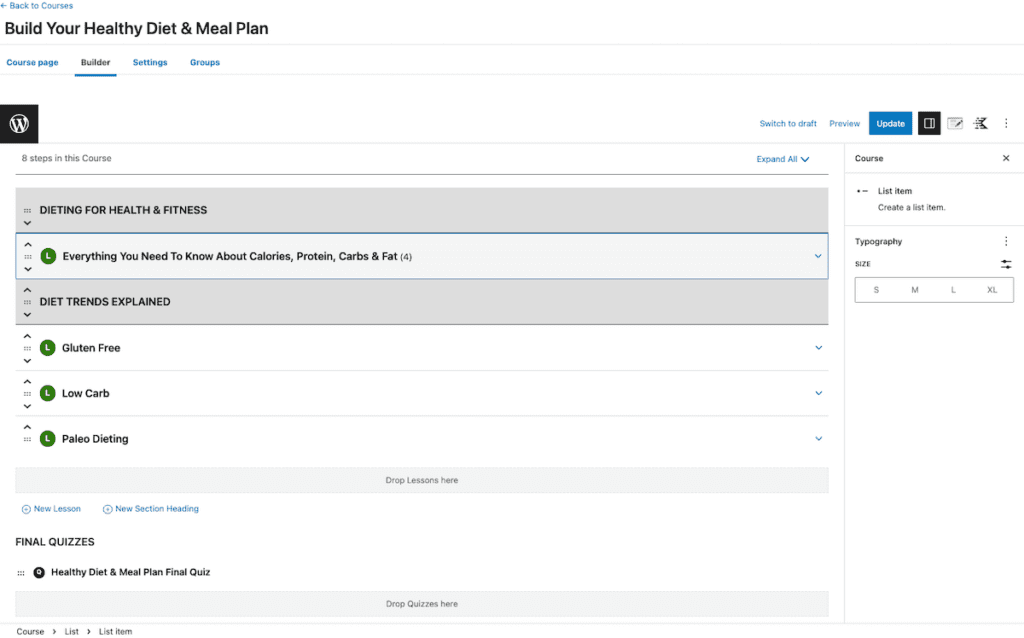
Once inside the builder, you can add videos, text files, and images for your lessons. You can also drag & drop quizzes, assignments, and many more interactive elements to enhance the overall learning experience.
You can also upload media files from the same section to the course content area and add them to lessons and topics.
Aside from creating engaging quizzes and adding media and video, you can pick and drag & drop nearly a hundred other elements to enhance your course’s appearance and usability.
Here are some of them:

As you scroll down the elements, you’ll also see Kadence blocks to help you build custom blocks to create visually appealing course content. Further, you’ll see design elements, widgets, theme-based options, embed options, and more.
Once you’re done with the course builder, LearnDash then allows you to customize your course settings, including course access, pricing, and visibility.
For example, your course’s access options can be:
- Open: Anyone can access its content without logging in or enrolling.
- Free: The course is protected. Users need to register and enroll to access the content.
- Buy now: The course is protected via the LearnDash built-in PayPal and/or Stripe. Users need to purchase the course (one-time fee) to gain access.
- Recurring: Users need to pay a recurring fee to gain access.
- Closed: Users can only access the course through admin enrollment (manual), group enrollment, or integration (shopping cart or membership) enrollment. No enrollment button will be displayed unless a URL is set (optional).
Next, you can set up course prerequisites. This feature allows you to configure your settings in a way that requires users to complete selected courses before they are able to access the current course. You can also allow access after specific course points or set a custom access expiration period.
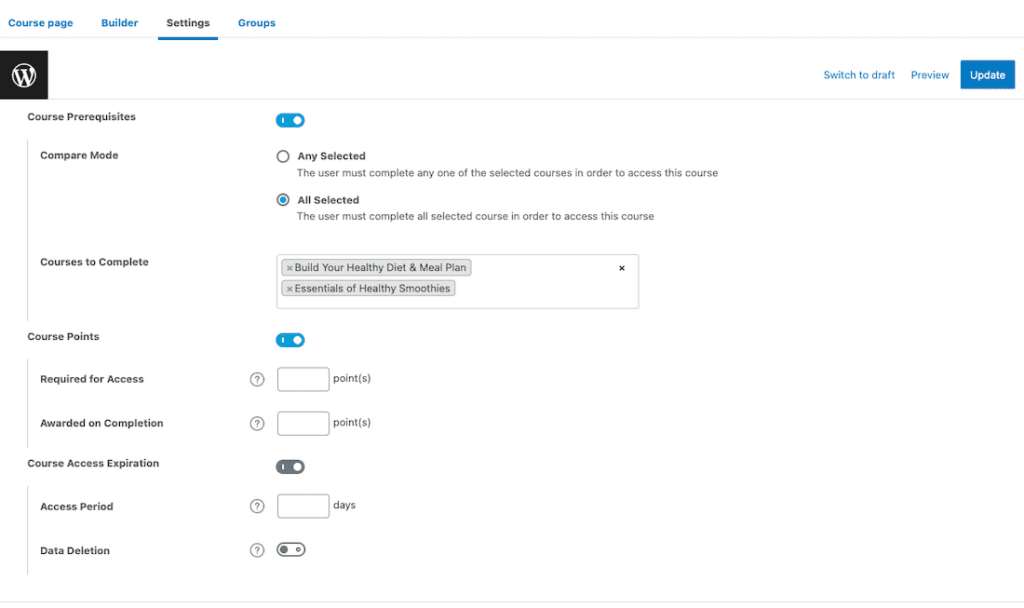
Further, you can control display options, how users interact with the content, and their navigational experience.
It’s also worth noting that the course builder is built into the WordPress environment. If you’re familiar with WordPress, you’ll find it easy to use.
However, if you’re unfamiliar with WordPress, the course builder interface may not seem intuitive. WordPress is a content management system with multiple options, menus, and settings, with a bit of a learning curve.
Read: How to start an online course website using WordPress
2. Course monetization options
LearnDash offers a wide variety of monetization options for your courses, including:
- Subscription plan: Users can enroll for a subscription plan that allows them to access all courses within a certain period of time for a fixed price per month or year. This option allows you to generate recurring income from your courses without additional work once set up.
- One-off payment plan: If users want to commit for only part of the term, they can also buy access to your course with one-off payment options like PayPal or Stripe payments.
- Membership: You can offer your course as part of a membership package. This allows learners to access multiple courses or other content for a recurring fee.
- Shopping cart integration: LearnDash integrates with popular shopping cart solutions, including WooCommerce and Samcart. This allows you to sell your courses alongside other products and services.
LearnDash also has a built-in affiliate program, allowing course creators to recruit affiliates to promote their courses. You can also set a commission rate for each sale and track affiliate performance.
You can also sell your courses individually or bundled together (e.g., a bundle of three courses).
3. Quizzes and assessments
Quizzes and assessments are vital to any e-learning platform, and LearnDash offers built-in tools to create and manage them.
You’ll find a “Quizzes” section on the left nav bar of your LearnDash dashboard, where you can add, edit, manage, and move around your quizzes. You’ll also be able to change the appearance of the quiz, configure settings, and choose question types.
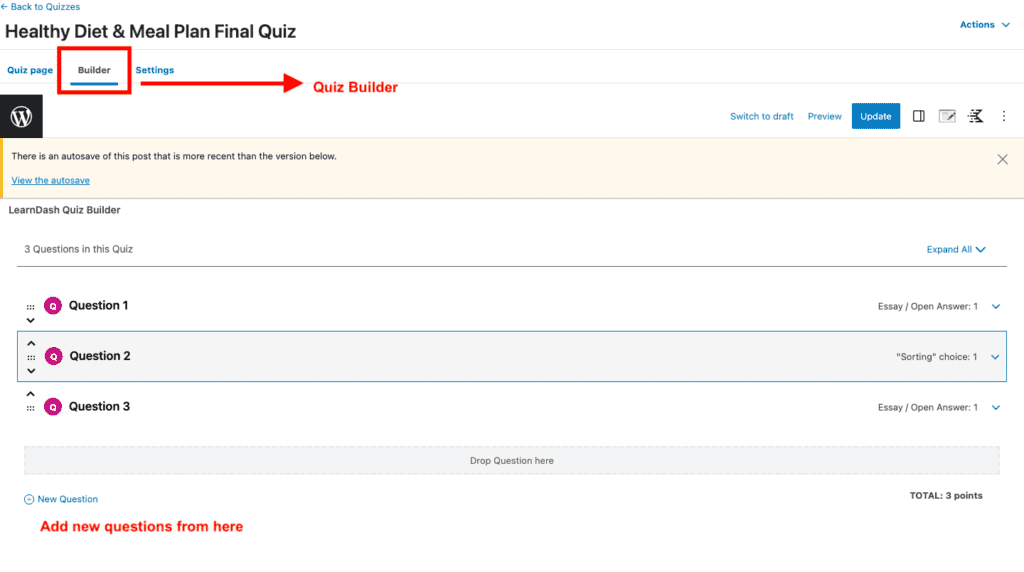
You can also pick your question type as you start adding or editing questions.
With LearnDash quizzes, you can create quizzes with eight different question types, including:
- Single choice
- Multiple choice
- Free choice
- Sorting choice
- Matrix sorting choice
- Fill-in-the-blank
- Assessment
- Essay
Quiz builder’s interface makes it super easy to add, edit, move, and delete questions.
Once you’re done playing around with the quiz builder, it’s time to configure the settings to customize how your quizzes look and behave. You can access them by navigating to LEARNDASH LMS > QUIZZES and clicking on the Settings tab of the quiz you want to edit.
From here, you can configure the Quiz access settings and the release schedule. For instance, do you want your quiz to be available on course enrollment or X days after course enrollment? Or do you want to display it on a specific date?
You can also select one or more quizzes that must be completed before taking this quiz or restrict the access to only registered users.
There are more options to further control the requirement for accessing and completing the quiz, including passing score, quiz retakes, number of retries allowed, and time limit.
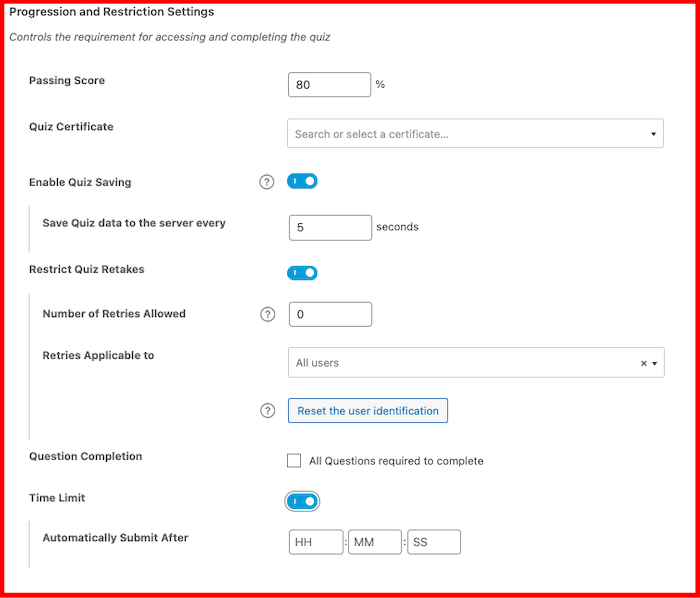
Next, you can control how the quiz will appear to the audience and what will be displayed. This includes settings like randomizing the quiz order, skip question option, etcetera.
Other quiz & assessment features include:
- Quiz statistics: You can enable quiz statistics to track and analyze the performance of your learners on your quizzes. You’ll be able to see details like number of attempts, average score, time spent, etc. You can also export the statistics data as CSV files.
- Quiz email notifications: You can set up custom email notifications for quiz results sent to learners and administrators.
- Quiz leaderboard: You can enable a leaderboard for your quiz that shows the top performers based on their score and time. You can also set a custom time format for the leaderboard.
4. Student engagement options
There are several ways LearnDash can help you improve student engagement.
To begin, you can embed videos, audio, images, and PDFs, into your courses and quizzes. This provides a more engaging and diverse learning experience for learners.
You can also award badges and certificates to your students for completing courses, lessons, quizzes, and assignments. This provides a sense of achievement and encourages them to continue their progress.
On top of that, you can group certain users and assign a group leader to track the progress and performance of any user in their group. You can associate any number of courses with these groups, and anyone in that group will be automatically enrolled in the course.
And just like courses, you’ll also get options to monetize your groups.

You can use groups to sell access to multiple courses for a single price. Or, create course bundles that offer access to multiple groups for a discounted price. This can attract more customers and increase your revenue.
Here are some more built-in student engagement features that LearnDash offers:
- Focus mode: LearnDash’s focus mode eliminates distractions by hiding unnecessary elements on the course page.
- Video progression: Allows you to mandate your students to watch a complete video before proceeding to the subsequent lesson or quiz.
- Automated notifications: Send email notifications to your students based on certain triggers, including completing a lesson, passing a quiz, earning a badge, etc.
- Content drip-feeding: Gradually release course content over time, keeping your students interested and engaged.
- Discussion forums: Foster a sense of community and encourage learners to stay engaged with the course.
5. Progress tracking and reporting
LearnDash does provide some basic reporting features, but they may not be enough for some users who need more advanced and detailed reports.
Just head to “Reports” from the left nav bar and “Export User Course Data.”

For more detailed reports, you’ll have to use additional tools like ProPanel or SCORM and xAPI1 to get more metrics and insights.
6. Integrations with third-party tools
LearnDash offers a wide range of integrations with over 30 third-party tools, which can help you improve your online courses’ functionality and overall user experience. While some of these integrations are available for free, others may require a fee.
These integrations cover a broad spectrum of features, including eCommerce, membership, marketing tools, and various communication platforms.
For example, you can integrate LearnDash with WooCommerce, a popular eCommerce platform, to manage your course payments, subscriptions, and other related activities.
It also provides native integration with popular membership plugins like MemberPress or Paid Memberships Pro to create custom membership levels for your courses and control access to your content.
Additionally, LearnDash also integrates with popular email marketing services like Mailchimp and ConvertKit, allowing you to automate email campaigns and send targeted messages to your students based on their behavior and performance.
Other popular integrations include:
- Zapier: A tool that lets you connect LearnDash with thousands of other apps, such as Gmail, Slack, Mailchimp, etc., and automate your workflows.
- BuddyPress: A social networking plugin that adds LearnDash activity streams, private messaging, and custom profiles for your learners.
- H5P: H5P is a free and open-source tool that lets you create interactive content, such as quizzes, presentations, and games. With the LearnDash-H5P integration, you can embed H5P content into your LearnDash courses and enhance their interactivity and engagement.
7. Customer support options
Customer support is an important aspect of any online learning platform. LearnDash offers various options for customers to get help and resolve their issues. Some of the customer support options are:
LearnDash Help Center: The LearnDash Help Center contains comprehensive articles on everything from setting up your site to adding courses on the fly. You can also search for answers to specific questions using the search bar at the top of every page. The help page also has a contact form for pre-sales questions and a link to the support site for license holders.
Knowledge Base: LearnDash has a separate knowledge base where customers can access user guides, troubleshooting tips, and code references.
Live chat: LearnDash offers live chat with their experts during specific times throughout the week and the day. Customers can use the live chat feature to ask questions, get feedback, and solve problems in real time.
Community forums: LearnDash has a vibrant Facebook community of users who share their experiences, insights, and best practices on various forums and groups. Customers can join this forum, get help from other LearnDash users, and learn from their success stories and challenges.
User Interface and User Experience
Ease of use for administrators
LearnDash is designed to create and sell online courses on WordPress. One feature that sets LearnDash apart is its user-friendly interface for administrators.
However, since it runs only on WordPress, you need to know how WordPress works and how to set up your site, hosting, domain, and security.
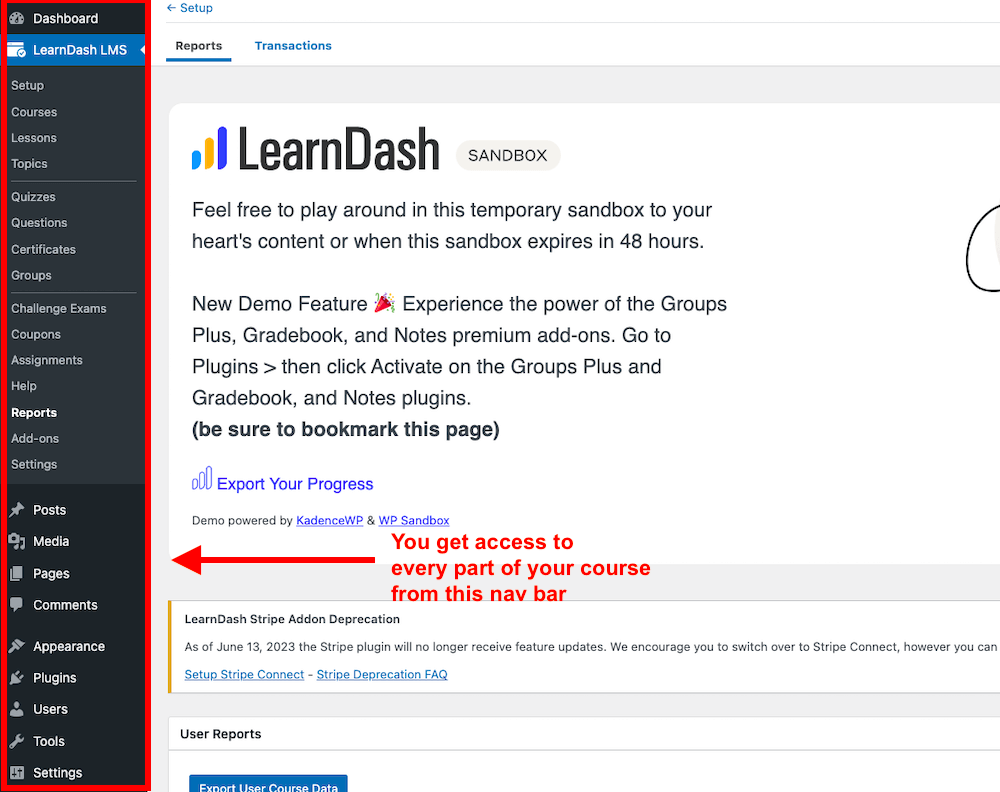
One aspect that contributes to the ease of use for administrators is the flexible course creation feature. With LearnDash, you can create courses with different pricing models, content types, access levels, and design options.
And that’s not it.
If you opt for LearnDash’s cloud-based version (which costs $29/month if paid annually), you’ll be able to create and host your online courses without having to build and maintain a separate WordPress site.
This can save you a lot of time, money, and hassle, as you don’t have to worry about themes, hosting, plugins, updates, security, or backups. You can focus on creating and selling your courses, while LearnDash takes care of the technical aspects.
You can also customize your course site’s layout and appearance with any WordPress theme or page builder or use templates provided by LearnDash or third-party providers.
You’ll see templates for different industries as well, including training courses, fitness, SEO, and many more.

Additionally, built-in tools and integrations like certificates, quizzes, assignments, badges, points, and leaderboards help enhance learning outcomes and engagement. You can also integrate LearnDash with popular plugins and services like WooCommerce, Stripe, PayPal, Zapier, and Mailchimp.
Moreover, LearnDash offers chat support and a wealth of resources like documentation, tutorials, videos, blog posts, and forums to assist you in using the platform.
You can also request a demo or try LearnDash to experience its user-friendly interface and other features.
Ease of use for learners
LearnDash not only provides a user-friendly interface and experience for course creators but also for learners.
Learners will see a clear and logical structure for courses, with well-organized topics, lessons, and quizzes. They can also see their progress and track completion status at a glance.
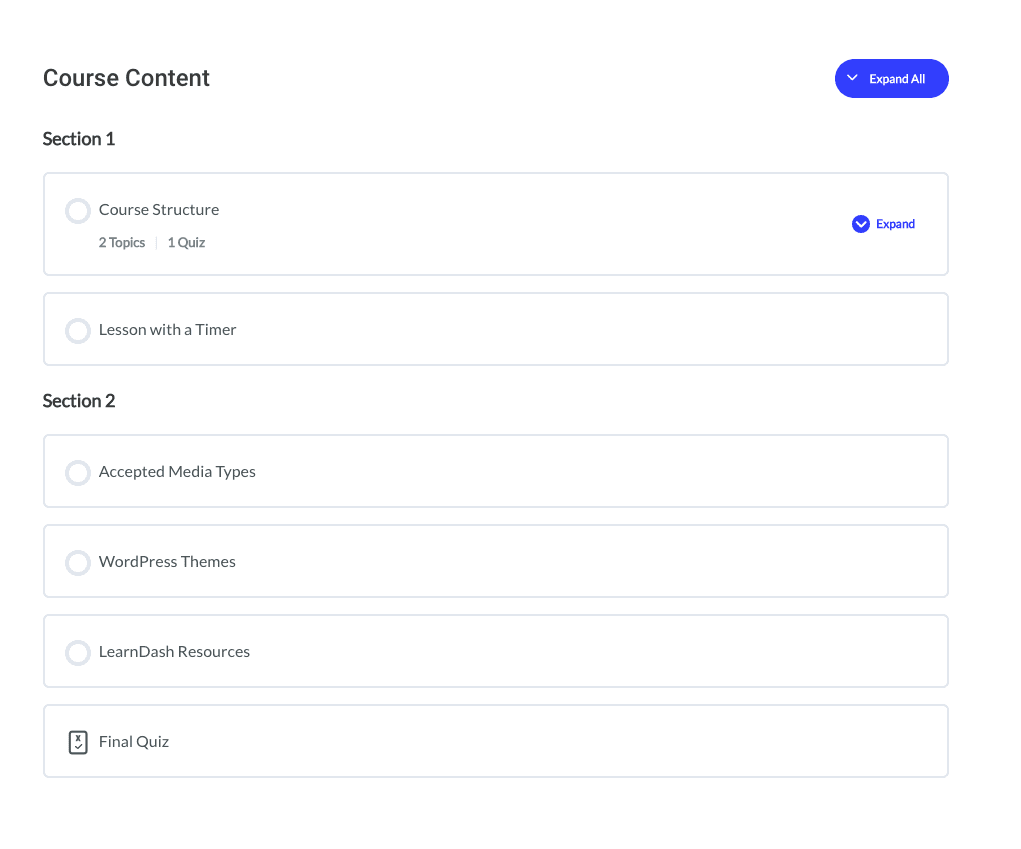
Responsive design is another bonus. LearnDash courses come optimized for different devices and screen sizes, including desktops, laptops, tablets, and smartphones. Learners can access their courses from anywhere, anytime, and continue learning at their own pace.
In addition, LearnDash’s social learning features, like discussion forums and group assignments, allow learners to collaborate and share with their fellow students.
Design and customization options
LearnDash lets you create courses with different content types, design options, and layout styles.
One of the ways LearnDash allows you to customize your courses is through its compatibility with any WordPress theme. This means you can use any theme you like and still be able to create and manage courses using LearnDash.
LearnDash also provides pre-built templates as a starting point for your courses. These templates can save you time and effort, so you don’t have to design your course from scratch.
Another way LearnDash enables you to customize your courses is through its flexible course builder. The course builder allows you to add various content types, including videos, images, audio, text, and quizzes. LearnDash also lets you add custom branding to your courses, like logos, colors, and fonts.
You can also arrange the content in any order and control the learners’ access to it through drip-feed scheduling or prerequisites.
In addition to the above, LearnDash provides several design options you can use to enhance your courses’ appearance and functionality.
For example, you can use the course grid or list layout to display your courses in an attractive and organized manner.
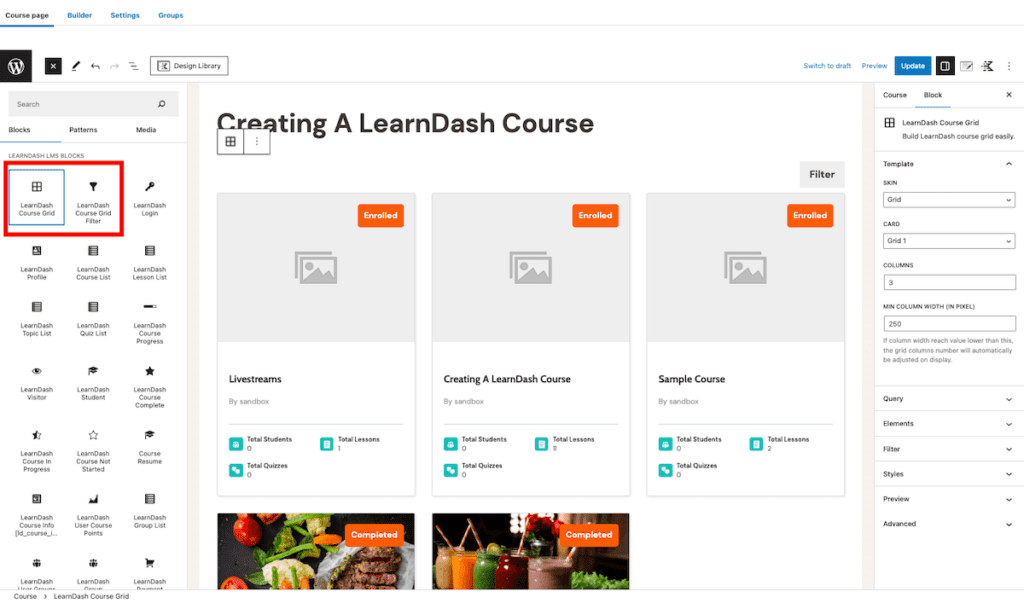
You can also use various course widgets to display course information, progress, and navigation on your site’s sidebar or footer. LearnDash also offers several course navigation options, including progress bars, breadcrumbs, and buttons that help learners move through the course easily.
Is LearnDash the Right LMS Platform For You?
LearnDash is a mature, feature-rich LMS built for WordPress users who want long-term control over their learning business. It gives you strong course creation tools, advanced quizzes and assignments, flexible pricing models, and the ability to own your site, data, and revenue.
When combined with WordPress plugins, it can support memberships, community features, coaching programs, and even enterprise training use cases.
LearnDash is a good buy if you are comfortable with WordPress or want a hosted WordPress setup through StellarSites, and you value flexibility over convenience. It also makes sense for organizations that need custom workflows, integrations, or SCORM support through add-ons.
It may not be the right choice if you want an all-in-one platform with built-in email marketing, community, and coaching tools, or if you prefer a simpler, plug-and-play experience. In those cases, a hosted platform like Thinkific can feel easier to manage.
Frequently Asked Questions (FAQs)
Is LearnDash free to use?
No. LearnDash does not offer a free plan. You can try an interactive demo, and annual licenses come with a 30-day money-back guarantee so you can test it without long-term risk.
Does LearnDash offer a lifetime license or lifetime deal?
No. LearnDash only offers subscription-based pricing. Licenses renew annually for the plugin and app, and monthly or annual billing is available for the hosted StellarSites option.
What kind of hosting do I need for LearnDash?
If you use the LearnDash plugin, you’ll need your own WordPress hosting. If you prefer not to manage hosting, StellarSites Learning includes managed WordPress hosting, security, backups, and updates.
Is LearnDash better than other WordPress LMS plugins?
LearnDash focuses on flexibility, scalability, and integrations. Some plugins include more features by default, but LearnDash gives you more control and customization as your learning business grows.
Does LearnDash support SCORM and xAPI?
Not out of the box. SCORM and xAPI support require third-party add-ons such as Tin Canny, which are commonly used for corporate training and compliance tracking.
Can LearnDash be used for corporate or employee training?
Yes. With group management, reporting add-ons, and optional SCORM or xAPI support, LearnDash works well for internal training, onboarding, and certification programs.
Does LearnDash include built-in email marketing?
No. LearnDash only sends basic notification emails such as course completion and quiz results. Full email marketing requires integration with external tools like Mailchimp or ConvertKit.
Can I run cohort-based or scheduled courses in LearnDash?
Yes. You can create cohort-style courses using drip schedules, enrollment windows, access expiration, and group-based controls.
Does LearnDash support live classes or Zoom sessions?
Yes, through integrations. LearnDash can be connected with Zoom or other scheduling tools to deliver live sessions alongside recorded content.
Is LearnDash suitable for beginners?
It depends. If you are comfortable with WordPress or use the hosted StellarSites option, LearnDash is manageable. If you want a simpler, plug-and-play experience, a fully hosted platform may feel easier.
Can I migrate from another course platform to LearnDash?
Yes, but migrations are usually not automatic. Most creators use manual imports or third-party tools, and some course data may need to be recreated.
Does LearnDash take a percentage of my course sales?
No. LearnDash does not charge transaction fees. You keep your revenue, aside from standard payment gateway fees from Stripe, PayPal, or WooCommerce.
Does LearnDash offer a mobile app for learners?
LearnDash offers a separate native mobile app product. It supports offline learning and progress sync but is not included in the standard plugin or hosted plans.
What happens if I stop paying for LearnDash?
Your courses will continue to function, but you’ll lose access to updates, new features, and official support once your license expires.
Is LearnDash suitable for selling memberships or course bundles?
Yes. LearnDash supports bundles and recurring access through built-in options or integrations with membership and eCommerce plugins.

Jeff Cobb, Founder of Learning Revolution
Jeff Cobb is an expert in online education and the business of adult lifelong learning. Over the past 20+ years he has built a thriving career based on that expertise – as an entrepreneur, a consultant, an author, and a speaker. Learning Revolution is a place where Jeff curates tips, insights, and resources to help you build a thriving expertise-based business. Learn more about Jeff Cobb here.
Table of Contents
Related Posts
8 Best Small Business LMS Platforms to Sell Courses [2026]
Zenler Review (2026) | Are Its Pricing & Features Worth It? [Examples + Tips]
What Is SCORM And Is It Necessary For Selling Online Courses